clutch MITSUBISHI LANCER SPORTBACK 2014 8.G Service Manual
[x] Cancel search | Manufacturer: MITSUBISHI, Model Year: 2014, Model line: LANCER SPORTBACK, Model: MITSUBISHI LANCER SPORTBACK 2014 8.GPages: 422, PDF Size: 55.11 MB
Page 175 of 422
Multi-information display 5-108 Features and controls
5
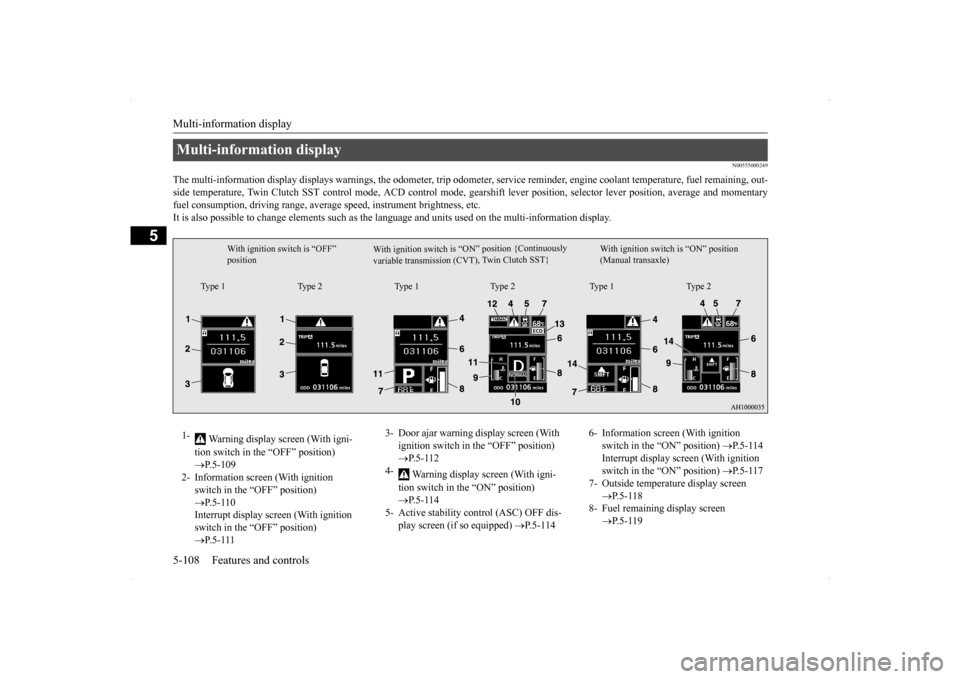
N00555000249
The multi-information display displays warn
ings, the odometer, trip odometer, service re
minder, engine coolant temperature, fue
l remaining, out-
side temperature, Twin Clutch SST control mode, ACD control
mode, gearshift lever position, selector lever position, average an
d momentary
fuel consumption, driving range, average speed, instrument brightness, etc. It is also possible to change elements such as th
e language and units used on the multi-information display.
Multi-information display
W i t h i g n i t i o n s w i t c h i s “ O N ” p o s i t i o n { C o nt i n u o us l y
v a r i a b l e t r a n s m i s s i o n ( C V T ) , Tw
i n C l u t c h S ST }
With ignition switch is “OFF” position
With ignition switch is “ON” position (Manual transaxle)
Type 1 Type 2 Type 1 Type 2 Type 1 Type 2
1-
Warning display screen (With igni- tion switch in the “OFF” position) P.5-109
2- Information screen (With ignition
switch in the “OFF” position) P.5-110 Interrupt display screen (With ignition switch in the “OFF” position) P.5-111
3- Door ajar warning display screen (With
ignition switch in the “OFF” position) P.5-112
4-
Warning display screen (With igni- tion switch in the “ON” position) P.5-114
5- Active stability control (ASC) OFF dis-
play screen (if so equipped)
P.5-114
6- Information screen (With ignition
switch in the “ON” position)
P. 5 - 1 1 4
Interrupt display screen (With ignition switch in the “ON” position)
P. 5 - 1 1 7
7- Outside temperature display screen
P.5-118
8- Fuel remaining display screen
P.5-119
BK0200700US.book
108 ページ 2013年2月15日 金曜日 午後12時17分
Page 176 of 422
Multi-information display
Features and controls 5-109
5
N00555100178
The multi-information meter switch is a but- ton marked “INFO” on the left side of thedash. Each time the multi-information meter switch is operated, a sound is emitted and the multi-information display changes between infor- mation such as warnings, service reminder, average and momentary fuel consumption,driving range, average speed and ACD con- trol mode display (if so equipped). It is also possible to change elements such asthe language and units used on the multi-
information display by operating the multi- information meter switch.
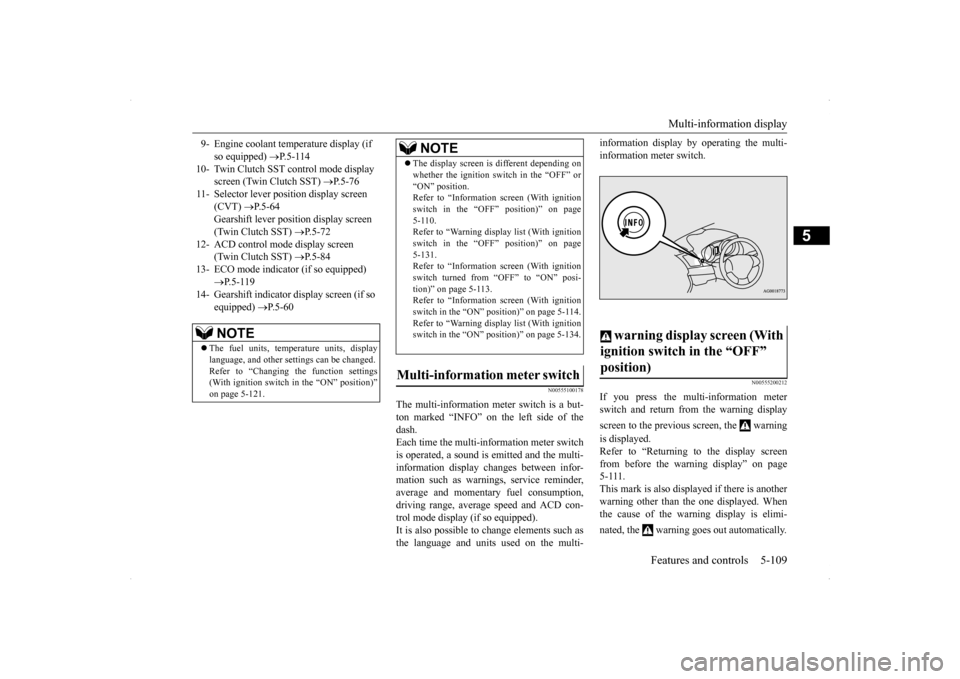
N00555200212
If you press the multi-information meter switch and return from the warning display screen to the previous screen, the warning is displayed. Refer to “Returning to the display screen from before the warning display” on page5-111. This mark is also displayed if there is another warning other than the one displayed. Whenthe cause of the warning display is elimi- nated, the warning goes out automatically.
9- Engine coolant temperature display (if
so equipped)
P.5-114
10- Twin Clutch SST control mode display
screen (Twin Clutch SST)
P. 5 - 7 6
11- Selector lever position display screen
(CVT)
P.5-64
Gearshift lever position display screen (Twin Clutch SST)
P. 5 - 7 2
12- ACD control mode display screen
(Twin Clutch SST)
P. 5 - 8 4
13- ECO mode indicator (if so equipped)
P. 5 - 1 1 9
14- Gearshift indicator display screen (if so
equipped)
P. 5 - 6 0
NOTE
The fuel units, temperature units, display language, and other settings can be changed.Refer to “Changing the function settings (With ignition switch in the “ON” position)” on page 5-121.
The display screen is different depending on whether the ignition switch in the “OFF” or “ON” position. Refer to “Information screen (With ignition switch in the “OFF” position)” on page5-110. Refer to “Warning displa
y list (With ignition
switch in the “OFF” position)” on page5-131. Refer to “Information screen (With ignition switch turned from “OFF” to “ON” posi-tion)” on page 5-113. Refer to “Information screen (With ignition switch in the “ON” position)” on page 5-114.Refer to “Warning displa
y list (With ignition
switch in the “ON” position)” on page 5-134.
Multi-information meter switch
NOTE
warning display screen (With ignition switch in the “OFF” position)
BK0200700US.book
109 ページ 2013年2月15日 金曜日 午後12時17分
Page 185 of 422
Multi-information display 5-118 Features and controls
5
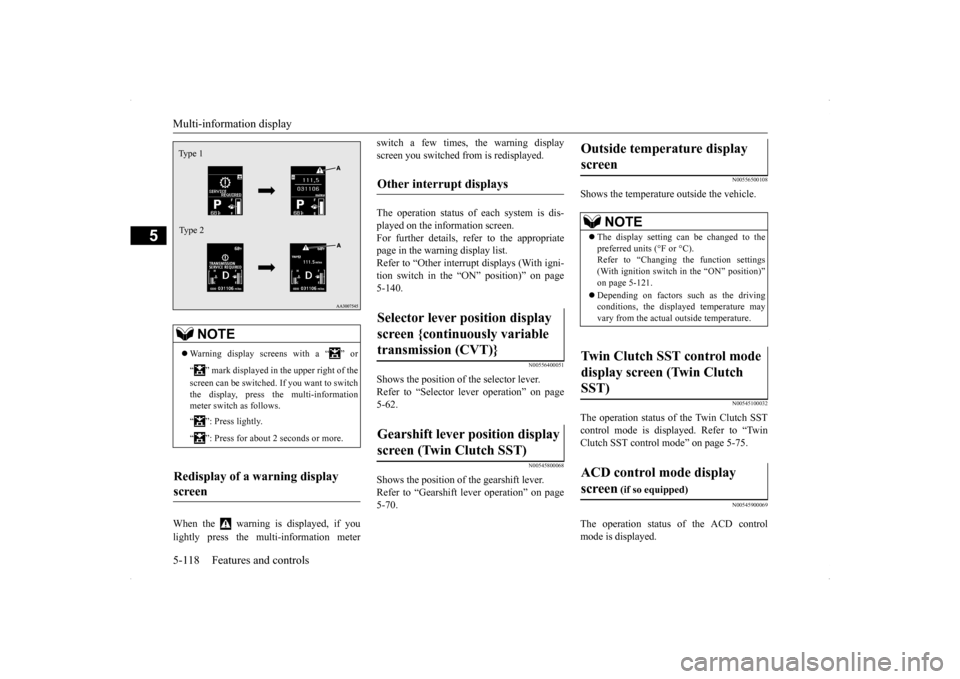
When the warning is displayed, if you lightly press the multi-information meter
switch a few times, the warning display screen you switched from is redisplayed. The operation status of each system is dis- played on the information screen. For further details, refer to the appropriate page in the warning display list.Refer to “Other interrupt displays (With igni-tion switch in the “ON” position)” on page 5-140.
N00556400051
Shows the position of the selector lever. Refer to “Selector lever operation” on page 5-62.
N00545800068
Shows the position of the gearshift lever. Refer to “Gearshift lever operation” on page5-70.
N00556500108
Shows the temperature outside the vehicle.
N00545100032
The operation status of the Twin Clutch SST control mode is displayed. Refer to “Twin Clutch SST control mode” on page 5-75.
N00545900069
The operation status of the ACD control mode is displayed.
NOTE
Warning display screens with a “ ” or “ ” mark displayed in the upper right of the screen can be switched. If you want to switch the display, press the multi-information meter switch as follows. “ ”: Press lightly. “ ”: Press for about 2 seconds or more.
Redisplay of a warning display screen Ty p e 1 Type 2
Other interrupt displays Selector lever position display screen {continuously variable transmission (CVT)} Gearshift lever position display screen (Twin Clutch SST)
Outside temperature display screen
NOTE
The display setting can be changed to the preferred units (°F or °C).Refer to “Changing the function settings (With ignition switch in the “ON” position)” on page 5-121. Depending on factors such as the driving conditions, the displayed temperature mayvary from the actual outside temperature.
Twin Clutch SST control mode display screen (Twin Clutch SST) ACD control mode display screen
(if so equipped)
BK0200700US.book
118 ページ 2013年2月15日 金曜日 午後12時17分
Page 187 of 422
Multi-information display 5-120 Features and controls
5
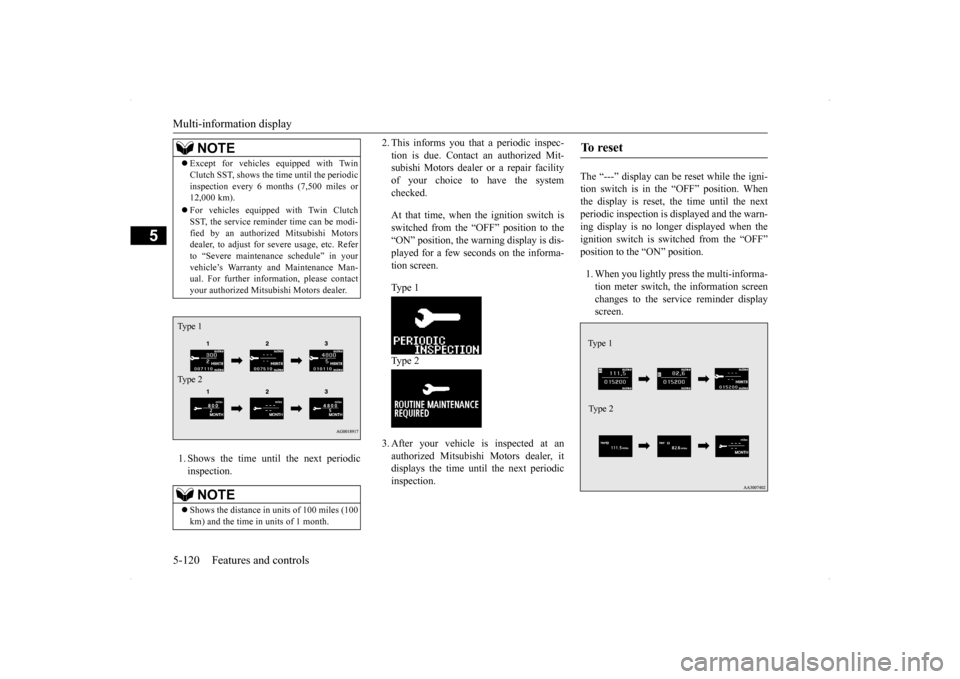
1. Shows the time until the next periodic inspection.
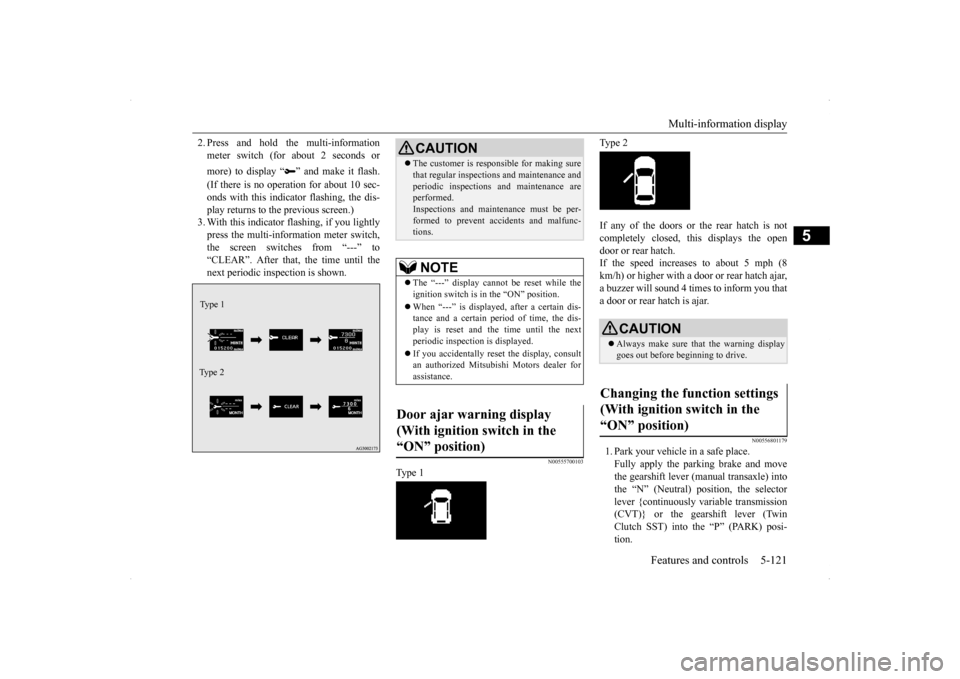
2. This informs you that a periodic inspec- tion is due. Contact an authorized Mit- subishi Motors dealer or a repair facility of your choice to have the systemchecked. At that time, when the ignition switch is switched from the “OFF” position to the “ON” position, the warning display is dis-played for a few seconds on the informa- tion screen. Type 1 Type 2 3. After your vehicle is inspected at an authorized Mitsubishi Motors dealer, itdisplays the time until the next periodicinspection.
The “---” display can be reset while the igni- tion switch is in the “OFF” position. Whenthe display is reset, the time until the next periodic inspection is displayed and the warn- ing display is no longer displayed when theignition switch is switched from the “OFF” position to the “ON” position. 1. When you lightly press the multi-informa- tion meter switch, the information screen changes to the service reminder displayscreen.
NOTE
Except for vehicles equipped with Twin Clutch SST, shows the time until the periodic inspection every 6 mo
nths (7,500 miles or
12,000 km). For vehicles equipped with Twin Clutch SST, the service reminder time can be modi- fied by an authorized Mitsubishi Motorsdealer, to adjust for severe usage, etc. Refer to “Severe maintenance schedule” in your vehicle’s Warranty and Maintenance Man-ual. For further information, please contact your authorized Mitsubishi Motors dealer.NOTE
Shows the distance in uni
ts of 100 miles (100
km) and the time in units of 1 month.
Type 1 Type 2
To r e s e t Type 1 Type 2
BK0200700US.book
120 ページ 2013年2月15日 金曜日 午後12時17分
Page 188 of 422
Multi-information display
Features and controls 5-121
5
2. Press and hold the multi-information meter switch (for about 2 seconds or more) to display “ ” and make it flash. (If there is no operation for about 10 sec- onds with this indicator flashing, the dis-play returns to the previous screen.) 3. With this indicator flashing, if you lightly press the multi-information meter switch,the screen switches from “---” to “CLEAR”. After that, the time until the next periodic inspection is shown.
N00555700103
Type 1
Type 2 If any of the doors or the rear hatch is not completely closed, this displays the open door or rear hatch.If the speed increases to about 5 mph (8 km/h) or higher with a door or rear hatch ajar, a buzzer will sound 4 times to inform you thata door or rear hatch is ajar.
N00556801179
1. Park your vehicle in a safe place. Fully apply the parking brake and move the gearshift lever (manual transaxle) intothe “N” (Neutral) position, the selectorlever {continuously variable transmission (CVT)} or the gearshift lever (Twin Clutch SST) into the “P” (PARK) posi-tion.
Type 1 Type 2
CAUTION The customer is responsible for making sure that regular inspections and maintenance and periodic inspections and maintenance are performed. Inspections and maintenance must be per-formed to prevent accidents and malfunc- tions.NOTE
The “---” display cannot be reset while the ignition switch is in the “ON” position. When “---” is displayed, after a certain dis- tance and a certain period of time, the dis- play is reset and the time until the next periodic inspection is displayed. If you accidentally reset the display, consult an authorized Mitsubishi Motors dealer forassistance.
Door ajar warning display (With ignition switch in the “ON” position)
CAUTION Always make sure that the warning display goes out before beginning to drive.
Changing the function settings (With ignition switch in the “ON” position)
BK0200700US.book
121 ページ 2013年2月15日 金曜日 午後12時17分
Page 204 of 422
Indicator light, warning light, an
d information screen display list Features and controls 5-137
5
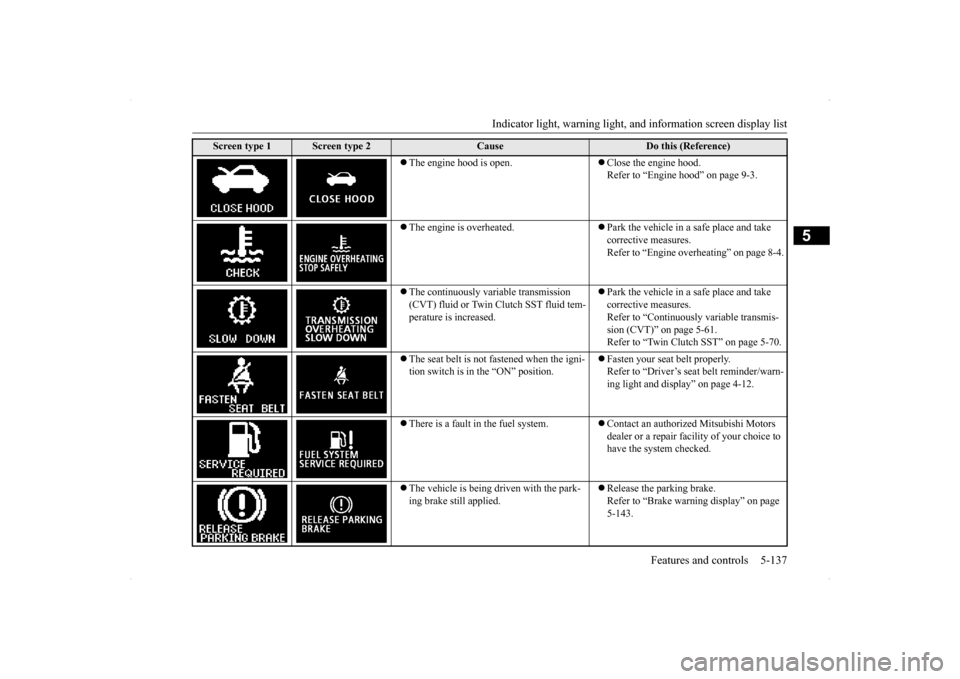
The engine hood is open.
Close the engine hood. Refer to “Engine hood” on page 9-3.
The engine is overheated.
Park the vehicle in a safe place and take corrective measures.Refer to “Engine overheating” on page 8-4.
The continuously variable transmission (CVT) fluid or Twin Clutch SST fluid tem-perature is increased.
Park the vehicle in a safe place and take corrective measures.Refer to “Continuously variable transmis- sion (CVT)” on page 5-61. Refer to “Twin Clutch SST” on page 5-70.
The seat belt is not fastened when the igni- tion switch is in
the “ON” position.
Fasten your seat belt properly. Refer to “Driver’s seat belt reminder/warn- ing light and display” on page 4-12.
There is a fault in the fuel system.
Contact an authorized Mitsubishi Motors dealer or a repair facility of your choice to have the system checked.
The vehicle is being driven with the park- ing brake still applied.
Release the parking brake. Refer to “Brake warning display” on page 5-143.
Screen type 1
Screen type 2
Cause
Do this (Reference)
BK0200700US.book
137 ページ 2013年2月15日 金曜日 午後12時17分
Page 205 of 422
Indicator light, warning light, an
d information screen display list
5-138 Features and controls
5
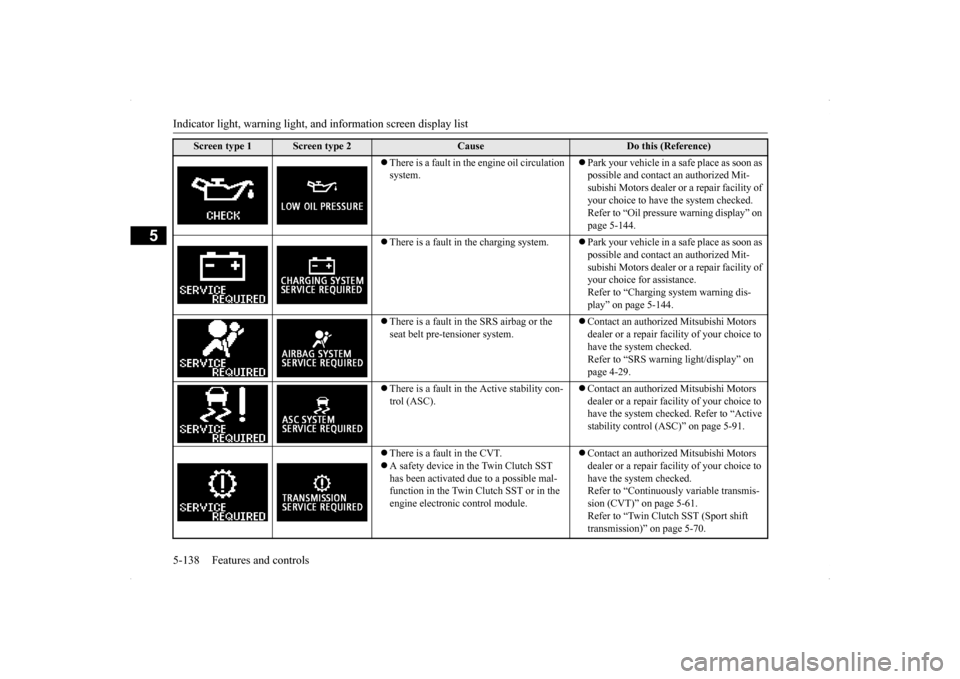
There is a fault in the engine oil circulation system.
Park your vehicle in a safe place as soon as possible and contact an authorized Mit- subishi Motors dealer or a repair facility of your choice to have the system checked. Refer to “Oil pressure warning display” on page 5-144.
There is a fault in the charging system.
Park your vehicle in a safe place as soon as possible and contact an authorized Mit- subishi Motors dealer or a repair facility of your choice for assistance.Refer to “Charging system warning dis- play” on page 5-144.
There is a fault in the SRS airbag or the seat belt pre-tensioner system.
Contact an authorized Mitsubishi Motors dealer or a repair facility of your choice to have the system checked. Refer to “SRS warning light/display” on page 4-29.
There is a fault in the Active stability con- trol (ASC).
Contact an authorized Mitsubishi Motors dealer or a repair facility of your choice to have the system checked. Refer to “Active stability control (ASC)” on page 5-91.
There is a fault in the CVT. A safety device in the Twin Clutch SST has been activated due to a possible mal- function in the Twin Clutch SST or in the engine electronic control module.
Contact an authorized Mitsubishi Motors dealer or a repair facility of your choice to have the system checked. Refer to “Continuously variable transmis-sion (CVT)” on page 5-61. Refer to “Twin Clutch SST (Sport shift transmission)” on page 5-70.
Screen type 1
Screen type 2
Cause
Do this (Reference)
BK0200700US.book
138 ページ 2013年2月15日 金曜日 午後12時17分
Page 209 of 422
Warning lights 5-142 Features and controls
5
N00520300147 N00520400366
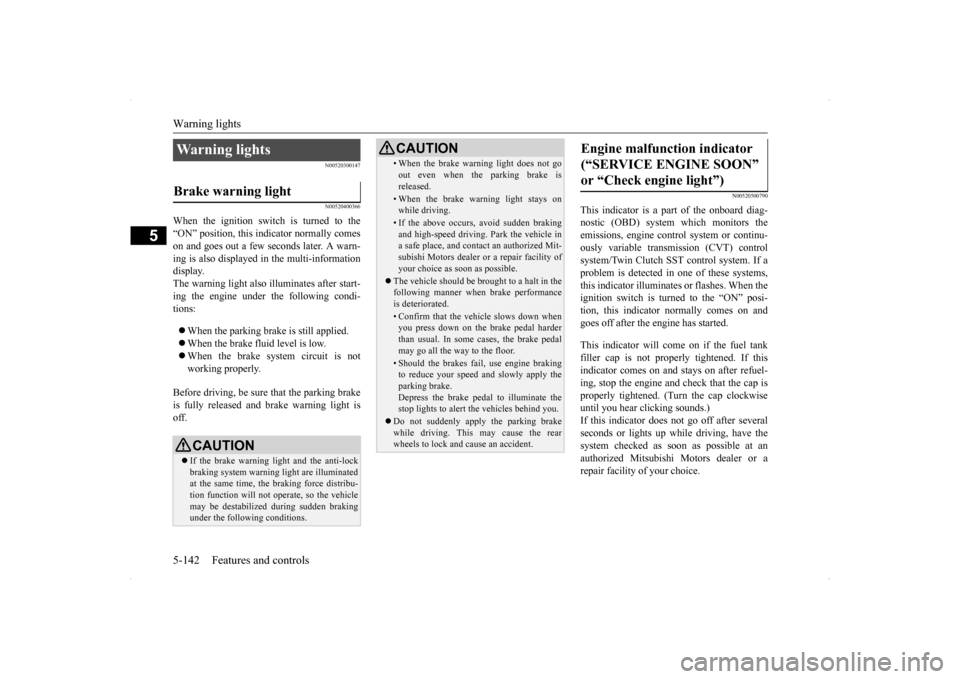
When the ignition switch is turned to the “ON” position, this indicator normally comeson and goes out a few seconds later. A warn- ing is also displayed in the multi-information display.The warning light also illuminates after start-ing the engine under the following condi- tions: When the parking brake is still applied. When the brake fluid level is low. When the brake system circuit is not working properly.
Before driving, be sure that the parking brake is fully released and brake warning light isoff.
N00520500790
This indicator is a part of the onboard diag- nostic (OBD) system which monitors the emissions, engine contro
l system or continu-
ously variable transmission (CVT) control system/Twin Clutch SST control system. If a problem is detected in one of these systems,this indicator illuminates or flashes. When theignition switch is turned to the “ON” posi- tion, this indicator normally comes on and goes off after the engine has started. This indicator will come on if the fuel tank filler cap is not properly tightened. If this indicator comes on and stays on after refuel- ing, stop the engine and check that the cap isproperly tightened. (Turn the cap clockwise until you hear clicking sounds.) If this indicator does not go off after severalseconds or lights up while driving, have the system checked as soon as possible at an authorized Mitsubishi Motors dealer or arepair facility of your choice.
Warning lights Brake warning light
CAUTION If the brake warning light and the anti-lock braking system warning light are illuminated at the same time, the braking force distribu-tion function will not operate, so the vehicle may be destabilized during sudden braking under the following conditions.
• When the brake warning light does not go out even when the parking brake is released.• When the brake warning light stays onwhile driving.• If the above occurs, avoid sudden brakingand high-speed driving. Park the vehicle in a safe place, and contact an authorized Mit- subishi Motors dealer or a repair facility ofyour choice as soon as possible.
The vehicle should be brought to a halt in the following manner when brake performance is deteriorated.• Confirm that the vehicle slows down whenyou press down on the brake pedal harder than usual. In some cases, the brake pedalmay go all the way to the floor.• Should the brakes fail, use engine brakingto reduce your speed and slowly apply the parking brake. Depress the brake pedal to illuminate thestop lights to alert the vehicles behind you.
Do not suddenly apply the parking brake while driving. This may cause the rear wheels to lock and cause an accident.CAUTION
Engine malfunction indicator (“SERVICE ENGINE SOON” or “Check engine light”)
BK0200700US.book
142 ページ 2013年2月15日 金曜日 午後12時17分
Page 210 of 422
Information screen display
Features and controls 5-143
5
N00520600296
This light comes on in the event of a malfunc- tion in the charging system or when the igni- tion switch is turned to the “ON” position (engine off). A warning is also displayed inthe multi-information display. When the engine is started,
the light should go out.
Check to make sure that the light has goneout before driving.
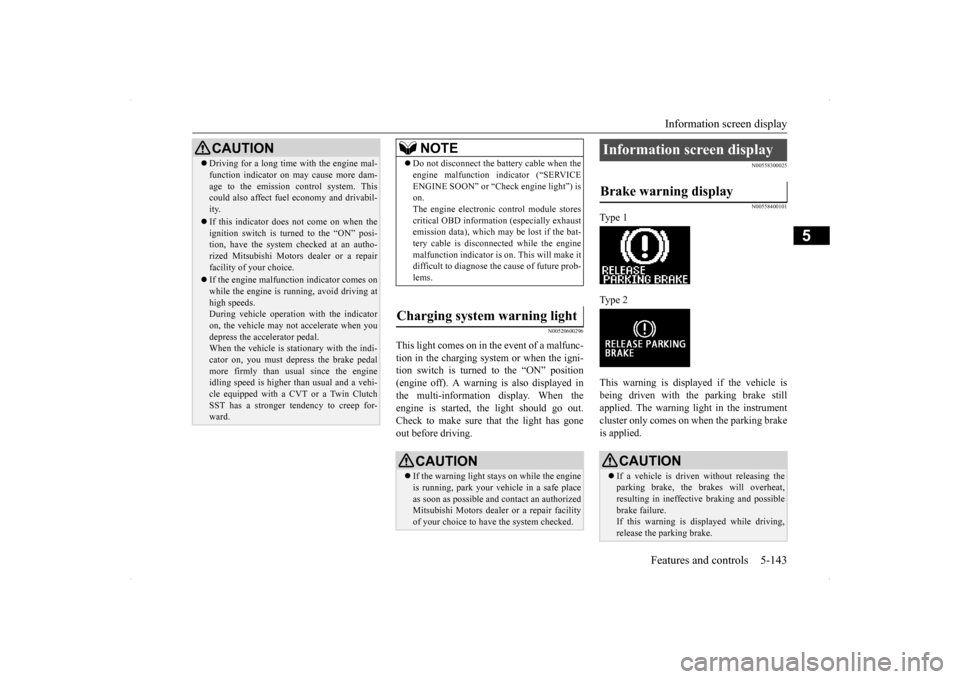
N00558300025 N00558400101
Type 1 Type 2 This warning is displayed if the vehicle is being driven with the parking brake still applied. The warning light in the instrumentcluster only comes on when the parking brake is applied.
CAUTION Driving for a long time with the engine mal- function indicator on may cause more dam- age to the emission control system. This could also affect fuel economy and drivabil- ity. If this indicator does not come on when the ignition switch is turned to the “ON” posi-tion, have the system checked at an autho- rized Mitsubishi Motors dealer or a repair facility of your choice. If the engine malfunction indicator comes on while the engine is running, avoid driving athigh speeds. During vehicle operation with the indicator on, the vehicle may not accelerate when youdepress the accelerator pedal. When the vehicle is stationary with the indi- cator on, you must depress the brake pedalmore firmly than usual since the engine idling speed is higher than usual and a vehi- cle equipped with a CVT or a Twin ClutchSST has a stronger tendency to creep for- ward.
NOTE
Do not disconnect the battery cable when the engine malfunction indicator (“SERVICE ENGINE SOON” or “Check engine light”) is on. The engine electronic control module storescritical OBD information (especially exhaust emission data), which may be lost if the bat- tery cable is disconnected while the enginemalfunction indicator is on. This will make it difficult to diagnose the cause of future prob- lems.
Charging system warning light
CAUTION If the warning light stays on while the engine is running, park your vehicle in a safe place as soon as possible and contact an authorizedMitsubishi Motors dealer or a repair facility of your choice to have the system checked.
Information screen display Brake warning display
CAUTION If a vehicle is driven without releasing the parking brake, the brakes will overheat, resulting in ineffective braking and possible brake failure.If this warning is displayed while driving, release the parking brake.
BK0200700US.book
143 ページ 2013年2月15日 金曜日 午後12時17分
Page 231 of 422

Bluetooth® 2.0 interface (if so equipped) 5-164 Features and controls
5
1. Stop your vehicle in a safe area, put the gearshift lever (manual transaxle) in the “N” (Neutral) position, or the selector lever {continuously variable transmission(CVT)} or gearshift lever (Twin Clutch SST) in the “P” (PARK) position, and then pull the parking brake lever. 2. Press the SPEECH button (except for vehicles with Mitsubishi Multi-Commu- nication System) or PICK-UP button (forvehicles with Mitsubishi Multi-Commu- nication System). 3. Say “Voice training.”
4. The voice guide will say “This operation must be performed in a quiet environment while the vehicle is stopped. See the owner’s manual for the list of requiredtraining phrases. Press and release the SPEECH button when you are ready to begin. Press the HANG-UP button to can-cel at any time.” Press the SPEECH button to start the speaker enrollment process.
5. The voice guide will prompt for phrase 1. Repeat the corresponding phrase listed in table “Enrollment commands” on page 5-180.The system will register your voice and then move on to the registration of the next command. Continue the process untilall phrases have been registered. 6. When all enrollment commands have been read out, the voice guide will say “Speaker enrollment is complete.” Thesystem will then end the speaker enroll- ment process and return to the main menu.
NOTE
Speaker enrollment is not possible unless the vehicle is parked. Make sure you park the vehicle in a safe area before attempting speaker enrollment.
NOTE
If you do not start the speaker enrollment process within 3 minutes after pressing the SPEECH button, the speaker enrollment function will time out. The voice guide will say “Speaker enroll- ment has timed out.” The system will then beep and the voice recognition mode will bedeactivated.
NOTE
To repeat the most recent voice training com- mand, press and release the SPEECH button. If you press the HANG-UP button anytime during the process, the system will beep andstop the speaker enrollment process.NOTE
Completing the speaker enrollment process will turn on the voice model automatically. The commands “Help” and “Cancel” will not work in this mode.
BK0200700US.book
164 ページ 2013年2月15日 金曜日 午後12時17分