phone MITSUBISHI MIRAGE 2014 6.G MMCS Manual
[x] Cancel search | Manufacturer: MITSUBISHI, Model Year: 2014, Model line: MIRAGE, Model: MITSUBISHI MIRAGE 2014 6.GPages: 135, PDF Size: 26.9 MB
Page 131 of 135
131
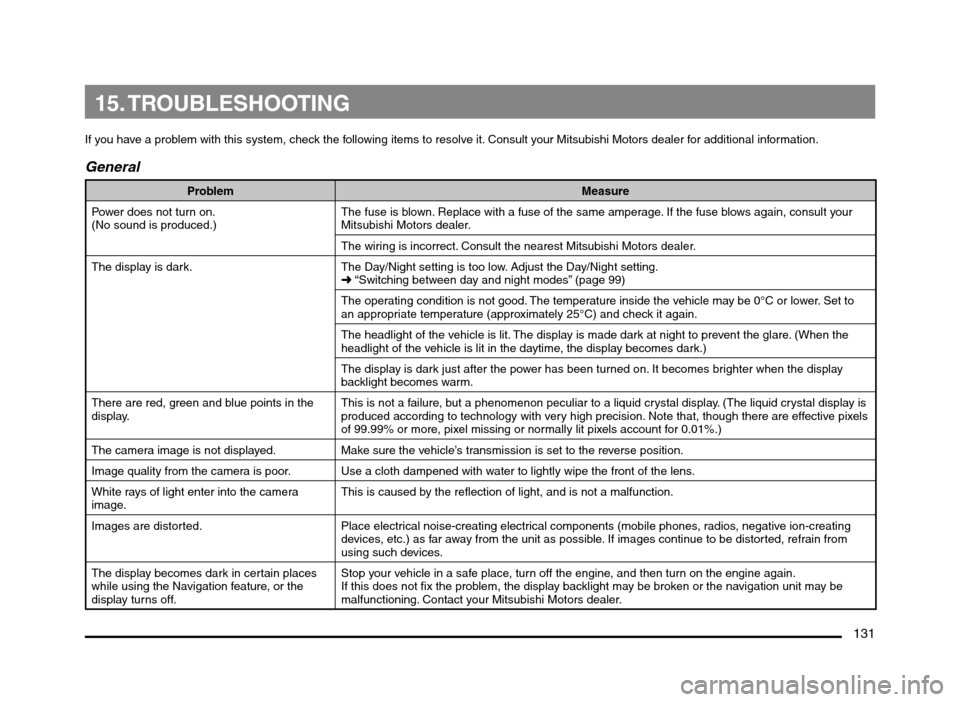
15. TROUBLESHOOTING
If you have a problem with this system, check the following items to resolve it. Consult your Mitsubishi Motors dealer for additional information.
General
Problem Measure
Power does not turn on.
(No sound is produced.)The fuse is blown. Replace with a fuse of the same amperage. If the fuse blows again, consult your
Mitsubishi Motors dealer.
The wiring is incorrect. Consult the nearest Mitsubishi Motors dealer.
The display is dark. The Day/Night setting is too low. Adjust the Day/Night setting.
É “Switching between day and night modes” (page 99)
The operating condition is not good. The temperature inside the vehicle may be 0°C or lower. Set to
an appropriate temperature (approximately 25°C) and check it again.
The headlight of the vehicle is lit. The display is made dark at night to prevent the glare. (When the
headlight of the vehicle is lit in the daytime, the display becomes dark.)
The display is dark just after the power has been turned on. It becomes brighter when the display
backlight becomes warm.
There are red, green and blue points in the
display.This is not a failure, but a phenomenon peculiar to a liquid crystal display. (The liquid crystal display is
produced according to technology with very high precision. Note that, though there are effective pixels
of 99.99% or more, pixel missing or normally lit pixels account for 0.01%.)
The camera image is not displayed. Make sure the vehicle’s transmission is set to the reverse position.
Image quality from the camera is poor. Use a cloth dampened with water to lightly wipe the front of the lens.
White rays of light enter into the camera
image.This is caused by the reflection of light, and is not a malfunction.
Images are distorted. Place electrical noise-creating electrical components (mobile phones, radios, negative ion-creating
devices, etc.) as far away from the unit as possible. If images continue to be distorted, refrain from
using such devices.
The display becomes dark in certain places
while using the Navigation feature, or the
display turns off.Stop your vehicle in a safe place, turn off the engine, and then turn on the engine again.
If this does not fix the problem, the display backlight may be broken or the navigation unit may be
malfunctioning. Contact your Mitsubishi Motors dealer.
205-0010-00_QY-7375M-A_EN.indb 131205-0010-00_QY-7375M-A_EN.indb 1313/12/2013 9:57:30 AM3/12/2013 9:57:30 AM
Page 135 of 135
135
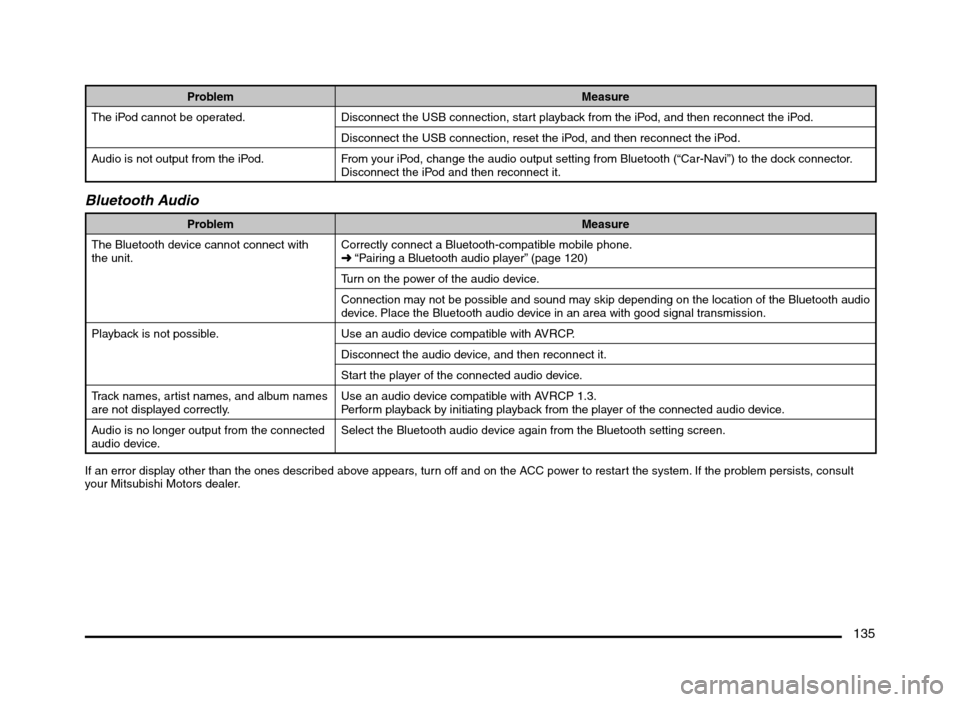
Problem Measure
The iPod cannot be operated. Disconnect the USB connection, start playback from the iPod, and then reconnect the iPod.
Disconnect the USB connection, reset the iPod, and then reconnect the iPod.
Audio is not output from the iPod. From your iPod, change the audio output setting from Bluetooth (“Car-Navi”) to the dock connector.
Disconnect the iPod and then reconnect it.
Bluetooth Audio
Problem Measure
The Bluetooth device cannot connect with
the unit.Correctly connect a Bluetooth-compatible mobile phone.
É “Pairing a Bluetooth audio player” (page 120)
Turn on the power of the audio device.
Connection may not be possible and sound may skip depending on the location of the Bluetooth audio
device. Place the Bluetooth audio device in an area with good signal transmission.
Playback is not possible. Use an audio device compatible with AVRCP.
Disconnect the audio device, and then reconnect it.
Start the player of the connected audio device.
Track names, artist names, and album names
are not displayed correctly.Use an audio device compatible with AVRCP 1.3.
Perform playback by initiating playback from the player of the connected audio device.
Audio is no longer output from the connected
audio device.Select the Bluetooth audio device again from the Bluetooth setting screen.
If an error display other than the ones described above appears, turn off and on the ACC power to restart the system. If the problem persists, consult
your Mitsubishi Motors dealer.
205-0010-00_QY-7375M-A_EN.indb 135205-0010-00_QY-7375M-A_EN.indb 1353/12/2013 9:57:30 AM3/12/2013 9:57:30 AM