phone MITSUBISHI MIRAGE 2014 6.G MMCS Manual
[x] Cancel search | Manufacturer: MITSUBISHI, Model Year: 2014, Model line: MIRAGE, Model: MITSUBISHI MIRAGE 2014 6.GPages: 135, PDF Size: 26.9 MB
Page 118 of 135
118
qNotes on using an Apple
iPod
CAUTION
Do not operate an iPod while driving.
Do not leave an iPod inside your vehicle.
Exposure to sunlight may cause the
inside of your vehicle to become
excessively hot, and result in the
malfunction of the iPod.
Do not sit on the iPod or place items
on top of it while it is connected. A
malfunction may occur.
On certain iPod models, a logo screen sent
from this unit is displayed on the screen of
the iPod after the iPod has been connected
to this unit.
Tag information such as track title, artist
name, and album title can be displayed for a
file containing tag information.
When you connect an iPod which has a
large number of tracks, it may take a long
time to establish a connection with the iPod
or to control the iPod features.
If the iPod stops operating, selecting a track
from the category list may make the iPod
operable again.
If you set the track repeat function on an
iPod, it may not operate correctly with this
unit.
If you set the shuffle function on an iPod, it
may not operate correctly with this unit. If
this happens, disable the shuffle function to
use the iPod.
Depending on the iPod model, titles and lists
of tracks from the iPod may not be displayed
if there are many playable tracks stored on
the iPod.
If an error message is displayed, disconnect
the iPod from this unit, and then reconnect it.
If the iPod becomes inoperable, reset the
iPod. For details on resetting the iPod, refer
to its operating instructions, etc.
If the iPod still cannot be operated after it
has been reset and connected to this unit,
reset the iPod, check if the iPod can be
operated, and then connect it to this unit.
Make sure to disconnect the iPod after
turning off your vehicle’s engine. If you leave
it connected, the iPod’s power may not turn
off, and the iPod battery may be depleted.
When connecting an iPod touch or iPhone
to this unit via Bluetooth and you perform
audio playback or a hands-free call, audio
cannot be output via iPod mode. Switch the
audio output setting from your iPod touch
or iPhone from Bluetooth (“Car-Navi”) to
the dock connector, or disconnect and
reconnect the iPod touch or iPhone. For
details, refer to the operating instructions of
the connecting device.
If you connect an audio device via
Bluetooth, audio cannot be output from an
iPod touch or iPhone via USB cable. Select
the Bluetooth device from Bluetooth Audio
in the Paired Device List screen, touch the
[Deselect] key, and then reconnect the iPod
touch or iPhone.
É “Paired Device List operations” (page 129)
If you connect an iPod that is currently
playing a track to this unit, playback of that
track will continue via this unit.
An iPod connected to this unit cannot be
controlled via the iPod itself.
Place the iPod in a safe location.
Precautions on battery
consumption
If the iPod is connected to this unit when the
iPod’s internal battery has run down, iPod
mode may not operate correctly. Charge the
iPod before connecting it.
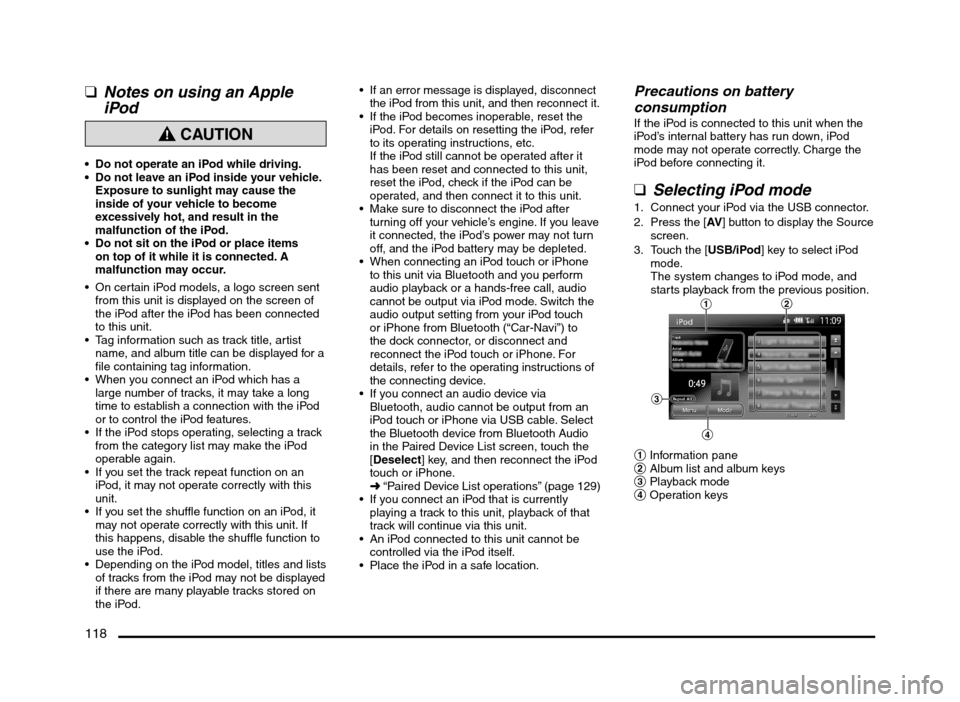
qSelecting iPod mode
1. Connect your iPod via the USB connector.
2. Press the [AV] button to display the Source
screen.
3. Touch the [USB/iPod] key to select iPod
mode.
The system changes to iPod mode, and
starts playback from the previous position.
12
3
4
1 Information pane
2 Album list and album keys
3 Playback mode
4 Operation keys
205-0010-00_QY-7375M-A_EN.indb 118205-0010-00_QY-7375M-A_EN.indb 1183/12/2013 9:57:29 AM3/12/2013 9:57:29 AM
Page 120 of 135
![MITSUBISHI MIRAGE 2014 6.G MMCS Manual 120
Selecting tracks to be played from
the Menu screen
1. Touch the [Menu] key to display the Menu
screen.
2. Touch the desired Category key to display
the corresponding list screen.
3. Touch th](/img/19/7509/w960_7509-119.png "MITSUBISHI MIRAGE 2014 6.G MMCS Manual 120
Selecting tracks to be played from
the Menu screen
1. Touch the [Menu] key to display the Menu
screen.
2. Touch the desired Category key to display
the corresponding list screen.
3. Touch th")
120
Selecting tracks to be played from
the Menu screen
1. Touch the [Menu] key to display the Menu
screen.
2. Touch the desired Category key to display
the corresponding list screen.
3. Touch the desired item key listed on the
screen to select it.
You can scroll the list by touching the
[{] or [
}] keys, and scroll 1 screen by
touching the [
{
{] or [}
}] keys.
When the track list of the specified
Album, Playlist, or Podcast is displayed,
selecting a track starts playback of the
listed tracks from the selected track.
When the track list of the Songs is
displayed, selecting a track starts
playback of all the tracks stored in the
iPod from the selected track.
When another list screen is displayed,
repeat this operation until you select the
tracks to be played.
Touching the [Menu] key returns to the
previous list screen.
Touching the [Now Playing] key returns
to the iPod mode screen.
Note:
When there are multiple levels in a playlist,
some items may not be displayed clearly
depending on the depth of the playlist level.
The screen returns to the iPod mode screen if
you do not operate the list for about 10 seconds.
Bluetooth Audio
Operations
This system can play audio data stored in a
Bluetooth audio player. Supported Bluetooth
audio players include some Bluetooth mobile
phones and some Bluetooth-enabled portable
audio players.
This system supports the following Bluetooth
profiles:
Advanced Audio Distribution Profile (A2DP)
Audio/Video Remote Control Profile
(AVRCP)
qNotes on using a Bluetooth
audio player
This system will not operate or may operate
improperly with some Bluetooth audio
players according to their performance or
specification.
A connection with a Bluetooth audio
player is disconnected forcibly when you
start transferring phonebook data from a
Bluetooth telephone. When transferring
the phonebook data is finished, it will be
reconnected automatically.
The sound of Bluetooth audio players may
be interrupted because of surrounding radio
wave conditions.
qSelecting Bluetooth audio
mode
1. Press the [AV] button to display the Source
screen.
2. Touch the [Bluetooth] key to select
Bluetooth audio mode.
The system changes to Bluetooth audio
mode, and starts searching for Bluetooth
audio players.If a connection with a Bluetooth audio
player is established, the system will start
playback after a short time.
You can also select Bluetooth audio
mode by using the Steering Wheel Audio
Remote Control (if so equipped).
É “Steering Wheel Audio Remote
Control Operations” (page 103)
3
2
1
1 Information pane
2 Playback mode
3 Operation keys
Note:
Some Bluetooth audio players may not support
sending audio information: Track, Artist, Album,
etc. These names/titles are not displayed for
such players.
The [Track List] key and the [Menu] key are
displayed only when a Bluetooth audio player
that supports these settings via this system is
connected.
Pairing a Bluetooth audio player
When a Bluetooth audio device has not
been connected:
You can pair up to 5 Bluetooth audio players.
Pairing is performed from the Bluetooth menu
screen under the Settings menu.
É “Pairing the Bluetooth device” (page 129)
After pairing, connect to a Bluetooth audio
player.
É “Paired Device List operations” (page 129)
205-0010-00_QY-7375M-A_EN.indb 120205-0010-00_QY-7375M-A_EN.indb 1203/12/2013 9:57:29 AM3/12/2013 9:57:29 AM
Page 122 of 135
122
13. TELEPHONE
OPERATIONS
Using your Bluetooth
Mobile Phone with this
Unit
When the connection with your Bluetooth
mobile phone is established, the following
functions are available on this unit:
Listening to your telephone calls on the
vehicle speakers.
Making a call using the keypad screen,
using the phonebook data downloaded from
your mobile phone, using the Call History
(incoming/outgoing call records), or using
the Handset Memory (speed dial).
This system supports the following
Bluetooth profiles:
Hands-free Profile (HFP)
Phonebook Access Profile (PBAP)
Note:
This system will not operate or may operate
improperly with some Bluetooth mobile phones
according to their performance or specification.
Depending on your mobile phone, you may
need to perform the Object Push transfer
operation on the mobile phone.
Some mobile phones may not be able to
transfer phonebook data.
Phonebook data transmission may take a long
time. Operations for making outgoing calls are
disabled during data transmission.
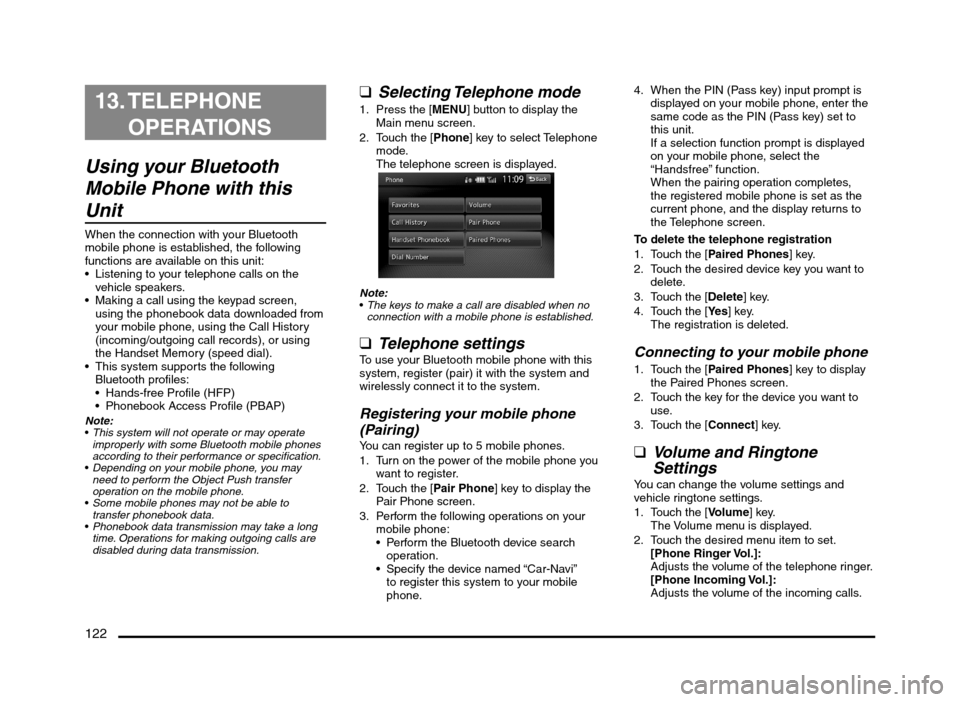
qSelecting Telephone mode
1. Press the [MENU] button to display the
Main menu screen.
2. Touch the [Phone] key to select Telephone
mode.
The telephone screen is displayed.
Note:
The keys to make a call are disabled when no
connection with a mobile phone is established.
q
Telephone settingsTo use your Bluetooth mobile phone with this
system, register (pair) it with the system and
wirelessly connect it to the system.
Registering your mobile phone
(Pairing)
You can register up to 5 mobile phones.
1. Turn on the power of the mobile phone you
want to register.
2. Touch the [Pair Phone] key to display the
Pair Phone screen.
3. Perform the following operations on your
mobile phone:
Perform the Bluetooth device search
operation.
Specify the device named “Car-Navi”
to register this system to your mobile
phone.4. When the PIN (Pass key) input prompt is
displayed on your mobile phone, enter the
same code as the PIN (Pass key) set to
this unit.
If a selection function prompt is displayed
on your mobile phone, select the
“Handsfree” function.
When the pairing operation completes,
the registered mobile phone is set as the
current phone, and the display returns to
the Telephone screen.
To delete the telephone registration
1. Touch the [Paired Phones] key.
2. Touch the desired device key you want to
delete.
3. Touch the [Delete] key.
4. Touch the [Ye s] key.
The registration is deleted.
Connecting to your mobile phone
1. Touch the [Paired Phones] key to display
the Paired Phones screen.
2. Touch the key for the device you want to
use.
3. Touch the [Connect] key.
qVolume and Ringtone
Settings
You can change the volume settings and
vehicle ringtone settings.
1. Touch the [Volume] key.
The Volume menu is displayed.
2. Touch the desired menu item to set.
[Phone Ringer Vol.]:
Adjusts the volume of the telephone ringer.
[Phone Incoming Vol.]:
Adjusts the volume of the incoming calls.
205-0010-00_QY-7375M-A_EN.indb 122205-0010-00_QY-7375M-A_EN.indb 1223/12/2013 9:57:29 AM3/12/2013 9:57:29 AM
Page 123 of 135
![MITSUBISHI MIRAGE 2014 6.G MMCS Manual 123
[Phone Outgoing Vol.]:
Adjusts the volume of the outgoing calls.
[Vehicle Ringtone] key:
Sets whether to activate the vehicle
ringtone.
qMaking and answering calls
Note:
Before using the follow](/img/19/7509/w960_7509-122.png "MITSUBISHI MIRAGE 2014 6.G MMCS Manual 123
[Phone Outgoing Vol.]:
Adjusts the volume of the outgoing calls.
[Vehicle Ringtone] key:
Sets whether to activate the vehicle
ringtone.
qMaking and answering calls
Note:
Before using the follow")
123
[Phone Outgoing Vol.]:
Adjusts the volume of the outgoing calls.
[Vehicle Ringtone] key:
Sets whether to activate the vehicle
ringtone.
qMaking and answering calls
Note:
Before using the following functions, you must
pair and connect your Bluetooth mobile phone.
É “Telephone settings” (page 122)
Making a call
Making a call using the keypad
1. Touch the [Dial Number] key to display the
keypad screen.
2. Enter the telephone number by using the
keypad displayed on the screen.
3. Touch the [Call] key to call the entered
telephone number.
The following Phone screen is displayed
during the phone call.
Touch the [Private] key to talk using the
mobile phone, cancelling the hands-free
function. To return to hands-free mode,
touch the [Private] key again.
Touch the [Mute] key to mute the
microphone. To resume using the
microphone, touch the [
Mute] key again.
4. When the call is finished, touch the [Hang
up] key to hang up.
Note:
Depending on the mobile phone, the connection
with this system may be disconnected when
entering Handset mode.
The Map screen can be displayed during a call
by pressing the [MAP] button. To return to the
Phone screen, press the [MENU] button and
touch the [Phone] key.
Making a call using the Call History
The system automatically records outgoing/
incoming call history data. You can confirm
calls and use the records to make a call from
this unit.
Up to 5 outgoing calls and 5 incoming calls
can be recorded for each registered mobile
phone.
You can delete the recorded telephone
numbers via the [Settings] menu.
É “System Settings” (page 125)
Note:
When using multiple registered mobile phones,
the outgoing/incoming call records of one
mobile phone do not display records made on
other mobile phones.
1. Touch the [Call History] key.
2. Touch the [Incoming Calls] or [Outgoing
Calls] key according to the type of record
list you want to display.
The corresponding record list screen is
displayed.
3. Touch the desired Record key you want to
dial.
4. Touch the [Call] key to call the specified
telephone number.
The Phone screen is displayed, and calling
starts.
You can adjust the volume of the calls.
When the call is finished, touch the
[Hang up] key to hang up.Making a call using the Handset
Phonebook
Note:
If Handset Phonebook data has not been
added, download phonebook data from your
mobile phone.
É “Downloading phonebook data from your
mobile phone” (page 124)
1. Touch the [Handset Phonebook] key to
display the Handset Phonebook screen.
2. Touch the desired name key you want to
dial.
You can scroll names by touching the
[{] or [
}] keys, and scroll 1 screen by
touching the [
{
{] or [}
}] keys.
When you touch the alphabet key at the
left of the screen, the list scrolls to the
first item which starts with the specified
character.
3. Touch the number key you want to dial.
4. Touch the [Call] key to call the specified
telephone number.
The Phone screen is displayed, and calling
starts.
When the call is finished, touch the
[Hang up] key to hang up.
Making a call using the Favorites
Note:
To use Favorites, download phonebook data
from your mobile phone, and add a Favorites
entry.
É “Downloading phonebook data from your
mobile phone” (page 124)
É “Adding a Favorites entry” (page 124)
1. Touch the [Favorites] key to display the
Favorites screen.
2. Touch the desired telephone number key
you want to dial.
3. Touch the [Call] key to call the specified
telephone number.
205-0010-00_QY-7375M-A_EN.indb 123205-0010-00_QY-7375M-A_EN.indb 1233/12/2013 9:57:29 AM3/12/2013 9:57:29 AM
Page 124 of 135
![MITSUBISHI MIRAGE 2014 6.G MMCS Manual 124
The Phone screen is displayed, and calling
starts.
When the call is finished, touch the
[Hang up] key to hang up.
Answering a callWhen a call is received, the Phone screen is
displayed.
1. To](/img/19/7509/w960_7509-123.png "MITSUBISHI MIRAGE 2014 6.G MMCS Manual 124
The Phone screen is displayed, and calling
starts.
When the call is finished, touch the
[Hang up] key to hang up.
Answering a callWhen a call is received, the Phone screen is
displayed.
1. To")
124
The Phone screen is displayed, and calling
starts.
When the call is finished, touch the
[Hang up] key to hang up.
Answering a callWhen a call is received, the Phone screen is
displayed.
1. Touch the [Answer] key to answer the call.
Touching the [Reject Call] key
disconnects the call.
2. When the call is finished, touch the [Hang
up] key to hang up.
Note:
The Audio feature is terminated temporarily
during a call, and the system resumes the last
status of the Audio feature when the call is
finished.
The Map screen can be displayed during a call
by pressing the [MAP] button. To return to the
Phone screen, press the [MENU] button and
touch the [Phone] key.
q
Downloading phonebook
data from your mobile phone
The system can download phonebook data
registered in the connected mobile phone. You
can use it to make a call from this unit.
You can also download phonebook data via
the [Settings] menu.
É “System Settings” (page 125)
Use the [Settings] menu when you want to
download only 1 telephone number, or when
you want to delete telephone numbers that
have already been added.
É “System Settings” (page 125)
You can delete registered telephone
numbers from the [Settings] menu.
É “System Settings” (page 125)
Note:
Some mobile phones may not be able to
transfer phonebook data.
Only phonebook items with at least one
telephone number registered in the downloaded
phonebook data are displayed on the
phonebook screen.
Some mobile phones may take a long time to
download phonebook data.
While transferring phonebook data, the
connection with the Bluetooth audio player will
be terminated temporarily. When transferring
phonebook data is finished, it automatically
reconnects.
When phonebook data downloading is
terminated by touching the [Cancel] key,
phonebook items already transferred will be
registered normally.
If the same phonebook item as an item already
registered is downloaded, it is overwritten.
The name for a phonebook entry may not be
displayed correctly if it includes double-byte
characters.
Up to 1000 entries can be stored per mobile
phone, and up to 5 mobile phones can be
registered. If there are more than 1000 entries,
some entries will be omitted.
1. Touch the [Handset Phonebook] key to
display the Phonebook screen.
2. Touch the [Download] key.
If no phonebook data has previously been
downloaded, the [Download] key is not
displayed.
A prompt is displayed.
[Yes]:
Starts transfer of the phonebook data. If
no operation from your mobile phone is
necessary, transfer is performed automatically.
If operation from your mobile phone is
necessary, follow the instructions on the unit
screen and transfer the phonebook data.
[No]:
Cancels transfer of the phonebook data.
When data downloading is completed, the
system will return to the Phonebook screen.
q
Adding a Favorites entryYou can register frequently used telephone
numbers into the Favorites.
You must download the phonebook from
your mobile phone before this function can
be used.
É “Downloading phonebook data from your
mobile phone” (page 124)
Up to 5 telephone numbers can be
registered.
You can delete registered telephone
numbers from the [Settings] menu.
É “System Settings” (page 125)
1. Touch the [Favorites] key to display the
Handset Phonebook screen.
2. Touch the [Add New] key.
3. Touch the key for the name you want to
add.
4. Touch the key for the telephone number
you want to add.
5. The specified telephone number is added
to the Favorites list.
205-0010-00_QY-7375M-A_EN.indb 124205-0010-00_QY-7375M-A_EN.indb 1243/12/2013 9:57:29 AM3/12/2013 9:57:29 AM
Page 126 of 135
![MITSUBISHI MIRAGE 2014 6.G MMCS Manual 126
3. Touch the [E] or [
e] key under the
frequency you want to adjust the level.
Frequency: 60Hz, 250Hz, 820Hz,
1.6kHz, 5kHz, 16kHz
Level: –6 to +6
Note:
To reset to the factory settings, tou](/img/19/7509/w960_7509-125.png "MITSUBISHI MIRAGE 2014 6.G MMCS Manual 126
3. Touch the [E] or [
e] key under the
frequency you want to adjust the level.
Frequency: 60Hz, 250Hz, 820Hz,
1.6kHz, 5kHz, 16kHz
Level: –6 to +6
Note:
To reset to the factory settings, tou")
126
3. Touch the [E] or [
e] key under the
frequency you want to adjust the level.
Frequency: 60Hz, 250Hz, 820Hz,
1.6kHz, 5kHz, 16kHz
Level: –6 to +6
Note:
To reset to the factory settings, touch the [Flat]
key.
qSound Restorer functionThe Sound Restorer function restores
high tone range to audio that has been
compressed, bringing it closer to its original,
pre-compressed quality.
1. Touch the [Sound Restorer] key.
The Sound Restorer function turns on/off.
qVolume Smoother functionThe Volume Smoother function automatically
adjusts the audio level to compensate for
differences in volume levels between multiple
audio playback sources or volume levels
between different scenes in a movie.
1. Touch the [T] or [t] key to adjust the
Volume Smoother level.
The factory setting is [OFF].
Adjustment range: [LOW] to [HIGH].
qSpeed Sensitive Vol. functionThe Speed Sensitive Vol. function automatically
increases the volume as your vehicle’s speed
increases, and decreases the volume as your
vehicle’s speed decreases.
1. Touch the [+] or [–] key to adjust the Speed
Sensitive Vol. level.
The factory setting is [OFF].
Adjustment range: 1 (low) to 3 (high)
bars.
qVirtual Bass functionThe Virtual Bass function adds harmonic
elements to bass ranges, strengthening them
and enabling richer bass playback.
1. Touch the [T] or [t] key to adjust the
Virtual Bass level.
The factory setting is [OFF].
Adjustment range: [LOW] to [HIGH].
Display Adjustment
When you touch the [Display Adj.] key
from the Settings menu, you can adjust the
brightness level of the monitor display.
Note:
The brightness level adjustment operates upon
the current Screen Color mode.
1. Touch the [+] or [–] key to adjust the
brightness level.
[+] key:
Makes the image brighter.
[–] key:
Makes the image dimmer.
Volume and Beeps
Settings
You can change the volume settings and other
beep settings.
1. Touch the [Volume and Beeps] key.
The Volume and Beeps menu is displayed.
2. Touch the desired menu item to set.
[Phone Ringer Vol.]:
Adjusts the volume of the telephone ringer.
[Phone Incoming Vol.]:
Adjusts the volume of the incoming calls.
[Phone Outgoing Vol.]:
Adjusts the volume of the outgoing calls.
[Button Beeps] key:
Sets whether to activate the sound of
button operations.
Selecting a Language
You can change the language used by the
system.
1. Touch the [Select Language] key.
2. Touch the key of the desired language.
3. At the [Reboot to change language?]
prompt, touch the [Ye s] key.
The system reboots and the language is
changed.
Phone Settings
You can download telephone numbers from
your mobile phone, as well as confirm and
delete telephone numbers stored in this unit.
qUsing Favorites
Adding a Favorites entry For details on this function, see below.
É “Adding a Favorites entry” (page 124)
1. Touch the [Phone] key to display the
Phone screen.
2. Touch the [Favorites] key to display the
Favorites screen.
3. Touch the [Add New] key.
4. Touch the key for the name you want to
add.
If no names are registered, skip to step 5.
5. Touch the key for the telephone number
you want to add.
6. The specified telephone number is added
to the Favorites list.
205-0010-00_QY-7375M-A_EN.indb 126205-0010-00_QY-7375M-A_EN.indb 1263/12/2013 9:57:29 AM3/12/2013 9:57:29 AM
Page 127 of 135
127
Checking the telephone number of
a Favorite
You can check the telephone number of a
favorite. If a telephone number is unnecessary,
you can also delete it.
For details on this function, see below.
É “Making a call using the Favorites”
(page 123)
1. Touch the [Phone] key to display the
Phone screen.
2. Touch the [Favorites] key to display the
Favorites screen.
3. Touch the desired telephone number key
you want to confirm.
4. Confirm the telephone number.
To delete a telephone number, touch the
[Delete] key, and then touch the [Ye s]
key at the prompt. The telephone number
is deleted.
qChecking the call historyYou can check telephone numbers in your call
history. If a telephone number is unnecessary,
you can delete it.
For details on this function, see below.
É “Making a call using the Call History”
(page 123)
1. Touch the [Phone] key to display the
Phone screen.
2. Touch the [Call History] key to display the
Call History screen.
3. Touch the [Incoming Calls] or [Outgoing
Calls] key according to the type of record
list you want to display.
The corresponding record list screen is
displayed.
4. Touch the desired Record key you want to
confirm. To delete a telephone number, touch the
[Delete] key, and then touch the [Ye s]
key at the prompt. The telephone number
is deleted.
qUsing the phonebook
Downloading phonebook data
from your mobile phone
For details on this function, see below.
É “Downloading phonebook data from your
mobile phone” (page 124)
1. Touch the [Phone] key to display the
Phone screen.
2. Touch the [Handset Phonebook] key to
display the Handset Phonebook screen.
3. Touch the [Download Entire Phonebook]
key to download phonebook data from your
mobile phone.
A prompt is displayed.
[Yes]:
Starts transfer of the phonebook data. If
no operation from your mobile phone is
necessary, transfer is performed automatically.
If operation from your mobile phone is
necessary, follow the instructions on the unit
screen and transfer the phonebook data.
[No]:
Cancels transfer of the phonebook data.
When data downloading is completed, the
system will return to the Phonebook screen.
Download a single telephone
number from your mobile phone
You can download a single telephone number
from your mobile phone.
Some mobile phones may not be able to
transfer phonebook data.
For details on this function, see below.É “Downloading phonebook data from your
mobile phone” (page 124)
1. Touch the [Phone] key to display the
Phone screen.
2. Touch the [Handset Phonebook] key to
display the Handset Phonebook screen.
3. Touch the [Download 1 Entry] key to
download a single telephone number from
your mobile phone.
A prompt is displayed.
[Yes]:
Starts transfer of the phonebook data. If
no operation from your mobile phone is
necessary, transfer is performed automatically.
If operation from your mobile phone is
necessary, follow the instructions on the unit
screen and transfer the phonebook data.
[No]:
Cancels transfer of the phonebook data.
When data downloading is completed, the
system will return to the Phonebook screen.
Checking the phonebookYou can check the telephone numbers
registered in the phonebook. If a telephone
number is unnecessary, you can delete it.
Note:
If Handset Phonebook data has not been
added, download phonebook data from your
mobile phone.
É “Downloading phonebook data from your
mobile phone” (page 124)
1. Touch the [Phone] key to display the
Phone screen.
2. Touch the [Handset Phonebook] key to
display the Handset Phonebook screen.
3. Touch the [Downloaded List] key.
4. Touch the desired name key you want to
confirm.
205-0010-00_QY-7375M-A_EN.indb 127205-0010-00_QY-7375M-A_EN.indb 1273/12/2013 9:57:29 AM3/12/2013 9:57:29 AM
Page 128 of 135
![MITSUBISHI MIRAGE 2014 6.G MMCS Manual 128
You can scroll names by touching the
[{] or [
}] keys, and scroll 1 screen by
touching the [
{
{] or [}
}] keys.
When you touch the alphabet key at the
left of the screen, the list scrolls to](/img/19/7509/w960_7509-127.png "MITSUBISHI MIRAGE 2014 6.G MMCS Manual 128
You can scroll names by touching the
[{] or [
}] keys, and scroll 1 screen by
touching the [
{
{] or [}
}] keys.
When you touch the alphabet key at the
left of the screen, the list scrolls to")
128
You can scroll names by touching the
[{] or [
}] keys, and scroll 1 screen by
touching the [
{
{] or [}
}] keys.
When you touch the alphabet key at the
left of the screen, the list scrolls to the
first item which starts with the specified
character.
5. Touch the desired telephone number key
you want to confirm.
The telephone number is displayed.
To delete a telephone number, touch the
[Delete] key, and then touch the [Ye s]
key at the prompt. The telephone number
is deleted.
qDeleting a telephone number
Deleting a Favorite telephone
number
To delete all Favorite telephone numbers
1. Touch the [Phone] key to display the
Phone screen.
2. Touch the [Delete Phone Info] key to
display the Delete Phone Info screen.
3. Touch the [Favorites] key to display the
Favorites screen.
4. Touch the [Delete All] key.
At the prompt, touch the [Ye s] key.
The list of telephone numbers you selected
is deleted.
To delete a single Favorite telephone
number
1. Touch the [Phone] key to display the
Phone screen.
2. Touch the [Delete Phone Info] key to
display the Delete Phone Info screen.
3. Touch the [Favorites] key to display the
Favorites screen.4. Touch the [Delete 1 Entry] key.
The Favorites list is displayed.
5. Touch the key for the telephone number
you want to delete.
The telephone number information is
displayed.
6. Touch the [Delete] key.
The selected telephone number is deleted.
Deleting a Call History telephone
number
To delete all Call History telephone
numbers
1. Touch the [Phone] key to display the
Phone screen.
2. Touch the [Delete Phone Info] key to
display the Delete Phone Info screen.
3. Touch the [Call History] key to display the
Call History screen.
4. Touch the [Delete All] key.
At the prompt, touch the [Ye s] key.
All Call History telephone numbers are
deleted.
To delete incoming/outgoing Call History
telephone numbers
1. Touch the [Phone] key to display the
Phone screen.
2. Touch the [Delete Phone Info] key to
display the Delete Phone Info screen.
3. Touch the [Call History] key to display the
Call History screen.
4. Touch the [Delete by Call List] key.
5. Touch the [Outgoing Calls] key or
[Incoming Calls] key to select to list of the
items you want to delete.
At the prompt, touch the [Ye s] key.
The list of telephone numbers you selected
is deleted.To delete a single Call History telephone
number
1. Touch the [Phone] key to display the
Phone screen.
2. Touch the [Delete Phone Info] key to
display the Delete Phone Info screen.
3. Touch the [Call History] key to Call History
screen.
4. Touch the [Delete 1 Entry] key.
The Call History list is displayed.
5. Touch the [Incoming Calls] key or
[Outgoing Calls] key according to the type
of record list you want to display.
6. Touch the key for the telephone number
you want to delete.
The telephone number information is
displayed.
7. Touch the [Delete] key.
At the prompt, touch the [Ye s] key. The
selected telephone number is deleted.
Deleting a telephone number from
the phonebook
To delete all phonebook telephone
numbers
1. Touch the [Phone] key to display the
Phone screen.
2. Touch the [Delete Phone Info] key to
display the Delete Phone Info screen.
3. Touch the [Handset Phonebook] key to
display the Handset Phonebook screen.
4. Touch the [Delete All] key.
At the prompt, touch the [Ye s] key.
All phonebook telephone numbers are
deleted.
205-0010-00_QY-7375M-A_EN.indb 128205-0010-00_QY-7375M-A_EN.indb 1283/12/2013 9:57:29 AM3/12/2013 9:57:29 AM
Page 129 of 135
![MITSUBISHI MIRAGE 2014 6.G MMCS Manual 129
To delete a single phonebook telephone
number
1. Touch the [Phone] key to display the
Phone screen.
2. Touch the [Delete Phone Info] key to
display the Delete Phone Info screen.
3. Touch the](/img/19/7509/w960_7509-128.png "MITSUBISHI MIRAGE 2014 6.G MMCS Manual 129
To delete a single phonebook telephone
number
1. Touch the [Phone] key to display the
Phone screen.
2. Touch the [Delete Phone Info] key to
display the Delete Phone Info screen.
3. Touch the")
129
To delete a single phonebook telephone
number
1. Touch the [Phone] key to display the
Phone screen.
2. Touch the [Delete Phone Info] key to
display the Delete Phone Info screen.
3. Touch the [Handset Phonebook] key to
display the Handset Phonebook screen.
4. Touch the [Delete 1 Entry] key.
The phonebook list is displayed.
5. Touch the desired name key you want to
delete.
6. Touch the [Delete] key.
The selected telephone number is deleted.
Deleting all telephone numbers
1. Touch the [Phone] key to display the
Phone screen.
2. Touch the [Delete Phone Info] key to
display the Delete Phone Info screen.
3. Touch the [Delete All Phone Information]
key.
At the prompt, touch the [Ye s] key.
All telephone numbers are deleted.
qVolume and Ringtone
Settings
You can change the volume settings and
vehicle ringtone settings.
1. Touch the [Phone] key to display the
Phone screen.
2. Touch the [Volume] key.
The Volume menu is displayed.
3. Touch the desired menu item to set.
[Phone Ringer Vol.]:
Adjusts the volume of the telephone ringer.
[Phone Incoming Vol.]:
Adjusts the volume of the incoming calls.
[Phone Outgoing Vol.]:
Adjusts the volume of the outgoing calls.
[Vehicle Ringtone] key:
Sets whether to activate the vehicle
ringtone.
Bluetooth Settings
When you touch the [Bluetooth] key from the
Settings menu, you can set various functions
related to the Bluetooth feature.
qActivating Bluetooth feature
1. Touch the [Connect with Bluetooth] key.
The Bluetooth feature turns on/off.
q
Pairing the Bluetooth device
1. Turn on the power of the mobile phone or
Bluetooth audio player you want to register.
2. Touch the [Pair Bluetooth Device] key.
3. Touch the [Mobile Phone] key to register a
mobile phone, or the [Audio Device] key to
register a Bluetooth audio player.
4. Perform the following operations on your
mobile phone or Bluetooth audio player:
Perform the search operation for
Bluetooth devices.
Specify the device named “Car-Navi” to
register your device.
5. When the PIN (Pass key) input prompt
appears on your device, enter the same
PIN (Pass key) set to this unit.
If you are prompted to select functions,
select the functions you want to use.
When the pairing operation completes,
the registered device is set as the current
telephone or audio device.
q
Paired Device List
operations
1. Touch the [Paired Device List] key to
display the Paired Device List screen.
2. Touch the [Bluetooth Phone] or
[Bluetooth Audio] key to display the list
for devices of that type.
3. Touch the key for the device you want to
use.
4. Touch the [Connect] key to pair with a
phone, or the [Select] key to pair with an
audio device.
To delete the registration of the specified
device, touch the [Delete] key.
To deselect the specified audio device,
touch the [Deselect] key.
qConfirming/Editing
Bluetooth Information
1. Touch the [Edit Bluetooth Information]
key to display the Edit Bluetooth
Information screen.
2. To change the PIN (Pass key), touch the
[PIN] key, enter your desired PIN (Pass
key), and then touch the [OK] key.
3. To change the device name of this unit,
touch the [Device Name] key, enter the
desired device name, and then touch the
[OK] key.
4. To save changes, touch the [OK] key.
Note:
The device name can be a maximum of 9
characters long.
205-0010-00_QY-7375M-A_EN.indb 129205-0010-00_QY-7375M-A_EN.indb 1293/12/2013 9:57:29 AM3/12/2013 9:57:29 AM
Page 130 of 135
![MITSUBISHI MIRAGE 2014 6.G MMCS Manual 130
Clock Settings
You can set various settings related to the clock.1. Touch the [Clock] key.
The Clock screen is displayed.
2. Touch the desired menu item to set.
[On-screen Clock] key:
Sets wheth](/img/19/7509/w960_7509-129.png "MITSUBISHI MIRAGE 2014 6.G MMCS Manual 130
Clock Settings
You can set various settings related to the clock.1. Touch the [Clock] key.
The Clock screen is displayed.
2. Touch the desired menu item to set.
[On-screen Clock] key:
Sets wheth")
130
Clock Settings
You can set various settings related to the clock.1. Touch the [Clock] key.
The Clock screen is displayed.
2. Touch the desired menu item to set.
[On-screen Clock] key:
Sets whether to display the clock on the
screen.
[Clock Format (24h)] key:
Sets to [ON] to change the clock to 24-hour
format. Turn off to change the clock to 12-hour
format.
Other Settings
When you touch the [Others] key from the
Settings menu, you can check system details
and adjust various system settings.
qInterruption featureYou can choose to automatically display
information on upcoming route directions in
the audio mode screen.
1. Touch the [AV Screen Navigation Guide
Interrupt] key.
The AV Screen Navigation Guide Interrupt
function turns on/off.
qUnit InformationYou can view details about this unit, and
update this unit’s software.
1. Touch the [Unit Information] key.
The Unit Information screen is displayed.
You can view software version
information by touching the [Version
Info] key. You can view the unit code and serial
number for this unit by touching the
[Product Info] key.
Note:
To update the unit’s software, insert an SD card
with a newer version of the system software,
and then touch the [Software Update] key after
touching the [Version Info] key. Normally this
feature is not used.
qChecking ConnectivityYou can view details for various connections
to this unit.
1. Touch the [Check Connectivity] key.
The Check Connectivity screen is
displayed.
2. [OK] is displayed in the panel for each item
that is correctly connected.
You can also touch the [GPS] key for
detailed GPS connection information.
qResetting to Factory
Settings
You can reset the system to return to the
factory settings.
Note:
When the system is reset to the factory settings,
all stored data will be erased except for updated
system software and map data.
All telephone numbers and phonebook data
used with the Bluetooth function will also be
erased.
1. Touch the [Reset to Factory Setting] key.
2. Touch the [Delete All Data] key.
3. From the displayed confirmation screen,
touch the [Ye s] key.
205-0010-00_QY-7375M-A_EN.indb 130205-0010-00_QY-7375M-A_EN.indb 1303/12/2013 9:57:29 AM3/12/2013 9:57:29 AM