Lights MITSUBISHI MIRAGE 2015 6.G Owner's Manual
[x] Cancel search | Manufacturer: MITSUBISHI, Model Year: 2015, Model line: MIRAGE, Model: MITSUBISHI MIRAGE 2015 6.GPages: 300, PDF Size: 43.44 MB
Page 122 of 300
Rear-view camera (if so equipped)
Features and controls 5-61
5
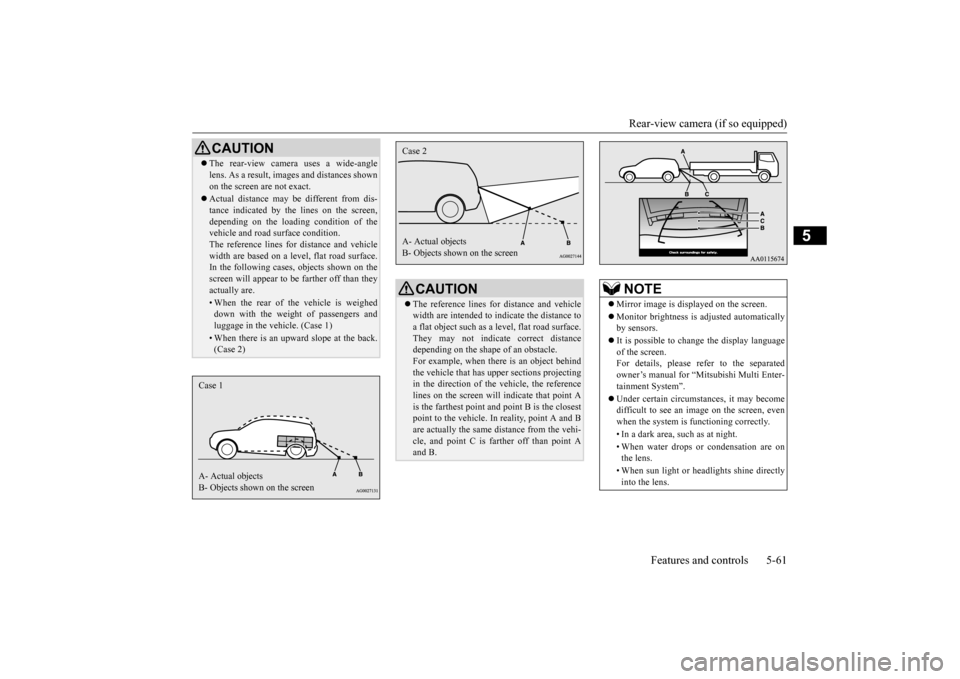
CAUTION The rear-view camera uses a wide-angle lens. As a result, imag
es and distances shown
on the screen are not exact. Actual distance may be different from dis- tance indicated by the
lines on the screen,
depending on the loadi
ng condition of the
vehicle and road surface condition. The reference lines for
distance and vehicle
width are based on a level, flat road surface. In the following cases, objects shown on the screen will appear to
be farther off than they
actually are.• When the rear of th
e vehicle is weighed
down with the weight of passengers and luggage in the vehicle. (Case 1)• When there is an upward slope at the back.(Case 2)
Case 1 A- Actual objects B- Objects shown on the screen
CAUTION The reference lines for
distance and vehicle
width are intended to i
ndicate the distance to
a flat object such as a level, flat road surface. They may not indicate correct distance depending on the shape of an obstacle.For example, when there is an object behind the vehicle that has u
pper sections projecting
in the direction of the
vehicle, the reference
lines on the screen will indicate that point A is the farthest point a
nd point B is the closest
point to the vehicle. In
reality, point A and B
are actually the same distance from the vehi- cle, and point C is fa
rther off than point A
and B.Case 2 A- Actual objects B- Objects shown on the screen
NOTE
Mirror image is displayed on the screen. Monitor brightness is ad
justed automatically
by sensors. It is possible to change the display language of the screen. For details, please refer to the separatedowner’s manual for “Mitsubishi Multi Enter- tainment System”. Under certain circumst
ances, it may become
difficult to see an image on the screen, even when the system is functioning correctly. • In a dark area, such as at night. • When water drops or condensation are on the lens. • When sun light or he
adlights shine directly
into the lens.
BK0212400US.book 61 ページ 2014年4月1日 火曜日 午後2時21分
Page 126 of 300
Multi-information display
Features and controls 5-65
5
To return the display to 0, hold down the multi-information display switch for about 1 second or more. Only the currently displayed value will be reset. Example If trip odometer is displayed, only tripodometer will be reset.
N00575100015
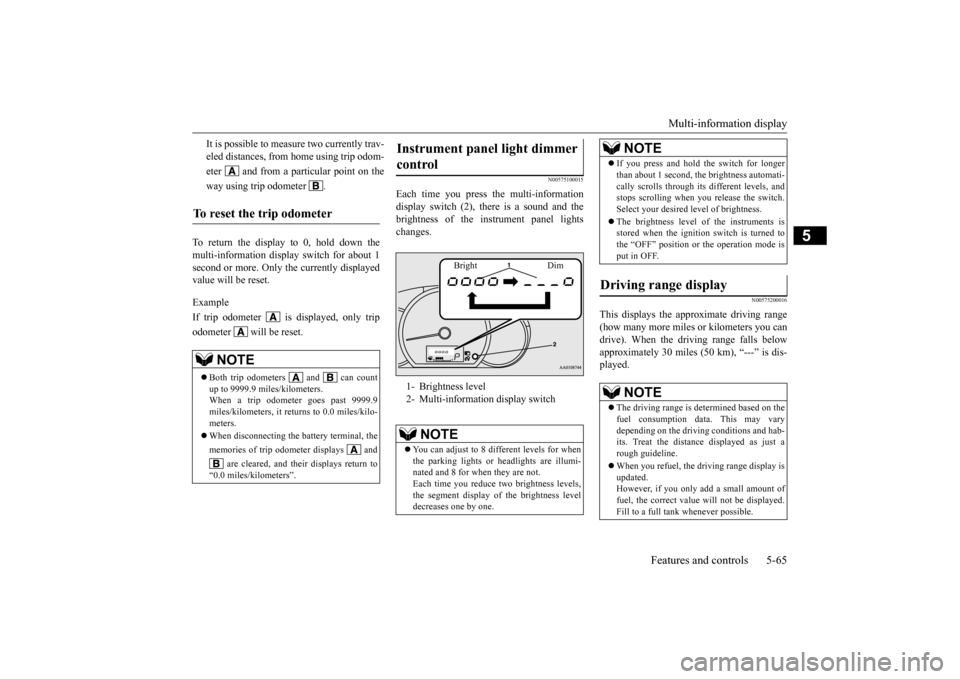
Each time you press
the multi-information
display switch (2), there is a sound and thebrightness of the in
strument panel lights
changes.
N00575200016
This displays the approximate driving range (how many more miles or
kilometers you can
drive). When the driving range falls below approximately 30 miles (
50 km), “---” is dis-
played.
It is possible to measure two currently trav- eled distances, from home using trip odom- eter and from a particular point on theway using trip odometer .
To reset the trip odometer
NOTE
Both trip odometers and can count up to 9999.9 miles/kilometers. When a trip odometer goes past 9999.9 miles/kilometers, it returns to 0.0 miles/kilo-meters. When disconnecting the battery terminal, the memories of trip odom
eter displays and
are cleared, and thei
r displays return to
“0.0 miles/kilometers”.
Instrument panel light dimmer control 1- Brightness level 2- Multi-informati
on display switch
NOTE
You can adjust to 8 different levels for when the parking lights or
headlights are illumi-
nated and 8 for when they are not. Each time you reduce tw
o brightness levels,
the segment display of the brightness leveldecreases one by one.
Bright Dim
If you press and hold the switch for longer than about 1 second, th
e brightness automati-
cally scrolls through its different levels, andstops scrolling when
you release the switch.
Select your desired
level of brightness.
The brightness level of the instruments is stored when the ignition switch is turned to the “OFF” position or the operation mode isput in OFF.
Driving range display
NOTE
The driving range is determined based on the fuel consumption data. This may vary depending on the drivi
ng conditions and hab-
its. Treat the distance displayed as just arough guideline. When you refuel, the driving range display is updated. However, if you only add a small amount of fuel, the correct value
will not be displayed.
Fill to a full tank whenever possible.NOTE
BK0212400US.book 65 ページ 2014年4月1日 火曜日 午後2時21分
Page 132 of 300
Indicators
Features and controls 5-71
5
N00519900127 N00520000216
The arrows will flash in time with the corre- sponding exterior turn signals when the turn signal lever is used. Both arrows will flash when the hazard warn- ing flasher swit
ch is pressed.
N00520100086
A blue light comes on when the headlights are on high beam.
N00520200175
This indicator comes on while the front foglights are on.
N00575600010
This indicator comes on in green while the coolant temperature is low.
N00568800036
This indicator comes on while fuel-efficient driving is achieved.
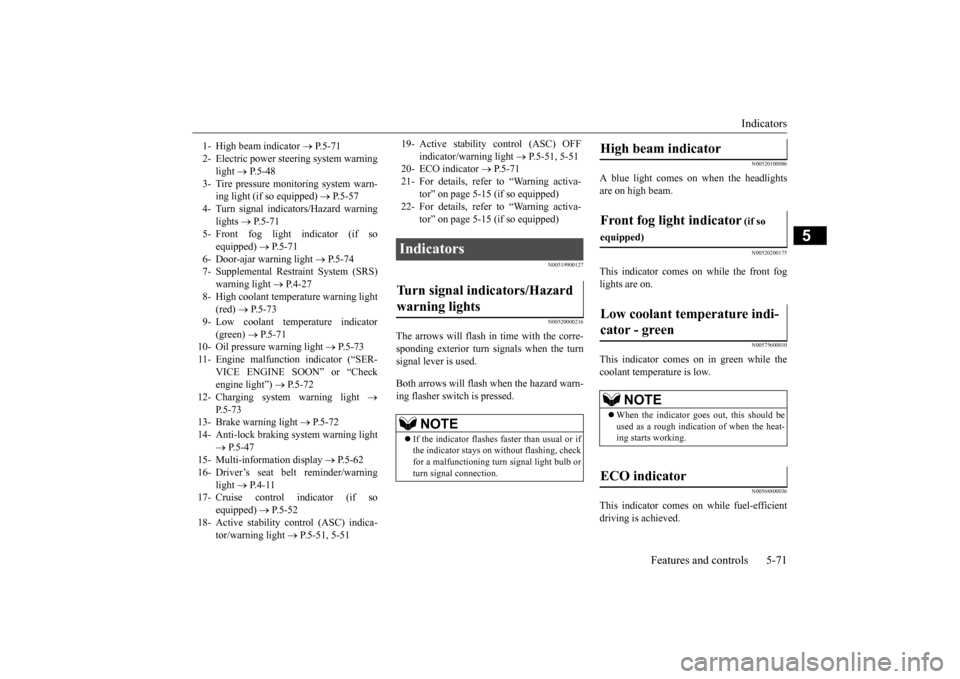
1- High beam indicator
P. 5 - 7 1
2- Electric power stee
ring system warning
light
P. 5 - 4 8
3- Tire pressure moni
toring system warn-
ing light (if so equipped)
P.5-57
4- Turn signal indicators/Hazard warning
lights
P.5-71
5- Front fog light indicator (if so
equipped)
P.5-71
6- Door-ajar warning light
P.5-74
7- Supplemental Restraint System (SRS)
warning light
P.4-27
8- High coolant temperature warning light
(red)
P.5-73
9- Low coolant temp
erature indicator
(green)
P. 5 - 7 1
10- Oil pressure warning light
P.5-73
11- Engine malfuncti
on indicator (“SER-
VICE ENGINE SOON” or “Checkengine light”)
P.5-72
12- Charging system warning light
P.5-73
13- Brake warning light
P.5-72
14- Anti-lock braking system warning light
P.5-47
15- Multi-information display
P. 5 - 6 2
16- Driver’s seat belt reminder/warning
light
P. 4 - 1 1
17- Cruise control indicator (if so
equipped)
P.5-52
18- Active stability control (ASC) indica-
tor/warning light
P.5-51, 5-51
19- Active stability control (ASC) OFF
indicator/warning light
P.5-51, 5-51
20- ECO indicator
P.5-71
21- For details, refer
to “Warning activa-
tor” on page 5-15 (if so equipped)
22- For details, refer
to “Warning activa-
tor” on page 5-15 (if so equipped)
Indicators Turn signal indicators/Hazard warning lights
NOTE
If the indicator flashes faster than usual or if the indicator stays on wi
thout flashing, check
for a malfunctioning turn signal light bulb orturn signal connection.
High beam indicator Front fog light indicator
(if so
equipped)Low coolant temperature indi- cator - green
NOTE
When the indicator goes out, this should be used as a rough indication of when the heat- ing starts working.
ECO indicator
BK0212400US.book 71 ページ 2014年4月1日 火曜日 午後2時21分
Page 133 of 300
Warning lights 5-72 Features and controls
5
N00520300147 N00520400526
This light comes on when the ignition switch is turned to the “ON” position (engine off) or the operation mode is put in ON.When the engine is started, the light should go off a few seconds later. The warning light also illuminates after start- ing the engine under the following condi- tions. When the parking brake is still applied. When the brake fluid level is low. When the brake system circuit is not working properly.
When the vehicle is moving at more than 5 mph (8 km/h) and the parking brake applied, a buzzer will sound to in
form the driver that
the parking brake is not properly release. Before driving, be sure that the parking brake is fully released and the brake warning light is off.
N00520500804
This indicator is a pa
rt of the onboard diag-
nostic (OBD) system which monitors the emissions, engine control system or continu- ously variable transmission (CVT) controlsystem. If a problem is detected in one of these systems, this indicator illuminates or flashes. When the ignition switch is turned to the “ON” position or the operation mode is put in ON, this indicator normally comes onand goes off after the engine has started. This indicator will come on if the fuel tank filler cap is not properly tightened. If this indicator comes on and stays on after refuel-ing, stop the engine and check that the cap is properly tightened. (Turn the cap clockwise until you hear clicking sounds.)If this indicator does not go off after several seconds or lights up while driving, have the system checked as s
oon as possible at an
authorized Mitsubishi Motors dealer or a repair facility of your choice.
Warning lights Brake warning light and buzzer
CAUTION If the brake warning light and the Anti-lock braking system warning
light are illuminated
at the same time, the braking force distribu-tion function will not
operate, the vehicle
may be destabilized
during sudden braking
under the following conditions.• When the brake warn
ing light does not go
out even when the parking brake isreleased.• When the brake warning light stays onwhile driving.If the above occurs, avoid sudden brakingand high-speed driving. Park the vehicle in a safe place, and c
ontact an authorized
Mitsubishi Motors dealer or a repair facilityof your choice as soon as possible. The vehicle should be bro
ught to a halt in the
following manner when
brake performance
is deteriorated.• Confirm that the vehicle slows down whenyou press down on the brake pedal harder than usual. In some cases, the brake pedalmay go all the way to the floor.• Should the brakes fail, use engine brakingto reduce your speed and slowly apply the parking brake. Depress the brake pedal to illuminate thestop lights and to aler
t the vehicles behind
you.
Engine malfunction indicator (“SERVICE ENGINE SOON” or “Check engine light”)
BK0212400US.book 72 ページ 2014年4月1日 火曜日 午後2時21分
Page 134 of 300
Warning lights
Features and controls 5-73
5
N00520600313
This light comes on in the event of a malfunc- tion in the charging system or when the igni-tion switch is turned to the “ON” position (engine off) or the operation mode is put in ON. When the engine is started, the lightshould go out. Check to make sure that the light has gone out before driving.
N00520700170
This light comes on when the engine oil pres-sure is below normal. If the light stays on while driving, stop the engine as soon as pos-sible. Do not run the engine until the cause of the low oil pressure is corrected.
N00575700011
This light comes on in red if the coolant tem- perature becomes excessively high.
CAUTION Driving for a long time
with the engine mal-
function indicator on may cause more dam-age to the emission control system. Thiscould also affect fuel
economy and drivabil-
ity. If this indicator does not come on when the ignition switch is turned to the “ON” posi- tion or the operation mode is put in ON, havethe system checked at an authorized Mitsubishi Motors dealer or a repair facility of your choice. If the engine malfunction indicator comes on while the engine is running, avoid driving athigh speeds. During vehicle
operation with the indicator
on, the vehicle may not
accelerate when you
depress the accelerator pedal. When the vehicle is stat
ionary with the indi-
cator on, you must depr
ess the brake pedal
more firmly than usual since the engine idling speed is higher th
an usual and a vehi-
cle with a CVT has a stronger tendency tocreep forward.
NOTE
Do not disconnect the ba
ttery cable when the
engine malfunction i
ndicator (“SERVICE
ENGINE SOON” or “Check engine light”) ison. The engine electronic
control module stores
critical OBD informati
on (especially exhaust
emission data), which ma
y be lost if the bat-
tery cable is disconne
cted while the engine
malfunction indicator is
on. This will make it
difficult to diagnose th
e cause of future prob-
lems.
Charging system warning light
CAUTION If the warning light stays on while the engine is running, park your ve
hicle in a safe place
as soon as possible and
contact an authorized
Mitsubishi Motors dealer
or a repair facility
of your choice to have the system checked.
Oil pressure warning light
CAUTION If this light comes on when the engine oil level is not low, have
your vehicle checked at
an authorized Mitsubish
i Motors dealer or a
repair facility of your choice. This warning light does not show the amount of oil in the crankcase. This can only be determined by checking the oil level with the dipstick with the engine turned off.
High coolant temperature warning light - red
BK0212400US.book 73 ページ 2014年4月1日 火曜日 午後2時21分
Page 135 of 300
Combination headlights and dimmer switch 5-74 Features and controls
5
N00520900329
This light comes on when any door or the lift- gate is open or not completely closed. When the vehicle is moving at more than 5 mph (8 km/h) and any door or the liftgate isopen or ajar, a tone will sound 4 times to inform the driver that any door or the liftgate is not properly shut.
N00522500736
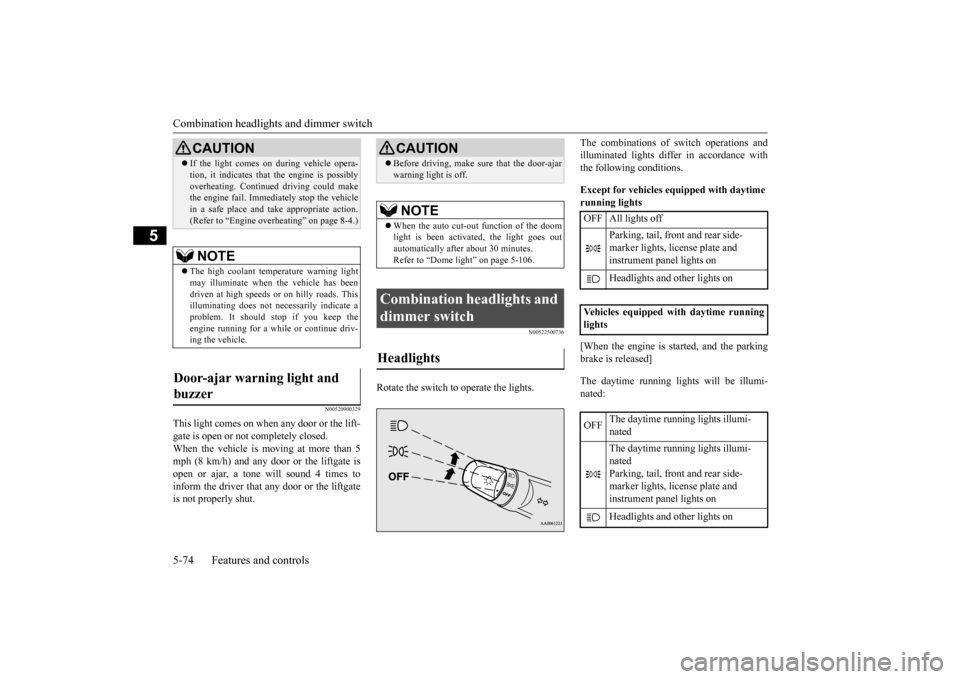
Rotate the switch to operate the lights.
The combinations of
switch operations and
illuminated lights differ in accordance withthe following conditions. Except for vehicles equipped with daytime running lights [When the engine is st
arted, and the parking
brake is released] The daytime running lights will be illumi- nated:
CAUTION If the light comes on
during vehicle opera-
tion, it indicates that
the engine is possibly
overheating. Continued driving could makethe engine fail. Immedi
ately stop the vehicle
in a safe place and ta
ke appropriate action.
(Refer to “Engine overh
eating” on page 8-4.)
NOTE
The high coolant temp
erature warning light
may illuminate when
the vehicle has been
driven at high speeds or on hilly roads. This illuminating does not ne
cessarily indicate a
problem. It should stop if you keep the engine running for a whil
e or continue driv-
ing the vehicle.
Door-ajar warning light and buzzer
CAUTION Before driving, make sure that the door-ajar warning light is off. NOTE
When the auto cut-out function of the doom light is been activa
ted, the light goes out
automatically after about 30 minutes. Refer to “Dome light” on page 5-106.
Combination headlights and dimmer switch Headlights
OFF All lights off
Parking, tail, front and rear side- marker lights, license plate and instrument panel lights on Headlights and
other lights on
Vehicles equipped with daytime running lights OFF
The daytime running lights illumi- nated The daytime running lights illumi- nated Parking, tail, front and rear side- marker lights, license plate and instrument panel lights on Headlights and
other lights on
BK0212400US.book 74 ページ 2014年4月1日 火曜日 午後2時21分
Page 136 of 300
![MITSUBISHI MIRAGE 2015 6.G Owners Manual Combination headlights and dimmer switch
Features and controls 5-75
5
[When the engine is not
running, or when the
engine is running but the parking brake is not released] The engine starts when t](/img/19/7511/w960_7511-135.png "MITSUBISHI MIRAGE 2015 6.G Owners Manual Combination headlights and dimmer switch
Features and controls 5-75
5
[When the engine is not
running, or when the
engine is running but the parking brake is not released] The engine starts when t")
Combination headlights and dimmer switch
Features and controls 5-75
5
[When the engine is not
running, or when the
engine is running but the parking brake is not released] The engine starts when the lights are off.
N00532600570
If the following operation is performed with the combination headlights and dim- mer switch in the “ ” or “ ” position, the lights automatically turn off. [Except for vehicles
equipped with the
F. A . S . T. - k e y ]The ignition switch is turned to the “OFF” or “ACC” position or the key is removed from the ignition switch and the driver’sdoor is opened. [For vehicles equipped with the F.A.S.T.- key] The operation mode is changed to OFF orACC and the driver’s door is opened.
If the following operation is performed with the combination headlights and dim- mer switch in the “ ” or “ ” position, the lights automatically turn off after about 3 minutes. [Except for vehicles equipped with the F. A . S . T. - k e y ]The ignition switch is turned to the “OFF” or “ACC” position or
the key is removed
from the ignition switch and the driver’s door is not opened. [For vehicles equipped with the F.A.S.T.- key]The operation mode is changed to OFF or ACC and the driver’s door is not opened.
If the combination
headlights and dimmer
switch is turned to the “ ” or “ ” posi- tion again after the engine is turned off, theabout 3-minute auto-cutout function
NOTE
Once the daytime running light come on, they do not go out until the ignition switch isturned to the “OFF” or “ACC” position orthe operation mode is changed to OFF or ACC.
OFF All lights off
Parking, tail, front
and rear side-
marker lights, lic
ense plate and
instrument panel lights on Headlights and other lights onNOTE
Do not leave the head
lights and ot
her lights
on for a long period of time when the engine is not running. The battery will run down.
When it rains, or wh
en the vehicle has been
washed, the inside of the lens sometimesbecomes foggy. This is the same as whenwindow glass mists up on a humid day, and does not indicate a pr
oblem. When the light
is switched on, the heat will dry out the fog.However, if water collects inside the light, have it checked by an authorized Mitsubishi Motors dealer or a repair facility of yourchoice.
Light auto-cutout function (headlights and other lights)
NOTE
NOTE
The light auto-cutout f
unction can be deacti-
vated.See your authorized Mitsubishi Motors dealer for details.
When you want to keep the lights on:
BK0212400US.book 75 ページ 2014年4月1日 火曜日 午後2時21分
Page 137 of 300
Turn signal lever 5-76 Features and controls
5
described above will not
work. The lights (the
parking lights, tail li
ghts and license plate
lights) will stay on and will not turn off auto- matically.
N00549800226
[When using a key to start the engine]If the driver’s door is opened with the key in the “OFF” or “ACC” position or removed from the ignition switch while the lights are on, the tone will sound to remind you to turnoff the lights. [When using the F.A.S.T.-key to start the engine] If the driver’s door is opened with the opera-tion mode is put in OFF or ACC, or if the operation mode is changed to OFF while the lights are on, the tone
will sound to remind
you to turn off the lights. In either case, the lights will turn off automat- ically and so will the tone. Or you can turn the light switch to the “OFF” position to stop the tone.
N00549900142
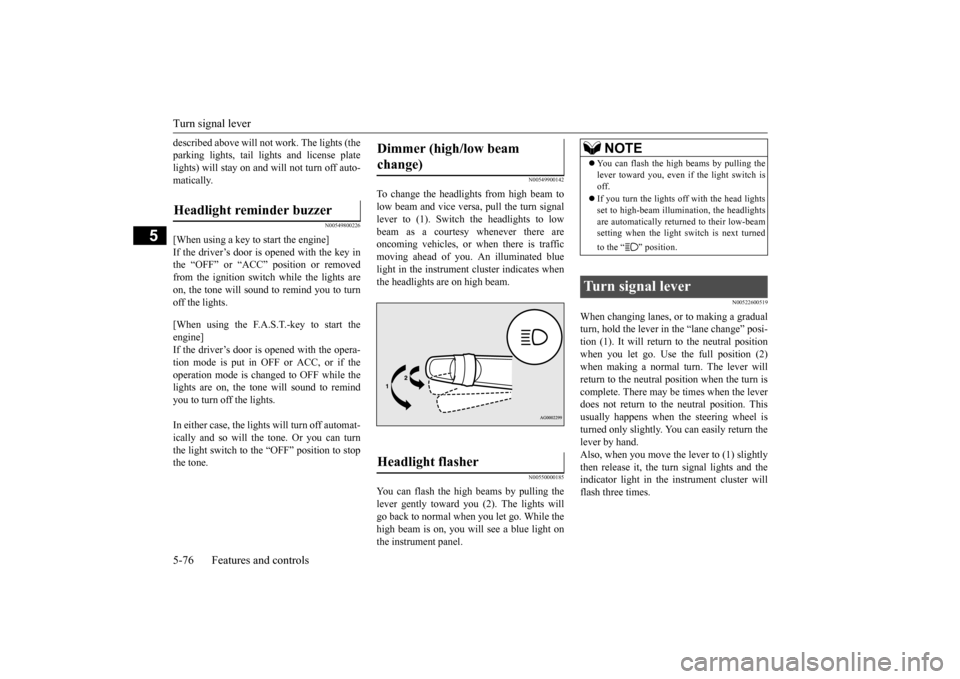
To change the headlights from high beam tolow beam and vice vers
a, pull the turn signal
lever to (1). Switch the headlights to low beam as a courtesy whenever there are oncoming vehicles, or when there is trafficmoving ahead of you. An illuminated blue light in the instrument
cluster indicates when
the headlights are on high beam.
N00550000185
You can flash the high beams by pulling the lever gently toward you (2). The lights will go back to normal when you let go. While thehigh beam is on, you will see a blue light on the instrument panel.
N00522600519
When changing lanes, or to making a gradual turn, hold the lever in the “lane change” posi-tion (1). It will return
to the neutral position
when you let go. Use the full position (2) when making a normal turn. The lever willreturn to the neutral position when the turn is complete. There may be times when the lever does not return to the neutral position. Thisusually happens when the steering wheel is turned only slightly. You can easily return the lever by hand.Also, when you move the lever to (1) slightly then release it, the turn signal lights and the indicator light in the instrument cluster willflash three times.
Headlight reminder buzzer
Dimmer (high/low beam change) Headlight flasher
NOTE
You can flash the high beams by pulling the lever toward you, even if the light switch isoff. If you turn the lights off with the head lights set to high-beam illumin
ation, the headlights
are automatically returned to their low-beam setting when the light
switch is next turned
to the “ ” position.
Turn signal lever
BK0212400US.book 76 ページ 2014年4月1日 火曜日 午後2時21分
Page 138 of 300
Hazard warning flasher switch Features and controls 5-77
5
See your authorized Mitsubishi Motors dealer for details.
N00522700318
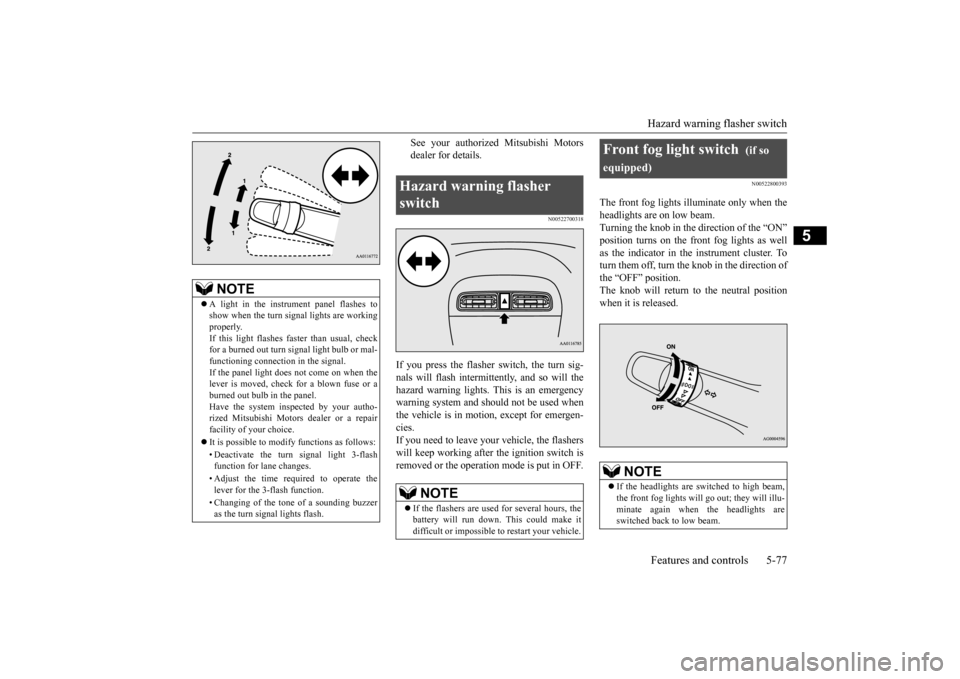
If you press the flasher switch, the turn sig- nals will flash intermittently, and so will the hazard warning lights.
This is an emergency
warning system and should not be used when the vehicle is in motion, except for emergen- cies.If you need to leave your vehicle, the flashers will keep working afte
r the ignition switch is
removed or the operation mode is put in OFF.
N00522800393
The front fog lights illuminate only when theheadlights are on low beam.Turning the knob in the direction of the “ON” position turns on the front fog lights as well as the indicator in the instrument cluster. Toturn them off, turn the knob in the direction of the “OFF” position. The knob will return to the neutral position when it is released.
NOTE
A light in the instrument panel flashes to show when the turn signal lights are workingproperly. If this light flashes fa
ster than usual, check
for a burned out turn signal light bulb or mal-functioning connect
ion in the signal.
If the panel light does not come on when the lever is moved, check for a blown fuse or aburned out bulb in the panel. Have the system inspected by your autho- rized Mitsubishi Motors dealer or a repairfacility of your choice. It is possible to modify functions as follows: • Deactivate the turn signal light 3-flash function for lane changes. • Adjust the time required to operate the lever for the 3-flash function. • Changing of the tone of a sounding buzzer as the turn signal lights flash.
Hazard warning flasher switch
NOTE
If the flashers are used for several hours, the battery will run down.
This could make it
difficult or impossible
to restart your vehicle.
Front fog light switch
(if so
equipped)
NOTE
If the headlights are sw
itched to high beam,
the front fog lights will go out; they will illu- minate again when the headlights are switched back to low beam.
BK0212400US.book 77 ページ 2014年4月1日 火曜日 午後2時21分
Page 139 of 300
Wiper and washer switch 5-78 Features and controls
5
N00523000666
The windshield wiper and washer can be operated with the ignition switch or the oper- ation mode is in ON or ACC.If the blades are frozen to the windshield, do not operate the wipers
until the ice has melted
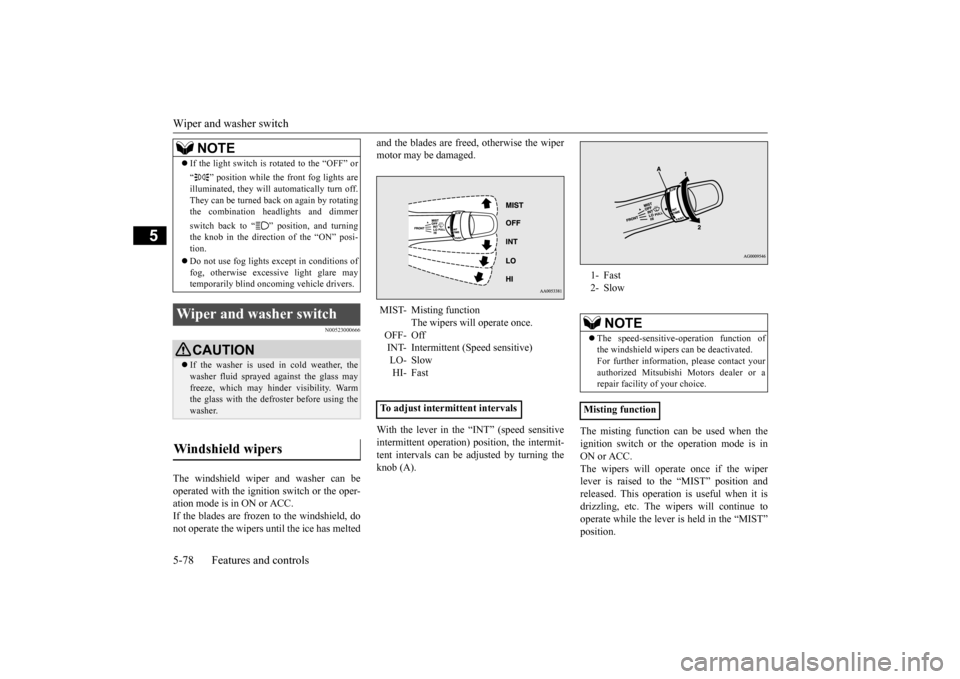
and the blades are freed, otherwise the wiper motor may be damaged. With the lever in the “INT” (speed sensitive intermittent operation)
position, the intermit-
tent intervals can be adjusted by turning theknob (A).
The misting function can be used when the ignition switch or the operation mode is inON or ACC. The wipers will operate once if the wiper lever is raised to the “MIST” position andreleased. This operation
is useful when it is
drizzling, etc. The wi
pers will continue to
operate while the lever is held in the “MIST”position.
If the light switch is rotated to the “OFF” or “ ” position while the front fog lights are illuminated, they will automatically turn off.They can be turned back on again by rotating the combination he
adlights and dimmer
switch back to “ ” position, and turning the knob in the direction of the “ON” posi-tion. Do not use fog lights except in conditions of fog, otherwise excessi
ve light glare may
temporarily blind oncom
ing vehicle drivers.
Wiper and washer switch
CAUTIONIf the washer is used in cold weather, the washer fluid sprayed against the glass mayfreeze, which may hi
nder visibility. Warm
the glass with the defro
ster before using the
washer.
Windshield wipers
NOTE
MIST- Misting function
The wipers will operate once.
OFF- OffINT- Intermittent (Speed sensitive) LO- Slow HI- Fast
To adjust intermittent intervals
1- Fast 2- Slow
NOTE
The speed-sensitive-
operation function of
the windshield wipers can be deactivated.For further information, please contact your authorized Mitsubishi Motors dealer or a repair facility
of your choice.
Misting function
BK0212400US.book 78 ページ 2014年4月1日 火曜日 午後2時21分