change time MITSUBISHI MIRAGE 2015 6.G Service Manual
[x] Cancel search | Manufacturer: MITSUBISHI, Model Year: 2015, Model line: MIRAGE, Model: MITSUBISHI MIRAGE 2015 6.GPages: 300, PDF Size: 43.44 MB
Page 215 of 300

To play tracks from USB device (if so equipped) 7-34 Comfort controls
7
N00703100012
Operate the SEL switch to
select desired file.
When this mode is activated by pressing the SEL switch, the SEL i
ndicator will be dis-
played in the display.
N00764500024
Press the RPT button to show “RPT” in the display. To cancel this
mode, press the button
again.
N00764600038
Press and hold the RPT button until you hear a beep to show “F-RPT” in the display. All tracks in the current folder are played repeatedly. To exit this mode, press the button again.
N00764700039
Press the RDM button to show “F-RDM” inthe display.The audio randomly selects tracks from the current folder and plays the selected tracks. To exit this mode, press the button again.
N00764800030
Press and hold the RDM button until you hear a beep to show “RDM” in the display. The audio randomly selects tracks from allfolders and plays the selected tracks.
To exit this mode, press the button again.
N00765100043
You can displays titles with tag information. The display changes as follows every time the DISP button is pressed during playback:Folder name
File name
Normal display.
1. Press and hold the DISP button until you hear a beep.2. The display changes
as follows every time
the DISP button is pressed briefly: Album TA G
Track TAG
Artist TAG
Genre TAG (vehicles with Bluetooth
® 2.0
interface)
Normal display.
To find a file
Press the SEL switch :To start this mode or
to select the folder or file.
Turn the SEL switch :To show the folder or
file.
NOTE
To cancel the selection, press the button to return to the previous step. If no operation is perfo
rmed for 10 seconds
or more or other butt
on is operated after the
SEL switch has been turned, searching of the desired file is canceled. If no operation is performed for 5 seconds or more after the file is
displayed, playback
starts. When the SEL indicato
r is not shown on the
display and the SEL switch is operated, thevolume adjustment is activated.
To play the same file repeatedly
To play the files in the same folder repeatedly
To play a folder in random order
To play all folders in random order
To switch the display
Folder title Tag information
NOTE
Press and hold the DISP button again until you hear a beep, and the tag information dis-play returns to the folder title display. Up to 11 characters are shown in the display at once. If the title is cut off in the middle, press the PAGE button. The next characters are displayed every time this button ispressed.
BK0212400US.book 34 ページ 2014年4月1日 火曜日 午後2時21分
Page 217 of 300

To play tracks from a Bluetooth® device
(vehicles with Blue
tooth® 2.0 interface)
7-36 Comfort controls
7
N00765500089
1. Press the PWR switch to turn on the audio system. The system turns on in the last mode used.2. Press the CD button several times to switch to the BT-A (Bluetooth
®) mode.
The input mode change
s as follows every
time the CD button is
pressed: CD mode
iPod mode
Bluetooth
® mode (if so
equipped)
AUX mode
CD mode.
The BT indicator are
illuminated and then
the BT-A mode will be activated. 3. Connect your Bluetooth
® device.
Refer to “Connecting the Bluetooth
® 2.0
interface and Bluetooth
® device” on page
5-87.4. Playback starts automatically.
N00765600035
To stop the playback, press the Stop button.To restart the playback, press the Play/Pausebutton.
N00765700036
To pause the playback, press and hold thePlay/Pause button until you hear a beep.To restart the playback, press the Play/Pause button.
N00703200013
To fast-forward/revers
e the current track,
press the button or button.
To fast-forward the current track, press the
button. While the button is kept pressed,
the track will be fast-forwarded. To fast-reverse the current track, press the button. While the button is kept pressed, the track will be fast-reversed.
N00765800037
Press the button repeatedly until thedesired file number a
ppears on the display.
Press the button repeatedly until the desired file number a
ppears on the display.
4- TRACK indicator 5- Display 6- PAGE (Title scroll) button7-
(Fast-reverse/Track down) button
8-
(Fast-forward/Track up) button
9- DISP (Title display) button 10- Play/Pause button 11- Stop button 12- RPT (Repeat) button 13- RDM (Random) buttonTo l i s t e n t o t r a c
ks from a device
connected via Bluetooth
®
NOTE
Depending on the connected device, the playback may not start automatically.In this case, operate
the connected device to
start the playback.
To stop the playback (if supported by the device) To pause the playback (if sup- ported by the device) To fast-forward/reverse the track (if supported by the device)
Fast-forward Fast-reverseTo select a track (if supported by the device) Track up Track down
NOTE
Pressing the button once during the song will cause the audio system to restart play- back from the beginning of the file.
BK0212400US.book 36 ページ 2014年4月1日 火曜日 午後2時21分
Page 218 of 300
Steering wheel audio remote control switches (if so equipped)
Comfort controls 7-37
7
N00765900038
Press the RPT button several times to switch to show “RPT” in the display. The mode changes as follows every time the RPT button is pressed:No display (not repeat)
RPT (repeat same
track)
F-RPT (repeat all tracks)
No dis-
play To exit this mode, press the button again.
N00703300014
Press the RPT button several times to switch to show “F-RPT” in the display. The mode changes as follows every time the RPT button is pressed:No display (not repeat)
RPT (repeat same
track)
F-RPT (repeat all tracks)
No dis-
play All tracks in the Bluetooth
® device are played
repeatedly. To exit this mode, press the button again.
N00766000023
Press the RDM button to show “RDM” in thedisplay. The system randomly selects and plays tracks from all tracks in the Bluetooth
® device.
To exit this mode, press the button again.
N00766200041
The system can display tag information. 1. Press the DISP button. 2. The display changes
as follows every time
the DISP button is pressed: Album title
Title name
Artist name
Genre
Normal display
N00714800484
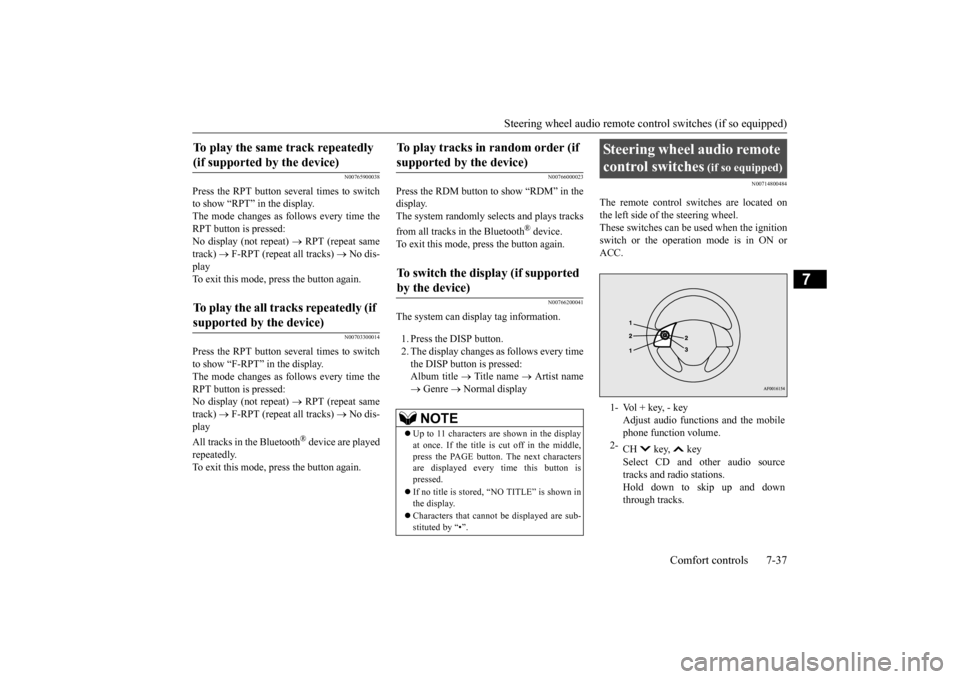
The remote control switches are located on the left side of
the steering wheel.
These switches can be us
ed when the ignition
switch or the operation mode is in ON or ACC.
To play the same track repeatedly (if supported by the device) To play the all tracks repeatedly (if supported by the device)
To play tracks in
random order (if
supported by the device) To switch the display (if supported by the device)
NOTE
Up to 11 characters are shown in the display at once. If the title is cut off in the middle, press the PAGE button. The next characters are displayed every time this button ispressed. If no title is stored, “NO TITLE” is shown in the display. Characters that cannot
be displayed are sub-
stituted by “•”.
Steering wheel audio remote control switches
(if so equipped)
1- Vol + key, - key
Adjust audio functions and the mobile phone function volume.
2-
CH key, key Select CD and ot
her audio source
tracks and radio stations. Hold down to skip up and downthrough tracks.
BK0212400US.book 37 ページ 2014年4月1日 火曜日 午後2時21分
Page 236 of 300
How to change a tire (Vehicle
s equipped with spare tire) For emergencies 8-11
8
18. After driving for 10 minutes or 3 miles (5
km) again, check the tire pressure usingthe air pressure gauge on the compressor. If the tire pressure has not dropped, the emergency repair proc
edure is complete.
Before driving, make sure that the com- pressor is stowed. You must still not exceed a speed of 50 mph (80 km/h).Observe local speed limits.
19. Immediately drive with great care to an
authorized Mitsubishi
Motors dealer or a
repair facility of your
choice and have the
tire repair/replacement performed.
N00836900819
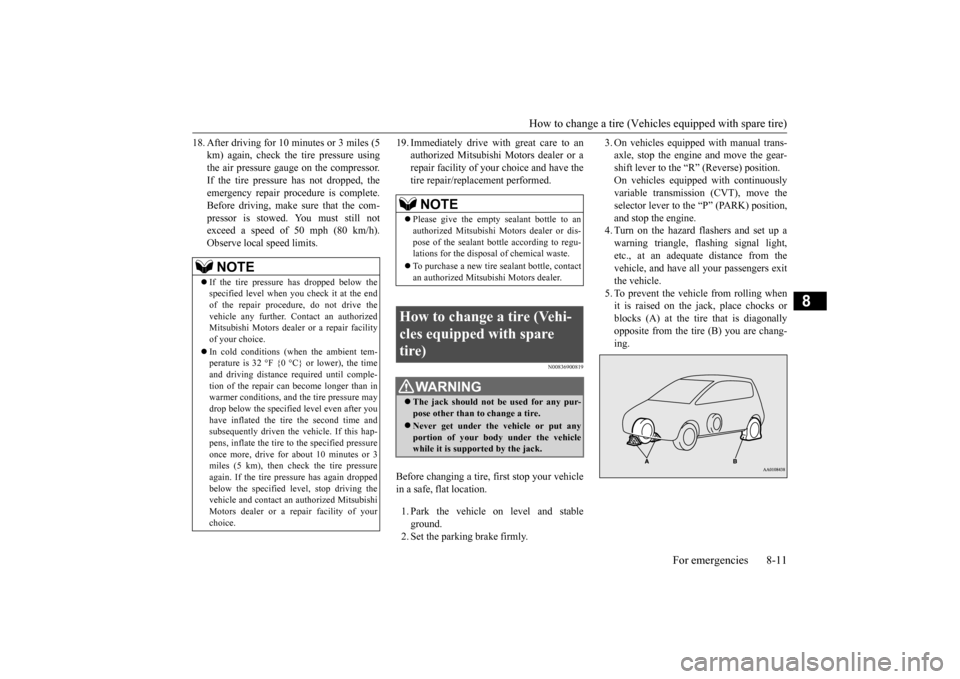
Before changing a tire, first stop your vehicle in a safe, flat location. 1. Park the vehicle on level and stable ground. 2. Set the parking brake firmly.
3. On vehicles equipped with manual trans- axle, stop the engine and move the gear-shift lever to the “R” (Reverse) position. On vehicles equippe
d with continuously
variable transmissi
on (CVT), move the
selector lever to the “P” (PARK) position, and stop the engine. 4. Turn on the hazard flashers and set up awarning triangle, flas
hing signal light,
etc., at an adequate distance from the vehicle, and have a
ll your passengers exit
the vehicle. 5. To prevent the vehicle from rolling whenit is raised on the jack, place chocks or blocks (A) at the tire
that is diagonally
opposite from the tire (B) you are chang-ing.
NOTE
If the tire pressure has dropped below the specified level when you check it at the end of the repair procedure, do not drive the vehicle any further.
Contact an authorized
Mitsubishi Motors dealer
or a repair facility
of your choice. In cold conditions (when the ambient tem- perature is 32 °F {0 °C} or lower), the time and driving distance
required until comple-
tion of the repair can become longer than in warmer conditions, and th
e tire pressure may
drop below the specified level even after youhave inflated the tire
the second time and
subsequently driven the
vehicle. If this hap-
pens, inflate the tire to the specified pressureonce more, drive for about 10 minutes or 3 miles (5 km), then check the tire pressure again. If the tire pressure has again droppedbelow the specified level, stop driving the vehicle and cont
act an authorized Mitsubishi
Motors dealer or a repair facility of yourchoice.
NOTE
Please give the empty sealant bottle to an authorized Mitsubishi Mo
tors dealer or dis-
pose of the sealant bottle according to regu- lations for the disposal of chemical waste. To purchase a new tire sealant bottle, contact an authorized Mitsubishi Motors dealer.
How to change a tire (Vehi- cles equipped with spare tire)
WA R N I N G The jack should not be used for any pur- pose other than to
change a tire.
Never get unde
r the vehicle or put any
portion of your body under the vehiclewhile it is supported by the jack.
BK0212400US.book 11 ページ 2014年4月1日 火曜日 午後2時21分
Page 237 of 300
How to change a tire (Vehicle
s equipped with spare tire)
8-12 For emergencies
8
6. Get the jack, bar and wheel nut wrench ready. (Refer to “Jack and tools” on page 8-5.)
N00849600344
The compact spare tire is stowed beneath thefloor board of the cargo area. It is designed to save space in the cargo area. Its lighter weightmakes it easier to use if a flat tire occurs.
N00849700286
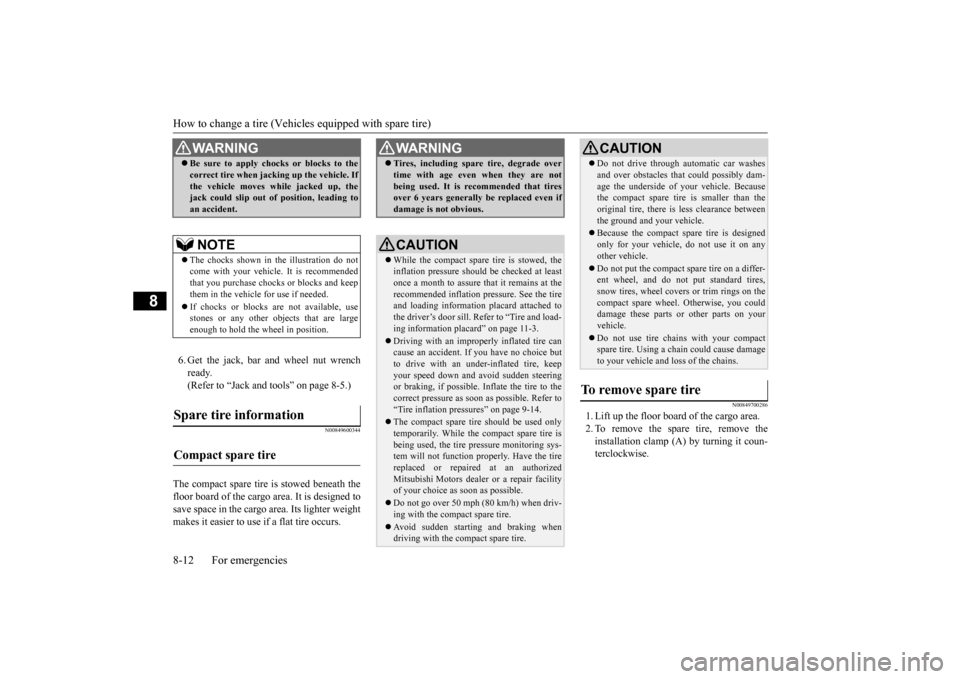
1. Lift up the floor board of the cargo area.2. To remove the spare tire, remove the installation clamp (A) by turning it coun- terclockwise.
WA R N I N G Be sure to apply choc
ks or blocks to the
correct tire when jacking up the vehicle. Ifthe vehicle moves while jacked up, thejack could slip out of
position, leading to
an accident.NOTE
The chocks shown in the illustration do not come with your vehicle. It is recommendedthat you purchase chocks
or blocks and keep
them in the vehicle for use if needed. If chocks or blocks ar
e not available, use
stones or any other obj
ects that are large
enough to hold the wheel in position.
Spare tire information Compact spare tire
WA R N I N G Tires, including spar
e tire, degrade over
time with age even when they are notbeing used. It is recommended that tiresover 6 years generally
be replaced even if
damage is not obvious.CAUTION While the compact spare tire is stowed, the inflation pressure shoul
d be checked at least
once a month to assure
that it remains at the
recommended inflation pressure. See the tire and loading informati
on placard attached to
the driver’s door sill. Refer to “Tire and load- ing information placard” on page 11-3. Driving with an improperly inflated tire can cause an accident. If
you have no choice but
to drive with an under-inflated tire, keepyour speed down and avoid sudden steering or braking, if possible. Inflate the tire to the correct pressure as s
oon as possible. Refer to
“Tire inflation pressures” on page 9-14. The compact spare tire should be used only temporarily. While the compact spare tire is being used, the tire pr
essure monitoring sys-
tem will not function pr
operly. Have the tire
replaced or repaired at an authorizedMitsubishi Motors dealer or a repair facility of your choice as soon as possible. Do not go over 50 mph (80 km/h) when driv- ing with the compact spare tire. Avoid sudden starting and braking when driving with the compact spare tire.
Do not drive through automatic car washes and over obstacles that
could possibly dam-
age the underside of your vehicle. Becausethe compact spare tire is smaller than the original tire, there is less clearance between the ground and your vehicle. Because the compact spare tire is designed only for your vehicle, do not use it on anyother vehicle. Do not put the compact spare tire on a differ- ent wheel, and do not put standard tires, snow tires, wheel covers or trim rings on the compact spare wheel.
Otherwise, you could
damage these parts or other parts on your vehicle. Do not use tire chains with your compact spare tire. Using a ch
ain could cause damage
to your vehicle and loss of the chains.
To remove spare tire
CAUTION
BK0212400US.book 12 ページ 2014年4月1日 火曜日 午後2時21分
Page 239 of 300
How to change a tire (Vehicle
s equipped with spare tire)
8-14 For emergencies
8
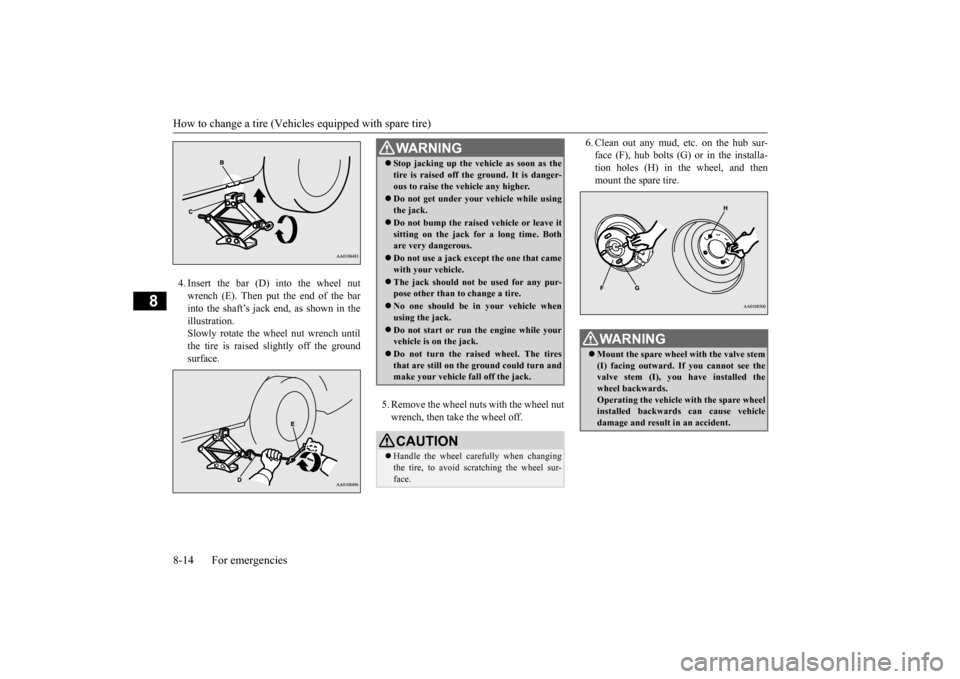
4. Insert the bar (D) into the wheel nut wrench (E). Then put the end of the barinto the shaft’s jack end, as shown in the illustration. Slowly rotate the wheel nut wrench untilthe tire is raised slightly off the ground surface.
5. Remove the wheel nuts with the wheel nut wrench, then take the wheel off.
6. Clean out any mud, etc. on the hub sur- face (F), hub bolts (G)
or in the installa-
tion holes (H) in the wheel, and then mount the spare tire.
WA R N I N G Stop jacking up the ve
hicle as soon as the
tire is raised off the ground. It is danger-ous to raise the ve
hicle any higher.
Do not get under your vehicle while using the jack. Do not bump the raised
vehicle or leave it
sitting on the jack for a long time. Bothare very dangerous. Do not use a jack except the one that came with your vehicle. The jack should not be used for any pur- pose other than to change a tire. No one should be
in your vehicle when
using the jack. Do not start or run
the engine while your
vehicle is on the jack. Do not turn the raised wheel. The tires that are still on the ground could turn and make your vehicle fall off the jack.CAUTION Handle the wheel carefully when changing the tire, to avoid scratching the wheel sur-face.
WA R N I N G Mount the spare wheel with the valve stem (I) facing outward. If
you cannot see the
valve stem (I), you
have installed the
wheel backwards. Operating the vehicle with the spare wheel installed backwards can cause vehicledamage and result
in an ac
cident.
BK0212400US.book 14 ページ 2014年4月1日 火曜日 午後2時21分
Page 252 of 300
Engine coolant
Vehicle care and maintenance 9-7
9
Mitsubishi Motors Genui
ne 0W-20 Synthetic
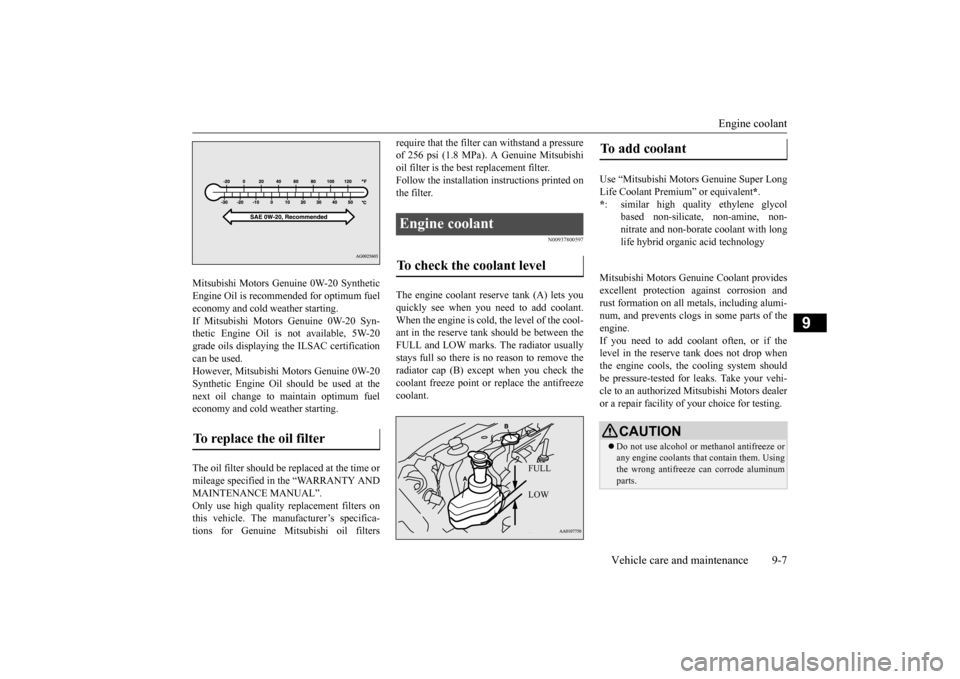
Engine Oil is recommended for optimum fueleconomy and cold weather starting. If Mitsubishi Motors Genuine 0W-20 Syn- thetic Engine Oil is not available, 5W-20grade oils displaying th
e ILSAC certification
can be used. However, Mitsubishi Motors Genuine 0W-20Synthetic Engine Oil s
hould be used at the
next oil change to maintain optimum fuel economy and cold weather starting. The oil filter should be replaced at the time or mileage specified in the “WARRANTY ANDMAINTENANCE MANUAL”. Only use high quality
replacement filters on
this vehicle. The manufacturer’s specifica-tions for Genuine Mitsubishi oil filters
require that the filter can withstand a pressure of 256 psi (1.8 MPa). A Genuine Mitsubishioil filter is the best replacement filter. Follow the installation instructions printed on the filter.
N00937800597
The engine coolant reserve tank (A) lets youquickly see when you need to add coolant. When the engine is cold
, the level of the cool-
ant in the reserve tank should be between theFULL and LOW marks. The radiator usually stays full so there is no reason to remove the radiator cap (B) except when you check thecoolant freeze point or replace the antifreeze coolant.
Mitsubishi Motors Genuine Coolant provides excellent protection
against corrosion and
rust formation on all me
tals, including alumi-
num, and prevents clogs in some parts of theengine. If you need to add coolant often, or if the level in the reserve
tank does not drop when
the engine cools, the
cooling system should
be pressure-tested for leaks. Take your vehi- cle to an authorized Mitsubishi Motors dealeror a repair facility of
your choice for testing.
To replace the oil filter
Engine coolant To check the coolant level
FULL LOW
To add coolant Use “Mitsubishi Motors
Genuine Super Long
Life Coolant Premium” or equivalent
*.
* : similar high quality
ethylene glycol
based non-silicate
, non-amine, non-
nitrate and non-borate coolant with long life hybrid organic acid technologyCAUTION Do not use alcohol or
methanol antifreeze or
any engine coolants th
at contain them. Using
the wrong antifreeze can corrode aluminum parts.
BK0212400US.book 7 ページ 2014年4月1日 火曜日 午後2時21分
Page 264 of 300
Wiper blades
Vehicle care and maintenance 9-19
9
N00940700138
Check the wiper blades occasionally. Clean them regularly to rem
ove deposits of salt and
road film. Use a sponge or cloth and a milddetergent or non-abrasive
cleaner to clean the
blades and glass areas. Replace the blades if they continue to streakor smear. If the blades are frozen to the windshield or rear window, do not operate the wipers until the ice has melted and the blades are freed, otherwise the wiper mo
tor may be damaged.
N00940800328
Your vehicle is equi
pped with an emission-
control system that meets all the requirementsof the U.S. Environm
ental Protection Agency
and Environment Canada. The emission-con- trol system is made of: a positive crankcase ventilation system an evaporative emission-control system an exhaust emission-control system
To be sure the emission-control system works properly, have your vehicle inspected andmaintained by an authorized Mitsubishi Motors dealer or a repair facility of your choice. This should be
done at the time or
mileage specified in the “WARRANTY AND MAINTENANCE MANUAL”.These, and all the other “general” mainte- nance services listed in this manual, need to be performed to keep your vehicle runningproperly and reliably. You should also have an inspection and ser- vice any time you suspect a malfunction.
N00940900228
Spark plugs must fire properly for good engine performance and emission-control. Do not reuse them by cleaning or regapping.Change them at the mileage listed in the “WARRANTY AND MAINTENANCE MANUAL”.
Wiper blades
NOTE
Do not run the wipers on dry glass for a long time. This wears out the rubber and canscratch the glass.
During cold weather Emission-control system maintenance
NOTE
To meet government
regulations and pro-
mote cleaner air, your
vehicle is equipped
with an onboard diagnostic system (OBD).The engine electroni
c control module that
controls OBD functions stores various data (especially about th
e exhaust emissions).
This data will be erased if the battery cable is disconnected, which c
ould make a rapid
diagnosis difficult. Do not disconnect thebattery cable when th
e engine malfunction
indicator (“SERVIC
E ENGINE SOON” or
“Check engine light”) is ON.
Spark plugs
NOTE
Use the spark plugs listed under “Engine specifications” on page
11-4 or plugs that are
exactly the same. Othe
r plugs could cause
engine damage, perf
ormance problems or
radio noise.
BK0212400US.book 19 ページ 2014年4月1日 火曜日 午後2時21分
Page 266 of 300
For cold and snowy weather
Vehicle care and maintenance 9-21
9
N00941800077
Check the following parts for damage and grease leaks: Ball joint boots of the front suspension and steering linkage Bellows on both ends of the drive shaft
N00942200111
The best way to keep carbon monoxide gas from entering inside your
vehicle is to have
the engine exhaust syst
em properly serviced.
Have a competent mechanic inspect the com- plete exhaust
system and nearby body areas
for broken, damaged, de
teriorated, or mispo-
sitioned parts if you not
ice any of the follow-
ing: A change in the sound of the exhaust sys- tem The smell of exhaust fumes inside the vehicle
The underside or rear of the vehicle is damaged
Also check the exhaust system each time the vehicle is raised for l
ubrication, oil changes,
or required service. Any open seams or loose connections could le
t dangerous exhaust
fumes seep into the
luggage and passenger
compartments. Check for holes or exhaust gas leaks caused by corrosion or damage. Check the joints and connections for looseness or exhaust gas leaks. Check the rubber hangers and brackets for damage.
N00942500127
The hood lock release mechanism and hood safety catch should be checked, cleaned, andoiled when needed for easy movement and to prevent rust and wear. Use Multipurpose Grease NLGI Grade 2 sparingly for all slidingparts of the hood latch and release lever. Work the grease into the hood lock mecha-
nism until all the m
ovable surfaces are cov-
ered.Also, put a light coat of the same grease on the safety catch wherev
er moving parts touch.
N00942600102
The ventilation slots in front of the wind- shield should be brus
hed clear after a heavy
snowfall so that the ope
ration of the heating
and ventilation systems
will not be impaired.
To prevent freezing of the weatherstripping on the doors, engine hood, etc., they should be treated with
silicone grease.
It is a good idea to carry a shovel or a short- handled spade in the vehicle during the win- ter so that you can clear away snow if you getstranded. A small hand-brush for sweeping
Ball joint, steering linkage seals and drive shaft boots Exhaust system
WA R N I N G Carbon monoxide gas
from your vehicle’s
exhaust is poisonous. Breathing thesefumes can cause unconsciousness or death.
Check for any of the following conditions: Hood lock release mechanism and safety catch
For cold and snowy weather Ventilation slots Weatherstripping Additional equipment (For regions where snow is encoun- tered)
BK0212400US.book 21 ページ 2014年4月1日 火曜日 午後2時21分
Page 295 of 300

Alphabetical index 12-2
12
D
Daytime running lights
Bulb capacity
.................................
9-26
Defogger (rear window)
......................
5-80
Defrosting or defogging (windshield, door windows)
................................
7-10
, 7-16
Dimensions
........................................
11-3
Dimmer (high/lo
w beam change)
.........
5-76
Disc brake pads
..................................
9-20
Dome light
Bulb capacity
.................................
9-27
Door-ajar warning buzzer
....................
5-74
Door-ajar warning light
.......................
5-74
Doors
Lock
..............................................
5-24
Power door locks
............................
5-26
Driving during cold weather
..................
6-4
Driving, alcohol and drugs
.....................
6-2
E
Electric power steering system (EPS)
...
5-48
Electric rear win
dow defogger switch
...
5-80
Electronic immobilizer (Anti-theft starting system)
.....................................
5-3
, 5-20
Emission-control sy
stem maintenance
..9-19
Engine
Compartment
...................................
9-5
Coolant
...................................
9-7
, 11-5
High coolant temperature warning light
....
5-73 Hood
...............................................
9-4
Oil and oil filter
.......................
9-5
, 11-5
Overheating
.....................................
8-4
Serial number
.................................
11-2
Specification
...................................
11-4
Engine hood
........................................
9-4
Engine switch
.....................................
5-13
Error codes
.........................................
7-38
Exhaust system
...................................
9-21
F
Floor mat
.............................................
6-2
Fluid
Brake fluid
.....................................
11-5
Continuously variable
transmission (CVT)
fluid
......................................
9-9
, 11-5
Engine coolant
.........................
9-7
, 11-5
Manual transaxle
.............................
11-5
Washer fluid
............................
9-9
, 11-5
Fluid capacities and lubricants
..............
11-5
Free-hand advanced security transmitter (F.A.S.T.-key)
...................................
5-9
Front fog lights
Bulb capacity
..................................
9-26
Indicators
.......................................
5-71
Replacement
..................................
9-29
Switch
...........................................
5-77
Front seat adjustment
............................
4-3
Front side-marker lights
Bulb capacity
.................................
9-26
Replacement
..................................
9-28
Front turn signal light
Bulb capacity
.................................
9-26
Replacement
..................................
9-28
Fuel
Filling the fuel tank
...........................
3-3
Fuel economy
...................................
6-2
Fuel hoses
......................................
9-20
Fuel remaining warning display
.......
5-66
Fuel selection
...................................
3-2
Tank capacity
.................................
11-5
Fuel Pump Shut-off System
.................
8-20
Fuel remaining display
........................
5-66
Fuses
.................................................
9-22
Fusible links
.......................................
9-22
G
General maintenance
Maintenance
...................................
9-20
General vehicle data
............................
11-3
Genuine parts
.......................................
3-6
Glove compartment
...........................
5-108
BK0212400US.book 2 ページ 2014年4月1日 火曜日 午後2時21分