change time MITSUBISHI MIRAGE 2015 6.G Owner's Manual
[x] Cancel search | Manufacturer: MITSUBISHI, Model Year: 2015, Model line: MIRAGE, Model: MITSUBISHI MIRAGE 2015 6.GPages: 300, PDF Size: 43.44 MB
Page 149 of 300

Bluetooth® 2.0 interface (if so equipped) 5-88 Features and controls
5
Up to 7 Bluetooth
® devices can be paired
with the Bluetooth
® 2.0 interface.
If multiple paired Bluetooth
® devices are
available in the vehicle,
the cellular phone or
music player most recently connected is auto- matically connected to the Bluetooth
® 2.0
interface. You can also change a Bluetooth
® device to
be connected. To pair a Bluetooth
® device with the Blue-
tooth
® 2.0 interface, foll
ow the steps below.
1. Stop your vehicle in a safe area, put the gearshift lever in the “N” (Neutral) posi-tion (manual transaxle), or the selector lever in the “P” (PARK) position (contin- uously variable transmission (CVT)), andpull the parking brake lever. 2. Press the SPEECH button. 3. Say “Setup.” 4. Say “Pairing Options.”5. The voice guide will
say “Select one of
the following: pair, ed
it, delete, or list.”
Say “Pair.”
6. The voice guide will say “Please say a 4- digit pairing code.”
Say a 4-digit number.
When the confirmation function is on, the system will confirm whether the number said is acceptable. Answer “Yes.”Answer “No” to return to pairing code selection. 7. The voice guide will say “Start pairing procedure on the device. See the devicemanual for instructions.” Enter in the Bluetooth
® device the 4-digit number you
have registered in Step 6.
NOTE
Pairing is required only when the device is used for the first time. Once the device has been paired with the Bluetooth
® 2.0 inter-
face, all you need is to
bring the device into
the vehicle next time
and the device will
connect to the Bluetooth
® 2.0 interface auto-
matically (if supported
by the device). The
device must have Bluetooth
® turned ON to
connect.
To p a i r
NOTE
You cannot pair any Bluetooth
® device with
the Bluetooth
® 2.0 interface unless the vehi-
cle is parked. Before pairing a Bluetooth
®
device with the Bluetooth
® 2.0 interface,
confirm that the vehicle is parked in a safe location.NOTE
If 7 devices have alre
ady been paired, the
voice guide will sa
y “Maximum devices
paired” and then the system will end the pairing process. To re
gister a ne
w device,
delete one device and th
en repeat the pairing
process. (Refer to “Selecting a device: Deleting a device” on page 5-89.)
NOTE
Some Bluetooth
® devices requi
re a specific
pairing code. Please re
fer to the device man-
ual for pairing code requirements. The pairing code ente
red here is only used
for the Bluetooth
® connection ce
rtification.
It is any 4-digit numbe
r the user would like
to select.Remember the pairing c
ode as it needs to be
keyed into the Bluetooth
® device later in the
pairing process. Depending on the connecti
on settings of the
Bluetooth
® device, this code may have to be
entered each time you connect the Blue- tooth
® device to the Bluetooth
® 2.0 inter-
face. For the default
connection settings,
refer to the instructions for the device.
BK0212400US.book 88 ページ 2014年4月1日 火曜日 午後2時21分
Page 150 of 300

Bluetooth® 2.0 interface (if so equipped)
Features and controls 5-89
5
8. The voice guide will
say “Please say the
name of the device after the beep.” You can assign a desired name for the Blue- tooth
® device and register it as a device
tag. Say the name you want to register after the beep.
9. The voice guide will say “Pairing com- plete,” after which a
beep will be played
and the pairing process will end.
N00565100025
If multiple paired Bluetooth
® devices are
available in the vehicle,
the cellular phone or
music player most recently connected is auto- matically connected
to the Bluetooth
® 2.0
interface. You can connect to the
other paired cellular
phone or music player by following setting change procedures. 1. Press the SPEECH button. 2. Say “Setup.”3. Say “Select phone.” 4. After the voice guide says “Please say,” the numbers of the cellular phones anddevice tags of corresponding cellular phones will be read out in order, starting with the cellular phone that has been mostrecently connected. Say the number of the cellular phone that you want to connect to.
When the confirmation function is on, the system will ask you again whether thephone that you want to connect to is cor- rect. Answer “Yes” to continue and con- nect to the cellular phone.Answer “No,” and the voice guide will say “Please say.” Say the number of the phone that you want to connect to. 5. The selected phone will be connected to the Bluetooth
® 2.0 interface. The voice
guide will say “
and then the system will return to the main menu. 1. Press the SPEECH button. 2. Say “Setup.”3. Say “Select music player.”
NOTE
Depending on the Bluetooth
® device, it may
take a few minutes to pair it with the Blue- tooth
® 2.0 interface.
If the Bluetooth
® 2.0 interface cannot recog-
nize the Bluetooth
® device, the voice guide
will say “Pairing has tim
ed out” and the pair-
ing process will be cancelled. Confirm that the devi
ce you are pairing sup-
ports Bluetooth
®, and try pairing it again.
If you enter the wrong number, the voice guide will say “Pairing
failed” and the pair-
ing process will be cancelled.Confirm the number is right, and try pairing it again.NOTE
When the confirmation function is on, after repeating the device
tag you have said, the
voice guide will ask “Is this correct?” Answer “Yes.” To change the device
tag, answer “No” and
then say the device tag again.
Selecting a device
To select a cellular phone
NOTE
You can connect to a
phone at any time by
pressing the SPEECH button and saying the number, even before all of the paired num-bers and device tags
of corresponding cellu-
lar phones are read out by the system.
To s e l e c t a
music player
BK0212400US.book 89 ページ 2014年4月1日 火曜日 午後2時21分
Page 154 of 300

Bluetooth® 2.0 interface (if so equipped)
Features and controls 5-93
5
5. If only 1 telephone number is registered under the name you just said, the voiceguide will proceed to Step 6. If 2 or more telephone
numbers are regis-
tered that match the name you just said,the voice guide will say “Would you like to call
6. The voice guide will say “Calling
the system will dial
the telephone number.
You can redial the last
number called, based
on the history of dialed calls in the paired cel- lular phone. Use the following procedure to redial. 1. Press the SPEECH button. 2. Say “Redial.”
N00565700018
During a call, press the SPEECH button toenter voice recognition mode, then say “
SPEECH button and speak “1 2 3 4 pound send” and the 1234# will be sent via your cel-lular phone.
N00565800035
If an incoming phone call is received whilethe ignition switch or
the operation mode is in
ON or ACC, the audio sy
stem will be auto-
matically turned on and switched to the incoming call, even when the audio system was originally off.The voice guide announcement for the incoming call will be output from the front passenger’s seat speaker.If the CD player or radio was playing when the incoming call was received, the audio sys- tem will mute the sound from the CD playeror radio and output only the incoming call. To receive the call, press the PICK-UP button on the steering wheel control switch.When the call is over, the audio system will return to its previous state.
N00565900010
At any time during a
call, you can mute the
vehicle microphone. Pressing the SPEECH button and then saying“Mute” during a call will turn ON the mute function and mute the microphone.
NOTE
If the name you sele
cted has matching data
in the vehicle phonebook but no telephone number is registered unde
r the selected loca-
tion, the voice guide will say“{home/work/mobile/other} not found for
nd you can register an
additional telephone number under the selected location. If the name you sele
cted has matching data
in the mobile phonebook but no telephone number is registered unde
r the selected loca-
tion, the voice guide will say “{home/work/mobile/other} not found for
NOTE
When the confirmation function is on, the system will check if
the name and location of
the receiver are correct. If the name is cor- rect, answer “Yes.”To change the name or location to call, answer “No.” The system will return to Step 3.
RedialingSend function
Receiving calls
Mute function
BK0212400US.book 93 ページ 2014年4月1日 火曜日 午後2時21分
Page 157 of 300

Bluetooth® 2.0 interface (if so equipped) 5-96 Features and controls
5
5. After the voice guide says “Ready to receive a contact from the phone. Only ahome, a work, and a mobile number can be imported,” the Bluetooth
® 2.0 inter-
face will receive th
e phonebook data from
the Bluetooth
® compatible cellular phone.
6. Operate the Bluetooth
® compatible cellu-
lar phone to set it up so that the phone- book entry you want to register in thevehicle phonebook can be transferred to the Bluetooth
® 2.0 interface.
7. When the reception is complete, the voice guide will say “<
Number of telephone
numbers that had been registered in theimport source> numbers have been imported. What name would you like to use for these numbers?”
Say the name you want to register for this phonebook entry. 8. The voice guide will say “Adding
er a different name.
9. The voice guide will say “Numbers saved.”
10. The voice guide will say “Would you like
to import another contact?” Answer “Yes” if you want to continuewith the registration.
You can continue to
register a new phonebook entry from Step 5.Answer “No,” the system will return to the main menu.
You can change or delete a name or telephone number registered in the vehicle phonebook.
You can also listen to
the list of names regis-
tered in the vehicle phonebook. [Editing a telephone number] 1. Press the SPEECH button. 2. Say “Phonebook.”3. The voice guide will say “Select one of the following: new entry, edit number, edit name, list names, delete, erase all, orimport contact”. Sa
y “Edit number.”
4. The voice guide will say “Please say the name of the entry you would like to edit,or say list names.”
Say the name of the
phonebook entry you want to edit. 5. The voice guide wi
ll say “Home, work,
mobile or other?” Sele
ct and say the loca-
tion where the telephone number you want to change or add is registered.
NOTE
If the Bluetooth
® 2.0 interface cannot recog-
nise the Bluetooth
® compatible cellular
phone or the connection takes too much time, the voice guide
will say “Import con-
tact has timed out” and
then the system will
cancel the registration. In such case, start over again from Step 1. Pressing the HANG-U
P button or pressing
and holding the SPEECH
button will cancel
the registration.
NOTE
If the entered name is already used for other phonebook entry or similar to a name used for other phonebook entry, that name cannotbe registered.
To change the content registered in the vehicle phonebook
NOTE
The system must have at least one entry.NOTE
Say “List names,” and the names registered in the phonebook will be read out in order. Refer to “Vehicle phonebook: Listening to the list of registered names” on page 5-98.
BK0212400US.book 96 ページ 2014年4月1日 火曜日 午後2時21分
Page 161 of 300
Bluetooth® 2.0 interface (if so equipped) 5-100 Features and controls
5
5. The voice guide will say “Importing the contact list from the mobile phonebook.This may take several minutes to com- plete. Would you li
ke to continue?”
Answer “Yes,” transferring to the mobilephonebook the phonebook stored in the cellular phone will start. Answer “No,” the system will return tothe main menu.
6. When the transfer is complete, the voice guide will say “Import complete” andthen the system will return to the main menu.
N00566301092
MODEL: MMC FCC ID: CB2MDGMY10IC: 279B-MDGMY10 Your Bluetooth
® 2.0 interface operates on a
radio frequency subject to Federal Communi- cations Commission (FCC)
Rules (For vehi-
cles sold in U.S.A.
) and Industry Canada
Rules (For vehicles so
ld in Canada). This
device complies with Part 15 of the FCCRules and RSS-210 of the Industry Canada Rules. Operation is subject to the following two conditions: This device may not
cause harmful inter-
ference. This device must ac
cept any interference
received, including interference that maycause undesired operation.
The term “IC:” before
the radio certification
number only signifies th
at Industry Canada
technical specifications were met. The antenna used for this transmitter must not be co-located or operating in conjunctionwith any other antenna
or transmitter. End-
users and installers must be provided with installation instructions
and transmitter oper-
ating conditions for sa
tisfying RF exposure
compliance. FCC Notice: This equipment has been tested and found to comply with the limits for a Class B digital device, pursuant to part 15 ofthe FCC Rules. These limits are designed to provide reasonable prot
ection against harmful
interference in a residential installation.This equipment generate
s, use and can radiate
radio frequency energy a
nd, if not installed
and used in accordance with the instructions,may cause harmful interf
erence to radio com-
munications. However, there is no guarantee that interfer-ence will not occur in a particular installation. If this equipment does
cause harmful interfer-
ence to radio or tele
vision reception, which
can be determined by turning the equipment off and on, the user is encouraged to try to correct the interference by one or more of thefollowing measures: Reorient or relocate the receiving antenna. Increase the separation between the equipment and receiver.
NOTE
The transfer may take some time to complete depending on the number of contacts. If the Bluetooth
® 2.0 interface could not be
connected to the Bluetooth
® compatible cel-
lular phone, the voice gui
de will sa
y “Unable
to transfer contact list from phone” and thenthe system will return to the main menu. If you press the HANG-UP button or press and hold the SPEECH button during the data transfer, the transfer will be cancelled and the system will return to the main menu. If an error occurs during the data transfer, all transfer will be canc
elled and the voice guide
will say “Unable to complete the phonebook import” and then the system will return to the main menu. If there are no contacts in the phonebook, the voice guide will say
“There are no contacts
on the connected phone.”
General information
CAUTION Changes or modifica
tions made to this
equipment not expressly approved by the manufacturer may void the FCC authoriza- tion to operate this equipment.
BK0212400US.book 100 ページ 2014年4月1日 火曜日 午後2時21分
Page 186 of 300
Heater without air conditioning function (if so equipped)
Comfort controls 7-5
7
N00738100061
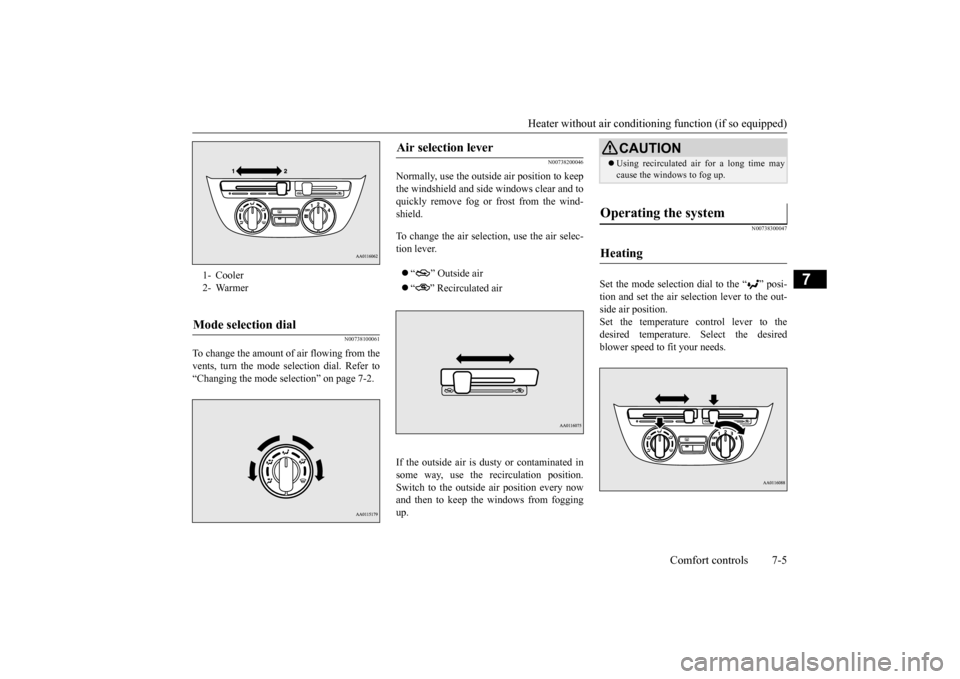
To change the amount of air flowing from the vents, turn the mode
selection dial. Refer to
“Changing the mode se
lection” on page 7-2.
N00738200046
Normally, use the outside air position to keep the windshield and side
windows clear and to
quickly remove fog or frost from the wind-shield. To change the air selection, use the air selec- tion lever. “ ” Outside air “ ” Recirculated air
If the outside air is dusty or contaminated in some way, use the
recirculat
ion position.
Switch to the outside air position every now and then to keep the windows from foggingup.
N00738300047
Set the mode selection
dial to the “ ” posi-
tion and set the air selection lever to the out- side air position.Set the temperature control lever to the desired temperature.
Select the desired
blower speed to fit your needs.
1- Cooler 2- WarmerMode selection dial
Air selection lever
CAUTION Using recirculated ai
r for a long time may
cause the windows to fog up.
Operating the system
Heating
BK0212400US.book 5 ページ 2014年4月1日 火曜日 午後2時21分
Page 189 of 300
Manual air conditioning (if so equipped) 7-8 Comfort controls
7
N00736800413
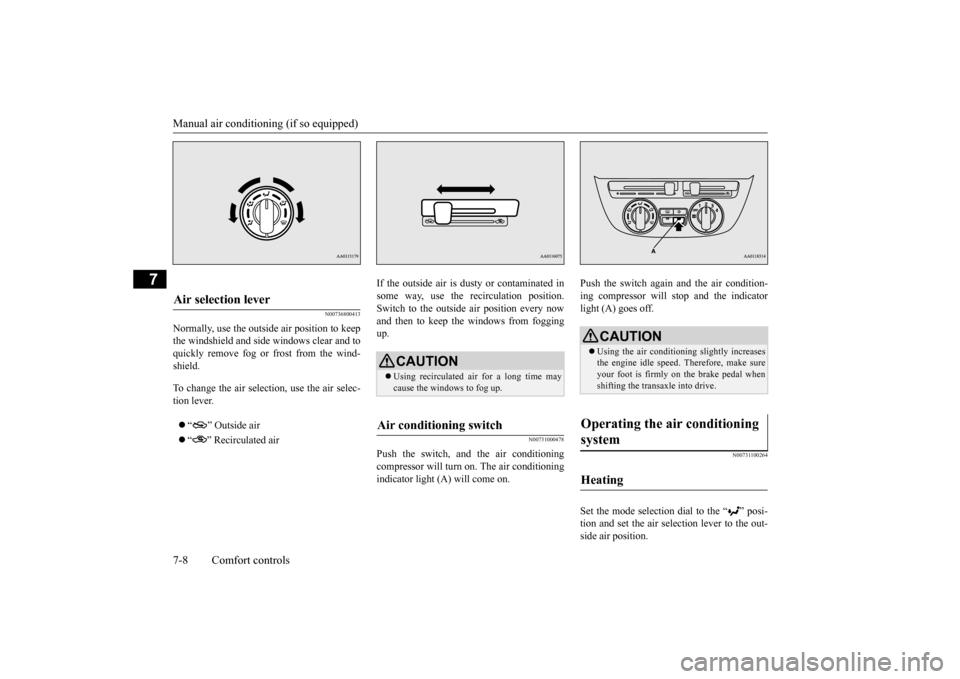
Normally, use the outside air position to keep the windshield and side windows clear and to quickly remove fog or frost from the wind- shield. To change the air selection, use the air selec- tion lever. “ ” Outside air “ ” Recirculated air
If the outside air is dusty or contaminated in some way, use the recirculation position.Switch to the outside
air position every now
and then to keep the windows from fogging up.
N00731000478
Push the switch, and the air conditioningcompressor will turn on. The air conditioning indicator light (A) will come on.
Push the switch again and the air condition- ing compressor will stop and the indicatorlight (A) goes off.
N00731100264
Set the mode selection dial to the “ ” posi-tion and set the air sele
ction lever to the out-
side air position.
Air selection lever
CAUTION Using recirculated ai
r for a long time may
cause the windows to fog up.
Air conditioning switch
CAUTION Using the air conditioni
ng slightly increases
the engine idle
speed. Therefore, make sure
your foot is firmly on the brake pedal when shifting the transaxle into drive.
Operating the air conditioning system
Heating
BK0212400US.book 8 ページ 2014年4月1日 火曜日 午後2時21分
Page 190 of 300
Manual air conditioning (if so equipped)
Comfort controls 7-9
7
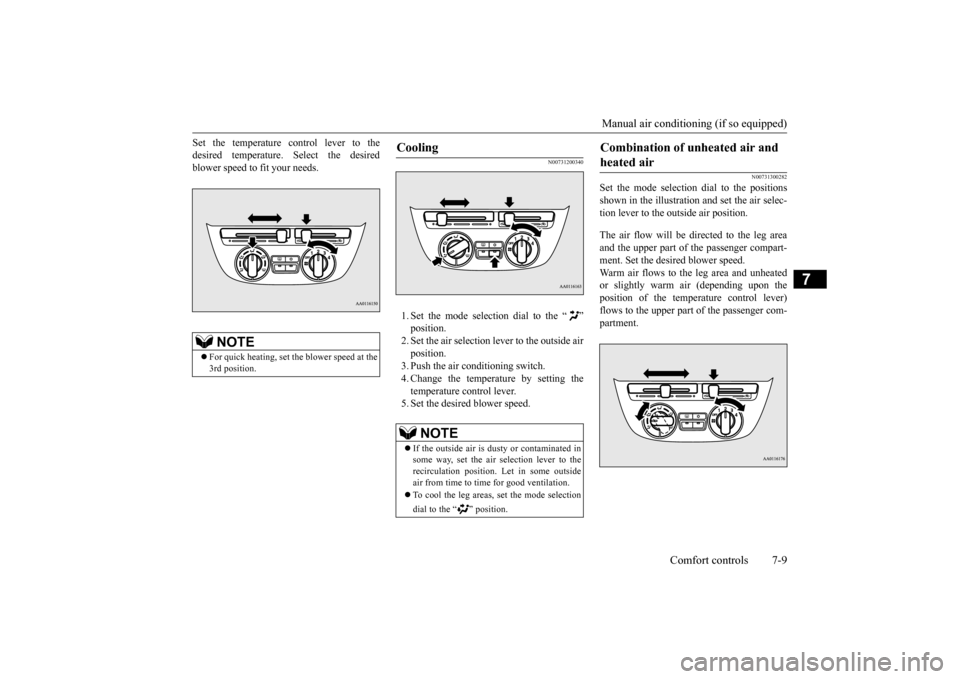
Set the temperature control lever to the desired temperature.
Select the desired
blower speed to fit your needs.
N00731200340
1. Set the mode selection dial to the “ ”position. 2. Set the air selection lever to the outside air position.3. Push the air conditioning switch. 4. Change the temperature by setting the temperature control lever.5. Set the desired blower speed.
N00731300282
Set the mode selection
dial to the positions
shown in the illustration and set the air selec- tion lever to the outside air position. The air flow will be directed to the leg area and the upper part of
the passenger compart-
ment. Set the desired blower speed. Warm air flows to the leg area and unheated or slightly warm
air (depending upon the
position of the temperature control lever) flows to the upper part of the passenger com-partment.
NOTE
For quick heating, set th
e blower speed at the
3rd position.
Cooling
NOTE
If the outside air is dusty or contaminated in some way, set the air selection lever to the recirculation position.
Let in some outside
air from time to time for good ventilation. To cool the leg areas, set the mode selection dial to the “ ” position.
Combination of unheated air and heated air
BK0212400US.book 9 ページ 2014年4月1日 火曜日 午後2時21分
Page 193 of 300
Automatic air conditioning (if so equipped) 7-12 Comfort controls
7
N00736900179
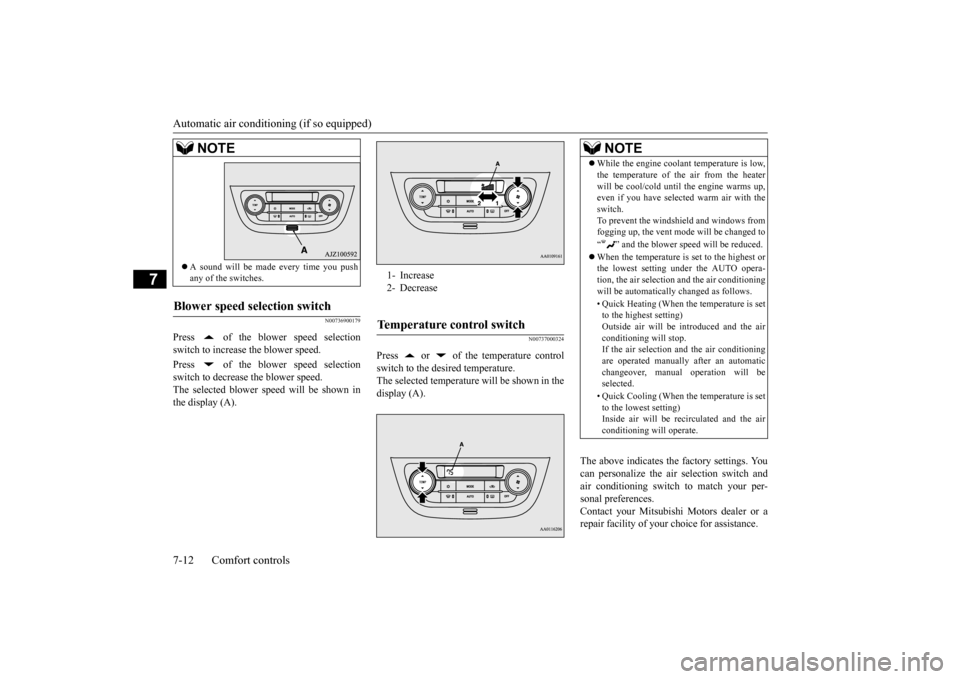
Press of the blower speed selection switch to increase the blower speed. Press of the blower speed selection switch to decrease the blower speed.The selected blower sp
eed will be shown in
the display (A).
N00737000324
Press or of the temperature controlswitch to the desired temperature. The selected temperature will be shown in thedisplay (A).
The above indicates the
factory settings. You
can personalize the air
selection switch and
air conditioning switch to match your per- sonal preferences. Contact your Mitsubishi Motors dealer or arepair facility of your choice for assistance.
A sound will be made every time you push any of the switches.
Blower speed selection switch
NOTE
1- Increase 2- DecreaseTemperature control switch
NOTE
While the engine coolant temperature is low, the temperature of the air from the heaterwill be cool/cold until
the engine warms up,
even if you have selected warm air with the switch. To prevent the windshield and windows fromfogging up, the vent mode will be changed to “ ” and the blower sp
eed will be reduced.
When the temperature is set to the highest or the lowest setting under the AUTO opera- tion, the air selection
and the air conditioning
will be automatically changed as follows. • Quick Heating (When th
e temperature is set
to the highest setting) Outside air will be introduced and the air conditioning will stop.If the air selection
and the air conditioning
are operated ma
nually after an automatic
changeover, manual
operation will be
selected. • Quick Cooling (When th
e temperature is set
to the lowest setting) Inside air will be recirculated and the air conditioning wi
ll operate.
BK0212400US.book 12 ページ 2014年4月1日 火曜日 午後2時21分
Page 194 of 300
Automatic air conditioning (if so equipped)
Comfort controls 7-13
7
Refer to “Personalizi
ng the air conditioning
switch (Changing the function setting)” onpage7-15. Refer to “Personalizing the air selection (Changing the function setting)” onpage7-14.
N00737100208
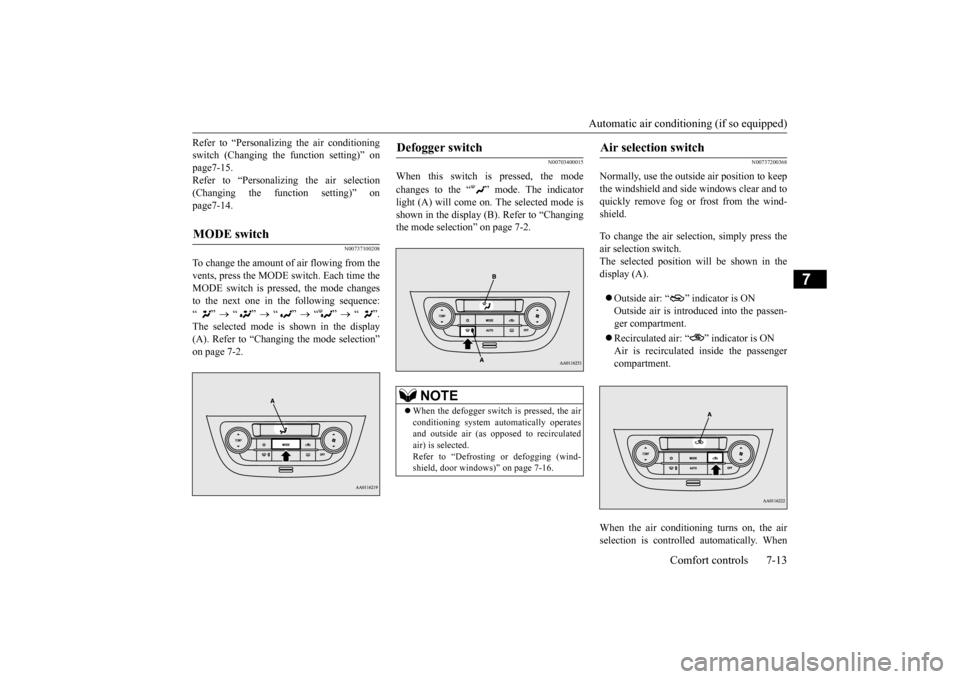
To change the amount of air flowing from the vents, press the MODE switch. Each time the MODE switch is pressed, the mode changesto the next one in the following sequence: “”
“”
“”
“”
“”.
The selected mode is shown in the display (A). Refer to “Changing the mode selection” on page 7-2.
N00703400015
When this switch is pressed, the mode changes to the “ ” mode. The indicator light (A) will come on. The selected mode is shown in the display (B). Refer to “Changingthe mode selection” on page 7-2.
N00737200368
Normally, use the outside
air position to keep
the windshield and side
windows clear and to
quickly remove fog or frost from the wind-shield. To change the air selection, simply press the air selection switch. The selected position will be shown in thedisplay (A). Outside air: “ ” indicator is ON Outside air is introduced into the passen- ger compartment. Recirculated air: “ ” indicator is ON Air is recirculated
inside the passenger
compartment.
When the air conditioning turns on, the air selection is controlled automatically. When
MODE switch
Defogger switch
NOTE
When the defogger switch is pressed, the air conditioning system au
tomatically operates
and outside air (as oppos
ed to recirculated
air) is selected.Refer to “Defrostin
g or defogging (wind-
shield, door windows)” on page 7-16.
Air selection switch
BK0212400US.book 13 ページ 2014年4月1日 火曜日 午後2時21分