light MITSUBISHI MIRAGE 2015 6.G Workshop Manual
[x] Cancel search | Manufacturer: MITSUBISHI, Model Year: 2015, Model line: MIRAGE, Model: MITSUBISHI MIRAGE 2015 6.GPages: 300, PDF Size: 43.44 MB
Page 118 of 300
Tire pressure monitoring system (if so equipped)
Features and controls 5-57
5
N00532701347
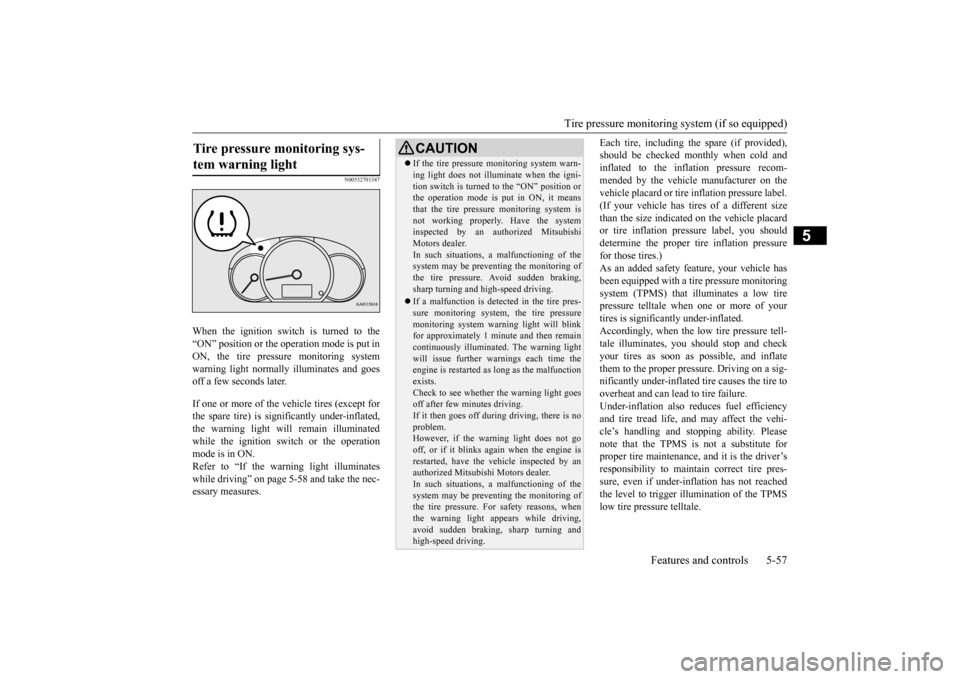
When the ignition switch is turned to the “ON” position or the operation mode is put inON, the tire pressure monitoring system warning light normally
illuminates and goes
off a few seconds later. If one or more of the vehicle tires (except for the spare tire) is significantly under-inflated, the warning light will remain illuminated while the ignition swit
ch or the operation
mode is in ON. Refer to “If the warning light illuminates while driving” on page 5-58 and take the nec-essary measures.
Each tire, including the spare (if provided), should be checked monthly when cold andinflated to the inflation pressure recom- mended by the vehicle manufacturer on the vehicle placard or tire in
flation pressure label.
(If your vehicle has tires of a different size than the size indicate
d on the vehicle placard
or tire inflation pressure label, you shoulddetermine the proper ti
re inflation pressure
for those tires.) As an added safety fe
ature, your vehicle has
been equipped with a tire pressure monitoring system (TPMS) that illuminates a low tirepressure telltale when one or more of your tires is significan
tly under-inflated.
Accordingly, when the low tire pressure tell-tale illuminates, you s
hould stop and check
your tires as soon as
possible, and inflate
them to the proper pressure. Driving on a sig-nificantly under-
inflated tire ca
uses the tire to
overheat and can lead to tire failure. Under-inflation also reduces fuel efficiencyand tire tread life, and may affect the vehi- cle’s handling and stoppi
ng ability. Please
note that the TPMS is
not a substitute for
proper tire maintenance, and it is the driver’s responsibility to
maintain corre
ct tire pres-
sure, even if under-infl
ation has not reached
the level to trigger illumination of the TPMS low tire pressure telltale.
Tire pressure monitoring sys- tem warning light
CAUTION If the tire pressure monitoring system warn- ing light does not illumi
nate when the igni-
tion switch is turned to the “ON” position orthe operation mode is put in ON, it means that the tire pressure monitoring system is not working properly. Have the systeminspected by an authorized Mitsubishi Motors dealer. In such situations, a malfunctioning of thesystem may be preventing the monitoring of the tire pressure. Avoid sudden braking, sharp turning and high-speed driving. If a malfunction is detected in the tire pres- sure monitoring system, the tire pressuremonitoring system warn
ing light will blink
for approximately 1 minute and then remain continuously illuminated. The warning lightwill issue further warnings each time the engine is restarted as
long as the malfunction
exists.Check to see whether
the warning light goes
off after few minutes driving. If it then goes off during driving, there is noproblem. However, if the warning light does not go off, or if it blinks again when the engine isrestarted, have the
vehicle inspected by an
authorized Mitsubishi Motors dealer. In such situations, a malfunctioning of thesystem may be preventing the monitoring of the tire pressure. For safety reasons, when the warning light appears while driving,avoid sudden braking, sharp turning and high-speed driving.
BK0212400US.book 57 ページ 2014年4月1日 火曜日 午後2時21分
Page 119 of 300
Tire pressure monitoring
system (if so equipped)
5-58 Features and controls
5
Your vehicle has also been equipped with a TPMS malfunction indicator to indicate whenthe system is not operating properly. The TPMS malfunction indicator is combined with the low tire pressure telltale.When the system detects a malfunction, the telltale will flash for
approximately one min-
ute and then remain continuously illuminated.This sequence will continue upon subsequent vehicle start-ups as
long as the malfunction
exists. When the malfunction indicator is illumi- nated, the system may not
be able to detect or
signal low tire pressure as intended. TPMS malfunctions may
occur for a variety
of reasons, including the installation ofreplacement or alternate tires or wheels on the vehicle that prevent the TPMS from function- ing properly. Always check the TPMS mal-function telltale after replacing one or more tires or wheels on your vehicle to ensure that the replacement or alternate tires and wheelsallow the TPMS to cont
inue to function prop-
erly.
N00532800501
1. If the tire pressure monitoring system warning light illumi
nates, avoid hard
braking, sharp steering maneuvers and high speeds. You should stop and adjust the tires to the proper inflation pressure assoon as possible. Adjust the spare tire at the same time. Refer to “Tires” on page 9-12.
2. If the tire pressure monitoring system warning light remains illuminated afteryou have been driving for about 20 min- utes after you adjust the tire inflation pres- sure, one or more of
the tires may have a
puncture. Inspect the tire and if it has a puncture, have it repaired by an autho- rized Mitsubishi Motors dealer as soon aspossible.
If the warning light illuminates while driving
NOTE
When inspecting or adjusting the tire pres- sure, do not apply excessive force to the valve stem to avoid breakage. After inspecting or adju
sting the tire pres-
sure, always reinstall the valve cap on thevalve stem. Without the valve cap, dirt or moisture could get into the valve, resulting in damage to thetire inflation pressure sensor. Do not use metal valve caps, which may cause a metal reaction, resulting in corrosion and damage of the tire
inflation pressure sen-
sors. Once adjustments have
been made, the warn-
ing light will go off after a few minutes ofdriving.
WA R N I N G If the warning light illuminates while you are driving, avoid ha
rd braking, sharp
steering maneuvers and high speeds. Driving with an under-inflated tire adversely affects vehi
cle performance and
can result in an accident.CAUTION The warning light may
not illuminate imme-
diately in the event of
a tire blowout or rapid
leak.NOTE
To avoid the risk of damage to the tire infla- tion pressure sensors, have any puncturedtire repaired by an authorized Mitsubishi Motors dealer. If the tire repair is not done by an authorized Mitsubishi Motors dealer,damage to the tire infl
ation pressure sensor is
not covered by your warranty.
BK0212400US.book 58 ページ 2014年4月1日 火曜日 午後2時21分
Page 120 of 300
Tire pressure monitoring system (if so equipped)
Features and controls 5-59
5
The tire pressure monitoring system may not work normally in the following circum- stances: A wireless facility or device using the same frequency is near the vehicle. Snow or ice is stuck inside the fenders and/or on the wheels. The tire inflation pres
sure sensor’s battery
is dead. Wheels other than Mitsubishi Genuine wheels are being used. Wheels that are not fitted with tire infla- tion pressure sensors are being used. Wheels whose ID codes are not memo- rized by the vehicle are used. Compact spare tire (if so equipped) is fit- ted on a road wheel. A window tint that affects the radio wave signals is installed.
N00532900153
If new wheels with new tire inflation pressuresensors are installed, their ID codes must be programmed into the tire pressure monitoring system. Have tire and
wheel replacement per-
formed by an authorized Mitsubishi Motors dealer to avoid the ri
sk of damaging the tire
inflation pressure sensors. If the wheelreplacement is not done by an authorized Mitsubishi Motors dealer
, it is not covered by
your warranty.
N00533000236
Your tire pressure monitoring system oper- ates on a radio frequenc
y subject to Federal
Communications Commission (FCC) Rules(For vehicles sold in
U.S.A.) and Industry
Canada Rules (For vehicles sold in Canada). This device complies with part 15 of FCCRules and Industry Ca
nada licence-exempt
RSS standard(s). Operation is subject to the following two con- ditions. This device may not
cause harmful inter-
ference This device must ac
cept any interference
received, including interference that may cause undesired operation.
Do not use an aerosol puncture-repair spray on any tire.Such a spray could damage the tire inflationpressure sensors. Have any puncture repaired by an authorized Mitsubishi Motors dealer. Using the tire repair kit may damage the tire inflation pressure sensor. The vehicle mustpromptly be inspected and repaired by an authorized Mitsubishi Motors dealer after using the tire repair kit.NOTE
NOTE
Tire inflation pressures vary with the ambi- ent temperature. If the vehicle is subjected tolarge variations in ambient temperature, thetire inflation pressures may be under-inflated (causing the warning light come on) when the ambient temperature is relatively low. Ifthe warning light comes on, adjust the tire inflation pressure.
Whenever the tires and wheels are replaced with new ones
CAUTION The use of non-genuine wheels will prevent the proper fit of the tire inflation pressure sensors, resulting air
leakage or damage of
the sensors.
General information
WA R N I N G Changes or modifica
tions not expressly
approved by the manufacturer for compli- ance could void the
user’s authority to
operate the equipment.
BK0212400US.book 59 ページ 2014年4月1日 火曜日 午後2時21分
Page 122 of 300
Rear-view camera (if so equipped)
Features and controls 5-61
5
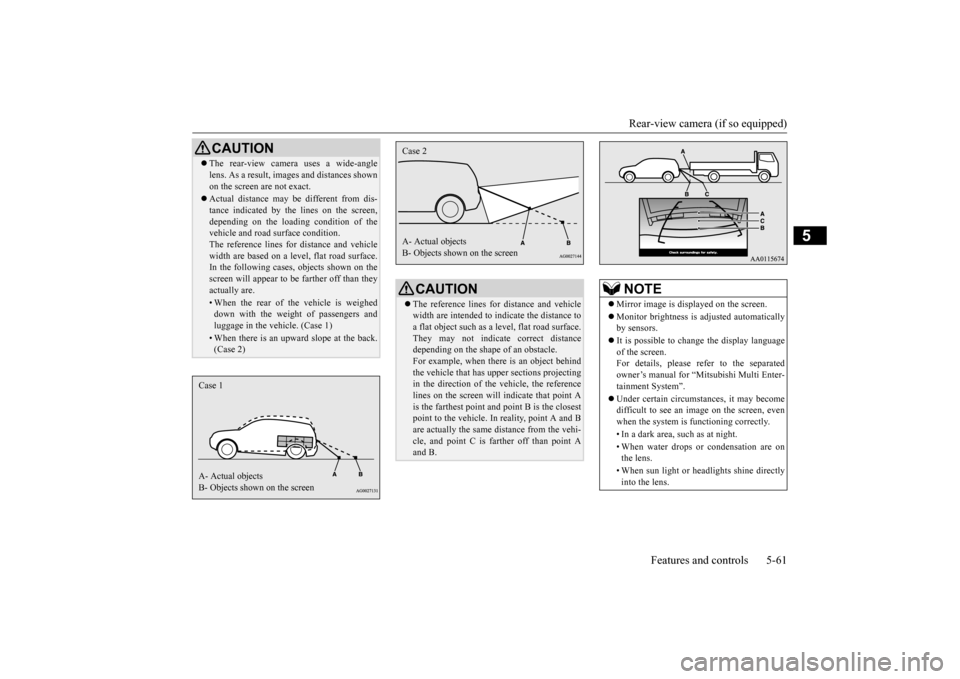
CAUTION The rear-view camera uses a wide-angle lens. As a result, imag
es and distances shown
on the screen are not exact. Actual distance may be different from dis- tance indicated by the
lines on the screen,
depending on the loadi
ng condition of the
vehicle and road surface condition. The reference lines for
distance and vehicle
width are based on a level, flat road surface. In the following cases, objects shown on the screen will appear to
be farther off than they
actually are.• When the rear of th
e vehicle is weighed
down with the weight of passengers and luggage in the vehicle. (Case 1)• When there is an upward slope at the back.(Case 2)
Case 1 A- Actual objects B- Objects shown on the screen
CAUTION The reference lines for
distance and vehicle
width are intended to i
ndicate the distance to
a flat object such as a level, flat road surface. They may not indicate correct distance depending on the shape of an obstacle.For example, when there is an object behind the vehicle that has u
pper sections projecting
in the direction of the
vehicle, the reference
lines on the screen will indicate that point A is the farthest point a
nd point B is the closest
point to the vehicle. In
reality, point A and B
are actually the same distance from the vehi- cle, and point C is fa
rther off than point A
and B.Case 2 A- Actual objects B- Objects shown on the screen
NOTE
Mirror image is displayed on the screen. Monitor brightness is ad
justed automatically
by sensors. It is possible to change the display language of the screen. For details, please refer to the separatedowner’s manual for “Mitsubishi Multi Enter- tainment System”. Under certain circumst
ances, it may become
difficult to see an image on the screen, even when the system is functioning correctly. • In a dark area, such as at night. • When water drops or condensation are on the lens. • When sun light or he
adlights shine directly
into the lens.
BK0212400US.book 61 ページ 2014年4月1日 火曜日 午後2時21分
Page 124 of 300
Multi-information display
Features and controls 5-63
5
N00574800015
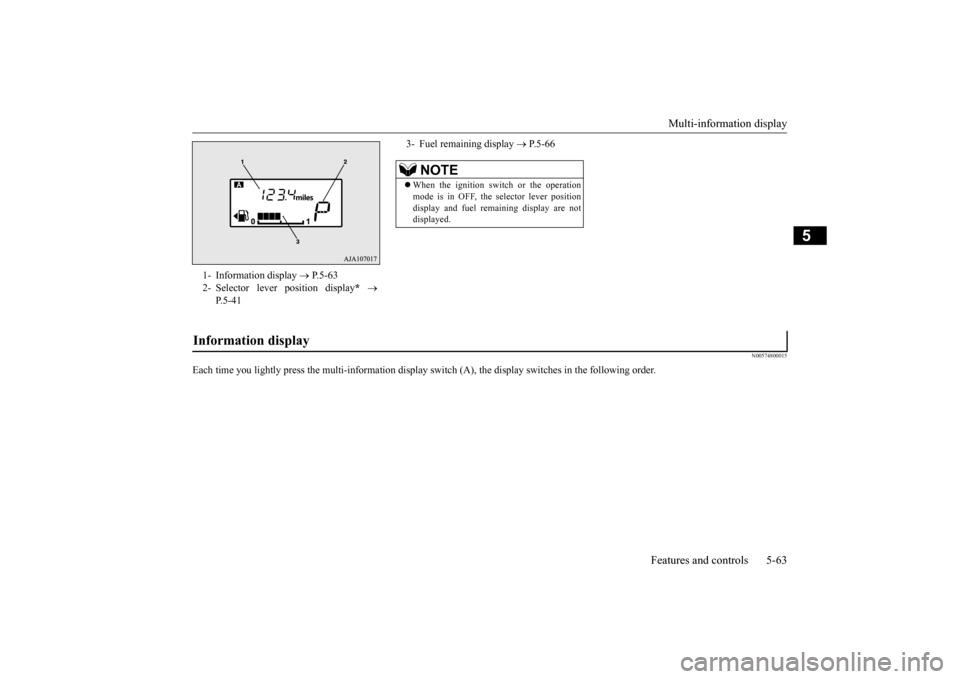
Each time you lightly press the multi-inf
ormation display switch (A), the disp
lay switches in the following order.
1- Information display
P.5-63
2- Selector lever
position display
*
P.5-41
3- Fuel remaining display
P.5-66
NOTE
When the ignition swit
ch or the operation
mode is in OFF, the
selector lever position
display and fuel rema
ining display are not
displayed.
Information display
BK0212400US.book 63 ページ 2014年4月1日 火曜日 午後2時21分
Page 126 of 300
Multi-information display
Features and controls 5-65
5
To return the display to 0, hold down the multi-information display switch for about 1 second or more. Only the currently displayed value will be reset. Example If trip odometer is displayed, only tripodometer will be reset.
N00575100015
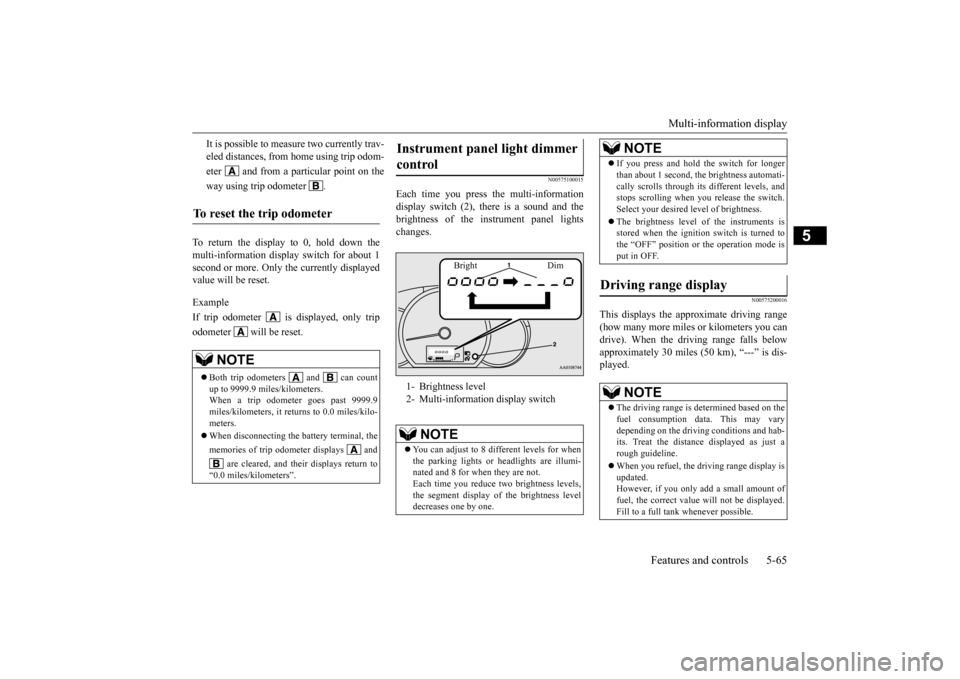
Each time you press
the multi-information
display switch (2), there is a sound and thebrightness of the in
strument panel lights
changes.
N00575200016
This displays the approximate driving range (how many more miles or
kilometers you can
drive). When the driving range falls below approximately 30 miles (
50 km), “---” is dis-
played.
It is possible to measure two currently trav- eled distances, from home using trip odom- eter and from a particular point on theway using trip odometer .
To reset the trip odometer
NOTE
Both trip odometers and can count up to 9999.9 miles/kilometers. When a trip odometer goes past 9999.9 miles/kilometers, it returns to 0.0 miles/kilo-meters. When disconnecting the battery terminal, the memories of trip odom
eter displays and
are cleared, and thei
r displays return to
“0.0 miles/kilometers”.
Instrument panel light dimmer control 1- Brightness level 2- Multi-informati
on display switch
NOTE
You can adjust to 8 different levels for when the parking lights or
headlights are illumi-
nated and 8 for when they are not. Each time you reduce tw
o brightness levels,
the segment display of the brightness leveldecreases one by one.
Bright Dim
If you press and hold the switch for longer than about 1 second, th
e brightness automati-
cally scrolls through its different levels, andstops scrolling when
you release the switch.
Select your desired
level of brightness.
The brightness level of the instruments is stored when the ignition switch is turned to the “OFF” position or the operation mode isput in OFF.
Driving range display
NOTE
The driving range is determined based on the fuel consumption data. This may vary depending on the drivi
ng conditions and hab-
its. Treat the distance displayed as just arough guideline. When you refuel, the driving range display is updated. However, if you only add a small amount of fuel, the correct value
will not be displayed.
Fill to a full tank whenever possible.NOTE
BK0212400US.book 65 ページ 2014年4月1日 火曜日 午後2時21分
Page 129 of 300
Multi-information display 5-68 Features and controls
5
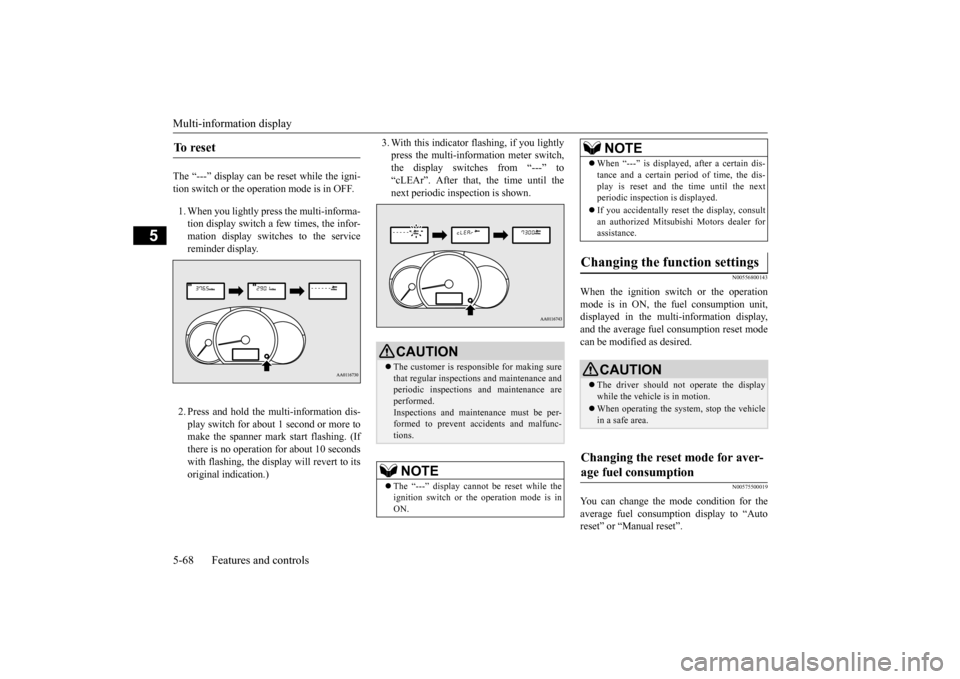
The “---” display can be reset while the igni- tion switch or the opera
tion mode is in OFF.
1. When you lightly press the multi-informa- tion display switch a few times, the infor-mation display switches to the service reminder display. 2. Press and hold the multi-information dis- play switch for about 1 second or more tomake the spanner mark start flashing. (If there is no operation for about 10 seconds with flashing, the displa
y will revert to its
original indication.)
3. With this indicator
flashing, if you lightly
press the multi-information meter switch,the display switches from “---” to “cLEAr”. After that, the time until the next periodic inspection is shown.
N00556800143
When the ignition switch or the operation mode is in ON, the
fuel consumption unit,
displayed in the multi-information display,and the average fuel
consumption reset mode
can be modified as desired.
N00575500019
You can change the mode condition for theaverage fuel consumpt
ion display to “Auto
reset” or “Manual reset”.
To r e s e t
CAUTION The customer is responsible for making sure that regular inspections and maintenance and periodic inspections
and maintenance are
performed.Inspections and mainte
nance must be per-
formed to prevent accidents and malfunc- tions.NOTE
The “---” display cannot
be reset while the
ignition switch or the operation mode is inON.
When “---” is displayed, after a certain dis- tance and a certain pe
riod of time, the dis-
play is reset and th
e time until the next
periodic inspection is displayed. If you accidentally reset
the display, consult
an authorized Mitsubishi Motors dealer for assistance.
Changing the function settings
CAUTION The driver should not operate the display while the vehicle is in motion. When operating the system, stop the vehicle in a safe area.
Changing the reset mode for aver- age fuel consumption
NOTE
BK0212400US.book 68 ページ 2014年4月1日 火曜日 午後2時21分
Page 130 of 300
Multi-information display
Features and controls 5-69
5
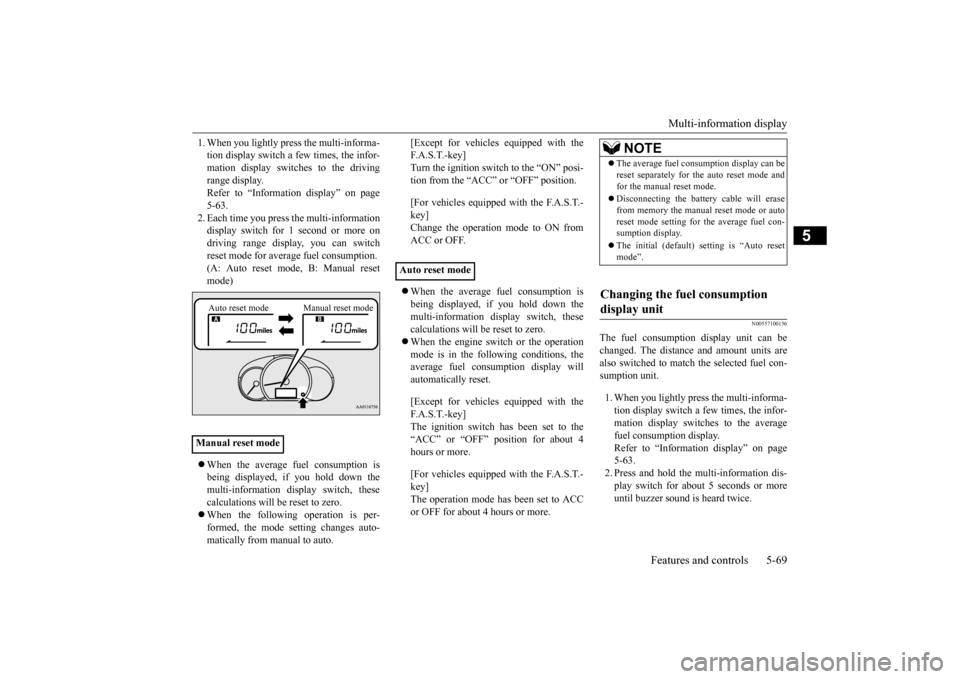
1. When you lightly press the multi-informa- tion display switch a few times, the infor-mation display switches to the driving range display. Refer to “Information display” on page5-63. 2. Each time you press the multi-information display switch for 1 second or more ondriving range disp
lay, you can switch
reset mode for average fuel consumption. (A: Auto reset mode, B: Manual reset mode) When the average fuel consumption is being displayed, if you hold down themulti-information display switch, these calculations will be reset to zero. When the following operation is per- formed, the mode setting changes auto- matically from manual to auto.
[Except for vehicles
equipped with the
F. A . S . T. - k e y ]Turn the ignition switch to the “ON” posi- tion from the “ACC” or “OFF” position. [For vehicles equipped with the F.A.S.T.- key]Change the operation mode to ON from ACC or OFF. When the average fuel consumption is being displayed, if you hold down the multi-information display switch, these calculations will
be reset to zero.
When the engine switch or the operation mode is in the following conditions, the average fuel consumption display willautomatically reset. [Except for vehicles
equipped with the
F. A . S . T. - k e y ] The ignition switch has been set to the“ACC” or “OFF” position for about 4 hours or more. [For vehicles equipped with the F.A.S.T.- key]The operation mode has been set to ACC or OFF for about 4 hours or more.
N00557100156
The fuel consumpti
on display unit can be
changed. The distance and amount units are also switched to match the selected fuel con-sumption unit. 1. When you lightly press the multi-informa- tion display switch a few times, the infor- mation display switches to the averagefuel consumption display. Refer to “Information display” on page 5-63.2. Press and hold the mu
lti-information dis-
play switch for about 5 seconds or more until buzzer sound is heard twice.
Manual reset mode
Auto reset mode Manual reset mode
Auto reset mode
NOTE
The average fuel cons
umption display can be
reset separately for the auto reset mode andfor the manual reset mode. Disconnecting the batter
y cable wi
ll erase
from memory the manual reset mode or autoreset mode setting for the average fuel con- sumption display. The initial (default) setting is “Auto reset mode”.
Changing the fuel consumption display unit
BK0212400US.book 69 ページ 2014年4月1日 火曜日 午後2時21分
Page 131 of 300
Indicator and warning light package 5-70 Features and controls
5
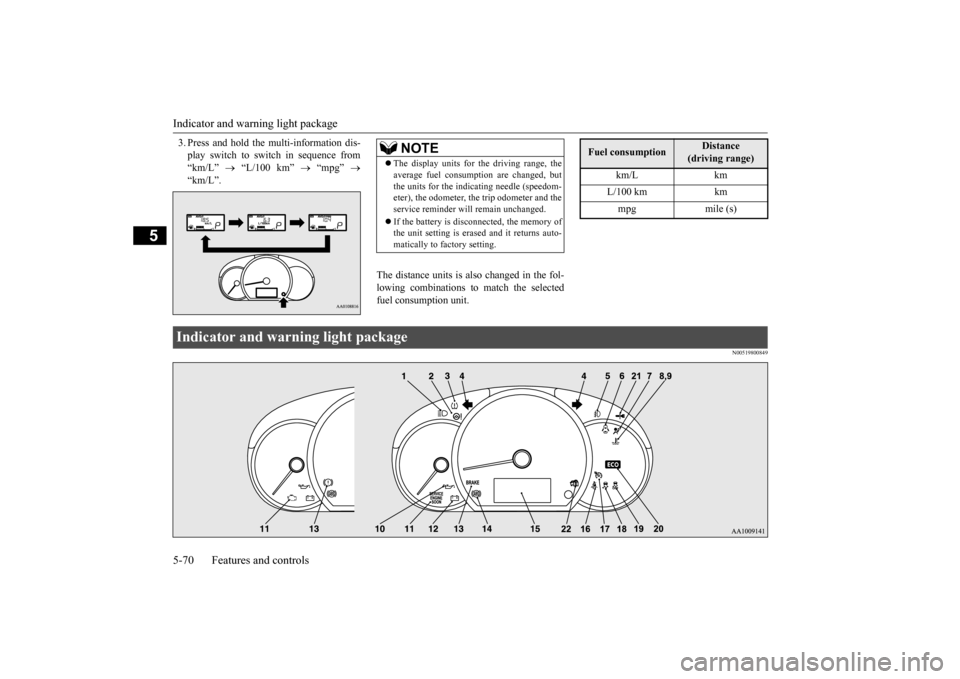
3. Press and hold the multi-information dis- play switch to swit
ch in sequence from
“km/L”
“L/100 km”
“mpg”
“km/L”.
The distance units is also changed in the fol- lowing combinations to match the selectedfuel consumption unit.
N00519800849
NOTE
The display units for the driving range, the average fuel consumption are changed, butthe units for the indica
ting needle (speedom-
eter), the odometer, the trip odometer and the service reminder will
remain unchanged.
If the battery is disconnected, the memory of the unit setting is erased and it returns auto- matically to factory setting.
Fuel consumption
Distance
(driving range)
km/L km L/100 km km mpg mile (s)
Indicator and warning light package BK0212400US.book 70 ページ 2014年4月1日 火曜日 午後2時21分
Page 132 of 300
Indicators
Features and controls 5-71
5
N00519900127 N00520000216
The arrows will flash in time with the corre- sponding exterior turn signals when the turn signal lever is used. Both arrows will flash when the hazard warn- ing flasher swit
ch is pressed.
N00520100086
A blue light comes on when the headlights are on high beam.
N00520200175
This indicator comes on while the front foglights are on.
N00575600010
This indicator comes on in green while the coolant temperature is low.
N00568800036
This indicator comes on while fuel-efficient driving is achieved.
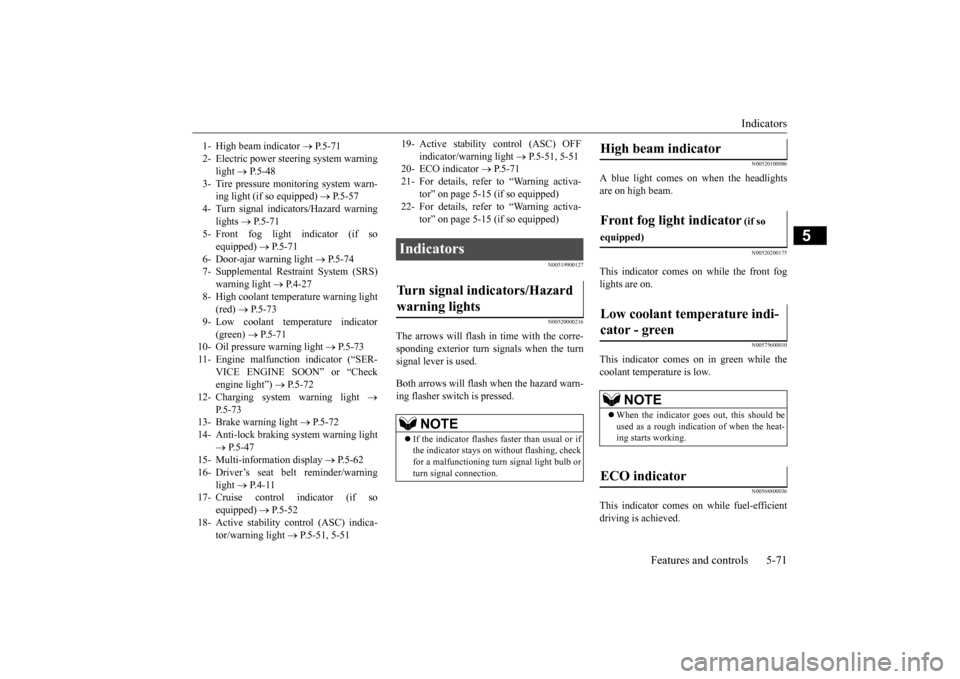
1- High beam indicator
P. 5 - 7 1
2- Electric power stee
ring system warning
light
P. 5 - 4 8
3- Tire pressure moni
toring system warn-
ing light (if so equipped)
P.5-57
4- Turn signal indicators/Hazard warning
lights
P.5-71
5- Front fog light indicator (if so
equipped)
P.5-71
6- Door-ajar warning light
P.5-74
7- Supplemental Restraint System (SRS)
warning light
P.4-27
8- High coolant temperature warning light
(red)
P.5-73
9- Low coolant temp
erature indicator
(green)
P. 5 - 7 1
10- Oil pressure warning light
P.5-73
11- Engine malfuncti
on indicator (“SER-
VICE ENGINE SOON” or “Checkengine light”)
P.5-72
12- Charging system warning light
P.5-73
13- Brake warning light
P.5-72
14- Anti-lock braking system warning light
P.5-47
15- Multi-information display
P. 5 - 6 2
16- Driver’s seat belt reminder/warning
light
P. 4 - 1 1
17- Cruise control indicator (if so
equipped)
P.5-52
18- Active stability control (ASC) indica-
tor/warning light
P.5-51, 5-51
19- Active stability control (ASC) OFF
indicator/warning light
P.5-51, 5-51
20- ECO indicator
P.5-71
21- For details, refer
to “Warning activa-
tor” on page 5-15 (if so equipped)
22- For details, refer
to “Warning activa-
tor” on page 5-15 (if so equipped)
Indicators Turn signal indicators/Hazard warning lights
NOTE
If the indicator flashes faster than usual or if the indicator stays on wi
thout flashing, check
for a malfunctioning turn signal light bulb orturn signal connection.
High beam indicator Front fog light indicator
(if so
equipped)Low coolant temperature indi- cator - green
NOTE
When the indicator goes out, this should be used as a rough indication of when the heat- ing starts working.
ECO indicator
BK0212400US.book 71 ページ 2014年4月1日 火曜日 午後2時21分