change time MITSUBISHI MIRAGE 2017 6.G User Guide
[x] Cancel search | Manufacturer: MITSUBISHI, Model Year: 2017, Model line: MIRAGE, Model: MITSUBISHI MIRAGE 2017 6.GPages: 305, PDF Size: 8.67 MB
Page 130 of 305
Multi-information display
Features and controls 5-67
5
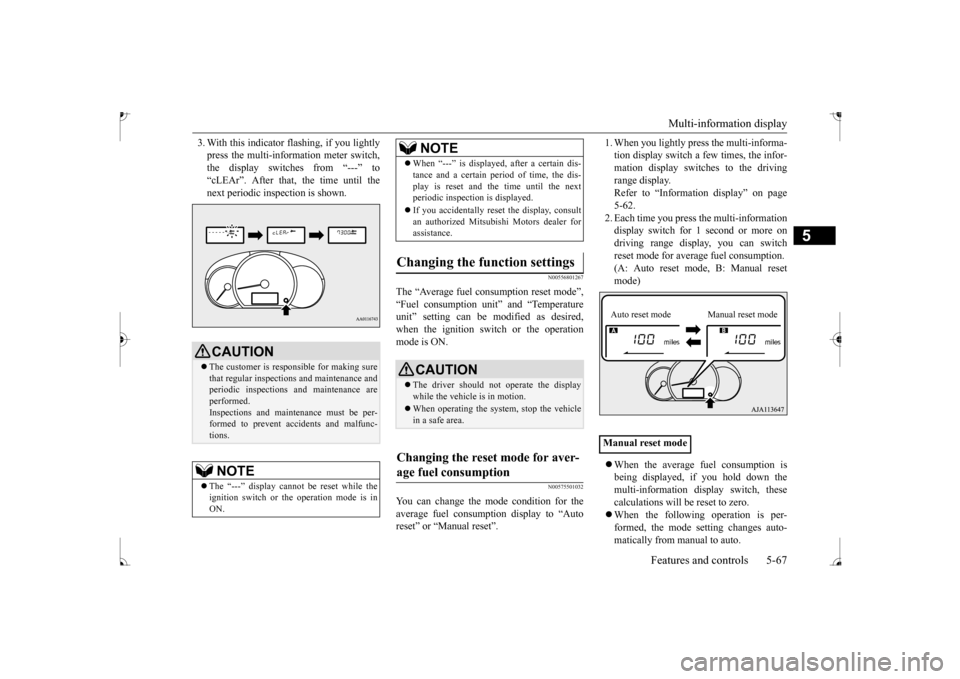
3. With this indicator
flashing, if you lightly
press the multi-information meter switch,the display switches from “---” to “cLEAr”. After that, the time until the next periodic inspection is shown.
N00556801267
The “Average fuel c
onsumption reset mode”,
“Fuel consumption uni
t” and “Temperature
unit” setting can be m
odified as desired,
when the ignition switch or the operation mode is ON.
N00575501032
You can change the mode condition for theaverage fuel consumpt
ion display to “Auto
reset” or “Manual reset”.
1. When you lightly press the multi-informa- tion display switch a few times, the infor-mation display switches to the driving range display. Refer to “Information display” on page5-62. 2. Each time you press th
e multi-information
display switch for 1 second or more ondriving range disp
lay, you can switch
reset mode for average fuel consumption. (A: Auto reset mode, B: Manual reset mode) When the average fuel consumption is being displayed, if you hold down themulti-information display switch, these calculations will be reset to zero. When the following operation is per- formed, the mode setting changes auto- matically from manual to auto.
CAUTION The customer is responsible for making sure that regular inspections and maintenance and periodic inspections
and maintenance are
performed.Inspections and mainte
nance must be per-
formed to prevent accidents and malfunc- tions.NOTE
The “---” display cannot
be reset while the
ignition switch or the operation mode is inON.
When “---” is displayed, after a certain dis- tance and a certain pe
riod of time, the dis-
play is reset and th
e time until the next
periodic inspection is displayed. If you accidentally reset
the display, consult
an authorized Mitsubishi Motors dealer for assistance.
Changing the function settings
CAUTION The driver should not operate the display while the vehicle is in motion. When operating the system, stop the vehicle in a safe area.
Changing the reset mode for aver- age fuel consumption
NOTE
Manual reset modeAuto reset mode Manual reset mode
BK0235100US.book 67 ページ 2015年11月20日 金曜日 午後3時12分
Page 131 of 305
![MITSUBISHI MIRAGE 2017 6.G User Guide Multi-information display 5-68 Features and controls
5
[Except for vehicles
equipped with the
F. A . S . T. - k e y ]Turn the ignition switch to the “ON” posi- tion from the “ACC” or “OFF](/img/19/7514/w960_7514-130.png "MITSUBISHI MIRAGE 2017 6.G User Guide Multi-information display 5-68 Features and controls
5
[Except for vehicles
equipped with the
F. A . S . T. - k e y ]Turn the ignition switch to the “ON” posi- tion from the “ACC” or “OFF")
Multi-information display 5-68 Features and controls
5
[Except for vehicles
equipped with the
F. A . S . T. - k e y ]Turn the ignition switch to the “ON” posi- tion from the “ACC” or “OFF” position. [For vehicles equipped
with the F.A.S.T.-
key]Change the operation mode to ON from ACC or OFF. When the average fuel consumption is being displayed, if you hold down the multi-information display switch, these calculations will
be reset to zero.
When the engine switch or the operation mode is in the following conditions, the average fuel consumption display willautomatically reset. [Except for vehicles
equipped with the
F. A . S . T. - k e y ] The ignition switch has been set to the“ACC” or “OFF” position for about 4 hours or more. [For vehicles equipped
with the F.A.S.T.-
key]The operation mode has been set to ACC or OFF for about 4 hours or more.
N00557100156
The fuel consumption display unit can bechanged. The distance
and amount units are
also switched to match the selected fuel con-sumption unit. 1. When you lightly press the multi-informa- tion display switch a few times, the infor- mation display switches to the averagefuel consumption display. Refer to “Information display” on page 5-62.2. Press and hold the mu
lti-information dis-
play switch for about 5 seconds or more until buzzer sound is heard twice.
3. Press and hold the multi-information dis- play switch to switch in sequence from“km/L”
“L/100 km”
“mpg”
The distance units is al
so changed in the fol-
lowing combinations to match the selected fuel consumption unit.
Auto reset mode
NOTE
The average fuel cons
umption display can be
reset separately for the auto reset mode andfor the manual reset mode. Disconnecting th
e battery cable will erase
from memory the manual reset mode or autoreset mode setting for the average fuel con- sumption display. The initial (default) setting is “Auto reset mode”.
Changing the fuel consumption display unit
NOTE
The display units for the driving range, the average fuel consumption are changed, but the units for the indicating needle (speedom- eter), the odometer, the trip odometer and theservice reminder will
remain unchanged.
If the battery is disconnected, the memory of the unit setting is erased and it returns auto- matically to factory setting.
BK0235100US.book 68 ページ 2015年11月20日 金曜日 午後3時12分
Page 137 of 305
Combination headlights and dimmer switch 5-74 Features and controls
5
N00590300021
This light comes on when the washer fluid is running low.If the light comes on, replenish the container with washer fluid. Refe
r to “Washer fluid” on
page 9-9.
N00522501889
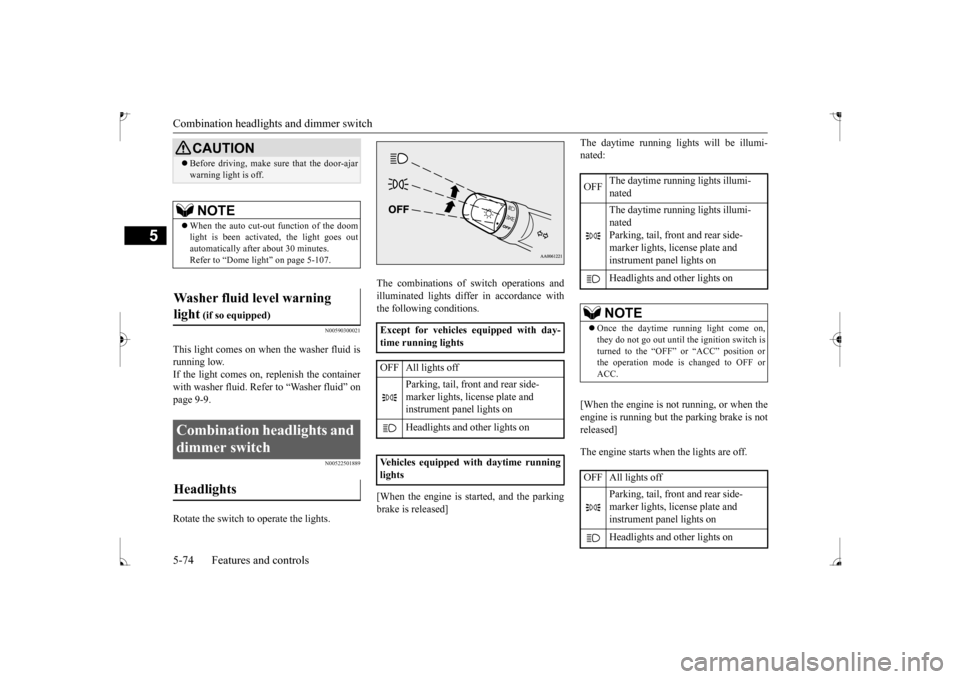
Rotate the switch to operate the lights.
The combinations of switch operations and illuminated lights differ in accordance withthe following conditions. [When the engine is started, and the parking brake is released]
The daytime running lights will be illumi- nated: [When the engine is not running, or when the engine is running but the parking brake is not released] The engine starts when the lights are off.
CAUTION Before driving, make sure that the door-ajar warning light is off. NOTE
When the auto cut-out function of the doom light is been activated, the light goes outautomatically after
about 30 minutes.
Refer to “Dome light” on page 5-107.
Washer fluid level warning light
(if so equipped)
Combination headlights and dimmer switch Headlights
Except for vehicles equipped with day- time running lights OFF All lights off
Parking, tail, front
and rear side-
marker lights, license plate and instrument panel lights on Headlights and other lights on
Vehicles equipped
with daytime running
lights
OFF
The daytime running lights illumi- nated The daytime running lights illumi- nated Parking, tail, front and rear side-marker lights, license plate and instrument panel lights on Headlights and
other lights on
NOTE
Once the daytime running light come on, they do not go out until the ignition switch isturned to the “OFF” or “ACC” position or the operation mode is changed to OFF or ACC.
OFF All lights off
Parking, tail, front and rear side- marker lights, license plate and instrument panel lights on Headlights and
other lights on
BK0235100US.book 74 ページ 2015年11月20日 金曜日 午後3時12分
Page 138 of 305
Combination headlights and dimmer switch
Features and controls 5-75
5
N00532600570
If the following operation is performed with the combination headlights and dim- mer switch in the “ ” or “ ” position, the lights automatically turn off. [Except for vehicles equipped with the F. A . S . T. - k e y ]The ignition switch is turned to the “OFF”
the key is removed
from the ignition switch and the driver’sdoor is opened. [For vehicles equipped with the F.A.S.T.- key]
The operation mode is changed to OFF or ACC and the driver’s door is opened. If the following operation is performed with the combination headlights and dim- mer switch in the “ ” or “ ” position, the lights automatically turn off after about 3 minutes. [Except for vehicles
equipped with the
F. A . S . T. - k e y ] The ignition switch is turned to the “OFF” from the ignition switch and the driver’s door is not opened. [For vehicles equipped with the F.A.S.T.- key] The operation mode is changed to OFF or ACC and the driver’s door is not opened.
If the combination
headlights and dimmer
switch is turned to the “ ” or “ ” posi- tion again after the engine is turned off, the about 3-minute auto-cutout function described above will not
work. The lights (the
parking lights, tail lig
hts and license plate
lights) will stay on and will not turn off auto-matically.
N00549800226
[When using a key to
start the engine]
If the driver’s door is opened with the key in the “OFF” or “ACC” position or removed from the ignition switch while the lights areon, the tone will sound to remind you to turn off the lights. [When using the F.A.S.T.-key to start the engine]If the driver’s door is opened with the opera- tion mode is put in OFF or ACC, or if the operation mode is changed to OFF while thelights are on, the tone will sound to remind you to turn off the lights. In either case, the lights will turn off automat- ically and so will the tone. Or you can turn
NOTE
Do not leave the head
lights and ot
her lights
on for a long period of time when the engineis not running. The battery will run down. When it rains, or wh
en the vehicle has been
washed, the inside of the lens sometimesbecomes foggy. This is the same as when window glass mists up
on a humid day, and
does not indicate a problem. When the lightis switched on, the heat
will dry out the fog.
However, if water collects inside the light, have it checked by an
authorized Mitsubishi
Motors dealer or a repair facility of your choice.
Light auto-cutout function (headlights and other lights)
NOTE
The light auto-cutout
function can be deacti-
vated. See your authorized Mitsubishi Motorsdealer for details.
When you want to keep the lights on: Headlight reminder buzzer
BK0235100US.book 75 ページ 2015年11月20日 金曜日 午後3時12分
Page 139 of 305
Turn signal lever 5-76 Features and controls
5
the light switch to the “OFF” position to stop the tone.
N00549900142
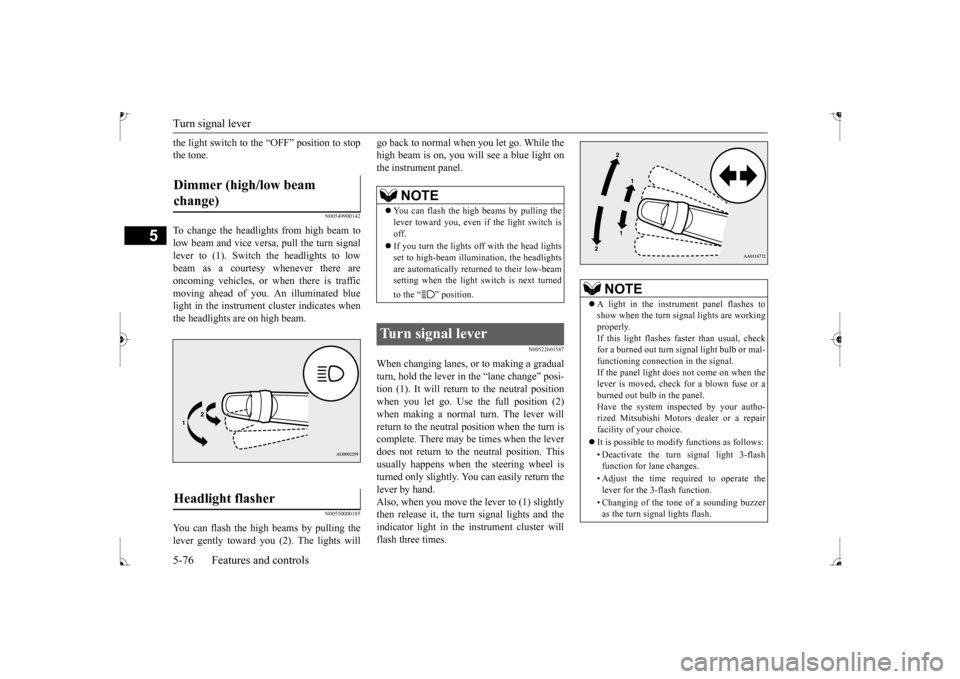
To change the headlights from high beam tolow beam and vice vers
a, pull the turn signal
lever to (1). Switch the headlights to low beam as a courtesy whenever there are oncoming vehicles, or when there is traffic moving ahead of you. An illuminated bluelight in the instrument cluster indicates when the headlights are on high beam.
N00550000185
You can flash the high beams by pulling the lever gently toward you (2). The lights will
go back to normal when you let go. While the high beam is on, you will see a blue light onthe instrument panel.
N00522601587
When changing lanes, or to making a gradual turn, hold the lever in the “lane change” posi- tion (1). It will return to the neutral positionwhen you let go. Use the full position (2) when making a normal turn. The lever will return to the neutral pos
ition when the turn is
complete. There may be times when the lever does not return to th
e neutral position. This
usually happens when the steering wheel isturned only slightly. You
can easily return the
lever by hand. Also, when you move the lever to (1) slightlythen release it, the turn signal lights and the indicator light in the instrument cluster will flash three times.
Dimmer (high/low beam change) Headlight flasher
NOTE
You can flash the high beams by pulling the lever toward you, even if the light switch isoff. If you turn the lights off with the head lights set to high-beam illumi
nation, the headlights
are automatically returned to their low-beam setting when the light
switch is next turned
to the “ ” position.
Turn signal lever
NOTE
A light in the instrument panel flashes to show when the turn signal lights are workingproperly. If this light flashes fast
er than usual, check
for a burned out turn
signal light bulb or mal-
functioning connecti
on in the signal.
If the panel light does not come on when the lever is moved, check
for a blown fuse or a
burned out bulb in the panel. Have the system inspected by your autho- rized Mitsubishi Motors
dealer or a repair
facility of your choice. It is possible to modify functions as follows: • Deactivate the turn signal light 3-flash function for lane changes. • Adjust the time required to operate the lever for the 3-flash function. • Changing of the tone of a sounding buzzer as the turn signal lights flash.
BK0235100US.book 76 ページ 2015年11月20日 金曜日 午後3時12分
Page 145 of 305
Bluetooth® 2.0 interface (if so equipped) 5-82 Features and controls
5
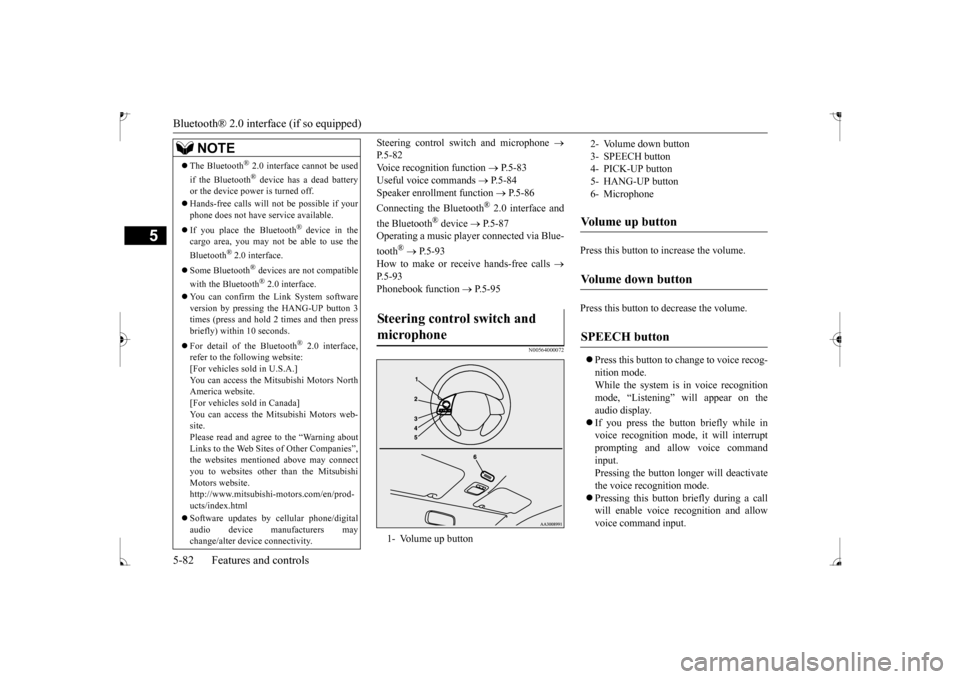
Steering control switch and microphone
P. 5 - 8 2Voice recognition function
P.5-83
Useful voice commands
P.5-84
Speaker enrollment function
P.5-86
Connecting the Bluetooth
® 2.0 interface and
the Bluetooth
® device
P.5-87
Operating a music player connected via Blue- tooth
® P. 5 - 9 3
How to make or receive hands-free calls
P. 5 - 9 3 Phonebook function
P.5-95
N00564000072
Press this button to increase the volume. Press this button to decrease the volume. Press this button to ch
ange to voice recog-
nition mode. While the system is in voice recognition mode, “Listening” will appear on theaudio display. If you press the button briefly while in voice recogniti
on mode, it will interrupt
prompting and allow voice command input. Pressing the button lo
nger will deactivate
the voice recognition mode. Pressing this button briefly during a call will enable voice
recognition and allow
voice command input.
The Bluetooth
® 2.0 interface cannot be used
if the Bluetooth
® device has a dead battery
or the device power is turned off. Hands-free calls
will not be possible if your
phone does not have
service available.
If you place the Bluetooth
® device in the
cargo area, you may not be able to use the Bluetooth
® 2.0 interface.
Some Bluetooth
® devices are not compatible
with the Bluetooth
® 2.0 interface.
You can confirm the Link System software version by pressing the HANG-UP button 3times (press and hold 2 times and then press briefly) within 10 seconds. For detail of the Bluetooth
® 2.0 interface,
refer to the following website: [For vehicles sold in U.S.A.] You can access the Mits
ubishi Motors North
America website.[For vehicles so
ld in Canada]
You can access the Mitsubishi Motors web- site.Please read and agree to the “Warning about Links to the Web Sites
of Other Companies”,
the websites mentione
d above may connect
you to websites other than the Mitsubishi Motors website. http://www.mitsubishi
-motors.com/en/prod-
ucts/index.html Software updates by cellular phone/digital audio device manufacturers may change/alter devi
ce connectivity.
NOTE
Steering control switch and microphone
1- Volume up button
2- Volume down button 3- SPEECH button 4- PICK-UP button5- HANG-UP button 6- MicrophoneVolume up button
Volume down button
SPEECH button
BK0235100US.book 82 ページ 2015年11月20日 金曜日 午後3時12分
Page 147 of 305
Bluetooth® 2.0 interface (if so equipped) 5-84 Features and controls
5
1. Press the SPEECH button. 2. Say “Setup.” 3. Say “Language.”4. The voice guide will say “Select a lan- guage: English, Spanish, French or Japa- nese.” Say the desired language.(Example: “English”) 5. The voice guide wi
ll say “English (Span-
ish, French or Japanese) selected. Is thiscorrect?” Say “Yes.” Step 4.
6. When the voice gui
de says “English
(Spanish, French or
Japanese) selected,”
the language change pr
ocess will be com-
pleted and the system will return to the main menu.
N00564200016 N00564300017
The Bluetooth
® 2.0 interface is equipped
with a help function. If you say “Help” when the system is waiting for a voice command input, the system will tell you a list of th
e commands that can be
used under the circumstances.
N00564401028
There are 2 cancel functions.If you are at the main menu, say “Cancel” to exit from the Bluetooth
® 2.0 interface.
If you are anywhere else within the system, say “Cancel” to return to the main menu.
N00564500019
The Bluetooth
® 2.0 interface is equipped
with a confirmation function. With the confirmation function activated, you are given more opportunities than normal toconfirm a command when making various settings to the Bluetooth
® 2.0 interface. This
allows you to decrease the possibility that asetting is accidentally changed. The confirmation function can be turned on or off by following the steps below. 1. Press the SPEECH button. 2. Say “Setup.” 3. Say “Confirmation prompts.” 4. The voice guide will say “Confirmationprompts are
Language can be change
d by using the audio
control panel besides the following proce-dure.For details, refer to
“To change the language
(vehicles with Bluetooth
® 2.0 interface)” on
page 7-27.
Selecting the language
NOTE
The voice guide will repeat the same mes- sage twice. The first message is in the cur-rent language, and th
e second message is in
the selected
language.
If many entries are regist
ered in the vehicle
phonebook, changing the language will take a longer time.NOTE
Changing the language
deletes the mobile
phonebook imported to the Bluetooth
® 2.0
interface. If you wish to use it, you will have to import it again.
Useful voice commands
Help function
Canceling
NOTE
NOTE
You can return to the previous menu by say- ing “Go Back.”
(if so equipped)
Confirmation function setting
BK0235100US.book 84 ページ 2015年11月20日 金曜日 午後3時12分
Page 150 of 305
Bluetooth® 2.0 interface (if so equipped)
Features and controls 5-87
5
N00564900055
You can turn a voice model registered with the speaker enrollment function on and off whenever you want.You can also retrain the system. Use the following procedure to perform these actions. 1. Press the SPEECH button. 2. Say “Voice training.” 3. If you have completed a speaker enroll- ment process once already, the voiceguide will say eith
er “Enrollment is
enabled. Would you like to disable or retrain?” or “Enrollment is disabled.Would you like to enable or retrain?” model is on; when enrollment is “dis-abled,” the voice model is off. Say the command that fits your needs.
Say “Retrain” to start the speaker enroll- ment process and recreate a new voicemodel. (Refer to “Speaker enrollment” on page 5-86.)
N00565001353
Before you can make or receive hands-free calls or play music using the Bluetooth
® 2.0
interface function, you
must pair the Blue-
tooth
® device and Bluetooth
® 2.0 interface.
Up to 7 Bluetooth
® devices can be paired
with the Bluetooth
® 2.0 interface.
If multiple paired Bluetooth
® devices are
available in the vehicle,
the cellular phone or
music player most recently connected is auto-
matically connected
to the Bluetooth
® 2.0
interface. You can also change a Bluetooth
® device to
be connected. To pair a Bluetooth
® device with the Blue-
tooth
® 2.0 interface, use either one of the fol-
lowing 2 methods (Type 1 or Type 2). 1. Stop your vehicle in a safe area, put the gearshift lever in the “N” (Neutral) posi- tion (manual transaxle), or the selector lever in the “P” (PARK) position (contin-uously variable transmission (CVT)), and pull the parking brake lever.
NOTE
Completing the speaker enrollment process will turn on the voice
model automatically.
The commands “Help” a
nd “Cancel” will not
work in this mode.
Enabling and disabling the voice model and retraining
Connecting the Bluetooth
® 2.0
interface and Bluetooth
® device
NOTE
Pairing is required only when the device is used for the first time. Once the device has been paired with the Bluetooth
® 2.0 inter-
face, all you need is to
bring the device into
the vehicle next time
and the device will
connect to the Bluetooth
® 2.0 interface auto-
matically (if supported by the device). The device must have Bluetooth
® turned ON to
connect.
To p a i r
Pairing procedure - Type 1
(if so
equipped) You cannot pair any Bluetooth
® device with
the Bluetooth
® 2.0 interface unless the vehi-
cle is parked. Before
pairing a Bluetooth
®
device with the Bluetooth
® 2.0 interface,
confirm that the vehicle is parked in a safelocation.
BK0235100US.book 87 ページ 2015年11月20日 金曜日 午後3時12分
Page 158 of 305
Bluetooth® 2.0 interface (if so equipped)
Features and controls 5-95
5
SPEECH button and speak “1 2 3 4 pound send” and the 1234# will be sent via your cel-lular phone.
N00565800035
If an incoming phone call is received whilethe ignition switch or
the operation mode is in
ON or ACC, the audio sy
stem will be auto-
matically turned on and switched to the incoming call, even when the audio system was originally off.The voice guide announcement for the incoming call will be output from the front passenger’s seat speaker.If the CD player or radio was playing when the incoming call was received, the audio sys- tem will mute the sound from the CD playeror radio and output only the incoming call. To receive the call, press the PICK-UP button on the steering wheel control switch.When the call is over, the audio system will return to its previous state.
N00565900010
At any time during a
call, you can mute the
vehicle microphone. Pressing the SPEECH button and then saying“Mute” during a call
will turn ON the mute
function and mute the microphone.
Saying “Mute off” in the same way will turn off the mute function and cancel the mute onthe microphone.
N00566600014
The Bluetooth
® 2.0 interface
can switch
between hands-free mode
(hands-free calls)
and private mode (calls
using cellular phone).
If you press the SPEECH button and say “Transfer call” during a hands-free call, you can stop the hands-free mode and talk in pri- vate mode. To return to hands-free mode, press the SPEECH button again and say “Transfer call.”The Bluetooth
® 2.0 interface
has 2 types of
unique phonebooks that are different from thephonebook stored in the cellular phone. They are the vehicle phonebook and the mobile phonebook.These phonebooks are used
to register tele-
phone numbers and make
calls to desired
numbers via voice
recognition function.
N00566101162
This phonebook is used when making calls with the voice re
cognition function.
Up to 32 names can be registered in the vehi-cle phonebook per language. Also, each entry has 4 locations associated with: home, work, mobile
and other. You can
register one telephone number for each loca- tion. You can register a desire
d name as a name for
any phonebook entry register
ed in the vehicle
phonebook. Names and telephone numbers can be changed later on. The vehicle phonebook ca
n be used with all
paired cellular phones. You can register a te
lephone number in the
vehicle phonebook in the following 2 ways: Reading out a telephone
number, and select-
Receiving calls
Mute function
Switching between hands-free mode and private mode
Phonebook function
NOTE
Disconnecting the batt
ery cable will not
delete information regi
stered in the phone-
book.
Vehicle phonebook
To register a telephone number in the vehicle phonebook
BK0235100US.book 95 ページ 2015年11月20日 金曜日 午後3時12分
Page 160 of 305
Bluetooth® 2.0 interface (if so equipped)
Features and controls 5-97
5
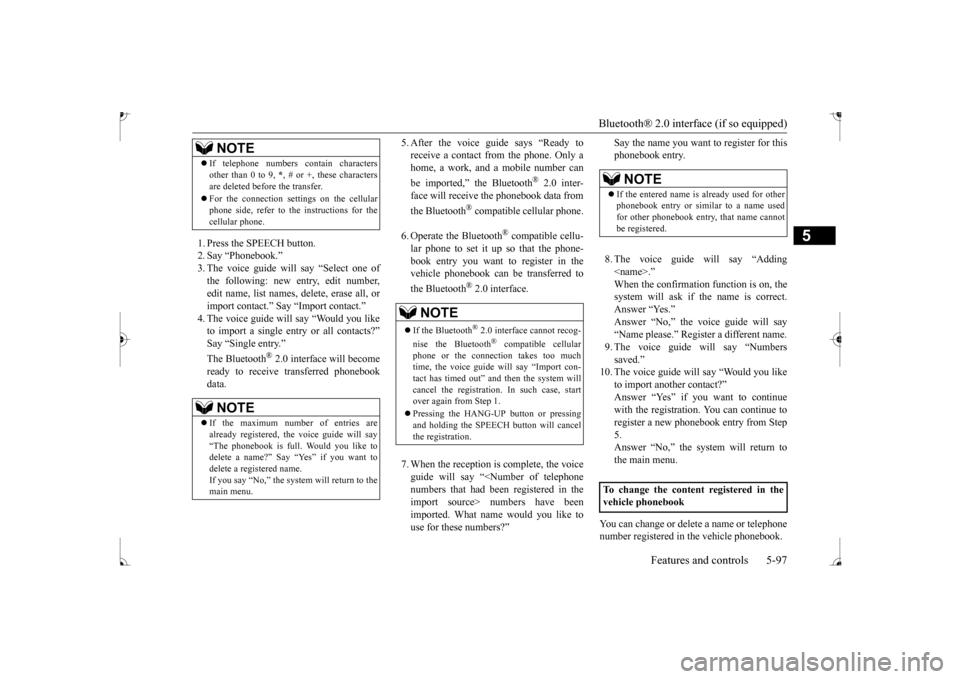
1. Press the SPEECH button. 2. Say “Phonebook.” 3. The voice guide will
say “Select one of
the following: new entry, edit number,edit name, list names, delete, erase all, or import contact.
” Say “Import contact.”
to import a single entr
y or all contacts?”
Say “Single entry.”
® 2.0 interface will become
ready to receive transferred phonebook data.
5. After the voice guide says “Ready to receive a contact from the phone. Only ahome, a work, and a mobile number can be imported,” the Bluetooth
® 2.0 inter-
face will re
ceive the phonebook data from
the Bluetooth
® compatible cellular phone.
6. Operate the Bluetooth
® compatible cellu-
lar phone to set it up so that the phone- book entry you want to register in thevehicle phonebook can be transferred to the Bluetooth
® 2.0 interface.
7. When the reception is complete, the voice guide will say “<
Number of telephone
numbers that had been registered in theimport source> numbers have been imported. What name would you like to use for these numbers?”
Say the name you want to register for this phonebook entry. 8. The voice guide will say “Adding
er a different name.
9. The voice guide will say “Numbers saved.”
10. The voice guide will say “Would you like
to import another contact?” Answer “Yes” if you want to continuewith the registration.
You can continue to
register a new phonebook entry from Step 5.Answer “No,” the system will return to the main menu.
You can change or delete a name or telephone number registered in the vehicle phonebook.
If telephone numbers
contain characters
other than 0 to 9,
*, # or +, these characters
are deleted before the transfer. For the connection set
tings on the cellular
phone side, refer to the instructions for thecellular phone.NOTE
If the maximum number of entries are already registered, the
voice guide will say
“The phonebook is full. Would you like to delete a name?” Say
“Yes” if you want to
delete a registered name.If you say “No,” the system will return to the main menu.NOTE
NOTE
If the Bluetooth
® 2.0 interface
cannot recog-
nise the Bluetooth
® compatible cellular
phone or the connection takes too much time, the voice guide will say “Import con- tact has timed out” and
then the system will
cancel the registration. In such case, start over again from Step 1. Pressing the HANG-UP button or pressing and holding the SPEECH
button will cancel
the registration.
NOTE
If the entered name is already used for other phonebook entry or similar to a name used for other phonebook entry, that name cannotbe registered.
To change the content registered in the vehicle phonebook
BK0235100US.book 97 ページ 2015年11月20日 金曜日 午後3時12分