fuel MITSUBISHI MIRAGE 2017 6.G User Guide
[x] Cancel search | Manufacturer: MITSUBISHI, Model Year: 2017, Model line: MIRAGE, Model: MITSUBISHI MIRAGE 2017 6.GPages: 305, PDF Size: 8.67 MB
Page 99 of 305
![MITSUBISHI MIRAGE 2017 6.G User Guide Starting the engine 5-36 Features and controls
5
N00512601816
[For vehicles equipped with the Free-hand Advanced Security Transmitter (F.A.S.T.- key)]For information on operation for vehicles equipped](/img/19/7514/w960_7514-98.png "MITSUBISHI MIRAGE 2017 6.G User Guide Starting the engine 5-36 Features and controls
5
N00512601816
[For vehicles equipped with the Free-hand Advanced Security Transmitter (F.A.S.T.- key)]For information on operation for vehicles equipped")
Starting the engine 5-36 Features and controls
5
N00512601816
[For vehicles equipped with the Free-hand Advanced Security Transmitter (F.A.S.T.- key)]For information on operation for vehicles equipped with the Free-hand Advanced Secu- rity Transmitter (F.A.S.T.-key), refer to“Free-hand Advanced Se
curity Transmitter
(F.A.S.T.-key): Starting and stopping the engine” on page 5-16. [Except for vehicles equipped with the Free-hand Advanced Security Transmit- ter (F.A.S.T.-key)] Do not operate the starter motor continu- ously for longer than 15 seconds as this could run the battery down or damage thestarter motor. If the engine does not start, turn the ignition switch back to the “OFF”
conds, and then try
again. Trying repeatedly with the engine or starter motor still turning will damage the starter mechanism. If the engine will not start because the bat- tery is weak or discharged, refer to “Jump-starting the engine” (on page 8-2)for instructions.
A longer warm up period will only con- sume extra fuel. The engine is warmed upenough for driving when the low coolant temperature indi
cator goes out.
Refer to “Low coolant temperature indi-cator” on page 5-71.
This model is equipped with an electronically controlled fuel injection system. This is a sys- tem that automatically controls fuel injection.
There is usually no need to depress the accel- erator pedal when starting the engine.The starter should not be run for more than 15 seconds at a time. To prevent battery drain, wait a few secondsbetween attempts to restart the engine. 1. Make sure all occupants are properly seated with seat belts fastened. 2. Insert the ignition key.3. Make sure the parking brake is applied. 4. Press and hold the brake pedal down with your right foot. 5. Press and hold the clutch pedal all the way down (manual transaxle). 6. On vehicles equippe
d with manual trans-
axle, place the gearshift lever in the “N” On vehicles equippe
d with continuously
variable transmission (CVT), make surethe selector lever is in the “P” (PARK) position.
Starting the engine Tips for starting
WA R N I N G Never run the engine in
a closed or poorly
ventilated area any longer than is neededto move your vehicle out of the area. Car- bon monoxide gas, which is odorless and extremely poisonous, could build up andcause serious injury or death.CAUTION Do not push-start the vehicle.Do not run the engine at high rpms or drive at high speeds until the engine has had a chance to warm up. Release the ignition sw
itch as soon as the
engine starts. Otherwise, the starter motorwill be damaged.
Starting the engine
NOTE
On vehicles equipped
with manual transaxle,
the starter will not ope
rate unless the clutch
pedal is fully depresse
d (Clutch interlock).
BK0235100US.book 36 ページ 2015年11月20日 金曜日 午後3時12分
Page 101 of 305
Manual transaxle (if so equipped) 5-38 Features and controls
5
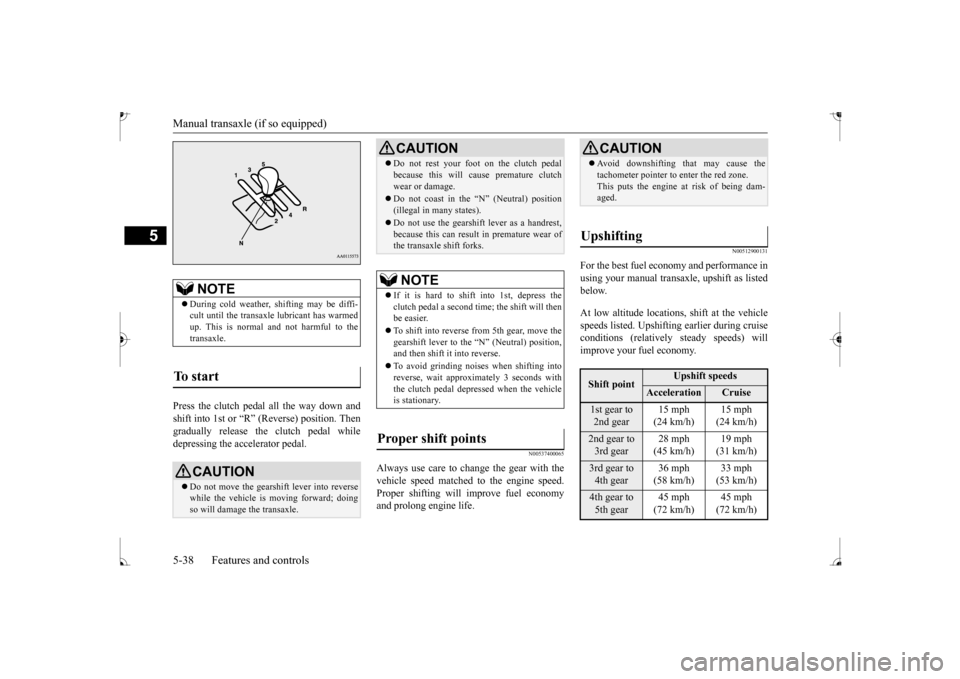
Press the clutch pedal all the way down and shift into 1st or “R” (Reverse) position. Then gradually release the
clutch pedal while
depressing the accelerator pedal.
N00537400065
Always use care to cha
nge the gear with the
vehicle speed matched
to the engine speed.
Proper shifting will
improve fuel economy
and prolong engine life.
N00512900131
For the best fuel economy and performance inusing your manual transaxle, upshift as listed below. At low altitude locations, shift at the vehicle speeds listed. Upshifting earlier during cruiseconditions (relatively
steady speeds) will
improve your fuel economy.
NOTE
During cold weather, shifting may be diffi- cult until the transaxle
lubricant has warmed
up. This is normal and not harmful to the transaxle.
To start
CAUTION Do not move the gearshift lever into reverse while the vehicle is
moving forward; doing
so will damage the transaxle.
Do not rest your foot on the clutch pedal because this will cause premature clutchwear or damage. Do not coast in the “N” (Neutral) position (illegal in many states). Do not use the gearshift lever as a handrest, because this can result in premature wear ofthe transaxle shift forks.NOTE
If it is hard to shift into 1st, depress the clutch pedal a second tim
e; the shift will then
be easier. To shift into reverse from 5th gear, move the gearshift lever to the “N” (Neutral) position, and then shift it into reverse. To avoid grinding noises when shifting into reverse, wait approxi
mately 3 seconds with
the clutch pedal depressed when the vehicle is stationary.
Proper shift points
CAUTION
CAUTION Avoid downshifting th
at may cause the
tachometer pointer to
enter the red zone.
This puts the engine at
risk of being dam-
aged.
Upshifting
Shift point
Upshift speeds
Acceleration
Cruise
1st gear to 2nd gear
15 mph (24 km/h)
(24 km/h)
2nd gear to 3rd gear
28 mph (45 km/h)
(31 km/h)
3rd gear to 4th gear
36 mph (58 km/h)
(53 km/h)
4th gear to 5th gear
45 mph (72 km/h)
(72 km/h)
BK0235100US.book 38 ページ 2015年11月20日 金曜日 午後3時12分
Page 102 of 305
Continuously variable transmission (CVT) (if so equipped)
Features and controls 5-39
5
At high altitude locati
ons, upshift as listed
below.
N00513000096
It is recommended th
at you downshift to a
lower gear when needed to maintain the desired speed, according to the table. Avoid downshifting at
too high a speed. The
engine may suffer damage. To maintain a safe speed and prolong brake life, shift down to 2nd or 1st when descend-ing a steep hill. Downshifting is also important to avoid “lug- ging” the engine at too low a speed, such aswhen turning a corner or when driving up a steep hill.
N00513100244
Do not use the gearshift lever as a han- drest. This can result
in premature wear of
the transaxle shift forks. The table above shows the maximum rec- ommended driving speed for in each gear. Do not drive near or at these speeds forprolonged periods of time.
N00560200050
The CVT will automatically and continuouslychange its gear ratio depending on road anddriving conditions. This helps achieve smooth driving and excellent fuel efficiency. The transmission prevents unnecessary upshifts even when the accelerator pedal isreleased and ensures smooth driving. According to the conditions, the transmission will automatically shift to a lower gear ratio to achieve stronger engine braking. This may help reduce your need
to use the service
brake.
N00560301087
As an additional safe
ty precaution, models
equipped with a continuously variable trans- mission have a shift-lock device that holds
Shift point
Upshift speeds
1st gear to 2nd gear 15 mph (24 km/h)2nd gear to 3rd gear 25 mph (40 km/h)3rd gear to 4th gear 40 mph (64 km/h)4th gear to 5th gear 45 mph (72 km/h)Downshifting
Recommended downshifting speed
Downshifting speed
Shift point
Under 20 mph (32 km/h)
Shift down from cur- rent gear to 2nd gear.
20 to 30 mph (32 to
48 km/h)
Shift down from cur- rent gear to 3rd gear.
Driving precautions
Maximum possible driving speed
Shift points
Maximum possible driving
speed
1st gear 28 mph (45 km/h)2nd gear 53 mph (85 km/h)3rd gear 78 mph (125 km/h)4th gear 105 mph (170 km/h)Downshifting speed
Shift point
Continuously variable transmission (CVT)
(if so
equipped)DRIVING UPHILL
DRIVING DOWNHILL
Selector lever operation
BK0235100US.book 39 ページ 2015年11月20日 金曜日 午後3時12分
Page 121 of 305
Tire pressure monitoring
system (if so equipped)
5-58 Features and controls
5
Each tire, including the spare, should be checked monthly when cold and inflated tothe inflation pressure recommended by the vehicle manufac
turer on the vehicle placard
or tire inflation pressu
re label. (If your vehi-
cle has tires of a different size than the size indicated on the vehicle
placard or tire infla-
tion pressure label, yo
u should determine the
proper tire inflation pr
essure for those tires.)
As an added safety feature, your vehicle has been equipped with a tire pressure monitoring system (TPMS) that illuminates a low tire pressure telltale when
one or more of your
tires is significant
ly under-inflated.
Accordingly, when the low tire pressure tell- tale illuminates, you should stop and checkyour tires as soon as possible, and inflate them to the proper pressure. Driving on a sig- nificantly under-inflated
tire causes the tire to
overheat and can lead
to tire failure.
Under-inflation also reduces fuel efficiency and tire tread life, and may affect the vehi-cle’s handling and stopping ability. Please note that the TPMS is not a substitute for proper tire maintenance, and it is the driver’sresponsibility to mainta
in correct tire pres-
sure, even if under-inf
lation has not
reached
the level to trigger illumination of the TPMSlow tire pressure telltale. Your vehicle has also been equipped with a TPMS malfunction indicator to indicate when
the system is not operating properly. The TPMS malfunction indicator is combinedwith the low tire pressure telltale. When the system detects a malfunction, the telltale will flash for approximately one min-ute and then remain c
ontinuously illuminated.
This sequence will c
ontinue upon subsequent
vehicle start-ups as long as the malfunctionexists. When the malfunction indicator is illumi- nated, the system may not
be able to detect or
signal low tire pr
essure as intended.
TPMS malfunctions may
occur for a variety
of reasons, including the installation of replacement or alternate tires or wheels on the vehicle that prevent the TPMS from function-ing properly. Always
check the TPMS mal-
function telltale after replacing one or more tires or wheels on your vehicle to ensure thatthe replacement or alternate tires and wheels allow the TPMS to continue to function prop- erly.
N00532801540
1. If the tire pressure monitoring systemwarning light illum
inates, avoid hard
braking, sharp steering maneuvers and high speeds. You should stop and adjust the tires to the proper inflation pressure assoon as possible. Adjust the spare tire at the same time. Refer to “Tires” on page 9-12.
If the warning light illuminates while driving
NOTE
When inspecting or adjusting the tire pres- sure, do not apply excessive force to the valve stem to
avoid breakage.
After inspecting or adjusting the tire pres- sure, always reinstall the valve cap on thevalve stem. Without the valve cap, di
rt or moisture could
get into the valve, resulting in damage to thetire inflation pressure sensor. Do not use metal valve caps, which may cause a metal reaction,
resulting in corrosion
and damage of the tire
inflation pressure sen-
sors. Once adjustments have
been made, the warn-
ing light will go off after a few minutes ofdriving.
BK0235100US.book 58 ページ 2015年11月20日 金曜日 午後3時12分
Page 124 of 305
Multi-information display
Features and controls 5-61
5
N00519201332
The tachometer shows en
gine revolutions per
minute. This allows the driver to determine the most efficient sel
ector position and engine
speed combinations.This gauge also assists in evaluating engine performance.
N00555001389
The multi-information display includes the odometer, trip odometer, service reminder, fuel remaining, selector
lever position, aver-
age fuel consumption, driving range, etc.
Tachometer Type D
CAUTION The red zone indicate
s an engine speed
beyond the range of safe operation.Select the correct shift position (manualtransaxle) or selector position (CVT) to con- trol the engine speed so that the tachometer indicator does not enter the red zone.
Multi-information display
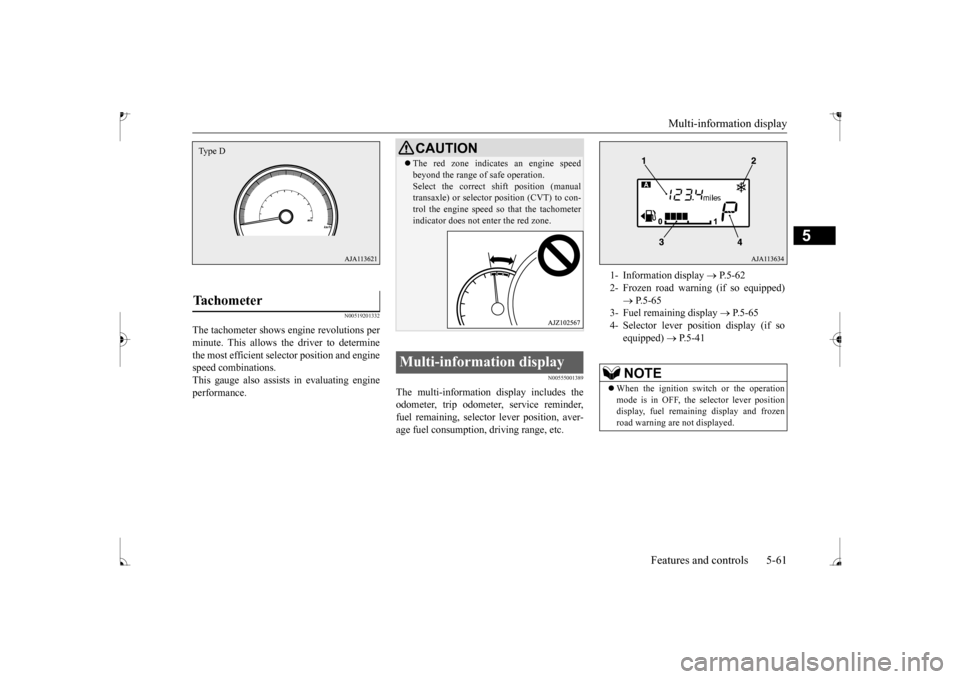
1- Information display
P.5-62
2- Frozen road warning (if so equipped)
P.5-65
3- Fuel remaining display
P.5-65
4- Selector lever pos
ition display (if so
equipped)
P.5-41
NOTE
When the ignition switch or the operation mode is in OFF, the selector lever position display, fuel remain
ing display and frozen
road warning are not displayed.
BK0235100US.book 61 ページ 2015年11月20日 金曜日 午後3時12分
Page 125 of 305
Multi-information display 5-62 Features and controls
5
N00574801041
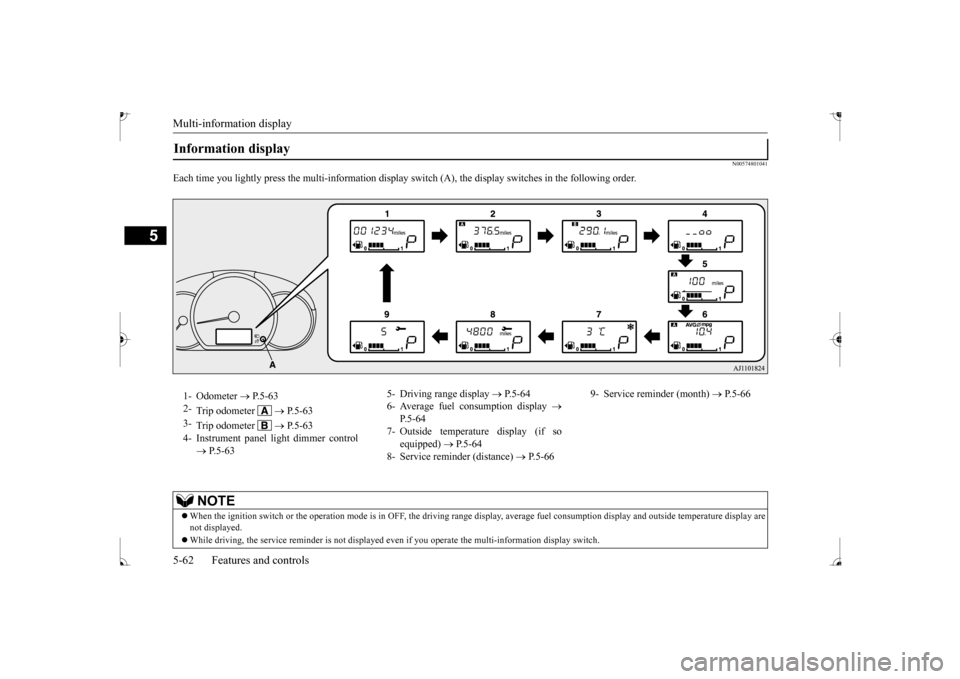
Each time you lightly press th
e multi-information display switch (A), th
e display switches in the following order.
Information display 1- Odometer
P.5-63
2-
Trip odometer
P. 5 - 6 3
3-
Trip odometer
P. 5 - 6 3
4- Instrument panel li
ght dimmer control
P.5-63
5- Driving range display
P.5-64
6- Average fuel consumption display
P.5-64
7- Outside temperature display (if so
equipped)
P.5-64
8- Service reminder (distance)
P.5-66
9- Service reminder (month)
P.5-66
NOTE
When the ignition switch or th
e operation mode is in OFF, the driving range di
splay, average fuel consumption display and outsi
de temperature display are
not displayed. While driving, the service reminder is
not displayed even if you operate th
e multi-information display switch.
BK0235100US.book 62 ページ 2015年11月20日 金曜日 午後3時12分
Page 127 of 305
Multi-information display 5-64 Features and controls
5
N00575201042
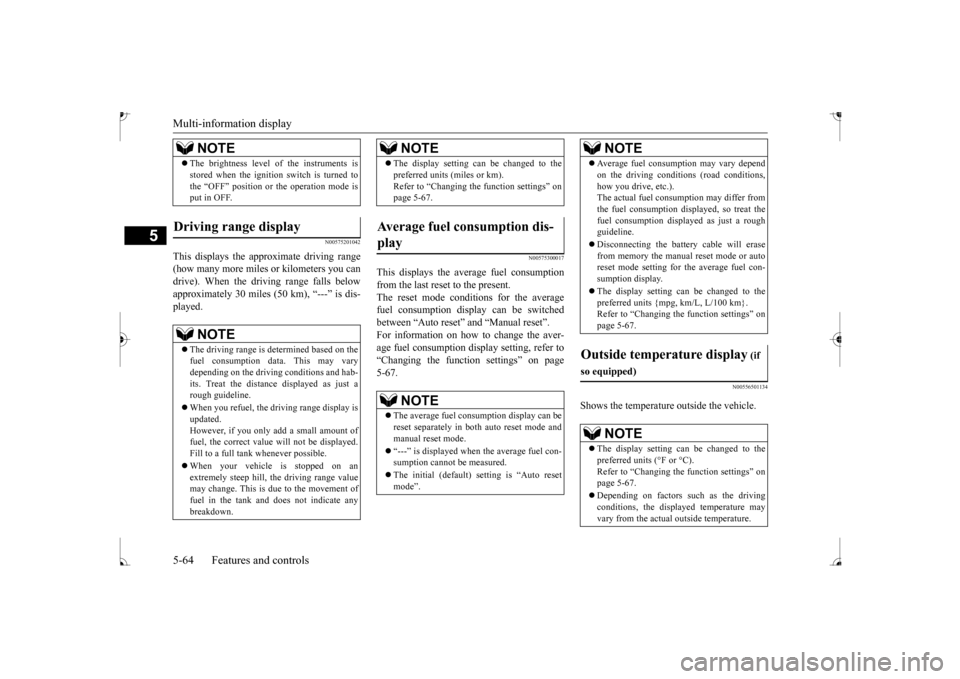
This displays the approximate driving range (how many more miles
or kilometers you can
drive). When the driving range falls below approximately 30 miles
(50 km), “---” is dis-
played.
N00575300017
This displays the average fuel consumptionfrom the last reset to the present. The reset mode conditions for the average fuel consumption display can be switchedbetween “Auto reset”
and “Manual reset”.
For information on how to change the aver- age fuel consumption di
splay setting, refer to
“Changing the function settings” on page 5-67.
N00556501134
Shows the temperature outside the vehicle.
The brightness level
of the instruments is
stored when the ignition switch is turned tothe “OFF” position or the operation mode isput in OFF.
Driving range display
NOTE
The driving range is determined based on the fuel consumption data. This may vary depending on the drivi
ng conditions and hab-
its. Treat the distance
displayed as just a
rough guideline. When you refuel, the driving range display is updated. However, if you only add a small amount offuel, the correct value
will not be displayed.
Fill to a full tank whenever possible. When your vehicle is stopped on an extremely steep hill, th
e driving range value
may change. This is due to the movement of fuel in the tank and does not indicate anybreakdown.NOTE
The display setting can be changed to the preferred units (miles or km).Refer to “Changing the
function settings” on
page 5-67.
Average fuel consumption dis- play
NOTE
The average fuel cons
umption display can be
reset separately in both auto reset mode andmanual reset mode. “---” is displayed when the average fuel con- sumption cannot be measured. The initial (default) setting is “Auto reset mode”.NOTE
Average fuel consumption may vary depend on the driving conditi
ons (road conditions,
how you drive, etc.).The actual fuel consum
ption may differ from
the fuel consumption displayed, so treat the fuel consumption displayed as just a roughguideline. Disconnecting the batt
ery cable will erase
from memory the manual reset mode or auto reset mode setting for the average fuel con- sumption display. The display setting ca
n be changed to the
preferred units {mpg, km/L, L/100 km}.Refer to “Changing th
e function settings” on
page 5-67.
Outside temperature display
(if
so equipped)
NOTE
The display setting ca
n be changed to the
preferred units (°F or °C).
e function settings” on
page 5-67. Depending on factors such as the driving conditions, the displa
yed temperature may
vary from the actual outside temperature.NOTE
BK0235100US.book 64 ページ 2015年11月20日 金曜日 午後3時12分
Page 130 of 305
Multi-information display
Features and controls 5-67
5
3. With this indicator
flashing, if you lightly
press the multi-information meter switch,the display switches from “---” to “cLEAr”. After that, the time until the next periodic inspection is shown.
N00556801267
The “Average fuel c
onsumption reset mode”,
“Fuel consumption uni
t” and “Temperature
unit” setting can be m
odified as desired,
when the ignition switch or the operation mode is ON.
N00575501032
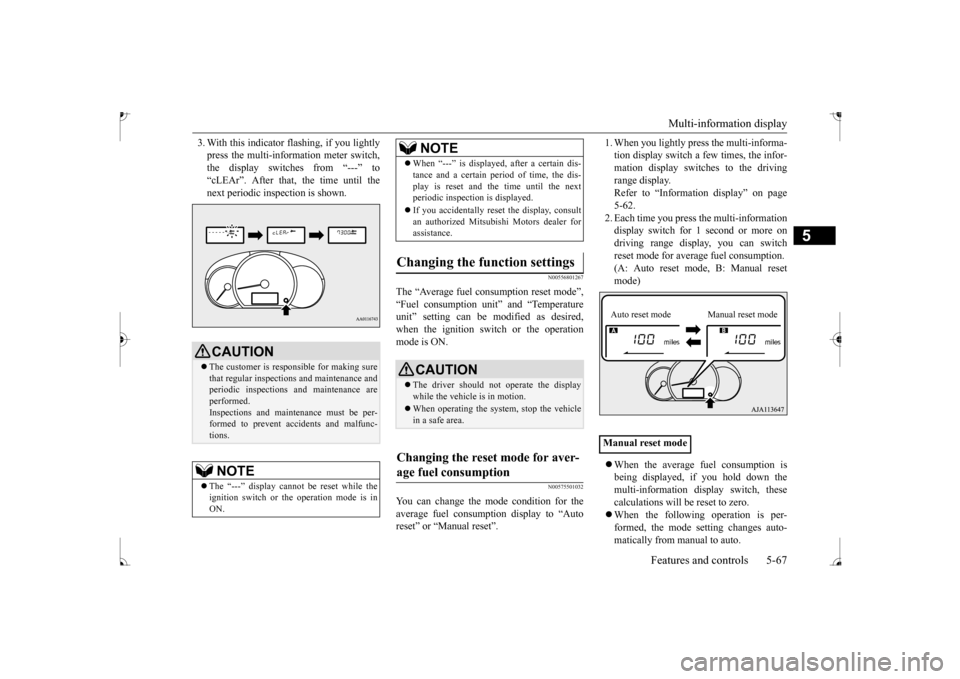
You can change the mode condition for theaverage fuel consumpt
ion display to “Auto
reset” or “Manual reset”.
1. When you lightly press the multi-informa- tion display switch a few times, the infor-mation display switches to the driving range display. Refer to “Information display” on page5-62. 2. Each time you press th
e multi-information
display switch for 1 second or more ondriving range disp
lay, you can switch
reset mode for average fuel consumption. (A: Auto reset mode, B: Manual reset mode) When the average fuel consumption is being displayed, if you hold down themulti-information display switch, these calculations will be reset to zero. When the following operation is per- formed, the mode setting changes auto- matically from manual to auto.
CAUTION The customer is responsible for making sure that regular inspections and maintenance and periodic inspections
and maintenance are
performed.Inspections and mainte
nance must be per-
formed to prevent accidents and malfunc- tions.NOTE
The “---” display cannot
be reset while the
ignition switch or the operation mode is inON.
When “---” is displayed, after a certain dis- tance and a certain pe
riod of time, the dis-
play is reset and th
e time until the next
periodic inspection is displayed. If you accidentally reset
the display, consult
an authorized Mitsubishi Motors dealer for assistance.
Changing the function settings
CAUTION The driver should not operate the display while the vehicle is in motion. When operating the system, stop the vehicle in a safe area.
Changing the reset mode for aver- age fuel consumption
NOTE
Manual reset modeAuto reset mode Manual reset mode
BK0235100US.book 67 ページ 2015年11月20日 金曜日 午後3時12分
Page 131 of 305
![MITSUBISHI MIRAGE 2017 6.G User Guide Multi-information display 5-68 Features and controls
5
[Except for vehicles
equipped with the
F. A . S . T. - k e y ]Turn the ignition switch to the “ON” posi- tion from the “ACC” or “OFF](/img/19/7514/w960_7514-130.png "MITSUBISHI MIRAGE 2017 6.G User Guide Multi-information display 5-68 Features and controls
5
[Except for vehicles
equipped with the
F. A . S . T. - k e y ]Turn the ignition switch to the “ON” posi- tion from the “ACC” or “OFF")
Multi-information display 5-68 Features and controls
5
[Except for vehicles
equipped with the
F. A . S . T. - k e y ]Turn the ignition switch to the “ON” posi- tion from the “ACC” or “OFF” position. [For vehicles equipped
with the F.A.S.T.-
key]Change the operation mode to ON from ACC or OFF. When the average fuel consumption is being displayed, if you hold down the multi-information display switch, these calculations will
be reset to zero.
When the engine switch or the operation mode is in the following conditions, the average fuel consumption display willautomatically reset. [Except for vehicles
equipped with the
F. A . S . T. - k e y ] The ignition switch has been set to the“ACC” or “OFF” position for about 4 hours or more. [For vehicles equipped
with the F.A.S.T.-
key]The operation mode has been set to ACC or OFF for about 4 hours or more.
N00557100156
The fuel consumption display unit can bechanged. The distance
and amount units are
also switched to match the selected fuel con-sumption unit. 1. When you lightly press the multi-informa- tion display switch a few times, the infor- mation display switches to the averagefuel consumption display. Refer to “Information display” on page 5-62.2. Press and hold the mu
lti-information dis-
play switch for about 5 seconds or more until buzzer sound is heard twice.
3. Press and hold the multi-information dis- play switch to switch in sequence from“km/L”
“L/100 km”
“mpg”
The distance units is al
so changed in the fol-
lowing combinations to match the selected fuel consumption unit.
Auto reset mode
NOTE
The average fuel cons
umption display can be
reset separately for the auto reset mode andfor the manual reset mode. Disconnecting th
e battery cable will erase
from memory the manual reset mode or autoreset mode setting for the average fuel con- sumption display. The initial (default) setting is “Auto reset mode”.
Changing the fuel consumption display unit
NOTE
The display units for the driving range, the average fuel consumption are changed, but the units for the indicating needle (speedom- eter), the odometer, the trip odometer and theservice reminder will
remain unchanged.
If the battery is disconnected, the memory of the unit setting is erased and it returns auto- matically to factory setting.
BK0235100US.book 68 ページ 2015年11月20日 金曜日 午後3時12分
Page 132 of 305
Multi-information display
Features and controls 5-69
5
N00557201183
The temperature display unit can be switched. 1. When you lightly press the multi-informa- tion display switch a few times, the infor- mation display switches to the outsidetemperature display. Refer to “Information display” on page 5-62. 2. Each time you press the multi-information display switch for 5 seconds or more onoutside temperature display, you can switch from °F to °C or from °C to °F unit of outside temperature display.Fuel consumption
Distance
(driving range)
km/L km L/100 km km mpg mile (s)
Changing the temperature unit
(if
so equipped)
NOTE
The temperature value on air conditioning panel is switched in
conjunction with outside
temperature display unit of the multi-infor-mation display. However, “°F” or “°C” are not shown to tem- perature display of an air conditioning.
BK0235100US.book 69 ページ 2015年11月20日 金曜日 午後3時12分