light MITSUBISHI MIRAGE 2017 6.G Workshop Manual
[x] Cancel search | Manufacturer: MITSUBISHI, Model Year: 2017, Model line: MIRAGE, Model: MITSUBISHI MIRAGE 2017 6.GPages: 305, PDF Size: 8.67 MB
Page 125 of 305
Multi-information display 5-62 Features and controls
5
N00574801041
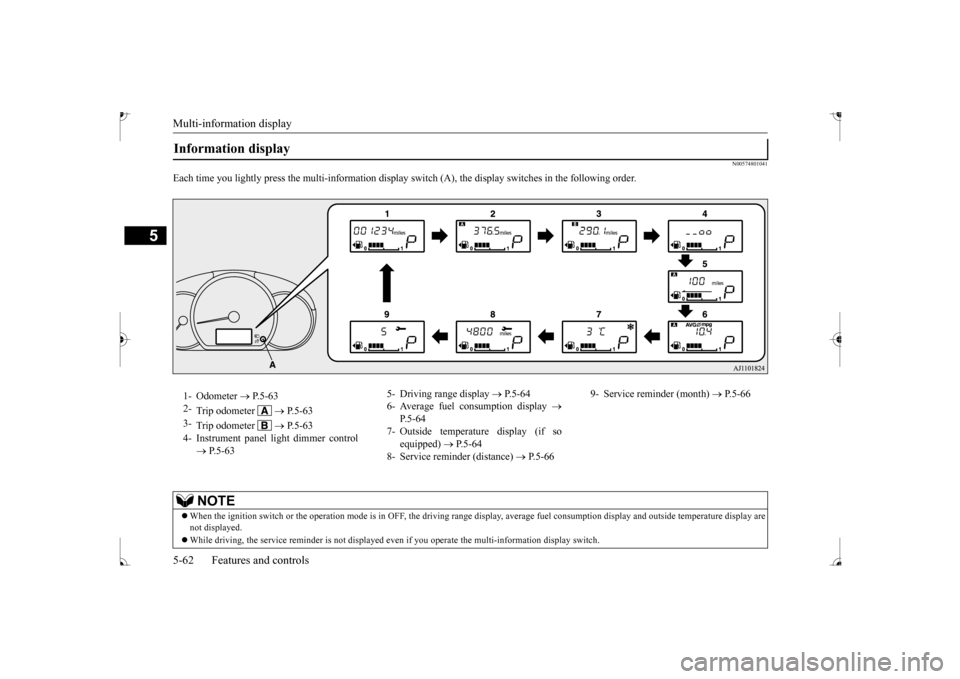
Each time you lightly press th
e multi-information display switch (A), th
e display switches in the following order.
Information display 1- Odometer
P.5-63
2-
Trip odometer
P. 5 - 6 3
3-
Trip odometer
P. 5 - 6 3
4- Instrument panel li
ght dimmer control
P.5-63
5- Driving range display
P.5-64
6- Average fuel consumption display
P.5-64
7- Outside temperature display (if so
equipped)
P.5-64
8- Service reminder (distance)
P.5-66
9- Service reminder (month)
P.5-66
NOTE
When the ignition switch or th
e operation mode is in OFF, the driving range di
splay, average fuel consumption display and outsi
de temperature display are
not displayed. While driving, the service reminder is
not displayed even if you operate th
e multi-information display switch.
BK0235100US.book 62 ページ 2015年11月20日 金曜日 午後3時12分
Page 126 of 305
Multi-information display
Features and controls 5-63
5
N00574900016
The odometer indicates the total distance the vehicle has traveled.
N00575000014
The trip odometer indicates the distance trav-eled between two points. To return the display to 0, hold down the multi-information display switch for about 1 second or more. Only the currently displayed value will be reset. Example
If trip odometer is
displayed, only trip
odometer wi
ll be reset.
N00575101025
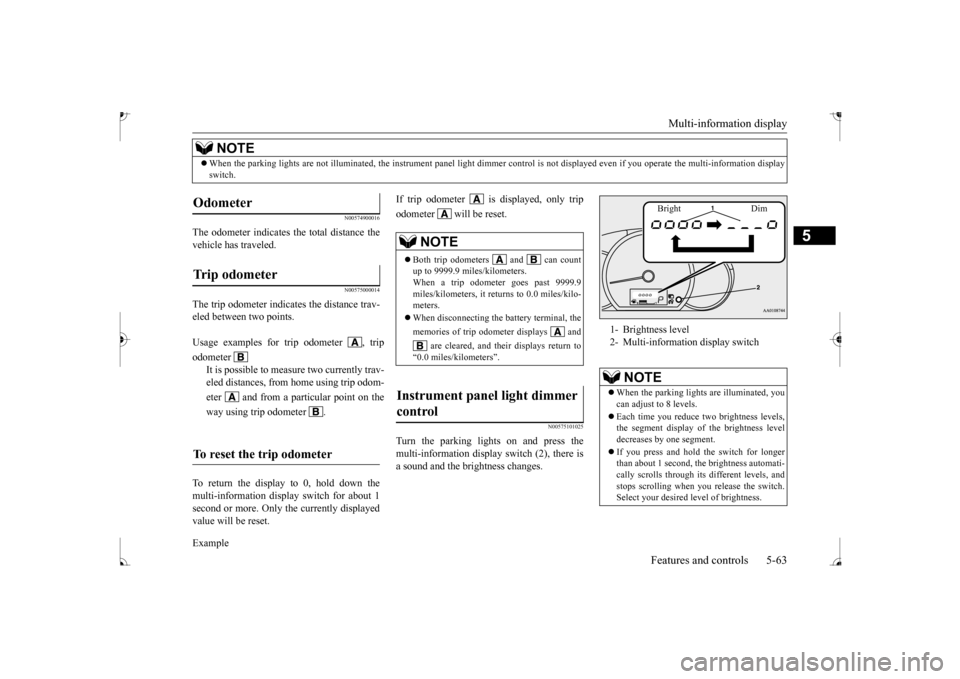
Turn the parking lights on and press the multi-information display switch (2), there is a sound and the brightness changes.
When the parking lights are not il
luminated, the instrument pane
l light dimmer control is not di
splayed even if you operate the
multi-information display
switch.NOTE
Odometer Trip odometer Usage examples for trip odometer , trip odometer
It is possible to measure two currently trav- eled distances, from home using trip odom- eter and from a particular point on theway using trip odometer .
To reset the trip odometer
NOTE
Both trip odometers and can count up to 9999.9 miles/kilometers. When a trip odometer goes past 9999.9miles/kilometers, it returns to 0.0 miles/kilo- meters. When disconnecting the battery terminal, the memories of trip odometer displays and
are cleared, and their displays return to
“0.0 miles/kilometers”.
Instrument panel light dimmer control
1- Brightness level 2- Multi-information display switch
NOTE
When the parking light
s are illuminated, you
can adjust to 8 levels. Each time you reduce tw
o brightness levels,
the segment display of
the brightness level
decreases by one segment. If you press and hold the switch for longer than about 1 second, th
e brightness automati-
cally scrolls through its different levels, and stops scrolling when
you release the switch.
Select your desired
level of brightness.
Bright Dim
BK0235100US.book 63 ページ 2015年11月20日 金曜日 午後3時12分
Page 129 of 305
Multi-information display 5-66 Features and controls
5
N00556701309
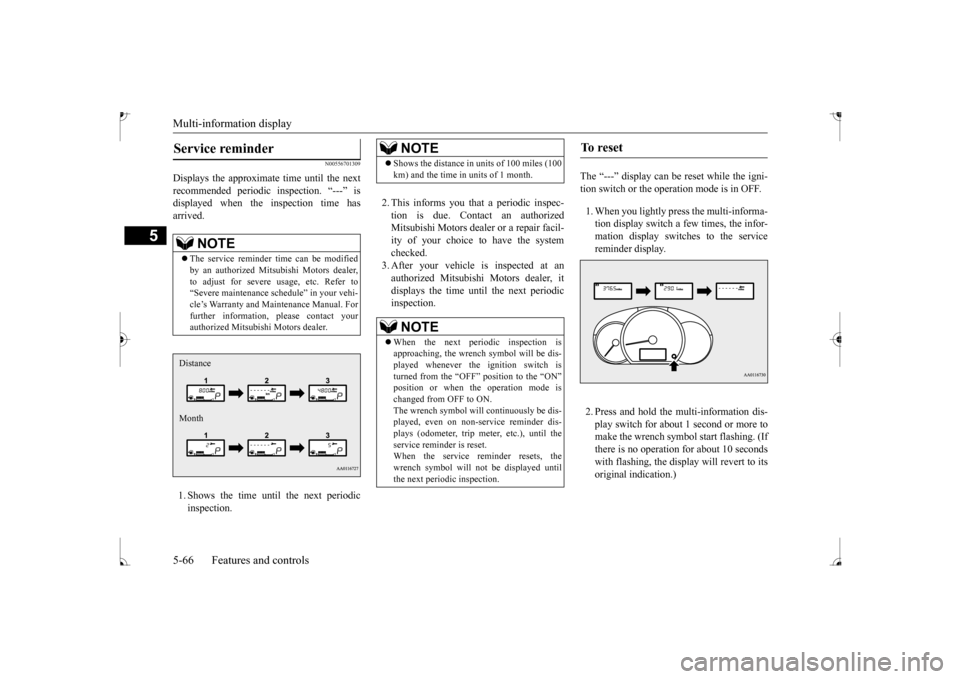
Displays the approximate time until the next recommended periodic
inspection. “---” is
displayed when the inspection time hasarrived. 1. Shows the time until the next periodic inspection.
2. This informs you that a periodic inspec- tion is due. Contact an authorized Mitsubishi Motors dealer
or a repair facil-
ity of your choice to have the system checked. 3. After your vehicle
is inspected at an
authorized Mitsubishi Motors dealer, it displays the time unt
il the next periodic
inspection.
The “---” display can be
reset while the igni-
tion switch or the opera
tion mode is in OFF.
1. When you lightly press the multi-informa- tion display switch a few times, the infor-mation display switches to the service reminder display. 2. Press and hold the multi-information dis- play switch for about 1 second or more tomake the wrench symbol start flashing. (If there is no operation for about 10 seconds with flashing, the displa
y will revert to its
original indication.)
NOTE
The service reminder time can be modified by an authorized Mitsubishi Motors dealer,to adjust for severe usage, etc. Refer to “Severe maintenance sc
hedule” in your vehi-
cle’s Warranty and Ma
intenance Manual. For
further information, please contact your authorized Mitsubishi Motors dealer.Distance Month
NOTE
Shows the distance in
units of 100 miles (100
km) and the time in units of 1 month.NOTE
When the next periodic inspection is approaching, the wrench symbol will be dis-played whenever the ignition switch is turned from the “OFF” position to the “ON”changed from OFF to ON. The wrench symbol will continuously be dis- played, even on non-service reminder dis-plays (odometer, trip meter, etc.), until the service reminder is reset. When the service reminder resets, thewrench symbol will not be displayed untilthe next periodic inspection.
To r e s e t
BK0235100US.book 66 ページ 2015年11月20日 金曜日 午後3時12分
Page 130 of 305
Multi-information display
Features and controls 5-67
5
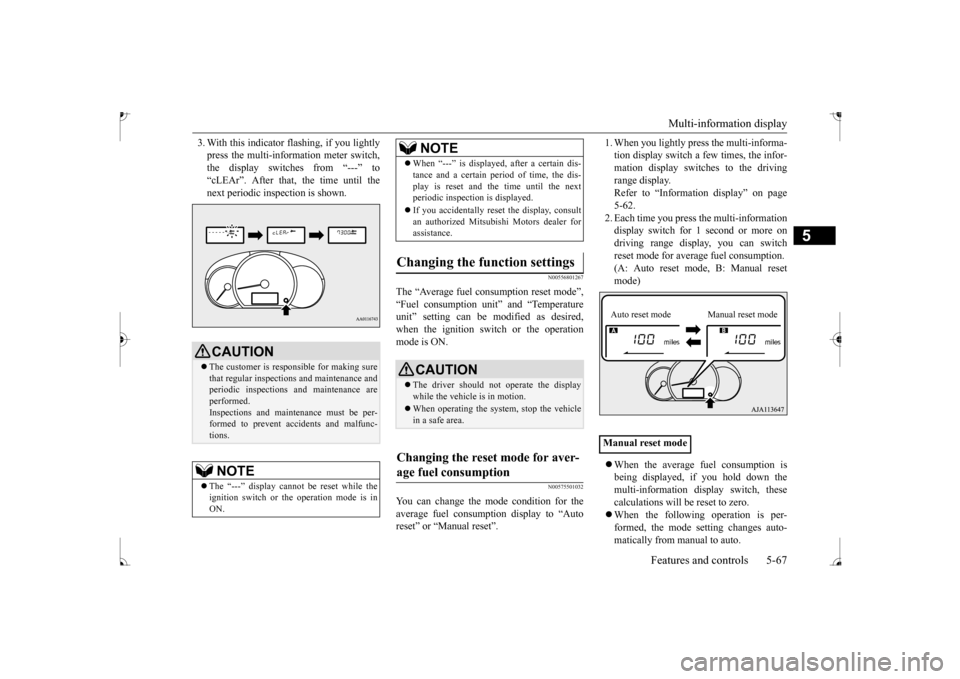
3. With this indicator
flashing, if you lightly
press the multi-information meter switch,the display switches from “---” to “cLEAr”. After that, the time until the next periodic inspection is shown.
N00556801267
The “Average fuel c
onsumption reset mode”,
“Fuel consumption uni
t” and “Temperature
unit” setting can be m
odified as desired,
when the ignition switch or the operation mode is ON.
N00575501032
You can change the mode condition for theaverage fuel consumpt
ion display to “Auto
reset” or “Manual reset”.
1. When you lightly press the multi-informa- tion display switch a few times, the infor-mation display switches to the driving range display. Refer to “Information display” on page5-62. 2. Each time you press th
e multi-information
display switch for 1 second or more ondriving range disp
lay, you can switch
reset mode for average fuel consumption. (A: Auto reset mode, B: Manual reset mode) When the average fuel consumption is being displayed, if you hold down themulti-information display switch, these calculations will be reset to zero. When the following operation is per- formed, the mode setting changes auto- matically from manual to auto.
CAUTION The customer is responsible for making sure that regular inspections and maintenance and periodic inspections
and maintenance are
performed.Inspections and mainte
nance must be per-
formed to prevent accidents and malfunc- tions.NOTE
The “---” display cannot
be reset while the
ignition switch or the operation mode is inON.
When “---” is displayed, after a certain dis- tance and a certain pe
riod of time, the dis-
play is reset and th
e time until the next
periodic inspection is displayed. If you accidentally reset
the display, consult
an authorized Mitsubishi Motors dealer for assistance.
Changing the function settings
CAUTION The driver should not operate the display while the vehicle is in motion. When operating the system, stop the vehicle in a safe area.
Changing the reset mode for aver- age fuel consumption
NOTE
Manual reset modeAuto reset mode Manual reset mode
BK0235100US.book 67 ページ 2015年11月20日 金曜日 午後3時12分
Page 131 of 305
![MITSUBISHI MIRAGE 2017 6.G Workshop Manual Multi-information display 5-68 Features and controls
5
[Except for vehicles
equipped with the
F. A . S . T. - k e y ]Turn the ignition switch to the “ON” posi- tion from the “ACC” or “OFF](/img/19/7514/w960_7514-130.png "MITSUBISHI MIRAGE 2017 6.G Workshop Manual Multi-information display 5-68 Features and controls
5
[Except for vehicles
equipped with the
F. A . S . T. - k e y ]Turn the ignition switch to the “ON” posi- tion from the “ACC” or “OFF")
Multi-information display 5-68 Features and controls
5
[Except for vehicles
equipped with the
F. A . S . T. - k e y ]Turn the ignition switch to the “ON” posi- tion from the “ACC” or “OFF” position. [For vehicles equipped
with the F.A.S.T.-
key]Change the operation mode to ON from ACC or OFF. When the average fuel consumption is being displayed, if you hold down the multi-information display switch, these calculations will
be reset to zero.
When the engine switch or the operation mode is in the following conditions, the average fuel consumption display willautomatically reset. [Except for vehicles
equipped with the
F. A . S . T. - k e y ] The ignition switch has been set to the“ACC” or “OFF” position for about 4 hours or more. [For vehicles equipped
with the F.A.S.T.-
key]The operation mode has been set to ACC or OFF for about 4 hours or more.
N00557100156
The fuel consumption display unit can bechanged. The distance
and amount units are
also switched to match the selected fuel con-sumption unit. 1. When you lightly press the multi-informa- tion display switch a few times, the infor- mation display switches to the averagefuel consumption display. Refer to “Information display” on page 5-62.2. Press and hold the mu
lti-information dis-
play switch for about 5 seconds or more until buzzer sound is heard twice.
3. Press and hold the multi-information dis- play switch to switch in sequence from“km/L”
“L/100 km”
“mpg”
The distance units is al
so changed in the fol-
lowing combinations to match the selected fuel consumption unit.
Auto reset mode
NOTE
The average fuel cons
umption display can be
reset separately for the auto reset mode andfor the manual reset mode. Disconnecting th
e battery cable will erase
from memory the manual reset mode or autoreset mode setting for the average fuel con- sumption display. The initial (default) setting is “Auto reset mode”.
Changing the fuel consumption display unit
NOTE
The display units for the driving range, the average fuel consumption are changed, but the units for the indicating needle (speedom- eter), the odometer, the trip odometer and theservice reminder will
remain unchanged.
If the battery is disconnected, the memory of the unit setting is erased and it returns auto- matically to factory setting.
BK0235100US.book 68 ページ 2015年11月20日 金曜日 午後3時12分
Page 132 of 305
Multi-information display
Features and controls 5-69
5
N00557201183
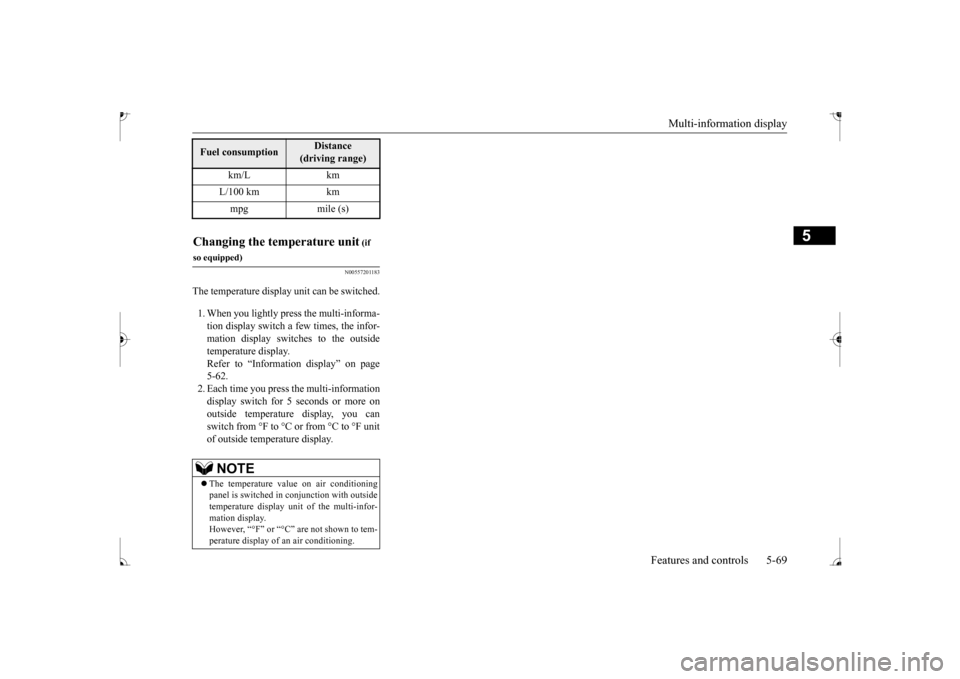
The temperature display unit can be switched. 1. When you lightly press the multi-informa- tion display switch a few times, the infor- mation display switches to the outsidetemperature display. Refer to “Information display” on page 5-62. 2. Each time you press the multi-information display switch for 5 seconds or more onoutside temperature display, you can switch from °F to °C or from °C to °F unit of outside temperature display.Fuel consumption
Distance
(driving range)
km/L km L/100 km km mpg mile (s)
Changing the temperature unit
(if
so equipped)
NOTE
The temperature value on air conditioning panel is switched in
conjunction with outside
temperature display unit of the multi-infor-mation display. However, “°F” or “°C” are not shown to tem- perature display of an air conditioning.
BK0235100US.book 69 ページ 2015年11月20日 金曜日 午後3時12分
Page 133 of 305
Indicator and warning light package 5-70 Features and controls
5
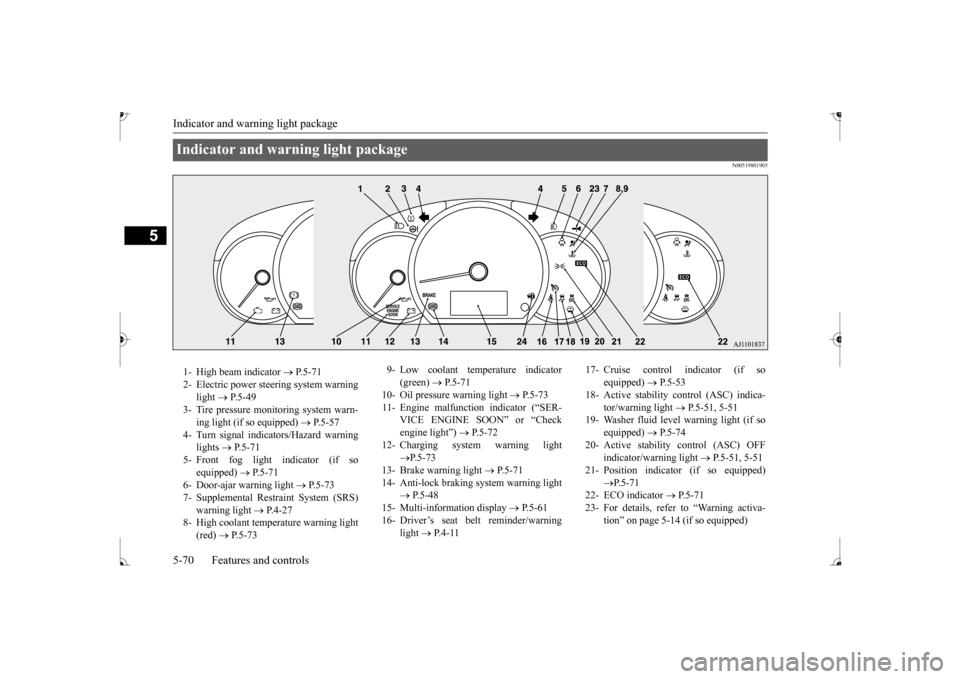
N00519801905
Indicator and warning light package 1- High beam indicator
P.5-71
2- Electric power steering system warning
light
P.5-49
3- Tire pressure moni
toring system warn-
ing light (if so equipped)
P.5-57
4- Turn signal indicators/Hazard warning
lights
P.5-71
5- Front fog light indicator (if so
equipped)
P.5-71
6- Door-ajar warning light
P.5-73
7- Supplemental Restraint System (SRS)
warning light
P.4-27
8- High coolant temperature warning light
(red)
P.5-73
9- Low coolant temperature indicator
(green)
P. 5 - 7 1
10- Oil pressure warning light
P.5-73
11- Engine malfunction indicator (“SER-
VICE ENGINE SOON” or “Check engine light”)
P.5-72
12- Charging system warning light
P.5-73
13- Brake warning light
P.5-71
14- Anti-lock braking system warning light
P.5-48
15- Multi-information display
P. 5 - 6 1
16- Driver’s seat belt reminder/warning
light
P. 4 - 1 1
17- Cruise control indicator (if so
equipped)
P.5-53
18- Active stability c
ontrol (ASC) indica-
tor/warning light
P.5-51, 5-51
19- Washer fluid level warning light (if so
equipped)
P.5-74
20- Active stability control (ASC) OFF
indicator/warning light
P.5-51, 5-51
21- Position indicator (if so equipped)
P.5-71
22- ECO indicator
P.5-71
23- For details, refer
to “Warning activa-
tion” on page 5-14 (if so equipped)
BK0235100US.book 70 ページ 2015年11月20日 金曜日 午後3時12分
Page 134 of 305
Indicators
Features and controls 5-71
5
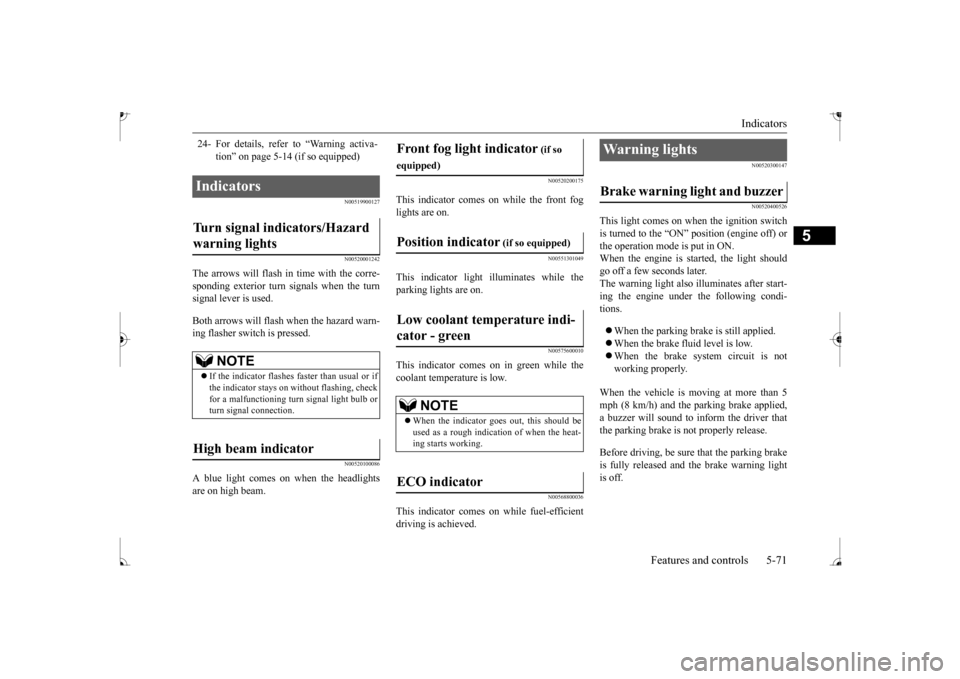
N00519900127 N00520001242
The arrows will flash in time with the corre- sponding exterior turn signals when the turn signal lever is used. Both arrows will flash when the hazard warn- ing flasher switch is pressed.
N00520100086
A blue light comes on when the headlights are on high beam.
N00520200175
This indicator comes on while the front fog lights are on.
N00551301049
This indicator light illuminates while theparking lights are on.
N00575600010
This indicator comes on in green while thecoolant temperature is low.
N00568800036
This indicator comes on while fuel-efficientdriving is achieved.
N00520300147 N00520400526
This light comes on when the ignition switch is turned to the
Page 135 of 305
Warning lights 5-72 Features and controls
5
N00520500804
This indicator is a part of the onboard diag- nostic (OBD) system which monitors the emissions, engine cont
rol system or continu-
ously variable transmission (CVT) controlsystem. If a problem is detected in one of these systems, this indicator illuminates or flashes. When the ignition switch is turned to the “ON” position or
the operation mode is
put in ON, this indicator normally comes onand goes off after the engine has started. This indicator will come on if the fuel tank filler cap is not properly tightened. If this indicator comes on and stays on after refuel-ing, stop the engine and check that the cap is properly tightened. (Turn the cap clockwise until you hear clicking sounds.)If this indicator does not go off after several seconds or lights up while driving, have the system checked as soon as possible at anauthorized Mitsubishi Motors dealer or a repair facility of your choice.
CAUTION If the brake warning light and the Anti-lock braking system warning
light are illuminated
at the same time, the braking force distribu-tion function will not
operate, the vehicle
may be destab
ilized during sudden braking
under the following conditions.• When the brake warning light does not goout even when the parking brake isreleased.• When the brake warning light stays onwhile driving.If the above occurs, avoid sudden brakingand high-speed driving.
Park the vehicle in a
safe place, and contact an authorized Mitsubishi Motors dealer
or a repair facility
of your choice as soon as possible. The vehicle should be brought to a halt in the following manner when
brake performance
is deteriorated.• Confirm that the vehicle slows down whenyou press down on the brake pedal harder than usual. In some cases, the brake pedalmay go all the way to the floor.• Should the brakes fail, use engine brakingto reduce your speed and slowly apply the parking brake. Depress the brake peda
l to illuminate the
stop lights and to alert the vehicles behind you.
Engine malfunction indicator (“SERVICE ENGINE SOON” or “Check engine light”)
CAUTION Driving for a long time with the engine mal- function indicator on
may cause more dam-
age to the emission control system. Thiscould also affect fuel economy and drivabil- ity. If this indicator does not come on when the ignition switch is turned to the “ON” posi- tion or the operation mode
is put in ON, have
the system checked at an authorized Mitsubishi Motors dealer
or a repair facility
of your choice. If the engine malfuncti
on indicator comes on
while the engine is running, avoid driving athigh speeds. During vehicle operation
with the indicator
on, the vehicle may not
accelerate when you
depress the accelerator pedal. When the vehicle is stat
ionary with the indi-
cator on, you must depress the brake pedalmore firmly than usual since the engine idling speed is higher than usual and a vehi- cle with a CVT has a stronger tendency tocreep forward.
BK0235100US.book 72 ページ 2015年11月20日 金曜日 午後3時12分
Page 136 of 305
Warning lights
Features and controls 5-73
5
N00520600313
This light comes on in the event of a malfunc- tion in the charging system or when the igni-tion switch is turned to the “ON” position (engine off) or the operation mode is put in ON. When the engine is started, the lightshould go out. Check to make sure that the light has gone out before driving.
N00520700170
This light comes on when the engine oil pres-sure is below normal. If the light stays on while driving, stop the engine as soon as pos-sible. Do not run the engine until the cause of the low oil pressure is corrected.
N00575700011
This light comes on in red if the coolant tem- perature becomes excessively high.
N00520900329
This light comes on when any door or the lift-gate is open or not completely closed. When the vehicle is moving at more than 5 mph (8 km/h) and any door or the liftgate isopen or ajar, a tone will sound 4 times to inform the driver that any door or the liftgate is not properly shut.
NOTE
Do not disconnect the battery cable when the engine malfunction i
ndicator (“SERVICE
ENGINE SOON” or “Che
ck engine light”) is
on. The engine electronic control module stores critical OBD information (especially exhaustemission data), which ma
y be lost if the bat-
tery cable is disconne
cted while the engine
malfunction indicator is
on. This will make it
difficult to diagnose the cause of future prob- lems.
Charging system warning light
CAUTION If the warning light stays on while the engine is running, park your ve
hicle in a safe place
as soon as possible and
contact an authorized
Mitsubishi Motors dealer
or a repair facility
of your choice to have the system checked.
Oil pressure warning light
CAUTION If this light comes on when the engine oil level is not low, have
your vehicle checked at
an authorized Mitsubish
i Motors dealer or a
repair facility
of your choice.
This warning light does not show the amount of oil in the crankcase. This can only be determined by checking the oil level with the dipstick with the engine turned off.
High coolant temperature warning light - red
CAUTION If the light comes on
during vehicle opera-
tion, it indicates that
the engine is possibly
overheating. Continue
d driving could make
the engine fail. Immedi
ately stop the vehicle
in a safe place and ta
ke appropriate action.
(Refer to