battery MITSUBISHI MIRAGE 2017 6.G User Guide
[x] Cancel search | Manufacturer: MITSUBISHI, Model Year: 2017, Model line: MIRAGE, Model: MITSUBISHI MIRAGE 2017 6.GPages: 307, PDF Size: 9.02 MB
Page 92 of 307
Power window control
Features and controls 5-31
5
stopped. However, once the driver’s door or the front passenger’s
door is opened, the
power windows cannot be operated.
N00549000169
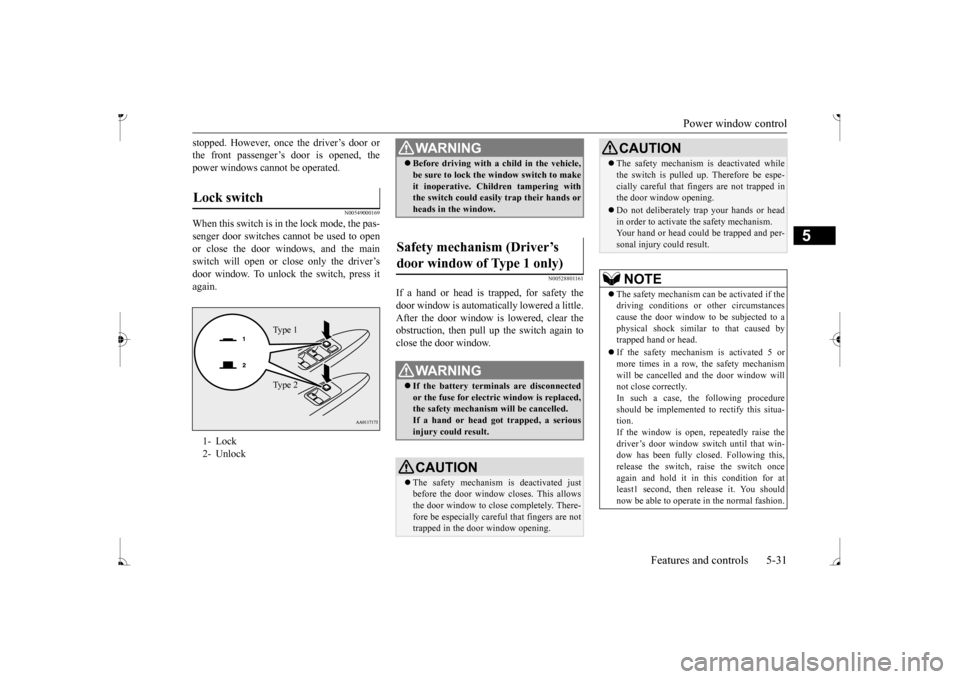
When this switch is in the lock mode, the pas-senger door switches cannot be used to open or close the door windows, and the main switch will open or close only the driver’s door window. To unlock the switch, press it again.
N00528801161
If a hand or head is trapped, for safety thedoor window is automatically lowered a little. After the door window is lowered, clear the obstruction, then pull up the switch again toclose the door window.
Lock switch 1- Lock2- Unlock
Ty p e 1 Ty p e 2
WA R N I N G Before driving with a child in the vehicle, be sure to lock the window switch to makeit inoperative. Children tampering withthe switch could easily trap their hands or heads in the window.
Safety mechanism (Driver’s door window of Type 1 only)
WA R N I N G If the battery terminals are disconnected or the fuse for electric window is replaced, the safety mechanism will be cancelled. If a hand or head got
trapped, a serious
injury could result.CAUTION The safety mechanism is deactivated just before the door window closes. This allows the door window to close completely. There- fore be especially careful that fingers are nottrapped in the door window opening.
The safety mechanism is deactivated while the switch is pulled up.
Therefore be espe-
cially careful that fi
ngers are not trapped in
the door window opening. Do not deliberately tr
ap your hands or head
in order to activate the safety mechanism. Your hand or head coul
d be trapped and per-
sonal injury could result.NOTE
The safety mechanism can be activated if the driving conditions or
other circumstances
cause the door window to be subjected to a physical shock similar
to that caused by
trapped hand or head. If the safety mechanism is activated 5 or more times in a row, the safety mechanismwill be cancelled a
nd the door window will
not close correctly. In such a case, the following procedureshould be implemented to rectify this situa- tion. If the window is open, repeatedly raise thedriver’s door window sw
itch until that win-
dow has been fully closed. Following this, release the switch, raise the switch once again and hold it in this condition for atleast1 second, then release it. You should now be able to operate in the normal fashion.CAUTION
BK0236100US.book 31 ページ 2016年2月1日 月曜日 午前10時15分
Page 93 of 307
Parking brake 5-32 Features and controls
5
N00551400043
Wind buffeting can be de
scribed as the per-
ception of pressure on the ears or a booming or rumbling sound. Your
vehicle may exhibit
wind buffeting when driving with one or bothrear door windows down or partially opened. This is a normal occurre
nce that can be mini-
mized. If the buffeting
occurs with the rear
door windows open, open the front door win- dows as well as the rear door windows to minimize the condition.
N00511400399
To park the vehicle, fi
rst bring it to a com-
plete stop, fully engage the parking brake, and then move the gearshift lever to 1st (on auphill) or “R” (Reverse) (on a downhill) posi- tion for vehicles equi
pped with a manual
transaxle, set the se
lector lever to “P”
(PARK) position for vehicles equipped with a continuously variable transmission (CVT).
If the battery terminals are disconnected or the fuse for electric
window is replaced, the
safety mechanism will
be cancelled and the
door window will not automatically open/close completely. If the window is open,
repeatedly raise the
driver’s door window switch until the win- dow has been fully cl
osed. Following this,
release the switch, raise the switch onceagain and hold it in this condition for at least 1 second, then release it. You should now be able to operate the driver’s door window inthe normal fashion.
What to do if you hear wind buffeting when driving
NOTE
Parking brake
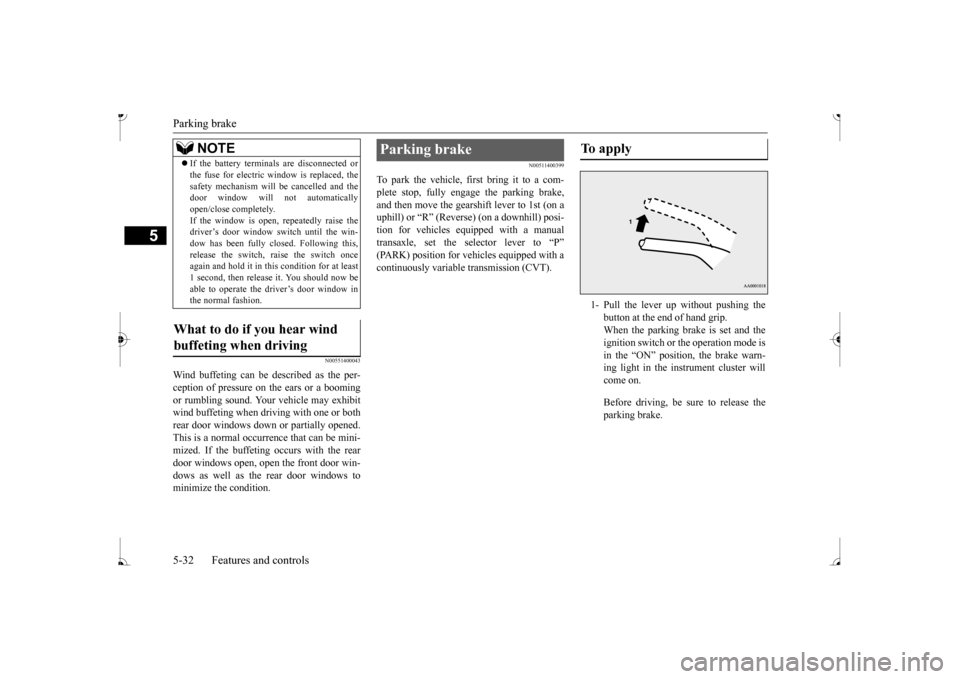
To apply 1- Pull the lever up without pushing the
button at the end of hand grip. When the parking brake is set and theignition switch or the operation mode is in the “ON” position, the brake warn- ing light in the instrument cluster willcome on. Before driving, be sure to release the parking brake.
BK0236100US.book 32 ページ 2016年2月1日 月曜日 午前10時15分
Page 99 of 307
Starting the engine 5-38 Features and controls
5
2. Turn the key to the “OFF” position and remove it.
N00512601816
[For vehicles equipped with the Free-hand Advanced Security Tr
ansmitter (F.A.S.T.-
key)]For information on
operation for vehicles
equipped with the Free-hand Advanced Secu- rity Transmitter (F.A
.S.T.-key), refer to
“Free-hand Advanced
Security Transmitter
(F.A.S.T.-key): Starting and stopping the engine” on page 5-16. [Except for vehicles equipped with the Free-hand Advanced Se
curity Transmit-
ter (F.A.S.T.-key)] Do not operate the starter motor continu- ously for longer than 15 seconds as this could run the battery
down or damage the
starter motor. If the engine does not start, turn the ignition switch back to the “OFF” position, wait a few se
conds, and then try
again. Trying repeatedly with the engine or starter motor still turning will damage the starter mechanism. If the engine will not
start because the bat-
tery is weak or discharged, refer to “Jump-starting the engine” (on page 8-2)for instructions.
A longer warm up period will only con- sume extra fuel. The engine is warmed upenough for driving when the low coolant temperature indicator goes out. Refer to “Low coolant temperature indi-cator” on page 5-76.
This model is equipped with an electronically controlled fuel injection system. This is a sys- tem that automatically controls fuel injection.
CAUTION If the engine is stopped while driving, the power brake booster will
cease to function
and braking efficiency will deteriorate. Also,the power steering syst
em will not function
and it will require gr
eater manual effort to
operate the steering. Do not leave the key in
the “ON” position for
a long time when the engine is not running.Doing so will cause the battery to be dis- charged. Do not turn the key to the “START” position when the engine is running, doing so could damage the starter motor.
Starting the engine Tips for starting
WA R N I N G Never run the engine in
a closed or poorly
ventilated area any longer than is neededto move your vehicle
out of the area. Car-
bon monoxide gas, wh
ich is odorless and
extremely poisonous, could build up andcause serious injury or death.CAUTION Do not push-start the vehicle.Do not run the engine at high rpms or drive at high speeds until
the engine has had a
chance to warm up. Release the ignition sw
itch as soon as the
engine starts. Otherwis
e, the starter motor
will be damaged.
Starting the engine
BK0236100US.book 38 ページ 2016年2月1日 月曜日 午前10時15分
Page 100 of 307
Starting the engine
Features and controls 5-39
5
There is usually no need to depress the accel- erator pedal when starting the engine.The starter should not be run for more than 15 seconds at a time. To prevent battery drai
n, wait a few seconds
between attempts to restart the engine. 1. Make sure all occupants are properly seated with seat belts fastened. 2. Insert the ignition key.3. Make sure the parking brake is applied. 4. Press and hold the
brake pedal down with
your right foot. 5. Press and hold the clut
ch pedal all the way
down (manual transaxle). 6. On vehicles equipped with manual trans- axle, place the gearshift lever in the “N” On vehicles equippe
d with continuously
variable transmission (CVT), make surethe selector lever is in the “P” (PARK) position.
7. Turn the ignition switch to the “ON” posi- tion and make certain that all warning lights are functioning properly beforestarting the engine. 8. Turn the ignition switch to the “START”
ssing the accelerator
pedal. Release the key when the engine starts.
After several attempts
, you may experience
that the engine still does not start. 1. Make sure that all electric devices, such as lights, air conditi
oning blower and rear
window defogger, are turned off.
2. While depressing the brake pedal {contin- uously variable transmission (CVT)} orthe clutch pedal (manual transaxle), press the accelerator peda
l halfway and hold it
there, then crank the engine. Release theaccelerator pedal, immediately after the engine starts. 3. If the engine still wi
ll not start, the engine
could be flooded with too much gasoline. While depressing the brake pedal (CVT) or the clutch pedal (manual transaxle), push the accelerator pedal all the way down and hold it there, then crank theengine for 5 to 6 seconds. Return the igni- tion switch to the “OFF” position and release the accelerator pedal. Wait a fewseconds, and then crank the engine again for 5 to 6 seconds while depressing the brake pedal (CVT) or the clutch pedal(manual transaxle), but do not push the accelerator pedal. Release the ignition key if the engine starts.
If the engine fails to
start, repeat these procedures. If the engine still will not
start, contact your
local Mitsubishi Motors dealer or a repairfacility of your choi
ce for assistance.
NOTE
On vehicles equipped
with manual transaxle,
the starter will not ope
rate unless the clutch
pedal is fully depresse
d (Clutch interlock).
NOTE
On vehicles equipped
with CVT, the starter
will not operate unless the selector lever is inthe
Page 104 of 307
Continuously variable transmission (CVT) (if so equipped)
Features and controls 5-43
5
N00563300049
When the selector lever cannot be shifted from the “P” (PARK) position to another position while the brake
pedal is pressed and
held down with the ignition switch or theoperation mode in ON, the battery may be flat or the shift-lock mechanism may be malfunc- tioning.Immediately have your
vehicle checked by an
authorized Mitsubishi Motors dealer or a repair facility
of your choice.
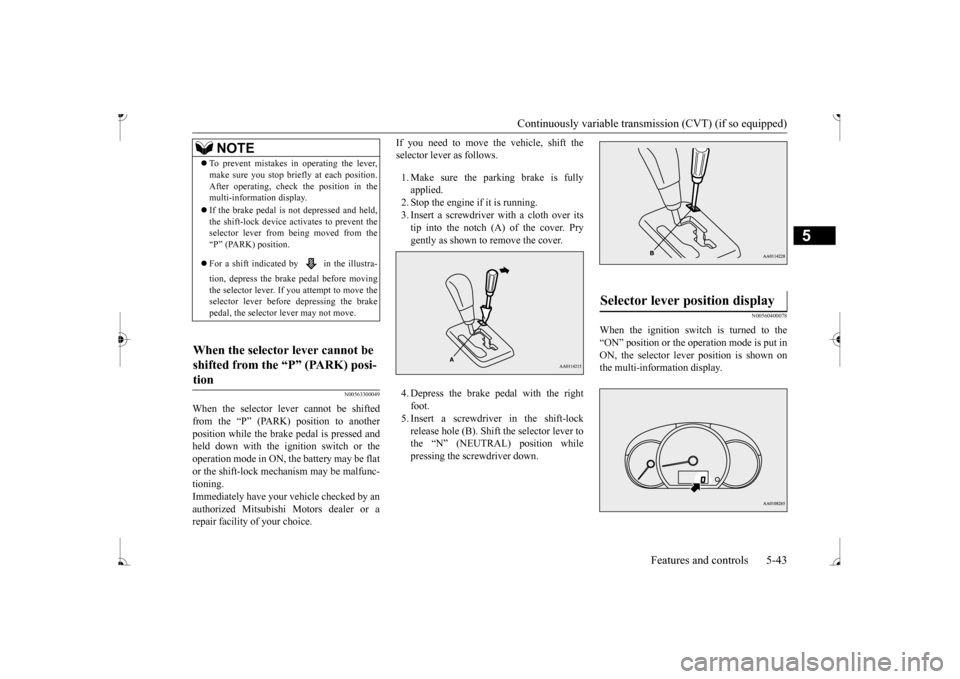
If you need to move the vehicle, shift the selector lever as follows. 1. Make sure the parking brake is fully applied. 2. Stop the engine if it is running. 3. Insert a screwdriver
with a cloth over its
tip into the notch (A) of the cover. Pry gently as shown to remove the cover. 4. Depress the brake pedal with the right foot. 5. Insert a screwdriver in the shift-lock release hole (B). Shift the selector lever tothe “N” (NEUTRAL) position while pressing the screwdriver down.
N00560400078
When the ignition switch is turned to the “ON” position or the operation mode is put in ON, the selector lever position is shown on the multi-information display.
NOTE
To prevent mistakes in operating the lever, make sure you stop brie
fly at each position.
After operating, chec
k the position in the
multi-information display. If the brake pedal is not depressed and held, the shift-lock device ac
tivates to prevent the
selector lever from being moved from the “P” (PARK) position. For a shift indicated by in the illustra- tion, depress the brake pedal before moving the selector lever. If you attempt to move the selector lever before depressing the brake pedal, the selector
lever may not move.
When the selector lever cannot be shifted from the “P” (PARK) posi-tion
Selector lever position display
BK0236100US.book 43 ページ 2016年2月1日 月曜日 午前10時15分
Page 115 of 307
Cruise control (if so equipped)
5
N00546600119
If an abnormal condition occurs in the sys- tem, the following indicator will turn on.
N00546300031
N00518300573
Cruise control is an automatic speed control system that keeps a set speed. It can be acti-vated at speeds from about 25 mph (40 km/h). Cruise cont
rol does not work at
speeds below about 25 mph (40 km/h).
NOTE
The indicator may turn on when you start the engine. This means
that the battery volt-
age momentarily dropped when the enginewas started. It does not
indicate a malfunc-
tion, provided that
the display goes out
immediately. When a compact spare tire has been put on your vehicle, the grippi
ng ability of the tire
will be lower, making it
more likely that the
indicator will blink.
ASC warning indicator
-
ASC indicator
-
ASC OFF indicator
CAUTION The system may be malfunctioning. Park your vehicle in a
safe place and stop the
engine.Restart the engine and check whether the indicator goes out. If th
ey go out, there is no
abnormal condition. If
they do not go out or
appear frequently, it is
not necessary to stop
the vehicle imme
diately, but you should have
your vehicle inspected by an authorizedMitsubishi Motors dealer or a repair facility of your choice as soon as possible.
To w i n g
CAUTION When towing the vehicle with only the front wheels or only the rear wheels raised off theground, do not place th
e ignition switch in
the “ON” position or
do not put the operation
mode in ON. Placing
the ignition switch in
the “ON” position or
putting the operation
mode in ON could cause the ASC to operate, resulting in an accident.Note that the correct towing method dependson the transmission type
and the vehicle’s
drive configuration. For details, refer to
“Towing” on page 8-12.
Cruise control
(if so equipped)
When you do not wish to drive at a set speed, turn off the cruise control for safety. Do not use cruise control when driving con- ditions will not allow
you to stay at the same
speed, such as in heavy traffic or on roads that are winding, icy, snow-covered, wet,slippery, on a steep downhill slope. On vehicles equipped
with manual transaxle,
do not move the gearshift lever to the “N” (Neutral) position whil
e driving at a set
speed without depressi
ng the clutch pedal.
The engine will run too fast and might be damaged.NOTE
Cruise control may not
be able to keep your
speed on uphills or downhills. Your speed may decr
ease on a steep uphill.
You may use the accelerator pedal if you want to stay at your set speed.
BK0236100US.book 54 ページ 2016年2月1日 月曜日 午前10時15分
Page 122 of 307
Tire pressure monitoring system (if so equipped)
Features and controls 5-61
5
2. If the tire pressure monitoring system warning light remain
s illuminated after
you have been driving for about 20 min- utes after you adjust the tire inflation pres- sure, one or more of the tires may have apuncture. Inspect the ti
re and if it has a
puncture, have it re
paired by an autho-
rized Mitsubishi Motors dealer as soon aspossible.
The tire pressure monitoring system may not work normally in the following circum- stances: A wireless facility
or device using the
same frequency is near the vehicle. Snow or ice is stuck inside the fenders and/or on the wheels. The tire inflation pressure sensor’s battery is dead. Wheels other than Mitsubishi Genuine wheels are being used. Wheels that are not fitted with tire infla- tion pressure sensors are being used. Wheels whose ID codes are not memo- rized by the vehicle are used. Compact spare tire is fitted on a road wheel. A window tint that af
fects the radio wave
signals is installed.
N00532900153
If new wheels with new tire inflation pressuresensors are installed,
their ID codes must be
programmed into the tire pressure monitoring system. Have tire and
wheel replacement per-
formed by an authorized Mitsubishi Motors dealer to avoid the risk of damaging the tire inflation pressure sensors. If the wheelreplacement is not done by an authorized Mitsubishi Motors dealer
, it is not covered by
your warranty.
WA R N I N G If the warning light illuminates while you are driving, avoid ha
rd braking, sharp
steering maneuvers and high speeds. Driving with an under-inflated tire adversely affe
cts vehicle performance and
can result in an accident.CAUTION The warning light may
not illuminate imme-
diately in the event of
a tire blowout or rapid
leak.NOTE
To avoid the risk of da
mage to the tire infla-
tion pressure sensors, have any puncturedtire repaired by an authorized Mitsubishi Motors dealer. If the tir
e repair is not done by
an authorized Mitsubishi Motors dealer,damage to the tire infl
ation pressure sensor is
not covered by your warranty.
Do not use an aerosol puncture-repair spray on any tire.Such a spray could dama
ge the tire inflation
pressure sensors. Have any puncture repa
ired by an authorized
Mitsubishi Moto
rs dealer.
NOTE
NOTE
Tire inflation pressures vary with the ambi- ent temperature. If the vehicle is subjected tolarge variations in ambient temperature, thetire inflation pressures may be under-inflated (causing the warning light come on) when the ambient temperature is relatively low. Ifthe warning light comes on, adjust the tire inflation pressure.
Whenever the tires and wheels are replaced with new ones
CAUTION The use of non-genuine wheels will prevent the proper fit of the tire inflation pressure sensors, resulting air
leakage or damage of
the sensors.
BK0236100US.book 61 ページ 2016年2月1日 月曜日 午前10時15分
Page 129 of 307
Multi-information display 5-68 Features and controls
5
N00574900016
The odometer indicates the total distance the vehicle has traveled.
N00575000014
The trip odometer indicates the distance trav-eled between two points. To return the display to 0, hold down the multi-information displa
y switch for about 1
second or more. Only the currently displayed value will be reset. Example
If trip odometer is displayed, only trip odometer will be reset.
N00575101025
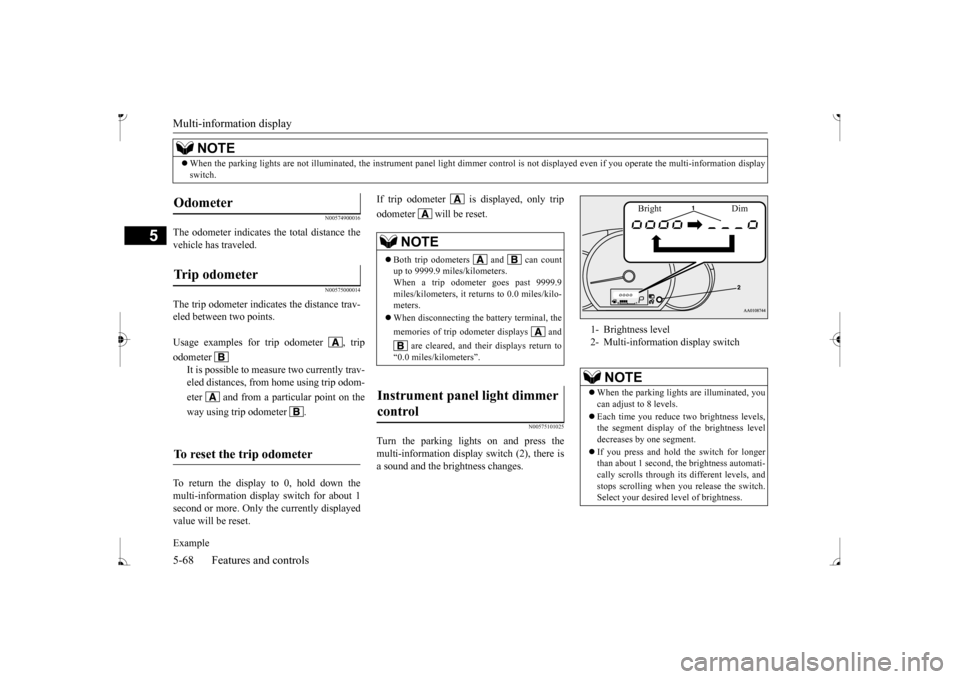
Turn the parking lights on and press the multi-information display switch (2), there is a sound and the brightness changes.
When the parking lights are not illuminated,
the instrument panel light
dimmer control is not displa
yed even if you operate the
multi-information display
switch.NOTE
Odometer Trip odometer Usage examples for trip odometer , trip odometer
It is possible to meas
ure two currently trav-
eled distances, from home using trip odom- eter and from a particular point on theway using trip odometer .
To reset the trip odometer
NOTE
Both trip odometers and can count up to 9999.9 miles/kilometers. When a trip odometer goes past 9999.9miles/kilometers, it returns to 0.0 miles/kilo- meters. When disconnecting the battery terminal, the memories of trip odom
eter displays and
are cleared, and thei
r displays return to
“0.0 miles/kilometers”.
Instrument panel light dimmer control
1- Brightness level 2- Multi-informati
on display switch
NOTE
When the parking lights are illuminated, you can adjust to 8 levels. Each time you reduce tw
o brightness levels,
the segment display of the brightness level decreases by one segment. If you press and hold the switch for longer than about 1 second, the brightness automati-cally scrolls through its different levels, and stops scrolling when you release the switch. Select your desired
level of brightness.
Bright Dim
BK0236100US.book 68 ページ 2016年2月1日 月曜日 午前10時15分
Page 134 of 307
![MITSUBISHI MIRAGE 2017 6.G User Guide Multi-information display
Features and controls 5-73
5
[Except for vehicles equipped with the F. A . S . T. - k e y ]Turn the ignition switch to the “ON” posi- tion from the “ACC” or “OFFâ€](/img/19/7512/w960_7512-133.png "MITSUBISHI MIRAGE 2017 6.G User Guide Multi-information display
Features and controls 5-73
5
[Except for vehicles equipped with the F. A . S . T. - k e y ]Turn the ignition switch to the “ON” posi- tion from the “ACC” or “OFFâ€")
Multi-information display
Features and controls 5-73
5
[Except for vehicles equipped with the F. A . S . T. - k e y ]Turn the ignition switch to the “ON” posi- tion from the “ACC” or “OFF” position. [For vehicles equipped with the F.A.S.T.- key]Change the operation mode to ON from ACC or OFF. When the average fuel consumption is being displayed, if you hold down the multi-information display switch, these calculations will be reset to zero. When the engine switch or the operation mode is in the following conditions, the average fuel consumption display willautomatically reset. [Except for vehicles equipped with the F. A . S . T. - k e y ] The ignition switch has been set to the“ACC” or “OFF” position for about 4 hours or more. [For vehicles equipped with the F.A.S.T.- key]The operation mode has been set to ACC or OFF for about 4 hours or more.
N00557100156
The fuel consumption display unit can bechanged. The distance and amount units are also switched to match the selected fuel con-sumption unit. 1. When you lightly press the multi-informa- tion display switch a few times, the infor- mation display switches to the averagefuel consumption display. Refer to “Information display” on page 5-67.2. Press and hold the multi-information dis- play switch for about 5 seconds or more until buzzer sound
is heard twice.
3. Press and hold the mu
lti-information dis-
play switch to switch in sequence from“km/L”
“L/100 km”
“km/L”.
The distance units is also changed in the fol- lowing combinations to match the selected fuel consumption unit.
Auto reset mode
NOTE
The average fuel cons
umption display can be
reset separately for the auto reset mode andfor the manual reset mode. Disconnecting the batt
ery cable will erase
from memory the manual reset mode or autoreset mode setting for the average fuel con- sumption display. The initial (default) setting is “Auto reset mode”.
Changing the fuel consumption display unit
NOTE
The display units for the driving range, the average fuel consumption are changed, but the units for the indica
ting needle (speedom-
eter), the odometer, the trip odometer and theservice reminder will
remain unchanged.
If the battery is disconnected, the memory of the unit setting is erased and it returns auto- matically to fa
ctory setting.
BK0236100US.book 73 ページ 2016年2月1日 月曜日 午前10時15分
Page 141 of 307
Combination headlights and dimmer switch 5-80 Features and controls
5
N00532600570
If the following operation is performed with the combination headlights and dim- mer switch in the “ ” or “ ” position, the lights automatically turn off. [Except for vehicles
equipped with the
F. A . S . T. - k e y ]The ignition switch is turned to the “OFF” from the ignition switch and the driver’sdoor is opened. [For vehicles equipped
with the F.A.S.T.-
key]
The operation mode is changed to OFF or ACC and the driver’s door is opened. If the following operation is performed with the combination headlights and dim- mer switch in the “ ” or “ ” position, the lights automatically turn off after about 3 minutes. [Except for vehicles equipped with the F. A . S . T. - k e y ] The ignition switch is turned to the “OFF”
the key is removed
from the ignition switch and the driver’s door is not opened. [For vehicles equipped with the F.A.S.T.- key] The operation mode is changed to OFF or ACC and the driver’s door is not opened.
If the combination headlights and dimmer switch is turned to the “ ” or “ ” posi- tion again after the engine is turned off, the about 3-minute auto-cutout function described above will not
work. The lights (the
parking lights, tail li
ghts and license plate
lights) will stay on and will not turn off auto-matically.
N00549800226
[When using a key to start the engine]If the driver’s door is opened with the key in the “OFF” or “ACC” position or removed from the ignition switch while the lights areon, the tone will sound to remind you to turn off the lights. [When using the F.A.S.T.-key to start the engine]If the driver’s door is opened with the opera- tion mode is put in OFF or ACC, or if the operation mode is changed to OFF while thelights are on, the tone
will sound to remind
you to turn off the lights. In either case, the lights will turn off automat- ically and so will the tone. Or you can turn
NOTE
Do not leave the headli
ghts and other lights
on for a long period of time when the engineis not running. The battery will run down. When it rains, or wh
en the vehicle has been
washed, the inside of the lens sometimesbecomes foggy. This is the same as when window glass mists up on a humid day, and does not indicate a pr
oblem. When the light
is switched on, the heat will dry out the fog. However, if water collects inside the light, have it checked by an authorized MitsubishiMotors dealer or a re
pair facility of your
choice.
Light auto-cutout function (headlights and other lights)
NOTE
The light auto-cutout f
unction can be deacti-
vated. See your authorized Mitsubishi Motorsdealer for details.
When you want to keep the lights on: Headlight reminder buzzer
BK0236100US.book 80 ページ 2016年2月1日 月曜日 午前10時15分