radio controls MITSUBISHI MIRAGE 2017 6.G User Guide
[x] Cancel search | Manufacturer: MITSUBISHI, Model Year: 2017, Model line: MIRAGE, Model: MITSUBISHI MIRAGE 2017 6.GPages: 307, PDF Size: 9.02 MB
Page 172 of 307
HomeLink® Wireless Control System (if so equipped)
Features and controls 5-111
5
N00584600029
Some garage door openers manufactured after 1995 have “rolling code protection”. To program a garage door openerequipped with “rolli
ng code protection”;
you will need to ac
cess the garage door
opener motor to press the motor’s “Learn”
For convenience, use
a ladder and another pe
rson to assist you.
It is recommended that a new battery be placed in the hand-held transmitter of the device being programmed to HomeLink
®
for quicker training and accurate trans- mission of the radio-frequency signal.
N00584700020
To program HomeLink
® to operate a garage
door, gate, or entry door opener, home oroffice lighting, you need to be at the same location as the device. 1. Press the HomeLink
® button that you
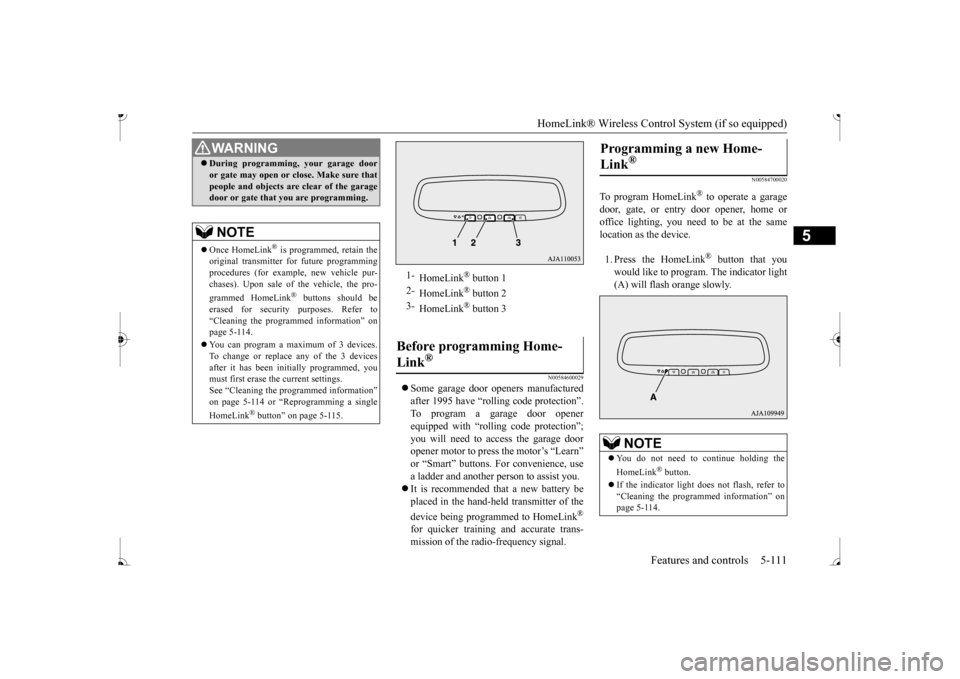
would like to program. The indicator light (A) will flash orange slowly.
During programming
, your garage door
or gate may open or close. Make sure thatpeople and objects are clear of the garagedoor or gate that you are programming.NOTE
Once HomeLink
® is programmed, retain the
original transmitter for future programming procedures (for example, new vehicle pur-chases). Upon sale of the vehicle, the pro- grammed HomeLink
® buttons should be
erased for security purposes. Refer to “Cleaning the programmed information” on page 5-114. You can program a ma
ximum of 3 devices.
To change or replace any of the 3 devicesafter it has been in
itially programmed, you
must first erase the current settings. See “Cleaning the programmed information”on page 5-114 or “Reprogramming a single HomeLink
® button” on page 5-115.
WA R N I N G
1-
HomeLink
® button 1
2-
HomeLink
® button 2
3-
HomeLink
® button 3
Before programming Home- Link
®
Programming a new Home- Link
®
NOTE
You do not need to continue holding the HomeLink
® button.
If the indicator light does not flash, refer to “Cleaning the programmed information” on page 5-114.
BK0236100US.book 111 ページ 2016年2月1日 月曜日 午前10時15分
Page 174 of 307
HomeLink® Wireless Control System (if so equipped)
Features and controls 5-113
5
N00584800021
Canadian radio-frequency laws require trans- mitter signals to “time-out” (or quit) afterseveral seconds of tr
ansmission - which may
not be long enough for HomeLink
® to pick
up the signal during pr
ogramming. Similar to
this Canadian law, some
U.S. gate operators
are designed to “time-out” in the same man-ner. The indicator LED on the hand-held transmit- ter will go off when the device times out indi-cating that it has finished transmitting. If you live in Canada or you are having diffi- culties programming a gate operator orgarage door opener by using the “Program- ming” procedures, replace “Programming a new HomeLink
®” step 3 with the following:
3. Press and release - every 2 seconds (“cycle”) your hand-held
transmitter until the
HomeLink
® indicator light changes from
slowly flashing orange to
either rapidly flash-
ing green (rolling code) or continuously litgreen (fixed code). Now you may release the hand-held transmitter button. Proceed with “Programming a new Home- Link
®” step 4 to complete.
N00584900022
The HomeLink
® has the capability of receiv-
ing garage door status from compatiblegarage door opener systems. Check your garage door opener manual for the available feature and HomeLink
® compatibility. Also
for a listing of compatible systems contact HomeLink
® at: www.homelink.com
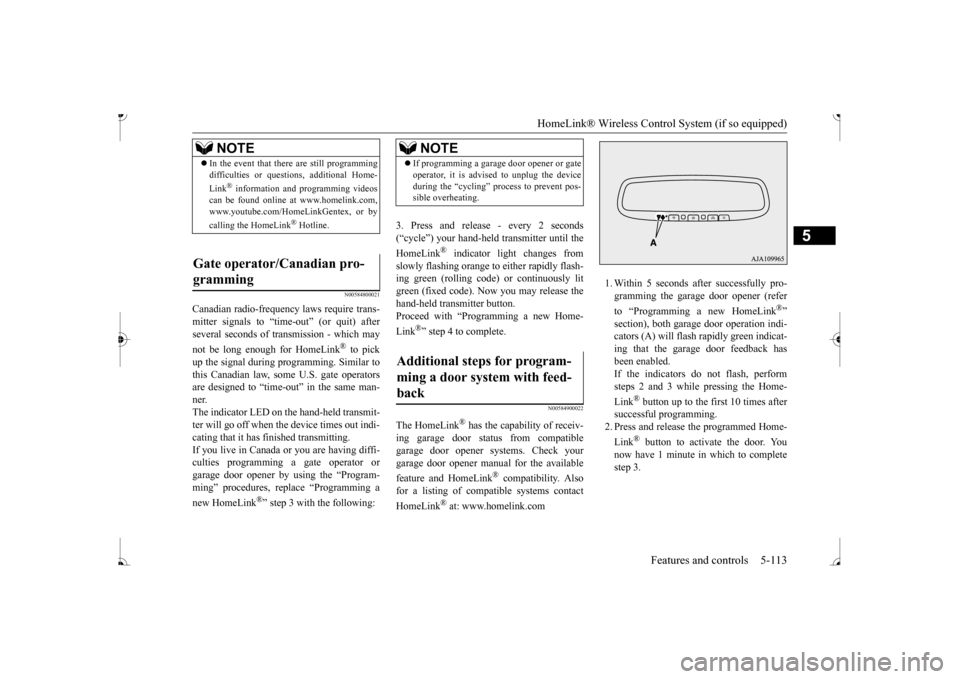
1. Within 5 seconds after successfully pro- gramming the garage
door opener (refer
to “Programming a new HomeLink
®”
section), both garage door operation indi- cators (A) will flash
rapidly green indicat-
ing that the garage
door feedback has
been enabled. If the indicators do not flash, performsteps 2 and 3 while pressing the Home- Link
® button up to the first 10 times after
successful programming.2. Press and release
the programmed Home-
Link
® button to activate the door. You
now have 1 minute in which to completestep 3.
NOTE
In the event that there are still programming difficulties or quest
ions, additional Home-
Link
® information and programming videos
can be found online at www.homelink.com,www.youtube.com/HomeLinkGentex, or by calling the HomeLink
® Hotline.
Gate operator/Canadian pro- gramming
NOTE
If programming a garage
door opener or gate
operator, it is advised to unplug the deviceduring the “cycling” process to prevent pos-sible overheating.
Additional steps for program- ming a door system with feed- back
BK0236100US.book 113 ページ 2016年2月1日 月曜日 午前10時15分
Page 176 of 307
Interior lights
Features and controls 5-115
5
1. Press and hold the 2 outer HomeLink
®
buttons for at least
10 seconds. The indi-
cator will change from continuous yellow to rapidly flashing green. 2. Release both buttons. 3. HomeLink
® is now in the train (or learn-
ing) mode and can be programmed at anytime beginning with
“Programming a new
HomeLink
®” step 1.
N00585400024
To reprogram a HomeLink
® button, complete
the following. 1. Press and hold the desired HomeLink
®
button. Do not release the button. 2. The indicator light
will begin to slowly
flash orange after 20 seconds. The Home- Link
® button can be released at this point.
Proceed with “Programming a new HomeLink
®” step 2.
N00585600026
Your HomeLink
® system operates on a radio
frequency subject to
Federal Communica-
tions Commission (FCC)
Rules (For vehicles
sold in U.S.A.) and Industry Canada Rules (For vehicles sold in
Canada). This device
complies with Part 15 of the FCC Rules and RSS- 210 of the Industry Canada Rules. Operation is subject to
the following two con-
ditions. This device may not
cause harmful inter-
ference. This device must ac
cept any interference
that may be received, including interfer- ence that may caus
e undesired operation.
This equipment complies with FCC radiation exposure limits set fo
rth for an uncontrolled
environment. End Users must follow the spe- cific operating instruct
ions for satisfying RF
exposure compliance. This transmitter must be at least 12 inches (20 cm) from the user and must not be co-loc
ated or operating in
conjunction with any other antenna or trans- mitter. The term “IC:” before
the certification/regis-
tration number only si
gnifies that Industry
Canada technical specifications were met.
N00525301644
NOTE
Do not hold for longer than 20 seconds.
Reprogramming a single HomeLink
® button
NOTE
If you do not complete the programming of a new device to the button, it will revert to thepreviously stored programming.For questions or comments, visit www.homelink.com, www.youtube.com/HomeLinkGentex, or by calling the HomeLink
® Hotline.
General information
CAUTION The transmitter has been tested and complies with FCC and IC rules.Changes or modifica
tions not expressly
approved by the party responsible for com- pliance could void the user’s authority to operate the device.
Interior lights
NOTE
Be aware that leaving the light illuminated with the engine off may run the batterydown. Never leave the vehi
cle without checking
that the light is off.
BK0236100US.book 115 ページ 2016年2月1日 月曜日 午前10時15分
Page 194 of 307
7
Comfort controlsVents ................................................................................................7-2 Heater without air conditioning functi
on (if so equipped) ...............7-4
Manual air conditioning (if so equipped) .........................................7-7Automatic air conditioning (if so equipped)...................................7-12 Important air conditioning operating tips ..
...........
...........
.........
.....7-18
Air purifier (if so equipped)............................................................7-19AM/FM electronically tune
d radio with CD player
(if so equipped) ..........................................................................7-19 To play tracks from USB device (if so equipped) ..........................7-29 To play tracks from a Bluetooth
® device
(vehicles with Bluetooth
® 2.0 interface) ...................................7-37
Steering wheel audio remote control
switches (if so equipped) .....7-40
Error codes .....................................................................................7-41 Handling of compact discs .............................................................7-42 Antenna ..........................................................................................7-44General information about your radio .....
...........
...........
...........
.....7-44
BK0236100US.book 1 ページ 2016年2月1日 月曜日 午前10時15分
Page 212 of 307
Air purifier (if so equipped) Comfort controls 7-19
7
Have the system inspected by your authorized Mitsubishi Motors dealer or a repair facilityof your choice. The air conditioning should be operated for at least five minutes each week, even in cold weather. This includes the quick defrosting mode. Operating the
air condition system
weekly maintains lubrication of the compres- sor internal parts to keep the air conditioning in the best operating condition.
N00733800180
The air conditioning system is equipped withan air filter to re
move pollen
and dust.
The air filter’s ability to collect pollen and dirt is reduced as it be
comes dirty, so replace
it periodically. For the maintenance interval,refer to the “WARRANTY AND MAINTE- NANCE MANUAL”.
N00734302131
The audio system can only be used when the ignition switch or the
operation mode is in
ON or ACC.
CAUTION The air conditioning system in your vehicle must be charged with the refrigerant HFC-134a and the lubricant ZXL 200PG. Use of any other refrigerant or lubricant will cause severe damage a
nd may require replac-
ing your vehicle’s en
tire air conditioning
system. The release of refrigerant into the atmo-sphere is not recommended. The new refrigerant HFC-134a in your vehi- cle is designed not to harm the earth’s ozonelayer. However, it may contribute slightly to global warming. It is recommended that the old refrigerant besaved and recycled for future use.
During a long period of disuse
Air purifier
(if so equipped)
NOTE
Operation in certain conditions such as driv- ing on a dusty road and frequent use of the air conditioning ca
n lead to reduction of ser-
vice life of the filter. When you feel that the air flow is lower than normal or when the windshield or windows st
art to fog up easily,
replace the air filter. Contact your Mitsubishi
Motors dealer or a
repair facility of your
choice for assistance.
AM/FM electronically tuned radio with CD player
(if so
equipped)
To listen to the audio system while the engine is not running, turn the ignitionswitch to the “ACC” pos
ition or put the oper-
ation mode in ACC. For vehicles equipped with the F.A.S.T.-key, if the operation mode is left in ACC, theaccessory power will automatically turn off after a certain period
of time and you will no
longer be able to use the audio system. Theaccessory power comes on again if the engine switch is operated with it in the “ACC” position. Refer
to “ACC power auto-
cutout function” on page 5-14. If a cellular phone is
used inside the vehicle,
it may create noise in the audio equipment. This does not mean that anything is wrong with your audio equipment. In such a case,use the cellular phone at
a place as
far away
as possible from the audio equipment. If foreign objects or wa
ter get into the audio
equipment, or if smoke or a strange odor comes from it, immediately turn off theaudio system and have
it checked at an
authorized Mitsubishi Motors dealer or a repair facility of your choice. Never try torepair it yourself. Avoid using the audio sys- tem until it is inspected by a qualified per- son. If the audio system is damaged by foreign objects, water, or fire, have the systemchecked by a qualified Mitsubishi Motors technician.
BK0236100US.book 19 ページ 2016年2月1日 月曜日 午前10時15分
Page 213 of 307
AM/FM electronically tuned radio with CD player (if so equipped) 7-20 Comfort controls
7
N00711901742 N00712001434
Turn the VOL switch clockwise to increase the volume; counterclockw
ise to decrease the
volume.The status will be shown in the display.
N00712101712
1. Press the /MENU button to select BASS
TREBLE
FADER
BAL-
ANCE
Sound control mode off.
2. Turn the SEL switch either clockwise or counterclockwise to change the tone/bal- ance setting.The status will be shown in the display.
To select the desired bass level.To select the desired treble level. To balance the volume from the F (front) and the R (rear) speakers. To balance the volume from the L (left) and the R (right) speakers.
N00734901925
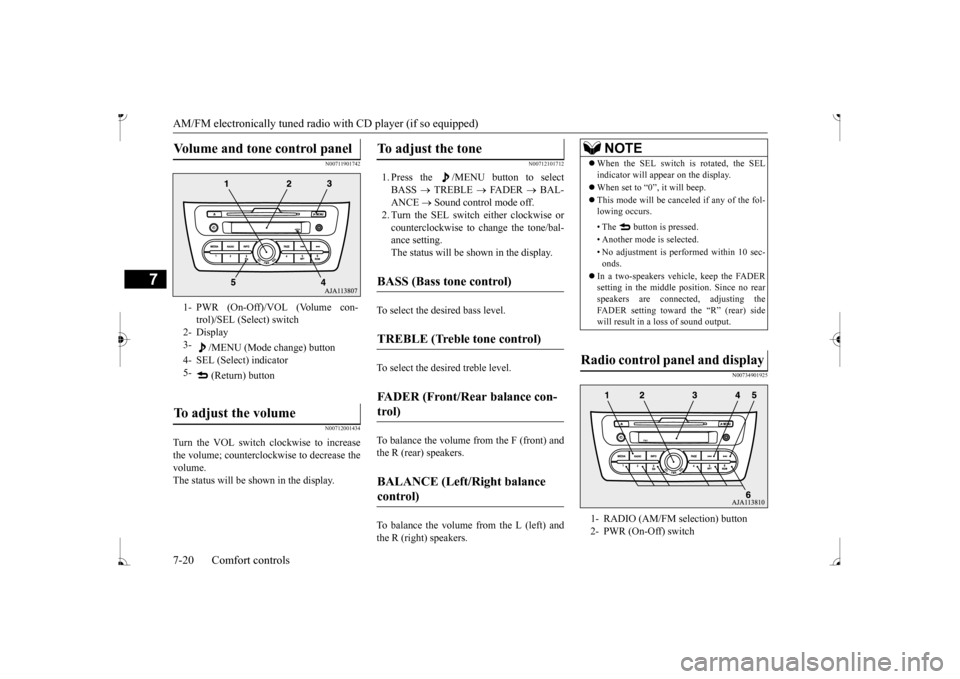
Volume and tone control panel
1- PWR (On-Off)/VOL (Volume con-
trol)/SEL (Select) switch
2- Display 3-
/MENU (Mode change) button
4- SEL (Select) indicator 5-
(Return) button
To adjust the volume
To adjust the tone
BASS (Bass tone control)
TREBLE (Treble tone control)
FADER (Front/Rear balance con- trol)
BALANCE (Left/Right balance control)
NOTE
When the SEL switch is rotated, the SEL indicator will appear on the display. When set to “0”, it will beep. This mode will be canc
eled if any of the fol-
lowing occurs. • The button is pressed. • Another mode is selected.• No adjustment is performed within 10 sec- onds.
In a two-speakers vehi
cle, keep the FADER
setting in the middle position. Since no rear speakers are connect
ed, adjusting the
FADER setting toward the “R” (rear) side will result in a loss of sound output.
Radio control panel and display
1- RADIO (AM/FM selection) button 2- PWR (On-Off) switch
BK0236100US.book 20 ページ 2016年2月1日 月曜日 午前10時15分
Page 214 of 307
AM/FM electronically tuned radio with CD player (if so equipped)
Comfort controls 7-21
7
N00735001936
1. Press the PWR switch or the RADIO but- ton to turn on the radio. Press and hold the PWR switch for 2 sec- onds or longer to turn off the radio. 2. Press the RADIO but
ton to select the
desired band (AM/FM1/FM2). 3. Press the seek button to tune to a station, or press one of the memory select buttonsto tune in to a station memorized for that button. Refer to “Automatic
tuning”, “Manual
tuning” or “To enter frequencies into the memory”.
The frequency changes every time the seek button is pressed. Pre
ss the button to select
the desired station.
After keeping the seek button depressed until it beeps, release the button, and the selectedstation reception will start. As many as 6 AM and
12 FM stations can be
entered into the memory. To store a frequency in the memory, follow these steps: 1. Press the seek button to tune to the fre- quency you wish to keep in the memory.2. Press and hold one of the memory select buttons until it beeps. The sound will be momentarily inter-rupted while the frequency is being entered into the memory. The number of the button matching the entry in memoryas well as the frequency is displayed. 3. The preset memory setting is retrieved by pressing the button and then releasing itwithin 1 second.
N00735301766
3- Display 4- Seek (Down-seek) button 5- Seek (Up-seek) button6- Memory select buttonsTo listen to the radio
To tune the radio
Manual tuning
Automatic tuningTo enter frequencies into the mem- ory
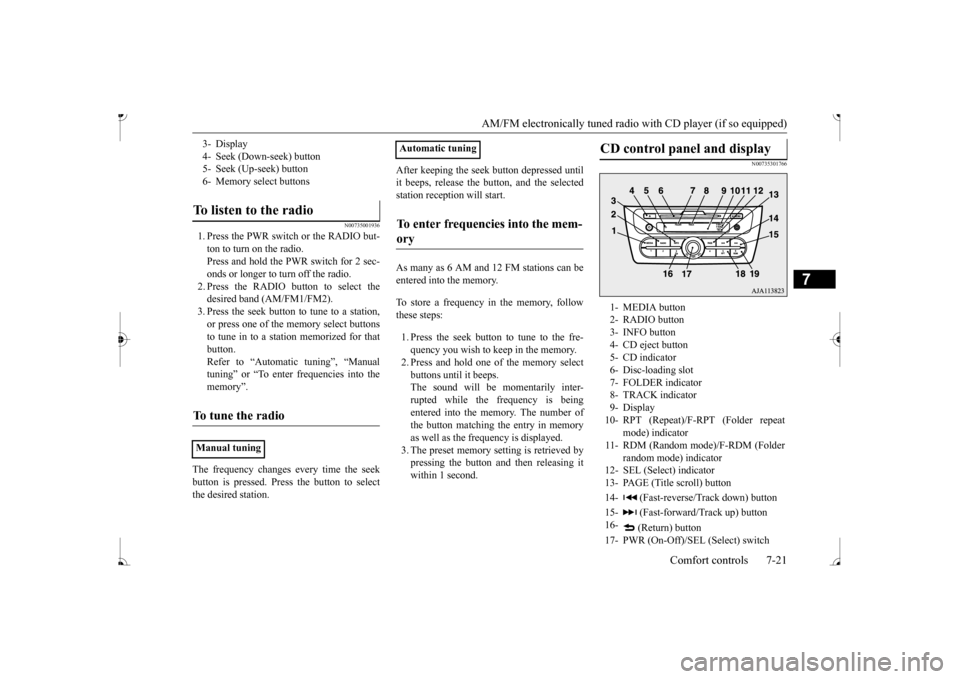
CD control panel and display
1- MEDIA button 2- RADIO button3- INFO button 4- CD eject button 5- CD indicator6- Disc-loading slot 7- FOLDER indicator 8- TRACK indicator9- Display 10- RPT (Repeat)/F-RPT (Folder repeat
mode) indicator
11- RDM (Random mode)/F-RDM (Folder
random mode) indicator
12- SEL (Select)
indicator
13- PAGE (Title scroll) button 14- (Fast-reverse/Track down) button15- (Fast-forward/Track up) button 16-
(Return) button
17- PWR (On-Off)/SEL (Select) switch
BK0236100US.book 21 ページ 2016年2月1日 月曜日 午前10時15分
Page 215 of 307
AM/FM electronically tuned radio with CD player (if so equipped) 7-22 Comfort controls
7
N00735502127
1. Insert the disc with the label facing up. When a disc is inserted, the CD indicator will come on and the CD player will begin playing even if the radio is being used. The CD player will also start playbackwhen the MEDIA button is pressed with a disc in the player or with a disc set in the Disc-loading slot, even if the radio isbeing used. 2. To stop the CD, turn off the power by pressing the PWR switch for 2 seconds orlonger, or change over to the radio mode by pressing the RADIO button, or eject the disc by pressi
ng the eject button.
When the CD eject button is pressed, the disc automatically stops and is ejected. Press the MEDIA button if
a disc is already in
the CD player. The CD player will start play- back. The track number and the playing timewill appear on the display. The tracks in the disc will be
played continuously.
This CD player allows you to play MP3 (MPEG Audio Layer-3) files recorded on CD-ROMs, CD-Rs (recordable CDs), andCD-RWs (rewritable CDs) in ISO9660 Level 1/Level 2, Joliet, an
d Romeo formats. Each
disc can hold up to 255 files in up to 100 fold-ers, up to a maximum of 16 levels. The ID3 tag information can be
displayed during MP3
playback. For inform
ation concerning ID3
tags, refer to “CD text
and MP3 title display”
1. Insert a disc containing MP3 files into the slot.2. Press the MEDIA button if a disc is already in the CD player. The display shows “READING”, thenplayback will begin.
18- RPT (Repeat) button 19- RDM (Random) buttonTo listen to a CD
To load a disc
NOTE
For information on adjusting the volume and tone, refer to “To adjust the volume” on page 7-20 and “To adjust the tone” on page 7-20. 3 inch (8 cm) compact discs cannot be played on this CD player. For information concerning the handling of compact discs, refer
to “Handling of com-
pact discs” on page 7-42.
To eject a disc
NOTE
If you do not remove the disc before 15 sec- onds have elapsed, the
CD player will auto-
matically reload
the disc and stop.
To listen to a music CD
To listen to an MP3 CD
NOTE
While listening to a
disc on which CD-DA
(CD-Digital Audio) a
nd MP3 files have both
been recorded, you can switch between read- ing of the CD-DA, reading of the MP3 files, and the external audio
input mode by press-
ing the MEDIA button for 2 seconds or lon- ger (until you hear a beep). For information on the
external audio input,
refer to “To use the external audio input function” on page 7-28. With a disc that contains both CD-DA and MP3 files, the CD-DA files are automati- cally played first. The playback sound quality differs depend- ing on the encoding software and the bit rate.For details, refer to
the user manual of your
encoding software. Depending on file/folder
configurations on a
disc, it may take some
time before playback
starts. MP3 encode software
and writing software
are not supplied with this unit.
BK0236100US.book 22 ページ 2016年2月1日 月曜日 午前10時15分
Page 216 of 307
AM/FM electronically tuned radio with CD player (if so equipped)
Comfort controls 7-23
7
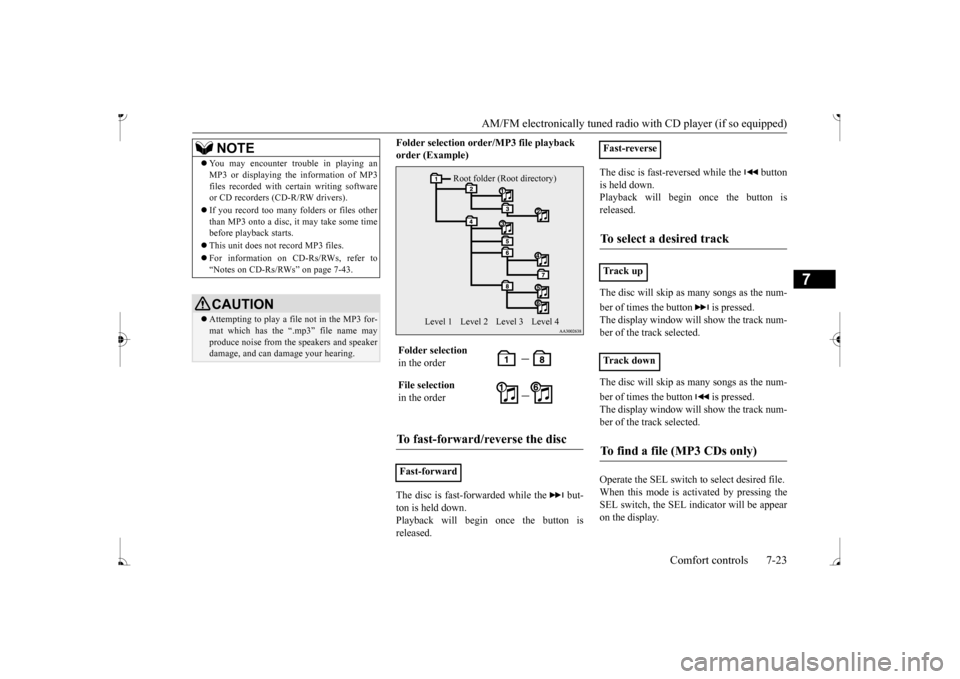
Folder selection orde
r/MP3 file playback
order (Example) The disc is fast-forwarded while the but- ton is held down. Playback will begin once the button is released.
The disc is fast-reversed while the button is held down. Playback will begi
n once the button is
released. The disc will skip as
many songs as the num-
ber of times the button is pressed. The display window will show the track num- ber of the track selected. The disc will skip as
many songs as the num-
ber of times the button is pressed. The display window will show the track num-ber of the track selected. Operate the SEL switch to select desired file. When this mode is activated by pressing the SEL switch, the SEL indicator will be appear on the display.
You may encounter trouble in playing an MP3 or displaying the information of MP3files recorded with certain writing softwareor CD recorders (CD-R/RW drivers). If you record too many folders or files other than MP3 onto a disc, it
may take some time
before playback starts. This unit does not record MP3 files. For information on CD-Rs/RWs, refer to “Notes on CD-Rs/RWs” on page 7-43.CAUTION Attempting to play a fi
le not in the MP3 for-
mat which has the “.m
p3” file name may
produce noise from the speakers and speaker damage, and can da
mage your hearing.
NOTE
Folder selection in the order File selection in the orderTo fast-forward/reverse the disc
Fast-forward
Root folder (Root directory)
Level 1 Level 3 Level 4
Level 2
Fast-reverseTo select a desired track
Tr a c k u p Tr a c k d o w nTo find a file (MP3 CDs only)
BK0236100US.book 23 ページ 2016年2月1日 月曜日 午前10時15分
Page 217 of 307
AM/FM electronically tuned radio with CD player (if so equipped) 7-24 Comfort controls
7
Press the RPT button to repeat the same track. If the RPT button is pressed, the RPT indica- tor will come on. To exit this mode, press the button again.
While a song is playing, press the RPT button for 2 seconds or longer (until you hear a beep). The F-RPT indicator will come on and the disc will repeat all the songs in the folderthat contains the s
ong currently playing.
To exit this mode, press the button again. If the RDM button is pr
essed, the RDM indi-
cator will come on and the tracks are playedat random. To exit this mode, press the button again.
If the RDM button is pressed, the F-RDM indicator will come on and the tracks are played at random from the folder that is cur- rently selected.To exit this mode, press the button again. Press the RDM button for 2 seconds or longer (until you hear a beep). The RDM indicator will come on and the tracks are played at ran- dom from all folders on the disc currentlyselected. To exit this mode, press the button again.
N00752101192
This CD player can display CD text and MP3titles, including ID
3 tag information.
Press the SEL switch :To start this mode or
to select the folder or file.
Turn the SEL switch :To show the folder or
file.
NOTE
To cancel the selection, press the button to return to the previous step. If no operation is perfo
rmed for 10 seconds
or more or another bu
tton is operated after
the SEL switch has been turned, searching for the desired file is canceled. If no operation is performed for 5 seconds or more after the file is
displayed, playback
starts. When the SEL indicato
r is not shown on the
display and the SEL switch is operated, thevolume adjustment is activated.
To repeat tracks
To repeat a track
To repeat songs in the same folder (MP3 CDs only)
NOTE
With a disc that contains both CD-DA and MP3 files, the repeat
mode causes only files
of the same format (CD-DA only or MP3files only) to be repeated.
To change the order of tracks for playback
Random playback for a disc (music CDs only)
only) Random playback for all folders on a disc (MP3 CDs only)
NOTE
With a disc that contains both CD-DA and MP3 files, the random mode causes onlyfiles of the same fo
rmat (CD-DA only or
MP3 files only) to be played in a random sequence.
CD text and MP3 title display
BK0236100US.book 24 ページ 2016年2月1日 月曜日 午前10時15分