ECO mode MITSUBISHI MONTERO 2000 Service User Guide
[x] Cancel search | Manufacturer: MITSUBISHI, Model Year: 2000, Model line: MONTERO, Model: MITSUBISHI MONTERO 2000Pages: 1839, PDF Size: 29.19 MB
Page 1402 of 1839

BODY -SunroofBODY -Sunroof42-50
"
BA
SUNROOF MOTOR ASSEMBLY INSTALLATION
1. Install the roof lid glass assembly and the sunroof motor
assembly with the sunroof motor assembly in the
fully-closed position.
2. Connect the sunroof motor assembly harness connector
and the sunroof switch harness connector to the vehicle
wiring harness connector.
3. Operate the sunroof and check that it operates correctly.
1. Install the roof lid glass assembly and the sunroof motor
assembly with the sunroof motor assembly in the
fully-closed position.
2. Connect the sunroof motor assembly harness connector
and the sunroof switch harness connector to the vehicle
wiring harness connector.
3. Operate the sunroof switch to slide the roof lid glass
to the fully-open position, and then tilt it up in steps of
30 mm to the fully-open position and then keep pressing
the switch for 3 seconds or more.
4. Operate the sunroof switch (CLOSE) using the one-touch
function to slide the roof lid glass to the fully-closed
position.
5. Operate the sunroof switch (OPEN) using the one-touch
function to slide the roof lid glass to the fully-open position.
6. Operate the sunroof switch (CLOSE) using the one-touch
function to slide the roof lid glass to the fully-closed
position.
7. Press the tilt - up switch to operate the sunroof and check
that learning is complete.
NOTE
(1) During initialisation (learning mode), use only the
CLOSE/DOWN switch to move the roof lid glass from
the fully-closed position to the fully tilted open position.
During initialisation, the TILT UP switch will not work
when pressed. Furthermore, the sunroof-ECU will stop
running in learning mode as soon as the roof lid glass
is tilted up.
(2) When the clamping prevention mechanism is
cancelled, the operation is the same as when the
roof lid glass operates 30 mm at a time.
www.WorkshopManuals.co.uk
Purchased from www.WorkshopManuals.co.uk
Page 1624 of 1839

CHASSIS ELECTRICAL -Clock or Center Display54A-54
BEFORE REMOVING THE BATTERY
The Center display has a large amount of data unique to the vehicle in its memory. When the battery
cable is disconnected, that memory is affected as shown in the table below. Accordingly, it is necessary
to make sure that you take notes of important information before disconnecting the battery cable.
FunctionInput function/memoryWhen battery cable is disconnected
Clock set on displayCurrent timeRetains data for approx. 1 hour
Vehicle model setShort (3-door models)/long (5-door
models)Retains data for approx. 1 hour
Brightness set for displayPosition set on displayRetains data for approx. 1 hour
Unit set for trip computerkm or mile, L/100km or mpg or km/L
Average vehicle speed after resetRetains data for approx. 1 hour
Average vehicle speed on displayAverage vehicle speed after resetRetains data for approx. 1 hour
Average fuel consumption on displayAverage fuel consumption after resetRetains data for approx. 1 hour
Cruising range on displayCruising range, fuel economyRetains data for approx. 1 hour
Outside temperature on displayOutside temperature after the ignition
switch is turned to the OFF(LOCK)
position.Retains data for approx. 1 hour
* The outside temperature sensor
is located near the engine.
Therefore, incorrectly high
temperature may be displayed
when the battery cable is
reconnected within one hour.
DIAGNOSIS FUNCTION FOR CENTER DISPLAY
Center display has the following diagnosis function:
FunctionContents
Service functionThere are the following 4 diagnosis modes available
1. Check of vehicle informationThe vehicle, short (3-door models)/long (5-door models) set
2. Check of LCD segmentsThe LCD segments for display available to light on or not
3. Check of sensorsOutside temperature, voltage of fuel gauge unit, system voltage, fuel amount
remains, fuel economy calculated after supply of fuel
4. Check of units connected into
the center displayThe units connected on display
Voltage (%) on terminal for MUT-II
Vehicle speed signal sent by engine-ECU
Oscillating signal
www.WorkshopManuals.co.uk
Purchased from www.WorkshopManuals.co.uk
Page 1634 of 1839
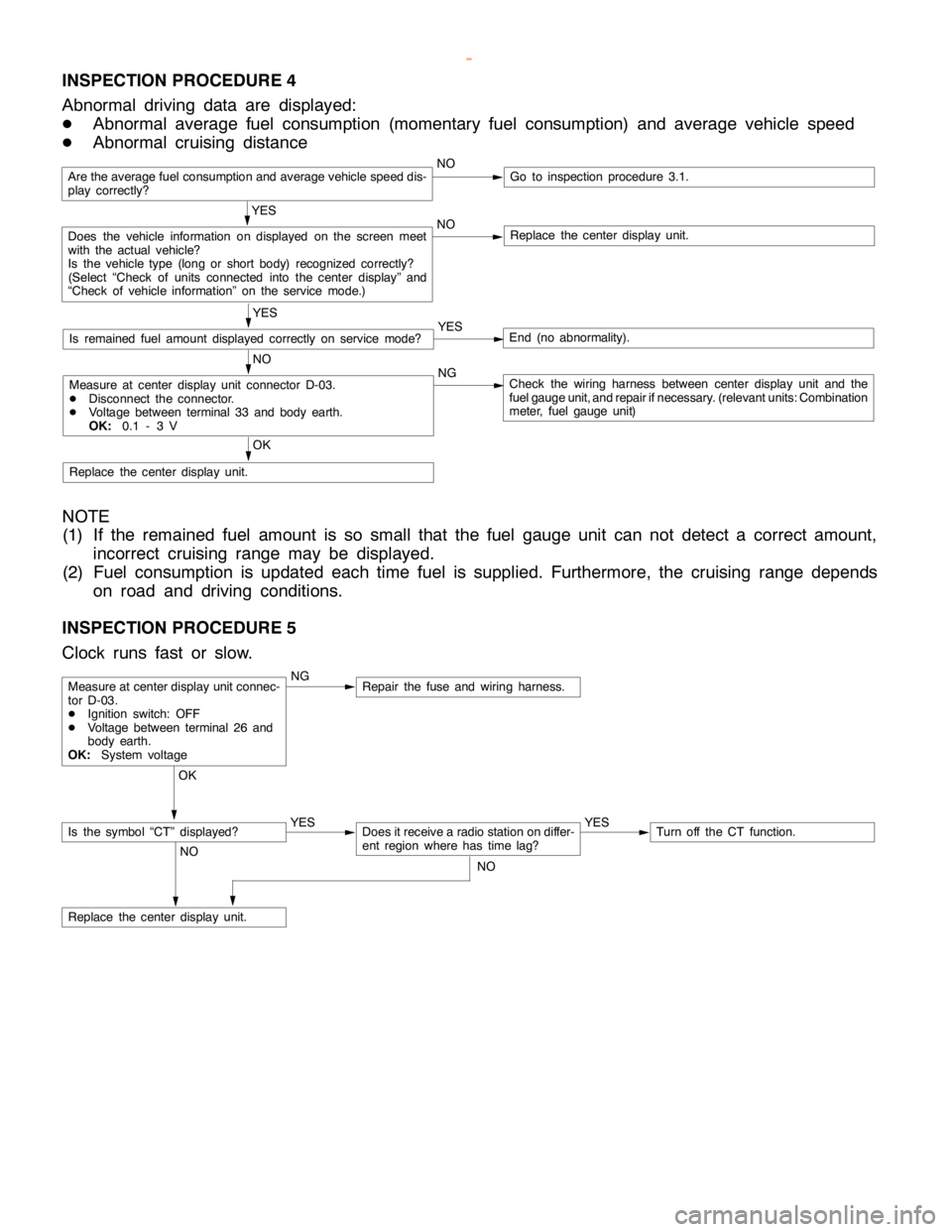
CHASSIS ELECTRICAL -Clock or Center Display54A-64
INSPECTION PROCEDURE 4
Abnormal driving data are displayed:
DAbnormal average fuel consumption (momentary fuel consumption) and average vehicle speed
DAbnormal cruising distance
Are the average fuel consumption and average vehicle speed dis-
play correctly?NOGo to inspection procedure 3.1.
YES
Does the vehicle information on displayed on the screen meet
with the actual vehicle?
Is the vehicle type (long or short body) recognized correctly?
(Select “Check of units connected into the center display” and
“Check of vehicle information” on the service mode.)NOReplace the center display unit.
YES
Is remained fuel amount displayed correctly on servicemode?YESEnd (no abnormality).
NO
Measure at center display unit connector D-03.
DDisconnect the connector.
DVoltage between terminal 33 and body earth.
OK:0.1 - 3 VNGCheck the wiring harness between center display unit and the
fuel gauge unit, and repair ifnecessary. (relevant units: Combination
meter, fuel gauge unit)
OK
Replace the center display unit.
NOTE
(1) If the remained fuel amount is so small that the fuel gauge unit can not detect a correct amount,
incorrect cruising range may be displayed.
(2) Fuel consumption is updated each time fuel is supplied. Furthermore, the cruising range depends
on road and driving conditions.
INSPECTION PROCEDURE 5
Clock runs fast or slow.
NGRepair the fuse and wiring harness.
OK
YES
Does it receive a radio station on differ-
ent region where has timelag?YESTurn off the CT function.
NO
Replace the center display unit.
Measure at center display unit connec-
tor D-03.
DIgnition switch: OFF
DVoltage between terminal 26 and
body earth.
OK:System voltage
Is the symbol “CT” displayed?
NO
www.WorkshopManuals.co.uk
Purchased from www.WorkshopManuals.co.uk
Page 1690 of 1839

SWS -General Information54B-4
WINDSHIELD WIPER AND WASHER
Windshield Low-speed/High-speed Wiper
Operation
DIf the windshield low-speed wiper switch is
turned to the ON position with the ignition switch
at the ACC or ON position, the column switch
sends a low-speed wiper ON and high-speed
wiper OFF signals to the front-ECU.
This turns the wiper signal on and the wiper
speed switching relay off (low-speed), causing
the wipers to operate at low-speed.
DIf the windshield high-speed wiper switch is
turned to the ON position, the column switch
sends a low-speed wiper OFF and high-speed
wiper ON signals to the front-ECU.
This turns both the wiper signal and the wiper
speed switching relay on (high-speed), causing
the wipers to operate at high-speed.
Windshield Intermittent Wiper Operation
The ETACS-ECU calculates the wiper operation
interval according to the voltage signal sent from the
column switch. Then the ETACS-ECU sends a
signal to the front-ECU. The front-ECU determines
the wiper operation interval and turns on the wiper
signal relay. This causes the wiper auto stop relay to
turn on. Then the wiper auto stop relay will turn off
after the wipers reach the park position. This causes
the wiper signal relay and then the wipers to turn off.
If the wiper signal relay remains off for the wiper
operation interval, the relay turns on again, causing
the wipers to operate in intermittent mode.Windshield Mist Wiper Operation
DIf the windshield mist wiper switch of the column
switch is turned to the ON position with the
ignition switch at ACC or ON position, the mist
wiper high-speed operation signal is sent to
the front-ECU. This signal turns on the wiper
speed switching relay, causing the wipers to
work at high-speed while the mist switch is
on.
DWhile the windshield mist wiper switch remains
turned on when the intermittent mode is still
working, the wipers work as the mist wiper.
However, the wipers return to the intermittent
mode again when the wiper auto stop signal
turns on after the mist wiper switch is turned
off.
Windshield Washer Operation
If the windshield washer switch of the column switch
is turned to the ON position with the ignition switch
at ACC or ON position, the windshield washer ON
signal is sent to the front-ECU, causing the
windshield wiper signal to turn on after 0.3 seconds.
After the windshield washer switch signal turns off,
the windshield wiper signal turns off in three
seconds.
If the windshield wiper switch is turned to the ON
position while the windshield wiper is at intermittent
mode, the windshield washer works for that period
when the windshield washer switch remains on.
Then the wipers return to the intermittent mode.
REAR WIPER AND WASHER
Rear Wiper Operation
If the rear wiper switch is turned to the ON position
with the ignition switch at ACC or ON position,
the ETACS-ECU turns ON the rear wiper drive signal
for three seconds (approx. two operations). 7.4
seconds later, the wiper begins the intermittent
operation with 8 seconds’ cycle.
If the shift lever
moved to the R position when the rear wiper switch
is turned to the ON position and the ignition switch
at ACC or ON position, back-up lamp switch
or inhibitor switch R turns ON. One second
later, the ETACS-ECU turns ON the rear wiper drive
signal for three seconds (approx. two operations)
to clear the rear field of view. 7.4 seconds later,
the wiper returns to the intermittent operation with
8 seconds’ cycle.Rear Washer Operation
If the rear washer switch is turned to the ON position
with the ignition switch at ACC or ON position,
the rear washer ON signal is sent to the
ETACS-ECU, causing the rear wiper signal to turn
on after 0.3 seconds. After the rear washer switch
signal turns off, the rear wiper signal turns off in
three seconds.
If the rear wiper is in intermittent operation when
the rear washer switch is turned ON, the rear wiper
again continues the intermittent operation with 8
seconds’ cycle from 7.4 seconds later since the
rear drive signal is turned OFF.
www.WorkshopManuals.co.uk
Purchased from www.WorkshopManuals.co.uk
Page 1746 of 1839

SWS -On-vehicle Service54B-60
ON-VEHICLE SERVICE
ADJUSTMENT PROCEDURES OF SWS FUNCTION
Through special operation of input switches, it is possible to disable and enable the functions listed below.
Settings are retained even if the battery is disconnected.
DKeyless entry hazard answerback function
DInitialization of above mentioned functions
Configuration Mode Entry Conditions
1. Set each switch at the following condition.
DHazard warning lamp switch: OFF
DDiagnosis control: ON (MUT-II
connected or terminal 1 of diagnosis connector connected to earth)
DKey reminder switch: OFF (ignition key inserted)
DIgnition switch: LOCK (OFF)
DDriver’s door switch: OFF (driver’s door closed)
2. When the windshield washer switch is continuously turned ON for more than 10 seconds, the buzzer
integrated in the ETACS-ECU sounds once and the mode is switched to the configuration mode.
Configuration Mode Cancellation Conditions
The ETACS-ECU cancels the configuration mode when any of the conditions listed below is satisfied.
DDiagnosis control: OFF (MUT-II
disconnected or terminal 1 of diagnosis connector disconnected from
earth)
DKey reminder switch: ON (ignition key removed)
DIgnition switch: any position other than LOCK (OFF)
DDriver’s door switch: ON (driver’s door open)
DNo configuration performed within three minutes of entry to configuration mode (If configuration is
performed within first three minutes, monitoring continues for three minutes from that point.)
Configuration of Functions
FunctionConfiguration procedure
Keyless entry hazard
answerbackIf the transmitter’s LOCK switch is turned ON twice within two seconds, the lock answerback
function’s enabled/disabled status is inverted.
D
When function is enabled, buzzer sounds once (initial status).
D
When function is disabled, buzzer sounds twice.
If the transmitter’s UNLOCK switch is turned ON twice within two seconds, the unlock
answerback function’s enabled/disabled status is inverted.
D
When function is enabled, buzzer sounds once (initial status).
D
When function is disabled, buzzer sounds twice.
Initialization of above
mentioned functionsIf the windshield washer switch is turned ON for more than 20 seconds, the buzzer sounds
twice and all functions are initialized. (The configuration mode entry buzzer sounds after 10
seconds, but the switch must be kept ON for 20 seconds to achieve initialization.)
IF the windshield washer switch ins kept ON for more than 20 seconds without prior entry
of the configuration mode, the configuration mode is entered after 10 seconds and
initialization does not take place.
www.WorkshopManuals.co.uk
Purchased from www.WorkshopManuals.co.uk