light MITSUBISHI MONTERO 2000 Service Owner's Manual
[x] Cancel search | Manufacturer: MITSUBISHI, Model Year: 2000, Model line: MONTERO, Model: MITSUBISHI MONTERO 2000Pages: 1839, PDF Size: 29.19 MB
Page 524 of 1839

DIESEL FUEL <4M4> -Troubleshooting13C-33
Item
No.Reference
page Code No.
or inspec-
tion proce-
dure No. Value to be
determined
as normal Inspection conditions Check item
06Vehicle
speed sen-
sorWhen drivingCompare the engine
speed displayed in the
speed meter with that
in MUT-IIMatchedCode No.
1713C-12
07Engine
speed sen-Engine: CrankingCompare the engine
speed displayed in theMatchedCode No.
1813C-13
sor (backup)Engine: Idlingtachometer with that in
MUT-II
08Engine
speed sen-Engine: CrankingCompare the engine
speed displayed in theMatchedCode No.
2113C-14
sorEngine: Idlingtachometer with that in
MUT-II
09Accelerator
pedal posi-Ignition switch: ONAccelerator pedal:
Idling position0.9 - 1.1VCode No.
1113C-8
tion sensor
(main)Accelerator pedal:
Fully opened position4.1 V or high-
er
10Idle switchIgnition switch: ONRelease the foot from
the accelerator pedal.0-1VCode No.
2313C-15
Step on the accelera-
tor pedal slightly4V or higher
11System volt-
ageIgnition switch: ONSystem volt-
ageProcedure
No. 1913C-31
13Timing con-Engine: After warmingIdling0%*1Code No.13C-16
trol valve*1up the engine2,500 r/min35 - 45%*125 or No.13C-20
High idling20 - 30%*143
14EGR com-
mand valueEngine: Idling0 - 100%*2–-
mand value
Engine: After warming up the engine
17Control
sleeve posi-Engine: After warming
up the engineIdling1.535 -
1.735 VCode No.
2613C-17
tion (target
value)2,500 r/minSlightly de-
creased.
High idling1.884 -
2.084 V
18Actual injec-Engine: After warmingIdling0.65 - 0.85 V––
tion timingup the engine2,500 r/min2.325 -
2.525 V
High idling3.814 -
4.014 V
19InjectionEngine: After warmingIdling0.3 - 0.5 V––
timing com-
mand valueup the engine2,500 r/min2.325 -
2.525 V
High idling3.814 -
4.014 V
www.WorkshopManuals.co.uk
Purchased from www.WorkshopManuals.co.uk
Page 525 of 1839

DIESEL FUEL <4M4> -Troubleshooting13C-34
Item
No.Reference
page Code No.
or inspec-
tion proce-
dure No. Value to be
determined
as normal Inspection conditions Check item
21GE actuatorEngine: After warmingIdling20 - 30%Code No.13C-17
up the engine2,500 r/min20 - 30%26 or No.13C-21
High idling20 - 29%48
22EGR dutyEngine: Idling0 - 100%*2––
valueEngine: After warming up the engine
23Control
sleeve posi-Engine: After warming
up the engineIdling1.535 -
1.735 VCode No.
2613C-17
tion (actual
value)2, 500 r/minSlightly de-
creased.
High idling1.884 -
2.084 V
24Accelerator
pedal posi-Ignition switch: ONAccelerator pedal:
Idling position0.9 - 1.1 VCode No.
2713C-18
tion sensor
(sub)Accelerator pedal:
Fully opened position4.1V or
higher
25Accelerator
pedal posi-Ignition switch: ONAccelerator pedal:
Idling position0%Code No.
2713C-18
tion sensor
(sub)Accelerator pedal:
Fully opened position99 - 100%
NOTE
*1: The opening degree of the timing control valve is converted into percentage. (0%: timer non-advanced angle,
100%: timer maximum advanced angle)
*
2: The opening degree of the EGR solenoid valve is converted into percentage.
Item
No.
Check itemInspection conditionsValue to be
determined
as normalCode No.
or inspec-
tion proce-
dure No.Reference
page
41Idle switchIgnition switch: ON
(check by repeatedRelease the foot from
the accelerator pedal.ON––
accelerator operation)Step on the accelerator
pedal slightly.OFF
43A/C switchEngine: Idling (The
A/C compressorA/C switch: ONON––
should be in operation
when the A/C switch is
“ON”)A/C switch: OFFOFF
44IgnitionIgnition switch: ONEngine: StopOFF––
switch-STEngine: CrankingON
45Ignition
switch-IGIgnition switch: ONON––
46Control
relayIgnition switch: ONON––
47A/C relayEngine: Idling after
warming up the engineA/C switch: OFFOFF (A/C
compressor
clutch not in
operation)––
A/C switch: ONON (A/C
compressor
clutch in op-
eration)
www.WorkshopManuals.co.uk
Purchased from www.WorkshopManuals.co.uk
Page 604 of 1839

MITSUBISHI SC-Troubleshooting13E-15
DATA LIST REFERENCE TABLE
The following ECU input data items can be read using the MUT-
II.
Item
No.Check itemInspection conditionsNormal condition
10Vehicle speedWhen vehicle is being drivenSpeedometer display and
MUT-IIdisplay are identical.
11AcceleratorIgnition switch:Release the accelerator pedal.0.9 - 1.1 V
pedal position
sensorONDepress the accelerator pedal gradually.Increases in response to
pedal depression stroke.
Depress the accelerator pedal fully4.0 V or more
18Power supply
voltageIgnition switch: ONSystem voltage
19Accelerator
pedal positionIgnition switch:
ONRelease the accelerator pedalON
pedal position
switch (Idle
switch)ON
Depress the accelerator pedal slightly.OFF
20Ignition switchIgnition switch: ONON
Ignition switch: OFFOFF
22Front-right
wheel speedWhen vehicle is being drivenSpeedometer display and
MUT-IIdisplay are identical.
28Engine typeVehicles with the 6G74 engine6G74
Vehicles with the 4M41 engine4M41
30Trace controlSC system control is activeON
SC system control is not activeOFF
31Engine specifi-Vehicles with the 6G74 engineDOHC
cation 1Vehicles with the 4M41 engine-
32Engine specifi-Vehicles with the 6G74 engineN/A
cation 2Vehicles with the 4M41 engine-
33Engine specifi-Vehicles with the 6G74 engineMIVEC/ETV
cation 3Vehicles with the 4M41 engine-
35Destination-EC
40Engine speedDepress the accelerator pedal gradually.Tachometer display and
MUT-IIdisplay are identical.
51Inhibitor switchIgnition switch:Selector lever position: PP
ONSelector lever position: RREngine:
stopped
Selector lever position: NN
Selector lever position: DD
52Shift positionSelector lever
position: sportsDriving at a constant speed of 10 km/h in
1st1st
modeDriving at a constant speed of 30 km/h in
2nd2nd
Driving at a constant speed of 50 km/h in
3rd3rd
Driving at a constant speed of 50 km/h in
4th4th
Driving at a constant speed of 70 km/h in
5th5th
www.WorkshopManuals.co.uk
Purchased from www.WorkshopManuals.co.uk
Page 652 of 1839

DIESEL FUEL <4D5-stepIII>-Troubleshooting13E-42
Item
No.Reference
page Code No.
or inspec-
tion proce-
dure No. Value to be
determined
as normal Inspection conditions Check item
25Accelerator
pedal
position
Ignition switch: ONAccelerator pedal:
Idling position0%Code No.
2713E-19
position
sensor (sub)Accelerator pedal:
Fully opened position99 - 100 %
31EGR valve
position
Engine: After warming
uptheengine
Idling under no load2.3 - 3.3 VCode No.
51
13E-25
position
sensor (tar-
get value)upthe engine
Engine is suddenly
racedMomentarily
decreases
(0.3 - 0.7 V)
51
32EGR valve
position
Engine: After warming
uptheengine
Idling under no load2.3 - 3.3 VCode No.
51
13E-25
position
sensor (ac-
tual value)upthe engine
Engine is suddenly
racedMomentarily
decreases
(0.3 - 0.7 V)
51
33Variable
geometry
Engine: After warming
uptheengine
Idling53 - 59 kPaCode No.
52
13E-26
geometry
control pres-
sure sensorupthe engine
Engine is suddenly
racedMomentarily
increases
52
NOTE
*1: The opening degree of the timing control valve is converted into percentage. (0 %: timer non-advanced angle,
100 %: timer maximum advanced angle)
*
2: The opening degree of the EGR solenoid valve is converted into percentage.
Item
No.
Check itemInspection conditionsValue to be
determined
as normalCode No.
or inspec-
tion proce-
dure No.Reference
page
41Idle switchIgnition switch: ON
(check by repeated
acceleratoroperation)
Release the foot from
the accelerator pedal.ONCode No.
2313E-16
y
accelerator operation)Step on the accelerator
pedal slightly.OFF
43A/C switchEngine: Idling (The
A/C compressor
shouldbeinoperation
A/C switch: ONONProcedure
No. 2513E-39
shouldbein operation
when the A/C switch is
“ON”)A/C switch: OFFOFF
44Ignition
ihST
Ignition switch: ONEngine: StopOFF––g
switch-ST
g
Engine: CrankingON
45Ignition
switch-IGIgnition switch: ONON––
46Control
relayIgnition switch: ONON––
47A/C relayEngine: Idling after
warming up the engineA/C switch: OFFOFF (A/C
compressor
clutch not in
operation)Procedure
No. 2513E-39
A/C switch: ONON (A/C
compressor
clutch in
operation)
www.WorkshopManuals.co.uk
Purchased from www.WorkshopManuals.co.uk
Page 657 of 1839

DIESEL FUEL <4D5-stepIII>-Troubleshooting13E-47
Terminal
No.Normal condition: Inspection conditions (engine status) Check item
21A/C relayA/C switch: OFF→ONSystem voltage→0-1
V
31Idle switchIgnition switch: ONRelease the foot from the
accelerator pedal.0-1V
Step on the accelerator
pedal slightly3 V or higher
32A/C switchA/C in operation (compressor in operation)System voltage
36Selector switch
between A/T and M/TIgnition switch: ONSystem voltage (M/T)
46Control relayIgnition switch: ON0-1V
Ignition switch: ON→OFF (in about 8 seconds)System voltage
51Pump speed sensorEngine: Idling (Use a digital voltage meter to check.)0V↔5V
(repeat the change)
55Accelerator pedal
position sensor (sub)Ignition switch: ONAccelerator pedal: Idling
position0.9 - 1.1 V
Accelerator pedal: Fully
opened position3.7 V or higher
60Sensor power supplyIgnition switch: ON4.6 - 5.4 V
71Ignition switch-STEngine: Cranking8 V or higher
80Back-up power supplyIgnition switch: OFFSystem voltage
81Power supply to accel-
erator pedal position
sensor (main)Ignition switch: ON4.6 - 5.4 V
82Ignition switch-IGIgnition switch: ONSystem voltage
83Engine coolant tem-
perature sensorIgnition switch: ONEngine coolant
temperature: 0_C3.7 - 4.3 V
Engine coolant
temperature: 20_C2.8 - 3.4 V
Engine coolant
temperature: 40_C1.9 - 2.5 V
Engine coolant
temperature: 80_C0.6 - 1.2 V
84Accelerator pedal posi-
tion sensor (main)Ignition switch: ONAccelerator pedal: Idling
position0.9 - 1.1 V
Accelerator pedal: Fully
opened position3.7 V or higher
85Boost pressure sensorIgnition switch: ON (101 kPa)1.0 - 1.4 V
86Vehicle speed sensorDIgnition switch: ON
DMove the vehicle forward slowly0V↔8 - 12 V
(repeat the change)
87Fuel temperature sen-
sor
Ignition switch: ONFuel temperature: 0_C3.2 - 3.6 V
sorFuel temperature: 20_C2.3 - 2.7 V
Fuel temperature: 40_C1.5 - 1.9 V
Fuel temperature: 80_C0.4 - 0.8 V
www.WorkshopManuals.co.uk
Purchased from www.WorkshopManuals.co.uk
Page 1361 of 1839
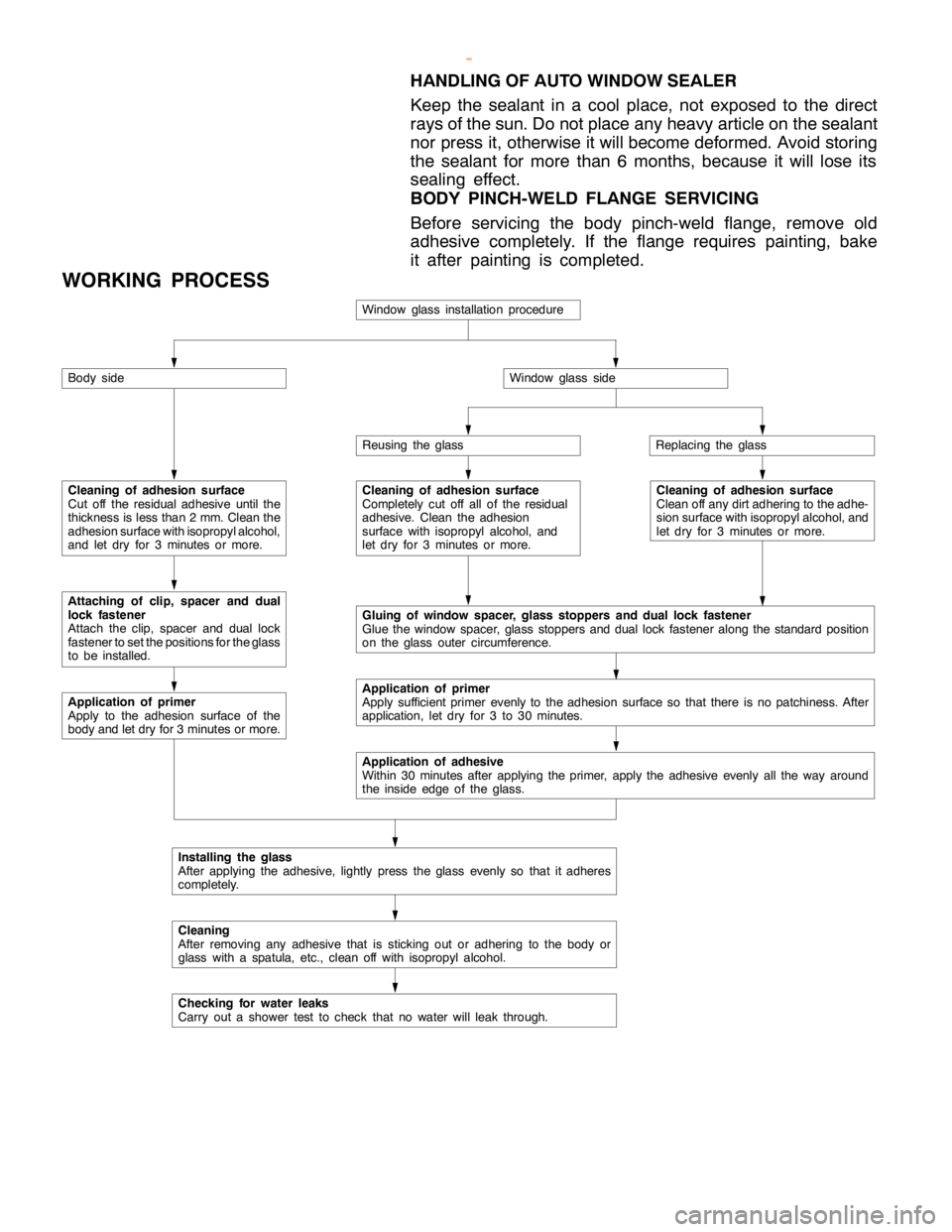
BODY -Window Glass42-9
HANDLING OF AUTO WINDOW SEALER
Keep the sealant in a cool place, not exposed to the direct
rays of the sun. Do not place any heavy article on the sealant
nor press it, otherwise it will become deformed. Avoid storing
the sealant for more than 6 months, because it will lose its
sealing effect.
BODY PINCH-WELD FLANGE SERVICING
Before servicing the body pinch-weld flange, remove old
adhesive completely. If the flange requires painting, bake
it after painting is completed.
WORKING PROCESS
Window glass installation procedure
Body side
Cleaning of adhesion surface
Cut off the residual adhesive until the
thickness is less than 2 mm. Clean the
adhesion surface with isopropyl alcohol,
and let dry for 3 minutes or more.
Attaching of clip, spacer and dual
lock fastener
Attach the clip, spacer andduallock
fastener to set the positions for the glass
to be installed.
Application of primer
Apply to the adhesion surface of the
body and let dry for 3 minutes or more.
Window glass side
Reusing the glassReplacing the glass
Cleaning of adhesion surface
Completely cut off all of the residual
adhesive. Clean the adhesion
surface with isopropyl alcohol, and
let dry for 3 minutes or more.Cleaning of adhesion surface
Clean off any dirt adhering to the adhe-
sion surface with isopropyl alcohol, and
let dry for 3 minutes or more.
Gluing of window spacer, glass stoppers and dual lock fastener
Glue the window spacer, glass stoppers andduallock fasteneralong the standard position
on the glass outer circumference.
Application of primer
Apply sufficient primer evenly to the adhesion surface so that there is no patchiness. After
application, let dry for 3 to 30 minutes.
Application of adhesive
Within 30 minutes after applying the primer, apply the adhesive evenly all the way around
the inside edge of theglass.
Installing the glass
After applying the adhesive, lightly press the glass evenly so that it adheres
completely.
Cleaning
After removing any adhesive that is sticking out or adhering to the body or
glass with a spatula, etc., clean off with isopropyl alcohol.
Checking for water leaks
Carry out a shower test to check that no water will leak through.
www.WorkshopManuals.co.uk
Purchased from www.WorkshopManuals.co.uk
Page 1573 of 1839

54A-3
ON-VEHICLE SERVICE 46......................
Room Lamp Delay-off Time Adjustment
Procedure 46...............................
REAR COMBINATION LAMP 47...........
SPECIAL TOOLS 47...........................
TROUBLESHOOTING 47.......................
REAR COMBINATION LAMP 47................
HIGH-MOUNTED STOP LAMP 48.........
COLUMN SWITCH 48....................
SPECIAL TOOLS 48...........................
COLUMN SWITCH 48..........................
HAZARD WARNING LAMP SWITCH 50....
SPECIAL TOOLS 50...........................
HAZARD WARNING LAMP SWITCH 50.........
HORN 51................................
CIGARETTE LIGHTER 51.................
ACCESSORY SOCKET 51................
RHEOSTAT 52...........................
CLOCK OR CENTER DISPLAY 53........
TROUBLESHOOTING 53.......................
CLOCK OR CENTER DISPLAY 67..............
RADIO/TAPE PLAYER 68.................
TROUBLESHOOTING 68.......................
RADIO AND CD AUTO CHANGER 81..........
FRONT SPEAKERS 82...................
REAR SPEAKERS 82.....................
ANTENNA83 ............................DEFOGGER 86...........................
TROUBLESHOOTING
ON-VEHICLE SERVICE 86.....................
Printed Heater Check 86.....................
Defogger Relay Continuity Check 86...........
DEFOGGER SWITCH 87.......................
SMART WIRING SYSTEM (SWS)
Refer to GROUP 54B ....................
RADIATOR (RADIATOR FAN MOTOR)
Refer to GROUP 14 ......................
AUTOMATIC TRANSMISSION
Refer to GROUP 23 ......................
ANTI-LOCK BRAKE SYSTEM (ABS)
Refer to GROUP 35B ....................
DOOR HANDLE LATCH (DOOR LOCK)
Refer to GROUP 42 ......................
DOOR GLASS-REGULATOR (POWER
WINDOWS)
Refer to GROUP 42 ......................
KEYLESS ENTRY SYSTEM
Refer to GROUP 42 ......................
WINDSHIELD WIPER/WASHER
Refer to GROUP 51 ......................
REAR WIPER/WASHER
Refer to GROUP 51 ......................
SRS AIRBAG Refer to GROUP 52B......
HEATER Refer to GROUP 55.............
AIR CONDITIONER Refer to GROUP 55...
www.WorkshopManuals.co.uk
Purchased from www.WorkshopManuals.co.uk
Page 1624 of 1839

CHASSIS ELECTRICAL -Clock or Center Display54A-54
BEFORE REMOVING THE BATTERY
The Center display has a large amount of data unique to the vehicle in its memory. When the battery
cable is disconnected, that memory is affected as shown in the table below. Accordingly, it is necessary
to make sure that you take notes of important information before disconnecting the battery cable.
FunctionInput function/memoryWhen battery cable is disconnected
Clock set on displayCurrent timeRetains data for approx. 1 hour
Vehicle model setShort (3-door models)/long (5-door
models)Retains data for approx. 1 hour
Brightness set for displayPosition set on displayRetains data for approx. 1 hour
Unit set for trip computerkm or mile, L/100km or mpg or km/L
Average vehicle speed after resetRetains data for approx. 1 hour
Average vehicle speed on displayAverage vehicle speed after resetRetains data for approx. 1 hour
Average fuel consumption on displayAverage fuel consumption after resetRetains data for approx. 1 hour
Cruising range on displayCruising range, fuel economyRetains data for approx. 1 hour
Outside temperature on displayOutside temperature after the ignition
switch is turned to the OFF(LOCK)
position.Retains data for approx. 1 hour
* The outside temperature sensor
is located near the engine.
Therefore, incorrectly high
temperature may be displayed
when the battery cable is
reconnected within one hour.
DIAGNOSIS FUNCTION FOR CENTER DISPLAY
Center display has the following diagnosis function:
FunctionContents
Service functionThere are the following 4 diagnosis modes available
1. Check of vehicle informationThe vehicle, short (3-door models)/long (5-door models) set
2. Check of LCD segmentsThe LCD segments for display available to light on or not
3. Check of sensorsOutside temperature, voltage of fuel gauge unit, system voltage, fuel amount
remains, fuel economy calculated after supply of fuel
4. Check of units connected into
the center displayThe units connected on display
Voltage (%) on terminal for MUT-II
Vehicle speed signal sent by engine-ECU
Oscillating signal
www.WorkshopManuals.co.uk
Purchased from www.WorkshopManuals.co.uk
Page 1635 of 1839
CHASSIS ELECTRICAL -Clock or Center Display54A-65
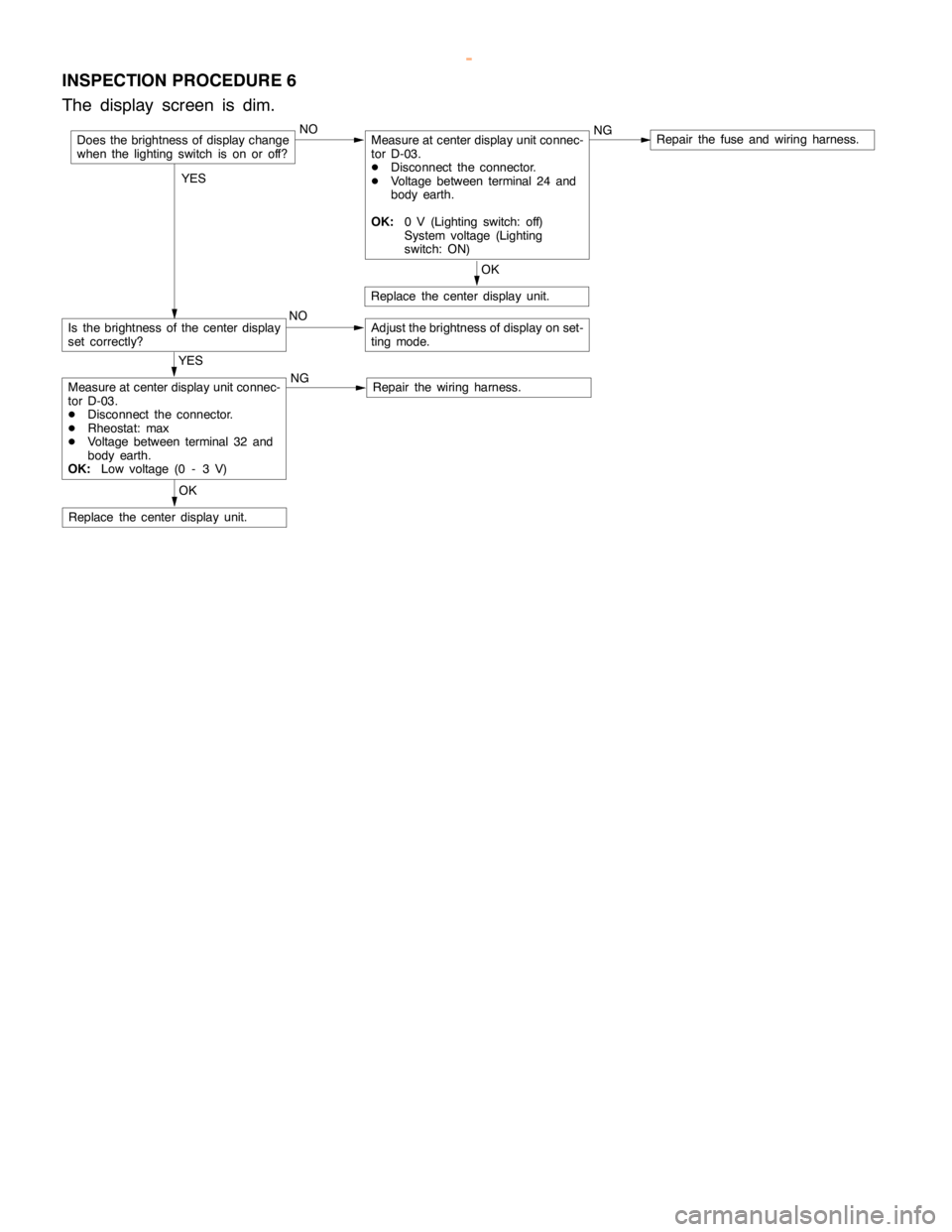
INSPECTION PROCEDURE 6
The display screen is dim.
NOMeasure at center display unit connec-
tor D-03.
DDisconnect the connector.
DVoltage between terminal 24 and
body earth.
OK:0 V (Lighting switch: off)
System voltage (Lighting
switch: ON)NGRepair the fuse and wiring harness.
Is the brightness of the center display
set correctly?NOAdjust the brightness of display on set-
ting mode.
OK
Replace the center display unit.
OK
Replace the center display unit.
YES
Measure at center display unit connec-
tor D-03.
DDisconnect the connector.
DRheostat: max
DVoltage between terminal 32 and
body earth.
OK:Low voltage (0 - 3 V)NGRepair the wiring harness.
Does the brightness of display change
when the lighting switch is on or off?
YES
www.WorkshopManuals.co.uk
Purchased from www.WorkshopManuals.co.uk
Page 1678 of 1839

CHASSIS ELECTRICAL -RV Meter54A-17
Termi-Input/out-
t
Signal sym-
bl
Terminal
lt
Harness problemTrouble symptoms when there is a
hblnal No.
p
put
gy
bolvoltage
(V)Open
circuitshort-cir-
cuit
yp
harness problem
11 - 1 4––––––
15Input/out-
putK (engine
K-LINE
signal)Hi: Sys-
tem volt-
age
Lo:0 - 1ExistsExistsDWiring communication error
DCommunication between the
engine-A/T-ECU
DAbnormal driving information
numerical display
16––––––
17Input/out-
putM-BUSY
(AUDIO)Hi:System
voltage
Lo:0 - 1ExistsExistsDAudio information does not
appear on the screen.
18–SHIELD-
EARTH
(AUDIO)––––
19Input/out-
putM-BUSY
(A/C)Hi:System
voltage
Lo:0 - 1ExistsExistsDAir conditioner information does
not appear on the screen.
DAmbient temperature is not
displayed.
20–SHIELD-
EARTH––––
22 - 21––––––
23InputAmbient
temperature
sensor–ExistsExistsDAmbient temperature is not
displayed.
24InputILL + (Light-
ing switch)Hi:System
voltage
Lo:0 - 1ExistsExistsDoes not illuminate.
25InputACC (ACC
power sup-
l)
System
voltageExists–Screen does not appear. No
operations are possible.
pp
ply)
g
–ExistsBlown multi-purpose fuse
26Input+BSystem
voltageExists–Screen does not appear. No
operations are possible.
g
–ExistsBlown multi-purpose fuse
27InputVSS (Vehicle
speed pulse
signal)Hi:System
voltage
Lo:0 - 1ExistsExistsDAbnormal “Distance km after
replacement” display in mainte-
nance screen
DSwitches which are not
supposed to operate during
driving do operate.
(Example:clock adjustment
screen, maintenance settings,
etc.)
DAmbient temperature display is
abnormally high.
28–Earth–Exists–Screen does not appear.
www.WorkshopManuals.co.uk
Purchased from www.WorkshopManuals.co.uk