ECO mode MITSUBISHI OUTLANDER 2014 3.G Owner's Manual
[x] Cancel search | Manufacturer: MITSUBISHI, Model Year: 2014, Model line: OUTLANDER, Model: MITSUBISHI OUTLANDER 2014 3.GPages: 451, PDF Size: 49.08 MB
Page 105 of 451
Free-hand Advanced Securi
ty Transmitter (F.A.S.T.-key) (if so equipped)
Features and controls 5-27
5
N00561100014
To add a F.A.S.T.-key, you must already have 2 registered F.A.S.T.-keys. You need to regis- ter the ID code to the vehicle.Registering the ID code can be done by your authorized Mitsubishi Motors dealer. Or it can be done by yourself (except for vehiclessold in Canada). For you to register the ID code yourself, fol- low the “Customer F.A.S.T.-key program- ming” procedure below. If you choose to have your authorizedMitsubishi Motors dealer register the ID code, take your vehicle and all remaining F.A.S.T.-keys to your authorized MitsubishiMotors dealer.
N00561201171
You can program new F.A.S.T.-keys to thesystem if you have tw
o valid (already regis-
tered) F.A.S.T.-keys an
d a blank (not regis-
tered) F.A.S.T.-key. For F.A.S.T.-key programming, follow the procedures below. 1. Open the driver’s door. 2. While carrying the first valid F.A.S.T.- key, put the operatio
n mode in ON. (Per-
form the following procedure within 30 seconds.)
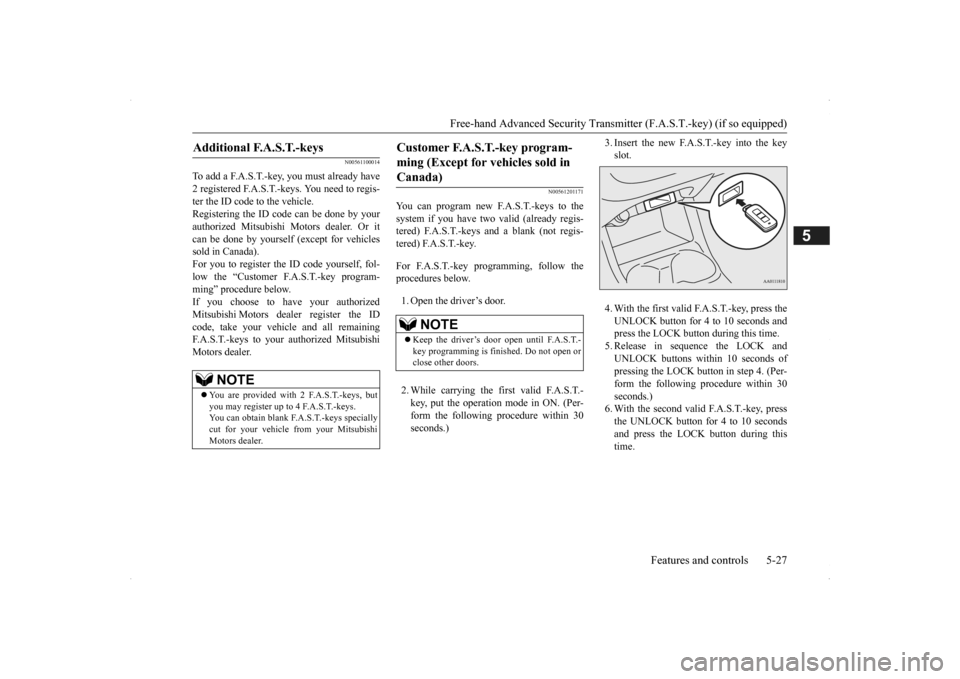
3. Insert the new F.A.S.T.-key into the key slot. 4. With the first valid F.A.S.T.-key, press the UNLOCK button for 4 to 10 seconds and press the LOCK button during this time.5. Release in sequence the LOCK and UNLOCK buttons within 10 seconds of pressing the LOCK butt
on in step 4. (Per-
form the following procedure within 30 seconds.) 6. With the second valid F.A.S.T.-key, pressthe UNLOCK button for 4 to 10 seconds and press the LOCK button during this time.
Additional F.A.S.T.-keys
NOTE
You are provided with 2 F.A.S.T.-keys, but you may register up to 4 F.A.S.T.-keys. You can obtain blank F.A.S.T.-keys specially cut for your vehicle from your MitsubishiMotors dealer.
Customer F.A.S.T.-key program- ming (Except for vehicles sold in Canada)
NOTE
Keep the driver’s door open until F.A.S.T.- key programming is finished. Do not open or close other doors.
BK0200500US.book 27 ページ 2013年2月12日 火曜日 午前9時46分
Page 106 of 451
Free-hand Advanced
Security Transmitter (F.A.S
.T.-key) (if so equipped)
5-28 Features and controls
5
7. Release in sequence the LOCK and UNLOCK buttons within 10 seconds ofpressing the LOCK button in step 6. The immobilizer display on the information screen in the multi-information displaywill blink. When registration of ID
code is complete,
the buzzer will sound 3 times and the immobilizer display will come on for 30seconds. If an error occurs, F.A.S.T.-key program- ming will be terminated and the buzzerwill sound for 3 seconds. 8. If you wish to register another F.A.S.T.- key, repeat the process from step 1 after the operation mode is put in OFF.
N00515501210
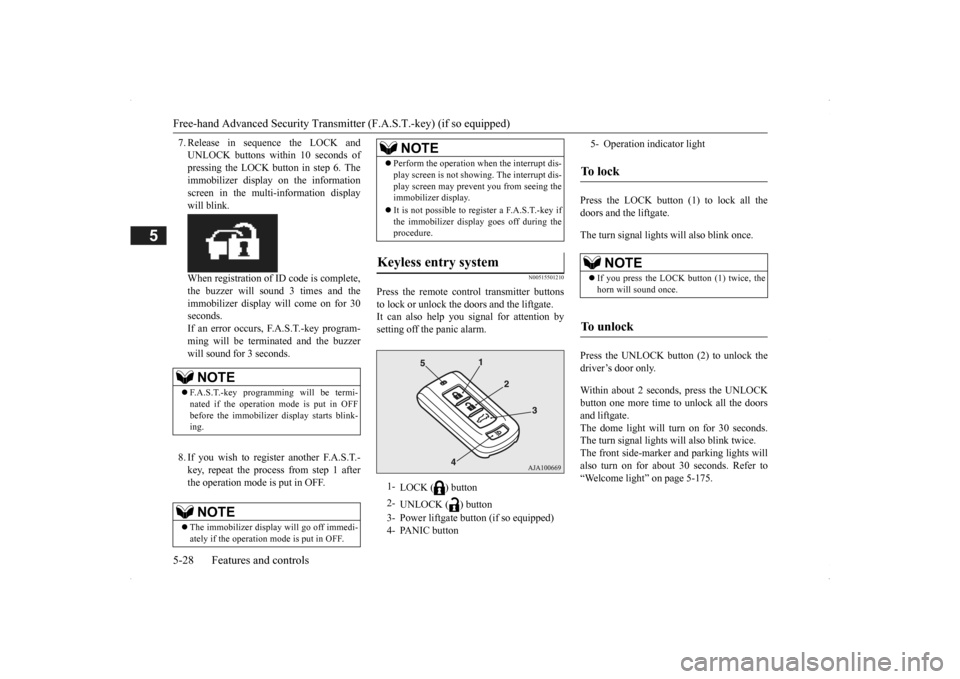
Press the remote control transmitter buttons to lock or unlock the doors and the liftgate. It can also help you
signal for attention by
setting off the panic alarm.
Press the LOCK button (1) to lock all the doors and the liftgate. The turn signal lights will also blink once. Press the UNLOCK button (2) to unlock the driver’s door only. Within about 2 seconds, press the UNLOCK button one more time to unlock all the doors and liftgate. The dome light will turn on for 30 seconds.The turn signal lights will also blink twice. The front side-marker and parking lights will also turn on for about 30 seconds. Refer to“Welcome light” on page 5-175.
NOTE
F.A.S.T.-key programming will be termi- nated if the operation
mode is put in OFF
before the immobilizer
display starts blink-
ing.NOTE
The immobilizer displa
y will go off immedi-
ately if the operation
mode is put in OFF.
Perform the operation when the interrupt dis- play screen is not show
ing. The interrupt dis-
play screen may prevent you from seeing theimmobilizer display. It is not possible to re
gister a F.A.S.T.-key if
the immobilizer displa
y goes off during the
procedure.
Keyless entry system
1-
LOCK ( ) button
2-
UNLOCK ( ) button
3- Power liftgate button (if so equipped) 4- PANIC button
NOTE
5- Operation indicator lightTo l o c k
NOTE
If you press the LOCK button (1) twice, the horn will sound once.
To unlock
BK0200500US.book 28 ページ 2013年2月12日 火曜日 午前9時46分
Page 107 of 451
Free-hand Advanced Securi
ty Transmitter (F.A.S.T.-key) (if so equipped)
Features and controls 5-29
5
The horn and turn signal lights of the keyless entry system answerback function can be changed as required. This is done with the key removed from the ignition switch. The answerback function can be set in the following three ways. 1. Put the operation mode in OFF.
2. Open the driver’s door and turn the com- bination headlights a
nd dimmer switch to
the “OFF” position. 3. Press the LOCK button (1) for 4 to 10 sec- onds and press the UNLOCK button (2)during this time. 4. Release in sequence the UNLOCK and LOCK buttons within 10 seconds ofpressing the UNLOCK button in step 3.
The answerback function from the turn signal lights can be turned ON or OFF separately. 1. Put the operation mode in OFF. 2. Open the driver’s door and turn the com-bination headlights a
nd dimmer switch to
the “OFF” position. 3. Press the UNLOCK button (2) for 4 to 10seconds and press the LOCK button (1) during this time.
4. Release in sequence the UNLOCK and LOCK buttons within 10 seconds ofpressing the LOCK button in step 3.
The buzzer answerback function can be turned ON or OFF as required.
NOTE
On a vehicle equippe
d with a Mitsubishi
Multi-Communication System, the functionscan be adjusted on the screen. For details,refer to the separa
te operation manual.
The door and liftgate unlock function can be set so that all doors and liftgate unlock when the UNLOCK button (2) is pressed once. Refer to “Setting of door
and liftgate unlock
function” on page 5-30.
Answerback function
Horn deactivation/reactivation One chime: The horn will not sound. Two chimes: The horn will sound. Four chimes: The horn will sound if the
LOCK button is pressed twicewithin 1 second.
NOTE
On a vehicle equippe
d with a Mitsubishi
Multi-Communication System, the functions can be adjusted on the screen. For details, refer to the separate operation manual.
Turn signal light
deactivation/reactiva-
tion
Number of chimes
To l o c k
To u n l o c k
One chime One flash Two flashes Two chimes One flash No flash Three chimes No flash Two flashes Four chimes Two flashes One flash Five chimes No flash One flash Six chimes Two flashes No flash Seven chimes No flash No flash
NOTE
On a vehicle equipped with a Mitsubishi Multi-Communication System, the functions can be adjusted on the screen. For details, refer to the separa
te operation manual.
Buzzer deactivation/reactivation
BK0200500US.book 29 ページ 2013年2月12日 火曜日 午前9時46分
Page 108 of 451
Free-hand Advanced
Security Transmitter (F.A.S
.T.-key) (if so equipped)
5-30 Features and controls
5
N00544601095
The door and liftgate
unlock function can be
set to the following two conditions.Each time the door and
liftgate unlock func-
tion is set, a chime wi
ll sound to tell you the
condition of the door and liftgate unlockfunction. 1. Put the operation mode in OFF. 2. Open the driver’s door and turn the com-bination headlights and dimmer switch to the “OFF” position. 3. Press the LOCK button (1) for 4 to 10 sec-onds and press the UNLOCK button (2) during this time.
4. Release in sequence the LOCK and UNLOCK buttons within 10 seconds ofpressing the LOCK button in step 3.
N00579500020
After unlocking the doors and the liftgate, thepower liftgate
can be operated
by pressing the
power liftgate button (3). Refer to “Power li
ftgate” on page 5-37.
N00544701067
If you are near your vehicle and feel threat- ened, you can activate the alarm to call atten- tion as follows: 1. Press the PANIC button (4) for more than 1 second. 2. The headlights will blink on and off and the horn will sound intermittently forabout 3 minutes. 3. To turn off the alarm, press any button on the remote control transmitter.
NOTE
On a vehicle equippe
d with a Mitsubishi
Multi-Communication System, the functionscan be adjusted on the screen. For details,refer to a separa
te operation manual.
Setting of door and liftgate unlock function
Number of chimes
Condition
One chime
All doors and the liftgate unlock
Tw o chimes
Driver’s door unlock only
NOTE
On a vehicle equippe
d with a Mitsubishi
Multi-Communication System, the functionscan be adjusted on the screen. For details, refer to the separa
te operation manual.
Operating the power liftgate
Using the panic alarm
NOTE
The indicator light (5) comes on each time a button is pressed. The F.A.S.T.-key can be used from about 40 feet (12 m) away. However, this distance may change if your vehicle is near a TVtransmitting tower, a power station, or a radio station. If the UNLOCK button (2) is pressed when all doors and the liftgate are locked and no doors or the liftgate
are opened within about
30 seconds, the doors a
nd the liftgate will
automatically re-lock. On a vehicle equippe
d with a Mitsubishi
Multi-Communication System, the functions can be adjusted on the screen. For details, refer to the separate operation manual. If the following conditi
ons are observed after
pressing the LOCK (1) or UNLOCK (2) but-ton on the remote control transmitter, the battery in the F.A.S.T.-key may need to be replaced. • The doors and the lift
gate cannot be locked
or unlocked. • The panic alarm
cannot be operated.
• The indicator light
(5) is dim or does not
come on.
If you lose your F.A.S.T.
-key, please contact
an authorized Mitsubish
i Motors dealer for a
replacement. If you wish to obtain an
additional F.A.S.T.-
key, please contact an
authorized Mitsubishi
Motors dealer. A maximu
m of four F.A.S.T.-
key can be programmed for your vehicle.
BK0200500US.book 30 ページ 2013年2月12日 火曜日 午前9時46分
Page 123 of 451
Theft-alarm system
Features and controls 5-45
5
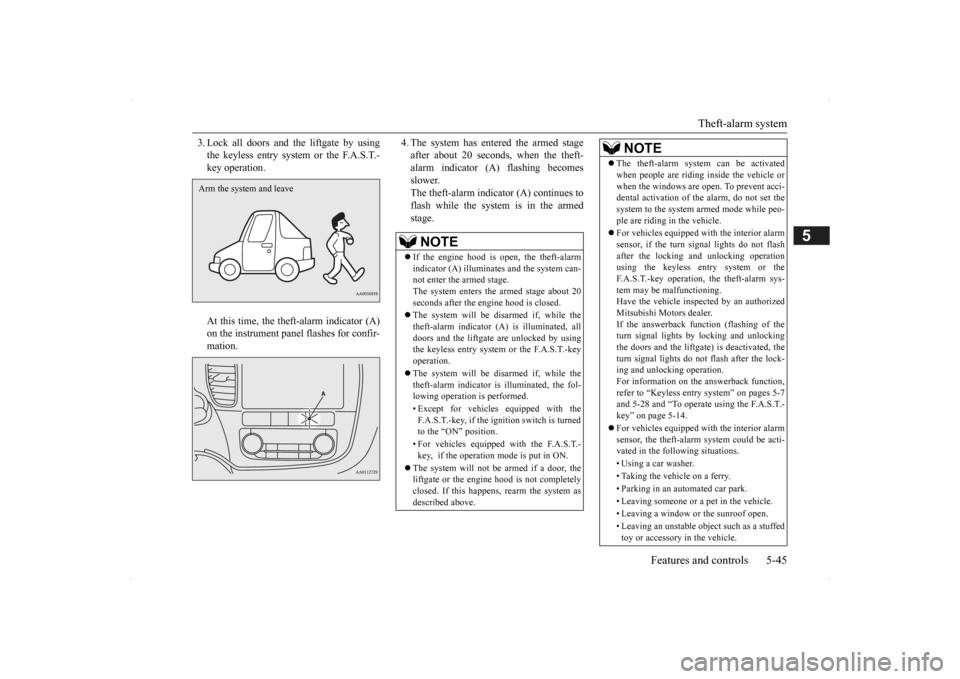
3. Lock all doors and the liftgate by using the keyless entry system or the F.A.S.T.-key operation. At this time, the theft-alarm indicator (A) on the instrument panel flashes for confir-mation.
4. The system has entered the armed stage after about 20 seconds, when the theft-alarm indicator (A) flashing becomes slower. The theft-alarm indicator (A) continues toflash while the system is in the armed stage.
Arm the system and leave
NOTE
If the engine hood is open, the theft-alarm indicator (A) illuminates and the system can-not enter the armed stage. The system enters the armed stage about 20 seconds after the e
ngine hood is closed.
The system will be disarmed if, while the theft-alarm indicator (A) is illuminated, alldoors and the liftgate are unlocked by using the keyless entry system or the F.A.S.T.-key operation. The system will be disarmed if, while the theft-alarm indicator is illuminated, the fol-lowing operation is performed. • Except for vehicles equipped with the F.A.S.T.-key, if the ignition switch is turned to the “ON” position. • For vehicles equippe
d with the F.A.S.T.-
key, if the operation mode is put in ON.
The system will not be armed if a door, the liftgate or the engine
hood is not completely
closed. If this happens, rearm the system asdescribed above.
The theft-alarm system can be activated when people are riding inside the vehicle orwhen the windows are open. To prevent acci-dental activati
on of the alarm, do not set the
system to the system armed mode while peo- ple are riding in the vehicle. For vehicles equipped wi
th the interior alarm
sensor, if the turn si
gnal lights do not flash
after the locking and unlocking operation using the keyless entry system or the F.A.S.T.-key operation, the theft-alarm sys-tem may be malfunctioning. Have the vehicle insp
ected by an authorized
Mitsubishi Motors dealer.If the answerback function (flashing of the turn signal lights by locking and unlocking the doors and the liftgate
) is deactivated, the
turn signal lights do not flash after the lock- ing and unlocking operation. For information on the answerback function,refer to “Keyless entry system” on pages 5-7 and 5-28 and “To operate using the F.A.S.T.- key” on page 5-14. For vehicles equipped wi
th the interior alarm
sensor, the theft-alarm
system could be acti-
vated in the following situations. • Using a car washer.• Taking the vehicle on a ferry. • Parking in an automated car park. • Leaving someone or a pet in the vehicle.• Leaving a window or the sunroof open. • Leaving an unstable object such as a stuffed toy or accessory in the vehicle.NOTE
BK0200500US.book 45 ページ 2013年2月12日 火曜日 午前9時46分
Page 125 of 451
Theft-alarm system
Features and controls 5-47
5
be deactivated when pa
rking in automated car
parks or leaving pe
ts in the vehicle.
1. Except for vehicles equipped with the F.A.S.T.-key, remove the key from the ignition switch. For vehicles equipped with the F.A.S.T.-key, put the operation mode in OFF. 2. Raise and hold the wiper and washer switch to the “MIST” position for about 3seconds. The buzzer will sound once and the function will be deactivated.
To activate the function again, raise and hold the wiper and washer switch to the “MIST” position for about 3 seconds. The buzzer will sound twice and the functionwill be activated.
N00510501172
The system will be disa
rmed if the following
operation is performed. Except for vehicles
equipped with the
F.A.S.T.-key, if the ignition switch is turned to the “ON” position. For vehicles equipped with the F.A.S.T.- key, if the operation mode is put in ON.
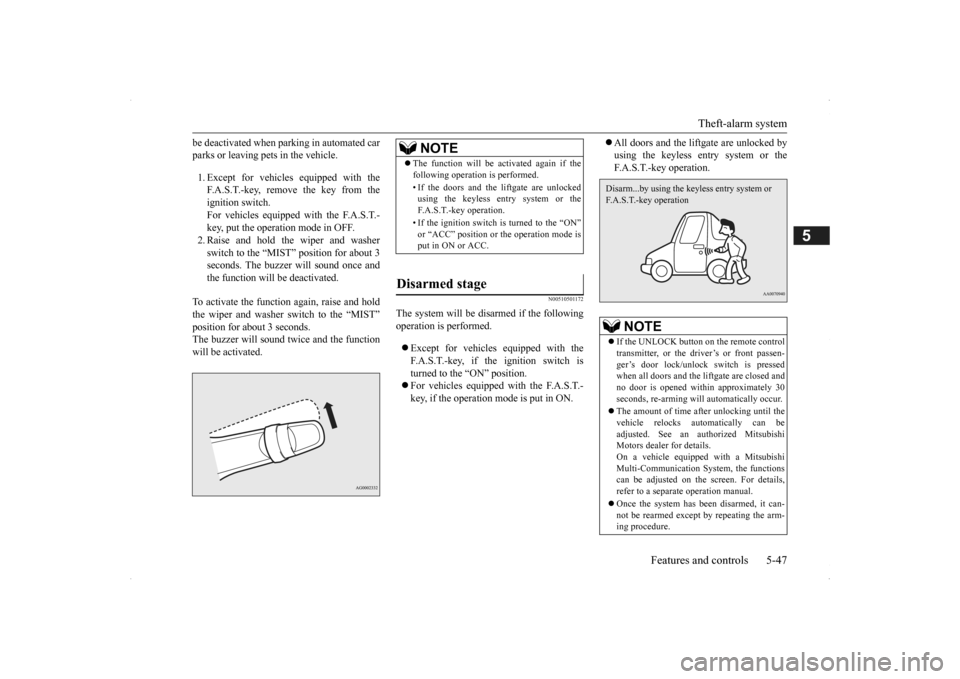
All doors and the lift
gate are unlocked by
using the keyless entry system or theF.A.S.T.-key operation.
NOTE
The function will be activated again if the following operation is performed. • If the doors and the liftgate are unlocked using the keyless entry system or the F.A.S.T.-key operation. • If the ignition switch is turned to the “ON” or “ACC” position or the operation mode isput in ON or ACC.
Disarmed stage
NOTE
If the UNLOCK button on the remote control transmitter, or the dr
iver’s or front passen-
ger’s door lock/unloc
k switch is pressed
when all doors and the liftgate are closed and no door is opened within approximately 30seconds, re-arming will
automatically occur.
The amount of time after unlocking until the vehicle relocks automatically can be adjusted. See an authorized Mitsubishi Motors dealer for details.On a vehicle equipped with a Mitsubishi Multi-Communication System, the functions can be adjusted on the screen. For details,refer to a separate operation manual. Once the system has been disarmed, it can- not be rearmed except
by repeating the arm-
ing procedure.Disarm...by using the keyless entry system or F.A.S.T.-key operation
BK0200500US.book 47 ページ 2013年2月12日 火曜日 午前9時46分
Page 127 of 451
Power window control
Features and controls 5-49
5
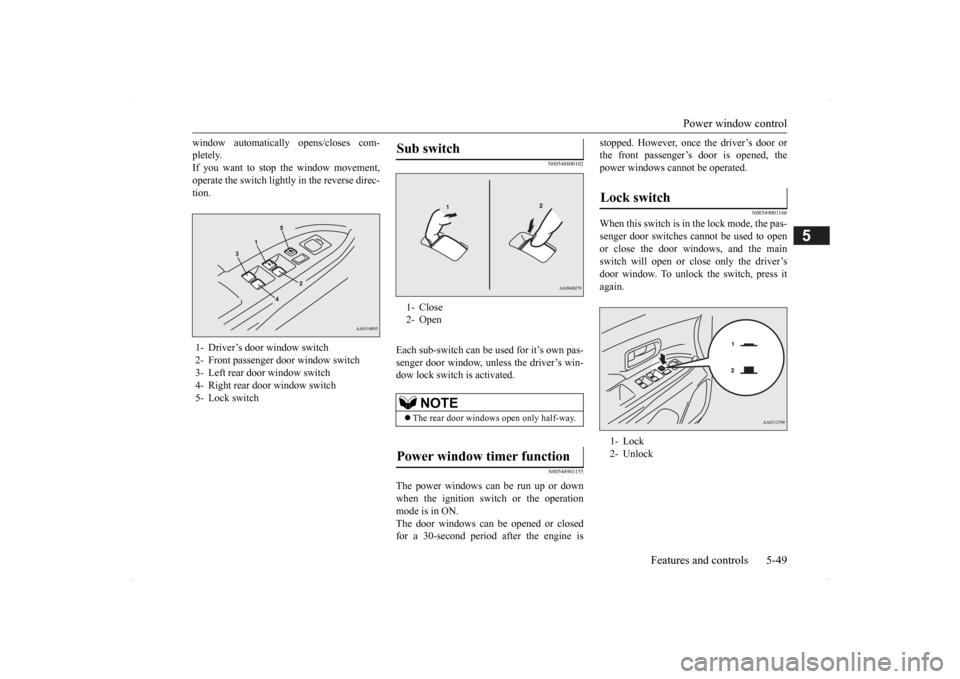
window automatically opens/closes com- pletely.If you want to stop the window movement, operate the switch lightly in the reverse direc- tion.
N00548800102
Each sub-switch can be
used for it’s own pas-
senger door window, unless the driver’s win-dow lock switch is activated.
N00548901155
The power windows can be run up or downwhen the ignition switch or the operationmode is in ON. The door windows can be opened or closed for a 30-second period after the engine is
stopped. However, once the driver’s door or the front passenger’s
door is opened, the
power windows cannot
be operated.
N00549001166
When this switch is in the lock mode, the pas- senger door switches cannot be used to open or close the door windows, and the main switch will open or close only the driver’s door window. To unlock the switch, press it again.
1- Driver’s door window switch 2- Front passenger door window switch 3- Left rear door window switch4- Right rear door window switch 5- Lock switch
Sub switch 1- Close 2- Open
NOTE
The rear door windows
open only half-way.
Power window timer function
Lock switch 1- Lock 2- Unlock
BK0200500US.book 49 ページ 2013年2月12日 火曜日 午前9時46分
Page 128 of 451
Sunroof (if so equipped) 5-50 Features and controls
5
N00528801129
If a hand or head is trapped, for safety the door window is automati
cally lowered a little.
After the obstruction is removed, pull up the switch again to close the door window.
N00551400014
Wind buffeting can be de
scribed as the per-
ception of pressure on the ears or a boomingor rumbling sound. Your
vehicle may exhibit
wind buffeting when driving with one or both rear door windows down or partially opened.This is a normal occurrence that can be mini- mized. If the buffeting
occurs with the rear
door windows open, open the front door win- dows as well as the rear door windows to minimize the condition.
N00511001682
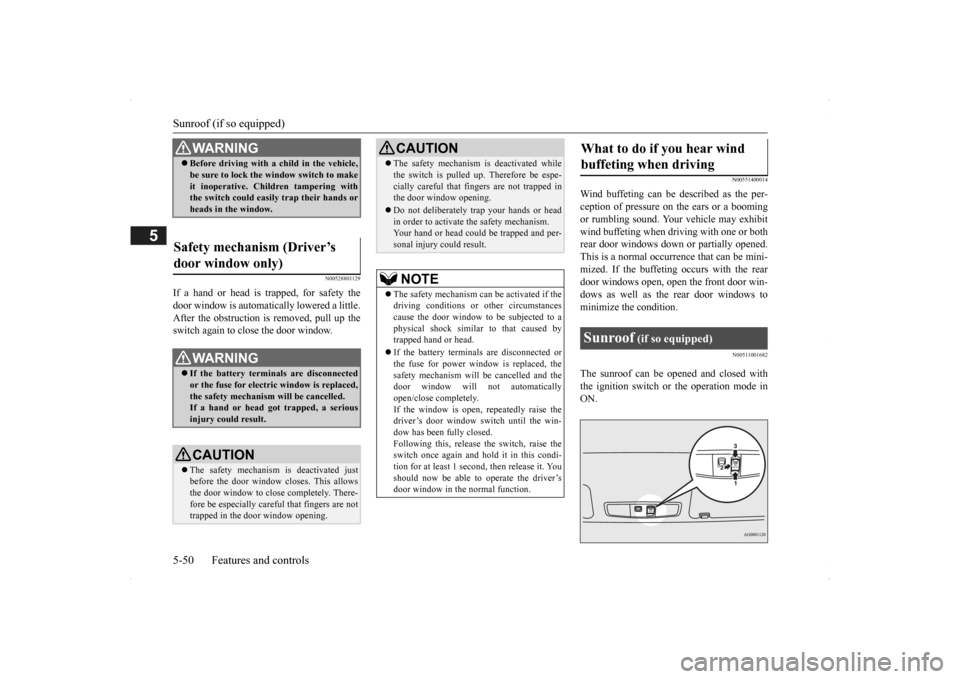
The sunroof can be opened and closed withthe ignition switch or the operation mode in ON.
WA R N I N G Before driving with a child in the vehicle, be sure to lock the window switch to makeit inoperative. Children tampering withthe switch could easily trap their hands or heads in the window.
Safety mechanism (Driver’s door window only)
WA R N I N G If the battery terminals are disconnected or the fuse for electric window is replaced, the safety mechanism will be cancelled.If a hand or head got
trapped, a serious
injury could result.CAUTION The safety mechanism is deactivated just before the door window closes. This allows the door window to close completely. There-fore be especially careful that fingers are not trapped in the door window opening.
The safety mechanism is deactivated while the switch is pulled up.
Therefore be espe-
cially careful that fi
ngers are not trapped in
the door window opening. Do not deliberately tr
ap your hands or head
in order to activate the safety mechanism. Your hand or head coul
d be trapped and per-
sonal injury could result.NOTE
The safety mechanism can be activated if the driving conditions or
other circumstances
cause the door window to be subjected to a physical shock similar to that caused by trapped hand or head. If the battery termin
als are disc
onnected or
the fuse for power window is replaced, thesafety mechanism will be cancelled and the door window will not
automatically
open/close completely.If the window is open,
repeatedly raise the
driver’s door window switch until the win- dow has been fully closed.Following this, release the switch, raise theswitch once again and hol
d it in this condi-
tion for at least 1 second,
then release it. You
should now be able to operate the driver’sdoor window in the normal function.CAUTION
What to do if you hear wind buffeting when driving Sunroof
(if so equipped)
BK0200500US.book 50 ページ 2013年2月12日 火曜日 午前9時46分
Page 129 of 451
Sunroof (if so equipped)
Features and controls 5-51
5
Press the switch (1), the sunroof automati- cally opens. To stop the moving sunroof, press the switch. Press the switch (3), the sunroof automati- cally closes. To stop the moving sunroof, press the switch. When the switch (2) is pressed, the rear of the sunroof raises
for ventilation.
Press the switch (3).
The sunroof can be operated when the igni- tion switch or the operation mode is in ON.The sunroof can be opened or closed for a 30- second period after th
e engine is stopped.
However, when the driver’s door or the frontpassenger door is opened, the sunroof cannot be operated. Turn on the ignition switch again to operate. If a hand or head is trapped in the closing sunroof opening, the safety mechanism willcause the sunroof to
re-open automatically.
The opened sunroof will become operational again after a few seconds. If the safety mechanism is activated 5 or more times consecutiv
ely, normal closing of
the sunroof will be aborted. As an emergency measure, the sunroof can be closed bit by bit until the sunroof is com-pletely closed by repeatedly pressing the switch (2).
After that, the sunroof can be set the initial- ized state in the following procedure. 1. Move the sunroof in slide open position. 2. Press the tilt up switch (2) continually in 10 seconds. 3. The sunroof will be
moved to tilt up posi-
tion automatically bit by bit. 4. The initialize is completed when the sun- roof is stopped at
tilt up position.
If the sunroof does not return to normal, consult an authoriz
ed Mitsubishi Motors
dealer.
To open
NOTE
The sunroof stops just before reaching the fully open position. If
the vehicle is driven
with the sunroof in this position, wind buf- feting is lower than with the sunroof fullyopen.
To close
To tilt up
To tilt down
NOTE
Be sure to tilt down the sunroof before clos- ing the sunshade.
Sunroof timer function
Safety mechanism
NOTE
The safety mechanism can be activated if the driving conditions or
other circumstances
cause the sunroof to be subjected to a physi- cal shock similar to th
at caused by a trapped
hand or head.CAUTION The safety mechanism is deactivated while the switch (2) is presse
d. Therefore be espe-
cially careful that fi
ngers are not trapped in
the sunroof opening. Do not deliberately tr
ap your hands or head
in order to activate the safety mechanism.Personal injury and malfunction of the sun- roof could result.
BK0200500US.book 51 ページ 2013年2月12日 火曜日 午前9時46分
Page 137 of 451
Starting the engine
Features and controls 5-59
5
“Free-hand Advanced
Security Transmitter
(F.A.S.T.-key): Starting” on page5-12. [Except for vehicles equipped with the Free-hand Advanced Security Transmit- ter (F.A.S.T.-key).] Do not operate the starter motor continu- ously for longer than 15 seconds as this could run the battery
down or damage the
starter motor. If the engine does not start, turn the ignition switch back to the “OFF” or “LOCK” position,
wait a few seconds,
and then try again. Trying repeatedly with the engine or starter motor still turning will damage the starter mechanism. If the engine will not
start because the bat-
tery is weak or discharged, refer to “Jump-starting the engine” (on page 8-2)for instructions. A longer warm up period will only con- sume extra fuel. The engine is warmed upenough for driving when the bar graph of engine coolant temper
ature display starts
to move or the low coolant temperatureindicator goes out. Refer to “Engine cool- ant temperature display” on page 5-128 or “Low coolant temper
ature indicator” on
page 5-166.
This model is equipped with an electronically controlled fuel injection system. This is a sys-tem that automatically controls fuel injection. There is usually no need to depress the accel- erator pedal when starting the engine.The starter should not be run for more than 15 seconds at a time. To prevent battery drain, wait a few secondsbetween attempts to restart the engine. 1. Make sure all occupants are properly seated with seat belts fastened.
2. Insert the ignition key. 3. Press and hold the brake pedal down withyour right foot. 4. Make sure the selector
lever is in the “P”
(PARK) position.5. Turn the ignition switch to the “ON” posi- tion and make certain that all warning lights are functioning properly beforestarting the engine. 6. Turn the ignition switch to the “START” position without pressi
ng the accelerator
pedal. Release the ignition switch when the engine starts.
After several attempts, you may experience that the engine still does not start. 1. Make sure that all electric devices, such as lights, air conditio
ning blower and rear
window defogger, are turned off.
Tips for starting
WA R N I N G Never run the engine in
a closed or poorly
ventilated area any longer than is neededto move your vehicle
out of the area. Car-
bon monoxide gas, wh
ich is odorless and
extremely poisonous, could build up and cause serious injury or death.CAUTION Do not push-start the vehicle.Do not run the engine at high rpms or drive at high speeds until
the engine has had a
chance to warm up. Release the ignition sw
itch as soon as the
engine starts. Otherwis
e, the starter motor
will be damaged
Starting the engine
NOTE
Minor noises may be heard on engine start- up. These will disappear as the engine warmsup.
When the engine is hard to start
BK0200500US.book 59 ページ 2013年2月12日 火曜日 午前9時46分