door lock MITSUBISHI OUTLANDER 2014 3.G Owner's Manual
[x] Cancel search | Manufacturer: MITSUBISHI, Model Year: 2014, Model line: OUTLANDER, Model: MITSUBISHI OUTLANDER 2014 3.GPages: 451, PDF Size: 49.08 MB
Page 105 of 451
Free-hand Advanced Securi
ty Transmitter (F.A.S.T.-key) (if so equipped)
Features and controls 5-27
5
N00561100014
To add a F.A.S.T.-key, you must already have 2 registered F.A.S.T.-keys. You need to regis- ter the ID code to the vehicle.Registering the ID code can be done by your authorized Mitsubishi Motors dealer. Or it can be done by yourself (except for vehiclessold in Canada). For you to register the ID code yourself, fol- low the “Customer F.A.S.T.-key program- ming” procedure below. If you choose to have your authorizedMitsubishi Motors dealer register the ID code, take your vehicle and all remaining F.A.S.T.-keys to your authorized MitsubishiMotors dealer.
N00561201171
You can program new F.A.S.T.-keys to thesystem if you have tw
o valid (already regis-
tered) F.A.S.T.-keys an
d a blank (not regis-
tered) F.A.S.T.-key. For F.A.S.T.-key programming, follow the procedures below. 1. Open the driver’s door. 2. While carrying the first valid F.A.S.T.- key, put the operatio
n mode in ON. (Per-
form the following procedure within 30 seconds.)
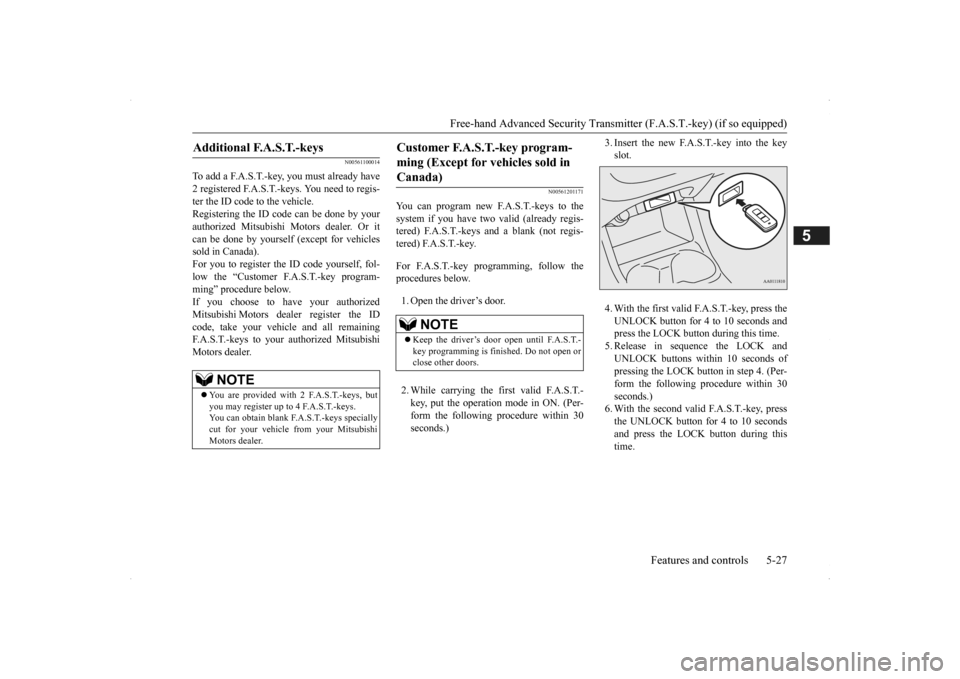
3. Insert the new F.A.S.T.-key into the key slot. 4. With the first valid F.A.S.T.-key, press the UNLOCK button for 4 to 10 seconds and press the LOCK button during this time.5. Release in sequence the LOCK and UNLOCK buttons within 10 seconds of pressing the LOCK butt
on in step 4. (Per-
form the following procedure within 30 seconds.) 6. With the second valid F.A.S.T.-key, pressthe UNLOCK button for 4 to 10 seconds and press the LOCK button during this time.
Additional F.A.S.T.-keys
NOTE
You are provided with 2 F.A.S.T.-keys, but you may register up to 4 F.A.S.T.-keys. You can obtain blank F.A.S.T.-keys specially cut for your vehicle from your MitsubishiMotors dealer.
Customer F.A.S.T.-key program- ming (Except for vehicles sold in Canada)
NOTE
Keep the driver’s door open until F.A.S.T.- key programming is finished. Do not open or close other doors.
BK0200500US.book 27 ページ 2013年2月12日 火曜日 午前9時46分
Page 106 of 451
Free-hand Advanced
Security Transmitter (F.A.S
.T.-key) (if so equipped)
5-28 Features and controls
5
7. Release in sequence the LOCK and UNLOCK buttons within 10 seconds ofpressing the LOCK button in step 6. The immobilizer display on the information screen in the multi-information displaywill blink. When registration of ID
code is complete,
the buzzer will sound 3 times and the immobilizer display will come on for 30seconds. If an error occurs, F.A.S.T.-key program- ming will be terminated and the buzzerwill sound for 3 seconds. 8. If you wish to register another F.A.S.T.- key, repeat the process from step 1 after the operation mode is put in OFF.
N00515501210
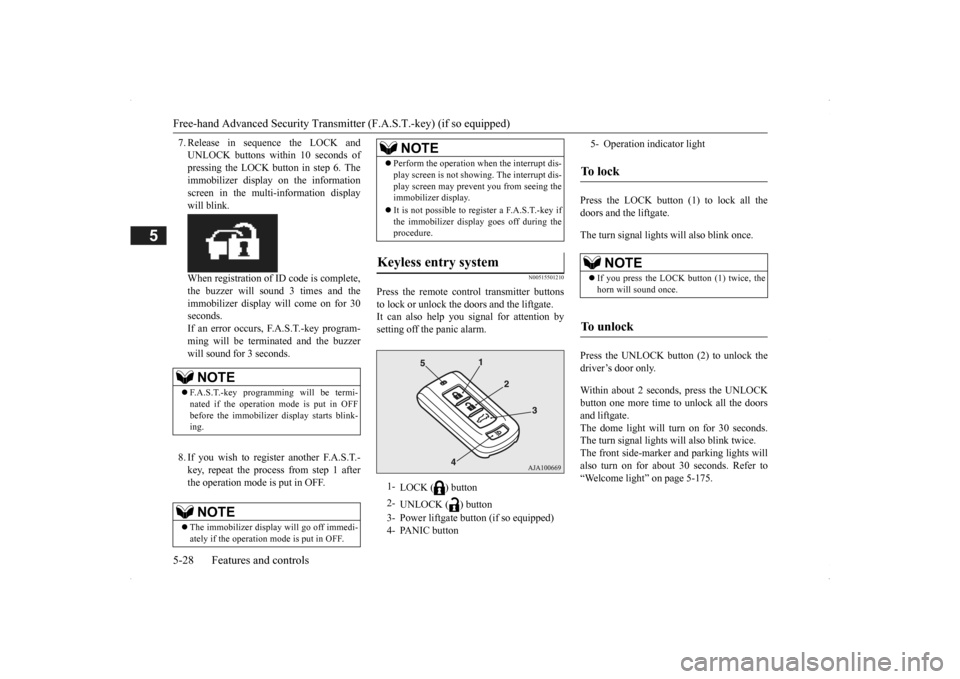
Press the remote control transmitter buttons to lock or unlock the doors and the liftgate. It can also help you
signal for attention by
setting off the panic alarm.
Press the LOCK button (1) to lock all the doors and the liftgate. The turn signal lights will also blink once. Press the UNLOCK button (2) to unlock the driver’s door only. Within about 2 seconds, press the UNLOCK button one more time to unlock all the doors and liftgate. The dome light will turn on for 30 seconds.The turn signal lights will also blink twice. The front side-marker and parking lights will also turn on for about 30 seconds. Refer to“Welcome light” on page 5-175.
NOTE
F.A.S.T.-key programming will be termi- nated if the operation
mode is put in OFF
before the immobilizer
display starts blink-
ing.NOTE
The immobilizer displa
y will go off immedi-
ately if the operation
mode is put in OFF.
Perform the operation when the interrupt dis- play screen is not show
ing. The interrupt dis-
play screen may prevent you from seeing theimmobilizer display. It is not possible to re
gister a F.A.S.T.-key if
the immobilizer displa
y goes off during the
procedure.
Keyless entry system
1-
LOCK ( ) button
2-
UNLOCK ( ) button
3- Power liftgate button (if so equipped) 4- PANIC button
NOTE
5- Operation indicator lightTo l o c k
NOTE
If you press the LOCK button (1) twice, the horn will sound once.
To unlock
BK0200500US.book 28 ページ 2013年2月12日 火曜日 午前9時46分
Page 107 of 451
Free-hand Advanced Securi
ty Transmitter (F.A.S.T.-key) (if so equipped)
Features and controls 5-29
5
The horn and turn signal lights of the keyless entry system answerback function can be changed as required. This is done with the key removed from the ignition switch. The answerback function can be set in the following three ways. 1. Put the operation mode in OFF.
2. Open the driver’s door and turn the com- bination headlights a
nd dimmer switch to
the “OFF” position. 3. Press the LOCK button (1) for 4 to 10 sec- onds and press the UNLOCK button (2)during this time. 4. Release in sequence the UNLOCK and LOCK buttons within 10 seconds ofpressing the UNLOCK button in step 3.
The answerback function from the turn signal lights can be turned ON or OFF separately. 1. Put the operation mode in OFF. 2. Open the driver’s door and turn the com-bination headlights a
nd dimmer switch to
the “OFF” position. 3. Press the UNLOCK button (2) for 4 to 10seconds and press the LOCK button (1) during this time.
4. Release in sequence the UNLOCK and LOCK buttons within 10 seconds ofpressing the LOCK button in step 3.
The buzzer answerback function can be turned ON or OFF as required.
NOTE
On a vehicle equippe
d with a Mitsubishi
Multi-Communication System, the functionscan be adjusted on the screen. For details,refer to the separa
te operation manual.
The door and liftgate unlock function can be set so that all doors and liftgate unlock when the UNLOCK button (2) is pressed once. Refer to “Setting of door
and liftgate unlock
function” on page 5-30.
Answerback function
Horn deactivation/reactivation One chime: The horn will not sound. Two chimes: The horn will sound. Four chimes: The horn will sound if the
LOCK button is pressed twicewithin 1 second.
NOTE
On a vehicle equippe
d with a Mitsubishi
Multi-Communication System, the functions can be adjusted on the screen. For details, refer to the separate operation manual.
Turn signal light
deactivation/reactiva-
tion
Number of chimes
To l o c k
To u n l o c k
One chime One flash Two flashes Two chimes One flash No flash Three chimes No flash Two flashes Four chimes Two flashes One flash Five chimes No flash One flash Six chimes Two flashes No flash Seven chimes No flash No flash
NOTE
On a vehicle equipped with a Mitsubishi Multi-Communication System, the functions can be adjusted on the screen. For details, refer to the separa
te operation manual.
Buzzer deactivation/reactivation
BK0200500US.book 29 ページ 2013年2月12日 火曜日 午前9時46分
Page 108 of 451
Free-hand Advanced
Security Transmitter (F.A.S
.T.-key) (if so equipped)
5-30 Features and controls
5
N00544601095
The door and liftgate
unlock function can be
set to the following two conditions.Each time the door and
liftgate unlock func-
tion is set, a chime wi
ll sound to tell you the
condition of the door and liftgate unlockfunction. 1. Put the operation mode in OFF. 2. Open the driver’s door and turn the com-bination headlights and dimmer switch to the “OFF” position. 3. Press the LOCK button (1) for 4 to 10 sec-onds and press the UNLOCK button (2) during this time.
4. Release in sequence the LOCK and UNLOCK buttons within 10 seconds ofpressing the LOCK button in step 3.
N00579500020
After unlocking the doors and the liftgate, thepower liftgate
can be operated
by pressing the
power liftgate button (3). Refer to “Power li
ftgate” on page 5-37.
N00544701067
If you are near your vehicle and feel threat- ened, you can activate the alarm to call atten- tion as follows: 1. Press the PANIC button (4) for more than 1 second. 2. The headlights will blink on and off and the horn will sound intermittently forabout 3 minutes. 3. To turn off the alarm, press any button on the remote control transmitter.
NOTE
On a vehicle equippe
d with a Mitsubishi
Multi-Communication System, the functionscan be adjusted on the screen. For details,refer to a separa
te operation manual.
Setting of door and liftgate unlock function
Number of chimes
Condition
One chime
All doors and the liftgate unlock
Tw o chimes
Driver’s door unlock only
NOTE
On a vehicle equippe
d with a Mitsubishi
Multi-Communication System, the functionscan be adjusted on the screen. For details, refer to the separa
te operation manual.
Operating the power liftgate
Using the panic alarm
NOTE
The indicator light (5) comes on each time a button is pressed. The F.A.S.T.-key can be used from about 40 feet (12 m) away. However, this distance may change if your vehicle is near a TVtransmitting tower, a power station, or a radio station. If the UNLOCK button (2) is pressed when all doors and the liftgate are locked and no doors or the liftgate
are opened within about
30 seconds, the doors a
nd the liftgate will
automatically re-lock. On a vehicle equippe
d with a Mitsubishi
Multi-Communication System, the functions can be adjusted on the screen. For details, refer to the separate operation manual. If the following conditi
ons are observed after
pressing the LOCK (1) or UNLOCK (2) but-ton on the remote control transmitter, the battery in the F.A.S.T.-key may need to be replaced. • The doors and the lift
gate cannot be locked
or unlocked. • The panic alarm
cannot be operated.
• The indicator light
(5) is dim or does not
come on.
If you lose your F.A.S.T.
-key, please contact
an authorized Mitsubish
i Motors dealer for a
replacement. If you wish to obtain an
additional F.A.S.T.-
key, please contact an
authorized Mitsubishi
Motors dealer. A maximu
m of four F.A.S.T.-
key can be programmed for your vehicle.
BK0200500US.book 30 ページ 2013年2月12日 火曜日 午前9時46分
Page 110 of 451
Door locks 5-32 Features and controls
5
N00509201544
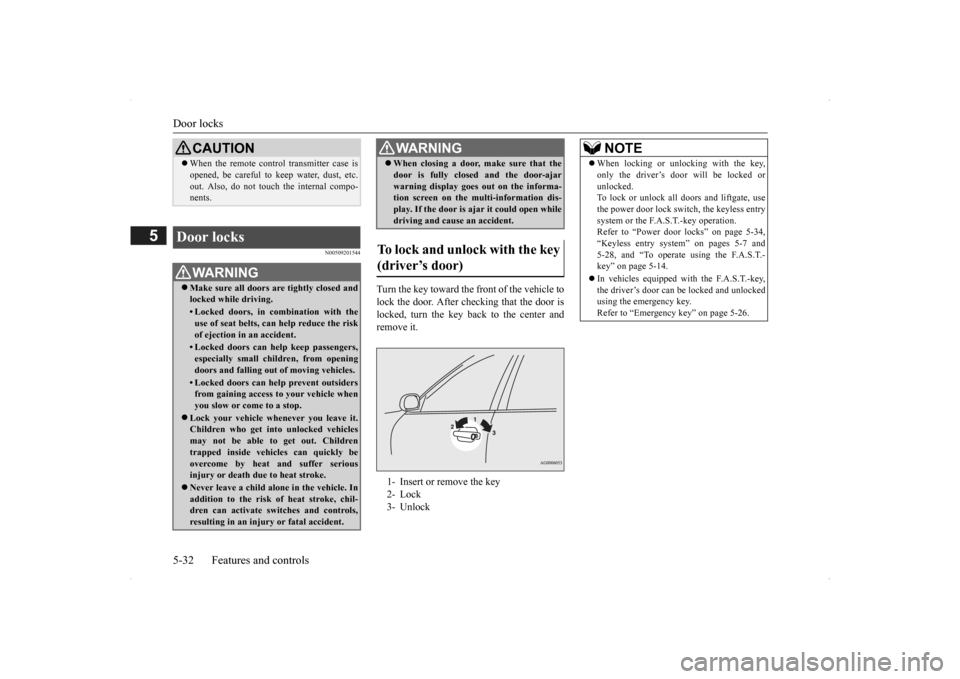
Turn the key toward the front of the vehicle to lock the door. After checking that the door is locked, turn the key back to the center and remove it.
CAUTION When the remote control transmitter case is opened, be careful to
keep water, dust, etc.
out. Also, do not touch the internal compo-nents.
Door locks
WA R N I N G Make sure all doors are tightly closed and locked while driving.• Locked doors, in co
mbination with the
use of seat belts, can help reduce the risk of ejection in an accident.• Locked doors can help keep passengers,especially small children, from openingdoors and falling out
of moving vehicles.
• Locked doors can help prevent outsiders from gaining access
to your vehicle when
you slow or come to a stop.
Lock your vehicle when
ever you leave it.
Children who get into unlocked vehicles may not be able to get out. Childrentrapped inside vehicles can quickly beovercome by heat and suffer serious injury or death due to heat stroke. Never leave a child alon
e in the vehicle. In
addition to the risk
of heat stroke, chil-
dren can activate switches and controls,resulting in an injury
or fatal accident.
When closing a door,
make sure that the
door is fully closed and the door-ajarwarning display goes
out on the informa-
tion screen on the multi-information dis- play. If the door is aj
ar it could open while
driving and cause an accident.
To lock and unlock with the key (driver’s door) 1- Insert or remove the key 2- Lock 3- UnlockWA R N I N G
NOTE
When locking or unlocking with the key, only the driver’s door will be locked orunlocked.To lock or unlock all doors and liftgate, use the power door lock switch, the keyless entry system or the F.A.S.T.-key operation.Refer to “Power door locks” on page 5-34, “Keyless entry system” on pages 5-7 and 5-28, and “To operate using the F.A.S.T.-key” on page 5-14. In vehicles equipped wi
th the F.A.S.T.-key,
the driver’s door can be locked and unlocked using the emergency key. Refer to “Emergency key” on page 5-26.
BK0200500US.book 32 ページ 2013年2月12日 火曜日 午前9時46分
Page 111 of 451
Door locks
Features and controls 5-33
5
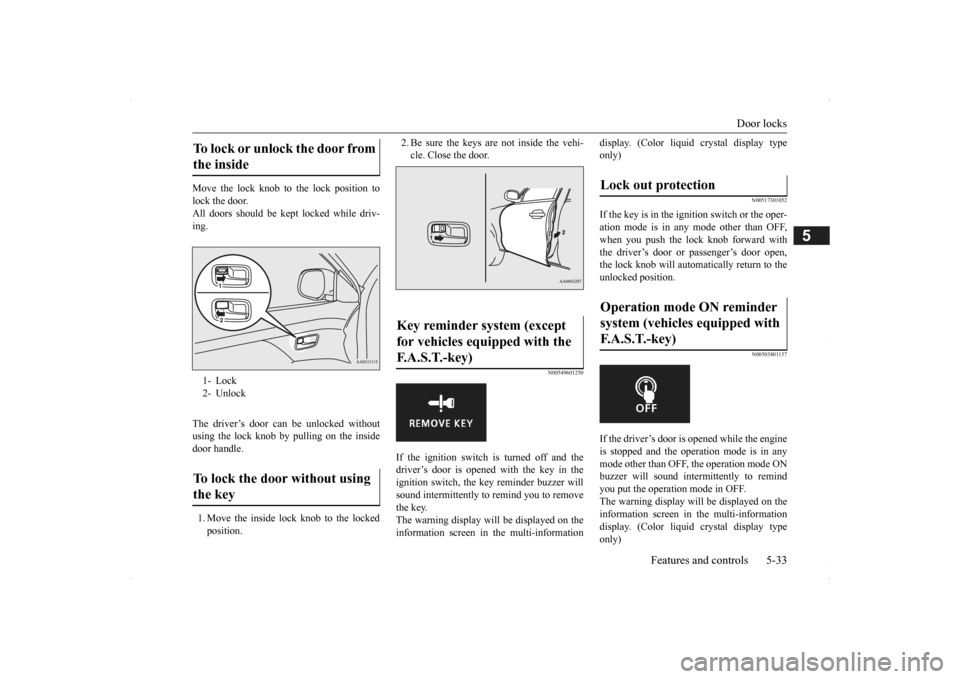
Move the lock knob to the lock position to lock the door. All doors should be kept locked while driv-ing. The driver’s door can be unlocked without using the lock knob by pulling on the insidedoor handle. 1. Move the inside lock knob to the locked position.
2. Be sure the keys are not inside the vehi- cle. Close the door.
N00549601250
If the ignition switch is turned off and thedriver’s door is opened with the key in theignition switch, the ke
y reminder buzzer will
sound intermittently to
remind you to remove
the key.The warning display will be displayed on the information screen in the multi-information
display. (Color liquid crystal display type only)
N00517301052
If the key is in the ignition switch or the oper-ation mode is in any
mode other than OFF,
when you push the lock knob forward with the driver’s door or passenger’s door open, the lock knob will automatically return to the unlocked position.
N00503801157
If the driver’s door is opened while the engineis stopped and the operation mode is in any mode other than OFF, the operation mode ONbuzzer will sound intermittently to remind you put the operation mode in OFF. The warning display will be displayed on theinformation screen in the multi-information display. (Color liquid crystal display type only)
To lock or unlock the door from the inside 1- Lock 2- UnlockTo lock the door without using the key
Key reminder system (except for vehicles equipped with the F.A.S.T.-key)
Lock out protection Operation mode ON reminder system (vehicles equipped with F. A . S . T. - k e y )
BK0200500US.book 33 ページ 2013年2月12日 火曜日 午前9時46分
Page 112 of 451
Power door locks 5-34 Features and controls
5
N00509301617
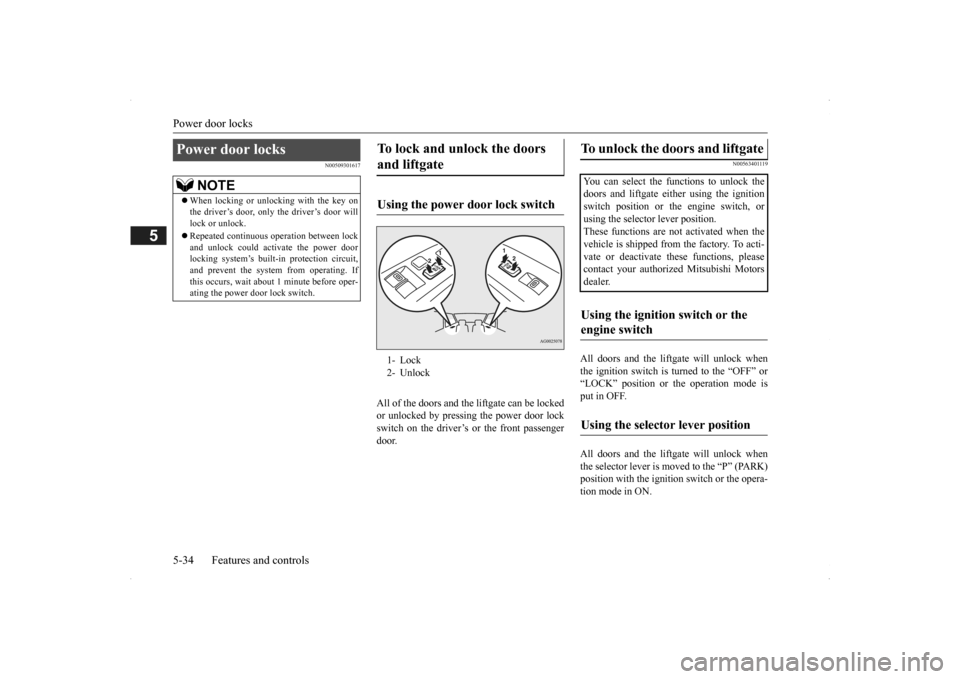
All of the doors and the
liftgate can be locked
or unlocked by pressing the power door lockswitch on the driver’s or the front passenger door.
N00563401119
All doors and the liftgate will unlock when the ignition switch is turned to the “OFF” or“LOCK” position or the operation mode is put in OFF. All doors and the liftgate will unlock when the selector lever is moved to the “P” (PARK) position with the ignition
switch or the opera-
tion mode in ON.
Power door locks
NOTE
When locking or unlocking with the key on the driver’s door, only the driver’s door willlock or unlock. Repeated continuous
operation between lock
and unlock could acti
vate the power door
locking system’s built-i
n protection circuit,
and prevent the system from operating. Ifthis occurs, wait about
1 minute before oper-
ating the power door lock switch.
To lock and unlock the doors and liftgate Using the power door lock switch 1- Lock 2- Unlock
To unlock the doors and liftgate You can select the functions to unlock thedoors and liftgate eith
er using the ignition
switch position or the engine switch, or using the selector lever position. These functions are not
activated when the
vehicle is shipped from the factory. To acti- vate or deactivate
these functions, please
contact your authorized Mitsubishi Motorsdealer.Using the ignition switch or the engine switch Using the selector lever position
BK0200500US.book 34 ページ 2013年2月12日 火曜日 午前9時46分
Page 113 of 451
Child safety locks for rear door Features and controls 5-35
5
N00509401298
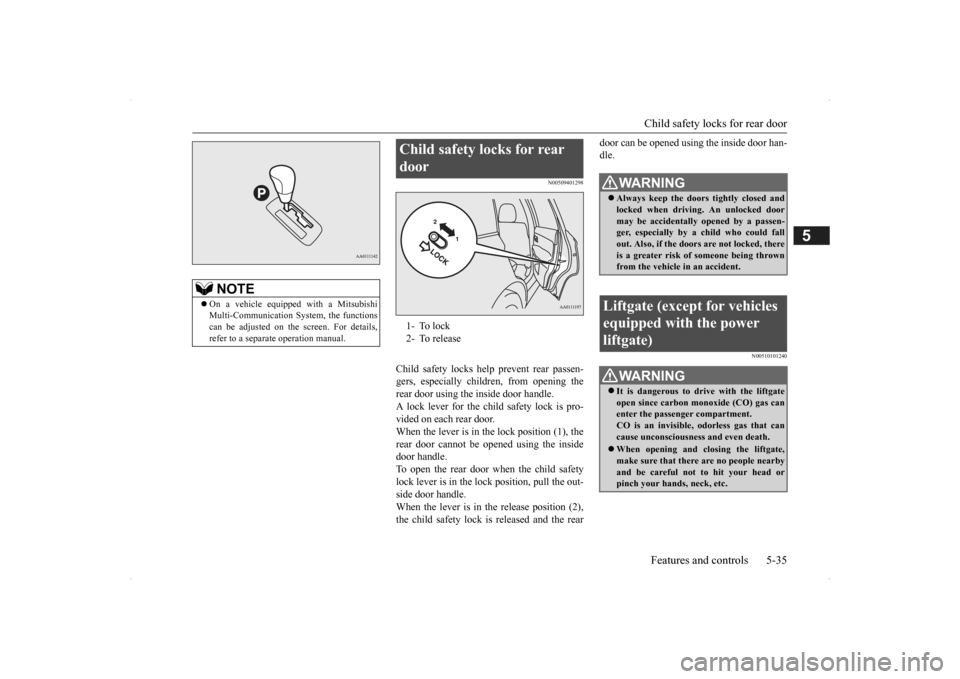
Child safety locks help prevent rear passen- gers, especially children, from opening therear door using the inside door handle. A lock lever for the child safety lock is pro- vided on each rear door.When the lever is in the lock position (1), the rear door cannot be opened using the inside door handle.To open the rear door when the child safety lock lever is in the lock position, pull the out- side door handle.When the lever is in the release position (2), the child safety lock is released and the rear
door can be opened using the inside door han- dle.
N00510101240
NOTE
On a vehicle equippe
d with a Mitsubishi
Multi-Communication System, the functionscan be adjusted on the screen. For details, refer to a separate operation manual.
Child safety locks for rear door 1- To lock 2- To release
WA R N I N G Always keep the door
s tightly closed and
locked when driving. An unlocked door may be accidentally
opened by a passen-
ger, especially by
a child who could fall
out. Also, if the doors are not locked, there is a greater risk of
someone being thrown
from the vehicle
in an accident.
Liftgate (except for vehicles equipped with the power liftgate)
WA R N I N G It is dangerous to drive with the liftgate open since carbon mo
noxide (CO) gas can
enter the passenger compartment. CO is an invisible,
odorless gas that can
cause unconsciousness and even death. When opening and closing the liftgate, make sure that there are no people nearbyand be careful not to hit your head or pinch your hands, neck, etc.
BK0200500US.book 35 ページ 2013年2月12日 火曜日 午前9時46分
Page 114 of 451
Liftgate (except for vehicles e
quipped with the power liftgate)
5-36 Features and controls
5
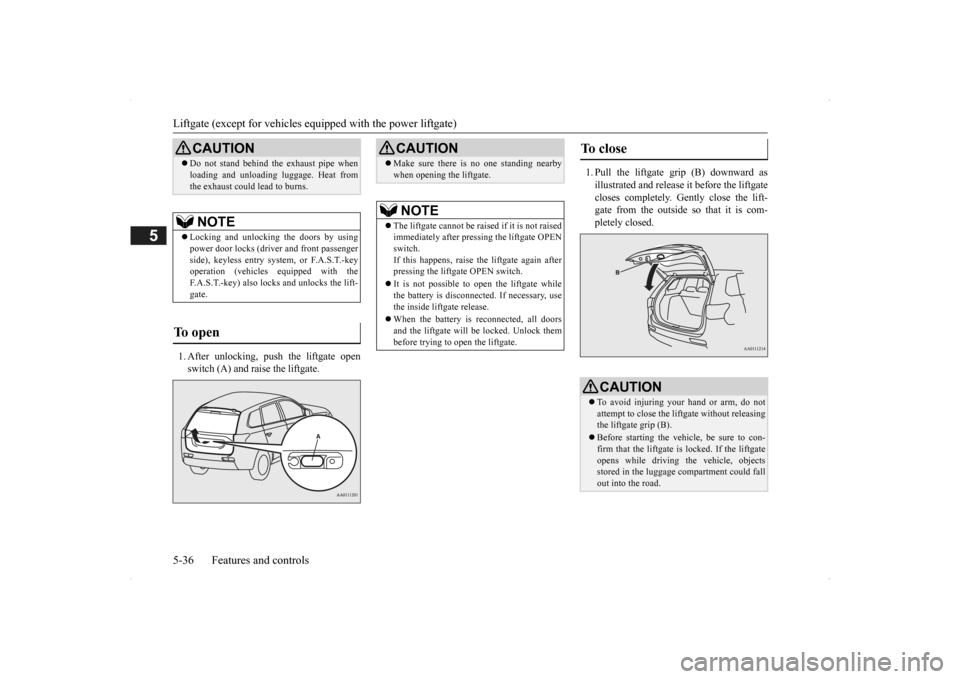
1. After unlocking, push the liftgate open switch (A) and raise the liftgate.
1. Pull the liftgate grip (B) downward as illustrated and release it before the liftgate closes completely. Gently close the lift- gate from the outside so that it is com-pletely closed.
CAUTION Do not stand behind the exhaust pipe when loading and unloading
luggage. Heat from
the exhaust could lead to burns.NOTE
Locking and unlocking the doors by using power door locks (driver and front passenger side), keyless entry system, or F.A.S.T.-key operation (vehicles equipped with theF.A.S.T.-key) also locks and unlocks the lift- gate.
To open
CAUTION Make sure there is no one standing nearby when opening the liftgate.NOTE
The liftgate cannot
be raised if it is not raised
immediately after pre
ssing the liftgate OPEN
switch. If this happens, raise the liftgate again after pressing the liftgate OPEN switch. It is not possible to open the liftgate while the battery is disconnect
ed. If necessary, use
the inside liftgate release. When the battery is reconnected, all doors and the liftgate will be locked. Unlock them before trying to open the liftgate.
To close
CAUTION To avoid injuring your hand or arm, do not attempt to close the lift
gate without releasing
the liftgate grip (B). Before starting the vehi
cle, be sure to con-
firm that the liftgate is locked. If the liftgateopens while driving
the vehicle, objects
stored in the luggage compartment could fall out into the road.
BK0200500US.book 36 ページ 2013年2月12日 火曜日 午前9時46分
Page 115 of 451
Power liftgate (if so equipped) Features and controls 5-37
5
N00575900026
Before operating the pow
er liftgate, unlock
the power liftgate by pushing the power door lock switch or the unlock button on the key- less entry system or F.A.S.T.-key.
Refer to “Keyless entry system”, “Free-hand Advanced Security Transmitter (F.A.S.T.-key)” and “Power door locks” on pages 5-7, 5-12 and 5-34 respectively.
N00576000024
NOTE
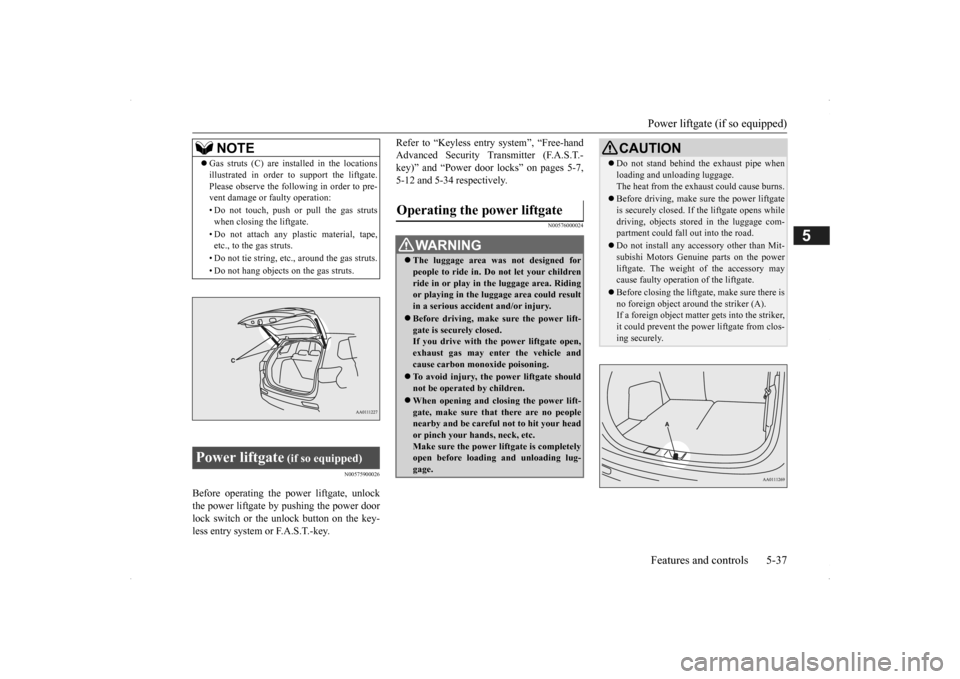
Gas struts (C) are installed in the locations illustrated in order to
support the liftgate.
Please observe the following in order to pre-vent damage or faulty operation: • Do not touch, push or pull the gas struts when closing the liftgate. • Do not attach any pl
astic material, tape,
etc., to the gas struts. • Do not tie string, etc., around the gas struts.• Do not hang objects on the gas struts.
Power liftgate
(if so equipped)
Operating the power liftgate
WA R N I N G The luggage area was
not designed for
people to ride in. Do not let your childrenride in or play in
the luggage area. Riding
or playing in the luggage area could result in a serious accide
nt and/or injury.
Before driving, make sure the power lift- gate is securely closed.If you drive with th
e power liftgate open,
exhaust gas may enter the vehicle and cause carbon monoxide poisoning. To avoid injury, the power liftgate should not be operated by children. When opening and clos
ing the power lift-
gate, make sure that there are no peoplenearby and be carefu
l not to hit your head
or pinch your hands, neck, etc. Make sure the power liftgate is completelyopen before loadin
g and unloading lug-
gage.
CAUTION Do not stand behind th
e exhaust pipe when
loading and unloading luggage.The heat from the exha
ust could cause burns.
Before driving, make
sure the power liftgate
is securely closed. If th
e liftgate opens while
driving, objects stored in the luggage com- partment coul
d fall out into the road.
Do not install any acce
ssory other than Mit-
subishi Motors Genui
ne parts on the power
liftgate. The weight of the accessory maycause faulty operati
on of the liftgate.
Before closing the liftga
te, make sure there is
no foreign object aroun
d the striker (A).
If a foreign object matter
gets into the striker,
it could prevent the power
liftgate from clos-
ing securely.
BK0200500US.book 37 ページ 2013年2月12日 火曜日 午前9時46分