battery MITSUBISHI OUTLANDER 2014 3.G Service Manual
[x] Cancel search | Manufacturer: MITSUBISHI, Model Year: 2014, Model line: OUTLANDER, Model: MITSUBISHI OUTLANDER 2014 3.GPages: 451, PDF Size: 49.08 MB
Page 264 of 451
Bluetooth® 2.0 interface (if so equipped) 5-186 Features and controls
5
Steering control switch and microphone
P.5-186Voice recognition function
P.5-188
Useful voice commands
P.5-189
Speaker enrollment function
P.5-190
Connecting the Bluetooth
® 2.0 interface and
the Bluetooth
® device
P.5-192
Operating a music player connected via Blue- tooth
® P.5-196
How to make or receive hands-free calls
P.5-196Phonebook function
P.5-199
N00564001109
Press this button to increase the volume.
NOTE
If the ignition switch
or the operation mode
is left in ACC, the accessory power willautomatically turn off after a certain periodof time and you will no longer be able to use the Bluetooth
® 2.0 interface. The accessory
power comes on again if
the ignition switch
or the engine switch is operated. Refer to“ACC power auto-cut
out function” on page
5-18 and 5-57. The Bluetooth
® 2.0 interface cannot be used
if the Bluetooth
® device has a dead battery
or the device power is turned off. Hands-free calls
will not be possible if your
phone does not have
service available.
If you place the Bluetooth
® device in the
vehicle’s third seat or
luggage compartment,
you may not be able to
use the Bluetooth
®
2.0 interface. Some Bluetooth
® devices are not compatible
with the Bluetooth
® 2.0 interface.
You can confirm the Link System software version by pressing the HANG-UP button 3times (press and hold 2 times and then press briefly) within 10 seconds.
For detail of the Bluetooth
® 2.0 interface,
refer to the following web site: [For vehicles sold in U.S.A.] You can access the MITSUBISHI MOTORSNORTH AMERICA web site. [For vehicles sold in Canada and Mexico] You can access the MITSUBISHI MOTORSweb site. Please read and agree to the “Warning about Links to the Web Sites of Other Companies”,the websites mentioned above may connect you to websites other
than the MITSUBISHI
MOTORS web site.http://www.mitsubishi-motors.com/en/prod- ucts/index.html Software updates by ce
llular phone/digital
audio device manufacturers may change/alter devi
ce connectivity.
NOTE
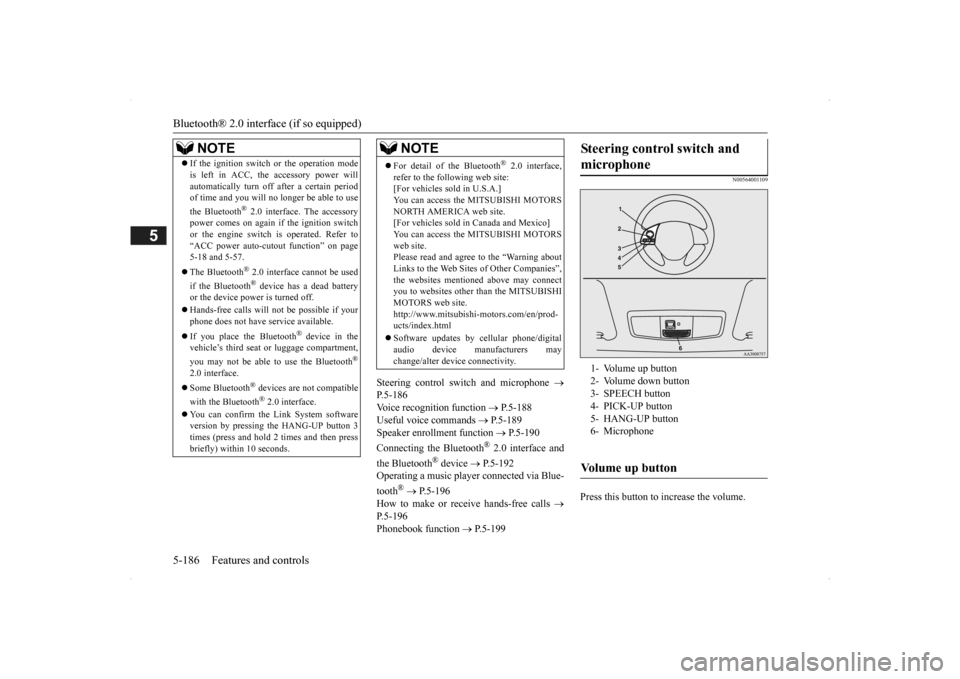
Steering control switch and microphone
1- Volume up button 2- Volume down button 3- SPEECH button4- PICK-UP button 5- HANG-UP button 6- MicrophoneVolume up button
BK0200500US.book 186 ページ 2013年2月12日 火曜日 午前9時46分
Page 265 of 451

Bluetooth® 2.0 interface (if so equipped)
Features and controls 5-187
5
Press this button to decrease the volume. Press this button to ch
ange to voice recog-
nition mode.While the system is in voice recognition mode, “Listening” wi
ll appear on the
audio display. If you press the button briefly while in voice recognition mode, it will interrupt prompting and allow voice commandinput. Pressing the button l
onger will deactivate
the voice recognition mode. Pressing this button briefly during a call will enable voice recognition and allow voice command input.
Press this button when an incoming call is received to answer the telephone. When another call is received during a call, press this button to put the first caller on hold and talk to the new caller. • In such circumstance
s, you can press the
button briefly to sw
itch between callers.
You will switch to the first caller and theother caller will be put on hold. • To establish a three-way call in such situ- ations, press the SPEECH button to entervoice recognition mode and then say “Join calls.”
Press this button when an incoming call is received to refuse the call. Press this button during a call to end the current call.When another call is on hold, you will switch to that call.
If this button is pressed in the voice recog- nition mode, the voice recognition modewill be de
activated.
Your voice will be
recognized by a micro-
phone in the overhead console, allowing youto make hands-free ca
lls with voice com-
mands.
Volume down button
SPEECH button
NOTE
On vehicles equipped
with the Mitsubishi
Multi-Communication System, pressing the SPEECH button will acti
vate the voice rec-
ognition mode (a beep will sound when suc- cessfully activated). To use the voice recognition of the Bluetooth
® 2.0 interface,
press the PICK-UP button.
PICK-UP button
NOTE
When not receiving incoming calls, pressing the PICK-UP button on
vehicles equipped
with the Mitsubishi Multi-Communication System, will activate
the voice recognition of
the Bluetooth
® 2.0 interface.
HANG-UP button
NOTE
When you press the SPEECH button (except for vehicles with Mi
tsubishi Multi-Commu-
nication System) or
PICK-UP button (for
vehicles with Mitsubishi Multi-Communica- tion System) to enter
voice recognition mode
with a cellular phone paired to the system, current information on
the cellular phone,
such as “remaining battery life,” “signalstrength” or “roaming,”
will be displayed on
the audio display.
*
* : Some cellular phones
will not send this
information to the Bluetooth
® 2.0 interface.
Call waiting and three-
way calls can be used
by the Bluetooth
® 2.0 interface, only if it is
possible to use those services with your cel- lular phone.
Microphone
BK0200500US.book 187 ページ 2013年2月12日 火曜日 午前9時46分
Page 288 of 451
Sun visors 5-210 Features and controls
5
N00524601363
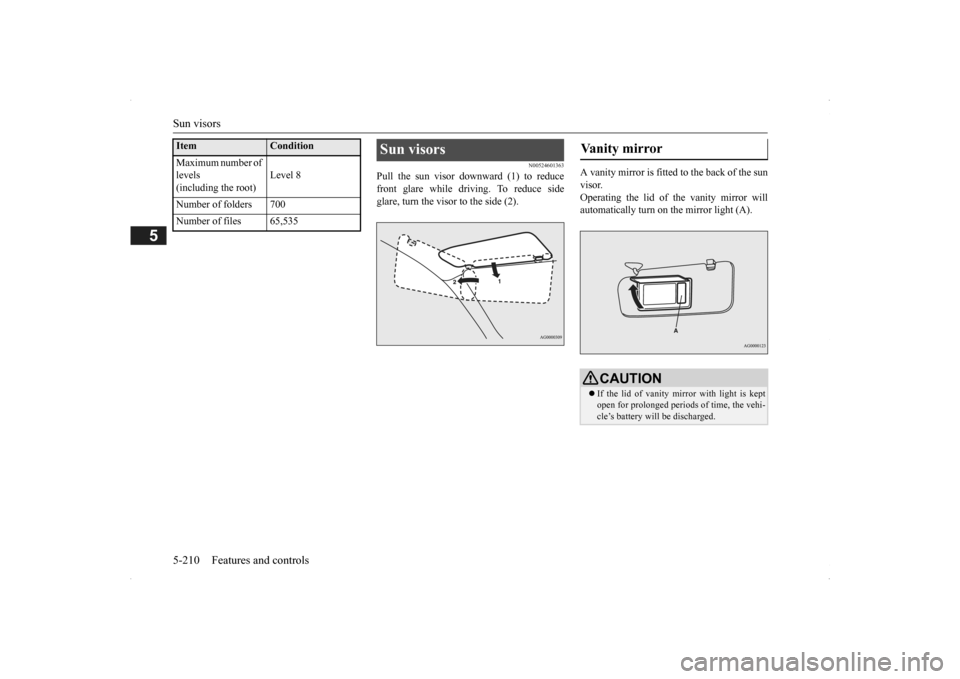
Pull the sun visor downward (1) to reduce front glare while driving. To reduce side glare, turn the visor to the side (2).
A vanity mirror is fitted to the back of the sun visor. Operating the lid of the vanity mirror will automatically turn on the mirror light (A).
Maximum number of levels(including the root)
Level 8
Number of folders 700 Number of files 65,535Item
Condition
Sun visors
Vanity mirror
CAUTION If the lid of vanity mirror with light is kept open for prolonged periods
of time, the vehi-
cle’s battery will be discharged.
BK0200500US.book 210 ページ 2013年2月12日 火曜日 午前9時46分
Page 289 of 451
12 V power outlets
Features and controls 5-211
5
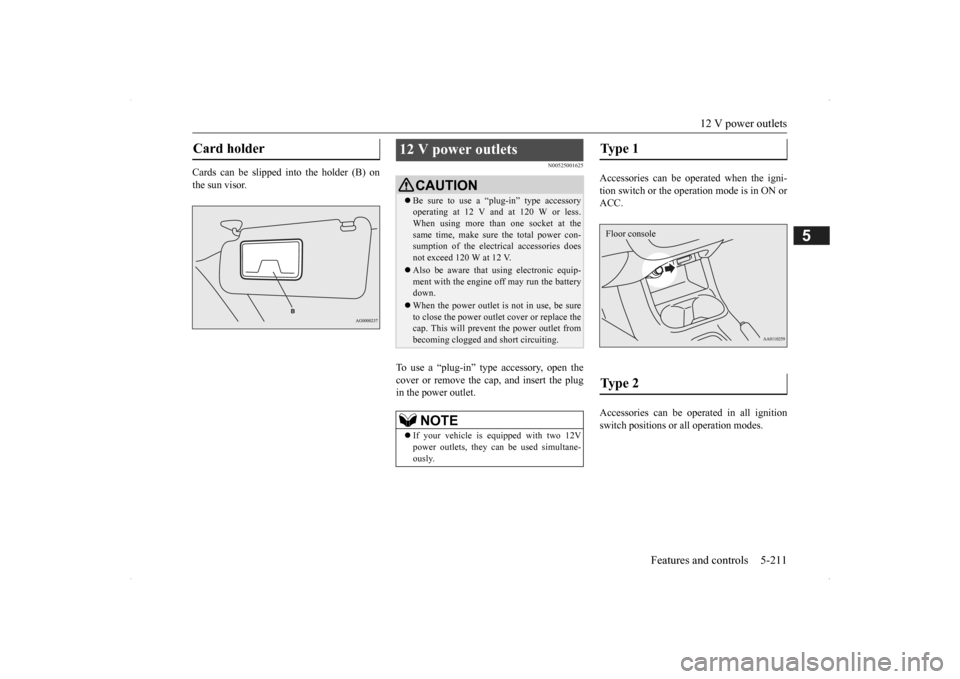
Cards can be slipped into the holder (B) on the sun visor.
N00525001625
To use a “plug-in” type accessory, open thecover or remove the cap, and insert the plugin the power outlet.
Accessories can be operated when the igni- tion switch or the operation mode is in ON or ACC. Accessories can be ope
rated in all ignition
switch positions or
all operation modes.
Card holder
12 V power outlets
CAUTIONBe sure to use a “plug-in” type accessory operating at 12 V and at 120 W or less.When using more than one socket at the same time, make sure
the total power con-
sumption of the electrical accessories doesnot exceed 120 W at 12 V. Also be aware that
using electronic equip-
ment with the engine
off may run the battery
down. When the power outlet is not in use, be sure to close the power outle
t cover or replace the
cap. This will prevent the power outlet frombecoming clogged and short circuiting.NOTE
If your vehicle is e
quipped with two 12V
power outlets, they ca
n be used simultane-
ously.
Type 1 Type 2 Floor console
BK0200500US.book 211 ページ 2013年2月12日 火曜日 午前9時46分
Page 290 of 451
Interior lights 5-212 Features and controls
5
N00525301585
N00525401469
Floor console box
Interior lights
NOTE
Be aware that leaving the light illuminated with the engine off may run the batterydown. Never leave the vehi
cle without checking
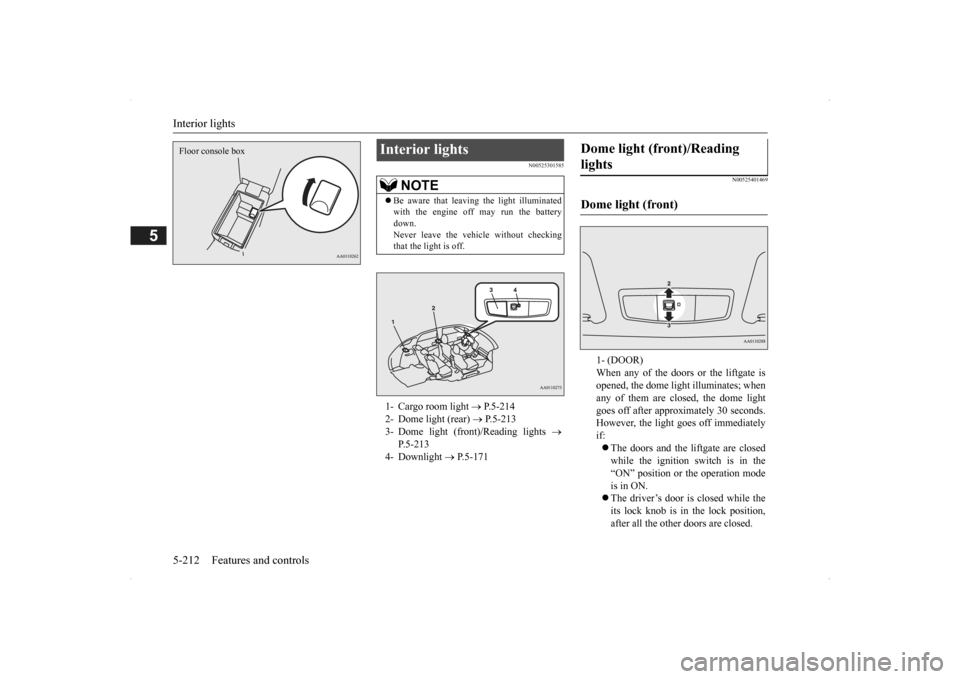
that the light is off.1- Cargo room light
P.5-214
2- Dome light (rear)
P.5-213
3- Dome light (front)/Reading lights
P.5-213
4- Downlight
P.5-171
Dome light (front)/Reading lights Dome light (front)
1- (DOOR) When any of the doors or the liftgate isopened, the dome light illuminates; when any of them are closed, the dome light goes off after approx
imately 30 seconds.
However, the light
goes off immediately
if: The doors and the liftgate are closed while the ignition switch is in the “ON” position or the operation mode is in ON. The driver’s door is closed while the its lock knob is in the lock position, after all the other doors are closed.
BK0200500US.book 212 ページ 2013年2月12日 火曜日 午前9時46分
Page 305 of 451
Driving during cold weather
Driving safety 6-5
6
Always obey applicab
le laws and regula-
tions. Be a polite and alert driver. Alwaysleave room for unexpected events, such as sudden braking. If you plan to drive in another country, obey their vehicle re
gistration laws and
make sure you will be able to get the right fuel.
N00629400445
Check the battery. At the same time, check the terminals and wiring. During extremely cold weather, the battery will not be as strong. Also, the battery powerlevel may drop beca
use more power is
used for cold starting and driving. Before driving the vehicle, check to see ifthe engine runs at the proper speed and if the headlights are as
bright as normally.
Charge or replace the battery if necessary.During extreme cold weather, it is possi- ble that a very low battery could freeze.
Warm the engine sufficiently. After start- ing the engine, allow a short warm-uptime to distribute oil to all cylinders. Then drive your vehicle slowly. Stay at low speeds at first so that thetransaxle, transfer case and rear axle oil have time to spread to all lubrication points. Check the engine antifreeze. If there is not enough coolant because of a leak or from engine
overheating, add Mit-
subishi Motors Genuine Super Long Life Coolant Premium or equivalent.Please read this section in conjunction with the “Engine coolant” on page 9-8.
N00629501528
All the parts of the brake system are critical to safety. Have the vehicle serviced by anauthorized Mitsubishi Motors dealer or a repair facility of your
choice at regular inter-
vals according to the “WARRANTY ANDMAINTENANCE MANUAL”.
Check the brake system while driving at a low speed immediately
after starting, espe-
cially when the brakes are wet, to confirmthey work normally. A film of water can be formed on the brake discs and prevent normal braking after driv-ing in heavy rain or through large puddles, or after the vehicle is washed. If this occurs, dry the brakes out by drivi
ng slowly while lightly
depressing the brake pedal. On snowy roads, ice can form on the braking system, making the brakes less effective. While driving in such
conditions, pay close
attention to surrounding vehicles and to the condition of the road surface. From time to time, lightly depress the brake pedal andcheck how effective the brakes are. It is important to take advantage of the engine braking by downshifting while driving on steep downhill roads in order to prevent the brakes from overheating.
Driving during cold weather
WA R N I N G The battery gives o
ff explosive hydrogen
gas. Any spark or flame can cause the bat- tery to explode, which could cause serious injury or death.Always wear protecti
ve clothes and a face
mask when working with your battery, or let a skilled mechanic do it.
WA R N I N G Never open the radiator cap when the radiator is hot. You could be seriously burned.
Braking
When brakes are wet When driving in cold weather When driving downhill
BK0200500US.book 5 ページ 2013年2月12日 火曜日 午前9時46分
Page 307 of 451
Loading information Driving safety 6-7
6
Vehicle maximum load on the tire: load on an individual tire that is determined bydistributing to each axle its share of the maximum loaded vehicle weight and dividing by two. Vehicle normal load on the tire: load on an individual tire that is determined by dis- tributing to each axle its share of the curbweight, accessory weight, and normal occupant weight and dividing by two. Maximum loaded vehicle weight: the sum of - (a) Curb weight;(b) Accessory weight; (c) Vehicle capacity weight; and (d) Production options weight. Curb weight: the weight of a motor vehi- cle with standard e
quipment including the
maximum capacity of fuel, oil, and cool-ant. Accessory weight: the combined weight (in excess of those
standard items which
may be replaced) of automatic transmis- sion, power steering, power brakes, power windows, power seats, radio, and heater,to the extent that these items are available as factory- installed equipment (whether installed or not). Vehicle capacity weight: the rated cargo and luggage load plus 150 lbs (68 kg) * times the vehicle’s
designated seating
capacity.
Production options weight: the combined weight of those installed regular produc-tion options weighing over 5 lbs (2.3 kg) in excess of those standard items which they replace, not prev
iously considered in
curb weight or accessory weight, includ- ing heavy duty brakes,
ride levelers, roof
rack, heavy duty battery, and special trim. Normal occupant weight: 150 lbs (68 kg) * times the number of
specified occupants
(3 in the case of your vehicle) Occupant distribution:
Occupant distribu-
tion within the passenger compartment (Inyour vehicle the distribution is 2 in front, 1 in second row seat)
N00630101407
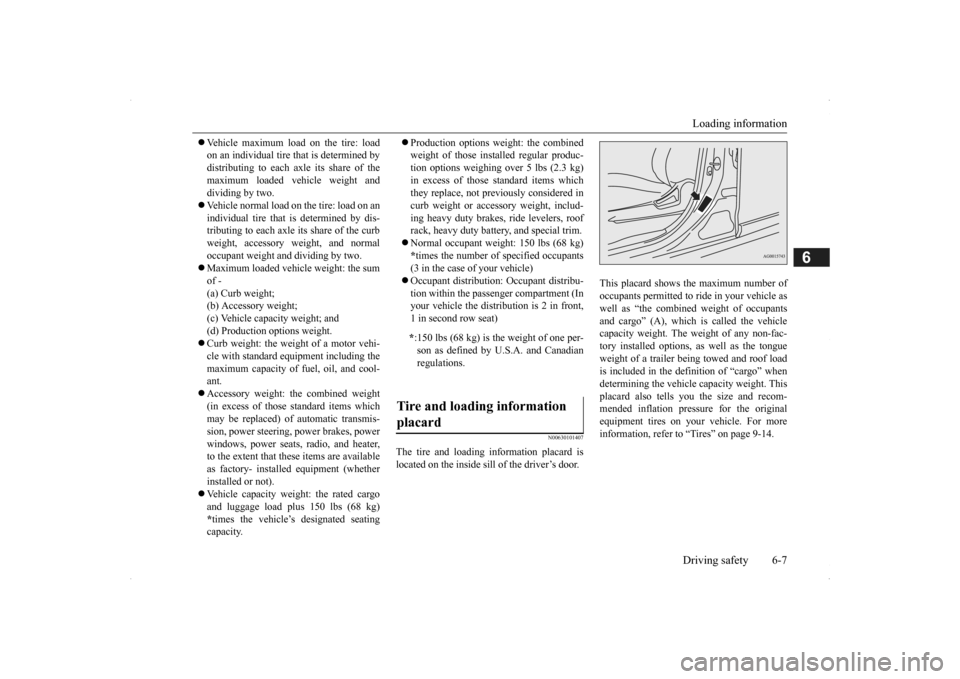
The tire and loading information placard is located on the inside sill of the driver’s door.
This placard shows the maximum number of occupants permitted to
ride in your vehicle as
well as “the combined
weight of occupants
and cargo” (A), which
is called the vehicle
capacity weight. The weight of any non-fac-tory installed options, as well as the tongue weight of a trailer being towed and roof load is included in the defi
nition of “cargo” when
determining the vehicle
capacity weight. This
placard also tells you the size and recom- mended inflation pressure for the originalequipment tires on your vehicle. For more information, refer to
“Tires” on page 9-14.
* :150 lbs (68 kg) is th
e weight of one per-
son as defined by U.S.A. and Canadian regulations.
Tire and loading information placard
BK0200500US.book 7 ページ 2013年2月12日 火曜日 午前9時46分
Page 368 of 451
If the vehicle breaks down 8-2 For emergencies
8
N00836301230
If your vehicle breaks down on the road, move to the shoulder and turn on the hazard warning flashers. If there is no shoulder, orthe shoulder is not safe, drive in the right lane slowly with the hazard
lights flashing, until
you come to a safe stopping place. Keep theflashers flashing. If the engine stops, there will be no power assist to the steering and brakes, making these difficult to use. The brake booster will not work, so the brakes will not grip well. The brake pedal will be harder to press than usual. Since there is no power steering assist, the steering wheel will be hard to turn.
Get help from your passengers, bystanders, etc. to push the vehicle
and move it to a safe
area.
N00836401778
If the engine cannot be started because the battery is weak or de
ad, you can start it with
the battery from anothe
r vehicle using jumper
cables. 1. Take off any metal jewelry such as watch bands or bracelets th
at might create an
accidental electrical contact.
2. Position the vehicles close enough together so that the jumper cables canreach, but be sure the vehicles aren’t touching each other. 3. Set the parking brake firmly on your vehi- cle and move the selector lever into the“P” (PARK) position. 4. Set the parking brake firmly on the other vehicle. Put the automatic transaxle in “P”(PARK) or the manual transaxle in “N” (Neutral). 5. Turn the ignition switch (the engineswitch) on each vehicle to the “LOCK” or “OFF” position.
If the vehicle breaks down If the engine stops/fails When the engine fails at the intersection
Jump-starting the engine
WA R N I N G To reduce the risk of igniting flammable gas that may be emitted from the battery,carefully read this section before jump- starting the vehicle. Do not try to start you
r vehicle by pushing
or towing. This can cause an accident resulting in serious
injury or death and
can damage the vehicle.NOTE
Do not use jumper cables if they have dam- age or corrosion.
CAUTION Check the other vehicle.
It must have a 12-
volt battery. If the other system isn’t 12-volt,both systems can be damaged.NOTE
Turn off all lights, heat
er, and othe
r electrical
loads. This will avoid sparks and help saveboth batteries.
BK0200500US.book 2 ページ 2013年2月12日 火曜日 午前9時46分
Page 369 of 451
Jump-starting the engine For emergencies 8-3
8
6. Make sure your batt
ery electrolyte is at
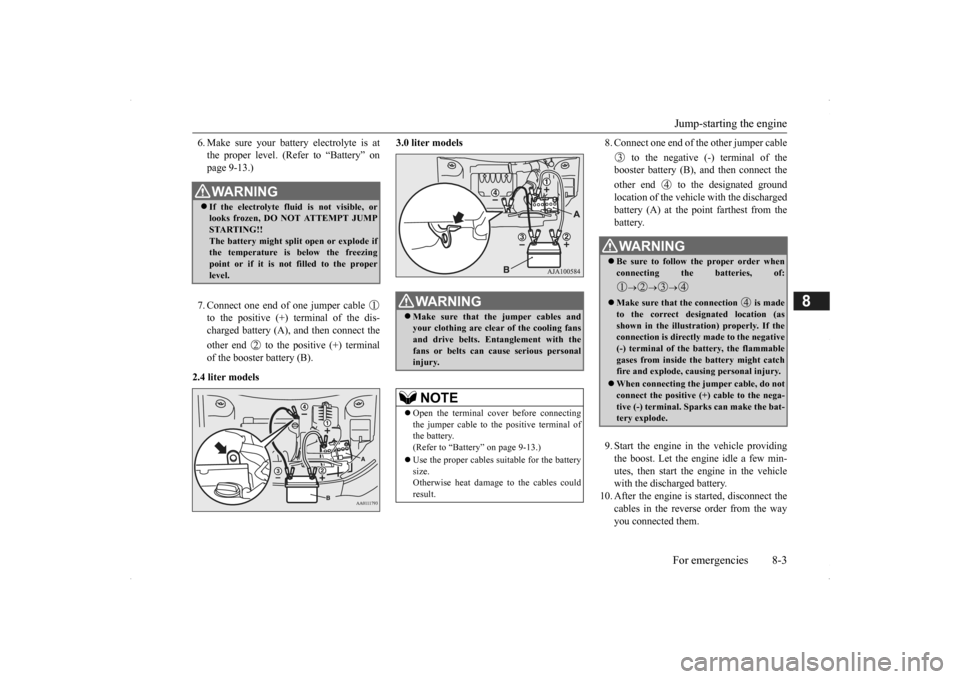
the proper level. (Refer to “Battery” onpage 9-13.) 7. Connect one end of one jumper cable to the positive (+) terminal of the dis-charged battery (A),
and then connect the
other end to the positive (+) terminal of the booster battery (B).
2.4 liter models
3.0 liter models
8. Connect one end of the other jumper cable
to the negative (-) terminal of the booster battery (B), a
nd then connect the
other end to the designated ground location of the vehicl
e with the discharged
battery (A) at the point farthest from the battery. 9. Start the engine in the vehicle providing the boost. Let the engine idle a few min- utes, then start the engine in the vehiclewith the discharged battery.
10. After the engine is
started, disconnect the
cables in the reverse order from the wayyou connected them.
WA R N I N G If the electrolyte flui
d is not visible, or
looks frozen, DO NOT ATTEMPT JUMP STARTING!! The battery might split open or explode ifthe temperature is below the freezing point or if it is not filled to the proper level.
WA R N I N G Make sure that the jumper cables and your clothing are clear of the cooling fans and drive belts. Entanglement with thefans or belts can ca
use serious personal
injury.NOTE
Open the terminal cover before connecting the jumper cable to the positive terminal of the battery.(Refer to “Battery” on page 9-13.) Use the proper cables suitable for the battery size. Otherwise heat damage
to the cables could
result.
WA R N I N G Be sure to follow the proper order when connecting the batteries, of:
Make sure that the connection is made to the correct designated location (as shown in the illustration) properly. If the connection is directly made to the negative(-) terminal of the battery, the flammable gases from inside the battery might catch fire and explode, caus
ing personal injury.
When connecting the jumper cable, do not connect the positive (+) cable to the nega-tive (-) terminal. Sparks can make the bat- tery explode.
BK0200500US.book 3 ページ 2013年2月12日 火曜日 午前9時46分
Page 370 of 451
Engine overheating 8-4 For emergencies
8
If you drive your vehicl
e with a low battery
charge after the engine has been started byusing jumper cables, th
e engine may misfire.
This can cause the anti-lock braking system warning light to blink on
and off. This is only
due to the low battery voltage. It is not a problem with the brake system. If this hap- pens, fully charge the battery and ensure the charging system is operating properly.
N00836501375
When the engine is overheating, the warningwill be displayed in th
e instrument cluster as
follows. The information screen in the multi infor- mation display will be interrupted and the engine coolant temp
erature warning dis-
play will appear. Also “ ” will blink. (Color liquid crystal display type) The high coolant temperature warning lamp will illuminate.
(Mono-color liquid
crystal display type)
If these warnings are displayed:
1. Stop the vehicle in a safe place. Turn on the hazard warning flashers.2. With the engine st
ill running, carefully
raise the engine hood to vent the engine compartment.3. Check that the cooling fan is running. If the fan is not turn
ing, stop the engine
immediately and cont
act an authorized
Mitsubishi Motors dealer or a repair facil- ity of your choice for assistance. 4. If you see steam or spray coming from under the hood, turn off the engine.
Charging the battery by using an external battery charger
WA R N I N G Always remove the
battery from your
vehicle when the battery is charged by an external battery charger. Keep sparks, cigarette
s, and flames away
from the battery because the battery couldexplode. Keep your work area well vented when charging or using
the battery in an
enclosed space. Remove all the caps before charging the battery. Electrolyte (battery acid) is made of corro- sive diluted sulfuric acid. If electrolyte comes in contact with your hands, eyes,clothes, or the pain
ted surface of your
vehicle, thoroughly
flush with water. If
electrolyte gets in your eyes, flush themimmediately and thor
oughly with water,
and get prompt medical attention. Always wear protective clothing and gog- gles when working near the battery. Keep the battery out of the reach of chil- dren.
As your vehicle has anti-lock brakes Engine overheating
WA R N I N G To avoid personal injury, keep hands, hair, jewelry and clothes aw
ay from the cooling
fan. The cooling fan ca
n start at any time.
BK0200500US.book 4 ページ 2013年2月12日 火曜日 午前9時46分