Screen MITSUBISHI OUTLANDER 2014 3.G Repair Manual
[x] Cancel search | Manufacturer: MITSUBISHI, Model Year: 2014, Model line: OUTLANDER, Model: MITSUBISHI OUTLANDER 2014 3.GPages: 451, PDF Size: 49.08 MB
Page 215 of 451
Multi Information display - Type 1
Features and controls 5-137
5
N00557201154
The temperature display unit can be switched. 1. Press and hold the mu
lti information dis-
play switch (for about 2 seconds or more) to switch from the setting mode screen tothe menu screen. Refer to “Changing th
e function settings”
on page 5-134.2. Lightly press the multi information dis- play switch to select “ ” (temperature unit setting). 3. Press and hold the mu
lti information dis-
play switch (for about 2 seconds or more)to switch in from °C to °F, or from °F to °C. The setting is changed to the selected tem-perature unit.
N00557301184
The language of the multi information displaycan be changed. 1. Press and hold the multi information dis- play switch (for about 2 seconds or more) to change from the setting mode screen to the menu screen.Refer to “Changing the function settings” on page 5-134.
2. Lightly press the multi information dis- play switch to se
lect “LANGUAGE” (lan-
guage setting). 3. Press and hold the multi information dis- play switch (for about 2 seconds or more)to display “LANGUAGE” (language set- ting). 4. Lightly press the multi information dis-play switch to select
the desired language.
5. Press and hold the multi information dis- play switch (for about 2 seconds or more)to change the setting to the selected lan- guage.
Changing the temperature unit
NOTE
The temperature value on air conditioner panel is switched in
conjunction with outside
temperature display unit of the multi infor-mation display. However, “°F” or “°C” are not shown to tem- perature display of an air conditioner.
On vehicles equipped
with Mitsubishi Multi-
Communication System, the temperaturevalue of the air condi
tioner screen of Mit-
subishi Multi-Communication System is switched in conjunction
with outside temper-
ature display unit of
the multi information
display. However, “°F” or “°C” are not shown to the air conditioner screen. If the battery is disconnected, the memory of the unit setting is erased and is automaticallyset to °F (°C).
Changing the display language
NOTE
NOTE
If the battery is disconnected, the memory of the language setting is erased and is automat- ically set to ENGLISH. If “---” is selected in
the language setting, a
warning message is not displayed when there is a warning display
or interrupt display.
BK0200500US.book 137 ページ 2013年2月12日 火曜日 午前9時46分
Page 216 of 451
Multi Information display - Type 1 5-138 Features and controls
5
N00529801298
The language used in Mitsubishi Multi-Com- munication System
(if so equipped) or Blue-
tooth
® 2.0 interface (if so equipped) can be
changed automatically
to the same language
as that shown in the multi information dis-play. 1. Press and hold the multi information dis- play switch (for about 2 seconds or more) to switch from the setting mode screen tothe menu screen. Refer to “Changing the function settings” on page 5-134.
2. Lightly press the multi information dis- play switch to select “ ” (language cooperative control). 3. Press and hold the mu
lti information dis-
play switch to switch from A/1 (Auto reset mode) to M/2/P (Manual resetmode), or from M/2/
P to A/1. The setting
is changed to the selected condition.
N00557401156
You can turn off the operation sounds of the multi information display switch and rheostatillumination button. 1. Press and hold the multi information dis- play switch (for about 2 seconds or more) to switch from the setting mode screen tothe menu screen. Refer to “Changing the function settings” on page 5-134.
Changing the language on Mit- subishi Multi-Communication System or Bluetooth
® 2.0 interface
to match the multi information display
(if so equipped)
NOTE
If the battery is disconnected, the language cooperative control is
automatically set to
“A or 1” (language
cooperation: enabled).
The language coopera
tion setting can be
switched in the following manner.
• When “A or 1” (l
anguage cooperation:
enabled) has been selected, the language forMitsubishi Multi-Communication System (if so equipped) or Bluetooth
® 2.0 interface
(if so equipped) is au
tomatically changed to
the language selected for the multi informa- tion display. • When “M, 2 or P”
(language cooperation:
disabled) has been selected, the languagefor Mitsubishi Multi-Communication Sys- tem (if so equipped) or Bluetooth
® 2.0
interface (if so equi
pped) is not automati-
cally changed to
match the language
selected for the multi information display.
On vehicles equipped with the audio system, the language on the display of the audio sys-tem is not switched even
if you select A or 1
of the language cooperation control.
Operation sound setting
NOTE
BK0200500US.book 138 ページ 2013年2月12日 火曜日 午前9時46分
Page 217 of 451
Multi Information display - Type 1
Features and controls 5-139
5
2. Lightly press the multi information dis- play switch to select “ ” (operation sound setting). 3. Press and hold the mu
lti information dis-
play switch (for about 2 seconds or more)to switch from ON (operation sound on) to OFF (operation sound off), or from OFF to ON.The setting is changed to the selected con- dition.
N00557501160
The time until the display appears can bechanged.
1. Press and hold the multi information dis- play switch (for about 2 seconds or more)to switch from the setting mode screen to the menu screen. Refer to “Changing the function settings”on page 5-134. 2. Lightly press the multi information dis- play switch to select “ALARM” (rest timesetting). 3. Press and hold the multi information dis- play switch (for about 2 seconds or more) to display “ALARM” (rest time setting). 4. Lightly press the multi information dis-play switch to select the time until the dis- play appears. 5. Press and hold the multi information dis-play switch (for about 2 seconds or more) to change the setting to the selected time.
N00563501080
It is possible to change the turn signal sound.
1. Press and hold the multi information dis- play switch (for about 2 seconds or more)to switch from the setting mode screen to the menu screen. Refer to “Changing th
e function settings”
on page 5-134. 2. Lightly press the multi information dis- play switch to select . (changing the turn signal sound) 3. Press and hold the multi information dis- play switch (for about 2 seconds or more) to switch from 1 (turn-signal sound 1) to 2(turn-signal sound 2), or from 2 to 1. The setting changes to the selected turn signal sound.
N00563601049
It is possible to change the bar graph settingof the momentary fuel consumption display. 1. Press and hold the multi information dis- play switch (for about 2 seconds or more) to switch from the setting mode screen to the menu screen.Refer to “Changing th
e function settings”
on page 5-134. 2. Lightly press the multi information dis- play switch to select . (changing the momentary fuel consumption display)
NOTE
If the battery is disconnected, the memory of the operation sound setting is erased and isautomatically
set to “ON” (operation sound
on). The operation sound set
ting only deactivates
the operation sound of the multi information display switch and rheo
stat illumination but-
ton. The warning disp
lay and other sounds
cannot be de
activated.
Changing the time until “REST REMINDER” is displayed
NOTE
If the battery is disconnected, the memory of the unit setting is erased and is automatically set to the “OFF”. The drive time is reset when the ignition switch is in the “LOCK” or “OFF” position or the operation mode is in OFF.
Changing the turn signal sound
Changing the momentary fuel con- sumption display
BK0200500US.book 139 ページ 2013年2月12日 火曜日 午前9時46分
Page 218 of 451
Multi Information display - Type 2 5-140 Features and controls
5
3. Press and hold the multi information dis- play switch (for about 2 seconds or more)to switch from ON (with the green bar graph) to OFF (without the green bar graph), or from OFF to ON.The setting changes to the selected bar graph setting.
N00557601190
All of the function settings can be returned to their factory settings. 1. Press and hold the multi information dis- play switch (for about 2 seconds or more) to switch from the setting mode screen to the menu screen.Refer to “Changing the function settings” on page 5-134. 2. Lightly press the multi information dis-play switch to select “RESET” (return to the factory settings). 3. Press and hold the multi information dis-play switch (for about
5 seconds or more),
the buzzer sounds and
all of the function
settings are returned to the factory set-tings.
N00555001291
The multi information display displays theodometer, trip odometer, service reminder,fuel remaining, outside
temperature, selector
lever position, average fuel consumption, driving range, etc. It is also possible to change elements such as the units used on the multi information dis- play.
Returning to the factory settings
NOTE
The factory settings are as follows.
• Average fuel consumption and average speed reset mode: A (Auto reset) • Fuel consumption di
splay unit: mpg (US)
or (L/100 km) • Temperature unit: °F (Fahrenheit) or {°C (Celsius)} • Display language: ENGLISH • Cooperative langua
ge setting: A
• Operation sounds: ON (Operation sound on) • “REST REMINDER” display: OFF • Turn signal sound: Turn signal sound 1 • Momentary fuel consumption with the green bar graph: ON
Multi Information display - Type 2
NOTE
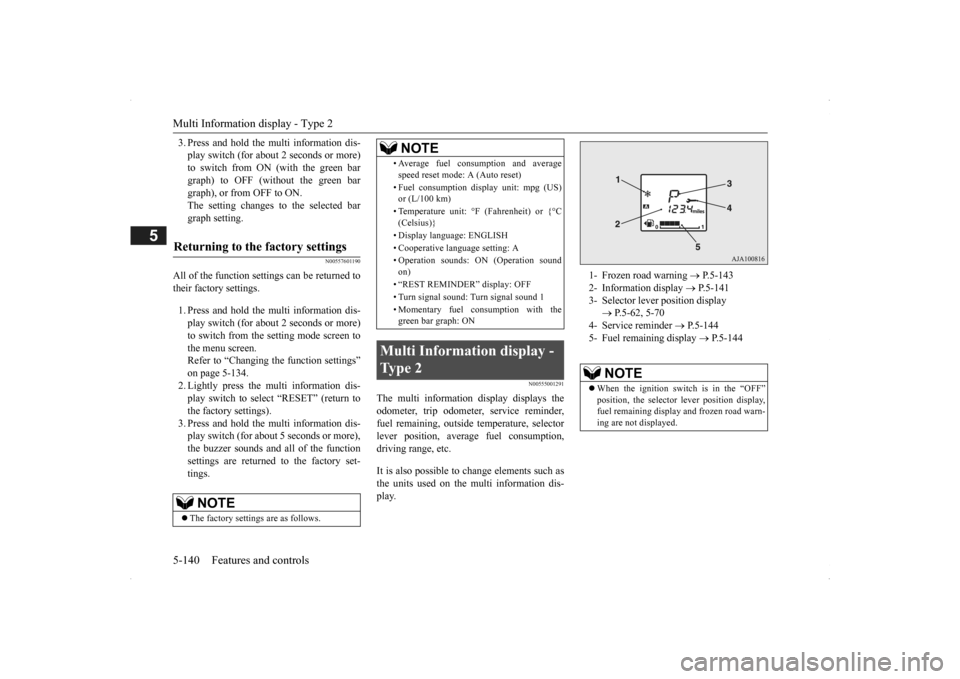
1- Frozen road warning
P.5-143
2- Information display
P.5-141
3- Selector lever position display
P.5-62, 5-70
4- Service reminder
P.5-144
5- Fuel remaining display
P.5-144
NOTE
When the ignition switch is in the “OFF” position, the selector
lever position display,
fuel remaining display and frozen road warn-ing are not displayed.
BK0200500US.book 140 ページ 2013年2月12日 火曜日 午前9時46分
Page 223 of 451
Multi Information display - Type 2
Features and controls 5-145
5
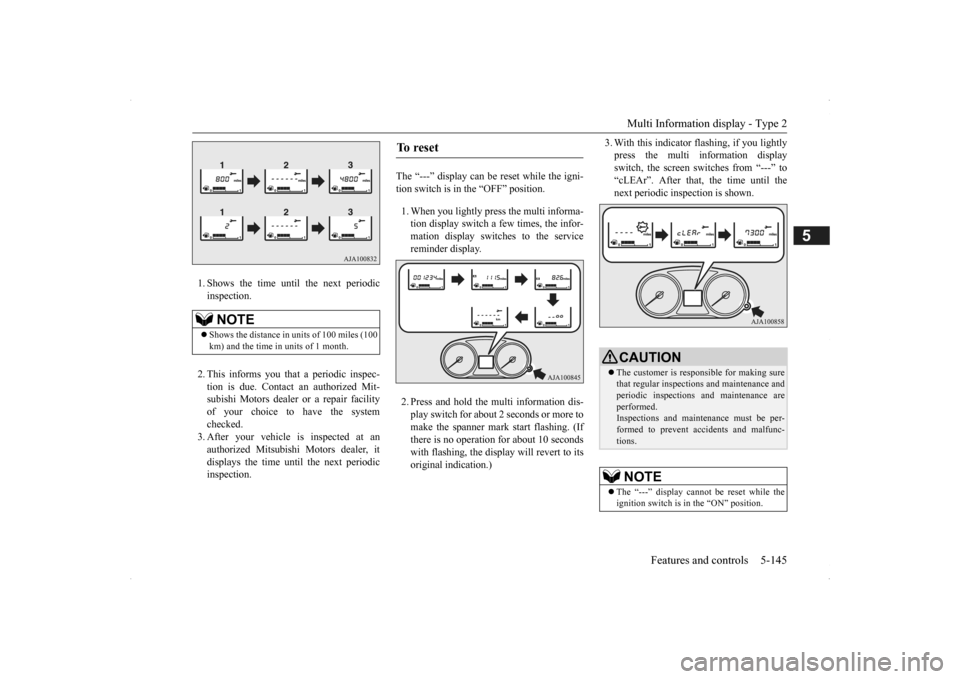
1. Shows the time until the next periodic inspection. 2. This informs you that a periodic inspec- tion is due. Contact
an authorized Mit-
subishi Motors dealer or a repair facilityof your choice to have the system checked. 3. After your vehicle
is inspected at an
authorized Mitsubishi Motors dealer, it displays the time unt
il the next periodic
inspection.
The “---” display can be reset while the igni- tion switch is in the “OFF” position. 1. When you lightly press the multi informa- tion display switch a few times, the infor-mation display switches to the service reminder display. 2. Press and hold the multi information dis- play switch for about
2 seconds or more to
make the spanner mark start flashing. (If there is no operation for about 10 secondswith flashing, the display will revert to its original indication.)
3. With this indicator
flashing, if you lightly
press the multi information displayswitch, the screen switches from “---” to “cLEAr”. After that, the time until the next periodic inspection is shown.
NOTE
Shows the distance in
units of 100 miles (100
km) and the time in units of 1 month.
To r e s e t
CAUTION The customer is responsible for making sure that regular inspections and maintenance andperiodic inspections
and maintenance are
performed. Inspections and mainte
nance must be per-
formed to prevent accidents and malfunc- tions.NOTE
The “---” display cannot
be reset while the
ignition switch is in
the “ON” position.
BK0200500US.book 145 ページ 2013年2月12日 火曜日 午前9時46分
Page 225 of 451
Multi Information display - Type 2
Features and controls 5-147
5
N00557101179
The fuel consumpti
on display unit can be
changed. The distance
and amount units are
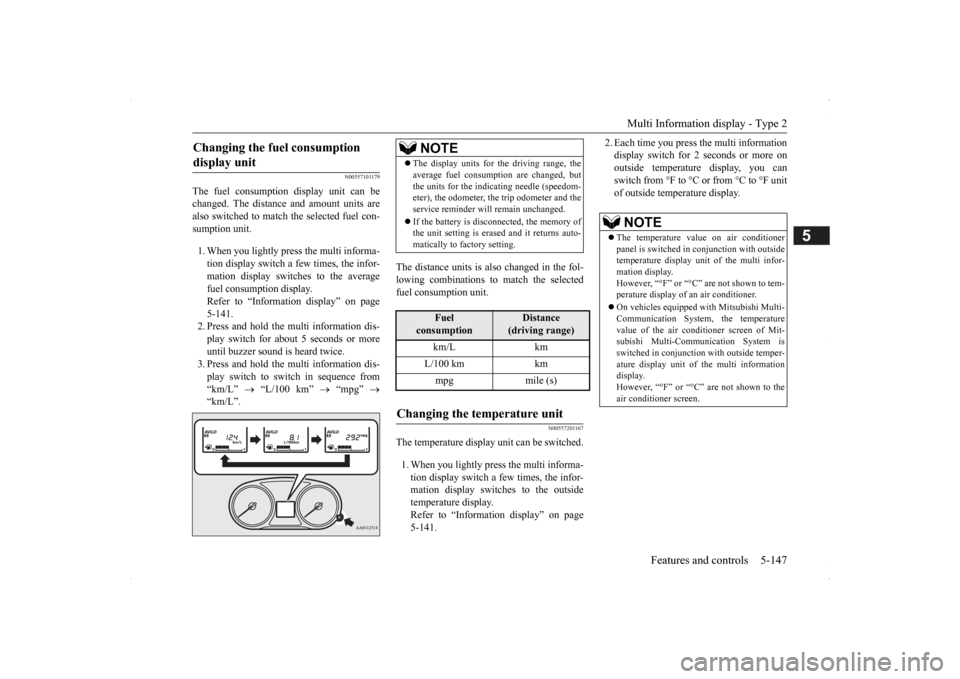
also switched to match the selected fuel con- sumption unit. 1. When you lightly press the multi informa- tion display switch a few times, the infor- mation display switches to the average fuel consumption display. Refer to “Information display” on page 5-141.2. Press and hold the mu
lti information dis-
play switch for about 5 seconds or more until buzzer sound is heard twice.3. Press and hold the mu
lti information dis-
play switch to switch in sequence from “km/L”
“L/100 km”
“mpg”
“km/L”.
The distance units is al
so changed in the fol-
lowing combinations to match the selected fuel consumption unit.
N00557201167
The temperature display unit can be switched. 1. When you lightly press the multi informa- tion display switch a few times, the infor- mation display switches to the outsidetemperature display. Refer to “Information display” on page 5-141.
2. Each time you press the multi information display switch for 2 seconds or more onoutside temperature display, you can switch from °F to °C or from °C to °F unit of outside temperature display.
Changing the fuel consumption display unit
NOTE
The display units for the driving range, the average fuel consumption are changed, butthe units for the indicating needle (speedom-eter), the odometer, the trip odometer and the service reminder will
remain unchanged.
If the battery is disconnected, the memory of the unit setting is erased and it returns auto- matically to factory setting.
Fuel
consumption
Distance
(driving range)
km/L km L/100 km km mpg mile (s)
Changing the temperature unit
NOTE
The temperature value on air conditioner panel is switched in
conjunction with outside
temperature display unit of the multi infor- mation display.However, “°F” or “°C” are not shown to tem- perature display of an air conditioner. On vehicles equipped
with Mitsubishi Multi-
Communication System, the temperature value of the air conditioner screen of Mit-subishi Multi-Communication System is switched in conjunction
with outside temper-
ature display unit of the multi informationdisplay. However, “°F” or “°C”
are not shown to the
air conditioner screen.
BK0200500US.book 147 ページ 2013年2月12日 火曜日 午前9時46分
Page 226 of 451
Indicator light, warning light, and information screen display list (multi information display - Type 1) 5-148 Features and controls
5
N00557701058 N00557801280
Indicator light, warning light, an
d information screen display list (multi information display -
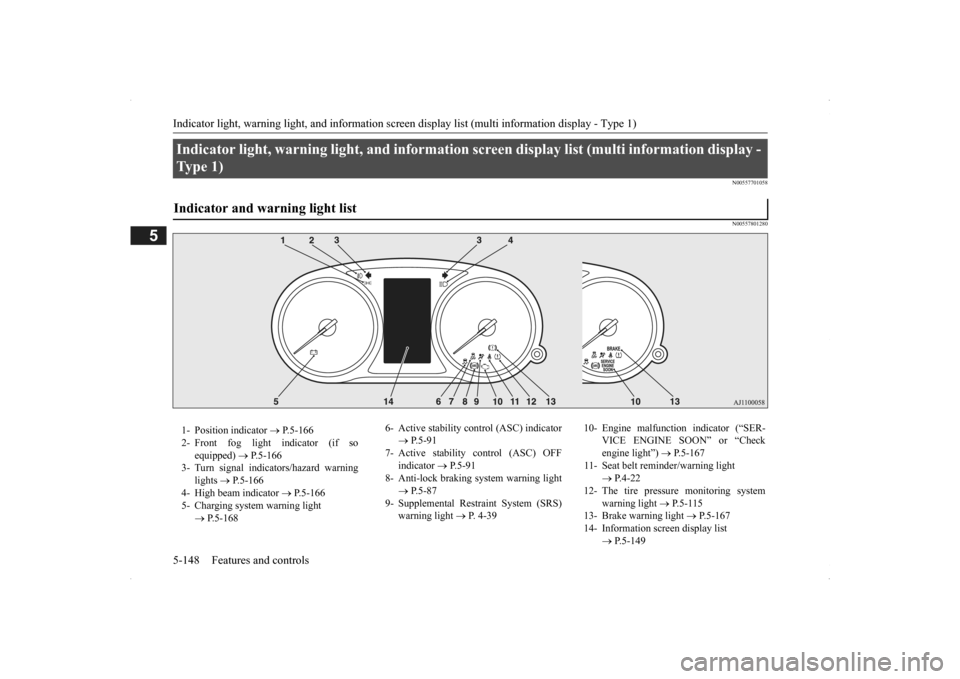
Ty p e 1 ) Indicator and warning light list 1- Position indicator
P.5-166
2- Front fog light indicator (if so
equipped)
P.5-166
3- Turn signal indicators/hazard warning
lights
P.5-166
4- High beam indicator
P.5-166
5- Charging system warning light
P.5-168
6- Active stability c
ontrol (ASC) indicator
P.5-91
7- Active stability control (ASC) OFF
indicator
P.5-91
8- Anti-lock braking
system warning light
P.5-87
9- Supplemental Restraint System (SRS)
warning light
P. 4-39
10- Engine malfunction indicator (“SER-
VICE ENGINE SOON” or “Check engine light”)
P.5-167
11- Seat belt reminder/warning light
P.4-22
12- The tire pressure monitoring system
warning light
P.5-115
13- Brake warning light
P.5-167
14- Information screen display list
P.5-149
BK0200500US.book 148 ページ 2013年2月12日 火曜日 午前9時46分
Page 227 of 451

Indicator light, warning light, and information screen display list (multi information display - Type 1)
Features and controls 5-149
5
N00557901092
When there is information to be announced,
such as light reminder, the tone sounds a
nd the screen switches to the displays show
n below. Refer to
the appropriate page and ta
ke the necessary measures.
When the cause of the warning display is eliminated, the warning display goes out automatically.Refer to Warning display list on page 5-150. Refer to Navigation inform
ation display on page 5-160.
Refer to Other interrupt
displays on page 5-161.
Information screen display list
NOTE
In the following cases, a warning may be
displayed on the information screen and
the buzzer may sound for a few seconds, at tim
es.
This is caused by the system picking up in
terference such as strong el
ectromagnetic waves or noise,
and is not a functional pro
blem.
• An extremely strong electromagnetic
wave is received from a source such as an i
llegal radio set, a spark
from a wire, or a rad
ar station.
• Abnormal voltage or a static el
ectricity discha
rge is generated by the operation of your
vehicle’s electroni
cs (including afte
r-market parts).
If the warning display has
occurred a number of times, take your
vehicle to an author
ized Mitsubishi Motors
dealer or a repair
facility of your choice and
have the system checked.
BK0200500US.book 149 ページ 2013年2月12日 火曜日 午前9時46分
Page 228 of 451
Indicator light, warning light, and information screen display list (multi information display - Type 1) 5-150 Features and controls
5
N00558001234
Warning display list
Screen
Cause
Do this (Reference)
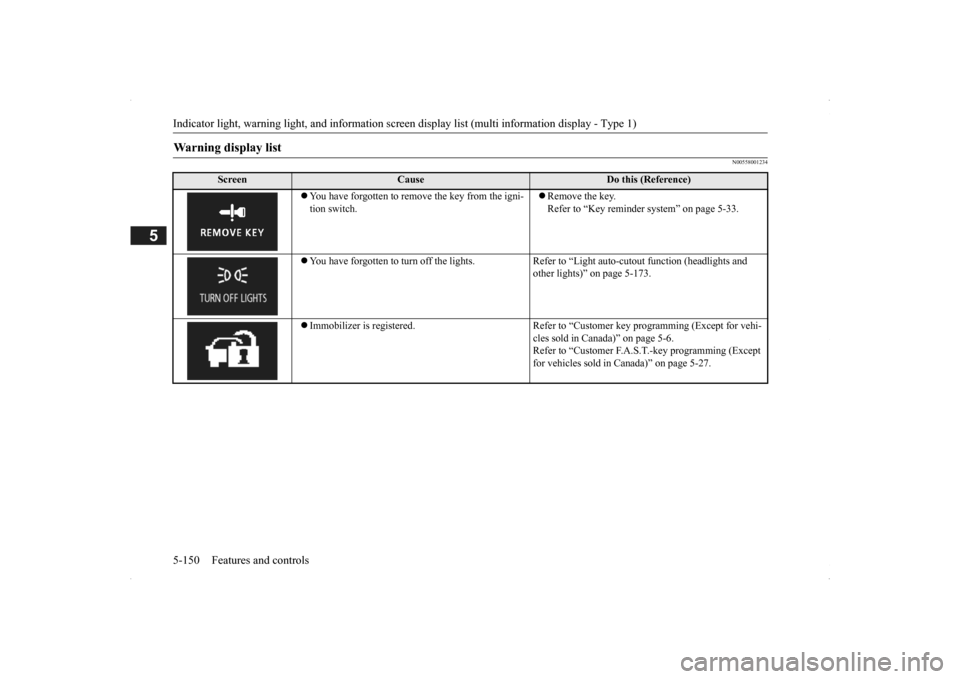
You have forgotten to remove the key from the igni- tion switch.
Remove the key. Refer to “Key reminder
system” on page 5-33.
You have forgotten to turn off the lights. Refer
to “Light auto-cutout function (headlights and
other lights)” on page 5-173.
Immobilizer is registered. Refer to “C
ustomer key programming (Except for vehi-
cles sold in Canada)” on page 5-6.Refer to “Customer F.A.S.
T.-key programming (Except
for vehicles sold in Canada)” on page 5-27.
BK0200500US.book 150 ページ 2013年2月12日 火曜日 午前9時46分
Page 229 of 451
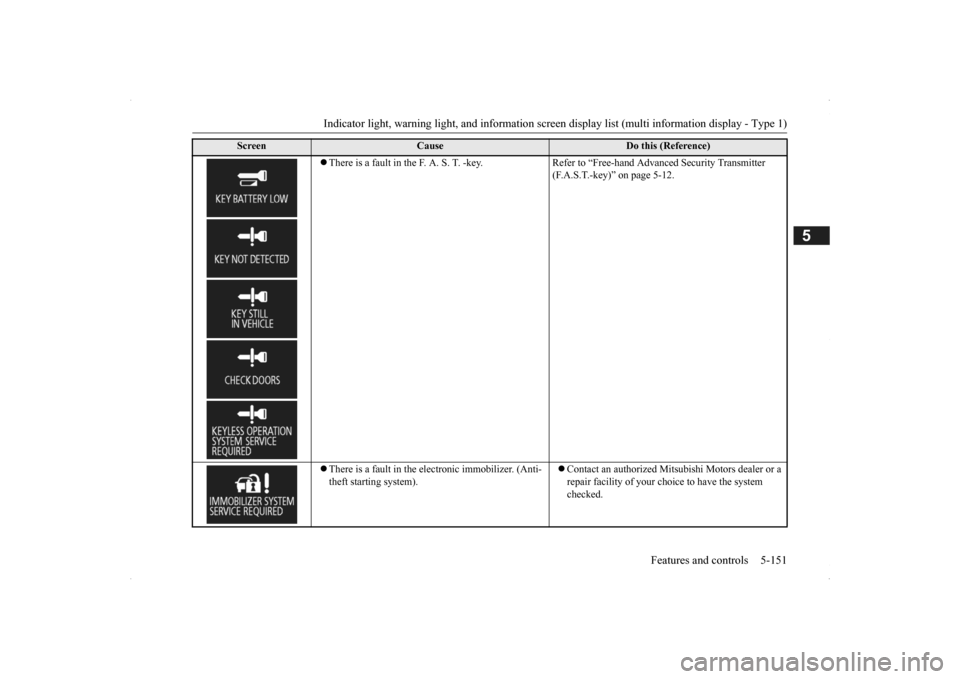
Indicator light, warning light, and information screen display list (multi information display - Type 1)
Features and controls 5-151
5
There is a fault in the F. A. S. T. -key. Refer to “Free-hand Advanced Security Transmitter
(F.A.S.T.-key)” on page 5-12.
There is a fault in the electronic immobilizer. (Anti- theft starting system).
Contact an authorized Mitsubishi Motors dealer or a repair facility of your choi
ce to have the system
checked.
Screen
Cause
Do this (Reference)
BK0200500US.book 151 ページ 2013年2月12日 火曜日 午前9時46分