light MITSUBISHI OUTLANDER 2014 3.G Manual PDF
[x] Cancel search | Manufacturer: MITSUBISHI, Model Year: 2014, Model line: OUTLANDER, Model: MITSUBISHI OUTLANDER 2014 3.GPages: 451, PDF Size: 49.08 MB
Page 204 of 451
Multi Information display - Type 1 5-126 Features and controls
5
N00556201232
Each time you lightly press th
e multi information display switch, the displa
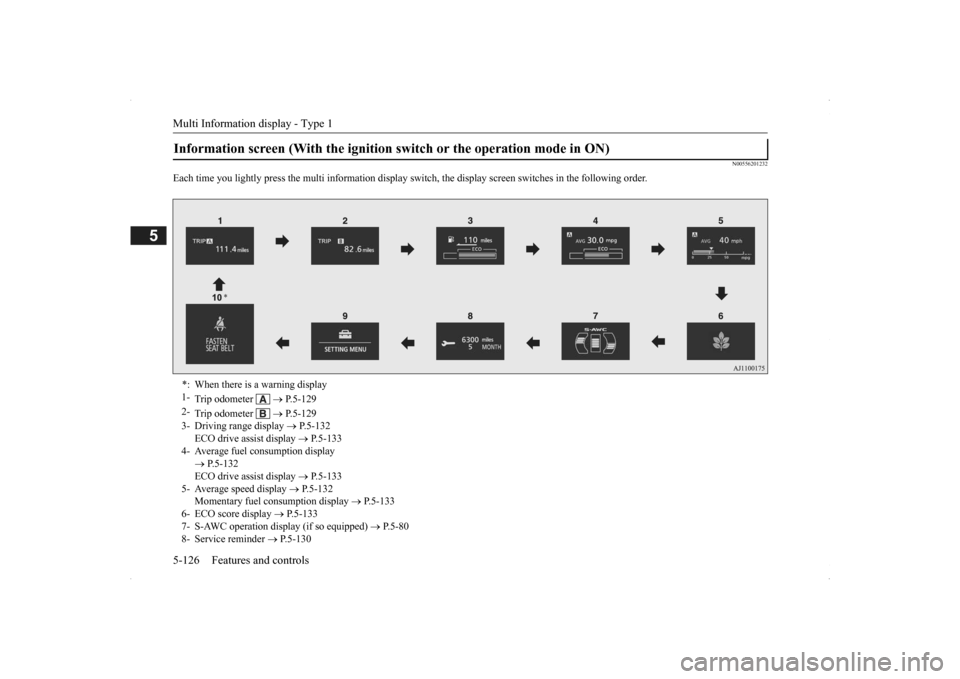
y screen switches in the following order.
Information screen (With the ignition
switch or the operation mode in ON)
*: When there is a warning display 1-
Trip odometer
P.5-129
2-
Trip odometer
P.5-129
3- Driving range display
P.5-132
ECO drive assist display
P.5-133
4- Average fuel consumption display
P.5-132 ECO drive assist display
P.5-133
5- Average speed display
P.5-132
Momentary fuel consumption display
P.5-133
6- ECO score display
P.5-133
7- S-AWC operation display (if so equipped)
P.5-80
8- Service reminder
P.5-130
BK0200500US.book 126 ページ 2013年2月12日 火曜日 午前9時46分
Page 206 of 451
Multi Information display - Type 1 5-128 Features and controls
5
N00579600021
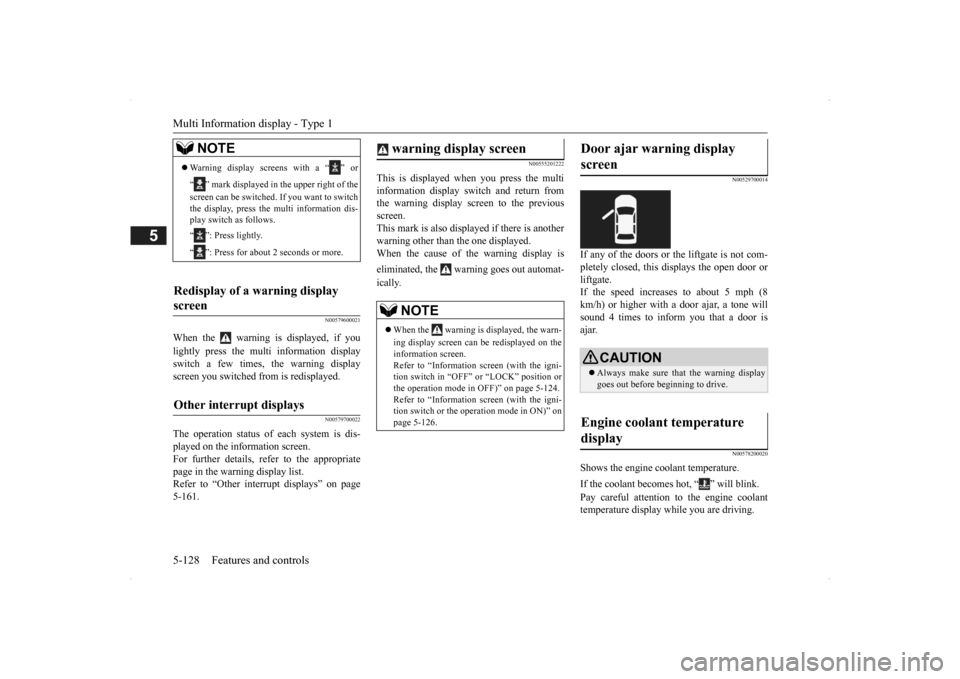
When the warning is displayed, if you lightly press the multi information display switch a few times, the warning display screen you switched from is redisplayed.
N00579700022
The operation status of
each system is dis-
played on the information screen.For further details, refer to the appropriate page in the warning display list. Refer to “Other interrupt displays” on page5-161.
N00555201222
This is displayed when you press the multi information display switch and return from the warning display screen to the previousscreen. This mark is also displa
yed if there is another
warning other than the one displayed.When the cause of the warning display is eliminated, the warning goes out automat- ically.
N00529700014
If any of the doors or the liftgate is not com- pletely closed, this displays the open door or liftgate. If the speed increases to about 5 mph (8 km/h) or higher with a door ajar, a tone will sound 4 times to inform you that a door isajar.
N00578200020
Shows the engine coolant temperature. If the coolant becomes hot, “ ” will blink. Pay careful attention to
the engine coolant
temperature display while you are driving.
NOTE
Warning display screens with a “ ” or “ ” mark displayed in the upper right of the screen can be switched
. If you want to switch
the display, press the multi information dis-play switch as follows. “ ”: Press lightly. “ ”: Press for about 2 seconds or more.
Redisplay of a warning display screen Other interrupt displays
warning display screen
NOTE
When the warning is displayed, the warn- ing display screen can
be redisplayed on the
information screen.Refer to “Information sc
reen (with the igni-
tion switch in “OFF” or “LOCK” position or the operation mode in OFF)” on page 5-124.Refer to “Information sc
reen (with the igni-
tion switch or the oper
ation mode in ON)” on
page 5-126.
Door ajar warning display screen
CAUTION Always make sure that
the warning display
goes out before beginning to drive.
Engine coolant temperature display
BK0200500US.book 128 ページ 2013年2月12日 火曜日 午前9時46分
Page 209 of 451
Multi Information display - Type 1
Features and controls 5-131
5
The “---” display can be
reset while the igni-
tion switch or the operation mode is in OFF. When the display is reset, the time until thenext periodic inspection
is displayed and the
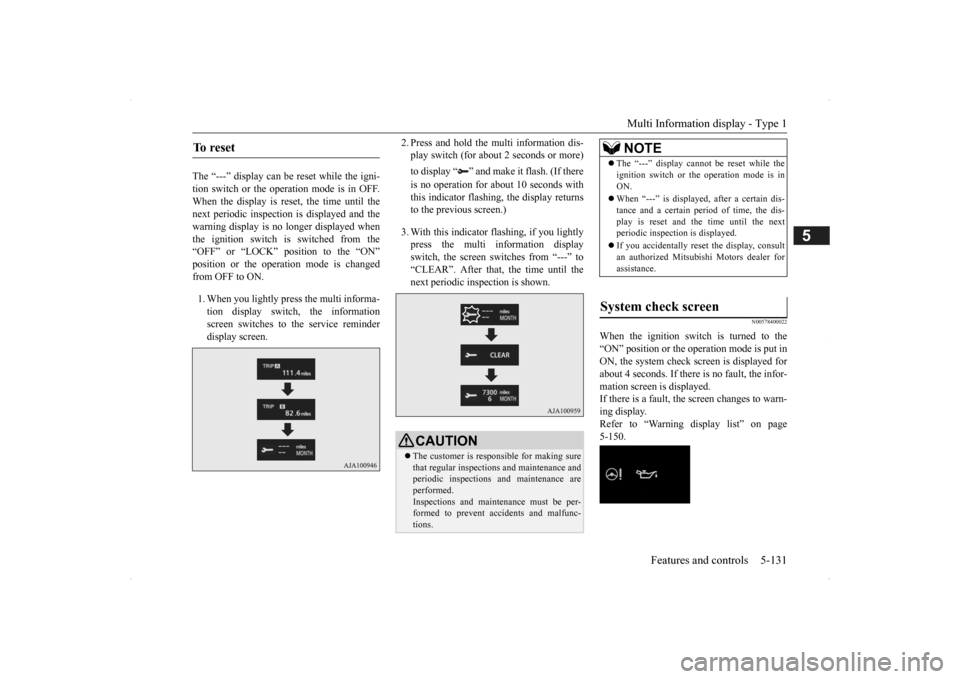
warning display is no longer displayed when the ignition switch is switched from the“OFF” or “LOCK” position to the “ON” position or the operation mode is changed from OFF to ON. 1. When you lightly press the multi informa- tion display switch, the information screen switches to the service reminderdisplay screen.
2. Press and hold the multi information dis- play switch (for about 2 seconds or more) to display “ ” and make it flash. (If there is no operation for about 10 seconds with this indicator flashing, the display returns to the previous screen.) 3. With this indicator flashing, if you lightly press the multi information display switch, the screen sw
itches from “---” to
“CLEAR”. After that, the time until thenext periodic inspection is shown.
N00578400022
When the ignition switch is turned to the “ON” position or the operation mode is put in ON, the system check screen is displayed forabout 4 seconds. If there is no fault, the infor- mation screen is displayed. If there is a fault, the screen changes to warn-ing display. Refer to “Warning display list” on page 5-150.
To reset
CAUTION The customer is responsible for making sure that regular inspections
and maintenance and
periodic inspections
and maintenance are
performed. Inspections and mainte
nance must be per-
formed to prevent accidents and malfunc- tions.
NOTE
The “---” display cannot
be reset while the
ignition switch or the operation mode is inON. When “---” is displaye
d, after a certain dis-
tance and a certain pe
riod of time, the dis-
play is reset and the time until the next periodic inspecti
on is displayed.
If you accidentally rese
t the display, consult
an authorized Mitsubishi Motors dealer for assistance.
System check screen
BK0200500US.book 131 ページ 2013年2月12日 火曜日 午前9時46分
Page 212 of 451
Multi Information display - Type 1 5-134 Features and controls
5
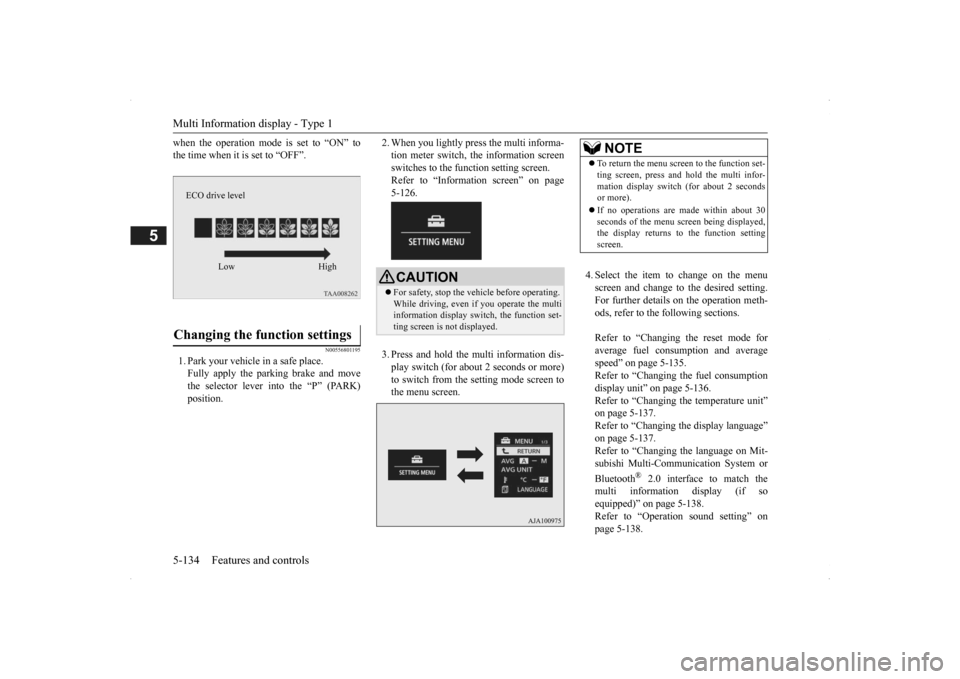
when the operation mode is set to “ON” to the time when it is set to “OFF”.
N00556801195
1. Park your vehicle in a safe place.Fully apply the parking brake and movethe selector lever into the “P” (PARK) position.
2. When you lightly press the multi informa- tion meter switch, the information screenswitches to the function setting screen. Refer to “Information screen” on page 5-126. 3. Press and hold the mu
lti information dis-
play switch (for about 2 seconds or more) to switch from the setting mode screen to the menu screen.
4. Select the item to change on the menu screen and change to the desired setting.For further details on the operation meth- ods, refer to the fo
llowing sections.
Refer to “Changing the reset mode for average fuel consumption and average speed” on page 5-135.Refer to “Changing the fuel consumption display unit” on page 5-136. Refer to “Changing th
e temperature unit”
on page 5-137. Refer to “Changing the display language” on page 5-137.Refer to “Changing the language on Mit- subishi Multi-Comm
unication System or
Bluetooth
® 2.0 interface to match the
multi informati
on display (if so
equipped)” on page 5-138. Refer to “Operati
on sound setting” on
page 5-138.
Changing the function settings
ECO drive level
Low High
CAUTION For safety, stop the ve
hicle before operating.
While driving, even if you operate the multi information display sw
itch, the function set-
ting screen is not displayed.
NOTE
To return the menu scre
en to the function set-
ting screen, press and hold the multi infor-mation display switch
(for about 2 seconds
or more). If no operations are made within about 30 seconds of the menu sc
reen being displayed,
the display returns to the function setting screen.
BK0200500US.book 134 ページ 2013年2月12日 火曜日 午前9時46分
Page 213 of 451
Multi Information display - Type 1
Features and controls 5-135
5
Refer to “Changing
the time until “REST
REMINDER” is displayed” on page 5-139.Refer to “Changing the turn signal sound” on page 5-139. Refer to “Changing the momentary fuelconsumption displa
y” on page 5-139.
Refer to “Returning to the factory set- tings” on page 5-140.
N00557001240
You can change the mode condition for theaverage fuel consumption and average speed display to “Auto reset” or “Manual reset.” 1. Press and hold the mu
lti information dis-
play switch (for about 2 seconds or more)to switch from the setting mode screen to the menu screen. Refer to “Changing th
e function settings”
on page 5-134.
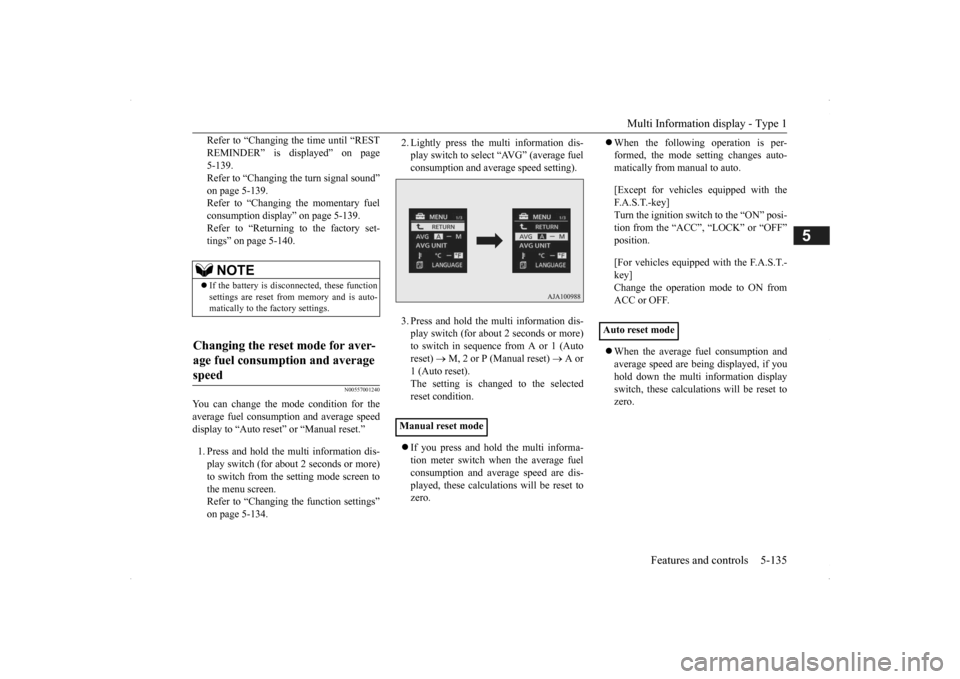
2. Lightly press the multi information dis- play switch to select “AVG” (average fuelconsumption and aver
age speed setting).
3. Press and hold the multi information dis- play switch (for about 2 seconds or more)to switch in sequence from A or 1 (Auto reset)
M, 2 or P (Manual reset)
A or
1 (Auto reset).The setting is changed to the selected reset condition. If you press and hold the multi informa- tion meter switch when the average fuelconsumption and average speed are dis- played, these calculati
ons will be reset to
zero.
When the following operation is per- formed, the mode setting changes auto-matically from manual to auto. [Except for vehicles equipped with the F. A . S . T. - k e y ] Turn the ignition switch to the “ON” posi-tion from the “ACC”, “LOCK” or “OFF” position. [For vehicles equipped with the F.A.S.T.- key] Change the operation mode to ON from ACC or OFF. When the average fuel consumption and average speed are being displayed, if you hold down the multi information display switch, these calculations will be reset tozero.
NOTE
If the battery is disc
onnected, these function
settings are reset from memory and is auto- matically to the
factory settings.
Changing the reset mode for aver- age fuel consumption and average speed
Manual reset mode
Auto reset mode
BK0200500US.book 135 ページ 2013年2月12日 火曜日 午前9時46分
Page 214 of 451
Multi Information display - Type 1 5-136 Features and controls
5
When the engine switch or the operation mode is in the following conditions, theaverage fuel consumption display and the average speed display will automatically reset. [Except for vehicles
equipped with the
F. A . S . T. - k e y ] The ignition switch has been set to the “ACC”, “LOCK” or
“OFF” position for
about 4 hours or more. [For vehicles equipped
with the F.A.S.T.-
key]The operation mode has been in ACC or OFF for about 4 hours or more.
N00557101166
The fuel consumption display unit can be changed. The distance, speed, and amount units are also changed to match the selected fuel consumption unit. 1. Press and hold the mu
lti information dis-
play switch (for about 2 seconds or more) to change from the setting mode screen to the menu screen. Refer to “Changing th
e function settings”
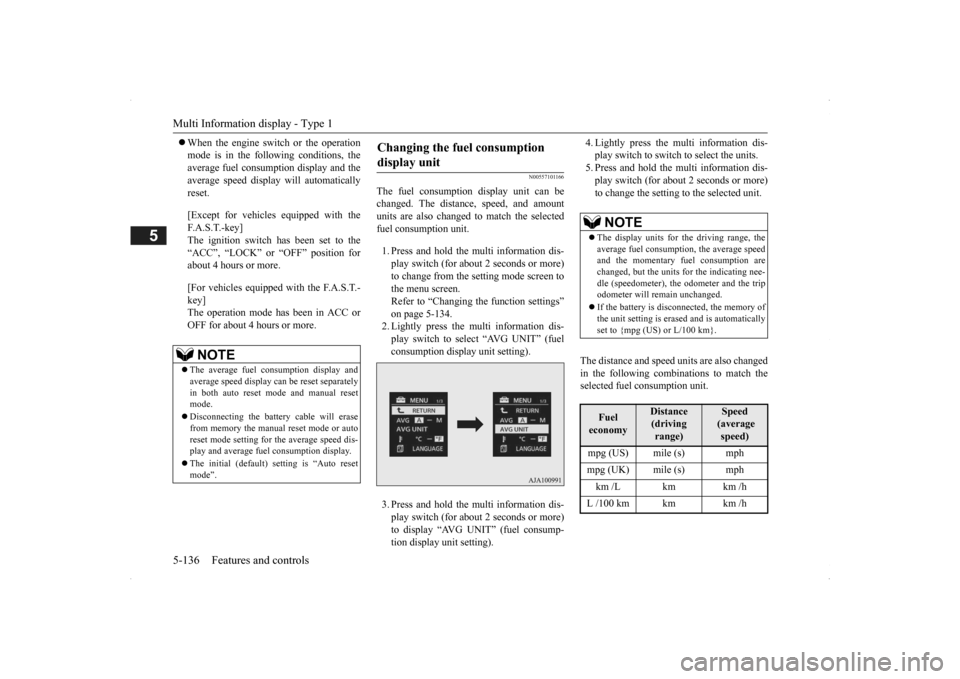
on page 5-134.2. Lightly press the multi information dis- play switch to select “AVG UNIT” (fuel consumption disp
lay unit setting).
3. Press and hold the mu
lti information dis-
play switch (for about 2 seconds or more) to display “AVG UNIT” (fuel consump- tion display unit setting).
4. Lightly press the multi information dis- play switch to switch to select the units.5. Press and hold the multi information dis- play switch (for about 2 seconds or more) to change the setting to the selected unit.
The distance and speed
units are also changed
in the following combinations to match theselected fuel consumption unit.
NOTE
The average fuel consumption display and average speed display ca
n be reset separately
in both auto reset m
ode and manual reset
mode. Disconnecting the batt
ery cable will erase
from memory the manual reset mode or auto reset mode setting for the average speed dis-play and average fuel consumption display. The initial (default) setting is “Auto reset mode”.
Changing the fuel consumption display unit
NOTE
The display units for the driving range, the average fuel consumption, the average speed and the momentary fuel consumption are changed, but the units
for the indicating nee-
dle (speedometer), the odometer and the trip odometer will remain unchanged. If the battery is disconnected, the memory of the unit setting is erased and is automatically set to {mpg (US) or L/100 km}.Fuel economy
Distance (driving range)
Speed (average speed)
mpg (US) mile (s) mph mpg (UK) mile (s) mph km /L km km /h L /100 km km km /h
BK0200500US.book 136 ページ 2013年2月12日 火曜日 午前9時46分
Page 215 of 451
Multi Information display - Type 1
Features and controls 5-137
5
N00557201154
The temperature display unit can be switched. 1. Press and hold the mu
lti information dis-
play switch (for about 2 seconds or more) to switch from the setting mode screen tothe menu screen. Refer to “Changing th
e function settings”
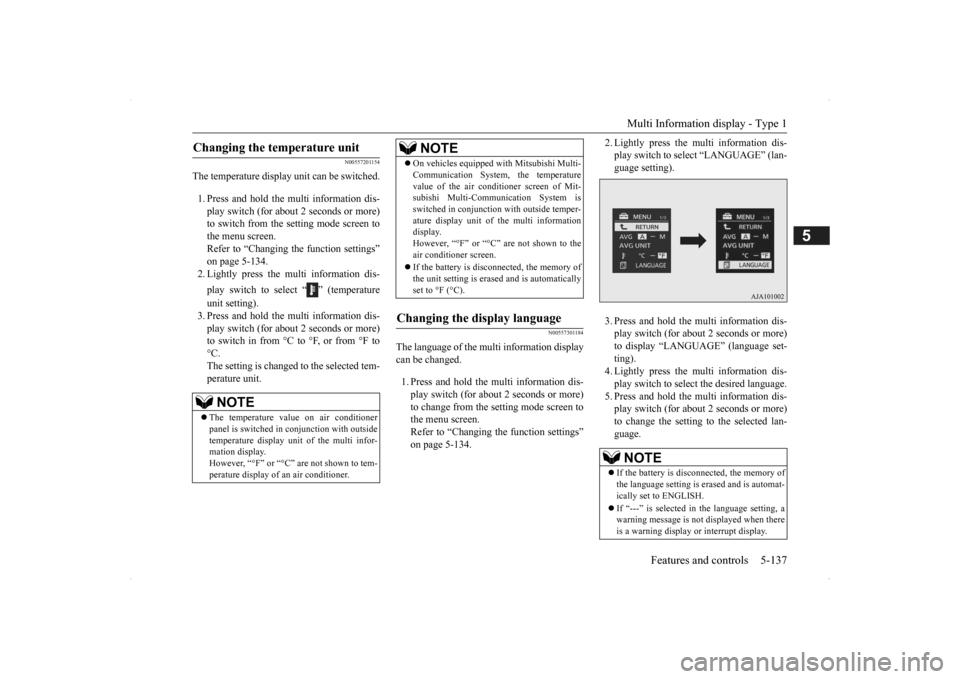
on page 5-134.2. Lightly press the multi information dis- play switch to select “ ” (temperature unit setting). 3. Press and hold the mu
lti information dis-
play switch (for about 2 seconds or more)to switch in from °C to °F, or from °F to °C. The setting is changed to the selected tem-perature unit.
N00557301184
The language of the multi information displaycan be changed. 1. Press and hold the multi information dis- play switch (for about 2 seconds or more) to change from the setting mode screen to the menu screen.Refer to “Changing the function settings” on page 5-134.
2. Lightly press the multi information dis- play switch to se
lect “LANGUAGE” (lan-
guage setting). 3. Press and hold the multi information dis- play switch (for about 2 seconds or more)to display “LANGUAGE” (language set- ting). 4. Lightly press the multi information dis-play switch to select
the desired language.
5. Press and hold the multi information dis- play switch (for about 2 seconds or more)to change the setting to the selected lan- guage.
Changing the temperature unit
NOTE
The temperature value on air conditioner panel is switched in
conjunction with outside
temperature display unit of the multi infor-mation display. However, “°F” or “°C” are not shown to tem- perature display of an air conditioner.
On vehicles equipped
with Mitsubishi Multi-
Communication System, the temperaturevalue of the air condi
tioner screen of Mit-
subishi Multi-Communication System is switched in conjunction
with outside temper-
ature display unit of
the multi information
display. However, “°F” or “°C” are not shown to the air conditioner screen. If the battery is disconnected, the memory of the unit setting is erased and is automaticallyset to °F (°C).
Changing the display language
NOTE
NOTE
If the battery is disconnected, the memory of the language setting is erased and is automat- ically set to ENGLISH. If “---” is selected in
the language setting, a
warning message is not displayed when there is a warning display
or interrupt display.
BK0200500US.book 137 ページ 2013年2月12日 火曜日 午前9時46分
Page 216 of 451
Multi Information display - Type 1 5-138 Features and controls
5
N00529801298
The language used in Mitsubishi Multi-Com- munication System
(if so equipped) or Blue-
tooth
® 2.0 interface (if so equipped) can be
changed automatically
to the same language
as that shown in the multi information dis-play. 1. Press and hold the multi information dis- play switch (for about 2 seconds or more) to switch from the setting mode screen tothe menu screen. Refer to “Changing the function settings” on page 5-134.
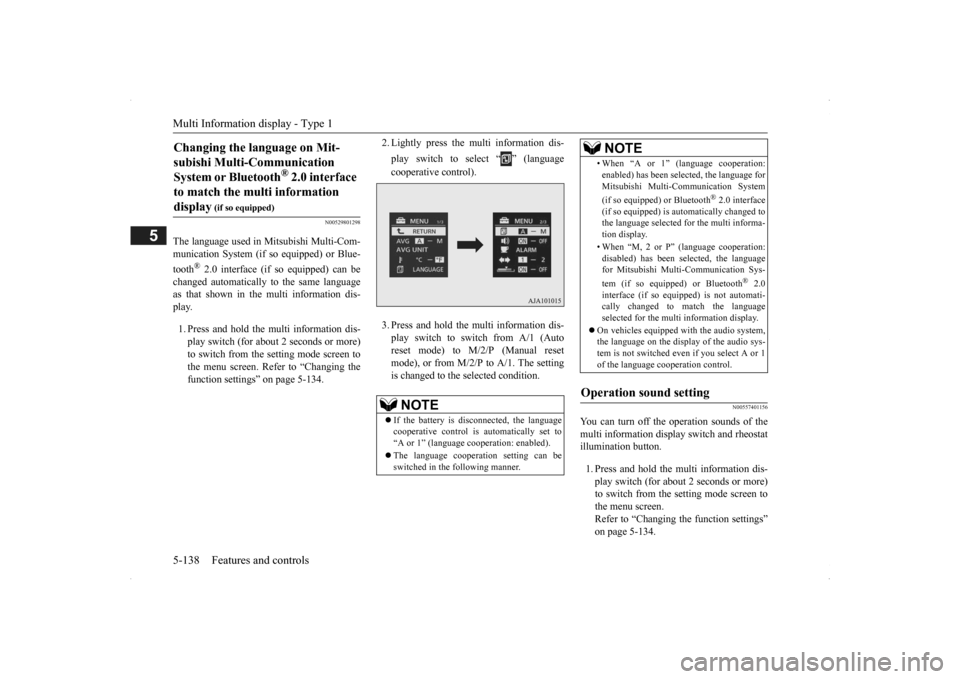
2. Lightly press the multi information dis- play switch to select “ ” (language cooperative control). 3. Press and hold the mu
lti information dis-
play switch to switch from A/1 (Auto reset mode) to M/2/P (Manual resetmode), or from M/2/
P to A/1. The setting
is changed to the selected condition.
N00557401156
You can turn off the operation sounds of the multi information display switch and rheostatillumination button. 1. Press and hold the multi information dis- play switch (for about 2 seconds or more) to switch from the setting mode screen tothe menu screen. Refer to “Changing the function settings” on page 5-134.
Changing the language on Mit- subishi Multi-Communication System or Bluetooth
® 2.0 interface
to match the multi information display
(if so equipped)
NOTE
If the battery is disconnected, the language cooperative control is
automatically set to
“A or 1” (language
cooperation: enabled).
The language coopera
tion setting can be
switched in the following manner.
• When “A or 1” (l
anguage cooperation:
enabled) has been selected, the language forMitsubishi Multi-Communication System (if so equipped) or Bluetooth
® 2.0 interface
(if so equipped) is au
tomatically changed to
the language selected for the multi informa- tion display. • When “M, 2 or P”
(language cooperation:
disabled) has been selected, the languagefor Mitsubishi Multi-Communication Sys- tem (if so equipped) or Bluetooth
® 2.0
interface (if so equi
pped) is not automati-
cally changed to
match the language
selected for the multi information display.
On vehicles equipped with the audio system, the language on the display of the audio sys-tem is not switched even
if you select A or 1
of the language cooperation control.
Operation sound setting
NOTE
BK0200500US.book 138 ページ 2013年2月12日 火曜日 午前9時46分
Page 217 of 451
Multi Information display - Type 1
Features and controls 5-139
5
2. Lightly press the multi information dis- play switch to select “ ” (operation sound setting). 3. Press and hold the mu
lti information dis-
play switch (for about 2 seconds or more)to switch from ON (operation sound on) to OFF (operation sound off), or from OFF to ON.The setting is changed to the selected con- dition.
N00557501160
The time until the display appears can bechanged.
1. Press and hold the multi information dis- play switch (for about 2 seconds or more)to switch from the setting mode screen to the menu screen. Refer to “Changing the function settings”on page 5-134. 2. Lightly press the multi information dis- play switch to select “ALARM” (rest timesetting). 3. Press and hold the multi information dis- play switch (for about 2 seconds or more) to display “ALARM” (rest time setting). 4. Lightly press the multi information dis-play switch to select the time until the dis- play appears. 5. Press and hold the multi information dis-play switch (for about 2 seconds or more) to change the setting to the selected time.
N00563501080
It is possible to change the turn signal sound.
1. Press and hold the multi information dis- play switch (for about 2 seconds or more)to switch from the setting mode screen to the menu screen. Refer to “Changing th
e function settings”
on page 5-134. 2. Lightly press the multi information dis- play switch to select . (changing the turn signal sound) 3. Press and hold the multi information dis- play switch (for about 2 seconds or more) to switch from 1 (turn-signal sound 1) to 2(turn-signal sound 2), or from 2 to 1. The setting changes to the selected turn signal sound.
N00563601049
It is possible to change the bar graph settingof the momentary fuel consumption display. 1. Press and hold the multi information dis- play switch (for about 2 seconds or more) to switch from the setting mode screen to the menu screen.Refer to “Changing th
e function settings”
on page 5-134. 2. Lightly press the multi information dis- play switch to select . (changing the momentary fuel consumption display)
NOTE
If the battery is disconnected, the memory of the operation sound setting is erased and isautomatically
set to “ON” (operation sound
on). The operation sound set
ting only deactivates
the operation sound of the multi information display switch and rheo
stat illumination but-
ton. The warning disp
lay and other sounds
cannot be de
activated.
Changing the time until “REST REMINDER” is displayed
NOTE
If the battery is disconnected, the memory of the unit setting is erased and is automatically set to the “OFF”. The drive time is reset when the ignition switch is in the “LOCK” or “OFF” position or the operation mode is in OFF.
Changing the turn signal sound
Changing the momentary fuel con- sumption display
BK0200500US.book 139 ページ 2013年2月12日 火曜日 午前9時46分
Page 218 of 451
Multi Information display - Type 2 5-140 Features and controls
5
3. Press and hold the multi information dis- play switch (for about 2 seconds or more)to switch from ON (with the green bar graph) to OFF (without the green bar graph), or from OFF to ON.The setting changes to the selected bar graph setting.
N00557601190
All of the function settings can be returned to their factory settings. 1. Press and hold the multi information dis- play switch (for about 2 seconds or more) to switch from the setting mode screen to the menu screen.Refer to “Changing the function settings” on page 5-134. 2. Lightly press the multi information dis-play switch to select “RESET” (return to the factory settings). 3. Press and hold the multi information dis-play switch (for about
5 seconds or more),
the buzzer sounds and
all of the function
settings are returned to the factory set-tings.
N00555001291
The multi information display displays theodometer, trip odometer, service reminder,fuel remaining, outside
temperature, selector
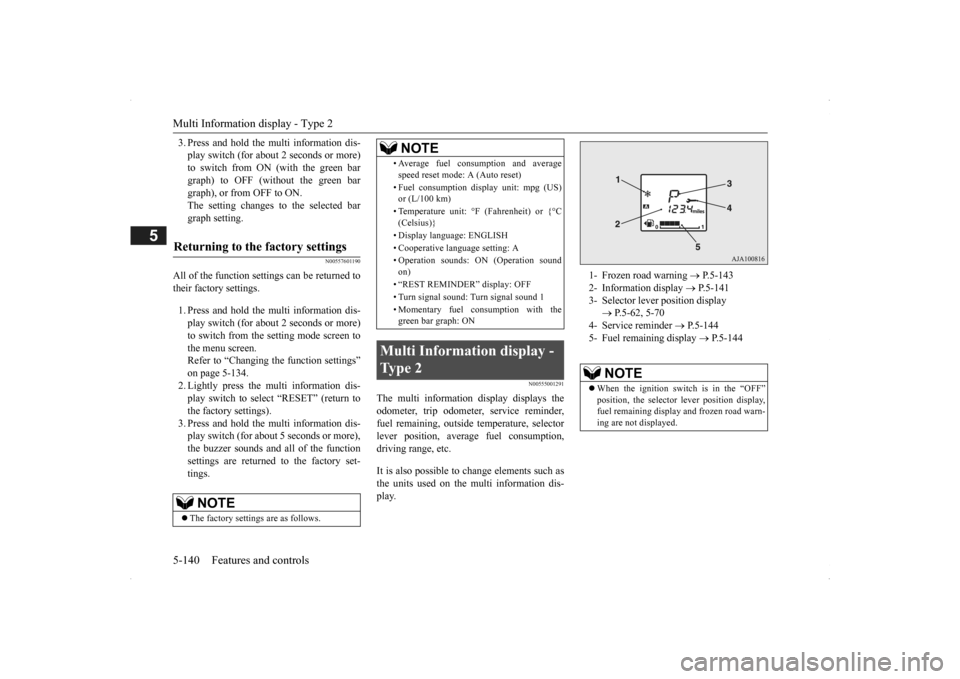
lever position, average fuel consumption, driving range, etc. It is also possible to change elements such as the units used on the multi information dis- play.
Returning to the factory settings
NOTE
The factory settings are as follows.
• Average fuel consumption and average speed reset mode: A (Auto reset) • Fuel consumption di
splay unit: mpg (US)
or (L/100 km) • Temperature unit: °F (Fahrenheit) or {°C (Celsius)} • Display language: ENGLISH • Cooperative langua
ge setting: A
• Operation sounds: ON (Operation sound on) • “REST REMINDER” display: OFF • Turn signal sound: Turn signal sound 1 • Momentary fuel consumption with the green bar graph: ON
Multi Information display - Type 2
NOTE
1- Frozen road warning
P.5-143
2- Information display
P.5-141
3- Selector lever position display
P.5-62, 5-70
4- Service reminder
P.5-144
5- Fuel remaining display
P.5-144
NOTE
When the ignition switch is in the “OFF” position, the selector
lever position display,
fuel remaining display and frozen road warn-ing are not displayed.
BK0200500US.book 140 ページ 2013年2月12日 火曜日 午前9時46分