ignition MITSUBISHI OUTLANDER 2014 3.G Manual Online
[x] Cancel search | Manufacturer: MITSUBISHI, Model Year: 2014, Model line: OUTLANDER, Model: MITSUBISHI OUTLANDER 2014 3.GPages: 451, PDF Size: 49.08 MB
Page 277 of 451

Bluetooth® 2.0 interface (if so equipped)
Features and controls 5-199
5
“
a call you need to sim-
ulate the pressing of a phone button as a response to an automated system, press theSPEECH button and speak “1 2 3 4 pound send” and the 1234# will be sent via your cel- lular phone.
N00565801045
If an incoming phone call is received whilethe ignition switch or
the operation mode is in
ON or ACC, the audio sy
stem will be auto-
matically turned on and switched to theincoming call, even when the audio system was originally off. The voice guide announcement for theincoming call will be output from the front passenger’s seat speaker. If the CD player or radio was playing whenthe incoming call was received, the audio sys- tem will mute the sound from the CD player or radio and output only the incoming call. To receive the call, press the PICK-UP button on the steering wheel control switch. When the call is over, the audio system willreturn to its previous state.
N00565900010
At any time during a ca
ll, you can mute the
vehicle microphone. Pressing the SPEECH button and then saying“Mute” during a call will turn ON the mute function and mute the microphone. Saying “Mute off” in the same way will turnoff the mute function and cancel the mute on the microphone.
N00566600014
The Bluetooth
® 2.0 interface
can switch
between hands-free mode
(hands-free calls)
and private mode (calls
using cellular phone).
If you press the SPEECH button and say “Transfer call” during a hands-free call, you can stop the hands-free mode and talk in pri-vate mode. To return to hands-free mode, press the SPEECH button again and say “Transfercall.”
N00566000018
The Bluetooth
® 2.0 interface
has 2 types of
unique phonebooks that are different from the phonebook stored in the cellular phone. They
are the vehicle phonebook and the mobile phonebook.These phonebooks are used to register tele- phone numbers and make
calls to desired
numbers via voice recognition function.
N00566101120
This phonebook is used when making callswith the voice re
cognition function.
Up to 32 names can be registered in the vehi- cle phonebook per language. Also, each entry has 4 locations associatedwith: home, work, mobile
and other. You can
register one telephone number for each loca- tion. You can register a desire
d name as a name for
any phonebook entry register
ed in the vehicle
phonebook. Names and telephone numbers can bechanged later on. The vehicle phonebook ca
n be used with all
paired cellular phones.
Receiving calls
Mute function
Switching between hands-free mode and private mode
Phonebook function
NOTE
Disconnecting the batt
ery cable will not
delete information regi
stered in the phone-
book.
Vehicle phonebook
BK0200500US.book 199 ページ 2013年2月12日 火曜日 午前9時46分
Page 285 of 451
USB input terminal (if so equipped)
Features and controls 5-207
5
N00566701041
You can connect your USB memory device or iPod
* to play music files stored in the USB
memory device or iPod. The following explains
how to connect and
remove a USB memory device or iPod. * : “iPod” is a registered trademark of Apple Inc. in the United States and other countries.
N00566801114
1. Park your vehicle in
a safe place and turn
the ignition switch to the “LOCK” posi- tion or put the opera
tion mode in OFF.
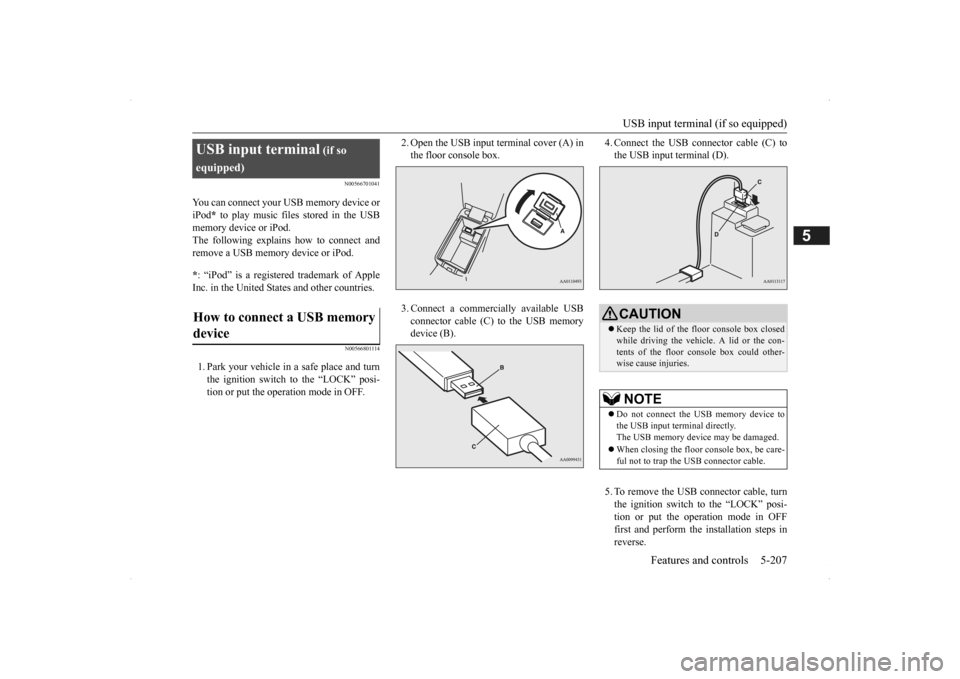
2. Open the USB input terminal cover (A) in the floor console box. 3. Connect a commercially available USB connector cable (C) to the USB memory device (B).
4. Connect the USB connector cable (C) to the USB input terminal (D). 5. To remove the USB connector cable, turn the ignition switch to the “LOCK” posi- tion or put the operation mode in OFFfirst and perform the installation steps in reverse.
USB input terminal
(if so
equipped)How to connect a USB memory device
CAUTION Keep the lid of the floor console box closed while driving the vehicle. A lid or the con- tents of the floor c
onsole box could other-
wise cause injuries.NOTE
Do not connect the USB memory device to the USB input term
inal directly.
The USB memory devi
ce may be damaged.
When closing the floor console box, be care- ful not to trap the USB connector cable.
BK0200500US.book 207 ページ 2013年2月12日 火曜日 午前9時46分
Page 286 of 451
USB input terminal (if so equipped) 5-208 Features and controls
5
N00566901102
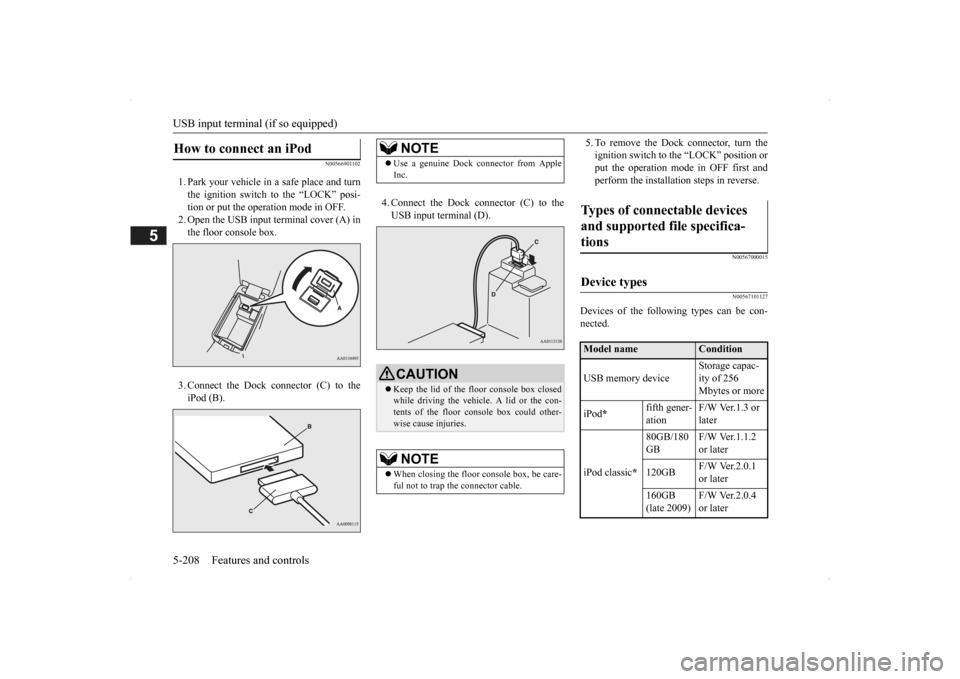
1. Park your vehicle in a safe place and turn the ignition switch to the “LOCK” posi-tion or put the operation mode in OFF. 2. Open the USB input terminal cover (A) in the floor console box. 3. Connect the Dock connector (C) to the iPod (B).
4. Connect the Dock connector (C) to the USB input terminal (D).
5. To remove the Dock connector, turn the ignition switch to the “LOCK” position orput the operation mode in OFF first and perform the installation steps in reverse.
N00567000015 N00567101127
Devices of the follow
ing types can be con-
nected.
How to connect an iPod
NOTE
Use a genuine Dock connector from Apple Inc.CAUTION Keep the lid of the floor console box closed while driving the vehicl
e. A lid or the con-
tents of the floor console box could other-wise cause injuries.NOTE
When closing the floor
console box, be care-
ful not to trap the connector cable.
Types of connectable devices and supported file specifica-tions
Device types
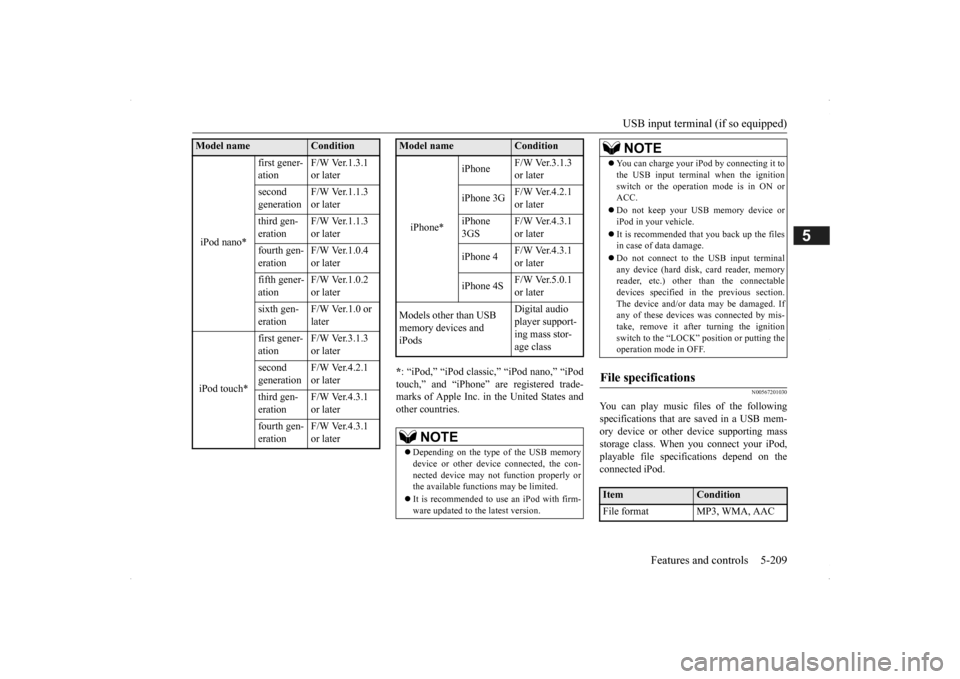
Model name
Condition
USB memory device
Storage capac- ity of 256 Mbytes or more
iPod
*
fifth gener- ation
F/W Ver.1.3 or later
iPod classic
*
80GB/180 GB
F/W Ver.1.1.2 or later
120GB
F/W Ver.2.0.1 or later
160GB (late 2009)
F/W Ver.2.0.4 or later
BK0200500US.book 208 ページ 2013年2月12日 火曜日 午前9時46分
Page 287 of 451
USB input terminal (if so equipped)
Features and controls 5-209
5
* : “iPod,” “iPod classic,” “iPod nano,” “iPod touch,” and “iPhone”
are registered trade-
marks of Apple Inc. in the United States and other countries.
N00567201030
You can play music files of the followingspecifications that are saved in a USB mem- ory device or other
device supporting mass
storage class. When
you connect your iPod,
playable file specif
ications depend on the
connected iPod.
iPod nano*
first gener- ation
F/W Ver.1.3.1 or later
second generation
F/W Ver.1.1.3 or later
third gen- eration
F/W Ver.1.1.3 or later
fourth gen- eration
F/W Ver.1.0.4 or later
fifth gener- ation
F/W Ver.1.0.2 or later
sixth gen- eration
F/W Ver.1.0 or later
iPod touch*
first gener- ation
F/W Ver.3.1.3 or later
second generation
F/W Ver.4.2.1 or later
third gen- eration
F/W Ver.4.3.1 or later
fourth gen- eration
F/W Ver.4.3.1 or later
Model name
Condition
iPhone*
iPhone
F/W Ver.3.1.3 or later
iPhone 3G
F/W Ver.4.2.1 or later
iPhone 3GS
F/W Ver.4.3.1 or later
iPhone 4
F/W Ver.4.3.1 or later
iPhone 4S
F/W Ver.5.0.1 or later
Models other than USB memory devices and iPods
Digital audio player support-ing mass stor- age class
NOTE
Depending on the type of the USB memory device or other devi
ce connected, the con-
nected device may not
function properly or
the available functi
ons may be limited.
It is recommended to use an iPod with firm- ware updated to th
e latest version.
Model name
Condition
You can charge your iP
od by connecting it to
the USB input terminal
when the ignition
switch or the operation mode is in ON orACC. Do not keep your USB memory device or iPod in your vehicle. It is recommended that you back up the files in case of data damage. Do not connect to the USB input terminal any device (hard disk
, card reader, memory
reader, etc.) other
than the connectable
devices specified in the previous section.The device and/or data
may be damaged. If
any of these devices
was connected by mis-
take, remove it after turning the ignitionswitch to the “LOCK” position or putting the operation mode in OFF.
File specifications
Item
Condition
File format MP3, WMA, AAC
NOTE
BK0200500US.book 209 ページ 2013年2月12日 火曜日 午前9時46分
Page 289 of 451
12 V power outlets
Features and controls 5-211
5
Cards can be slipped into the holder (B) on the sun visor.
N00525001625
To use a “plug-in” type accessory, open thecover or remove the cap, and insert the plugin the power outlet.
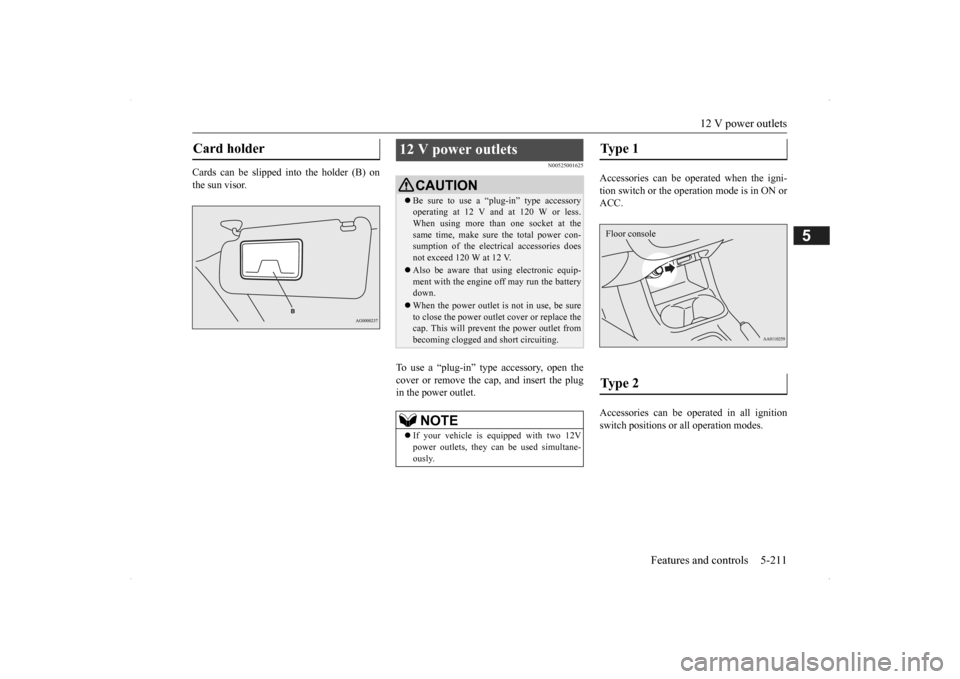
Accessories can be operated when the igni- tion switch or the operation mode is in ON or ACC. Accessories can be ope
rated in all ignition
switch positions or
all operation modes.
Card holder
12 V power outlets
CAUTIONBe sure to use a “plug-in” type accessory operating at 12 V and at 120 W or less.When using more than one socket at the same time, make sure
the total power con-
sumption of the electrical accessories doesnot exceed 120 W at 12 V. Also be aware that
using electronic equip-
ment with the engine
off may run the battery
down. When the power outlet is not in use, be sure to close the power outle
t cover or replace the
cap. This will prevent the power outlet frombecoming clogged and short circuiting.NOTE
If your vehicle is e
quipped with two 12V
power outlets, they ca
n be used simultane-
ously.
Type 1 Type 2 Floor console
BK0200500US.book 211 ページ 2013年2月12日 火曜日 午前9時46分
Page 290 of 451
Interior lights 5-212 Features and controls
5
N00525301585
N00525401469
Floor console box
Interior lights
NOTE
Be aware that leaving the light illuminated with the engine off may run the batterydown. Never leave the vehi
cle without checking
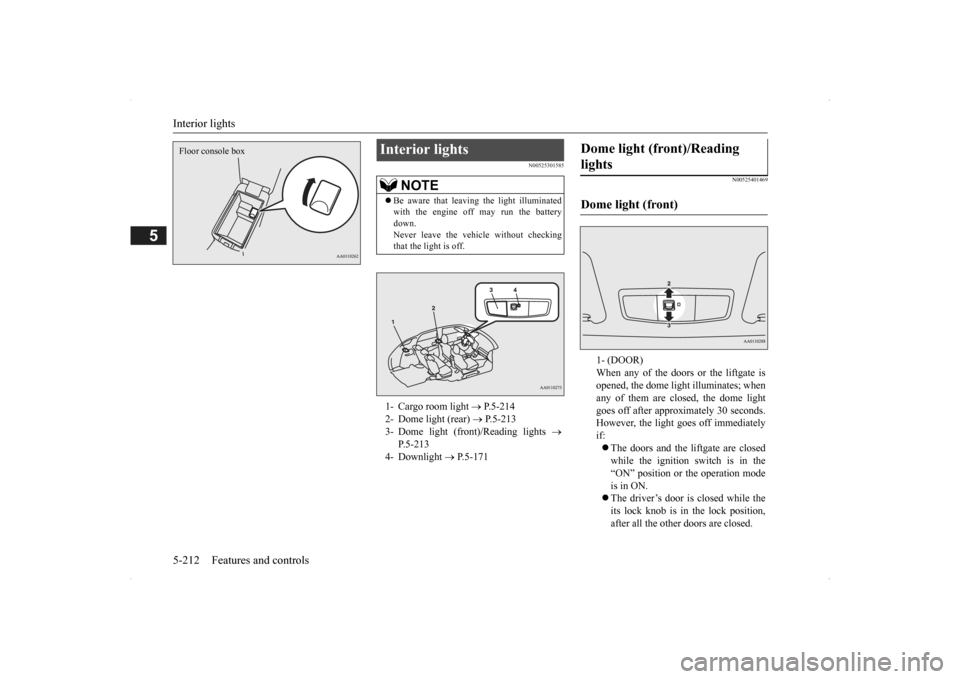
that the light is off.1- Cargo room light
P.5-214
2- Dome light (rear)
P.5-213
3- Dome light (front)/Reading lights
P.5-213
4- Downlight
P.5-171
Dome light (front)/Reading lights Dome light (front)
1- (DOOR) When any of the doors or the liftgate isopened, the dome light illuminates; when any of them are closed, the dome light goes off after approx
imately 30 seconds.
However, the light
goes off immediately
if: The doors and the liftgate are closed while the ignition switch is in the “ON” position or the operation mode is in ON. The driver’s door is closed while the its lock knob is in the lock position, after all the other doors are closed.
BK0200500US.book 212 ページ 2013年2月12日 火曜日 午前9時46分
Page 291 of 451
Interior lights
Features and controls 5-213
5
2- (OFF) The dome light stays off regardless of any door or the liftgate being opened or closed.
N00537601165
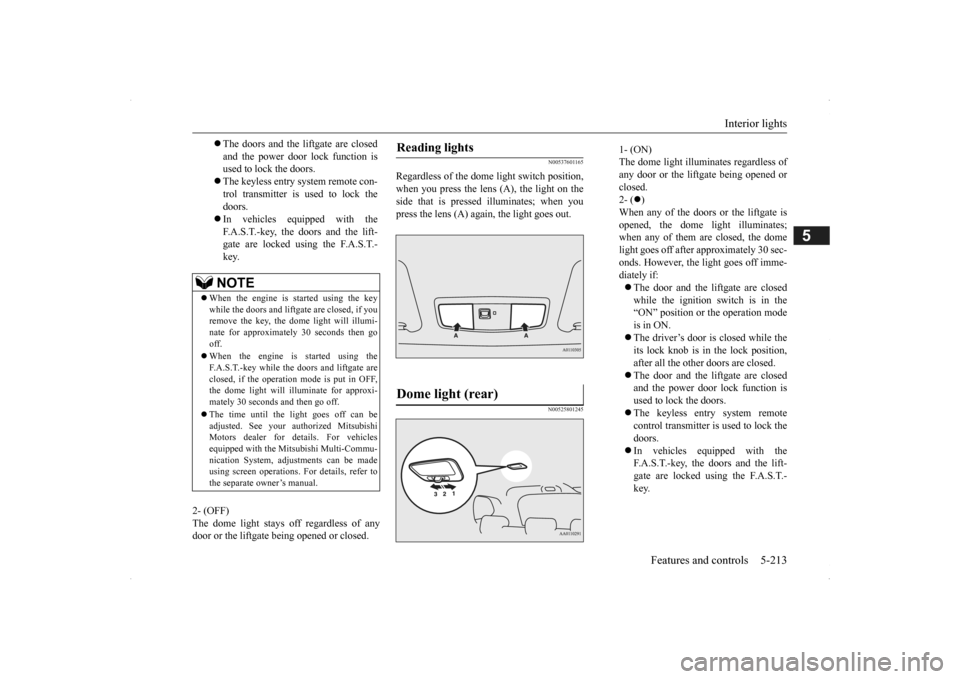
Regardless of the dome light switch position, when you press the lens (A), the light on the side that is pressed illuminates; when youpress the lens (A) agai
n, the light goes out.
N00525801245
The doors and the liftgate are closed and the power door lock function is used to lock the doors. The keyless entry system remote con- trol transmitter is used to lock the doors. In vehicles equipped with the F.A.S.T.-key, the doors and the lift- gate are locked using the F.A.S.T.-key.NOTE
When the engine is
started using the key
while the doors and liftgate are closed, if youremove the key, the dom
e light will illumi-
nate for approximately 30 seconds then go off. When the engine is started using the F.A.S.T.-key while the doors and liftgate areclosed, if the operation
mode is put in OFF,
the dome light will illuminate for approxi- mately 30 seconds and then go off. The time until the light goes off can be adjusted. See your authorized MitsubishiMotors dealer for details. For vehicles equipped with the Mitsubishi Multi-Commu- nication System, adjustments can be madeusing screen operations.
For details, refer to
the separate owner’s manual.
Reading lights Dome light (rear)
1- (ON) The dome light illumin
ates regardless of
any door or the liftgate being opened or closed. 2- (
)
When any of the doors or the liftgate is opened, the dome li
ght illuminates;
when any of them are closed, the domelight goes off after approximately 30 sec- onds. However, the li
ght goes off imme-
diately if: The door and the liftgate are closed while the ignition switch is in the“ON” position or the operation mode is in ON. The driver’s door is closed while the its lock knob is in the lock position, after all the other doors are closed. The door and the liftgate are closed and the power door lock function is used to lock the doors. The keyless entry system remote control transmitter is used to lock the doors. In vehicles equipped with the F.A.S.T.-key, the doors and the lift- gate are locked using the F.A.S.T.- key.
BK0200500US.book 213 ページ 2013年2月12日 火曜日 午前9時46分
Page 292 of 451
Interior lights 5-214 Features and controls
5
3- (OFF) The dome light stays off regardless of anydoor or the liftgate being opened or closed.
N00526101186
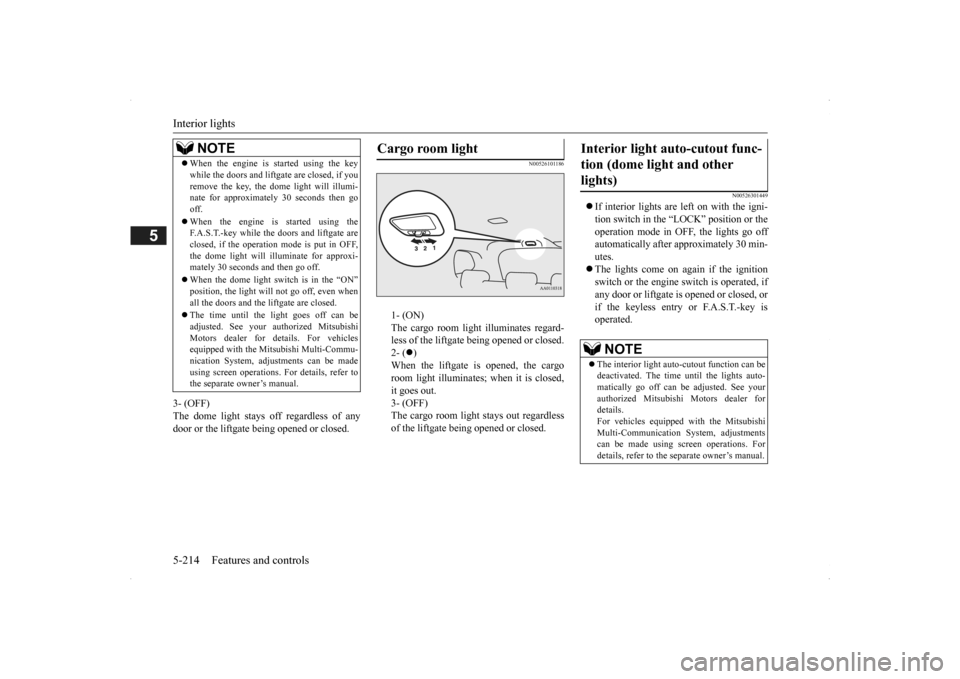
1- (ON) The cargo room light illuminates regard- less of the liftgate being opened or closed.2- (
)
When the liftgate is opened, the cargo room light illuminates;
when it is closed,
it goes out. 3- (OFF) The cargo room light
stays out regardless
of the liftgate bei
ng opened or closed.
N00526301449
If interior lights are left on with the igni- tion switch in the “LOCK” position or the operation mode in OFF, the lights go off automatically after approximately 30 min-utes. The lights come on again if the ignition switch or the engine
switch is operated, if
any door or liftgate is opened or closed, or if the keyless entry or F.A.S.T.-key isoperated.
NOTE
When the engine is started using the key while the doors and liftga
te are closed, if you
remove the key, the do
me light will illumi-
nate for approximately 30 seconds then go off. When the engine is started using the F.A.S.T.-key while the doors and liftgate are closed, if the operation mode is put in OFF,the dome light will il
luminate for approxi-
mately 30 seconds and then go off. When the dome light switch is in the “ON” position, the light will not go off, even when all the doors and the liftgate are closed. The time until the light goes off can be adjusted. See your authorized MitsubishiMotors dealer for details. For vehicles equipped with the Mitsubishi Multi-Commu- nication System, adju
stments can be made
using screen operations. For details, refer to the separate owner’s manual.
Cargo room light
Interior light auto-cutout func- tion (dome light and other lights)
NOTE
The interior light auto
-cutout function can be
deactivated. The time until the lights auto- matically go off can be
adjusted. See your
authorized Mitsubishi Motors dealer fordetails. For vehicles equipped
with the Mitsubishi
Multi-Communication System, adjustmentscan be made using sc
reen operations. For
details, refer to the
separate owner’s manual.
BK0200500US.book 214 ページ 2013年2月12日 火曜日 午前9時46分
Page 306 of 451
Parking 6-6 Driving safety
6
N00629601330
When parking on a hill, set the parking brake, and turn the front wheels toward the curb on a downhill, or away from
the curb on an uphill.
If necessary, apply chocks to the wheels. Be sure that the parki
ng brake is firmly set
when parked and that the selector lever is in the “P” (PARK) position. When parking on a hill, it
is important to set
the parking brake before moving the selector lever to the “P” (PARK) position. This pre- vents loading the parking brake against thetransaxle. When this ha
ppens, it is difficult to
move the selector lever out of the “P” (PARK) position. Never leave the engine running while you take a short nap or rest. Also, never leave the engine running in a closed or poorly venti- lated place.
Your front bumper can be damaged if you scrape it over curbs or parking stop blocks.Be careful when traveling up or down steep slopes where your bumper can scrape the road. Always remove the key from the ignition switch and lock all doors and the liftgate when leaving the
vehicle unattended.
Always try to park your vehicle in a well lit area.
Move effort could be required to turn the steering wheel.Refer to “Electric power steering system (EPS)” on page 5-89.
N00629900352
It is very important to know how much weight your vehicle can carry. This weight iscalled the vehicle ca
pacity weight and
includes the weight of
all occupants, cargo
(including the roof load), non-factory-installed options, and the tongue weight of the trailer, if any, being towed. The tire and loading information placard located on thedriver’s door sill of
your vehicle will show
how much weight it may properly carry. It is important to familiarize yourself with the following terms before
loading your vehicle:
Parking Parking on a hill Parking with the engine run- ning
WA R N I N G Leaving the engine ru
nning risks injury or
death from accidentally moving the selec-tor lever or the accumulation of toxicexhaust fumes in the passenger compart- ment.
Where you park
WA R N I N G Do not park your vehicle in areas where combustible materials
such as dry grass or
leaves can come in contact with a hotexhaust, since a fire could occur.
When leaving the vehicle
Do not keep the steering wheel fully turned for a long time Loading information
WA R N I N G Never overload your ve
hicle. Overloading
can damage your vehicle, adversely affectvehicle performance, including handling and braking, cause tire failure, and result in an accident.
BK0200500US.book 6 ページ 2013年2月12日 火曜日 午前9時46分
Page 331 of 451
AM/FM radio/CD player (if so equipped)
Comfort controls 7-15
7
N00734302102
The audio system can only be used when the ignition switch or the
operation mode is in
ON or ACC.
N00715000021
This product supports audio playback from iPod/iPhone devices, however dif- fering versions mean
that playback cannot
be guaranteed. Please be aware that depending on the iPod/iPhone model or
version, operation
may differ.
N00715200023
If the product becomes dirty, wipe with a soft cloth. If very dirty, use a soft cloth dipped in neutral detergent diluted in water, and then wrung out. Do not use benzene, thin- ners, or other chemic
al wipes. This may
harm the surface.
N00715300024
Product names and other proper names are the trademarks or registered trade- marks of their respective owners.
AM/FM radio/CD player
(if
so equipped)
NOTE
To listen to the audio system while the engine is not running, turn the ignitionswitch to the “ACC” position or put the oper- ation mode in ACC. If the ignition switch
or the operation mode
is left in ACC, the accessory power will automatically turn off after a certain period of time and you will no longer be able to usethe audio system. The accessory power comes on again if the ignition switch or the engine switch is operated with it in the“ACC” position. Refer
to “ACC power auto-
cutout function” on page 5-18 and 5-57. If a cellular phone is
used inside the vehicle,
it may create noise in the audio equipment. This does not mean that anything is wrongwith your audio equipment. In such a case, use the cellular phone at
a place as far away
as possible from the audio equipment.
If foreign objects or water get into the audio equipment, or if smoke or a strange odorcomes from it, immediately turn off theaudio system and have it checked at an authorized Mitsubishi
Motors dealer or a
repair facility of your
choice. Never try to
repair it yourself. Avoid using the audio sys- tem until it is insp
ected by a qualified per-
son. If the audio system is damaged by foreign objects, water, or fi
re, have the system
checked by a qualified Mitsubishi Motors technician.
Important Points on Usage
iPod/iPhone Playback Function
(if
so equipped)
NOTE
How to Clean
Trademarks
BK0200500US.book 15 ページ 2013年2月12日 火曜日 午前9時46分