language MITSUBISHI OUTLANDER 2014 3.G Owners Manual
[x] Cancel search | Manufacturer: MITSUBISHI, Model Year: 2014, Model line: OUTLANDER, Model: MITSUBISHI OUTLANDER 2014 3.GPages: 451, PDF Size: 49.08 MB
Page 198 of 451
Instrument cluster 5-120 Features and controls
5
N00519001402
N00519101272
The speedometer shows
the vehicle speed in
miles per hour (mph) or kilometers per hour(km/h).
NOTE
Mirror image is displayed on the screen. Monitor brightness is adjusted automatically by sensors. It is possible to change the display language of the screen. For details, please refer to the separatedowner’s manual for “Mitsubishi Multi-Com- munication System”. Under certain circumst
ances, it may become
difficult to see an image on the screen, even when the system is functioning correctly. • In a dark area, such as at night. • When water drops or condensation are on the lens. • When sun light or he
adlights shine directly
into the lens.
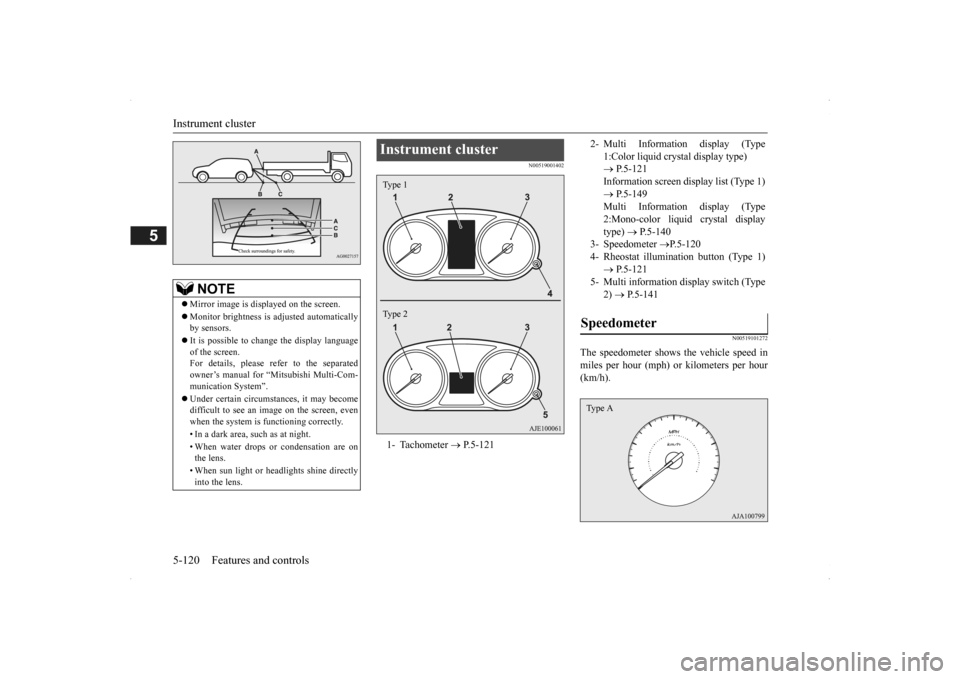
Instrument cluster 1- Tachometer
P.5-121
Type 1 Type 2
2- Multi Information display (Type
1:Color liquid crystal display type) P.5-121 Information screen display list (Type 1) P.5-149 Multi Information display (Type2:Mono-color liquid crystal display type)
P.5-140
3- Speedometer
P.5-120
4- Rheostat illumination button (Type 1)
P.5-121
5- Multi information display switch (Type
2) P.5-141
Speedometer Type A
BK0200500US.book 120 ページ 2013年2月12日 火曜日 午前9時46分
Page 200 of 451
Multi Information display - Type 1 5-122 Features and controls
5
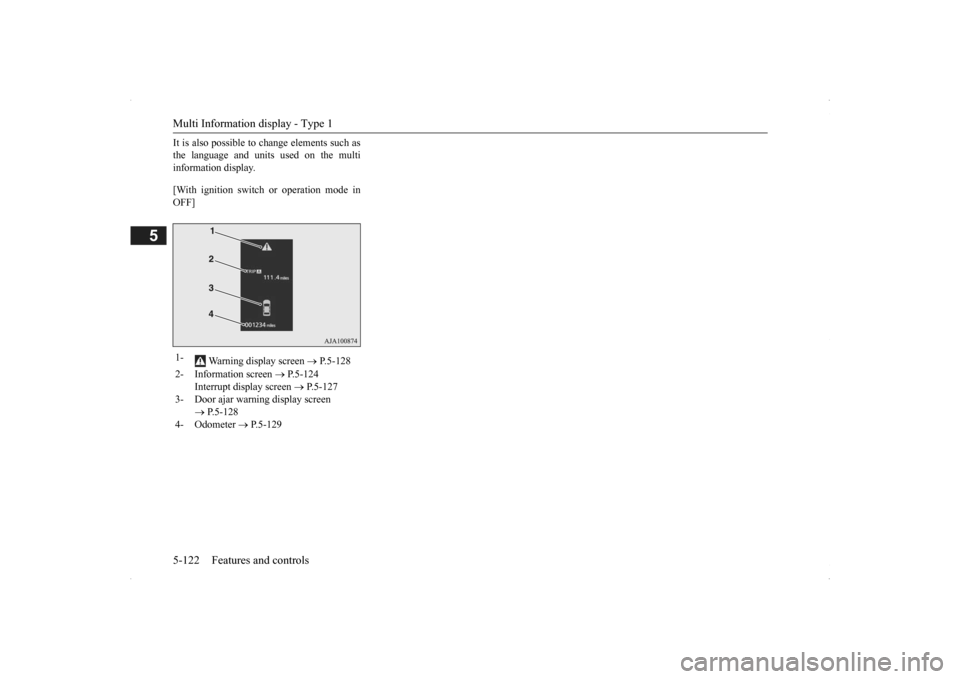
It is also possible to change elements such as the language and units used on the multiinformation display. [With ignition switch or operation mode in OFF] 1-
Warning display screen
P.5-128
2- Information screen
P.5-124
Interrupt display screen
P.5-127
3- Door ajar warning display screen
P.5-128
4- Odometer
P.5-129
BK0200500US.book 122 ページ 2013年2月12日 火曜日 午前9時46分
Page 201 of 451
![MITSUBISHI OUTLANDER 2014 3.G Owners Manual Multi Information display - Type 1
Features and controls 5-123
5
[With ignition switch or operation mode in ON]
N00555101188
Each time the multi information display switch is operated, th
e buzzer s](/img/19/7531/w960_7531-200.png "MITSUBISHI OUTLANDER 2014 3.G Owners Manual Multi Information display - Type 1
Features and controls 5-123
5
[With ignition switch or operation mode in ON]
N00555101188
Each time the multi information display switch is operated, th
e buzzer s")
Multi Information display - Type 1
Features and controls 5-123
5
[With ignition switch or operation mode in ON]
N00555101188
Each time the multi information display switch is operated, th
e buzzer sounds and the
multi information disp
lay changes between
information such as warnings, trip odometer,
1- Drive mode indicator display screen (if
so equipped)
P. 5 - 7 6
2- S-AWC control mode display screen (if
so equipped)
P. 5 - 7 8
3-
Warning display screen
P.5-128
4- Forward Collision Mitigation System
(FCM) OFF displa
y screen (if so
equipped)
P.5-107
5- Lane Departure Warning (LDW) dis-
play screen (if so equipped)
P. 5 - 1 1 1
6- ECO mode indicator display screen
P.5-178
7- Information screen
P.5-124
8- Selector lever
position display
P.5-70
9- Engine coolant te
mperature display
P.5-128
10- Odometer
P.5-129
11- Cruise control display screen (if so
equipped)
P.5-92
12- Adaptive Cruise Control System (ACC)
display screen (if so equipped) P.5-96
13- ECO indicator (if so equipped)
P.5-133
14- Fuel remaining display screen
P.5-129
15- Outside temperature display screen
P.5-129
NOTE
The fuel units, outside
temperature units,
display language, and
other settings can be
changed. Refer to “Changing the function settings” onpage 5-134.
Multi information display switch
BK0200500US.book 123 ページ 2013年2月12日 火曜日 午前9時46分
Page 202 of 451
Multi Information display - Type 1 5-124 Features and controls
5
average and momentary fuel consumption, distance range, etc.It is also possible to change elements such as the language and units used on the multi information display by operating the multiinformation display switch.
N00555301177
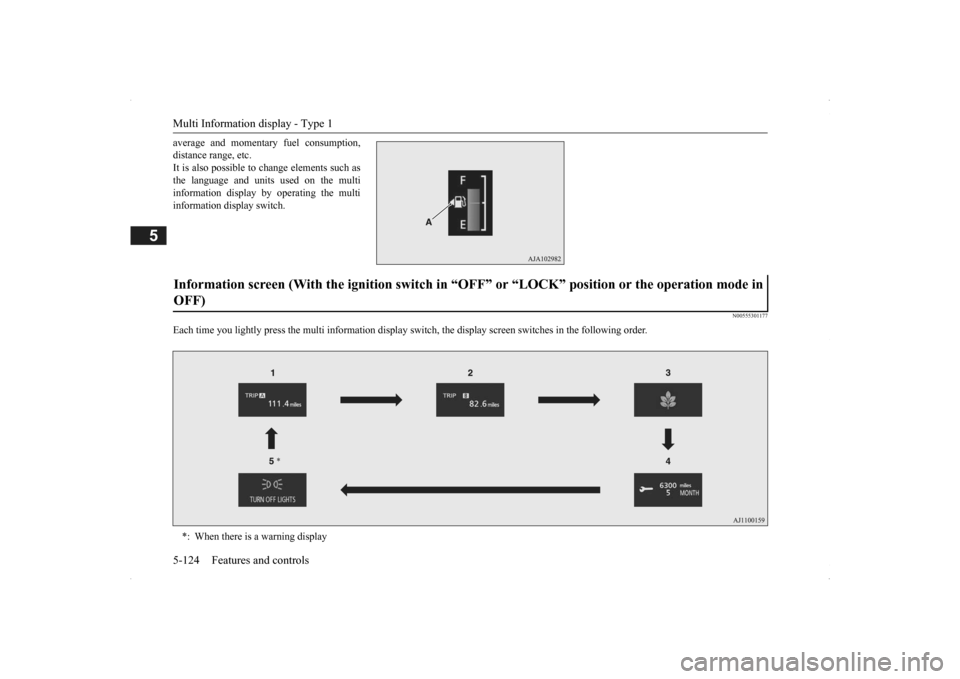
Each time you lightly press th
e multi information display switch, the displa
y screen switches in the following order.
Information screen (With the igniti
on switch in “OFF” or “LOCK” po
sition or the operation mode in
OFF) *: When there is a warning display
BK0200500US.book 124 ページ 2013年2月12日 火曜日 午前9時46分
Page 212 of 451
Multi Information display - Type 1 5-134 Features and controls
5
when the operation mode is set to “ON” to the time when it is set to “OFF”.
N00556801195
1. Park your vehicle in a safe place.Fully apply the parking brake and movethe selector lever into the “P” (PARK) position.
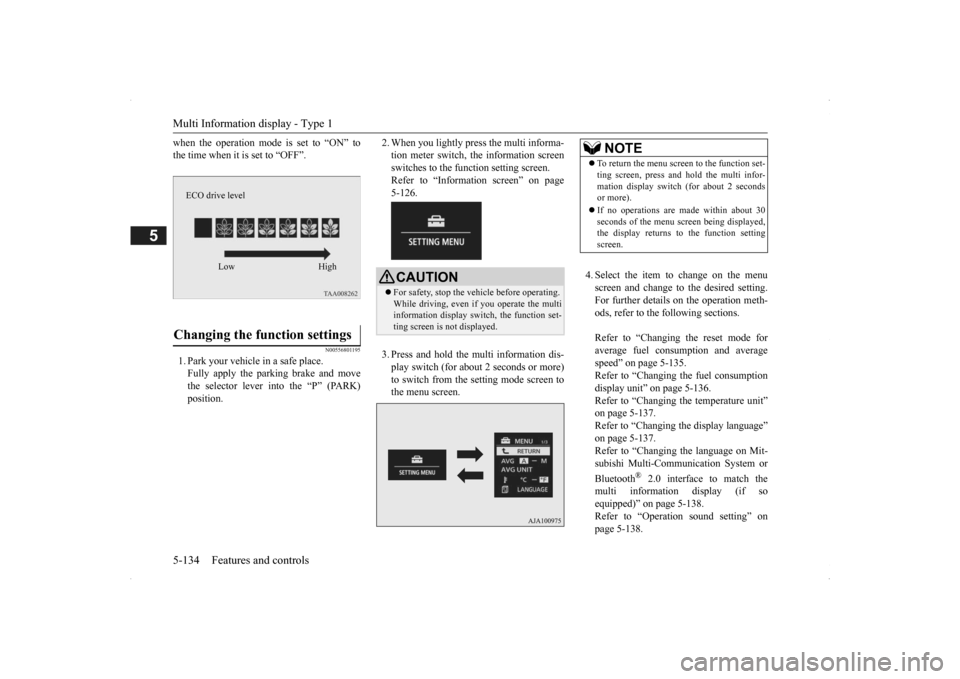
2. When you lightly press the multi informa- tion meter switch, the information screenswitches to the function setting screen. Refer to “Information screen” on page 5-126. 3. Press and hold the mu
lti information dis-
play switch (for about 2 seconds or more) to switch from the setting mode screen to the menu screen.
4. Select the item to change on the menu screen and change to the desired setting.For further details on the operation meth- ods, refer to the fo
llowing sections.
Refer to “Changing the reset mode for average fuel consumption and average speed” on page 5-135.Refer to “Changing the fuel consumption display unit” on page 5-136. Refer to “Changing th
e temperature unit”
on page 5-137. Refer to “Changing the display language” on page 5-137.Refer to “Changing the language on Mit- subishi Multi-Comm
unication System or
Bluetooth
® 2.0 interface to match the
multi informati
on display (if so
equipped)” on page 5-138. Refer to “Operati
on sound setting” on
page 5-138.
Changing the function settings
ECO drive level
Low High
CAUTION For safety, stop the ve
hicle before operating.
While driving, even if you operate the multi information display sw
itch, the function set-
ting screen is not displayed.
NOTE
To return the menu scre
en to the function set-
ting screen, press and hold the multi infor-mation display switch
(for about 2 seconds
or more). If no operations are made within about 30 seconds of the menu sc
reen being displayed,
the display returns to the function setting screen.
BK0200500US.book 134 ページ 2013年2月12日 火曜日 午前9時46分
Page 215 of 451
Multi Information display - Type 1
Features and controls 5-137
5
N00557201154
The temperature display unit can be switched. 1. Press and hold the mu
lti information dis-
play switch (for about 2 seconds or more) to switch from the setting mode screen tothe menu screen. Refer to “Changing th
e function settings”
on page 5-134.2. Lightly press the multi information dis- play switch to select “ ” (temperature unit setting). 3. Press and hold the mu
lti information dis-
play switch (for about 2 seconds or more)to switch in from °C to °F, or from °F to °C. The setting is changed to the selected tem-perature unit.
N00557301184
The language of the multi information displaycan be changed. 1. Press and hold the multi information dis- play switch (for about 2 seconds or more) to change from the setting mode screen to the menu screen.Refer to “Changing the function settings” on page 5-134.
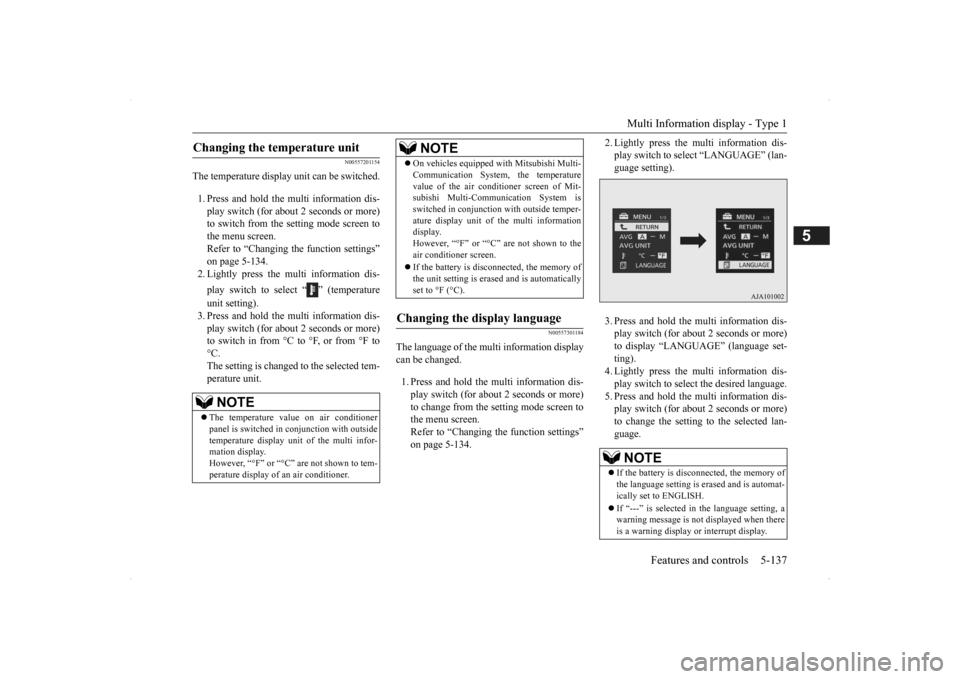
2. Lightly press the multi information dis- play switch to se
lect “LANGUAGE” (lan-
guage setting). 3. Press and hold the multi information dis- play switch (for about 2 seconds or more)to display “LANGUAGE” (language set- ting). 4. Lightly press the multi information dis-play switch to select
the desired language.
5. Press and hold the multi information dis- play switch (for about 2 seconds or more)to change the setting to the selected lan- guage.
Changing the temperature unit
NOTE
The temperature value on air conditioner panel is switched in
conjunction with outside
temperature display unit of the multi infor-mation display. However, “°F” or “°C” are not shown to tem- perature display of an air conditioner.
On vehicles equipped
with Mitsubishi Multi-
Communication System, the temperaturevalue of the air condi
tioner screen of Mit-
subishi Multi-Communication System is switched in conjunction
with outside temper-
ature display unit of
the multi information
display. However, “°F” or “°C” are not shown to the air conditioner screen. If the battery is disconnected, the memory of the unit setting is erased and is automaticallyset to °F (°C).
Changing the display language
NOTE
NOTE
If the battery is disconnected, the memory of the language setting is erased and is automat- ically set to ENGLISH. If “---” is selected in
the language setting, a
warning message is not displayed when there is a warning display
or interrupt display.
BK0200500US.book 137 ページ 2013年2月12日 火曜日 午前9時46分
Page 216 of 451
Multi Information display - Type 1 5-138 Features and controls
5
N00529801298
The language used in Mitsubishi Multi-Com- munication System
(if so equipped) or Blue-
tooth
® 2.0 interface (if so equipped) can be
changed automatically
to the same language
as that shown in the multi information dis-play. 1. Press and hold the multi information dis- play switch (for about 2 seconds or more) to switch from the setting mode screen tothe menu screen. Refer to “Changing the function settings” on page 5-134.
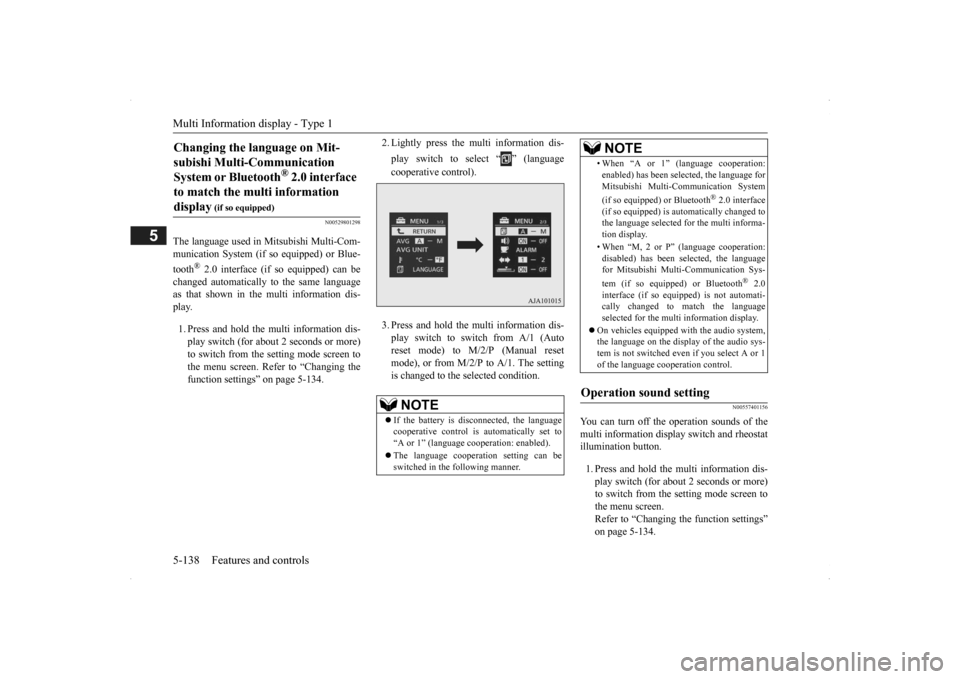
2. Lightly press the multi information dis- play switch to select “ ” (language cooperative control). 3. Press and hold the mu
lti information dis-
play switch to switch from A/1 (Auto reset mode) to M/2/P (Manual resetmode), or from M/2/
P to A/1. The setting
is changed to the selected condition.
N00557401156
You can turn off the operation sounds of the multi information display switch and rheostatillumination button. 1. Press and hold the multi information dis- play switch (for about 2 seconds or more) to switch from the setting mode screen tothe menu screen. Refer to “Changing the function settings” on page 5-134.
Changing the language on Mit- subishi Multi-Communication System or Bluetooth
® 2.0 interface
to match the multi information display
(if so equipped)
NOTE
If the battery is disconnected, the language cooperative control is
automatically set to
“A or 1” (language
cooperation: enabled).
The language coopera
tion setting can be
switched in the following manner.
• When “A or 1” (l
anguage cooperation:
enabled) has been selected, the language forMitsubishi Multi-Communication System (if so equipped) or Bluetooth
® 2.0 interface
(if so equipped) is au
tomatically changed to
the language selected for the multi informa- tion display. • When “M, 2 or P”
(language cooperation:
disabled) has been selected, the languagefor Mitsubishi Multi-Communication Sys- tem (if so equipped) or Bluetooth
® 2.0
interface (if so equi
pped) is not automati-
cally changed to
match the language
selected for the multi information display.
On vehicles equipped with the audio system, the language on the display of the audio sys-tem is not switched even
if you select A or 1
of the language cooperation control.
Operation sound setting
NOTE
BK0200500US.book 138 ページ 2013年2月12日 火曜日 午前9時46分
Page 218 of 451
Multi Information display - Type 2 5-140 Features and controls
5
3. Press and hold the multi information dis- play switch (for about 2 seconds or more)to switch from ON (with the green bar graph) to OFF (without the green bar graph), or from OFF to ON.The setting changes to the selected bar graph setting.
N00557601190
All of the function settings can be returned to their factory settings. 1. Press and hold the multi information dis- play switch (for about 2 seconds or more) to switch from the setting mode screen to the menu screen.Refer to “Changing the function settings” on page 5-134. 2. Lightly press the multi information dis-play switch to select “RESET” (return to the factory settings). 3. Press and hold the multi information dis-play switch (for about
5 seconds or more),
the buzzer sounds and
all of the function
settings are returned to the factory set-tings.
N00555001291
The multi information display displays theodometer, trip odometer, service reminder,fuel remaining, outside
temperature, selector
lever position, average fuel consumption, driving range, etc. It is also possible to change elements such as the units used on the multi information dis- play.
Returning to the factory settings
NOTE
The factory settings are as follows.
• Average fuel consumption and average speed reset mode: A (Auto reset) • Fuel consumption di
splay unit: mpg (US)
or (L/100 km) • Temperature unit: °F (Fahrenheit) or {°C (Celsius)} • Display language: ENGLISH • Cooperative langua
ge setting: A
• Operation sounds: ON (Operation sound on) • “REST REMINDER” display: OFF • Turn signal sound: Turn signal sound 1 • Momentary fuel consumption with the green bar graph: ON
Multi Information display - Type 2
NOTE
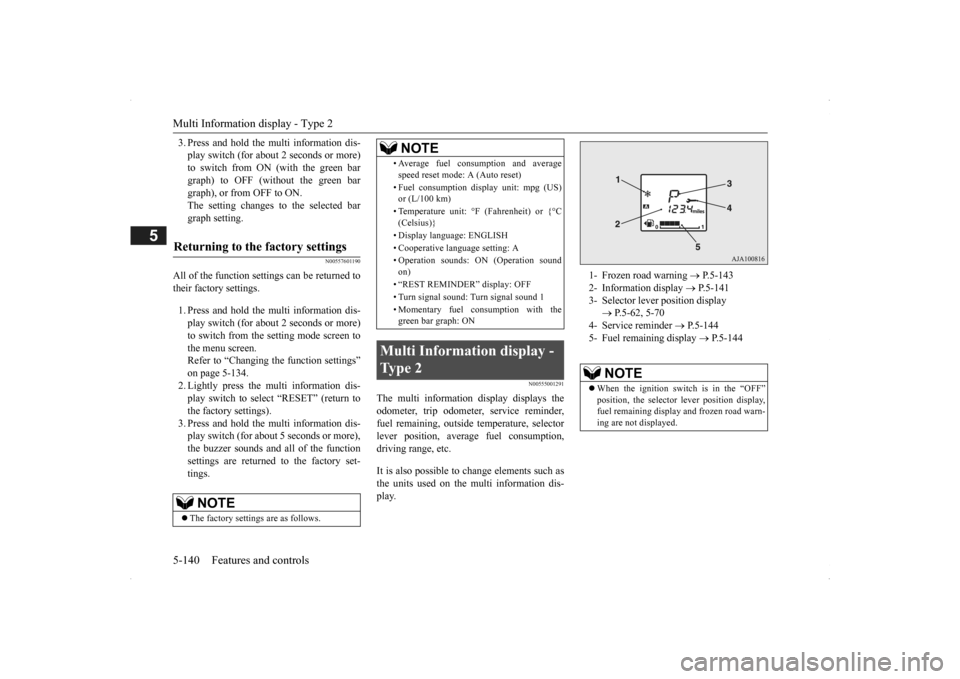
1- Frozen road warning
P.5-143
2- Information display
P.5-141
3- Selector lever position display
P.5-62, 5-70
4- Service reminder
P.5-144
5- Fuel remaining display
P.5-144
NOTE
When the ignition switch is in the “OFF” position, the selector
lever position display,
fuel remaining display and frozen road warn-ing are not displayed.
BK0200500US.book 140 ページ 2013年2月12日 火曜日 午前9時46分
Page 266 of 451

Bluetooth® 2.0 interface (if so equipped) 5-188 Features and controls
5
N00564101113
The Bluetooth
® 2.0 interface is equipped
with a voice recognition function. Simply say voice commands and you can per- form various operations
and make or receive
hands-free calls. With the Bluetooth
® 2.0 interface, voice rec-
ognition is possible for
US English, North
American Spanish, Canadian French and Jap-anese. The factory setting is “English.”
1. Press the SPEECH button (except for vehicles with Mitsubishi Multi-Commu- nication System) or PICK-UP button (for vehicles with Mitsubishi Multi-Commu-nication System). 2. Say “Setup.” 3. Say “Language.”4. The voice guide will
say “Select a lan-
guage: English, Spanish, French or Japa- nese.” Say the desired language.(Example: “English”)
5. The voice guide wi
ll say “English (Span-
ish, French or Japanese) selected. Is thiscorrect?” Say “Yes.” If you say “No,” the system will return to Step 4. 6. When the voice guide says “English (Spanish, French or Japanese) selected,” the language change process will be com- pleted and the system will return to themain menu.
NOTE
If a cellular phone is
within close proximity
of the microphone, it may distort the soundquality. In this case,
place the cellular phone
as far as possible from the microphone.
Voice recognition function
NOTE
If the voice command th
at you say differs
from the predefined command or cannot be recognised due to ambient noise or some other reason, the Bluetooth
® 2.0 interface
will ask you for the voice command again up to 3 times.
For best performance and further reduction of ambient noise, the vehicle windowsshould be closed, lower the blower speed andrefrain from conversation with your passen- gers while engaging
the voice recognition
function. Some voice commands have alternative commands. Depending on the sele
cted language, some
functions may not
be available.
Language can be change
d by using the audio
control panel besides
the following proce-
dure. For details, refer to “System settings” on page 7-42. For DISPLAY AUDIO and Mit-subishi Multi-Communication System, refer to the separate owner’s manuals.
Selecting the language
NOTE
NOTE
The voice guide will repeat the same mes- sage twice. The first message is in the cur- rent language, and th
e second message is in
the selected
language.
If many entries are regist
ered in the vehicle
phonebook, changing the language will take a longer time. Changing the language
deletes the mobile
phonebook imported to the Bluetooth
® 2.0
interface. If you wish to use it, you will have to import it again.
BK0200500US.book 188 ページ 2013年2月12日 火曜日 午前9時46分
Page 268 of 451

Bluetooth® 2.0 interface (if so equipped) 5-190 Features and controls
5
If a passcode has been set and the security function is enabled, the voice guide will say “Hands-free system is lo
cked. State the pass-
code to continue” when the SPEECH button (except for vehicles with Mitsubishi Multi- Communication System) or PICK-UP button(for vehicles with Mi
tsubishi Multi-Commu-
nication System) is pre
ssed to enter voice rec-
ognition mode. Say th
e 4-digit passcode
number to enter the passcode. If the entered passcode
is wrong, the voice
guide will say “<4-digi
t passcode>, Incorrect
passcode. Please try again.” Enter the correctpasscode.
Use the following procedure to turn off the security function by di
sabling the passcode.
1. Press the SPEECH button (except for vehicles with Mitsubishi Multi-Commu-nication System) or PICK-UP button (for vehicles with Mitsubishi Multi-Commu- nication System).2. Say “Setup.” 3. Say “Passcode.” 4. The voice guide w
ill say “Passcode is
enabled. Would you like to disable it?” Answer “Yes.” Answer “No” to cancel the disabling ofthe passcode and return to the main menu.
5. When the disabling of the passcode is completed, the voice
guide will say “Pass-
code is disabled” and the system will return to the main menu.
N00564700011
The Bluetooth
® 2.0 interface can use the
speaker enrollment func
tion to create a voice
model for one person per language. This makes it easier for the Bluetooth
® 2.0
interface to recognise
voice commands said
by you. You can turn a voice model registered with the speaker enrollment function on and offwhenever you want.
N00564801110
It takes about 2 to 3 minutes to complete thespeaker enrollment process. To ensure the best results, run through the process while in the driver’s seat, in an envi-ronment that is as qu
iet as possible (when
there is no rain or strong winds and the vehi- cle windows are closed). Please turn off yourphone while in speaker enrollment to prevent interruption of the process. Use the following procedure for speakerenrollment.
NOTE
Passcode will be require
d to access the sys-
tem after the next
ignition cycle.
It is required for a little time after engine stop that the entered passcode is actually recorded in the system.If the ignition switch
or the operation mode
is made to ACC or ON or the engine is started immediately afte
r engine stop, there
is a case when the entered passcode is not recorded in the system. At this time, please try to enter the passcode again.
Entering the passcode
NOTE
You can reenter the pa
sscode as many times
as you want. If you have forgot
ten your passcode, say
“Cancel” to quit the voice input mode and then check with an authorized MitsubishiMotors dealer.
Disabling the passcode
NOTE
System must be unlocke
d to disable the pass-
code.
Speaker enrollment function
Speaker enrollment
BK0200500US.book 190 ページ 2013年2月12日 火曜日 午前9時46分