Check MITSUBISHI OUTLANDER 2015 3.G Repair Manual
[x] Cancel search | Manufacturer: MITSUBISHI, Model Year: 2015, Model line: OUTLANDER, Model: MITSUBISHI OUTLANDER 2015 3.GPages: 446, PDF Size: 59.52 MB
Page 260 of 446
Electric rear window defogger switch
Features and controls 5-183
5
N00523501264
N00523701426
The rear window defogger can be used when the engine is running. The indicator light (A) will come on whenyou press the electric rear window defogger switch. Electric current will flow through the heating wires on the rear window to helpclear away moisture or frost.
NOTE
The rear window wiper
will automatically
perform several conti
nuous operations if the
selector lever is put in
the “R” position while
the windshield wipers or the rear window wiper is operating.(a
utomatic operation
mode)After the automatic operation, the rear win- dow wiper will stop ope
rating if the knob is
in the “OFF” position. If the knob is in the“INT” position, the re
ar window wiper will
return to the intermittent operation. It is possible to set the rear window wiper toperform the automatic operation only if the selector lever is put in
the “R” position while
the rear window wiper
is operating with the
knob in the “INT” position. See your authorized Mitsubishi Motors dealer for details. If the knob is in the “OFF” position, turn the knob to the “INT” position twice quickly tooperate the rear window
wiper continuously.
(continuous operation mode) Turn the knob to the “OFF” position to stopthe rear window wipe
r continuous operation.
The wiper intermittent
operation time can be
adjusted. See your authorized Mitsubishi Motors dealer for details.For vehicles equipped
with the Mitsubishi
Multi-Communication System, adjustments can be made using screen operations. Forfurther details, refer to the separate owner’s manual.
The washer fluid reser
voir is located in the
engine compartment.Check the fluid level regularly and refill ifnecessary. (Refer to
“Washer fluid” on page
9-12.)
Precautions to observe when using wipers and washers
CAUTION If the washer is used in cold weather, the washer fluid sprayed onto the glass mightfreeze, blocking your vi
ew. Heat the glass
with the defroster befo
re using the washer.
NOTE
Do not use the wipers when the windshield is dry. This could scratch the glass and wear the wiper blades prematurely. Before using the wipe
rs in cold weather,
check to be sure that the wiper blades are notfrozen to the windshield or rear window. Using the wipers while the blades are frozen could cause the wiper motor to burn out.NOTE
If the wipers become
blocked by ice or other
deposits on the glass, the motor may stillburn out even if the wiper switch is OFF. Ifdeposits form on the windshield, park your vehicle in a safe place,
turn off the engine,
and clean the glass so that the wipers canoperate smoothly. Avoid using the washer for more than 20 sec- onds at a time. Do not operate the washer when the washer fluid reservoir is empty or the pump may fail. During cold weather,
add a recommended
washer solution that will not freeze in thewasher fluid reservoir.
Otherwise the washer
may not work or may be damaged. Replace the wiper blades when they are worn. Use the proper size replacement blades. For further information, please con-tact your authorized Mitsubishi Motors dealer.
Electric rear window defog- ger switch
NOTE
BK0211800US.book 183 ページ 2014年3月12日 水曜日 午後2時42分
Page 267 of 446

Bluetooth® 2.0 interface (if so equipped) 5-190 Features and controls
5
Use the following procedure to turn off the security function by di
sabling the passcode.
1. Press the SPEECH button (except for vehicles with Mitsubishi Multi-Commu-nication System) or
PICK-UP button (for
vehicles with Mitsubishi Multi-Commu- nication System).2. Say “Setup.” 3. Say “Passcode.” 4. The voice guide will say “Passcode isenabled. Would you like to disable it?” Answer “Yes.” Answer “No” to cancel the disabling ofthe passcode and return to the main menu.
5. When the disabling of the passcode is completed, the voice
guide will say “Pass-
code is disabled” and the system will return to the main menu.
N00564700011
The Bluetooth
® 2.0 interface can use the
speaker enrollment function to create a voice model for one person per language. This makes it easier for the Bluetooth
® 2.0
interface to recognise
voice commands said
by you. You can turn a voice model registered with the speaker enrollment function on and offwhenever you want.
N00564801110
It takes about 2 to 3 mi
nutes to complete the
speaker enrollment process. To ensure the best results, run through the process while in the driver’s seat, in an envi-ronment that is as quiet as possible (when there is no rain or strong winds and the vehi- cle windows are closed).
Please turn off your
phone while in speaker enrollment to prevent interruption of the process. Use the following procedure for speakerenrollment.
1. Stop your vehicle in a safe area, put the selector lever in the “P” (PARK) positionand pull the parking brake lever. 2. Press the SPEECH button (except for vehicles with Mitsubishi Multi-Commu-nication System) or
PICK-UP button (for
vehicles with Mitsubishi Multi-Commu- nication System).3. Say “Voice training.” 4. The voice guide will
say “This operation
must be performed in
a quiet environment
while the vehicle is stopped. See the owner’s manual for th
e list of required
training phrases. Pr
ess and release the
SPEECH button when you are ready to begin. Press the HANG-UP button to can- cel at any time.”Press the SPEECH button to start the speaker enrollment process.
NOTE
You can reenter the passcode as many times as you want. If you have forgotten your passcode, say “Cancel” to quit the voice input mode and then check with an authorized MitsubishiMotors dealer.
Disabling the passcode
NOTE
System must be unlocked to disable the pass- code.
Speaker enrollment function
Speaker enrollment
NOTE
Speaker enrollment is not possible unless the vehicle is parked. Make sure you park the vehicle in a safe area before attempting speaker enrollment.
BK0211800US.book 190 ページ 2014年3月12日 水曜日 午後2時42分
Page 271 of 446

Bluetooth® 2.0 interface (if so equipped) 5-194 Features and controls
5
4. After the voice guide says “Please say,” the numbers of the music players anddevice tags of corresponding music play- ers will be read out in order, starting with the music player that has been mostrecently connected. Say the number of the music player that you want to connect to.When the confirmation function is on, the system will ask you again whether the music player that you want to connect to is correct. Answer “Yes” to continue and connect to the music player.Answer “No,” and the voice guide will say “Please say.” Say the number of the music player that you want to connect to. 5. The selected music player will be con- nected to the Bluetooth
® 2.0 interface.
The voice guide will
say “
selected” and then the system will return to the main menu.
N00582400036
Use the following procedure to delete a paired Bluetooth
® device from the Blue-
tooth
® 2.0 interface.
1. Press the SPEECH button (except for vehicles with Mitsubishi Multi-Commu-nication System) or PICK-UP button (for vehicles with Mitsubishi Multi-Commu- nication System). 2. Say “Setup.” 3. Say “Pairing Options.”4. The voice guide will
say “Select one of
the following: pair, ed
it, delete, or list.”
Say “Delete.”5. After the voice guide
says “Please say,”
the numbers of the devices and device tags of corresponding
devices will be read
out in order, starting with the device that has been most recently connected. After it completes reading all pairs, the voiceguide will say “or all.” Say the number of the device that you want to delete from the system.If you want to delete all paired phones from the system, say “All.” 6. For confirmation purposes, the voiceguide will say “Deleting
Answer “No,” the system will return to Step 4.7. The voice guide will say “Deleted,” and then the system will
end the device dele-
tion process.
N00565201036
You can check a paired Bluetooth
® device by
following the steps below. 1. Press the SPEECH button (except for vehicles with Mitsubishi Multi-Commu- nication System) or
PICK-UP button (for
vehicles with Mitsubishi Multi-Commu-nication System). 2. Say “Setup.” 3. Say “Pairing Options.”4. The voice guide will say “Select one of the following: pair, edit, delete, or list.” Say “List.”
NOTE
You can connect to a music player at any time by pressing the SPEECH button andsaying the number, even before all of the paired numbers and de
vice tags of corre-
sponding music players are read out by thesystem.
Deleting a device
NOTE
If the device deletion process fails for some reason, the voice guide
will say “Delete
failed” and then the system will cancel delet-ing the device.
To check a paired Bluetooth
®
device
BK0211800US.book 194 ページ 2014年3月12日 水曜日 午後2時42分
Page 274 of 446

Bluetooth® 2.0 interface (if so equipped)
Features and controls 5-197
5
1. Press the SPEECH button (except for vehicles with Mitsubishi Multi-Commu-nication System) or PICK-UP button (for vehicles with Mitsubishi Multi-Commu- nication System).2. Say “Call.” 3. After the voice guide says “Name please,” say the name you want
to call, from those
registered in the phonebook.4. If there is only 1 ma
tch, the system will
proceed to Step 5. If there are 2 or more matches, the voiceguide will say “More than one match was found, would you like to call
be uttered by the
voice guide.
5. If only 1 telephone number is registered under the name you just said, the voiceguide will proceed to Step 6. If 2 or more telephone numbers are regis- tered that match the name you just said,the voice guide will say “Would you like to call
” Select the location
to call.
6. The voice guide will say “Calling
the system will dial
the telephone number.
You can redial the last
number called, based
on the history of dialed calls in the paired cel- lular phone. Use the following procedure to redial.
NOTE
If you say “Call” wh
en the vehicle phone-
book and the mobile phonebook are empty, the voice guide
will say “The vehicle phone-
book is empty. Would you like to add a newentry now?” Answer “Yes,” and the voice guide will say “Entering the phonebook - new entry menu.”You can now create da
ta in the vehicle
phonebook. Answer “No,” the system will return to themain menu.
NOTE
If you say “No” to all names read by the sys- tem, the voice guide will say “Name notfound, returning to main menu” and the sys-tem will return to the main menu.NOTE
If the name you select
ed has matching data
in the vehicle phonebook but no telephone number is registered unde
r the selected loca-
tion, the voice guide will say “{home/work/mobile/other} not found for
nd you can register an
additional telephone
number under the
selected location.
If the name you sele
cted has matching data
in the mobile phonebook but no telephonenumber is registered unde
r the selected loca-
tion, the voice guide will say “{home/work/mobile/other} not found for
When the confirmation function is on, the system will check if the name and location of the receiver are correct. If the name is cor- rect, answer “Yes.”To change the name
or location to call,
answer “No.” The system will return to Step 3.
Redialing
NOTE
BK0211800US.book 197 ページ 2014年3月12日 水曜日 午後2時42分
Page 278 of 446

Bluetooth® 2.0 interface (if so equipped)
Features and controls 5-201
5
8. The voice guide will say “Adding
er a different name.
9. The voice guide will say “Numberssaved.”
10. The voice guide will say “Would you like
to import another contact?” Answer “Yes” if you want to continue with the registration.
You can continue to
register a new phonebook entry from Step 5. Answer “No,” the system will return tothe main menu.
N00579800049
You can change or delete a name or telephonenumber registered in the vehicle phonebook.You can also listen to the list of names regis- tered in the vehicle phonebook.
N00579900053
1. Press the SPEECH button (except forvehicles with Mitsubishi Multi-Commu- nication System) or
PICK-UP button (for
vehicles with Mitsubishi Multi-Commu- nication System). 2. Say “Phonebook.”3. The voice guide will say “Select one of the following: new entry, edit number, edit name, list names, delete, erase all, or import contact”. Sa
y “Edit number.”
4. The voice guide will say “Please say thename of the entry you would like to edit, or say list names.”
Say the name of the
phonebook entry you want to edit. 5. The voice guide wi
ll say “Home, work,
mobile or other?” Sele
ct and say the loca-
tion where the telephone number you want to change or add is registered.When the confirmation function is on, the system will check the target name and location again. Answer “Yes” if you wantto continue with the editing.
Answer “No,” the system will return to Step 3.6. The voice guide will say “Number, please.” Say the
telephone number you
want to register. 7. The voice guide will
repeat the telephone
number. When the confirmation function is on, the system will ask if th
e number is correct.
Answer “Yes.” Answer “No,” the system will return to the Step 3.8. Once the telephone number is registered, the voice guide will say “Number saved” and then the system will return to themain menu.
To change the content registered in the vehicle phonebook NOTE
The system must have at least one entry.
Editing a telephone number
NOTE
Say “List names,” and the names registered in the phonebook will be read out in order.Refer to “Vehicle phonebook: Listening to the list of registered names” on page 5-202.
NOTE
If the telephone number is already registered in the selected location, the voice guide will say “The current number is
se.” Say a new tele-
phone number to change the current number.NOTE
If the location where a telephone number was already registered
has been overwritten
with a new number, the voice guide will say “Number changed” and
then the system will
return to the main menu.
BK0211800US.book 201 ページ 2014年3月12日 水曜日 午後2時42分
Page 279 of 446

Bluetooth® 2.0 interface (if so equipped) 5-202 Features and controls
5
N00580100055
1. Press the SPEECH button (except for vehicles with Mitsubishi Multi-Commu- nication System) or
PICK-UP button (for
vehicles with Mitsubishi Multi-Commu- nication System). 2. Say “Phonebook.”3. The voice guide will say “Select one of the following: new entry, edit number, edit name, list names, delete, erase all, or import contact.”
Say “Edit name.”
4. The voice guide will say “Please say thename of the entry you would like to edit, or say list names.”
Say the name you want
to edit. 5. The voice guide
will say “Changing
6. The voice guide will say “Name please.” Say the new name you
want to register.
7. The registered name will be changed. When the change is complete, the system will return to the main menu.
N00580200043
1. Press the SPEECH button (except forvehicles with Mitsubishi Multi-Commu-nication System) or PICK-UP button (for vehicles with Mitsubishi Multi-Commu- nication System). 2. Say “Phonebook.” 3. The voice guide will
say “Select one of
the following: new entry, edit number, edit name, list names, delete, erase all, or import contact.” Sa
y “List names.”
4. Bluetooth
® 2.0 interface will read out the
entries in the phonebook in order. 5. When the voice guide is done reading thelist, it will say “End of list, would you like to start from the beginning?” When you want to check the list again from thebeginning, answer “Yes.” When you are done, answer “No” to return to the previous or main menu.
N00580300057
1. Press the SPEECH button (except forvehicles with Mitsubishi Multi-Commu-nication System) or
PICK-UP button (for
vehicles with Mitsubishi Multi-Commu- nication System).2. Say “Phonebook.” 3. The voice guide will say “Select one of the following: new entry, edit number,edit name, list names, delete, erase all, or import contact.” Say “Delete.”
Editing a name
NOTE
Say “List names,” and the names registered in the phonebook are read out in order. Referto “Vehicle phonebook: Listening to the list of registered na
mes” on page 5-202.
Listening to the list of registered names
NOTE
You can call, edit or
delete a name that is
being read out.Press the SPEECH button and say “Call” tocall the name, “Edit name” to edit it, or “Delete” to delete it. The system will beep and then execute yourcommand. If you press the SPEECH button and say “Continue” or “Previous” while the list is being read, the system will advance or rewind the list. Say “C
ontinue” to proceed to
the next entry or “Previous” to return to the previous entry.
Deleting a telephone number
BK0211800US.book 202 ページ 2014年3月12日 水曜日 午後2時42分
Page 288 of 446
Interior lights
Features and controls 5-211
5
N00525301602
N00525401469
2- (OFF) The dome light stays off regardless of any door or the liftgate being opened or closed.
Interior lights
NOTE
Be aware that leaving the light illuminated with the engine off may run the batterydown. Never leave the vehi
cle without checking
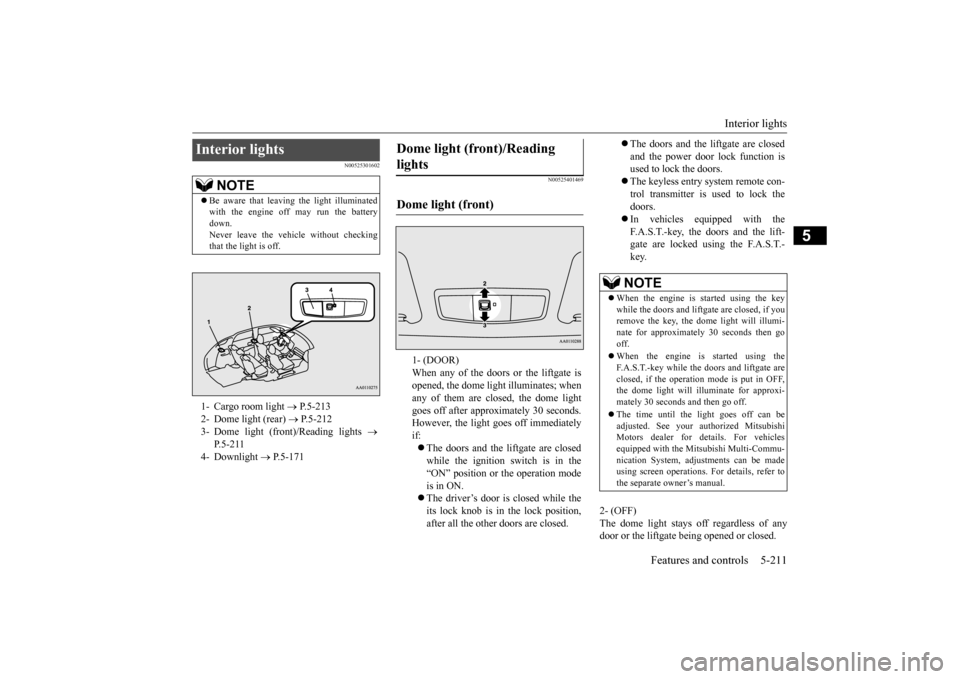
that the light is off.1- Cargo room light
P.5-213
2- Dome light (rear)
P.5-212
3- Dome light (front)/Reading lights
P.5-211
4- Downlight
P.5-171
Dome light (front)/Reading lights Dome light (front)
1- (DOOR) When any of the doors or the liftgate isopened, the dome light illuminates; when any of them are closed, the dome light goes off after approximately 30 seconds.However, the light goes off immediately if: The doors and the liftgate are closed while the ignition switch is in the “ON” position or the operation mode is in ON. The driver’s door is closed while the its lock knob is in the lock position, after all the other doors are closed.
The doors and the liftgate are closed and the power door lock function is used to lock the doors. The keyless entry system remote con- trol transmitter is used to lock the doors. In vehicles equipped with the F.A.S.T.-key, the doors and the lift- gate are locked using the F.A.S.T.-key.NOTE
When the engine is
started using the key
while the doors and liftgate are closed, if youremove the key, the dom
e light will illumi-
nate for approximately 30 seconds then go off. When the engine is started using the F.A.S.T.-key while the doors and liftgate areclosed, if the operation
mode is put in OFF,
the dome light will illu
minate for approxi-
mately 30 seconds and then go off. The time until the light goes off can be adjusted. See your authorized MitsubishiMotors dealer for details. For vehicles equipped with the Mitsubishi Multi-Commu- nication System, adjustments can be madeusing screen operations.
For details, refer to
the separate owner’s manual.
BK0211800US.book 211 ページ 2014年3月12日 水曜日 午後2時42分
Page 302 of 446
Floor mat
Driving safety 6-3
6
N00628600033
The original equipment floor mat provided with your vehicle was
specifically designed
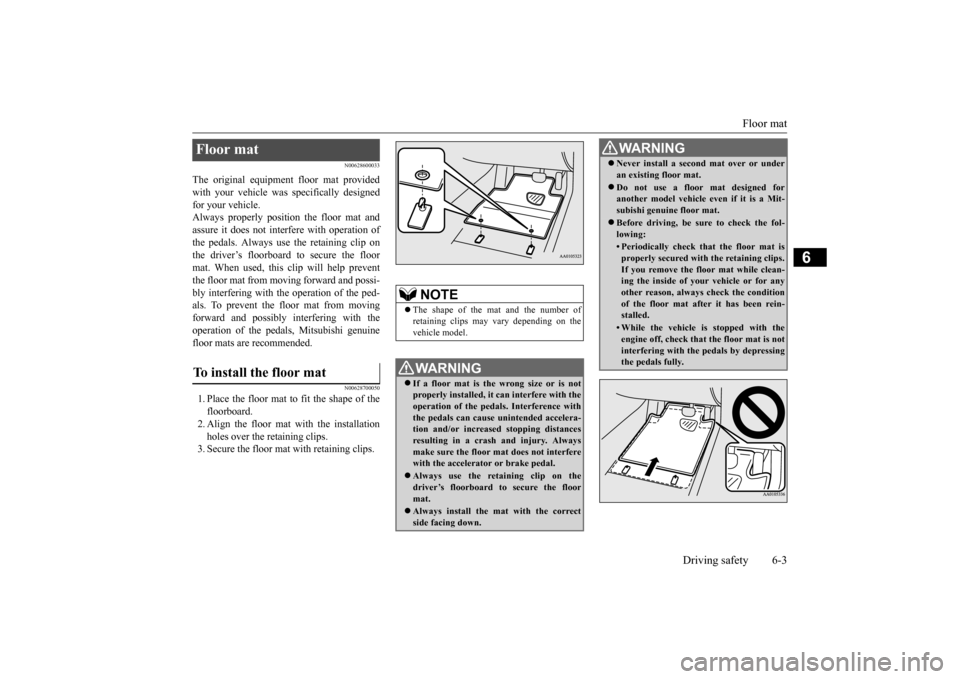
for your vehicle.Always properly positio
n the floor mat and
assure it does not inte
rfere with operation of
the pedals. Always use the retaining clip onthe driver’s floorboard to secure the floor mat. When used, this clip will help prevent the floor mat from moving forward and possi- bly interfering with the operation of the ped- als. To prevent the floor mat from movingforward and possibly interfering with the operation of the pedals, Mitsubishi genuine floor mats are recommended.
N00628700050
1. Place the floor mat to fit the shape of thefloorboard.2. Align the floor mat with the installation holes over the retaining clips. 3. Secure the floor mat with retaining clips.Floor mat To install the floor mat
NOTE
The shape of the mat and the number of retaining clips may vary depending on the vehicle model.WA R N I N G If a floor mat is the
wrong size or is not
properly installed, it can interfere with theoperation of the pedals. Interference with the pedals can cause unintended accelera- tion and/or increased stopping distancesresulting in a cras
h and injury. Always
make sure the floor mat does not interfere with the accelerator or brake pedal. Always use the reta
ining clip on the
driver’s floorboard to secure the floormat. Always install the mat with the correct side facing down.
Never install a second mat over or under an existing floor mat. Do not use a floor mat designed for another model vehicle ev
en if it is a Mit-
subishi genuine floor mat. Before driving, be sure to check the fol- lowing:• Periodically check that the floor mat isproperly secured with the retaining clips.If you remove the fl
oor mat while clean-
ing the inside of you
r vehicle or for any
other reason, always
check the condition
of the floor mat afte
r it has been rein-
stalled.• While the vehicle is stopped with theengine off, check that
the floor mat is not
interfering with the pedals by depressingthe pedals fully.WA R N I N G
BK0211800US.book 3 ページ 2014年3月12日 水曜日 午後2時42分
Page 303 of 446
Vehicle preparation before driving 6-4 Driving safety
6
N00629001709
For a safer and more enjoyable trip, always check for the following: Before starting the vehicle, make certain that you and all passengers are seated and wearing their seat
belts properly (with
children in the rear seat, in appropriate restraints), and that all the doors and the liftgate are locked. Move the driver’s seat as far backward as possible, while keep
ing good visibility,
and good control of the steering wheel,brakes, accelerator,
and controls. Check
the instrument panel
indicators and multi-
information display for any possible prob-lem. Similarly, the front
passenger seat should
also be moved as far back as possible. Make sure that infa
nts and small children
are properly restrained in accordance with all laws and regulations.
Check these by selecting the defroster mode, and set the blower swit
ch on high. You should
be able to feel the air blowing against thewindshield. Refer to “Defrosti
ng or defogging (wind-
shield, door windows)” on page 7-13 Check all the tires for heavy tread wear or uneven wear patterns. Look for stones, nails, glass, or other objects
stuck in the tread. Look
for any tread cuts or
sidewall cracks. Check
the wheel nuts for tightness, and the tires (including spare tire) for proper pressure. Replace your tires before they are heavilyworn out. As your vehicle is equi
pped with a tire pres-
sure monitoring system, there is a risk ofdamage to the tire inflation pressure sensors when the tire is replaced on the rim. Tire replacement should, only, be performed by anauthorized Mitsubishi Motors dealer. Have someone watch while you turn all the exterior lights on and off. Also check the turn
signal indicators and hi
gh-beam indicators on
the instrument panel. Check the ground under the vehicle after parking overnight, for
fuel, water, oil, or
other leaks. Make sure
all the fluid levels are
correct. Also, if you
can smell fuel, you need
to find out why imme
diately and have it
fixed.
N00629201134
Even this vehicle’s sa
fety equipment, and
your safest driving, ca
nnot guarantee that you
can avoid an accident or injury. However, ifyou give extra attention to the following areas, you can better protect yourself and your passengers: Drive defensively. Be aware of traffic, road and weather conditions. Leave plenty of stopping distance between your vehicle and the vehicle ahead. Before changing lanes, check your mir- rors, blind spots, and use your turn-signal light. While driving, watch the behavior of other drivers, bicyc
lists, and pedestrians.
Vehicle preparation before driving Seat belts and seats
Defrosters Tires Lights
Fluid leaks Safe driving techniques
BK0211800US.book 4 ページ 2014年3月12日 水曜日 午後2時42分
Page 304 of 446
Driving during cold weather
Driving safety 6-5
6
Always obey applicab
le laws and regula-
tions. Be a polite and alert driver. Alwaysleave room for unexpected events, such as sudden braking. If you plan to drive in another country, obey their vehicle re
gistration laws and
make sure you will be able to get the right fuel.
N00629400445
Check the battery. At the same time, check the terminals and wiring. During extremely cold weather, the battery will not be as strong. Also, the battery powerlevel may drop beca
use more power is
used for cold starting and driving. Before driving the vehicle, check to see ifthe engine runs at the proper speed and if the headlights are as
bright as normally.
Charge or replace the battery if necessary.During extreme cold weather, it is possi- ble that a very low battery could freeze.
Warm the engine sufficiently. After start- ing the engine, allow a short warm-uptime to distribute oil to all cylinders. Then drive your vehicle slowly. Stay at low speeds at first so that thetransaxle, transfer case and rear axle oil have time to spread to all lubrication points. Check the engine antifreeze. If there is not enough coolant because of a leak or from engine
overheating, add Mit-
subishi Motors Genuine Super Long Life Coolant Premium or equivalent.Please read this section in conjunction with the “Engine coolant” on page 9-8.
N00629501528
All the parts of the brake system are critical to safety. Have the vehicle serviced by anauthorized Mitsubishi Motors dealer or a repair facility of your
choice at regular inter-
vals according to the “WARRANTY ANDMAINTENANCE MANUAL”.
Check the brake system while driving at a low speed immediately
after starting, espe-
cially when the brakes are wet, to confirmthey work normally. A film of water can be formed on the brake discs and prevent normal braking after driv-ing in heavy rain or through large puddles, or after the vehicle is washed. If this occurs, dry the brakes out by drivi
ng slowly while lightly
depressing the brake pedal. On snowy roads, ice can form on the braking system, making the brakes less effective. While driving in such
conditions, pay close
attention to surrounding vehicles and to the condition of the road surface. From time to time, lightly depress the brake pedal andcheck how effective the brakes are. It is important to take advantage of the engine braking by downshifting while driving on steep downhill roads in order to prevent the brakes from overheating.
Driving during cold weather
WA R N I N G The battery gives o
ff explosive hydrogen
gas. Any spark or flame can cause the bat- tery to explode, which could cause serious injury or death.Always wear protecti
ve clothes and a face
mask when working with your battery, or let a skilled mechanic do it.
WA R N I N G Never open the radiator cap when the radiator is hot. You could be seriously burned.
Braking
When brakes are wet When driving in cold weather When driving downhill
BK0211800US.book 5 ページ 2014年3月12日 水曜日 午後2時42分