Check MITSUBISHI OUTLANDER 2015 3.G Owner's Manual
[x] Cancel search | Manufacturer: MITSUBISHI, Model Year: 2015, Model line: OUTLANDER, Model: MITSUBISHI OUTLANDER 2015 3.GPages: 446, PDF Size: 59.52 MB
Page 108 of 446
Door locks
Features and controls 5-31
5
N00562101076
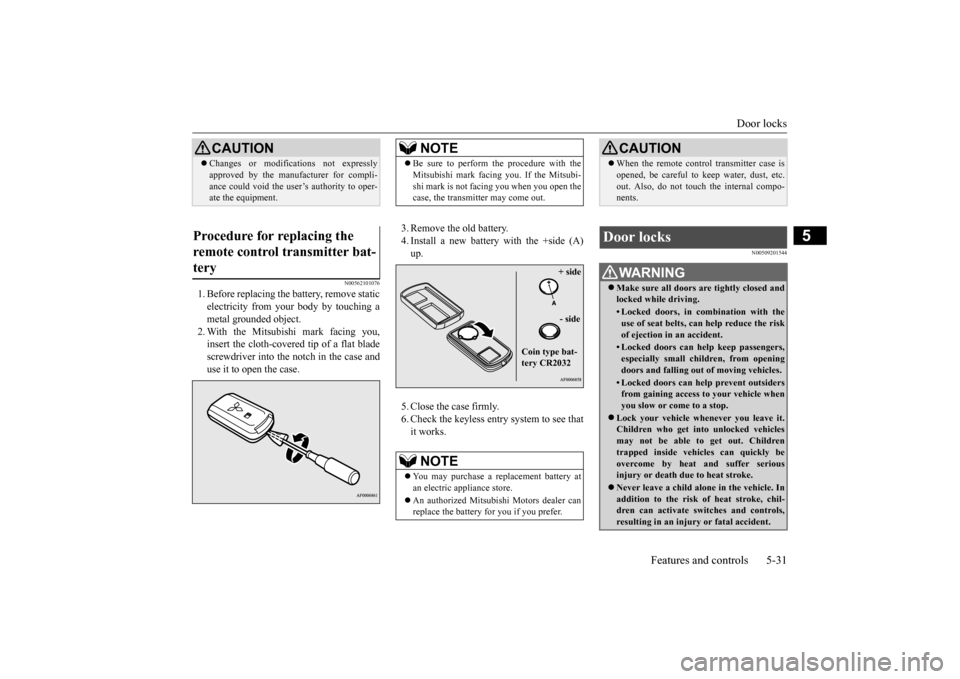
1. Before replacing the battery, remove static electricity from your body by touching ametal grounded object. 2. With the Mitsubishi mark facing you, insert the cloth-covered tip of a flat bladescrewdriver into the notch in the case and use it to open the case.
3. Remove the old battery. 4. Install a new battery with the +side (A) up. 5. Close the case firmly. 6. Check the keyless entry system to see that it works.
N00509201544
CAUTION Changes or modifica
tions not expressly
approved by the manufacturer for compli-ance could void the user’s authority to oper-ate the equipment.
Procedure for replacing the remote control transmitter bat- tery
NOTE
Be sure to perform the procedure with the Mitsubishi mark facing you. If the Mitsubi-shi mark is not facing you when you open thecase, the transmitter may come out.NOTE
You may purchase a replacement battery at an electric appliance store. An authorized Mitsubishi Motors dealer can replace the battery for you if you prefer.
+ side - side
Coin type bat- tery CR2032
CAUTION When the remote control transmitter case is opened, be careful to keep water, dust, etc.out. Also, do not touch the internal compo-nents.
Door locks
WA R N I N G Make sure all doors are tightly closed and locked while driving.• Locked doors, in co
mbination with the
use of seat belts, can help reduce the risk of ejection in
an accident.
• Locked doors can help keep passengers, especially small children, from openingdoors and falling out
of moving vehicles.
• Locked doors can help
prevent outsiders
from gaining access to your vehicle when you slow or come to a stop.
Lock your vehicle when
ever you leave it.
Children who get into unlocked vehicles may not be able to get out. Childrentrapped inside vehicles can quickly beovercome by heat
and suffer serious
injury or death due to heat stroke. Never leave a ch
ild alone in the vehicle. In
addition to the risk
of heat stroke, chil-
dren can activate switches and controls,resulting in an injury
or fatal accident.
BK0211800US.book 31 ページ 2014年3月12日 水曜日 午後2時42分
Page 109 of 446
Door locks 5-32 Features and controls
5
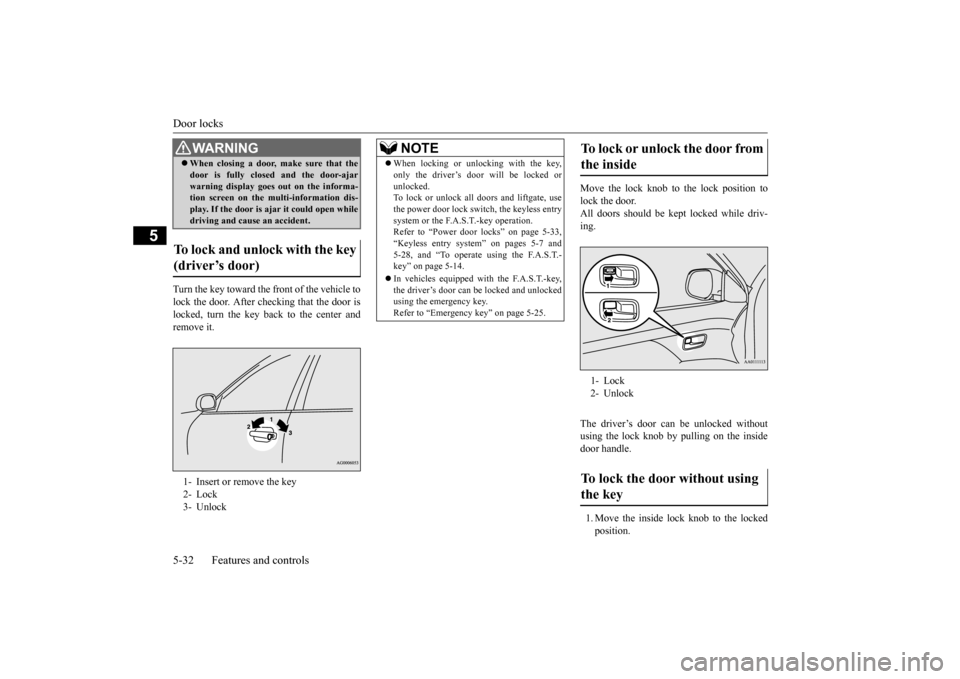
Turn the key toward the front of the vehicle to lock the door. After checking that the door is locked, turn the key back to the center and remove it.
Move the lock knob to the lock position to lock the door. All doors should be kept locked while driv-ing. The driver’s door can be unlocked without using the lock knob by pulling on the insidedoor handle. 1. Move the inside lock knob to the locked position.
When closing a door,
make sure that the
door is fully closed
and the door-ajar
warning display goes
out on the informa-
tion screen on the multi-information dis- play. If the door is aj
ar it could open while
driving and caus
e an accident.
To lock and unlock with the key (driver’s door) 1- Insert or remove the key 2- Lock 3- UnlockWA R N I N G
NOTE
When locking or unlocking with the key, only the driver’s door will be locked orunlocked.To lock or unlock all doors and liftgate, use the power door lock swit
ch, the keyless entry
system or the F.A.S.T.-key operation.Refer to “Power door locks” on page 5-33, “Keyless entry system” on pages 5-7 and 5-28, and “To operate using the F.A.S.T.-key” on page 5-14. In vehicles equipped wi
th the F.A.S.T.-key,
the driver’s door can be locked and unlocked using the emergency key. Refer to “Emergency key” on page 5-25.
To lock or unlock the door from the inside 1- Lock 2- UnlockTo lock the door without using the key
BK0211800US.book 32 ページ 2014年3月12日 水曜日 午後2時42分
Page 128 of 446
Sunroof (if so equipped)
Features and controls 5-51
5
After that, the sunroof can be set the initial- ized state in the following procedure. 1. Move the sunroof in slide open position. 2. Press the tilt up switch (2) continually in 10 seconds. 3. The sunroof will be
moved to tilt up posi-
tion automatically bit by bit. 4. The initialize is completed when the sun- roof is stopped at
tilt up position.
If the sunroof does not return to normal, consult an authoriz
ed Mitsubishi Motors
dealer.
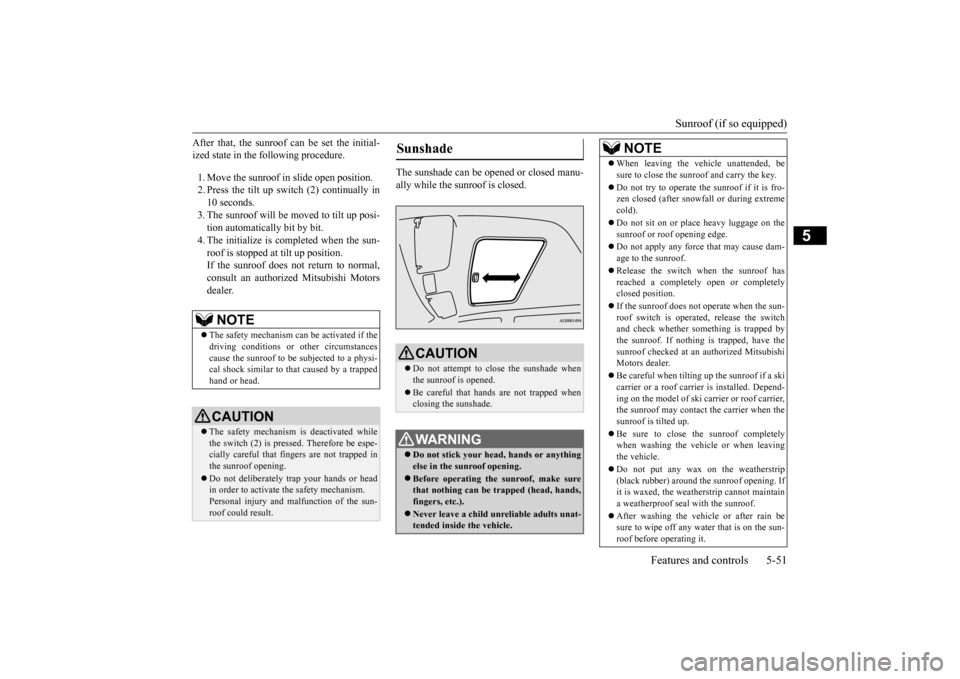
The sunshade can be opened or closed manu- ally while the sunroof is closed.
NOTE
The safety mechanism can be activated if the driving conditions or
other circumstances
cause the sunroof to be subjected to a physi- cal shock similar to th
at caused by a trapped
hand or head.CAUTION The safety mechanism is deactivated while the switch (2) is presse
d. Therefore be espe-
cially careful that fi
ngers are not trapped in
the sunroof opening. Do not deliberately tr
ap your hands or head
in order to activate the safety mechanism.Personal injury and malfunction of the sun- roof could result.
Sunshade
CAUTION Do not attempt to cl
ose the sunshade when
the sunroof is opened. Be careful that hands are not trapped when closing the sunshade.WA R N I N G Do not stick your head
, hands or anything
else in the su
nroof opening.
Before operating the sunroof, make sure that nothing can be trapped (head, hands, fingers, etc.). Never leave a child unre
liable adults unat-
tended inside the vehicle.
NOTE
When leaving the vehicle unattended, be sure to close the sunroof and carry the key. Do not try to operate th
e sunroof if it is fro-
zen closed (after snowfa
ll or during extreme
cold). Do not sit on or plac
e heavy luggage on the
sunroof or roof opening edge. Do not apply any force that may cause dam- age to the sunroof. Release the switch when the sunroof has reached a completely
open or completely
closed position. If the sunroof does not operate when the sun- roof switch is operate
d, release the switch
and check whether something is trapped by the sunroof. If nothing is trapped, have thesunroof checked at an authorized Mitsubishi Motors dealer. Be careful when tilting up the sunroof if a ski carrier or a roof carrier is installed. Depend- ing on the model of ski carrier or roof carrier,the sunroof may contact the carrier when the sunroof is tilted up. Be sure to close the sunroof completely when washing the vehicle or when leaving the vehicle. Do not put any wax on the weatherstrip (black rubber) around the sunroof opening. Ifit is waxed, the weathe
rstrip cannot maintain
a weatherproof seal with the sunroof. After washing the vehi
cle or after rain be
sure to wipe off any wa
ter that is on the sun-
roof before operating it.
BK0211800US.book 51 ページ 2014年3月12日 水曜日 午後2時42分
Page 138 of 446
Automatic transaxle (if so equipped)
Features and controls 5-61
5
N00563101044
When the selector lever cannot be shifted from the “P” (PARK) position to anotherposition while the brake pedal is pressed and held down with the operation mode in ON, the battery may be flat or the shift-lock mech-anism may be malfunctioning. Immediately have your
vehicle checked by an
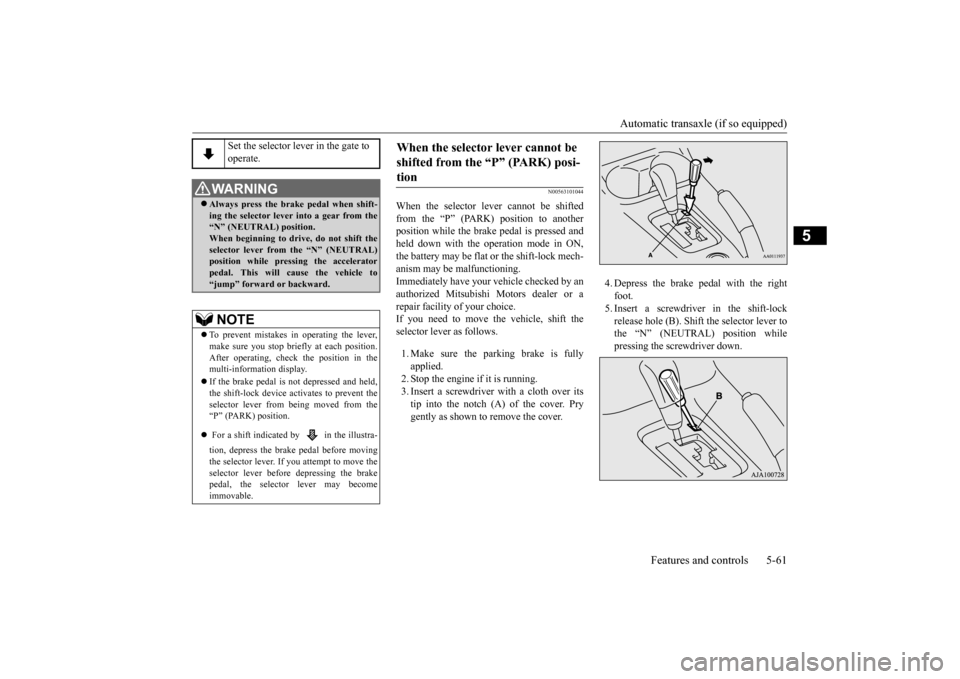
authorized Mitsubishi Motors dealer or a repair facility of your choice. If you need to move the vehicle, shift theselector lever as follows. 1. Make sure the parking brake is fully applied. 2. Stop the engine if it is running.3. Insert a screwdriver
with a cloth over its
tip into the notch (A) of the cover. Pry gently as shown to remove the cover.
4. Depress the brake
pedal with the right
foot.5. Insert a screwdriver in the shift-lock release hole (B). Shift the selector lever to the “N” (NEUTRAL) position whilepressing the screwdriver down.
Set the selector lever in the gate to operate.
WA R N I N G Always press the brake pedal when shift- ing the selector
lever into a gear from the
“N” (NEUTRAL) position. When beginning to drive, do not shift theselector lever from
the “N” (NEUTRAL)
position while pressing the accelerator pedal. This will cause the vehicle to“jump” forward or backward.NOTE
To prevent mistakes in operating the lever, make sure you stop brie
fly at each position.
After operating, chec
k the position in the
multi-information display. If the brake pedal is not depressed and held, the shift-lock device ac
tivates to prevent the
selector lever from being moved from the “P” (PARK) position. For a shift indicated by in the illustra- tion, depress the brake pedal before moving the selector lever. If you attempt to move theselector lever before depressing the brake pedal, the selector lever may become immovable.
When the selector lever cannot be shifted from the “P” (PARK) posi-tion
BK0211800US.book 61 ページ 2014年3月12日 水曜日 午後2時42分
Page 144 of 446
Continuously variable transmission (CVT) (if so equipped)
Features and controls 5-67
5
To park the vehicle, fi
rst bring it to a com-
plete stop, fully engage the parking brake, and then move the sele
ctor lever to the “P”
(PARK) position. If the transaxle does not change gears while driving, or your vehicle does not pick upenough speed when starting on an uphill slope, it may be that there is something unusual happening in the
transaxle, causing a
safety device to activa
te. Have your vehicle
checked at an authorized Mitsubishi Motors dealer or a repair fac
ility of your choice as
soon as possible.
N00560200034
The CVT will automati
cally and continuously
change its gear ratio depending on road anddriving conditions. This helps achieve smooth driving and excellent fuel efficiency. Also you can manually shift up and shiftdown the transmission. Refer to “Sports mode” on page 5-72. The transmission prevents unnecessary upshifts even when the accelerator pedal is released and ensures smooth driving.
According to the conditions, the transmission will automatically shift to a lower gear ratio to achieve stronger engine braking. This mayhelp reduce your need
to use the service
brake.
N00560301061
As an additional safe
ty precaution, models
equipped with a continuously variable trans-mission have a shift-lock device that holds the selector lever in the “P” (PARK) position. To move the selector lever from the “P”(PARK) position to another position, follow the steps below. 1. Press and hold the brake pedal down. 2. Move the selector lever to the desiredposition.
Do not rev the engine unnecessarily while the vehicle is stationary. Unexpected acceler-ation may occur if the se
lector lever is in a
position other than “P” (PARK) or “N” (NEUTRAL).
Parking
When the automatic transaxle makes no gear change
CAUTION
NOTE
When the warning display and “SLOW DOWN” or the wa
rning display and
“SERVICE REQUIRED” appear on the information screen in the multi-informationdisplay, there could be
a malfunction in the
automatic transaxle. Refer to “Automatic transaxle: Warning di
splay” on page 5-62.
Continuously variable transmission (CVT)
(if so
equipped)DRIVING UPHILL
DRIVING DOWNHILL
Selector lever operation
NOTE
The selector lever cannot
be moved from “P”
(PARK) to another position if the ignition switch is set to the “OFF” or “LOCK” or“ACC” position, or if the key has been removed, or the opera
tion mode is put in
OFF or ACC, or if the brake pedal is notpressed and held down.
BK0211800US.book 67 ページ 2014年3月12日 水曜日 午後2時42分
Page 145 of 446
Continuously variable transmission (CVT) (if so equipped) 5-68 Features and controls
5
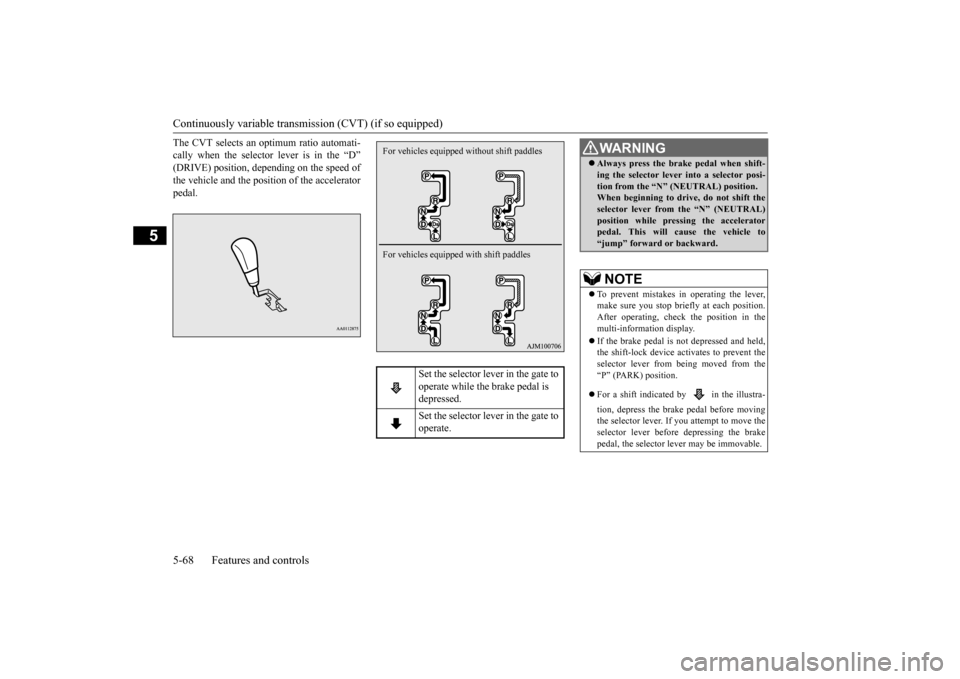
The CVT selects an optimum ratio automati- cally when the selector lever is in the “D”(DRIVE) position, depending on the speed of the vehicle and the position of the accelerator pedal.
Set the selector lever in the gate to operate while the brake pedal is depressed. Set the selector lever in the gate to operate.
For vehicles equipped without shift paddles For vehicles equipped with shift paddles
WA R N I N G Always press the brake pedal when shift- ing the selector lever into a selector posi-tion from the “N”
(NEUTRAL) position.
When beginning to drive, do not shift the selector lever from
the “N” (NEUTRAL)
position while pressing the acceleratorpedal. This will cause the vehicle to “jump” forward or backward.NOTE
To prevent mistakes in operating the lever, make sure you stop brie
fly at each position.
After operating, check the position in the multi-information display. If the brake pedal is not
depressed and held,
the shift-lock device activates to prevent the selector lever from being moved from the“P” (PARK) position. For a shift indicated by in the illustra- tion, depress the brake pedal before moving the selector lever. If you attempt to move the selector lever before
depressing the brake
pedal, the selector le
ver may be immovable.
BK0211800US.book 68 ページ 2014年3月12日 水曜日 午後2時42分
Page 146 of 446
Continuously variable transmission (CVT) (if so equipped)
Features and controls 5-69
5
N00563301059
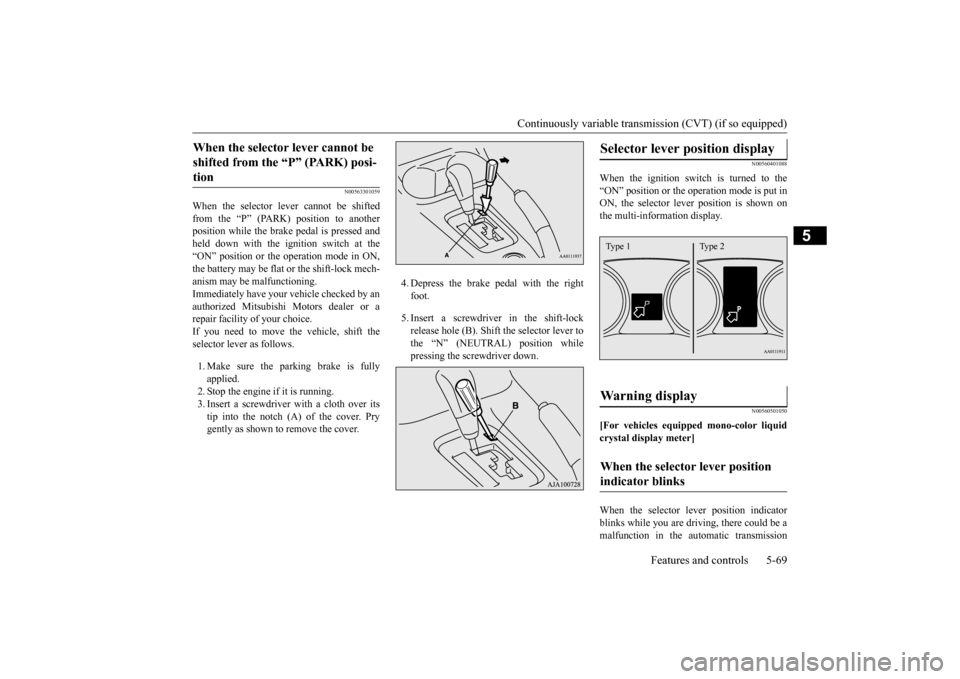
When the selector lever cannot be shifted from the “P” (PARK) position to anotherposition while the brake
pedal is pressed and
held down with the i
gnition switch at the
“ON” position or the operation mode in ON,the battery may be flat or the shift-lock mech- anism may be malfunctioning. Immediately have your
vehicle checked by an
authorized Mitsubishi Motors dealer or a repair facility
of your choice.
If you need to move the vehicle, shift the selector lever as follows. 1. Make sure the parking brake is fully applied.2. Stop the engine if it is running. 3. Insert a screwdrive
r with a cloth over its
tip into the notch (A) of the cover. Prygently as shown to remove the cover.
4. Depress the brake pedal with the right foot. 5. Insert a screwdriver in the shift-lock release hole (B). Shift the selector lever to the “N” (NEUTRAL) position while pressing the screwdriver down.
N00560401088
When the ignition switch is turned to the “ON” position or the operation mode is put in ON, the selector lever position is shown onthe multi-information display.
N00560501050
[For vehicles equipped mono-color liquidcrystal display meter] When the selector le
ver position indicator
blinks while you are driv
ing, there could be a
malfunction in the automatic transmission
When the selector lever cannot be shifted from the “P” (PARK) posi-tion
Selector lever position display
Warning display
When the selector lever position indicator blinks
Type 1 Type 2
BK0211800US.book 69 ページ 2014年3月12日 水曜日 午後2時42分
Page 151 of 446
Electronically controlled 4W
D system (if so equipped)
5-74 Features and controls
5
For short waiting periods, such as at traffic lights, the vehicle can be
left in selector lever
position and held stationary with the servicebrake. For longer waiting periods with the engine running, place th
e selector lever in the “N”
(NEUTRAL) position a
nd apply the parking
brake, while holding the vehicle stationary with the service brake.Prior to moving off after having stopped the vehicle, make sure that
the selector lever is in
“D” (DRIVE) position or
Sports mode posi-
tion.
To park the vehicle, fi
rst bring it to a com-
plete stop, fully engage the parking brake, and then move the sele
ctor lever to the “P”
(PARK) position. If the CVT does not shift while driving, or your vehicle does not pick up enough speed when starting on an uphill slope, it may be that there is something unusual happening inthe transmission, causing a safety device to activate. Have your ve
hicle checked at an
authorized Mitsubishi Motors dealer or arepair facility of your c
hoice as soon as possi-
ble.
N00548301029
The electronically controlled 4WD systemhelps improve accelera
tion and vehicle stabil-
ity by controlling the front-rear distribution ofdriving torque using
the electronic control
coupling in the rear differential assembly.
NOTE
In sports mode, downshifts do not take place when the accelerator is depressed all the wayto the floor.
Waiting
CAUTION To avoid transmission
overheating, never try
to keep your vehicle
stationary on a hill by
using the accelerator
pedal. Always apply
the parking brake and/or service brake. Do not rev the engine unnecessarily while the vehicle is stationary. Unexpected acceler- ation may occur if the selector lever is in aposition other than “P” (PARK) or “N” (NEUTRAL).
Parking
When the CVT makes no speed change
NOTE
[For vehicles equipped with mono-color liq- uid crystal display meter]When the selector le
ver position indicator
blinks while you are driving, there could be a malfunction in the automatic transmission system or CVT fluid
temperature becomes
abnormally high. [For vehicles equippe
d with color liquid
crystal display meter] When the warning display and “SLOW DOWN” or the wa
rning display and
“SERVICE REQUIRED” appear on the information screen in the multi-informationdisplay, there could be
a malfunction in the
CVT. Refer to “Continuously variable trans- mission (CVT): Warning display” on page5-69.
Electronically controlled 4WD system
(if so equipped)
BK0211800US.book 74 ページ 2014年3月12日 水曜日 午後2時42分
Page 158 of 446
4-wheel drive operation
Features and controls 5-81
5
When turning a sharp corner in “4WD LOCK” or “LOCK” position at low speed, a slight difference in
steering may be experi-
enced similar to feeling as if the brakes wereapplied. This is called tight corner braking and results from each of the four tires being at a different distance from the corner. The phe-nomenon is typical of 4-
wheel drive vehicles.
If this occurs, either straighten out the steer- ing wheel or change to another mode. Set the drive mode-selector to “4WD AUTO”, “4WD LOCK” or “SNOW” inaccordance with the road conditions, and then gradually depress the accelerator pedal for a smooth start.
Set the drive mode-selector to “4WD LOCK” or “LOCK” and then gradually depress theaccelerator pedal for a
smooth start. Keep the
pressure on the accelera
tor pedal as constant
as possible, and drive at low speed.
NOTE
Driving on rough roads can be hard on a vehicle. Before you le
ave the pavement, be
sure all scheduled ma
intenance and service
has been done, and that
you have inspected
your vehicle. Pay spec
ial attention to the
condition of the ti
res, and check the tire pres-
sures. Mitsubishi Motors is not responsible to the operator for any damage or injury caused or liability incurred by improper and negligent operation of a vehicl
e. All techniques of
vehicle operation depend on the skill and experience of the opera
tor and other partici-
pating parties. Any de
viation from the rec-
ommended operating instru
ctions above is at
their own risk. Note that the stopping distance required of the 4-wheel drive vehicle differs very little from that of the front-wheel drive vehicle.When driving on a snow-covered road or a slippery, muddy surface, make sure that you keep a sufficient dist
ance between your vehi-
cle and the one ahead of you. The driving posture s
hould be more upright;
adjust the seat to a good position for easy steering and pedal operati
on. Be sure to wear
the seat belt. After driving on rough roads, check each part of the vehicle
and wash it thoroughly
with water. Refer to the “Inspection and maintenance followi
ng rough road opera-
tion” section and “Vehicle care and Mainte-nance” sections.
CAUTION Setting the drive mode-selector to “4WD LOCK” or “LOCK” position to drive on drypaved road will increa
se fuel consumption,
with possible noise generation.
Turning sharp corners On snowy or icy roads
NOTE
The use of snow tires is recommended.
Maintain a safe distan
ce between
vehicles,
avoid sudden braking, and use engine brak-ing (downshifting).CAUTION Avoid sudden braking,
sudden acceleration
and sharp turning. Sk
idding occurs and con-
trol of the vehicle could be lost.
Driving on sandy or muddy roads
CAUTION Do not force the vehicle or drive recklessly on sandy surfaces. In comparison with nor- mal road surfaces, the engine and otherdrive-system components are put under excessive strain when driving on such a sur- face. This could lead to accidents. If any of the follow
ing conditions occur
while the vehicle is
being driven, immedi-
ately park your vehicle in a safe place and follow these procedures:NOTE
BK0211800US.book 81 ページ 2014年3月12日 水曜日 午後2時42分
Page 159 of 446
Inspection and maintenance following rough road operation 5-82 Features and controls
5
Your vehicle may not provide sufficient hill climbing ability and engine braking on steep slope. Avoid driving on steep slopes even though the vehicle is an 4-wheel drive vehi-cle.
N00537800085
If the electrical circuits become wet, furtheroperation of the vehicl
e will be impossible;
therefore, avoid drivi
ng through water unless
absolutely necessary. If driving through wateris unavoidable, use the following procedure: Check the depth of the water and the terrain before attempting to drive through it. Drive
slowly to avoid creating excessive water splashing.
N00530700085
After operating the vehicle in rough road con-ditions, be sure to perform the following inspection and maintenance procedures: Check that the vehicle has not been dam- aged by rocks, gravel, etc.
• If the engine coolan
t temperature display
flashes on the information screen in the multi-information di
splay or the engine
power drops suddenly. Refer to “Engine overh
eating” on page 8-4.
• If the “ ” warning display and “SLOW DOWN” or the “ ” wa
rning display and
“SERVICE REQUIRED” appear on the information screen in the multi-information display. Refer to “Warning disp
lay” on page 5-62,
5-69.WA R N I N G When attempting to rock your vehicle out of a stuck position, be sure that the area around the vehicle is clear of people and physical objects. The rocking motion maycause the vehicle to suddenly launch for- ward/backward, caus
ing injury or dam-
age to nearby people or objects.NOTE
Avoid sudden braking,
sudden ac
celeration
and sharp turning; such operations couldresult in the vehicle becoming stuck.CAUTION
If the vehicle become
s stuck in sandy or
muddy roads, it can often be moved with arocking motion. Move the selector leveralternately between the “D” (DRIVE) and “R” (REVERSE) positi
ons while pressing
lightly on the ac
celerator pedal.
Driving on rough road can cause rust on the vehicle; wash the vehi
cle thoroughly as soon
as possible after such use.
Climbing/descending sharp grades Driving through water
NOTE
CAUTION Never drive through water that is deep enough to cover wheel hubs, axles or exhaust pipe. Do not change th
e selector lever posi-
tion while driving through water.Frequent driving through water can adversely affect the life
span of the vehicle;
consult an authorized Mitsubishi Motorsdealer or a repair fac
ility of your choice and
take the necessary measures to prepare, inspect, and repair the vehicle. After driving through water, apply the brakes to be sure they are
functioning properly. If
the brakes are wet and not functioning prop- erly, dry them out by driving slowly while lightly depressing the brake pedal. Inspecteach part of the vehicle carefully.
Inspection and maintenance following rough road opera-tion
BK0211800US.book 82 ページ 2014年3月12日 水曜日 午後2時42分