display MITSUBISHI OUTLANDER 2016 3.G Owner's Manual
[x] Cancel search | Manufacturer: MITSUBISHI, Model Year: 2016, Model line: OUTLANDER, Model: MITSUBISHI OUTLANDER 2016 3.GPages: 464, PDF Size: 60.77 MB
Page 102 of 464
Free-hand Advanced
Security Transmitter (F.A.S
.T.-key) (if so equipped)
5-26 Features and controls
5
1. Stop the vehicle. 2. Fully engage the parking brake while depressing the brake pedal. 3. Move the selector
lever to the “P”
(PARK) position, and then press the engine switch to stop the engine.
N00568301041
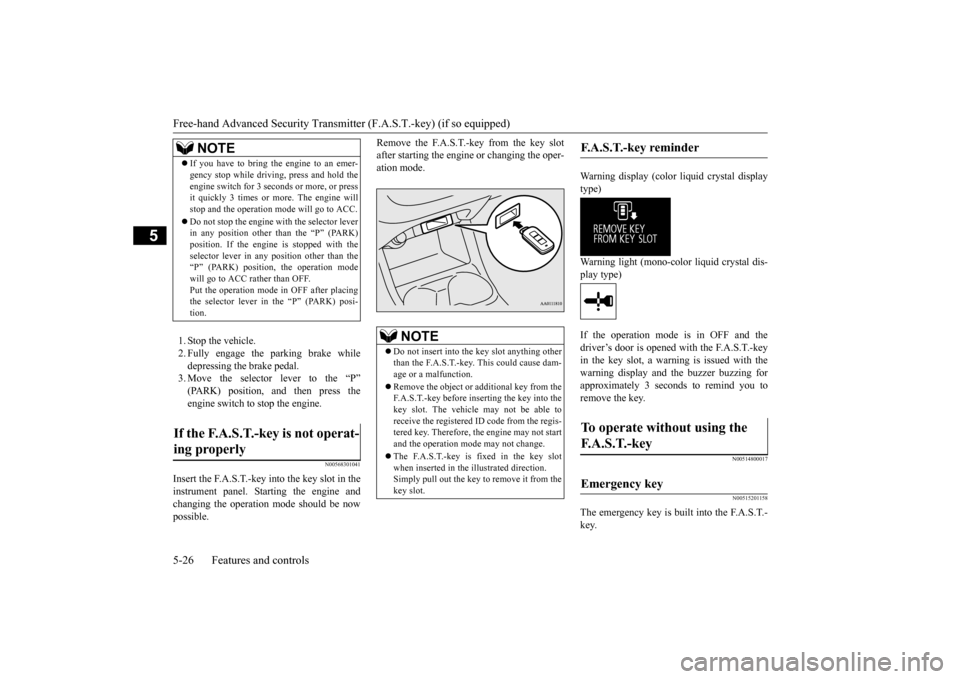
Insert the F.A.S.T.-key into the key slot in the instrument panel. St
arting the engine and
changing the operation mode should be now possible.
Remove the F.A.S.T.-key from the key slot after starting the engine
or changing the oper-
ation mode.
Warning display (color liquid crystal display type) Warning light (mono-color liquid crystal dis- play type) If the operation mode is in OFF and the driver’s door is opened with the F.A.S.T.-key in the key slot, a warni
ng is issued with the
warning display and
the buzzer buzzing for
approximately 3 seconds to remind you to remove the key.
N00514800017 N00515201158
The emergency key is built into the F.A.S.T.- key.
NOTE
If you have to bring the engine to an emer- gency stop while driving, press and hold theengine switch for 3 seconds or more, or pressit quickly 3 times or
more. The engine will
stop and the operation m
ode will go to ACC.
Do not stop the engine wi
th the selector lever
in any position other than the “P” (PARK) position. If the engine is stopped with theselector lever in any
position other than the
“P” (PARK) position, the operation mode will go to ACC rather than OFF.Put the operation mode
in OFF after placing
the selector lever in the “P” (PARK) posi- tion.
If the F.A.S.T.-key is not operat- ing properly
NOTE
Do not insert into the
key slot anything other
than the F.A.S.T.-key. This could cause dam- age or a malfunction. Remove the object or additional key from the F.A.S.T.-key before inserting the key into the key slot. The vehicle
may not be able to
receive the registered ID code from the regis- tered key. Therefore, th
e engine may not start
and the operation mode may not change. The F.A.S.T.-key is fixed in the key slot when inserted in the illustrated direction.Simply pull out the key to remove it from the key slot.
F.A.S.T.-key reminder
To operate without using the F. A . S . T. - k e y
Emergency key
BK0223400US.book 26 ページ 2015年2月13日 金曜日 午後12時15分
Page 104 of 464
Free-hand Advanced
Security Transmitter (F.A.S
.T.-key) (if so equipped)
5-28 Features and controls
5
If you choose to have your authorized Mitsubishi Motors dealer register the IDcode, take your vehicle and all remaining F.A.S.T.-keys to your authorized Mitsubishi Motors dealer.
N00561201197
You can program new F.A.S.T.-keys to the system if you have tw
o valid (already regis-
tered) F.A.S.T.-keys an
d a blank (not regis-
tered) F.A.S.T.-key. For F.A.S.T.-key programming, follow the procedures below. 1. Open the driver’s door.
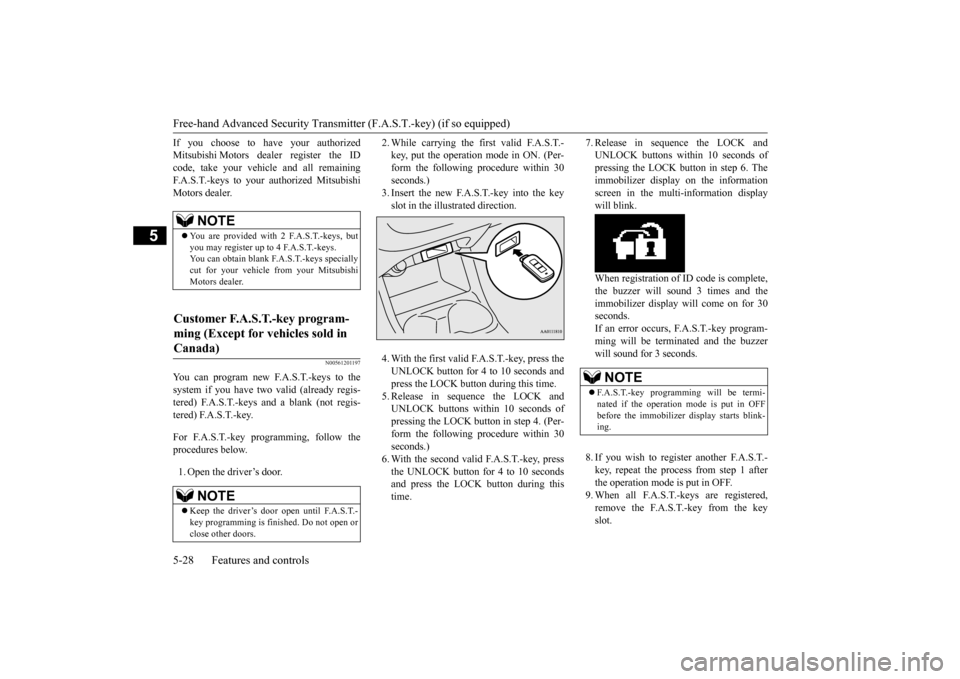
2. While carrying the fi
rst valid F.A.S.T.-
key, put the operation mode in ON. (Per-form the following procedure within 30 seconds.) 3. Insert the new F.A.S.T.-key into the keyslot in the illustrated direction. 4. With the first valid F.A.S.T.-key, press the UNLOCK button for 4 to 10 seconds andpress the LOCK button during this time. 5. Release in sequence the LOCK and UNLOCK buttons within 10 seconds ofpressing the LOCK button in step 4. (Per- form the following procedure within 30 seconds.)6. With the second valid F.A.S.T.-key, press the UNLOCK button for 4 to 10 seconds and press the LOCK button during thistime.
7. Release in sequence the LOCK and UNLOCK buttons within 10 seconds ofpressing the LOCK button in step 6. The immobilizer display on the information screen in the multi-information displaywill blink. When registration of ID
code is complete,
the buzzer will sound 3 times and the immobilizer display will come on for 30seconds. If an error occurs, F.A.S.T.-key program- ming will be terminated and the buzzerwill sound for 3 seconds. 8. If you wish to register another F.A.S.T.- key, repeat the process from step 1 after the operation mode is put in OFF.9. When all F.A.S.T.-keys are registered, remove the F.A.S.T.-key from the key slot.
NOTE
You are provided with 2 F.A.S.T.-keys, but you may register up to 4 F.A.S.T.-keys. You can obtain blank F.
A.S.T.-keys specially
cut for your vehicle from your MitsubishiMotors dealer.
Customer F.A.S.T.-key program- ming (Except for vehicles sold in Canada)
NOTE
Keep the driver’s door open until F.A.S.T.- key programming is finished. Do not open orclose other doors.
NOTE
F.A.S.T.-key programming will be termi- nated if the operation mode is put in OFF before the immobilizer
display starts blink-
ing.
BK0223400US.book 28 ページ 2015年2月13日 金曜日 午後12時15分
Page 105 of 464
Free-hand Advanced Securi
ty Transmitter (F.A.S.T.-key) (if so equipped)
Features and controls 5-29
5
N00515501249
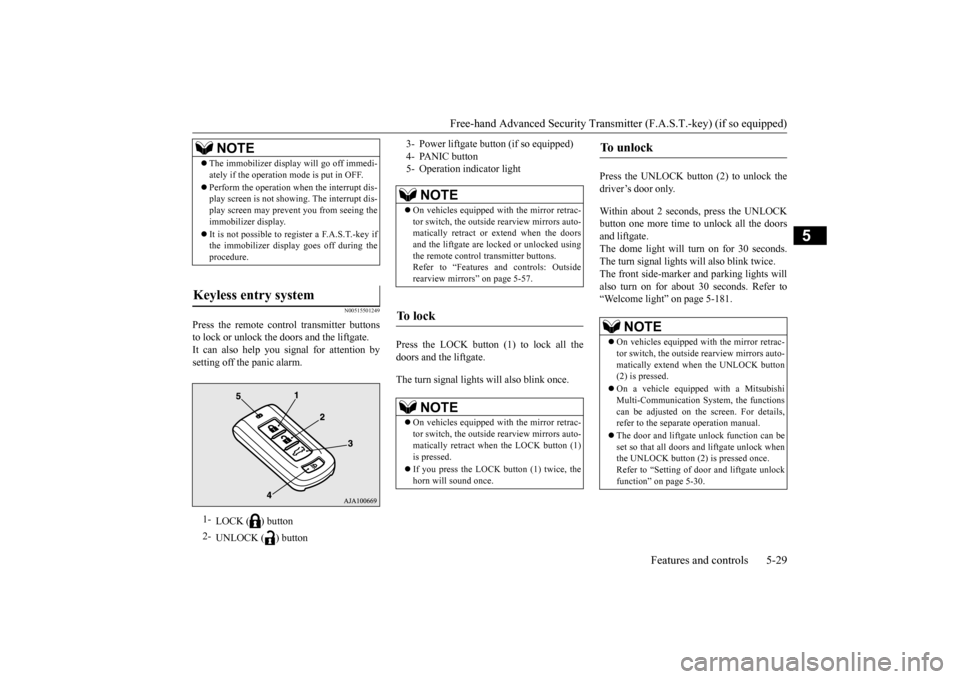
Press the remote control transmitter buttons to lock or unlock the doors and the liftgate.It can also help you
signal for attention by
setting off the panic alarm.
Press the LOCK button (1) to lock all the doors and the liftgate. The turn signal lights will also blink once.
Press the UNLOCK button (2) to unlock the driver’s door only. Within about 2 seconds, press the UNLOCK button one more time to unlock all the doorsand liftgate. The dome light will turn on for 30 seconds. The turn signal lights will also blink twice. The front side-marker
and parking lights will
also turn on for about 30 seconds. Refer to“Welcome light” on page 5-181.
NOTE
The immobilizer displa
y will go off immedi-
ately if the operation mode is put in OFF. Perform the operation when the interrupt dis- play screen is not showing. The interrupt dis- play screen may prevent you from seeing theimmobilizer display. It is not possible to re
gister a F.A.S.T.-key if
the immobilizer displa
y goes off during the
procedure.
Keyless entry system
1-
LOCK ( ) button
2-
UNLOCK ( ) button
3- Power liftgate but
ton (if so equipped)
4- PANIC button 5- Operation indicator light
NOTE
On vehicles e
quipped with the
mirror retrac-
tor switch, the outside rearview mirrors auto- matically retr
act or extend when the doors
and the liftgate are locked or unlocked usingthe remote control transmitter buttons. Refer to “Features a
nd controls: Outside
rearview mirrors” on page 5-57.
To l o c k
NOTE
On vehicles e
quipped with the
mirror retrac-
tor switch, the outside rearview mirrors auto-matically retract when the LOCK button (1)is pressed. If you press the LOCK button (1) twice, the horn will sound once.
To u n l o c k
NOTE
On vehicles equipped wi
th the mirror retrac-
tor switch, the outside rearview mirrors auto- matically extend when
the UNLOCK button
(2) is pressed. On a vehicle equipped with a Mitsubishi Multi-Communication System, the functionscan be adjusted on the screen. For details, refer to the separa
te operation manual.
The door and liftgate unlock function can be set so that all doors and liftgate unlock when the UNLOCK button (2) is pressed once.Refer to “Setting of door
and liftgate unlock
function” on page 5-30.
BK0223400US.book 29 ページ 2015年2月13日 金曜日 午後12時15分
Page 109 of 464
Door locks
Features and controls 5-33
5
N00509201544
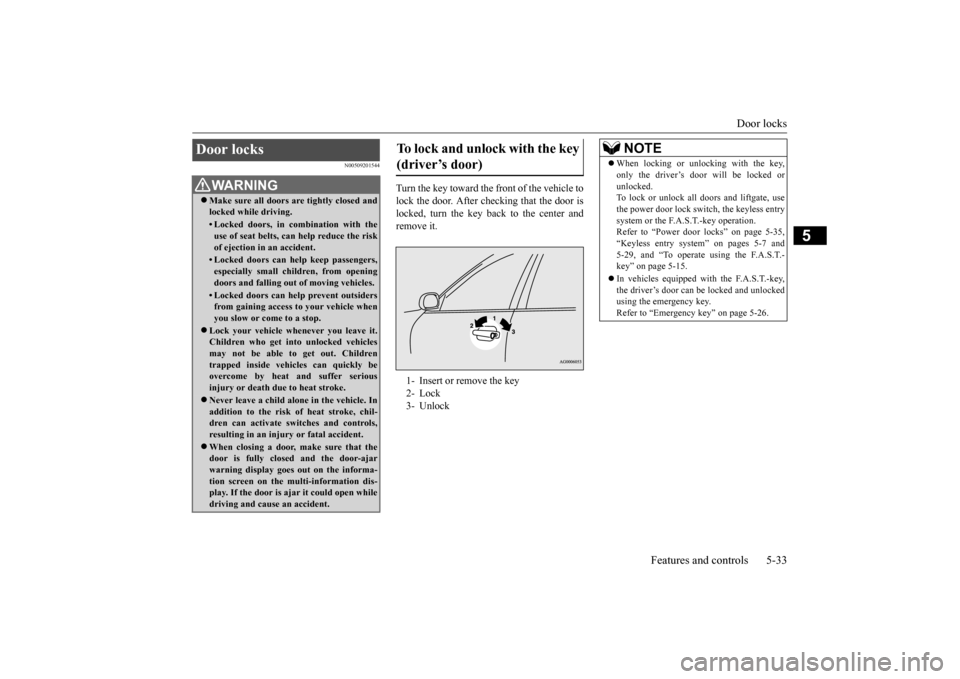
Turn the key toward the front of the vehicle to lock the door. After checking that the door is locked, turn the key back to the center andremove it.
Door locks
WA R N I N G Make sure all doors are tightly closed and locked while driving.• Locked doors, in co
mbination with the
use of seat belts, can help reduce the riskof ejection in
an accident.
• Locked doors can help keep passengers, especially small children, from opening doors and falling out
of moving vehicles.
• Locked doors can help
prevent outsiders
from gaining access to your vehicle when you slow or come to a stop.
Lock your vehicle when
ever you leave it.
Children who get into unlocked vehiclesmay not be able to get out. Children trapped inside vehicles can quickly be overcome by heat
and suffer serious
injury or death due to heat stroke. Never leave a ch
ild alone in the vehicle. In
addition to the risk
of heat stroke, chil-
dren can activate switches and controls, resulting in an injury
or fatal accident.
When closing a door,
make sure that the
door is fully closed
and the door-ajar
warning display goes out on the informa- tion screen on the multi-information dis- play. If the door is aj
ar it could open while
driving and cause an accident.
To lock and unlock with the key (driver’s door) 1- Insert or remove the key 2- Lock3- Unlock
NOTE
When locking or unlocking with the key, only the driver’s door will be locked orunlocked.To lock or unlock all doors and liftgate, use the power door lock swit
ch, the keyless entry
system or the F.A.S.T.-key operation.Refer to “Power door locks” on page 5-35, “Keyless entry system” on pages 5-7 and 5-29, and “To operate using the F.A.S.T.-key” on page 5-15. In vehicles equipped wi
th the F.A.S.T.-key,
the driver’s door can be locked and unlocked using the emergency key. Refer to “Emergency key” on page 5-26.
BK0223400US.book 33 ページ 2015年2月13日 金曜日 午後12時15分
Page 110 of 464
Door locks 5-34 Features and controls
5
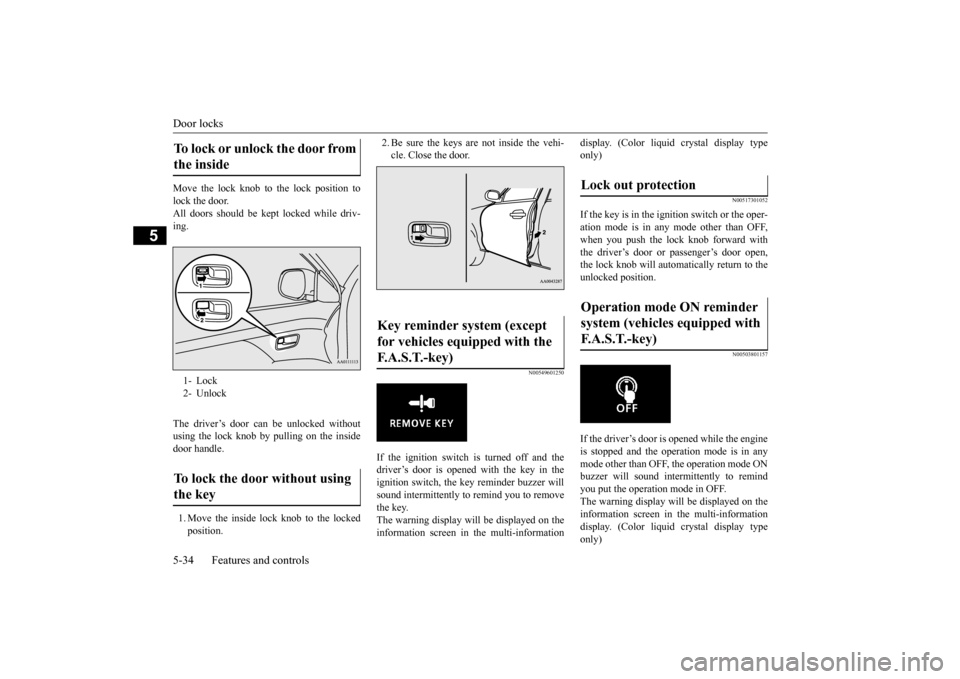
Move the lock knob to the lock position to lock the door. All doors should be kept locked while driv-ing. The driver’s door can be unlocked without using the lock knob by pulling on the insidedoor handle. 1. Move the inside lock knob to the locked position.
2. Be sure the keys are not inside the vehi- cle. Close the door.
N00549601250
If the ignition switch is turned off and thedriver’s door is opened with the key in theignition switch, the ke
y reminder buzzer will
sound intermittently to remind you to remove the key.The warning display will be displayed on the information screen in the multi-information
display. (Color liquid crystal display type only)
N00517301052
If the key is in the ignition switch or the oper-ation mode is in any mode other than OFF,when you push the lock knob forward with the driver’s door or passenger’s door open, the lock knob will automatically return to the unlocked position.
N00503801157
If the driver’s door is opened while the engineis stopped and the operation mode is in any mode other than OFF, the operation mode ONbuzzer will sound interm
ittently to remind
you put the operation mode in OFF. The warning display will be displayed on theinformation screen in the multi-information display. (Color liquid crystal display type only)
To lock or unlock the door from the inside 1- Lock 2- UnlockTo lock the door without using the key
Key reminder system (except for vehicles equipped with the F. A . S . T. - k e y )
Lock out protection Operation mode ON reminder system (vehicles equipped with F.A.S.T.-key)
BK0223400US.book 34 ページ 2015年2月13日 金曜日 午後12時15分
Page 130 of 464
Steering wheel height and reach adjustment 5-54 Features and controls
5
When parking on a hill, set the parking brake, and turn the front wheels toward the curb on a downhill, or away from the curb on an uphill.
N00511501241
To adjust the steering wheel to the desired position, move the lever upward or down- ward while moving the steering wheel to the desired position.
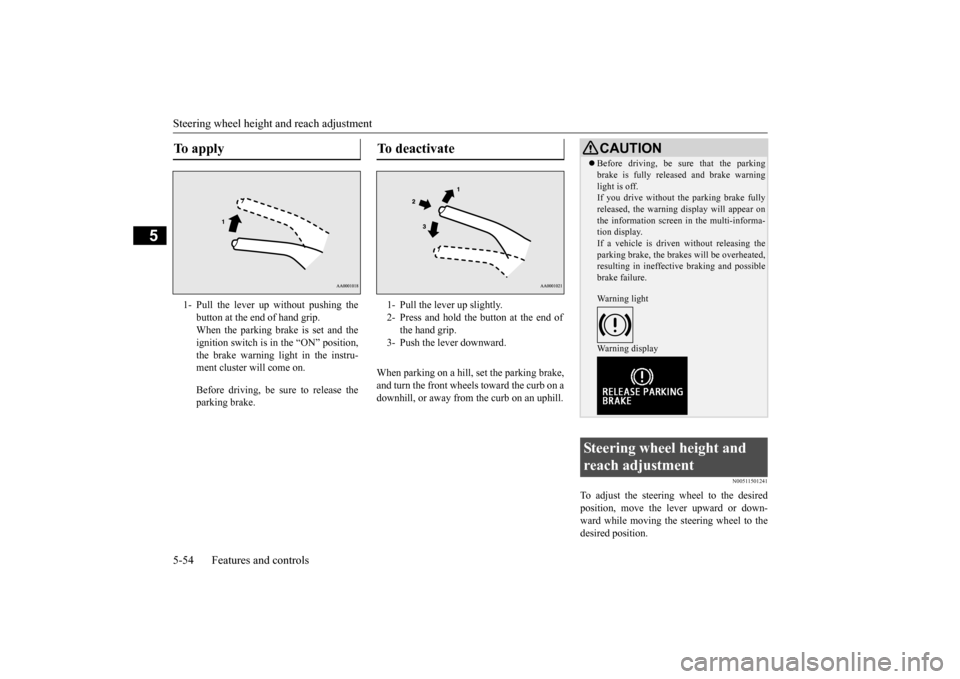
To apply 1- Pull the lever up without pushing the
button at the end of hand grip. When the parking brake is set and theignition switch is in
the “ON” position,
the brake warning light in the instru- ment cluster will come on. Before driving, be sure to release the parking brake.
To deactivate 1- Pull the lever up slightly. 2- Press and hold the button at the end of
the hand grip.
3- Push the lever downward.
CAUTION Before driving, be sure that the parking brake is fully released and brake warninglight is off.If you drive without the parking brake fully released, the warning
display will appear on
the information screen
in the multi-informa-
tion display. If a vehicle is driven without releasing the parking brake, the brakes will be overheated,resulting in ineffectiv
e braking and possible
brake failure. Warning light Warning display
Steering wheel height and reach adjustment
BK0223400US.book 54 ページ 2015年2月13日 金曜日 午後12時15分
Page 138 of 464
![MITSUBISHI OUTLANDER 2016 3.G Owners Manual Steering wheel lock (if so equipped) 5-62 Features and controls
5
N00512501222
[For vehicles equipped with the Free-hand Advanced Security Transmitter (F.A.S.T.-key).] For information on operations fo](/img/19/7535/w960_7535-137.png "MITSUBISHI OUTLANDER 2016 3.G Owners Manual Steering wheel lock (if so equipped) 5-62 Features and controls
5
N00512501222
[For vehicles equipped with the Free-hand Advanced Security Transmitter (F.A.S.T.-key).] For information on operations fo")
Steering wheel lock (if so equipped) 5-62 Features and controls
5
N00512501222
[For vehicles equipped with the Free-hand Advanced Security Transmitter (F.A.S.T.-key).] For information on operations for vehicles equipped with the Free-hand Advanced Secu-rity Transmitter (F.A.S.T.-key), refer to “Free-hand Advanced Se
curity Transmitter
(F.A.S.T.-key): Steering wheel lock” on page5-23 [Except for vehicles equipped with the Free-hand Advanced Security Transmit-ter (F.A.S.T.-key).] (Vehicles with steering lock system)
Remove the key at the “LOCK” position. Turn the steering wheel until it is locked. Turn the key to the “ACC” position while moving the steeri
ng wheel slightly.
N00512601803
[For vehicles equipped with the Free-hand Advanced Security Tr
ansmitter (F.A.S.T.-
key).] For information on
operation for vehicles
equipped with the Free-hand Advanced Secu- rity Transmitter (F.A
.S.T.-key), refer to
“Free-hand Advanced Se
curity Transmitter
(F.A.S.T.-key): Starting” on page5-12. [Except for vehicles equipped with the Free-hand Advanced Security Transmit- ter (F.A.S.T.-key).] Do not operate the starter motor continu- ously for longer than 15 seconds as this could run the battery down or damage the starter motor. If the engine does not start, turn the ignition switch back to the “OFF” or “LOCK” position, wait a few seconds,and then try again. Trying repeatedly with the engine or starter motor still turning will damage the starter mechanism. If the engine will not start because the bat- tery is weak or discharged, refer to “Jump-starting the engine” (on page 8-2)for instructions. A longer warm up period will only con- sume extra fuel. The engine is warmed upenough for driving when the bar graph of engine coolant temperature display starts to move or the low coolant temperatureindicator goes out. Refe
r to “Engine cool-
ant temperature display” on page 5-134 or “Low coolant temperature indicator” onpage 5-172.
Steering wheel lock
(if so
equipped)
To l o c k
To unlock
CAUTION Remove the key when leaving the vehicle.NOTE
If the front wheels are turned, the anti-theft lock may sometimes make it difficult to turn the key from “LOCK” to “ACC”. Firmlyturn the steering wheel to the left or to the right as you turn the key.
Starting the engine
Tips for starting
BK0223400US.book 62 ページ 2015年2月13日 金曜日 午後12時15分
Page 141 of 464
Automatic transaxle (if so equipped)
Features and controls 5-65
5
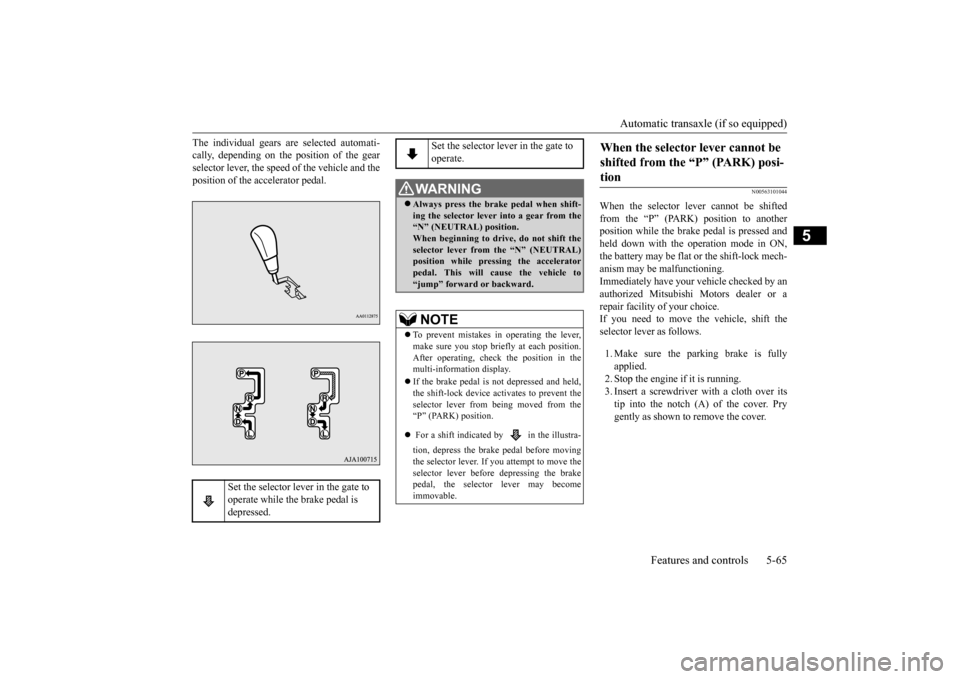
The individual gears are selected automati- cally, depending on the position of the gearselector lever, the speed of the vehicle and the position of the accelerator pedal.
N00563101044
When the selector lever cannot be shifted from the “P” (PARK) position to anotherposition while the brake
pedal is pressed and
held down with the operation mode in ON, the battery may be flat or the shift-lock mech-anism may be malfunctioning. Immediately have your
vehicle checked by an
authorized Mitsubishi Motors dealer or a repair facility
of your choice.
If you need to move the vehicle, shift theselector lever as follows. 1. Make sure the parking brake is fully applied. 2. Stop the engine if it is running.3. Insert a screwdrive
r with a cloth over its
tip into the notch (A) of the cover. Pry gently as shown to remove the cover.
Set the selector lever in the gate to operate while the brake pedal is depressed.
Set the selector lever in the gate to operate.
WA R N I N G Always press the brak
e pedal when shift-
ing the selector
lever into a gear from the
“N” (NEUTRAL) position. When beginning to drive, do not shift theselector lever from
the “N” (NEUTRAL)
position while pressing the accelerator pedal. This will cause the vehicle to“jump” forward or backward.NOTE
To prevent mistakes in operating the lever, make sure you stop brie
fly at each position.
After operating, check
the position in the
multi-information display. If the brake pedal is not depressed and held, the shift-lock device activates to prevent theselector lever from being moved from the “P” (PARK) position. For a shift indicated by in the illustra- tion, depress the brake pedal before moving the selector lever. If you attempt to move theselector lever before
depressing the brake
pedal, the selector
lever may become
immovable.
When the selector lever cannot be shifted from the “P” (PARK) posi-tion
BK0223400US.book 65 ページ 2015年2月13日 金曜日 午後12時15分
Page 142 of 464
Automatic transaxle (if so equipped) 5-66 Features and controls
5
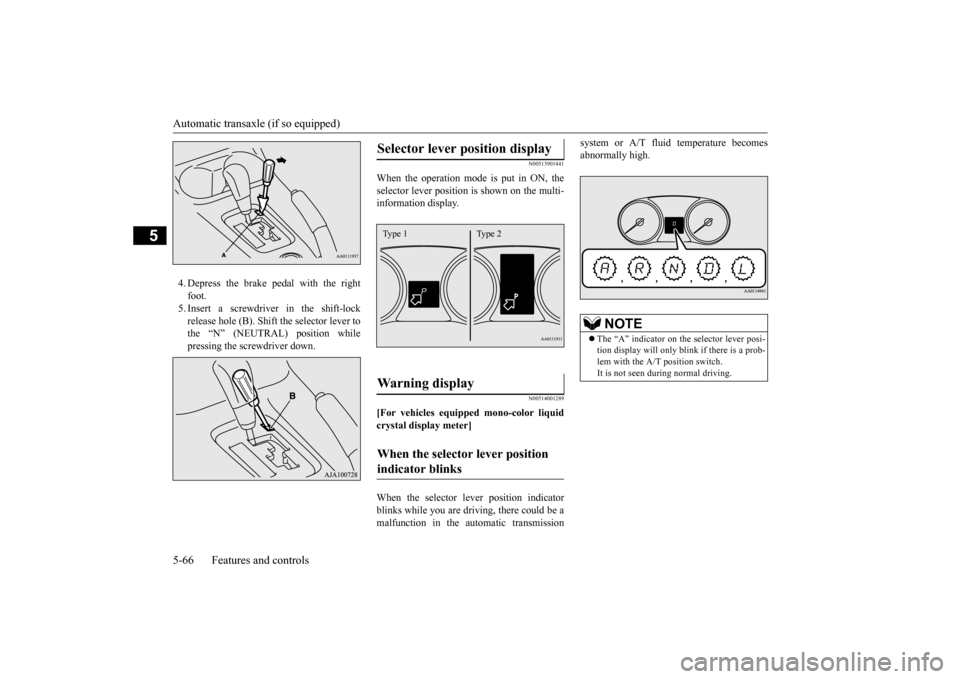
4. Depress the brake pedal with the right foot.5. Insert a screwdriver in the shift-lock release hole (B). Shift the selector lever to the “N” (NEUTRAL) position whilepressing the screwdriver down.
N00513901441
When the operation mode is put in ON, the selector lever position is
shown on the multi-
information display.
N00514001289
[For vehicles equipped mono-color liquid crystal display meter] When the selector le
ver position indicator
blinks while you are driv
ing, there could be a
malfunction in the automatic transmission
system or A/T fluid temperature becomes abnormally high.
Selector lever position display
Wa r n i n g d i s p l a y
When the selector lever position indicator blinks
Type 1 Type 2
NOTE
The “A” indicator on th
e selector lever posi-
tion display will only blink if there is a prob- lem with the A/T position switch.It is not seen during normal driving.
BK0223400US.book 66 ページ 2015年2月13日 金曜日 午後12時15分
Page 143 of 464
![MITSUBISHI OUTLANDER 2016 3.G Owners Manual Automatic transaxle (if so equipped)
Features and controls 5-67
5
[For vehicles equipped with color liquid crystal display meter]
or
When the warning display or the warn- ing display appears](/img/19/7535/w960_7535-142.png "MITSUBISHI OUTLANDER 2016 3.G Owners Manual Automatic transaxle (if so equipped)
Features and controls 5-67
5
[For vehicles equipped with color liquid crystal display meter]
or
When the warning display or the warn- ing display appears")
Automatic transaxle (if so equipped)
Features and controls 5-67
5
[For vehicles equipped with color liquid crystal display meter]
or
When the warning display or the warn- ing display appears on
the information screen
in the multi-information display while you are driving, there could be a malfunction inthe automatic transaxle.
CAUTION If a malfunction occurs in the A/T while driving, the indicator will blink.In this case, immediat
ely park your vehicle
in a safe place and follow these procedures: [If the indicator blinks
rapidly (once per sec-
ond), the A/T fluid is overheating.]Park your vehicle in
a safe place but do not
turn off the engine. M
ove the selector lever
to the “P” (PARK) position and open thebonnet. Keep the engine, idling. After a while, move the selector lever into any position other than
“P” (PARK) position
and confirm that the in
dicator stops blinking.
It is safe to continue driving if the indicator no longer blinks.If the indicator conti
nues blinking or blinks
intermittently, have
your vehicle inspected
by an authorized Mitsubishi Motors dealer.[If the indicator blinks slowly (once per 2 seconds), the A/T safety
device may be oper-
ating due to a malfunction.]Have the vehicle inspected by an authorized Mitsubishi Motors dealer as soon as possi- ble.
CAUTION If a malfunction occurs in the automatic transaxle while driving, the warning dis- play or the warni
ng display will appear
on the information screen in the multi-infor- mation display. In this case, immediat
ely park your vehicle
in a safe place and follow these procedures: When warning display is showing The automatic transaxl
e fluid is overheating.
Stop your vehicle in a safe place, put the selector lever in the
“P” position, and open
the engine hood with the engine running to allow the engine to c
ool down. After a while,
confirm that the warning display is no longer showing. It is sa
fe to continue driving
if the display is no longer showing. If thewarning display rema
ins or flashes fre-
quently, have your ve
hicle inspected by an
authorized Mitsubishi Motors dealer or arepair facility
of your choice.
When warning display is showing It may be that ther
e is something unusual
happening in the automatic transaxle, caus-ing a safety device
to activate. Have your
vehicle inspected by an authorized Mitsubi- shi Motors dealer or a repair facility of yourchoice as soon
as possible.
BK0223400US.book 67 ページ 2015年2月13日 金曜日 午後12時15分