Electrical MITSUBISHI OUTLANDER 2017 3.G Owners Manual
[x] Cancel search | Manufacturer: MITSUBISHI, Model Year: 2017, Model line: OUTLANDER, Model: MITSUBISHI OUTLANDER 2017 3.GPages: 521, PDF Size: 14.91 MB
Page 26 of 521
Modifications to and racing of your vehicle
General information 3-5
3
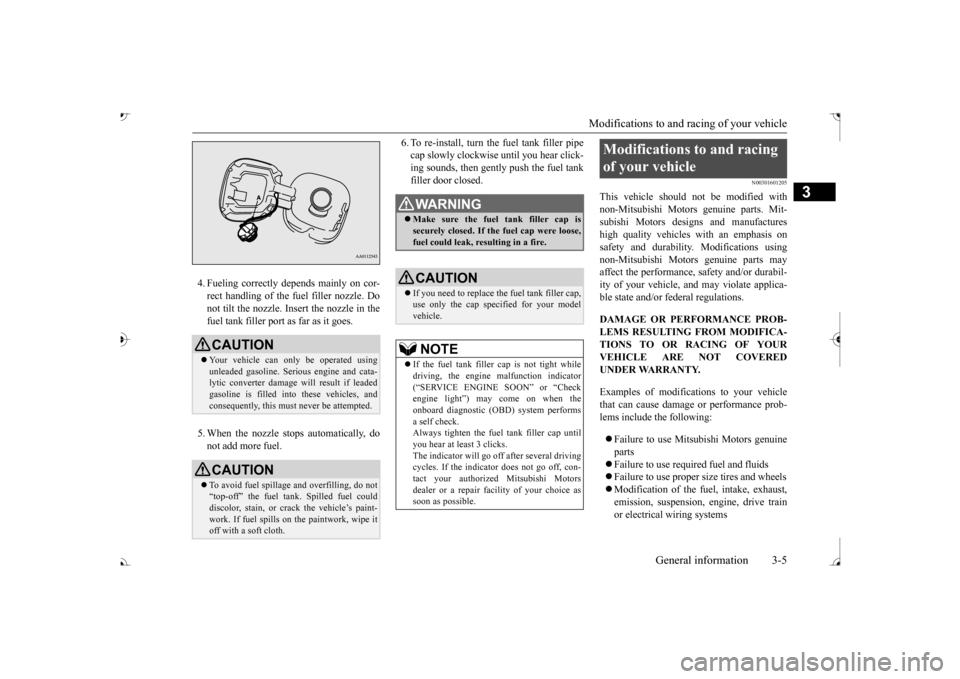
4. Fueling correctly depends mainly on cor- rect handling of the fuel filler nozzle. Donot tilt the nozzle. Insert the nozzle in the fuel tank filler port as far as it goes. 5. When the nozzle stops automatically, do not add more fuel.
6. To re-install, turn the fuel tank filler pipe cap slowly clockwise until you hear click-ing sounds, then gently push the fuel tank filler door closed.
N00301601205
This vehicle should not be modified withnon-Mitsubishi Motors
genuine parts. Mit-
subishi Motors desi
gns and manufactures
high quality vehicles
with an emphasis on
safety and durability.
Modifications using
non-Mitsubishi Motors genuine parts mayaffect the performance,
safety and/or durabil-
ity of your vehicle, a
nd may violate applica-
ble state and/or fe
deral regulations.
DAMAGE OR PERFORMANCE PROB- LEMS RESULTING FROM MODIFICA- TIONS TO OR RACING OF YOURVEHICLE ARE NOT COVERED UNDER WARRANTY. Examples of modifications to your vehicle that can cause damage or performance prob-lems include the following: Failure to use Mits
ubishi Motors genuine
parts Failure to use required fuel and fluids Failure to use proper
size tires and wheels
Modification of the fu
el, intake, exhaust,
emission, suspension,
engine, drive train
or electrical wiring systems
CAUTION Your vehicle can only be operated using unleaded gasoline. Seri
ous engine and cata-
lytic converter damage will result if leaded gasoline is filled into these vehicles, andconsequently, this must
never be attempted.
CAUTIONTo avoid fuel spillage
and overfilling, do not
“top-off” the fuel tank. Spilled fuel could discolor, stain, or cr
ack the vehicle’s paint-
work. If fuel spills on the paintwork, wipe it off with a soft cloth.
WA R N I N G Make sure the fuel tank filler cap is securely closed. If the fuel cap were loose,fuel could leak, re
sulting in a fire.
CAUTIONIf you need to replace th
e fuel tank filler cap,
use only the cap specified for your model vehicle.NOTE
If the fuel tank filler cap is not tight while driving, the engine
malfunction indicator
(
Page 27 of 521
Modifications to and racing of your vehicle 3-6 General information
3
Modification of any onboard com- puter/control module, including repro-gramming, or replacing/adding chips to any onboard computer/control module
Review the Warranty and Maintenance Man- ual for further details
regarding warranty cov-
erage.
N00301701251
The installation of accessories, optional parts, etc., should only be performedwithin the limits prescribed by law, and in accordance with the guidelines and warn- ings contained within the documentsaccompanying this vehicle.
Only Mitsubishi Motors approved acces- sories should be fitted to your vehicle. Improper installation of electrical parts could cause a fire. Re
fer to the “Modifica-
tion/alterations to the electrical or fuelsystems” section with
in this owner’s man-
ual. Using a cellular phone or radio set inside the vehicle without an
external antenna
may cause electrical system interference, which could lead to unsafe vehicle opera- tion. Tires and wheels whic
h do not meet spec-
ifications must not be used. Refer to the “Specifications” section for information regard
ing wheel and tire
sizes.
Due to the large number of accessory and replacement parts provided by different man- ufacturers in the market, it is not always pos-sible for an authorized Mitsubishi Motors dealer to check whether the attachment or installation of a non-Mitsubishi Motors genu-ine parts affects the driving safety of your Mitsubishi-vehicle.
N00301800141
Mitsubishi Motors manu
factures high quality
vehicles with an emphasis on safety. It is important to consult an
authorized Mitsubishi
Motors dealer before
installation of any
accessory which may in
volve modification of
the electrical or fuel systems.
Installation of accessories
CAUTION Before any electrical or electronic accesso- ries are installed, cons
ult an authorized Mit-
subishi Motors dealer. Your vehicle is equipped with a diagnosis connector (data link connector) for checking and servicing the elec
tronic control system.
Mitsubishi Motors doe
s not recommend con-
necting a device other th
an the Scan Tool for
inspections and service to this connectorbecause an unexpected
problem could result.
In addition, malfuncti
ons caused by connect-
ing a device other than the Scan Tool maynot be covered under warranty.
WA R N I N G While driving, do not use a cellular phone in a way that hinder
s safe driving. Any-
thing, including cell
ular phone usage, that
distracts you from the safe operation ofyour vehicle incr
eases your risk of an acci-
dent. Refer to and follow al
l state and local laws
in your area regardi
ng cellular phone
usage while driving.
Important point! Modification/alterations to the electrical or fuel systems
CAUTION Please consult an authorized Mitsubishi Motors dealer concer
ning any such acces-
sory fitment or modification. If the wires interfere
with the vehicle body or
improper installation me
thods are used (pro-
tective fuses not included, etc.), electronic devices may be adversel
y affected, resulting
in a fire, vehicle dama
ge, or other accident.
BK0239700US.book 6 ページ 2016年6月16日 木曜日 午前10時58分
Page 95 of 521
Free-hand Advanced
Security Transmitter (F.A.S
.T.-key) (if so equipped)
5
The operations possible with the F.A.S.T.- key can be modified as stated below.(Keyless entry operations are possible.) For details, contact an
authorized Mitsubi-
shi Motors dealer.• Enabling only the locking and unlocking of the doors and the liftgate • Enabling only the starting of the engine• Deactivating the F.A.S.T.-key
N00503201177
When a person enters the operating range ofthe F.A.S.T.-key while carrying the F.A.S.T.- key and presses the driver’s or front passen- ger’s door lock/unlock switch, the liftgateLOCK switch or the liftgate OPEN switch, verification of the ID
code is performed.
The doors and the liftgate can be locked andunlocked and the engine
can be started only
when the ID codes of the vehicle and F.A.S.T.-key match.
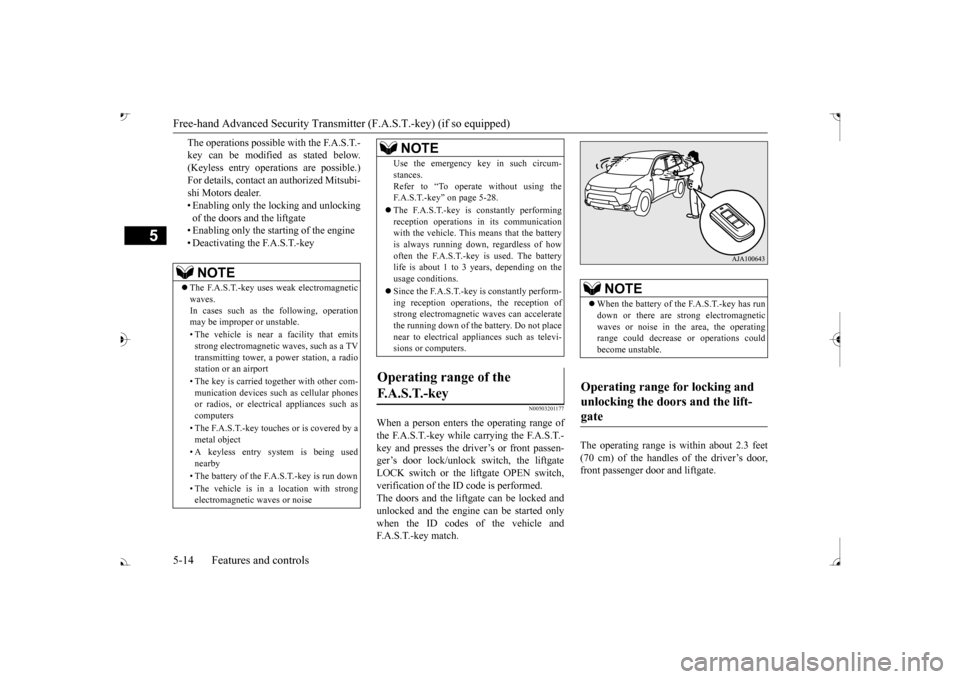
The operating range is
within about 2.3 feet
(70 cm) of the handles of the driver’s door, front passenger door and liftgate.
NOTE
The F.A.S.T.-key uses weak electromagnetic waves.In cases such as the following, operation may be improper or unstable. • The vehicle is near a facility that emits strong electromagnetic
waves, such as a TV
transmitting tower, a pow
er station, a radio
station or an airport • The key is carried together with other com- munication devices such
as cellular phones
or radios, or electrical appliances such as computers • The F.A.S.T.-key touches or is covered by a metal object • A keyless entry system is being used nearby • The battery of the F.A.S.T.-key is run down • The vehicle is in
a location with strong
electromagnetic
waves or noise
Use the emergency key in such circum- stances.Refer to “To operate without using theF.A.S.T.-key” on page 5-28. The F.A.S.T.-key is constantly performing reception operations
in its communication
with the vehicle. This means that the battery is always running down, regardless of howoften the F.A.S.T.-key is used. The battery life is about 1 to 3 years, depending on the usage conditions. Since the F.A.S.T.-key is constantly perform- ing reception operati
ons, the reception of
strong electromagnetic
waves can accelerate
the running down of the ba
ttery. Do not place
near to electrical appliances such as televi-sions or computers.
Operating range of the F. A . S . T. - k e y
NOTE
NOTE
When the battery of the F.A.S.T.-key has run down or there are st
rong electromagnetic
waves or noise in the area, the operating range could decrease
or operations could
become unstable.
Operating range for locking and unlocking the doors and the lift- gate
BK0239700US.book 14 ページ 2016年6月16日 木曜日 午前10時58分
Page 100 of 521
Free-hand Advanced Securi
ty Transmitter (F.A.S.T.-key) (if so equipped)
Features and controls 5-19
5
The indicator light on the engine switch turns off. The operation mode cannot be put in OFF when the selector lever is in any positionother than the “P” (PARK) position. Allows operation of el
ectrical accessories.
The indicator light on
the engine switch illu-
minates orange. All electrical accessories can be used. The indicator light on
the engine switch illu-
minates green.The indicator light goes off when the engine is running.
N00568001035
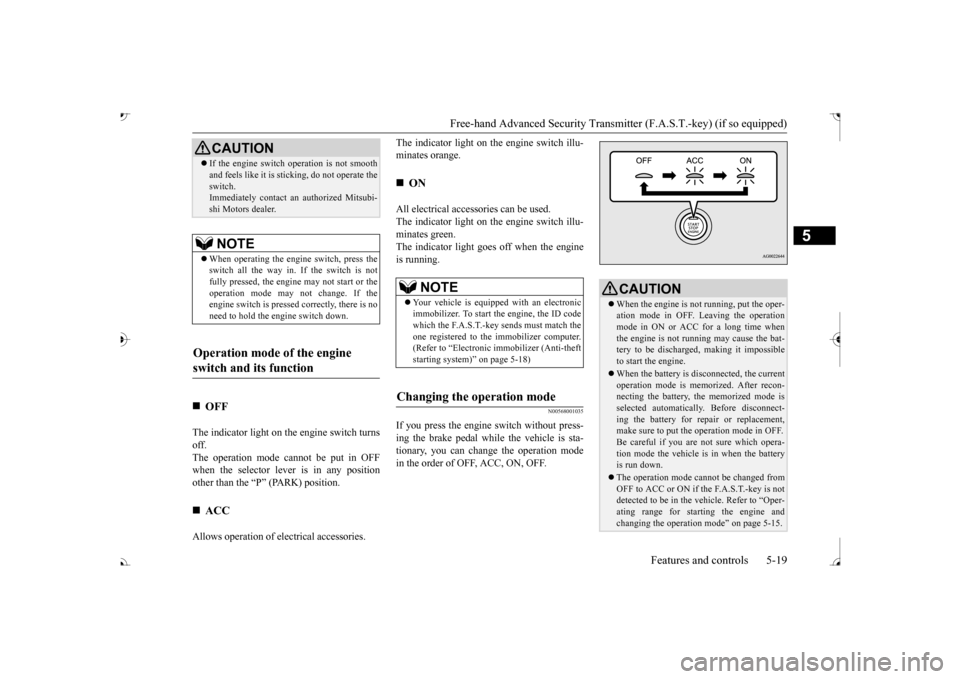
If you press the engine
switch without press-
ing the brake pedal whil
e the vehicle is sta-
tionary, you can change the operation modein the order of OFF, ACC, ON, OFF.
If the engine switch
operation is not smooth
and feels like it is st
icking, do not operate the
switch.Immediately contact an authorized Mitsubi- shi Motors dealer.NOTE
When operating the engi
ne switch, press the
switch all the way in. If the switch is not fully pressed, the engine may not start or theoperation mode may
not change. If the
engine switch is presse
d correctly, there is no
need to hold the e
ngine switch down.
Operation mode of the engine switch and its function
OFF
ACC CAUTION
ON NOTE
Your vehicle is equippe
d with an electronic
immobilizer. To start
the engine, the ID code
which the F.A.S.T.-key sends must match theone registered to the immobilizer computer. (Refer to “Electronic immobilizer (Anti-theft starting system)” on page 5-18)
Changing the operation mode
CAUTION When the engine is not running, put the oper- ation mode in OFF. Leaving the operationmode in ON or ACC for a long time when the engine is not running may cause the bat- tery to be discharged
, making it impossible
to start the engine. When the battery is disconnected, the current operation mode is memo
rized. After recon-
necting the battery, the memorized mode is selected automaticall
y. Before disconnect-
ing the battery for re
pair or replacement,
make sure to put the operation mode in OFF. Be careful if you are not sure which opera-tion mode the vehicle is in when the battery is run down. The operation mode cannot be changed from OFF to ACC or ON if the F.A.S.T.-key is not detected to be in the
vehicle. Refer to “Oper-
ating range for star
ting the engine and
changing the operation mode” on page 5-15.
BK0239700US.book 19 ページ 2016年6月16日 木曜日 午前10時58分
Page 136 of 521
Parking brake
Features and controls 5-55
5
When the parking brake is applied, the brake warning light (red) in
the instrument cluster
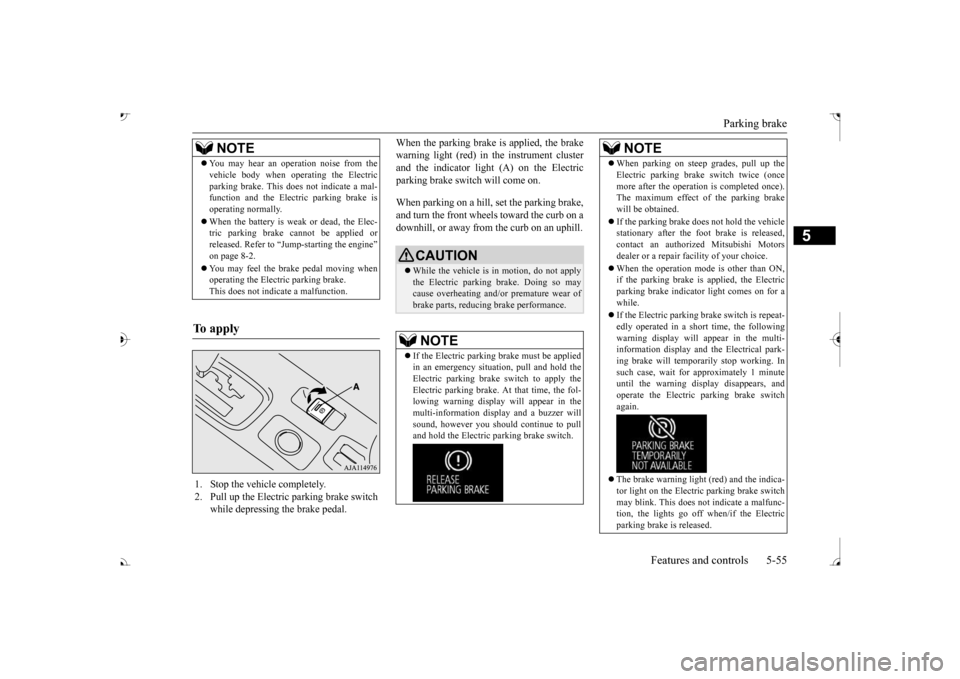
and the indicator light (A) on the Electric parking brake switch will come on. When parking on a hill, set the parking brake, and turn the front wheels toward the curb on adownhill, or away from
the curb on an uphill.
NOTE
You may hear an operation noise from the vehicle body when operating the Electricparking brake. This do
es not indicate a mal-
function and the Elec
tric parking brake is
operating normally. When the battery is weak or dead, the Elec- tric parking brake cannot be applied or released. Refer to “Jum
p-starting the engine”
on page 8-2. You may feel the brake pedal moving when operating the Electr
ic parking brake.
This does not indi
cate a malfunction.
To apply
1. Stop the vehicle completely. 2. Pull up the Electric parking brake switch
while depressing the brake pedal.
CAUTION While the vehicle is in motion, do not apply the Electric parking
brake. Doing so may
cause overheating and/or
premature wear of
brake parts, reducing brake performance. NOTE
If the Electric parking
brake must be applied
in an emergency situa
tion, pull and hold the
Electric parking brake
switch to apply the
Electric parking brake. At that time, the fol- lowing warning display
will appear in the
multi-information disp
lay and a buzzer will
sound, however you should continue to pull and hold the Electric
parking brake switch.
When parking on stee
p grades, pull up the
Electric parking brak
e switch twice (once
more after the operati
on is completed once).
The maximum effect of the parking brake will be obtained. If the parking brake does not hold the vehicle stationary after the f
oot brake is released,
contact an authorized Mitsubishi Motorsdealer or a repair fa
cility of your choice.
When the operation mode is other than ON, if the parking brake is applied, the Electric parking brake indicator light comes on for a while. If the Electric parking brake switch is repeat- edly operated in a short time, the followingwarning display will appear in the multi- information display and
the Electrical park-
ing brake will temporarily stop working. Insuch case, wait for
approximately 1 minute
until the warning display disappears, and operate the Electric
parking brake switch
again. The brake warning light (red) and the indica- tor light on the Electric
parking brake switch
may blink. This does no
t indicate a malfunc-
tion, the lights go off when/if the Electric parking brake is released.NOTE
BK0239700US.book 55 ページ 2016年6月16日 木曜日 午前10時58分
Page 145 of 521
Ignition switch 5-64 Features and controls
5
The engine is off a
nd the steering wheel is
locked. The key can be inserted and removed only when the switch is in this position. The engine is off. The
key can be inserted and
removed only when the sw
itch is in this posi-
tion. Allows operation of electrical accessories with the engine off. All accessories can be used. Engages the starter. Release the key when the engine starts.It will automatically return to the “ON” position.
N00539601071
After about 30 minutes has elapsed with the ignition switch in the “ACC” position, thefunction automatically cuts out the power for the audio system and ot
her electric devices
that can be operated with that position.When the ignition switch is turned from the “ACC” position, the pow
er is supplied again
to those devices.
N00550901211
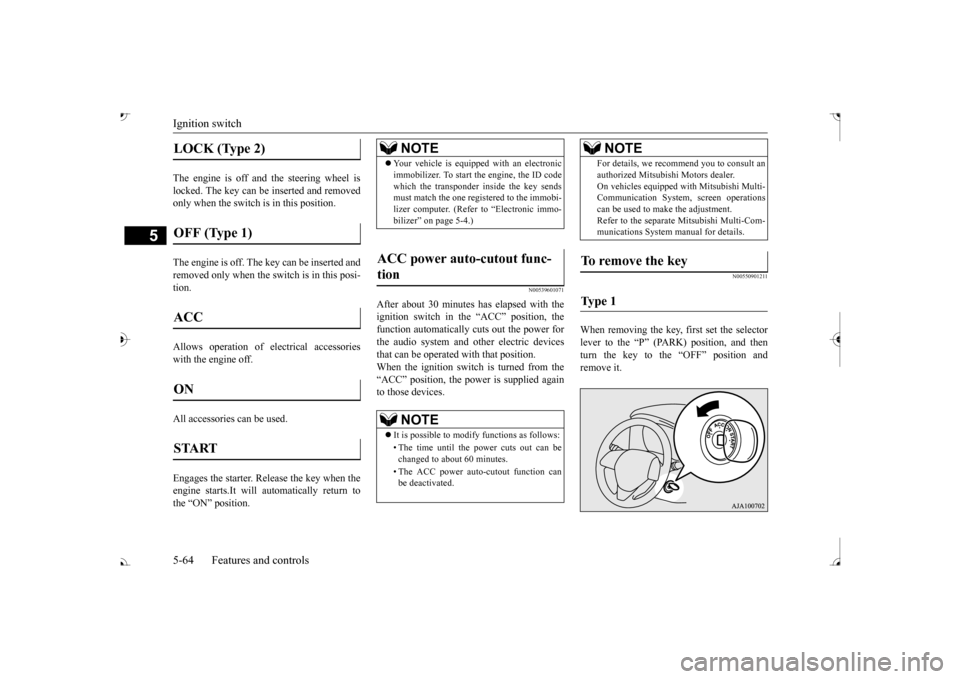
When removing the key, first set the selectorlever to the “P” (PARK) position, and thenturn the key to the “OFF” position and remove it.
LOCK (Type 2) OFF (Type 1) ACC ON START
NOTE
Your vehicle is equippe
d with an electronic
immobilizer. To start the engine, the ID codewhich the transponder inside the key sendsmust match the one registered to the immobi- lizer computer. (Refer to “Electronic immo- bilizer” on page 5-4.)
ACC power auto-cutout func- tion
NOTE
It is possible to modify functions as follows: • The time until the power cuts out can be changed to about 60 minutes. • The ACC power auto
-cutout function can
be deactivated.
For details, we recommend you to consult anauthorized Mitsubishi Motors dealer.On vehicles e
quipped with Mitsubishi Multi-
Communication System, screen operations can be used to ma
ke the adjustment.
Refer to the separate Mitsubishi Multi-Com-munications System manual for details.
To remove the key Ty p e 1
NOTE
BK0239700US.book 64 ページ 2016年6月16日 木曜日 午前10時58分
Page 171 of 521
4-wheel drive operation 5-90 Features and controls
5
Set the drive mode-selector to “4WD LOCK” (Electronically controlled 4WD) or “LOCK” accelerator pedal for a
smooth start. Keep the
pressure on the accelera
tor pedal as constant
as possible, and drive at low speed.
Your vehicle may not pr
ovide sufficient hill
climbing ability and e
ngine braking on steep
slope. Avoid driving on steep slopes even though the vehicle is an 4-wheel drive vehi- cle.
N00537800085
If the electrical circuits become wet, furtheroperation of the vehicl
e will be impossible;
therefore, avoid driv
ing through water unless
absolutely necessary. If driving through wateris unavoidable, use th
e following procedure:
Check the depth of the water and the terrain before attempting to drive through it. Drive slowly to avoid creating excessive watersplashing.
Driving on sandy or muddy roads
CAUTION Do not force the vehicle or drive recklessly on sandy surfaces. In comparison with nor-mal road surfaces, th
e engine and other
drive-system components are put under excessive strain when driving on such a sur-face. This could le
ad to accidents.
If any of the following conditions occur while the vehicle is
being driven, immedi-
ately park your vehicle
in a safe place and
follow these procedures:• If the engine coolan
t temperature display
flashes on the information screen in the multi-information di
splay or the engine
power drops suddenly.Refer to “Engine overh
eating” on page 8-4.
• If the “ ” warning
display and “SLOW
DOWN” or the “ ” warning display and “SERVICE REQUIRED” appear on the information screen in the multi-informationdisplay. Refer to “Warning di
splay” on page 5-70,
5-78.WA R N I N G When attempting to rock your vehicle out of a stuck position, be
sure that the area
around the vehicle is clear of people and physical objects. The rocking motion may cause the vehicle to suddenly launch for-ward/backward, caus
ing injury or dam-
age to nearby people or objects.NOTE
Avoid sudden braking,
sudden acceleration
and sharp turning; such operations could result in the vehicle becoming stuck. If the vehicle become
s stuck in sandy or
muddy roads, it can often be moved with arocking motion. Move the selector lever alternately between the
Page 238 of 521
Multi Around Monitor (if so equipped)
Features and controls 5-157
5
N00587500032
The Multi Around Monitor can only be used when the operation mode is put in ON. When you move the selector lever to the “R” view/rear-view is disp
layed on the screen of
the inside rearview mirror, the DISPLAY AUDIO, the Smartphone Link Display Audio or the Mitsubishi Multi-communication Sys-
tem. When you move the selector lever to any other position, the
display disappears.
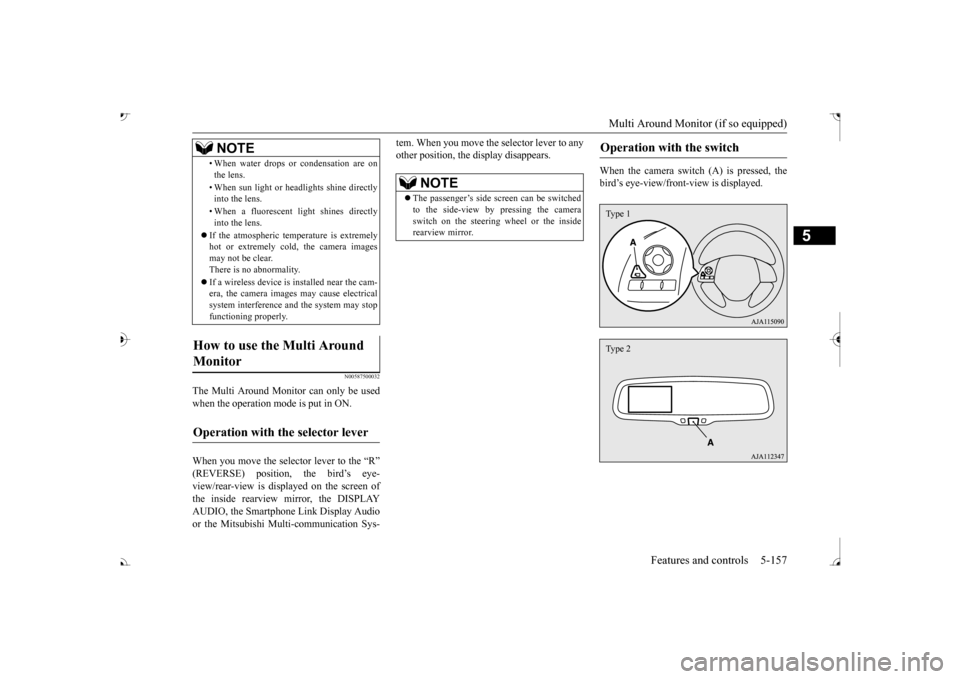
When the camera switch (A) is pressed, the bird’s eye-view/front
-view is displayed.
• When water drops or
condensation are on
the lens. • When sun light or he
adlights shine directly
into the lens. • When a fluorescent li
ght shines directly
into the lens.
If the atmospheric temperature is extremely hot or extremely cold, the camera images may not be clear.There is no abnormality. If a wireless device is installed near the cam- era, the camera images may cause electrical system interference and the system may stop functioning properly.
How to use the Multi Around Monitor
Operation with the selector lever
NOTE
NOTE
The passenger’s side sc
reen can be switched
to the side-view by pressing the camera switch on the steering wheel or the inside rearview mirror.
Operation with the switch
Type 1Type 2
BK0239700US.book 157 ページ 2016年6月16日 木曜日 午前10時58分
Page 278 of 521
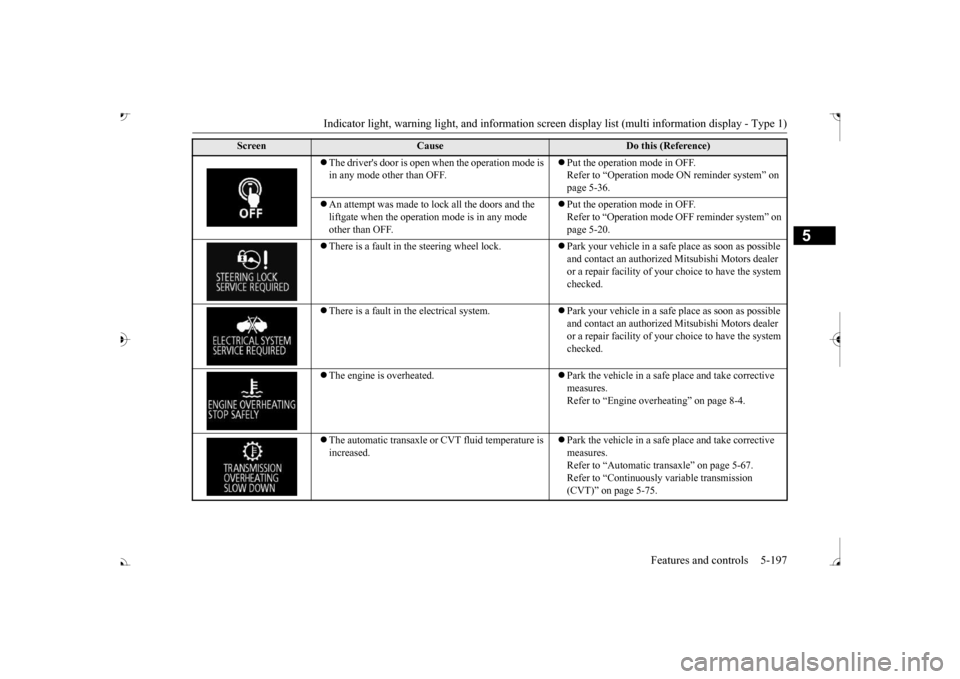
Indicator light, warning light, and information screen display list (multi information display - Type 1)
Features and controls 5-197
5
The driver's door is open when the operation mode is in any mode other than OFF.
Put the operation mode in OFF. Refer to “Operation mode
ON reminder system” on
page 5-36.
An attempt was made to lock all the doors and the liftgate when the operati
on mode is in any mode
other than OFF.
Put the operation mode in OFF. Refer to “Operation mode
OFF reminder system” on
page 5-20.
There is a fault in the steering wheel lock.
Park your vehicle in a safe
place as soon as possible
and contact an authorized
Mitsubishi Motors dealer
or a repair facility of your
choice to have the system
checked.
There is a fault in the electrical system.
Park your vehicle in a safe
place as soon as possible
and contact an authorized
Mitsubishi Motors dealer
or a repair facility of your
choice to have the system
checked.
The engine is overheated.
Park the vehicle in a safe place and take corrective measures. Refer to “Engine overh
eating” on page 8-4.
The automatic transaxle or CVT fluid temperature is increased.
Park the vehicle in a safe place and take corrective measures. Refer to “Automatic tr
ansaxle” on page 5-67.
Refer to “Continuously variable transmission (CVT)” on page 5-75.
Screen
Cause
Do this (Reference)
BK0239700US.book 197 ページ 2016年6月16日 木曜日 午前10時58分
Page 348 of 521
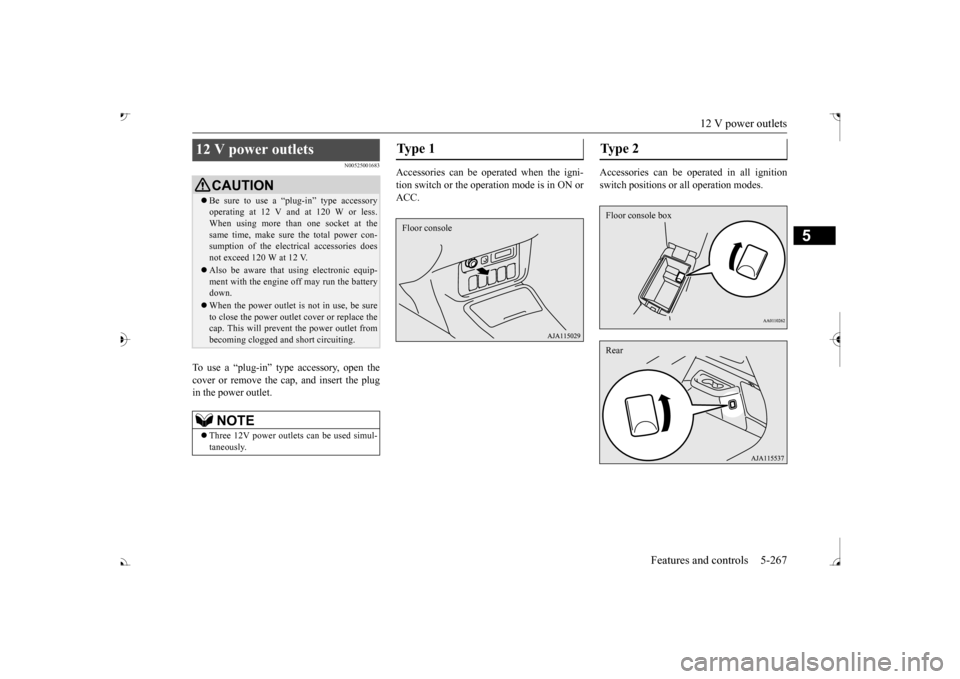
12 V power outlets
Features and controls 5-267
5
N00525001683
To use a “plug-in” type accessory, open the cover or remove the ca
p, and insert the plug
in the power outlet.
Accessories can be operated when the igni- tion switch or the operation mode is in ON or ACC.
Accessories can be ope
rated in all ignition
switch positions or
all operation modes.
12 V power outlets
CAUTIONBe sure to use a “plug-in” type accessory operating at 12 V and at 120 W or less.When using more than one socket at the same time, make sure the total power con- sumption of the electrical accessories doesnot exceed 120 W at 12 V. Also be aware that
using electronic equip-
ment with the engine
off may run the battery
down. When the power outlet is not in use, be sure to close the power outle
t cover or replace the
cap. This will prevent the power outlet frombecoming clogged and
short circuiting.
NOTE
Three 12V power outlet
s can be used simul-
taneously.
Ty p e 1 Floor console
Type 2 Floor console boxRear
BK0239700US.book 267 ページ 2016年6月16日 木曜日 午前10時58分