tow MITSUBISHI OUTLANDER III 2017 Owner's Manual
[x] Cancel search | Manufacturer: MITSUBISHI, Model Year: 2017, Model line: OUTLANDER III, Model: MITSUBISHI OUTLANDER III 2017Pages: 521, PDF Size: 14.95 MB
Page 192 of 521
Adaptive Cruise Control System (ACC) (if so equipped)
Features and controls 5-111
5
N00576900036
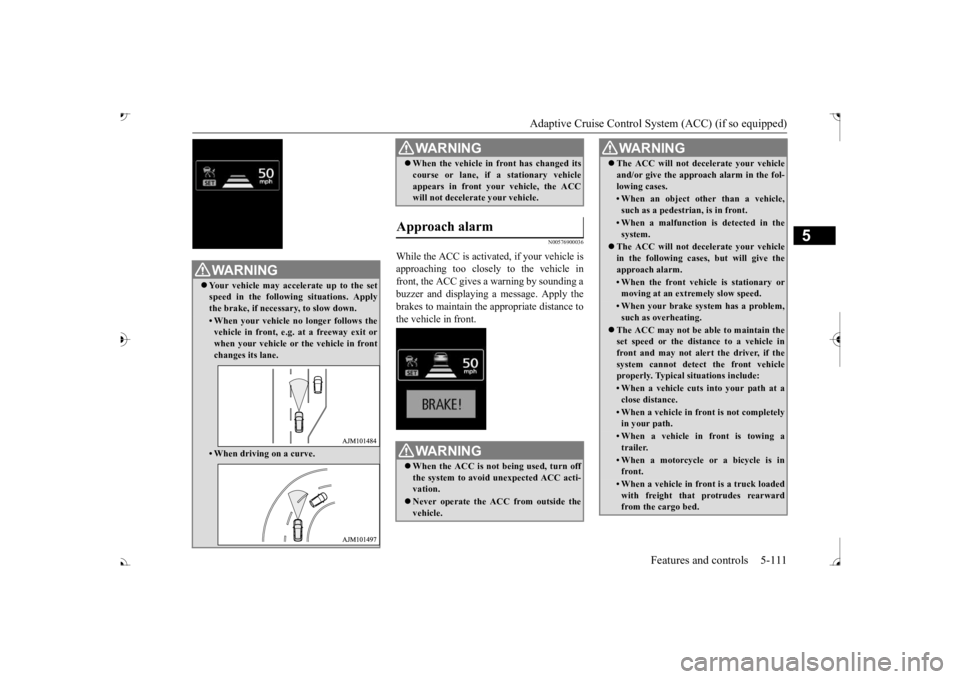
While the ACC is activated, if your vehicle is approaching too closely to the vehicle infront, the ACC gives a warning by sounding a buzzer and displaying
a message. Apply the
brakes to maintain the appropriate distance tothe vehicle in front.
WA R N I N G Your vehicle may accelerate up to the set speed in the following situations. Apply the brake, if necessary, to slow down.• When your vehicle no longer follows thevehicle in front, e.g. at a freeway exit orwhen your vehicle or
the vehicle in front
changes its lane.• When driving on a curve.
When the vehicle in
front has changed its
course or lane, if
a stationary vehicle
appears in front you
r vehicle, the ACC
will not decelerate your vehicle.
Approach alarm
WA R N I N G When the ACC is not being used, turn off the system to avoid
unexpected
ACC acti-
vation. Never operate the AC
C from outside the
vehicle.WA R N I N G
The ACC will not decelerate your vehicle and/or give the approach alarm in the fol-lowing cases.• When an object other than a vehicle,such as a pedestrian, is in front. • When a malfunction is detected in thesystem.
The ACC will not decelerate your vehicle in the following cases, but will give theapproach alarm.• When the front vehicle is stationary ormoving at an extremely slow speed.• When your brake system has a problem,such as overheating.
The ACC may not be able to maintain the set speed or the dist
ance to a vehicle in
front and may not alert the driver, if the system cannot detect the front vehicleproperly. Typical situations include: • When a vehicle cuts
into your path at a
close distance.• When a vehicle in front is not completelyin your path.• When a vehicle in front is towing atrailer.• When a motorcycle or a bicycle is infront.• When a vehicle in fr
ont is a truck loaded
with freight that protrudes rearward from the cargo bed.WA R N I N G
BK0239700US.book 111 ページ 2016年6月16日 木曜日 午前10時58分
Page 193 of 521
Adaptive Cruise Control System (ACC) (if so equipped) 5-112 Features and controls
5
N00581500027
There are two ways to increase the set speed. The set speed will increase by 1 mph (1 km/h) every time you push up the “RES +” switch while the ACC is activated. If youhold the switch pushed up, the set speed increases in 5 mph (5 km/h) increments.
• When the height of a vehicle in front is extremely low or the road clearance ofthe vehicle is extremely high.• When driving on a r
oad with alternating
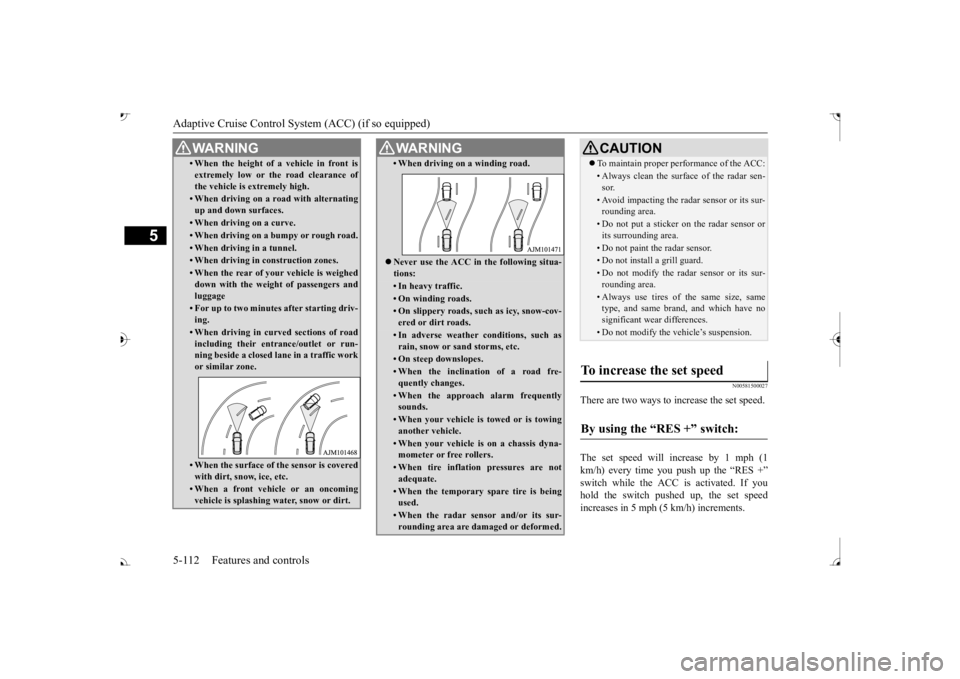
up and down surfaces.• When driving on a curve.• When driving on a bumpy or rough road.• When driving in a tunnel.• When driving in construction zones.• When the rear of your vehicle is weighed down with the weight of passengers and luggage• For up to two minutes after starting driv-ing.• When driving in curved sections of roadincluding their entrance/outlet or run-ning beside a closed lane in a traffic work or similar zone.• When the surface of th
e sensor is covered
with dirt, snow, ice, etc.• When a front vehicle or an oncomingvehicle is splashing wa
ter, snow or dirt.
WA R N I N G
• When driving on
a winding road.
Never use the ACC in the following situa- tions:• In heavy traffic.• On winding roads.• On slippery roads, such as icy, snow-cov-ered or dirt roads.• In adverse weather conditions, such asrain, snow or sand storms, etc.• On steep downslopes.• When the inclination of a road fre-quently changes.• When the approach alarm frequentlysounds.• When your vehicle is towed or is towinganother vehicle.• When your vehicle is on a chassis dyna-mometer or free rollers.• When tire inflation pressures are notadequate.• When the temporary sp
are tire is being
used.• When the radar sensor and/or its sur-rounding area are damaged or deformed.WA R N I N G
CAUTION To maintain proper performance of the ACC:• Always clean the surface of the radar sen- sor.• Avoid impacting the radar sensor or its sur-rounding area.• Do not put a sticker on the radar sensor orits surrounding area.• Do not paint the radar sensor.• Do not install a grill guard.• Do not modify the radar sensor or its sur- rounding area.• Always use tires of the same size, sametype, and same brand, and which have no significant wear differences.• Do not modify the vehicle’s suspension.
To increase the set speed
By using the “RES +” switch:
BK0239700US.book 112 ページ 2016年6月16日 木曜日 午前10時58分
Page 201 of 521
Forward Collision Mitigation System (FCM) (if so equipped) 5-120 Features and controls
5
• When a vehicle ahead is not completely in your path.• When your vehicle ch
anged lanes, and
your vehicle approac
hed immediately
behind the vehicle ahead.• When a vehicle ahead
is towing a trailer.
• When a vehicle ahead is a truck loaded with freight that protrudes rearward from the cargo bed.• When the height of a vehicle ahead isextremely low or its road clearance isextremely high.• When a vehicle ahead is extremely dirty.• When a vehicle ahea
d is covered with
snow.• When a vehicle ahea
d has a large glass
surface.• When a vehicle ahead does not havereflectors (light reflector) or the positionof the reflector is low.• When a vehicle ahead is a car carrier ora similar shaped vehicle.• When accelerating and deceleratingquickly.• When driving on a sl
ippery road covered
by rain water, snow, ice, etc.• When driving on a r
oad with alternating
up and down steep slopes.• When driving on a curve.• When driving on a bumpy or rough road.• When driving in dark areas, such as in a tunnel or at night.WA R N I N G
• When the system recognizes driver’s steering, accelerati
ng, braking or gear
shifting actions as
evasive actions to
avoid collision.• When the rear of your vehicle is weigheddown with the weight of passengers and luggage.• Up to several seconds after starting driv-ing.• In adverse weather conditions, such asrain, snow, fog or sand-storm.• When the windshield of the sensor por-tion is covered with
dirt, water droplets,
snow and ice, etc.• When a vehicle ahea
d or an oncoming
vehicle is splashing water, snow or dirt. • When using a windshield washer.• If windshield wipers are not Mitsubishi Motors Genuine parts or equivalent. • When the sensor becomes extremely hotor cold.• If the battery becomes weak or runsdown.• When the sensor is affected by stronglight, such as direct sunlight or the head- lights of an oncoming vehicle.
The FCM may not detect a pedestrian in certain situations. Some of these include:• If the pedestrian is
shorter than approxi-
mately 3.2 feet (1 m) or taller thanapproximately 6.5 feet (2 m).WA R N I N G
• If the pedestrian is
wearing loose-fitting
clothes.• If part of a pedestrian’s body is hidden, such as when holding an umbrella, large bag, etc.• If a pedestrian bends forward, sits or lieson the road.• When a pedestrian is pushing/pullingsomething, such as a stroller, bicycle orwheelchair.• When pedestrians gather in a group.• When a pedestrian
clothing appears to
be nearly the same color or brightness asits surroundings.• When a pedestrian is very close to anobject, such as a vehicle.• When a pedestrian is in a dark area, suchas at night or in a tunnel.• When a pedestrian is walking fast orrunning.• When a pedestrian suddenly rushes infront of the vehicle.• When the position of
a pedestrian is close
to the edge of the vehicle.
When the system recognizes driver’s steering or accelerati
ng actions as evasive
actions to avoid a collision, FCM control and alarm functions
may be canceled.
In certain situations,
though there is little
or no risk of a collision, the FCM mayactivate. Examples include: • When overtaking a vehicle.WA R N I N G
BK0239700US.book 120 ページ 2016年6月16日 木曜日 午前10時58分
Page 202 of 521
Forward Collision Mitigation System (FCM) (if so equipped)
Features and controls 5-121
5
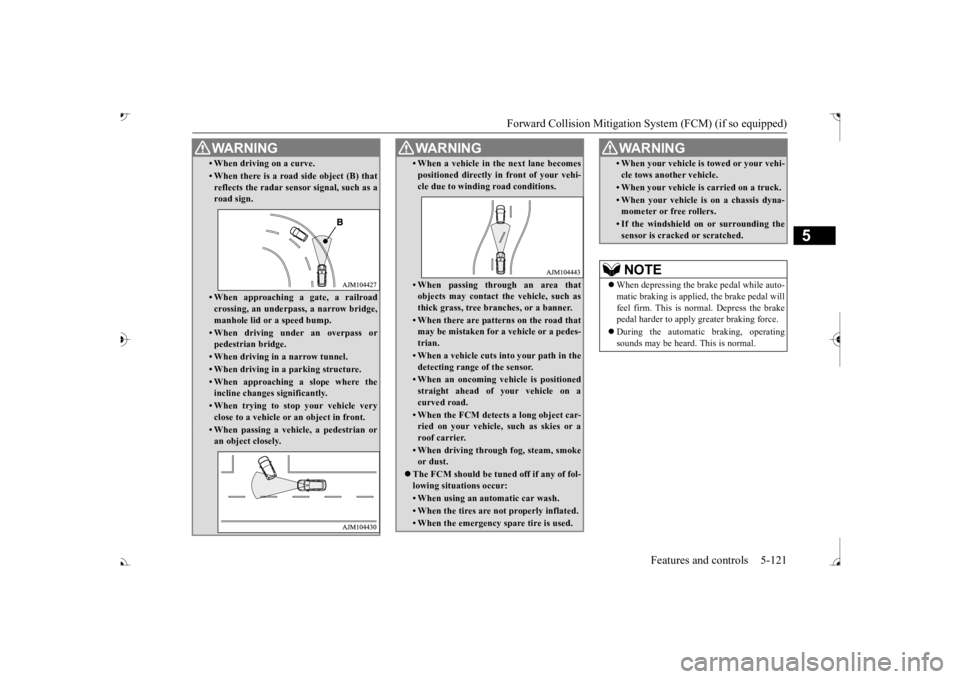
• When driving on a curve.• When there is a road
side object (B) that
reflects the radar sensor signal, such as a road sign.• When approaching a gate, a railroad crossing, an underpa
ss, a narrow bridge,
manhole lid or
a speed bump.
• When driving unde
r an overpass or
pedestrian bridge.• When driving in
a narrow tunnel.
• When driving in a parking structure.• When approaching a slope where the incline changes
significantly.
• When trying to stop your vehicle very close to a vehicle or
an object in front.
• When passing a vehicle, a pedestrian or an object closely.WA R N I N G
• When a vehicle in the next lane becomespositioned directly in
front of your vehi-
cle due to winding road conditions.• When passing through an area that objects may contact the vehicle, such as thick grass, tree br
anches, or a banner.
• When there are patterns on the road that may be mistaken for
a vehicle or a pedes-
trian.• When a vehicle cuts in
to your path in the
detecting range of the sensor.• When an oncoming vehicle is positionedstraight ahead of your vehicle on a curved road.• When the FCM detects a long object car-ried on your vehicle, such as skies or a roof carrier.• When driving through fog, steam, smokeor dust.
The FCM should be tuned off if any of fol- lowing situations occur:• When using an automatic car wash.• When the tires are not properly inflated. • When the emergency spare tire is used.WA R N I N G
• When your vehicle is
towed or
your vehi-
cle tows another vehicle.• When your vehicle is
carried on a truck.
• When your vehicle is on a chassis dyna- mometer or free rollers.• If the windshield on or surrounding thesensor is cracke
d or scratched.
NOTE
When depressing the brake pedal while auto- matic braking is applie
d, the brake pedal will
feel firm. This is normal. Depress the brake pedal harder to apply
greater braking force.
During the automatic braking, operating sounds may be heard. This is normal. WA R N I N G
BK0239700US.book 121 ページ 2016年6月16日 木曜日 午前10時58分
Page 211 of 521
Ultrasonic misacceleration Miti
gation System (if so equipped)
5
• When a vehicle ahea
d or behind is a
truck loaded with fr
eight that protrudes
rearward from the cargo bed.• If the height of an object is low. • If the ground clearance of an object is extremely high.• When an object is covered by snow.• When the shape of an object is rounded, such as a pole.• When ultrasonic waves are absorbed byan object, such as snow or a spongy material.• When an obstacle
is a chain fence.
• When an object is moving.• If an aftermarket el
ectrical device, such
as a radio antenna, is
installed near the
sensor
The Ultrasonic misacc
eleration Mitigation
System operation may be cancelled when the system recognizes evasive actions by the driver to avoid a co
llision or
when the
obstacle moves out of
the detection range
of the sensor. In certain situations,
though there is little
or no risk of a col
lision, the Ultrasonic
misacceleration Mitigation System mayactivate. Examples include:• When a vehicle ahea
d or an oncoming
vehicle is splashing wa
ter, snow or dirt.
• When a bump or step
is ahead of the
vehicle.WA R N I N G
• When a parking gate or crossing gate isnot fully opened.• When the vehicle is in smoke, fog or steam.• When attempting to park the vehiclevery close to another
vehicle or
an object.
• When the vehicle is exiting from parallel parking.• When the system detects ultrasonicnoise, such as the noise from motorcycle engines, brakes, radios, pouring rain,splashing water, tire chains or a ultra- sonic wave from a sonar sensor on another vehicle.• If an aftermarket el
ectrical device, such
as a radio antenna, is
installed near the
sensor.• When the vehicle is
on a gravel road.
• When the vehicle is in a tall grass area.The Ultrasonic misacc
eleration Mitigation
System should be tuned off if any of fol- lowing situations occur:• When attempting to get out of a roadgroove or a mud.• When using an automatic car wash.• When the vehicle is entering or exiting a car elevator.• When your vehicle is on a chassis dyna-mometer or free rollers.• When your vehicle is
towed or
your vehi-
cle tows another vehicle.• When your vehicle is
carried on a truck.
WA R N I N G
• When driving on a circuit.• When the tires are not properly inflated.• When the ultrasonic sensor and its sur- rounding area is damaged or deformed.CAUTION To maintain proper perf
ormance of the Ultra-
sonic misaccelerati
on Mitigation System,
follow the instructions below.• Do not hit or apply load to the sensors.• Wipe the sensors and surrounding areas ifan object, such as dirt, adheres.• Do not cover the sensors.• Do not modify the suspension of your vehi- cle.
If the bumper has experienced an impact, the sensor area may have
been damaged and the
Ultrasonic misacceleration Mitigation Sys-tem may not function
properly. Have the
vehicle inspected at an
authorized Mitsubishi
Motors dealer or a repair facility of yourchoice.WA R N I N G
BK0239700US.book 130 ページ 2016年6月16日 木曜日 午前10時58分
Page 219 of 521
Rear Cross Traffic Alert
(RCTA) (if so equipped)
5-138 Features and controls
5
1. Press the Blind Spot Warning switch while the operation mode is put in ON. (Refer to “Blind Spot Warning (BSW): To operate” on page 5-134.)2. When the selector le
ver is moved to the
“R” (REVERSE) position, the RCTA will operate.
If the system detects a problem, a warning is displayed on the information screen in themulti-information display. Refer to “Blind Spot Warning (BSW): Sys- tem problem warning” on page 5-134.
N00594000026
For vehicles sold in U.S.A FCC ID:OAYSRR3A For vehicles sold in Canada Applicable law: Canada 310 Frequency bands: 24.05 - 24.25GHz Output power: less than 20 milliwatts This device complies with Part 15 of FCC Rules and Industry Ca
nada licence-exempt
RSS standard(s).Operation is subject to the following two con- ditions: This device may not
cause harmful inter-
ference. This device must ac
cept any interference
received, including interference that may cause undesired operation.
To operate
NOTE
Set the RCTA to OFF when towing. The Blind Spot Warning light in the outside rearview mirror may not look due to strongdirect sunlight or th
e glare from the head-
lights of vehicles
behind you during night
driving.
When a problem is detected in the system
General information
CAUTION Changes or modifica
tions not expressly
approved by the manufacturer for compli- ance could void the user’s authority to oper-ate the equipment.
BK0239700US.book 138 ページ 2016年6月16日 木曜日 午前10時58分
Page 229 of 521
Parking sensors (Front/Rear) (if so equipped) 5-148 Features and controls
5
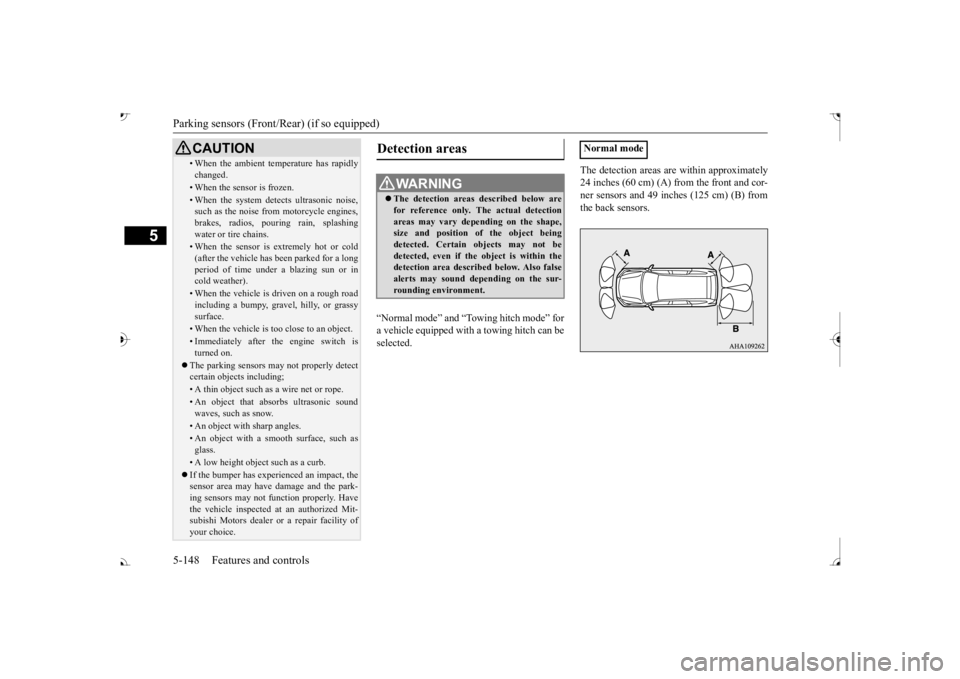
“Normal mode” and “Tow
ing hitch mode” for
a vehicle equipped with a towing hitch can beselected.
The detection areas are within approximately 24 inches (60 cm) (A) from the front and cor-ner sensors and 49 inches (125 cm) (B) from the back sensors.
• When the ambient temp
erature has rapidly
changed.• When the sensor is frozen.• When the system detects ultrasonic noise,such as the noise from motorcycle engines, brakes, radios, pouring rain, splashing water or tire chains.• When the sensor is extremely hot or cold(after the vehicle has
been parked for a long
period of time under
a blazing sun or in
cold weather).• When the vehicle is driven on a rough roadincluding a bumpy, gravel, hilly, or grassy surface.• When the vehicle is too close to an object.• Immediately after the engine switch is turned on.
The parking sensors may not properly detect certain objects including;• A thin object such as a wire net or rope.• An object that absorbs ultrasonic sound waves, such as snow.• An object with sharp angles.• An object with a sm
ooth surface, such as
glass.• A low height object such as a curb. If the bumper has experienced an impact, the sensor area may have
damage and the park-
ing sensors may not f
unction properly. Have
the vehicle inspected at an authorized Mit- subishi Motors dealer or a repair facility of your choice.CAUTION
Detection areas
WA R N I N G The detection areas described below are for reference only. The actual detectionareas may vary depend
ing on the shape,
size and position of
the object being
detected. Certain objects may not bedetected, even if the object is within the detection area described below. Also false alerts may sound de
pending on the sur-
rounding environment.
Normal mode
BK0239700US.book 148 ページ 2016年6月16日 木曜日 午前10時58分
Page 230 of 521
Parking sensors (Front/Rear) (if so equipped)
Features and controls 5-149
5
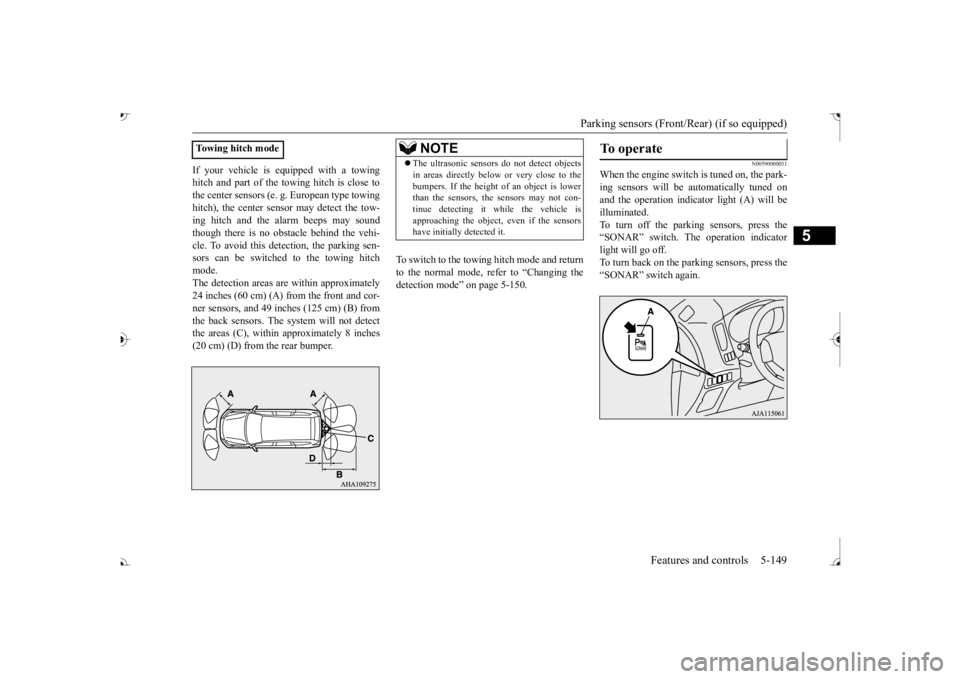
If your vehicle is equipped with a towing hitch and part of the towing hitch is close tothe center sensors (e. g.
European type towing
hitch), the center sens
or may detect the tow-
ing hitch and the alarm beeps may soundthough there is no obstacle behind the vehi- cle. To avoid this dete
ction, the parking sen-
sors can be switched to the towing hitchmode. The detection areas ar
e within approximately
24 inches (60 cm) (A) from the front and cor- ner sensors, and 49 inches (125 cm) (B) from the back sensors. The
system will not detect
the areas (C), within approximately 8 inches (20 cm) (D) from the rear bumper.
To switch to the towing hitch mode and return to the normal mode, refer to “Changing thedetection mode” on page 5-150.
N00590000031
When the engine switch is tuned on, the park- ing sensors will be
automatically tuned on
and the operation indica
tor light (A) will be
illuminated. To turn off the parking sensors, press the “SONAR” switch. The operation indicatorlight will go off. To turn back on the parking sensors, press the “SONAR” switch again.
Towing hitch mode
NOTE
The ultrasonic sensors
do not dete
ct objects
in areas directly below or very close to thebumpers. If the height of an object is lowerthan the sensors, the sensors may not con- tinue detecting it
while the vehicle is
approaching the object, even if the sensorshave initially detected it.
To operate
BK0239700US.book 149 ページ 2016年6月16日 木曜日 午前10時58分
Page 232 of 521
Rear-view camera (if so equipped)
Features and controls 5-151
5
avoid this detection,
the parking sensors can
be switched to th
e towing hitch mode.
To switch to the towing hitch mode; While the selector lever is in the “R” sensors by pressing
the “SONAR” switch,
then press and hold the “SONAR” switch approximately 3 seconds or more and release it. A buzzer will sound tw
ice to indicate the
detection mode is sw
itched to the towing
hitch mode. To turn on the parking sensors, press the “SONAR” switch again. To return to the normal mode; While the selector lever is in the “R”sensors by pressing
the “SONAR” switch,
then press and hold the “SONAR” switch approximately 3 seconds or more and releaseit. A buzzer will sound once to indicate the detection mode is returned to the normal mode. To turn on the parking sensors, pressthe “SONAR” switch again.
N00590200033
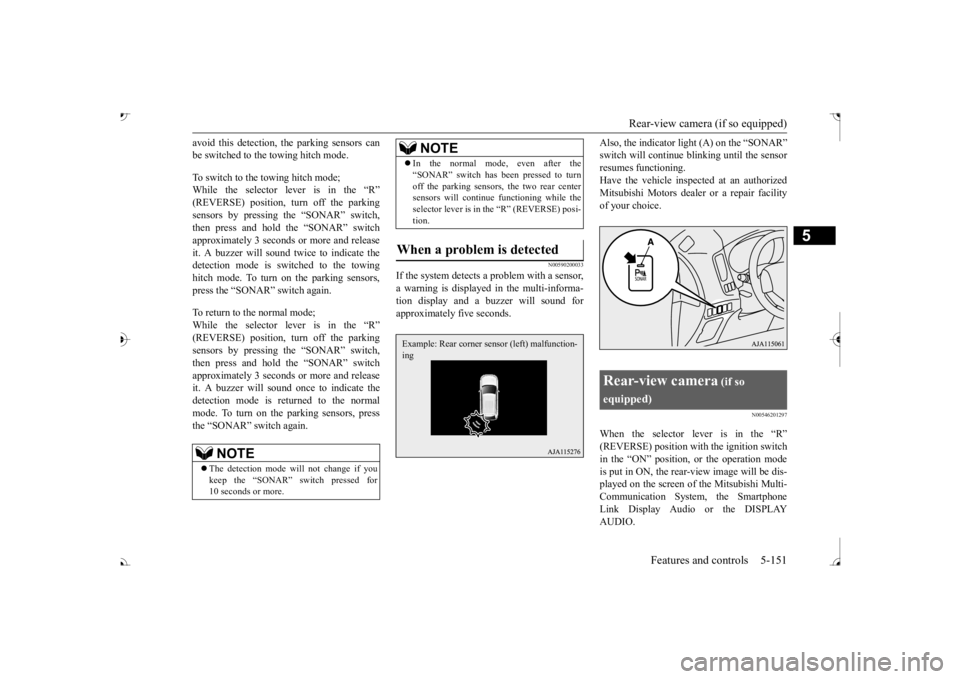
If the system detects a
problem with a sensor,
a warning is displayed in the multi-informa- tion display and a buzzer will sound for approximately five seconds.
Also, the indicator light (A) on the “SONAR”
inking until the sensor
resumes functioning. Have the vehicle inspected at an authorized Mitsubishi Motors dealer or a repair facilityof your choice.
N00546201297
When the selector lever is in the “R”
the ignition switch
in the “ON” position, or the operation mode is put in ON, the rear-view image will be dis- played on the screen of the Mitsubishi Multi-Communication System, the Smartphone Link Display Audio or the DISPLAY AUDIO.
NOTE
The detection mode wi
ll not change if you
keep the “SONAR” switch pressed for 10 seconds or more.
In the normal mode, even after the “SONAR” switch has been pressed to turnoff the parking sensors, the two rear centersensors will continue
functioning while the
selector lever is in the “R” (REVERSE) posi- tion.
When a problem is detected
NOTE
Example: Rear corner sensor (left) malfunction- ing
Rear-view camera
(if so
equipped)
BK0239700US.book 151 ページ 2016年6月16日 木曜日 午前10時58分
Page 305 of 521
Combination headlights and dimmer switch 5-224 Features and controls
5
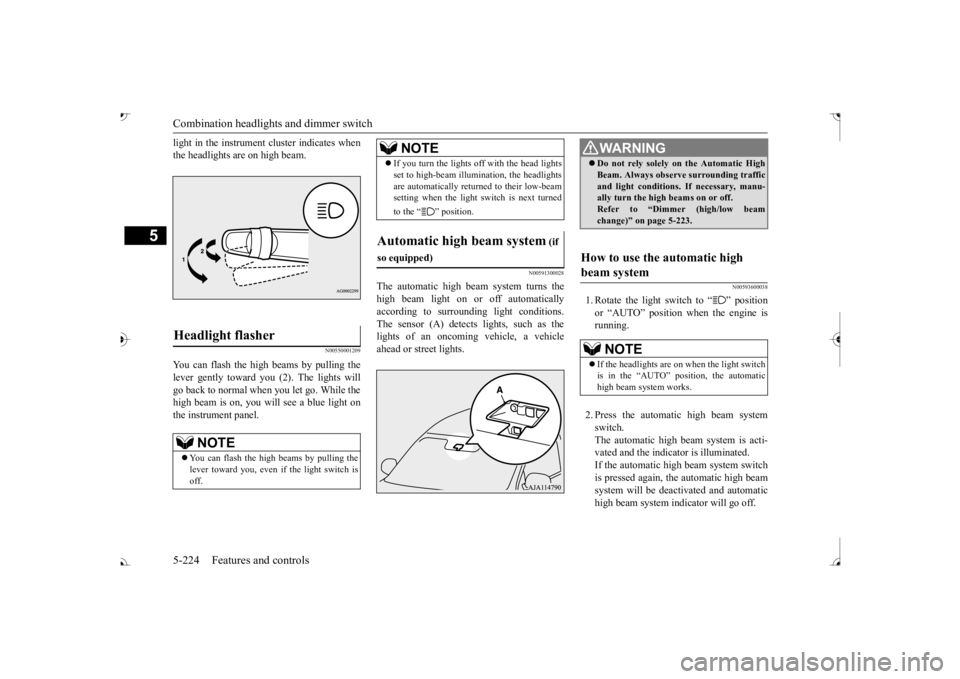
light in the instrument cluster indicates when the headlights are on high beam.
N00550001209
You can flash the high beams by pulling the lever gently toward you (2). The lights will go back to normal when you let go. While thehigh beam is on, you will
see a blue light on
the instrument panel.
N00591300028
The automatic high beam system turns the high beam light on
or off automatically
according to surrounding light conditions. The sensor (A) detects lights, such as thelights of an oncoming vehicle, a vehicle ahead or street lights.
N00593600038
1. Rotate the light switch to “ ” position or “AUTO” position when the engine isrunning. 2. Press the automatic high beam system switch. The automatic high beam system is acti-vated and the indicator is illuminated. If the automatic high beam system switch is pressed again, the automatic high beamsystem will be deactivated and automatic high beam system indicator will go off.
Headlight flasher
NOTE
You can flash the high beams by pulling the lever toward you, even if the light switch isoff.
If you turn the lights off with the head lights set to high-beam illumi
nation, the headlights
are automatically returned to their low-beamsetting when the light
switch is next turned
to the “ ” position.
Automatic high beam system
(if
so equipped)
WA R N I N G Do not rely solely on the Automatic High Beam. Always observe
surrounding traffic
and light conditions. If necessary, manu-ally turn the high beams on or off. Refer to “Dimmer (high/low beam change)” on page 5-223.
How to use the automatic high beam system
NOTE
If the headlights are on when the light switch is in the “AUTO” position, the automatic high beam system works.
BK0239700US.book 224 ページ 2016年6月16日 木曜日 午前10時58分