tow MITSUBISHI OUTLANDER III 2017 Owner's Guide
[x] Cancel search | Manufacturer: MITSUBISHI, Model Year: 2017, Model line: OUTLANDER III, Model: MITSUBISHI OUTLANDER III 2017Pages: 521, PDF Size: 14.95 MB
Page 306 of 521
Combination headlights and dimmer switch
Features and controls 5-225
5
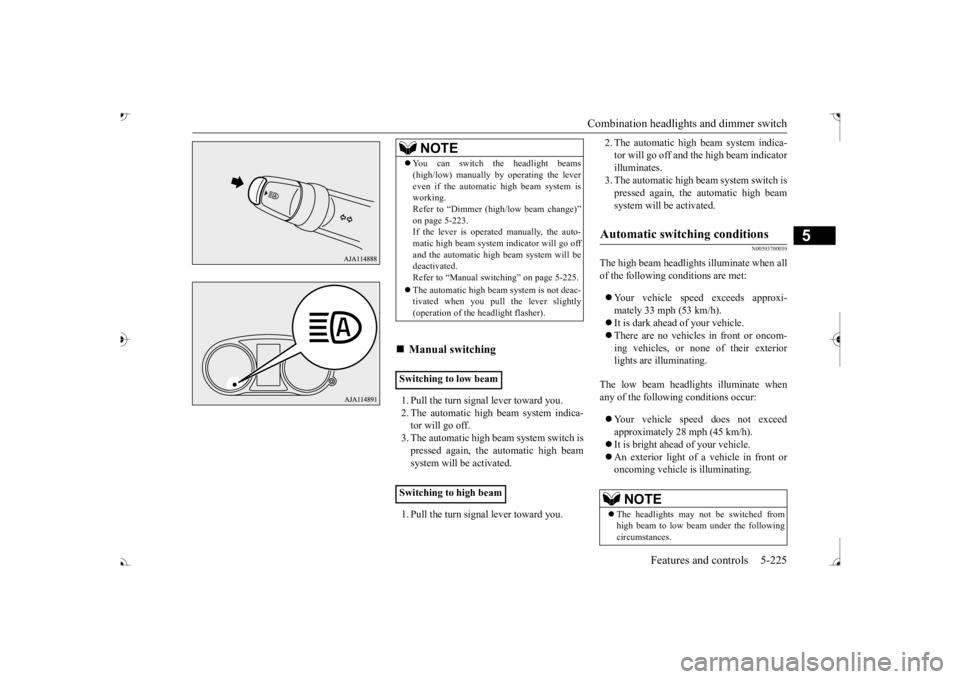
1. Pull the turn signal lever toward you. 2. The automatic high beam system indica-tor will go off. 3. The automatic high beam system switch is pressed again, the
automatic high beam
system will be activated. 1. Pull the turn signal lever toward you.
2. The automatic high beam system indica- tor will go off and the high beam indicatorilluminates. 3. The automatic high beam system switch is pressed again, the
automatic high beam
system will be activated.
N00593700039
The high beam headlight
s illuminate when all
of the following
conditions are met:
Your vehicle speed exceeds approxi- mately 33 mph (53 km/h). It is dark ahead of your vehicle. There are no vehicles in front or oncom- ing vehicles, or none
of their exterior
lights are illuminating.
The low beam headlights illuminate when any of the followi
ng conditions occur:
Your vehicle speed does not exceed approximately 28 mph (45 km/h). It is bright ahead of your vehicle. An exterior light of a vehicle in front or oncoming vehicle is illuminating.
NOTE
You can switch the headlight beams (high/low) manually
by operating the lever
even if the automatic high beam system isworking. Refer to “Dimmer (high/low beam change)” on page 5-223.If the lever is operated manually, the auto- matic high beam system
indicator will go off
and the automatic high beam system will bedeactivated. Refer to “Manual swit
ching” on page 5-225.
The automatic high beam
system is not deac-
tivated when you pull
the lever slightly
(operation of the he
adlight flasher).
Manual switching
Switching to low beam Switching to high beam
Automatic switching conditions
NOTE
The headlights may not be switched from high beam to low beam under the following circumstances.
BK0239700US.book 225 ページ 2016年6月16日 木曜日 午前10時58分
Page 307 of 521
Combination headlights and dimmer switch 5-226 Features and controls
5
The sensitivity of the se
nsor can be temporar-
ily lowering in the following ways. 1. Park your vehicle in a safe place and the ignition switch is turned to the “OFF” or “LOCK” position or the operation mode is put in OFF.2. Press the automatic high beam system switch more than 15 times within 5 sec- onds after operation mode is turned on.
• A vehicle in front
or oncoming vehicle is
hindered by any object
such as continuous
bends, elevated median/i
sland, traffic signs,
roadside trees. • Your vehicle passes
an oncoming vehicle
suddenly on a bend with poor visibility. • Another vehicle crosse
s ahead of your vehi-
cle.
The headlights may remain at low beam (or be switched from high beam to low beam) when a reflective object (e.g. street light, traffic signal, noticeboard and signboard) Any of the following factors may influence the headlight beam switching timing: • How brightly the exteri
or lights of a vehicle
in front or oncoming
vehicle il
luminate.
• Movement or direction
of a vehicle in front
or oncoming vehicle. • Only right or left exte
rior light of a vehicle
in front or oncoming
vehicle is illuminat-
ing. • A vehicle in front or
oncoming vehicle is a
motorcycle. • Road conditions (gradient, bends and road surface). • The number of occupa
nts and luggage load.
The automatic high beam
system recognises
environmental conditi
ons by sensing a light
source ahead of your ve
hicle. Therefore, you
may feel like someth
ing is not quite right
when the headlight beams are switched auto- matically.NOTE
The system may not de
tect a light vehicle
such as a bicycle. The system may not detect an ambient brightness precisely. Th
is causes the traffic
to be dazzled by high beam or the low beamto be maintained. In such cases, you should switch the headli
ght beams manually.
• In bad weather (heavy
rain, fog, snow or
sandstorm). • The windshield is dirty or fogged up. • The windshield is cracked or broken.• The sensor is deformed or dirty. • A light, which is simila
r to the headlights or
tail lights, is shining around your vehicle. • A vehicle in front
or oncoming vehicle is
driven without lights, the exterior lights are dirty or discoloured, or the direction of theheadlight beams is adjusted improperly. • It becomes dark and bright suddenly and continuously around your vehicle. • Your vehicle is driven on uneven surfaces.• Your vehicle is driven on a winding road. • A reflective object such as a noticeboard or a mirror reflects a li
ght ahead of your vehi-
cle. • When lights of the vehicle in front or head- lights of an oncoming ve
hicle blend into the
other lights. • The rear end of a vehicle in front (such as a container truck) re
flect a strong light.
• Your vehicle's headlight
is broken or dirty.
NOTE
• Your vehicle is inclined due to a flat tire or towing. • The warning display appears. (Refer to “System
problem warning” on
page 5-227.)
Observe the precautions below to maintain good usage conditions: • Do not attempt to di
sassemble the sensor.
• Do not affix a sticker or label on the wind- shield near the sensor. • Avoid overload. • Do not modify your vehicle.• When the windshield is replaced, use the Mitsubishi Motors
genuine parts.
To adjust the sensitivity of the sensor
NOTE
BK0239700US.book 226 ページ 2016年6月16日 木曜日 午前10時58分
Page 310 of 521
Headlight leveling switch (if so equipped)
Features and controls 5-229
5
3. Within 60 seconds of
turning the ignition
switch to the “OFF” or “LOCK” positionor putting the operation mode in OFF, pull the turn signal lever toward you. 4. The headlights will come on in the low beam setting for about 30 seconds. After the headlights go off, the headlights can be turned on again in
the low beam setting
for about 30 seconds by pulling the turnsignal lever toward you within 60 seconds of turning the ignition switch to the “OFF” or “LOCK” position or putting theoperation mode in OFF. To turn on the headlights again after 60 seconds of turn- ing the ignition switch to the “OFF” or“LOCK” position or
putting the operation
mode in OFF, repeat the process from step 1.
N00537101115
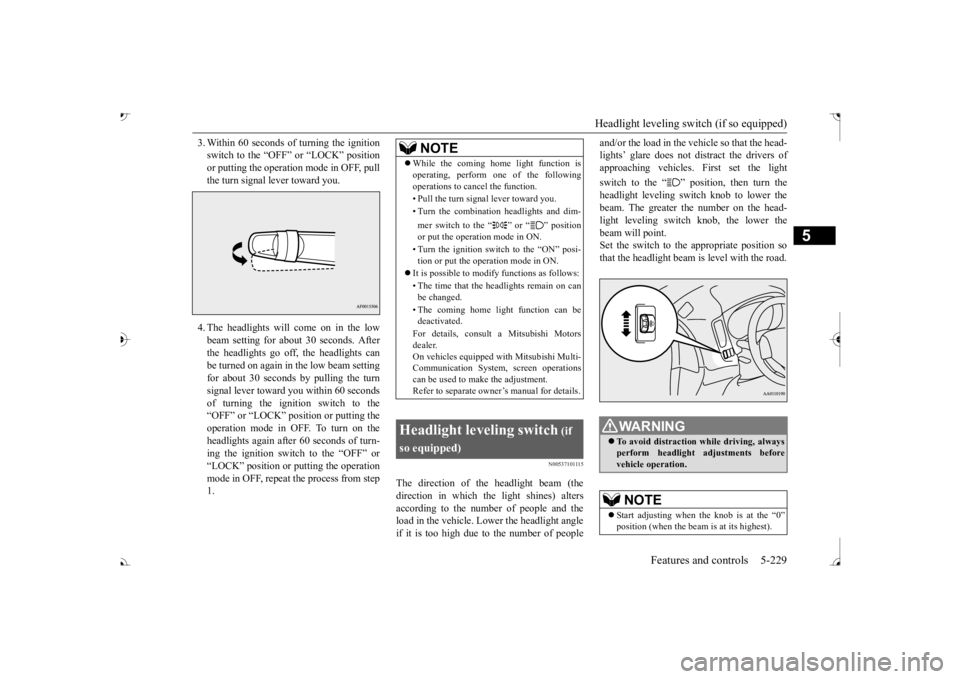
The direction of the headlight beam (thedirection in which the light shines) alters according to the number of people and the load in the vehicle. Lo
wer the headlight angle
if it is too high due to the number of people
and/or the load in the vehicle so that the head- lights’ glare does not distract the drivers ofapproaching vehicles
. First set the light
switch to the “ ” position, then turn the headlight leveling swit
ch knob to lower the
beam. The greater th
e number on the head-
light leveling switch knob, the lower the beam will point. Set the switch to the appropriate position sothat the headlight beam is level with the road.
NOTE
While the coming home light function is operating, perform one of the followingoperations to cancel the function. • Pull the turn signal lever toward you. • Turn the combination headlights and dim- mer switch to the “ ” or “ ” position or put the operation mode in ON. • Turn the ignition switch to the “ON” posi- tion or put the operation mode in ON.
It is possible to modify functions as follows: • The time that the he
adlights remain on can
be changed. • The coming home light function can be deactivated. For details, consult a Mitsubishi Motors dealer. On vehicles equipped
with Mitsubishi Multi-
Communication System, screen operationscan be used to ma
ke the adjustment.
Refer to separate owne
r’s manual for details.
Headlight leveling switch
(if
so equipped)
To avoid distraction while driving, always perform headlight adjustments before vehicle operation.NOTE
Start adjusting when the knob is at the “0”
is at its highest).
BK0239700US.book 229 ページ 2016年6月16日 木曜日 午前10時58分
Page 316 of 521
Wiper and washer switch
Features and controls 5-235
5
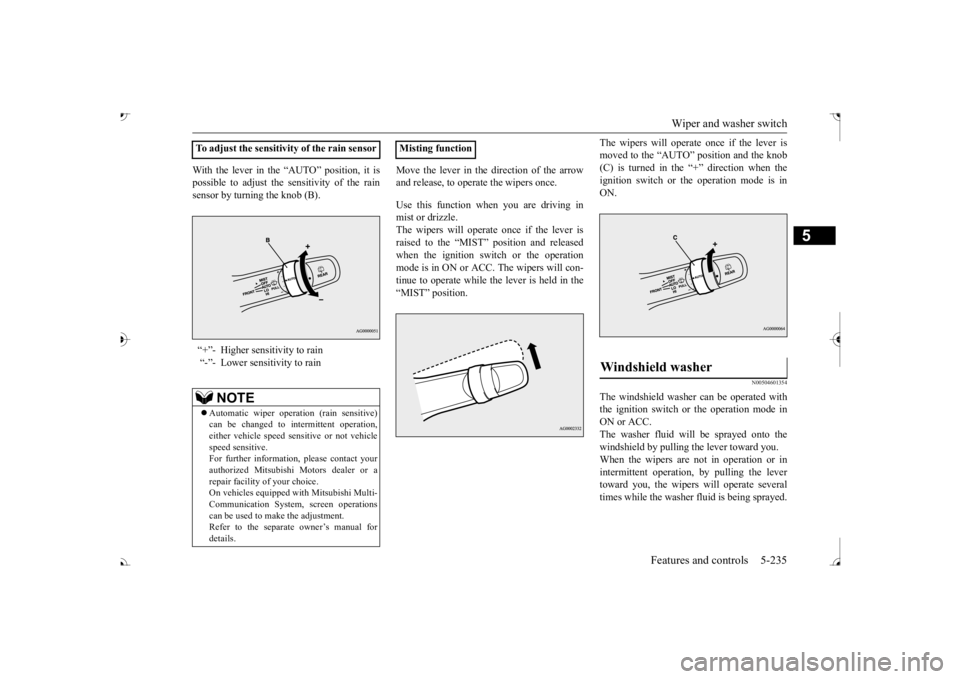
With the lever in the “AUTO” position, it is possible to adjust the sensitivity of the rainsensor by turning the knob (B).
Move the lever in the direction of the arrow and release, to operate the wipers once. Use this function when you are driving in mist or drizzle. The wipers will operate once if the lever is raised to the “MIST” position and releasedwhen the ignition switch or the operation mode is in ON or ACC. The wipers will con- tinue to operate while the lever is held in the “MIST” position.
The wipers will operate once if the lever is moved to the “AUTO” position and the knob(C) is turned in the “+” direction when the ignition switch or the
operation mode is in
ON.
N00504601354
The windshield washer can be operated withthe ignition switch or the operation mode in ON or ACC. The washer fluid will be sprayed onto thewindshield by pulling th
e lever toward you.
When the wipers are not in operation or in intermittent operation,
by pulling the lever
toward you, the wipers
will operate several
times while the washer
fluid is being sprayed.
To adjust the sensitivity of the rain sensor “+”- Higher sensitivity to rain “-”- Lower sensitivity to rain
NOTE
Automatic wiper operation (rain sensitive) can be changed to in
termittent operation,
either vehicle speed se
nsitive or not vehicle
speed sensitive.For further informati
on, please contact your
authorized Mitsubishi Motors dealer or a repair facility of your choice.On vehicles equipped
with Mitsubishi Multi-
Communication System,
screen operations
can be used to make the adjustment.Refer to the separate owner’s manual for details.
Misting function
Windshield washer
BK0239700US.book 235 ページ 2016年6月16日 木曜日 午前10時58分
Page 317 of 521
Wiper and washer switch 5-236 Features and controls
5
By releasing the lever soon after pulling it toward you, the washer
fluid will be sprayed
several times while the wipers are operatingseveral times. Intelligent washer will stop operating with any operation of the lever.
N00523201418
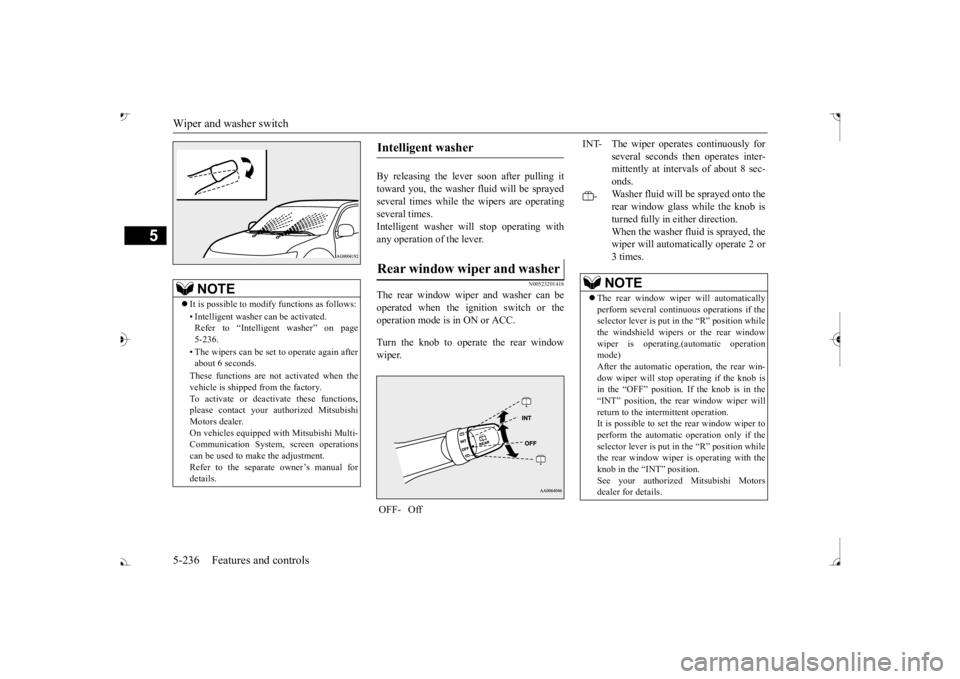
The rear window wiper and washer can beoperated when the ignition switch or the operation mode is in ON or ACC. Turn the knob to operate the rear window wiper.
NOTE
It is possible to modify functions as follows: • Intelligent washer
can be activated.
Refer to “Intelligent washer” on page 5-236. • The wipers can be set
to operate again after
about 6 seconds. These functions are not activated when the vehicle is shipped
from the factory.
To activate or deacti
vate these functions,
please contact your authorized Mitsubishi Motors dealer.On vehicles e
quipped with Mitsubishi Multi-
Communication System, screen operations can be used to ma
ke the adjustment.
Refer to the separate
owner’s manual for
details.
Intelligent washer Rear window wiper and washer OFF- Off
INT- The wiper operates continuously for
several seconds then operates inter- mittently at interv
als of about 8 sec-
onds.
-
Washer fluid will be
sprayed onto the
rear window glass while the knob isturned fully in either direction. When the washer fluid is sprayed, the wiper will automati
cally operate 2 or
3 times.NOTE
The rear window wipe
r will automatically
perform several conti
nuous operations if the
selector lever is put in the “R” position while the windshield wipers
or the rear window
wiper is operating.(a
utomatic operation
mode) After the automatic operation, the rear win- dow wiper will stop operating if the knob isin the “OFF” position. If the knob is in the “INT” position, the re
ar window wiper will
return to the intermittent operation.It is possible to set the rear window wiper to perform the automatic operation only if the selector lever is put in the “R” position whilethe rear window wiper
is operating with the
knob in the “INT” position. See your authorized Mitsubishi Motorsdealer for details.
BK0239700US.book 236 ページ 2016年6月16日 木曜日 午前10時58分
Page 362 of 521
Cargo area cover (if so equipped)
Features and controls 5-281
5
N00528301179
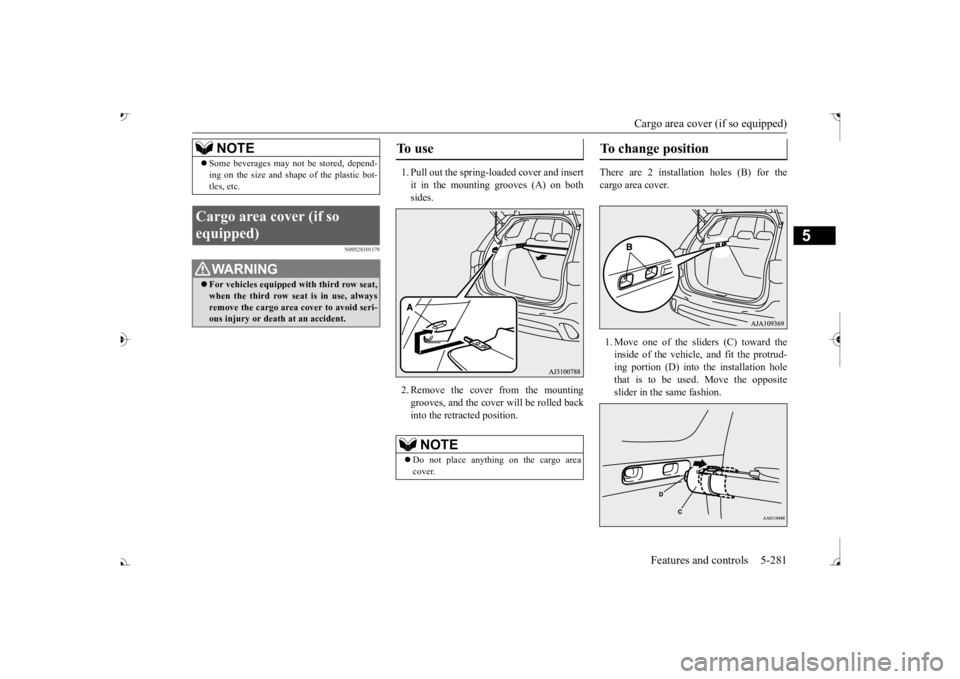
1. Pull out the spring-loaded cover and insert it in the mounting grooves (A) on both sides. 2. Remove the cover from the mounting grooves, and the cover will be rolled back into the retracted position.
There are 2 installation holes (B) for the cargo area cover. 1. Move one of the sliders (C) toward the inside of the vehicle, and fit the protrud- ing portion (D) into the installation hole that is to be used. Move the oppositeslider in the same fashion.
Some beverages may not
be stored, depend-
ing on the size and shape of the plastic bot-tles, etc.
Cargo area cover (if so equipped)
WA R N I N G For vehicles equipped with third row seat, when the third row seat is in use, always remove the cargo area cover to avoid seri-ous injury or death at an accident.NOTE
To u s e
NOTE
Do not place anything on the cargo area cover.
To change position
BK0239700US.book 281 ページ 2016年6月16日 木曜日 午前10時58分
Page 363 of 521
Cargo area cover (if so equipped) 5-282 Features and controls
5
2. After changing the position, gently shake the entire cargo area cover to make sure itis securely retained.
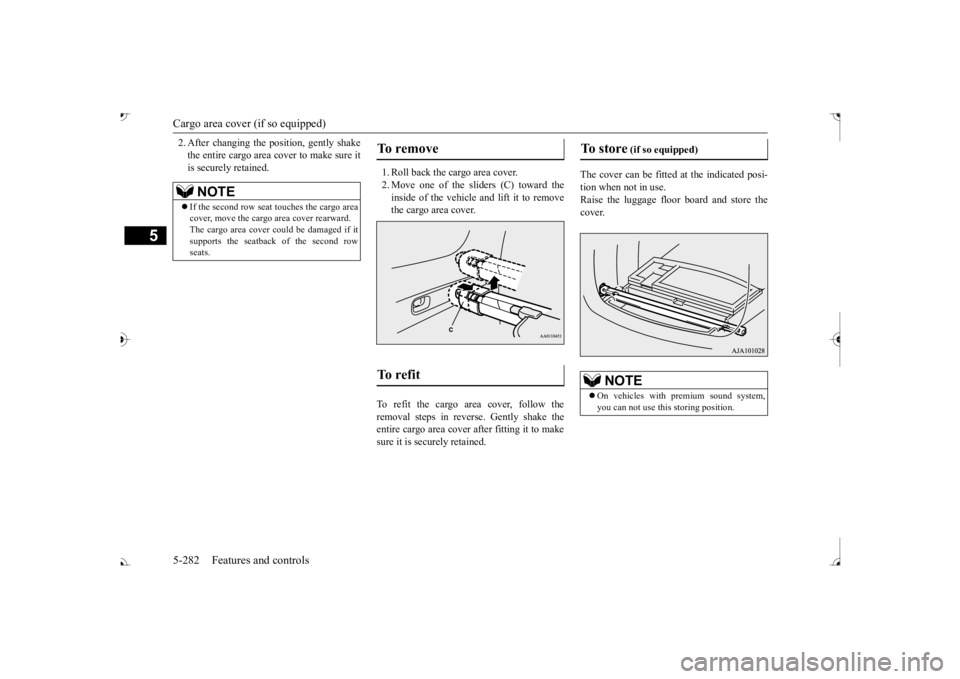
1. Roll back the cargo area cover. 2. Move one of the sliders (C) toward the inside of the vehicle and lift it to remove the cargo area cover.
To refit the cargo area cover, follow the removal steps in reverse. Gently shake the entire cargo area cover
after fitting it to make
sure it is securely retained.
The cover can be fitted
at the indicated posi-
tion when not in use. Raise the luggage floor board and store thecover.
NOTE
If the second row seat
touches the cargo area
cover, move the cargo
area cover rearward.
The cargo area cover co
uld be damaged if it
supports the seatback of the second rowseats.
To remove To refit
To store
(if so equipped)
On vehicles with premium sound system, you can not use this storing position.
BK0239700US.book 282 ページ 2016年6月16日 木曜日 午前10時58分
Page 366 of 521
6
Driving safetyDriving precaution ...........................................................................6-2 Fuel economy .......
...........
...........
............
...........
.........
........
.........
.....6-2
Driving, alcohol and drugs ..
...........
...........
...........
...........
...........
.....6-2
Floor mat ..........................................................................................6-3 Vehicle preparation before driving ..................................................6-4 Safe driving techniques ....................................................................6-4Driving during cold weather ............................................................6-5 Braking ............................................................................................6-5 Parking .............................................................................................6-6Loading information ........................................................................6-6 Cargo loads ....................................................................................6-10 Trailer towing ................................................................................ 6-11
BK0239700US.book 1 ページ 2016年6月16日 木曜日 午前10時58分
Page 371 of 521
Parking 6-6 Driving safety
6
On snowy roads, ice can form on the braking system, making the brakes less effective. While driving in such conditions, pay closeattention to surrounding
vehicles and to the
condition of the road surface. From time to time, lightly depress the brake pedal andcheck how effective the brakes are. It is important to take
advantage of the engine
braking by downshifting while driving on steep downhill roads in order to prevent thebrakes from overheating.
N00629601385
When parking on a hill, set the parking brake,and turn the front wheels toward the curb on a downhill, or away from
the curb on an uphill.
If necessary, apply chocks to the wheels.Be sure that the parki
ng brake is firmly set
when parked and that the selector lever is in the “P” (PARK) position.
When parking on a hill, it is important to set the parking brake befo
re moving the selector
lever to the “P” (PARK) position. This pre- vents loading the parking brake against the transaxle. When this ha
ppens, it is difficult to
move the selector lever out of the “P” Never leave the engine running while you take a short nap or rest. Also, never leave the engine running in a closed or poorly venti- lated place. Your front bumper can be damaged if you scrape it over curbs or parking stop blocks.Be careful when traveling up or down steep slopes where your bumper can scrape the road.
Always carry the key and lock all doors and the liftgate when leaving the vehicle unat- tended. Always try to park your vehicle in a well litarea. Move effort could be required to turn the steering wheel. Refer to “Electric power steering system(EPS)” on page 5-99.
N00629901434
It is very important to know how muchweight your vehicle can carry. This weight is called the vehicle ca
pacity weight and
includes the weight of
all occupants, cargo
(including the roof load), non-factory-
When driving in cold weather When driving downhill Parking Parking on a hill
Parking with the engine run- ning
WA R N I N G Leaving the engine ru
nning risks injury or
death from accidentally moving the selec- tor lever or the accumulation of toxicexhaust fumes in the passenger compart- ment.
Where you park
WA R N I N G Do not park your vehicle in areas where combustible materials
such as dry grass or
leaves can come in contact with a hotexhaust, since a fire could occur.
When leaving the vehicle Do not keep the steering wheel fully turned for a long time Loading information
BK0239700US.book 6 ページ 2016年6月16日 木曜日 午前10時58分
Page 372 of 521
Loading information Driving safety 6-7
6
installed options, and
the tongue weight of
the trailer, if any, being towed. The tire andloading information placard located on the driver’s door sill of your vehicle will show how much weight it may properly carry. It is important to famil
iarize yourself with the
following terms before loading your vehicle: Vehicle maximum load on the tire: load on an individual tire that is determined by distributing to each axle its share of the maximum loaded vehicle weight anddividing by two. Vehicle normal load on the tire: load on an individual tire that is determined by dis-tributing to each axle its share of the curb weight, accessory weight, and normal occupant weight and dividing by two. Maximum loaded vehicle weight: the sum of - (a) Curb weight;(b) Accessory weight; (c) Vehicle capacity weight; and (d) Production options weight.
Curb weight: the weight of a motor vehi- cle with standard equipment including themaximum capacity of
fuel, oil, and cool-
ant. Accessory weight: the combined weight (in excess of those st
andard items which
may be replaced) of automatic transaxle, power steering, power brakes, power win-dows, power seats, radio, and heater, to the extent that these items are available as factory- installed equipment (whether installed or not). Vehicle capacity weight: the rated cargo and luggage load plus 150 lbs (68 kg) * times the vehicle’s designated seating capacity. Production options weight: the combined weight of those installed regular produc- tion options weighing over 5 lbs (2.3 kg)in excess of those standard items which they replace, not prev
iously considered in
curb weight or accessory weight, includ-ing heavy duty brakes,
ride levelers, roof
rack, heavy duty battery, and special trim. Normal occupant weight: 150 lbs (68 kg) * times the number of
specified occupants
(3 in the case of your vehicle) Occupant distribution:
Occupant distribu-
tion within the passenger compartment (In your vehicle the distribution is 2 in front, 1 in second row seat)
N00630101407
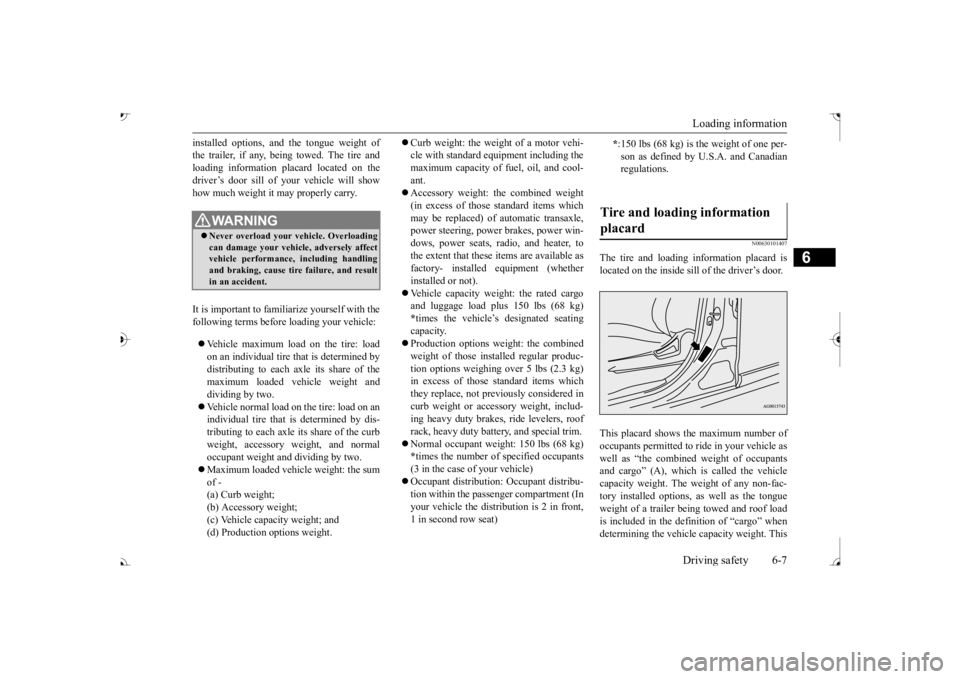
The tire and loading information placard islocated on the inside sill of the driver’s door. This placard shows the maximum number of occupants permitted to
ride in your vehicle as
well as “the combined
weight of occupants
and cargo” (A), which
is called the vehicle
capacity weight. The weight of any non-fac- tory installed options, as well as the tongueweight of a trailer being towed and roof load is included in the defi
nition of “cargo” when
determining the vehicle
capacity weight. This
WA R N I N GNever overload your ve
hicle. Overloading
can damage your vehicl
e, adversely affect
vehicle performance, including handling and braking, cause tire failure, and resultin an accident.
* :150 lbs (68 kg) is the weight of one per- son as defined by U.
S.A. and Canadian
regulations.
Tire and loading information placard
BK0239700US.book 7 ページ 2016年6月16日 木曜日 午前10時58分