engine MITSUBISHI OUTLANDER III 2018 Owners Manual
[x] Cancel search | Manufacturer: MITSUBISHI, Model Year: 2018, Model line: OUTLANDER III, Model: MITSUBISHI OUTLANDER III 2018Pages: 441, PDF Size: 13.71 MB
Page 291 of 441
![MITSUBISHI OUTLANDER III 2018 Owners Manual Combination headlights and dimmer switch5-210 Features and controls
5
[For vehicles equipped
with the F.A.S.T.-
key]The operation mode is changed to OFF orACC and the driver’s door is not opened.
I](/img/19/58144/w960_58144-290.png "MITSUBISHI OUTLANDER III 2018 Owners Manual Combination headlights and dimmer switch5-210 Features and controls
5
[For vehicles equipped
with the F.A.S.T.-
key]The operation mode is changed to OFF orACC and the driver’s door is not opened.
I")
Combination headlights and dimmer switch5-210 Features and controls
5
[For vehicles equipped
with the F.A.S.T.-
key]The operation mode is changed to OFF orACC and the driver’s door is not opened.
If the combination headlights and dimmerswitch is turned to the “ ” or “ ” posi-tion again after the engine is turned off, theapproximately 3-minute
auto-cutout function
described above will not
work. The lights (the
parking lights, tail li
ghts and license plate
lights) will stay on and will not turn off auto-matically.
N00584500028
This warning light will illuminate when thereis a malfunction in the LED headlights.
N00549801236
[When using a key to start the engine]If the driver’s door is opened with the key inthe “OFF” or “LOCK” or “ACC” position orremoved from the ignition switch while thelights are on, the tone
will sound to remind
you to turn off the lights.[When using the F.A.S.T.-key to start theengine]If the driver’s door is opened with the opera-tion mode is put in OFF or ACC, or if theoperation mode is changed to OFF while thelights are on, the tone
will sound to remind
you to turn off the lights.In either case, the lights will turn off automat-ically and so will the tone. Or you can turnthe light switch to the “OFF” position to stopthe tone.
N00549901178
To change the headlights from high beam tolow beam and vice vers
a, pull the turn signal
lever to (1). Switch the headlights to lowbeam as a courtesy whenever there areoncoming vehicles, or when there is trafficmoving ahead of you. An illuminated blue
NOTE
The light auto-cutout
function can be deacti-
vated.See your authorized Mitsubishi Motorsdealer for details.For vehicles equipped with the SmartphoneLink Display Audio, adjustments can bemade using screen ope
rations. For further
details, refer to the se
parate owner’s manual.
When you want to keep the lights on:
LED headlight warning light
(if
so equipped)If the warning light il
luminates, there may be
a malfunction in the unit. Contact an autho-rized Mitsubishi Motors dealer or a repairfacility of your choice to have the systemchecked.Type 1Type 2
Headlight reminder buzzer Dimmer (high/low beam change)
BK0249100US.book 210 ページ 2017年5月10日 水曜日 午前8時49分
Page 292 of 441
Combination headlights and dimmer switch
Features and controls 5-211
5
light in the instrument
cluster i
ndicates when
the headlights are on high beam.
N00550001209
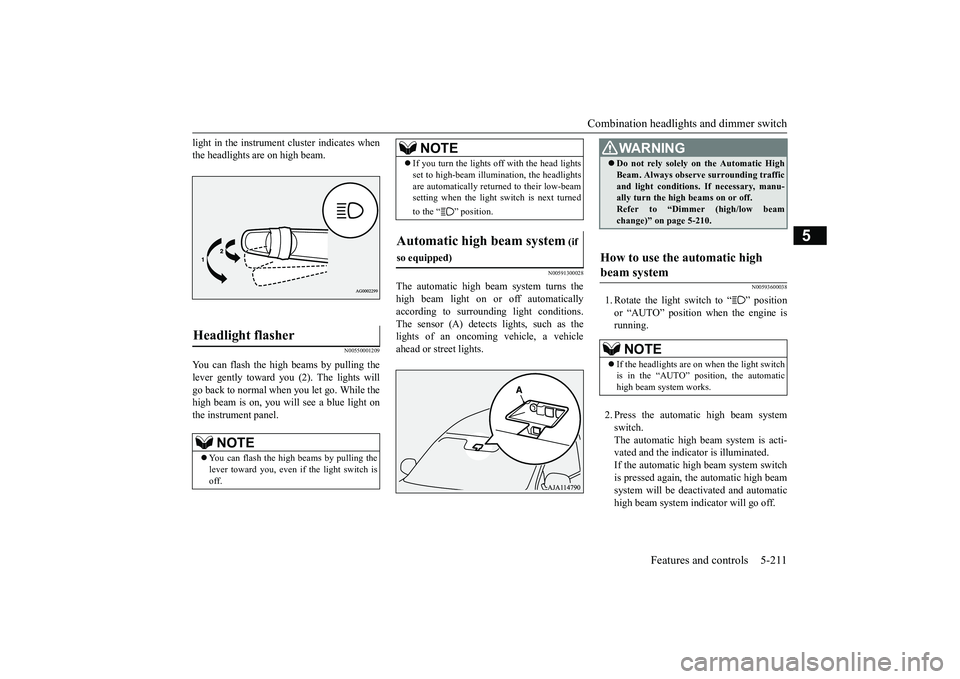
You can flash the high beams by pulling thelever gently toward you (2). The lights willgo back to normal when you let go. While thehigh beam is on, you will see a blue light onthe instrument panel.
N00591300028
The automatic high beam
system turns the
high beam light on or
off automatically
according to surrounding light conditions.The sensor (A) detects lights, such as thelights of an oncoming
vehicle, a vehicle
ahead or street lights.
N00593600038
1. Rotate the light switch to “ ” positionor “AUTO” position when the engine isrunning.2. Press the automatic high beam systemswitch.The automatic high beam system is acti-vated and the indicator is illuminated.If the automatic high beam system switchis pressed again, the automatic high beamsystem will be deac
tivated and automatic
high beam system indicator will go off.
Headlight flasher
NOTE
You can flash the high beams by pulling thelever toward you, even if the light switch isoff.
If you turn the lights off with the head lightsset to high-beam illumin
ation, the headlights
are automatically returned to their low-beamsetting when the light
switch is next turned
to the “ ” position.
Automatic high beam system
(if
so equipped)
NOTE
WA R N I N GDo not rely solely on the Automatic HighBeam. Always observe surrounding trafficand light conditions. If necessary, manu-ally turn the high beams on or off.Refer to “Dimmer (high/low beamchange)” on page 5-210.
How to use the automatic high beam system
NOTE
If the headlights are on when the light switchis in the “AUTO” position, the automatichigh beam system works.
BK0249100US.book 211 ページ 2017年5月10日 水曜日 午前8時49分
Page 296 of 441
Combination headlights and dimmer switch
Features and controls 5-215
5
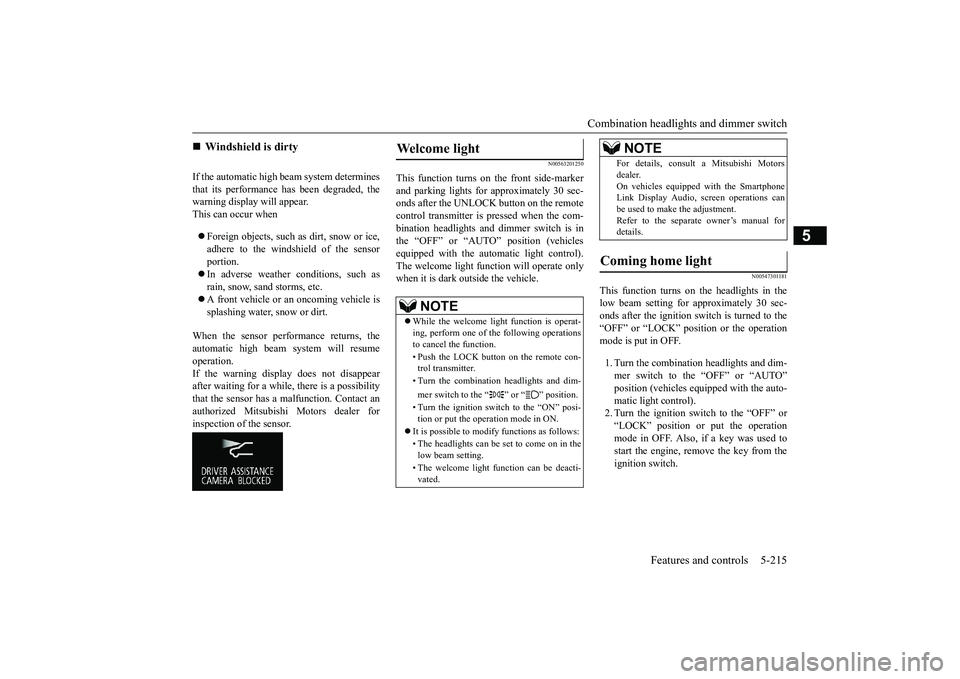
If the automatic high beam system determinesthat its performance has been degraded, thewarning display will appear.This can occur whenForeign objects, such as dirt, snow or ice,adhere to the windshield of the sensorportion.In adverse weather conditions, such asrain, snow, sand storms, etc.A front vehicle or an oncoming vehicle issplashing water, snow or dirt.
When the sensor performance returns, theautomatic high beam system will resumeoperation.If the warning display does not disappearafter waiting for a while, there is a possibilitythat the sensor has a
malfunction. Contact an
authorized Mitsubishi Motors dealer forinspection of the sensor.
N00563201250
This function turns on the front side-markerand parking lights for approximately 30 sec-onds after the UNLOCK button on the remotecontrol transmitter is pressed when the com-bination headlights and dimmer switch is inthe “OFF” or “AUTO” position (vehiclesequipped with the automatic light control).The welcome light func
tion will operate only
when it is dark outside the vehicle.
N00547301181
This function turns on the headlights in thelow beam setting for approximately 30 sec-onds after the ignition switch is turned to the“OFF” or “LOCK” position or the operationmode is put in OFF.1. Turn the combination headlights and dim-mer switch to the “OFF” or “AUTO”
pped with the auto-
matic light control).2. Turn the ignition switch to the “OFF” or“LOCK” position or put the operationmode in OFF. Also, if a key was used tostart the engine, rem
ove the key from the
ignition switch.
Windshield is dirty
Welcome light
NOTE
While the welcome light function is operat-ing, perform one of
the following operations
to cancel the function.• Push the LOCK button on the remote con-trol transmitter.• Turn the combination headlights and dim-mer switch to the “ ” or “ ” position.• Turn the ignition switch to the “ON” posi-tion or put the operation mode in ON.
It is possible to modify functions as follows:• The headlights can be set to come on in thelow beam setting.• The welcome light f
unction can be deacti-
vated.
For details, consult a Mitsubishi Motorsdealer.On vehicles equipped with the SmartphoneLink Display Audio, sc
reen operations can
be used to make the adjustment.Refer to the separate owner’s manual fordetails.
Coming home light
NOTE
BK0249100US.book 215 ページ 2017年5月10日 水曜日 午前8時49分
Page 299 of 441
Hazard warning flasher switch5-218 Features and controls
5
N00522701328
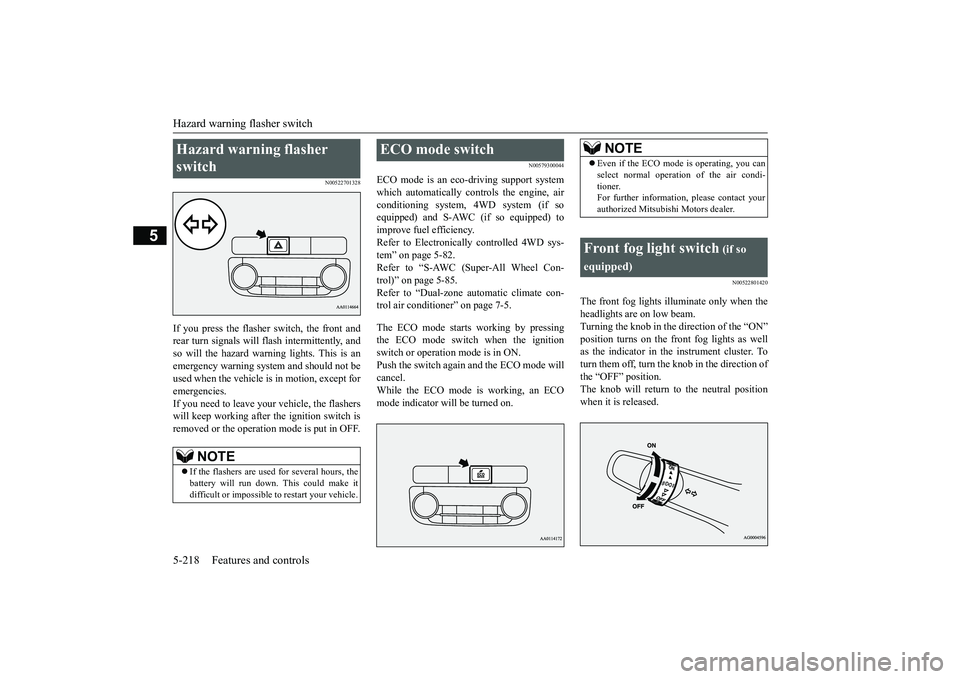
If you press the flasher switch, the front andrear turn signals will flash intermittently, andso will the hazard warn
ing lights. This is an
emergency warning syst
em and should not be
used when the vehicle is in motion, except foremergencies.If you need to leave your vehicle, the flasherswill keep working afte
r the ignition switch is
removed or the operation mode is put in OFF.
N00579300044
ECO mode is an eco-driving support systemwhich automatically cont
rols the engine, air
conditioning system,
4WD system (if so
equipped) and S-AWC (if so equipped) toimprove fuel efficiency.Refer to Electronically
controlled 4WD sys-
tem” on page 5-82.Refer to “S-AWC (Super-All Wheel Con-trol)” on page 5-85.Refer to “Dual-zone automatic climate con-trol air conditioner” on page 7-5.The ECO mode starts
working by pressing
the ECO mode switch when the ignitionswitch or operation mode is in ON.Push the switch again and the ECO mode willcancel.While the ECO mode is working, an ECOmode indicator will be turned on.
N00522801420
The front fog lights illuminate only when theheadlights are on low beam.Turning the knob in the direction of the “ON”position turns on the front fog lights as wellas the indicator in the instrument cluster. Toturn them off, turn the knob in the direction ofthe “OFF” position.The knob will return to the neutral positionwhen it is released.
Hazard warning flasher switch
NOTE
If the flashers are used for several hours, thebattery will run down.
This could make it
difficult or impossible
to restart your vehicle.
ECO mode switch
NOTE
Even if the ECO mode is operating, you canselect normal operati
on of the air condi-
tioner.For further information, please contact yourauthorized Mitsubishi Motors dealer.
Front fog light switch
(if so
equipped)
BK0249100US.book 218 ページ 2017年5月10日 水曜日 午前8時49分
Page 305 of 441
Wiper deicer switch (if so equipped)5-224 Features and controls
5
N00523501277
N00584400027
The electric rear window defogger switch canbe operated when the engine is running.
NOTE
The rear window wipe
r will automatically
perform several conti
nuous operations if the
selector lever is put in the “R” position whilethe windshield wipers
or the rear window
wiper is operating.(a
utomatic operation
mode)After the automatic operation, the rear win-dow wiper will stop operating if the knob isin the “OFF” position. If the knob is in the“INT” position, the re
ar window wiper will
return to the intermittent operation.It is possible to set the rear window wiper toperform the automatic operation only if theselector lever is put in the “R” position whilethe rear window wiper
is operating with the
knob in the “INT” position.See your authorized Mitsubishi Motorsdealer for details.If the knob is in the “OFF” position, turn theknob to the “INT” position twice quickly tooperate the rear window
wiper continuously.
(continuous ope
ration mode)
Turn the knob to the “OFF” position to stopthe rear window wipe
r continuous operation.
The wiper intermittent
operation time can be
adjusted.See your authorized Mitsubishi Motorsdealer for details.For vehicles equipped with the SmartphoneLink Display Audio, adjustments can bemade using screen ope
rations. For further
details, refer to the se
parate owner’s manual.
The washer fluid reservoir is located in theengine compartment.Check the fluid level re
gularly and refill if
necessary. (Refer to
“Washer fluid” on page
9-12.)
Precautions to observe when using wipers and washers
CAUTIONIf the washer is used
in cold weather, the
washer fluid sprayed onto the glass mightfreeze, blocking your vi
ew. Heat the glass
with the defroster befo
re using the washer.
NOTE
Do not use the wipers when the windshield isdry. This could scratch the glass and wear thewiper blades prematurely.Before using the wipe
rs in cold weather,
check to be sure that the wiper blades are notfrozen to the windshield or rear window.Using the wipers while the blades are frozencould cause the wiper motor to burn out.NOTE
If the moving wipers be
come blocked part-
way through a sweep by ic
e or other deposits
on the glass, the wipers may temporarily stopoperating to prevent the motor from over-heating. In this case, park the vehicle in asafe place, turn the ignition switch to the“OFF” position or put the operation mode inOFF, and then remove
the ice or other depos-
its.Because the wipers will start operating againafter the wiper motor cools down, check thatthe wipers operate
before using them.
Avoid using the washer for more than 20 sec-onds at a time. Do not operate the washerwhen the washer fluid reservoir is empty orthe pump may fail.During cold weather, add a recommendedwasher solution that will not freeze in thewasher fluid reservoir. Otherwise the washermay not work or may be damaged.Replace the wiper blades when they areworn. Use the proper size replacementblades. For further info
rmation, please con-
tact your authorized
Mitsubishi Motors
dealer.
Wiper deicer switch
(if so
equipped)
BK0249100US.book 224 ページ 2017年5月10日 水曜日 午前8時49分
Page 306 of 441
Electric rear window defogger switch
Features and controls 5-225
5
When the front wipers have frozen to thewindshield at the parked
positions, turning on
this switch will heat the windshield to makethe wipers operable. Pr
ess the electric rear
window defogger switch and the deicer willoperate.
N00523701497
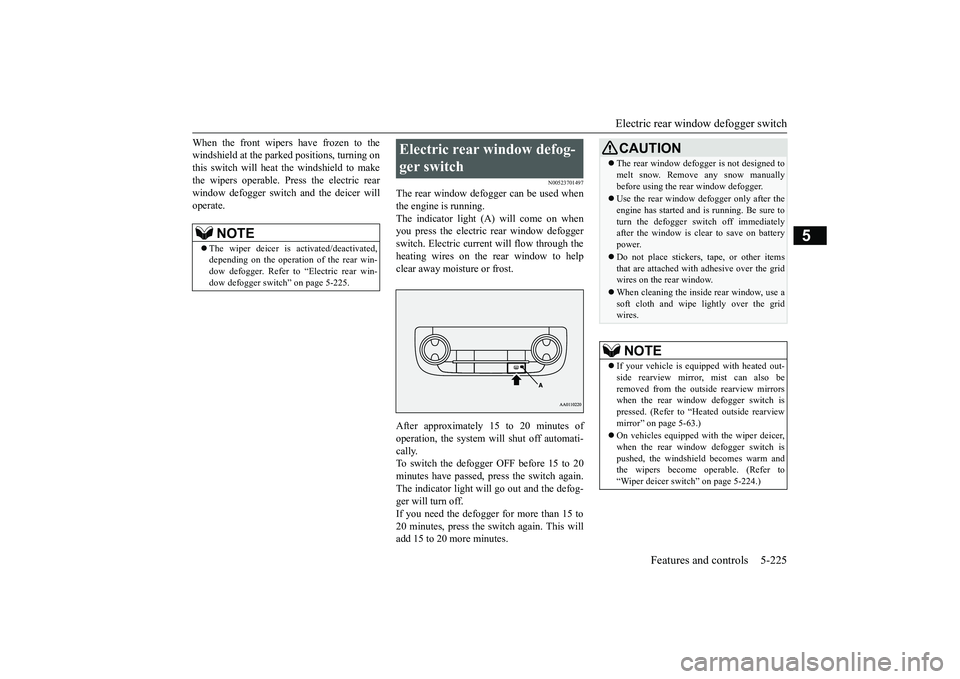
The rear window defogger can be used whenthe engine is running.The indicator light (A) will come on whenyou press the electric rear window defoggerswitch. Electric current will flow through theheating wires on the rear window to helpclear away moisture or frost.After approximately 15 to 20 minutes ofoperation, the system wi
ll shut off automati-
cally.To switch the defogger OFF before 15 to 20minutes have passed,
press the switch again.
The indicator light will
go out and the defog-
ger will turn off.If you need the defogger for more than 15 to20 minutes, press the switch again. This willadd 15 to 20 more minutes.
NOTE
The wiper deicer is
activated/de
activated,
depending on the operation of the rear win-dow defogger. Refer to
“Electric rear win-
dow defogger switch
” on page 5-225.
Electric rear window defog-ger switch
CAUTIONThe rear window defogge
r is not designed to
melt snow. Remove
any snow manually
before using the rear window defogger.Use the rear window de
fogger only after the
engine has started and
is running. Be sure to
turn the defogger swit
ch off immediately
after the window is cl
ear to save on battery
power.Do not place stickers,
tape, or other items
that are attached with adhesive over the gridwires on the rear window.When cleaning the inside
rear window, use a
soft cloth and wipe lightly over the gridwires.NOTE
If your vehicle is equi
pped with heated out-
side rearview mirror, mist can also beremoved from the outside rearview mirrorswhen the rear window defogger switch ispressed. (Refer to “Hmirror” on page 5-63.)On vehicles equipped w
ith the wiper deicer,
when the rear window defogger switch ispushed, the windshield
becomes warm and
the wipers become operable. (Refer to“Wiper deicer switch” on page 5-224.)
BK0249100US.book 225 ページ 2017年5月10日 水曜日 午前8時49分
Page 307 of 441
Heated steering wheel sw
itch (if so equipped)
5-226 Features and controls
5
N00589100032
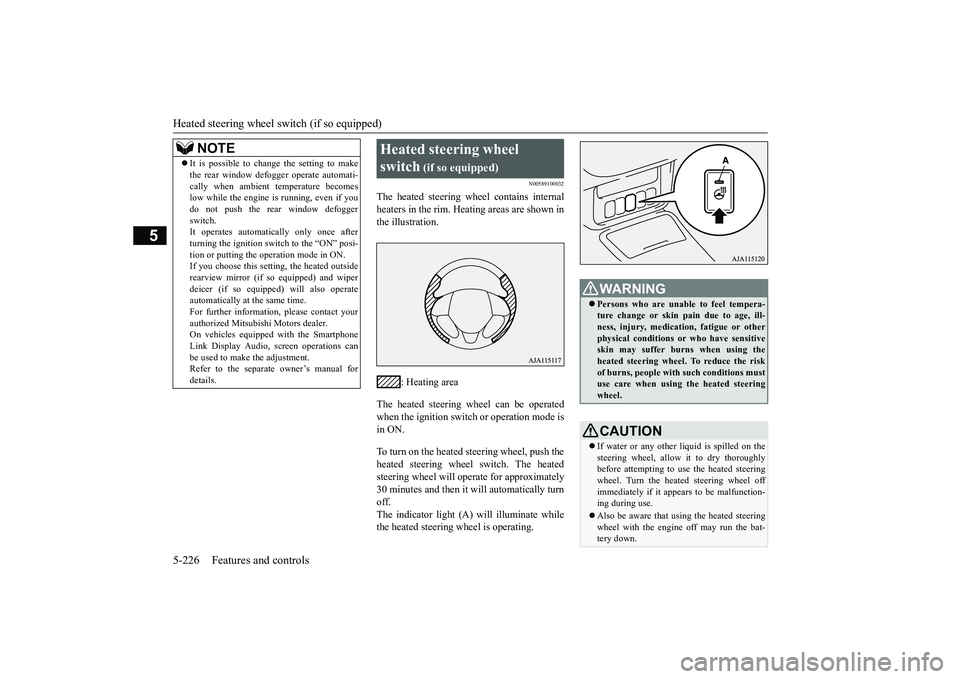
The heated steering wheel contains internalheaters in the rim. Heating areas are shown inthe illustration.
: Heating area
The heated steering wheel can be operatedwhen the ignition switch or operation mode isin ON.To turn on the heated steering wheel, push theheated steering wheel switch. The heatedsteering wheel will ope
rate for approximately
30 minutes and then it
will automatically turn
off.The indicator light (A) will illuminate whilethe heated steering wheel is operating.
It is possible to change the setting to makethe rear window def
ogger operate automati-
cally when ambient temperature becomeslow while the engine is running, even if youdo not push the rear window defoggerswitch.It operates automatica
lly only once after
turning the ignition switch to the “ON” posi-tion or putting the ope
ration mode in ON.
If you choose this setti
ng, the heated outside
rearview mirror (if so
equipped) and wiper
deicer (if so equippe
d) will also operate
automatically at the same time.For further information, please contact yourauthorized Mitsubishi Motors dealer.On vehicles equippe
d with the Smartphone
Link Display Audio, sc
reen operations can
be used to make the adjustment.Refer to the separate
owner’s manual for
details.NOTE
Heated steering wheel switch
(if so equipped)
Persons who are unable
to feel tempera-
ture change or skin
pain due to age, ill-
ness, injury, medicati
on, fatigue or other
physical conditions or
who have sensitive
skin may suffer burns when using theheated steering wheel. To reduce the riskof burns, people with such conditions mustuse care when using the heated steeringwheel.CAUTIONIf water or any other li
quid is spilled on the
steering wheel, allow it to dry thoroughlybefore attempting to use the heated steeringwheel. Turn the heated steering wheel offimmediately if it appe
ars to be malfunction-
ing during use.Also be aware that us
ing the heated steering
wheel with the engine off may run the bat-tery down.
BK0249100US.book 226 ページ 2017年5月10日 水曜日 午前8時49分
Page 311 of 441
12 V power outlets5-230 Features and controls
5
N00525001683
To use a “plug-in” type
accessory, open the
cover or remove the ca
p, and insert the plug
in the power outlet.
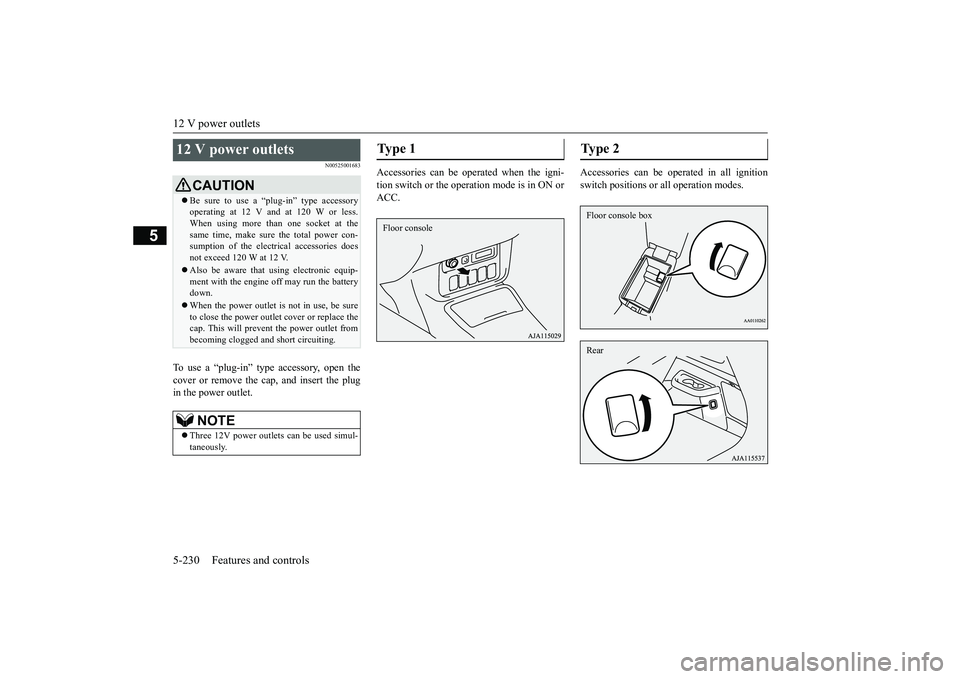
Accessories can be operated when the igni-tion switch or the operation mode is in ON orACC.
Accessories can be oper
ated in all ignition
switch positions or all operation modes.
12 V power outlets
CAUTIONBe sure to use a “plug-in” type accessoryoperating at 12 V and at 120 W or less.When using more than one socket at thesame time, make sure the total power con-sumption of the electrical accessories doesnot exceed 120 W at 12 V.Also be aware that
using electronic equip-
ment with the engine
off may run the battery
down.When the power outlet is not in use, be sureto close the power outle
t cover or replace the
cap. This will prevent the power outlet frombecoming clogged and short circuiting.NOTE
Three 12V power
outlets can be used simul-
taneously.
Type 1 Floor console
Ty p e 2 Floor console boxRear
BK0249100US.book 230 ページ 2017年5月10日 水曜日 午前8時49分
Page 317 of 441
Interior lights5-236 Features and controls
5
This equipment complies with FCC radiationexposure limits set forth for an uncontrolledenvironment. End Users must follow the spe-cific operating instruc
tions for satisfying RF
exposure compliance. This transmitter mustbe at least 12 inches (20 cm) from the userand must not be co-located or operating inconjunction with any other antenna or trans-mitter.The term “IC:” before the certification/regis-tration number only signi
fies that Industry
Canada technical spec
ifications were met.
N00525301660
N00525401531
CAUTIONThe transmitter has been tested and complieswith FCC and IC rules.Changes or modifica
tions not expressly
approved by the party responsible for com-pliance could void the
user’s authority to
operate the device.
Interior lights
NOTE
Be aware that leaving the light illuminatedwith the engine off may run the batterydown.Never leave the vehi
cle without checking
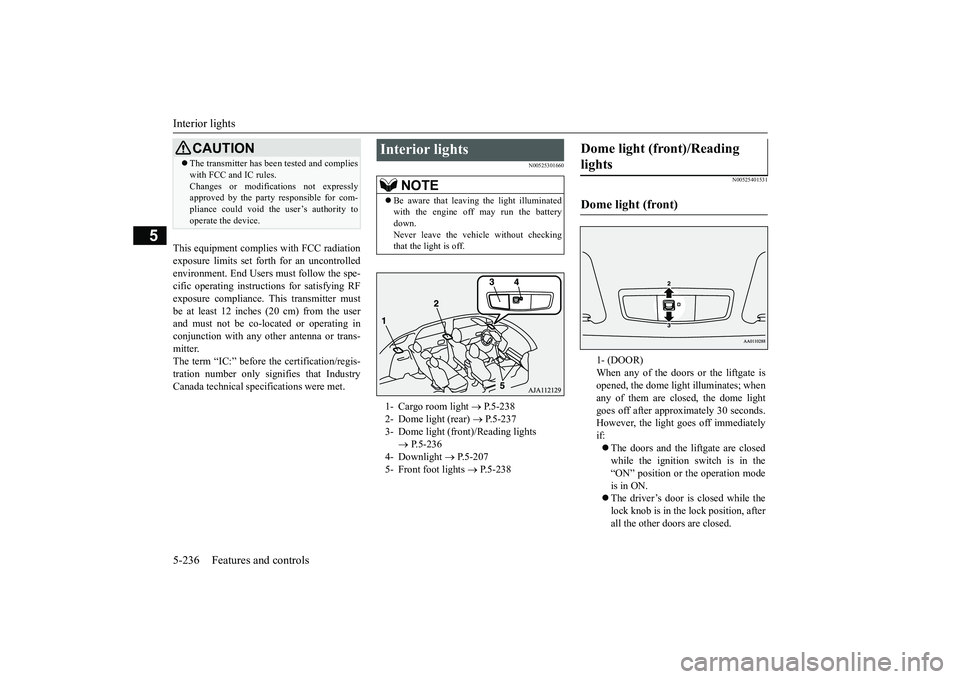
that the light is off.1- Cargo room light
P.5-238
2- Dome light (rear)
P.5-237
3- Dome light (front)/Reading lights
P.5-236
4- Downlight
P.5-207
5- Front foot lights
P.5-238
Dome light (front)/Reading lights Dome light (front)
1- (DOOR)When any of the doors or the liftgate isopened, the dome light illuminates; whenany of them are closed, the dome lightgoes off after approx
imately 30 seconds.
However, the light
goes off immediately
if:The doors and the liftgate are closedwhile the ignition switch is in the“ON” position or the operation modeis in ON.The driver’s door is closed while thelock knob is in the lock position, afterall the other doors are closed.
BK0249100US.book 236 ページ 2017年5月10日 水曜日 午前8時49分
Page 318 of 441
Interior lights
Features and controls 5-237
5
2- (OFF)The dome light stays off regardless of anydoor or the liftgate being opened or closed.
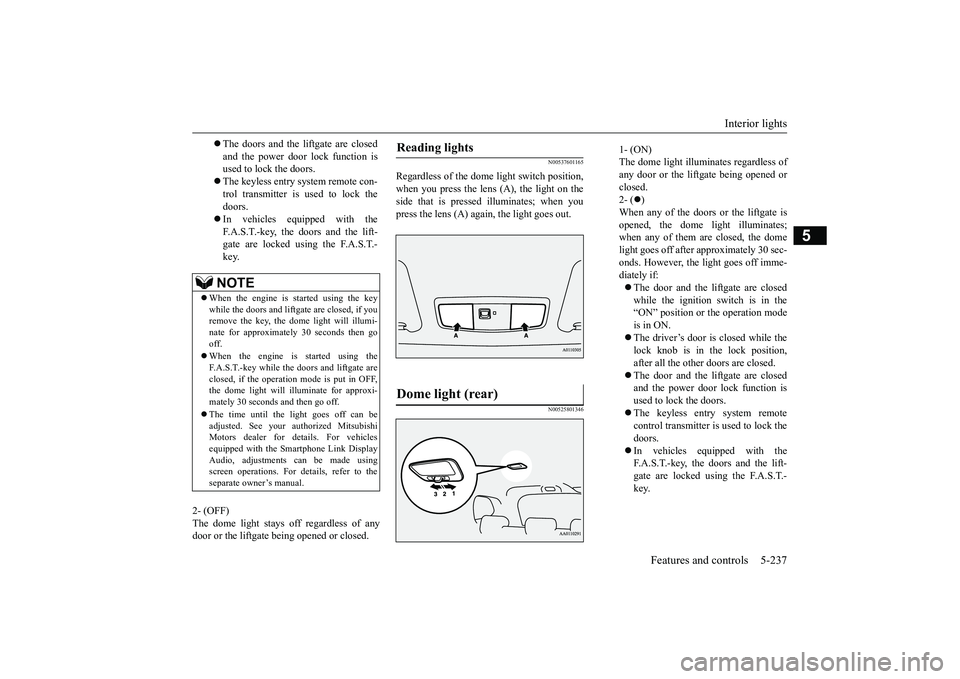
N00537601165
Regardless of the dome light switch position,when you press the lens (A), the light on theside that is pressed illuminates; when youpress the lens (A) agai
n, the light goes out.
N00525801346
The doors and the liftgate are closedand the power door lock function isused to lock the doors.The keyless entry system remote con-trol transmitter is used to lock thedoors.In vehicles equipped with theF.A.S.T.-key, the doors and the lift-gate are locked using the F.A.S.T.-key.NOTE
When the engine is
started using the key
while the doors and liftgate are closed, if youremove the key, the dom
e light will illumi-
nate for approximately 30 seconds then gooff.When the engine is started using theF.A.S.T.-key while the doors and liftgate areclosed, if the operation
mode is put in OFF,
the dome light will illuminate for approxi-mately 30 seconds and then go off.The time until the light goes off can beadjusted. See your authorized MitsubishiMotors dealer for details. For vehiclesequipped with the Smar
tphone Link Display
Audio, adjustments can be made usingscreen operations. For details, refer to theseparate owner’s manual.
Reading lights Dome light (rear)
1- (ON)The dome light illumin
ates regardless of
any door or the liftgate being opened orclosed.2- (
)
When any of the doors or the liftgate isopened, the dome li
ght illuminates;
when any of them are closed, the domelight goes off after approximately 30 sec-onds. However, the li
ght goes off imme-
diately if:The door and the liftgate are closedwhile the ignition switch is in the“ON” position or the operation modeis in ON.The driver’s door is closed while thelock knob is in the lock position,after all the other doors are closed.The door and the liftgate are closedand the power door lock function isused to lock the doors.The keyless entry system remotecontrol transmitter is used to lock thedoors.In vehicles equipped with theF.A.S.T.-key, the doors and the lift-gate are locked using the F.A.S.T.-key.
BK0249100US.book 237 ページ 2017年5月10日 水曜日 午前8時49分