service MITSUBISHI OUTLANDER III 2018 Owner's Manual
[x] Cancel search | Manufacturer: MITSUBISHI, Model Year: 2018, Model line: OUTLANDER III, Model: MITSUBISHI OUTLANDER III 2018Pages: 441, PDF Size: 13.71 MB
Page 241 of 441
Multi Information display - Type 15-160 Features and controls
5
N00556301233
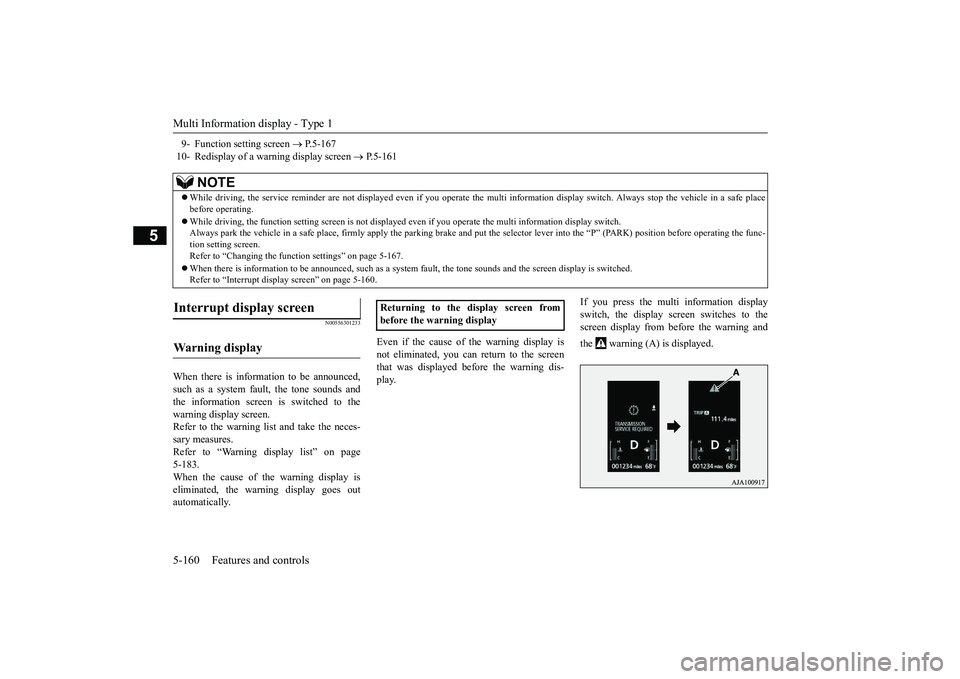
When there is information to be announced,such as a system fault, the tone sounds andthe information screen is switched to thewarning display screen.Refer to the warning li
st and take the neces-
sary measures. Refer to “Warning di
splay list” on page
5-183.When the cause of the warning display iseliminated, the warn
ing display goes out
automatically.
Even if the cause of the warning display isnot eliminated, you can return to the screenthat was displayed be
fore the warning dis-
play.
If you press the multi information displayswitch, the display screen switches to thescreen display from before the warning andthe warning (A) is displayed.
9- Function setting screen
P.5-167
10- Redisplay of a warning display screen
P.5-161
NOTE
While driving, the service reminder are not
displayed even if you operate the multi in
formation display switch. Always stop the
vehicle in a safe place
before operating.While driving, the function se
tting screen is not displayed even if you ope
rate the multi inform
ation display switch.
Always park the vehicle in a sa
fe place, firmly apply the park
ing brake and put the selector le
ver into the
Page 244 of 441
Multi Information display - Type 1
Features and controls 5-163
5
To return the display to 0, hold down themulti information display switch for about 2seconds or more. Only the currently dis-played value wi
ll be reset.
ExampleIf trip odometer is displayed, only tripodometer will be reset.Both trip odometers and cancount up to 9999.9 miles/kilometers.When a trip odometer goes past 9999.9miles/kilometers, it returns to 0.0 miles/kilometers.When disconnecting th
e battery terminal,
the memories of trip odometer displays
and are cleared, and their displays
return to “0.0 miles/kilometers”.
N00556701237
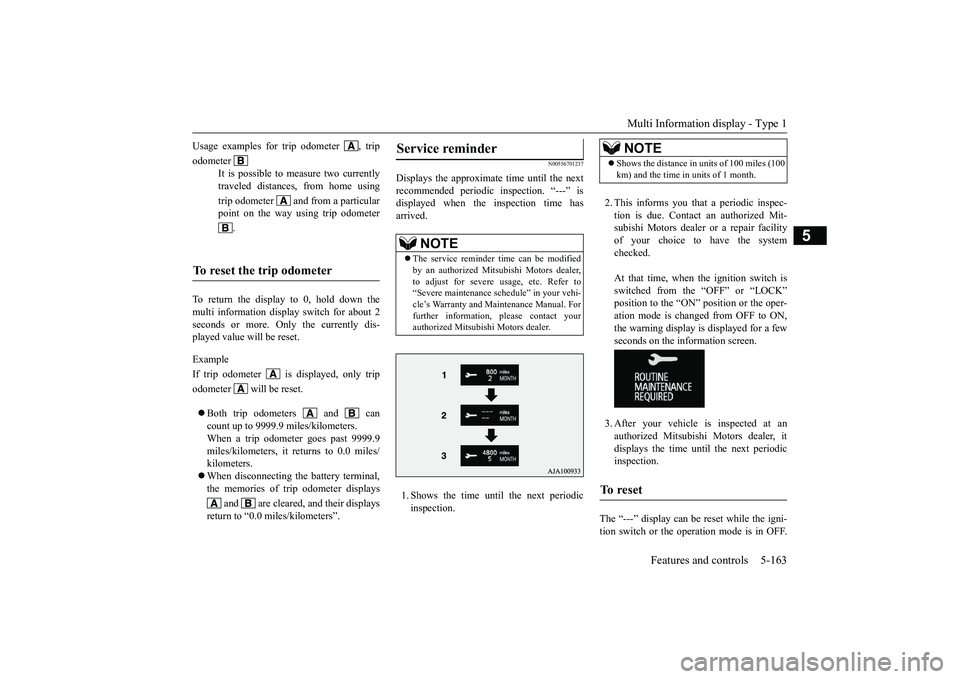
Displays the approximate time until the nextrecommended periodic
inspection. “---” is
displayed when the inspection time hasarrived.1. Shows the time until
the next periodic
inspection.
2. This informs you that a periodic inspec-tion is due. Contact
an authorized Mit-
subishi Motors dealer or a repair facilityof your choice to have the systemchecked.At that time, when the ignition switch isswitched from the “OFF” or “LOCK”position to the “ON” position or the oper-ation mode is changed from OFF to ON,the warning display is displayed for a fewseconds on the information screen.3. After your vehicle
is inspected at an
authorized Mitsubishi Motors dealer, itdisplays the time unt
il the next periodic
inspection.
The “---” display can be
reset while the igni-
tion switch or the operation mode is in OFF.
Usage examples for trip odometer , tripodometer
It is possible to
measure two currently
traveled distances, from home usingtrip odometer and from a particularpoint on the way using trip odometer
.
To reset the trip odometer
Service reminder
NOTE
The service reminder time can be modifiedby an authorized Mitsubishi Motors dealer,to adjust for severe usage, etc. Refer to“Severe maintenance sc
hedule” in your vehi-
cle’s Warranty and Ma
intenance Manual. For
further information,
please contact your
authorized Mitsubishi Motors dealer.
NOTE
Shows the distance in units of 100 miles (100km) and the time in units of 1 month.
To reset
BK0249100US.book 163 ページ 2017年5月10日 水曜日 午前8時49分
Page 245 of 441
Multi Information display - Type 15-164 Features and controls
5
When the display is reset, the time until thenext periodic inspection
is displayed and the
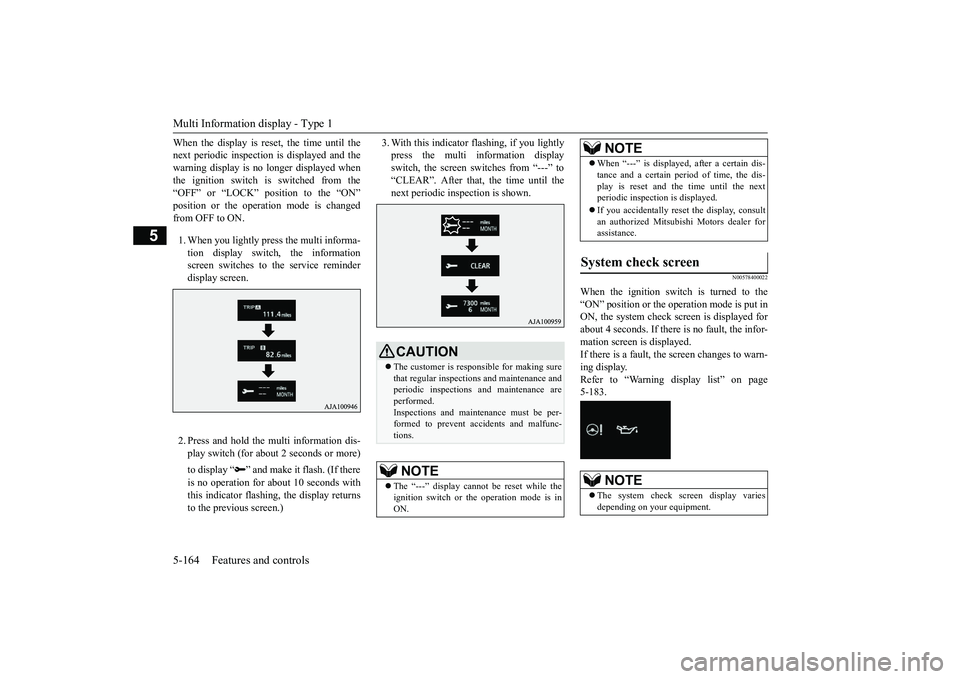
warning display is no longer displayed whenthe ignition switch is switched from the“OFF” or “LOCK” position to the “ON”from OFF to ON.1. When you lightly press the multi informa-tion display switch, the informationscreen switches to the service reminderdisplay screen.2. Press and hold the multi information dis-play switch (for about 2 seconds or more)to display “ ” and make it flash. (If thereis no operation for
about 10 seconds with
this indicator flashing, the display returnsto the previous screen.)
3. With this indicator
flashing, if you lightly
press the multi information displayswitch, the screen switches from “---” to“CLEAR”. After that, the time until thenext periodic inspection is shown.
N00578400022
When the ignition switch is turned to the“ON” position or the ope
ration mode is put in
ON, the system check sc
reen is displayed for
about 4 seconds. If there is no fault, the infor-mation screen is displayed.If there is a fault, the screen changes to warn-ing display.Refer to “Warning di
splay list” on page
5-183.
CAUTIONThe customer is responsible for making surethat regular inspections and maintenance andperiodic inspections
and maintenance are
performed.Inspections and mainte
nance must be per-
formed to prevent accidents and malfunc-tions.NOTE
The “---” display cannot
be reset while the
ignition switch or the operation mode is inON.
When “---” is displayed, after a certain dis-tance and a certain pe
riod of time, the dis-
play is reset and th
e time until the next
periodic inspection is displayed.If you accidentally reset
the display, consult
an authorized Mitsubishi Motors dealer forassistance.
System check screen
NOTE
The system check screen display variesdepending on your equipment.NOTE
BK0249100US.book 164 ページ 2017年5月10日 水曜日 午前8時49分
Page 254 of 441
Multi Information display - Type 2
Features and controls 5-173
5
1. Press and hold the mu
lti information dis-
play switch (for about 2 seconds or more)to switch from the setting mode screen tothe menu screen.Refer to “Changing th
e function settings”
on page 5-167.2. Lightly press the multi information dis-play switch to select “RESET” (return tothe factory settings).3. Press and hold the mu
lti information dis-
play switch (for about 5 seconds or more),the buzzer sounds and all of the functionsettings are returned to the factory set-tings.
N00555001291
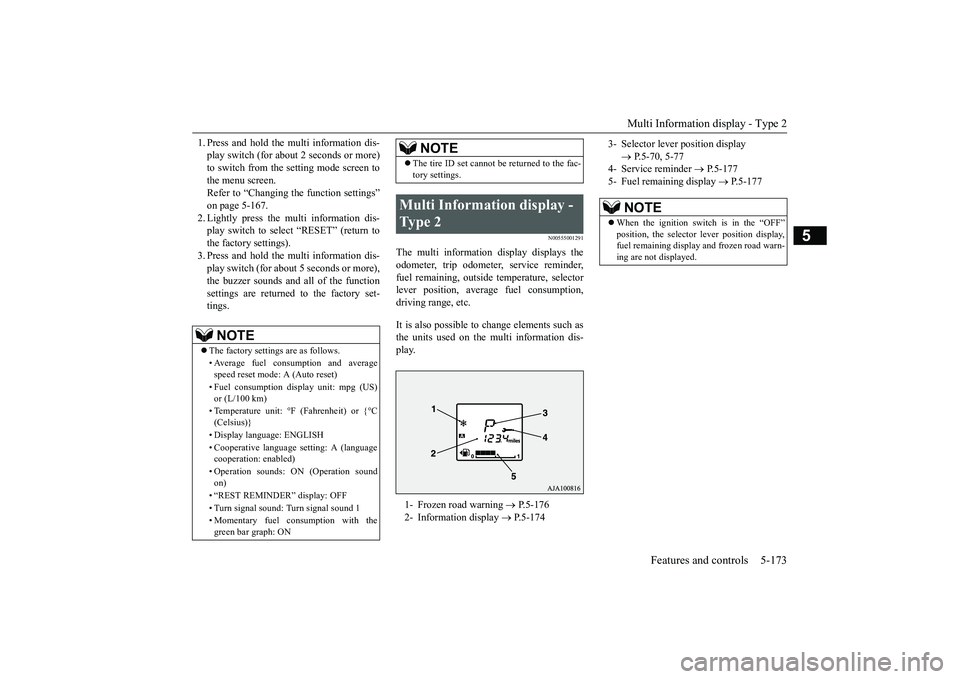
The multi information display displays theodometer, trip odometer, service reminder,fuel remaining, outside
temperature, selector
lever position, averag
e fuel consumption,
driving range, etc.It is also possible to change elements such asthe units used on the multi information dis-play.
NOTE
The factory settings are as follows.• Average fuel consumption and averagespeed reset mode: A (Auto reset)• Fuel consumption di
splay unit: mpg (US)
or (L/100 km)• Temperature unit: °F (Fahrenheit) or {°C(Celsius)}• Display language: ENGLISH• Cooperative language
setting: A (language
cooperation: enabled)• Operation sounds: ON (Operation soundon)• “REST REMINDER” display: OFF• Turn signal sound: Turn signal sound 1• Momentary fuel consumption with thegreen bar graph: ON
The tire ID set cannot be returned to the fac-tory settings.
Multi Information display - Type 2 1- Frozen road warning
P.5-176
2- Information display
P.5-174
NOTE
3- Selector lever position display
P.5-70, 5-77
4- Service reminder
P.5-177
5- Fuel remaining display
P.5-177
NOTE
When the ignition switch is in the “OFF”
lever position display,
fuel remaining display and frozen road warn-ing are not displayed.
BK0249100US.book 173 ページ 2017年5月10日 水曜日 午前8時49分
Page 255 of 441
Multi Information display - Type 25-174 Features and controls
5
N00574801070
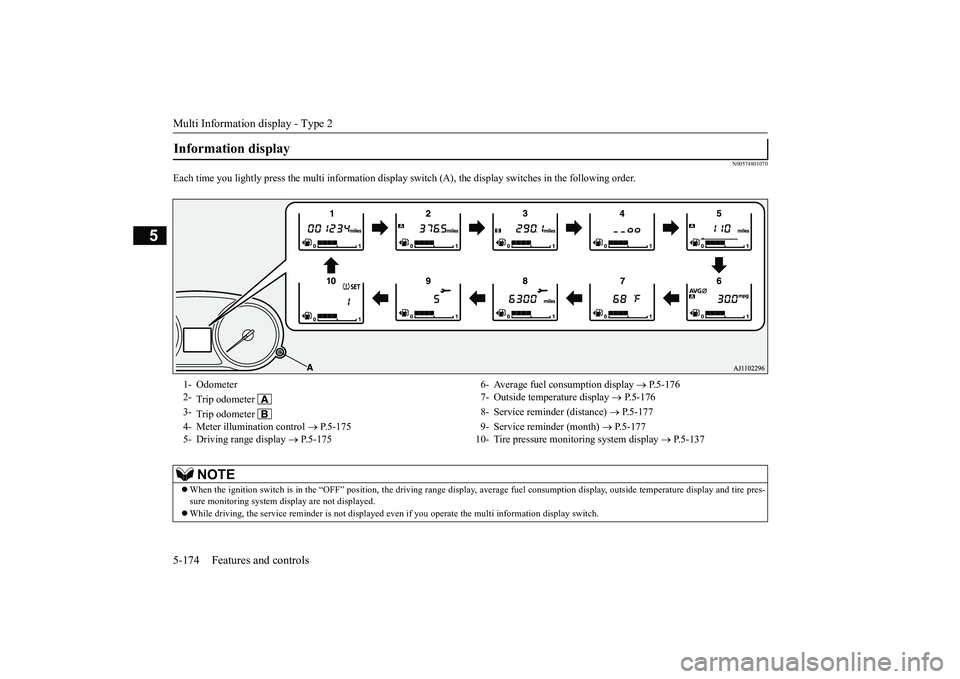
Each time you lightly press th
e multi information display switch (A), th
e display switches in
the following order.
Information display 1- Odometer 6- Average fuel
consumption display
P.5-176
2-
Trip odometer
7- Outside temperature display
P.5-176
3-
Trip odometer
8- Service reminder (distance)
P.5-177
4- Meter illumination control
P.5-175 9- Service reminder (month)
P.5-177
5- Driving range display
P.5-175 10- Tire pressure monitoring system display
P.5-137
NOTE
When the ignition switch is in the “OFF” position, the driving ra
nge display, average fuel consum
ption display, outside tempera
ture display and tire pres-
sure monitoring system di
splay are not displayed.
While driving, the service reminder is
not displayed even if you operate th
e multi information display switch.
BK0249100US.book 174 ページ 2017年5月10日 水曜日 午前8時49分
Page 258 of 441
Multi Information display - Type 2
Features and controls 5-177
5
N00556601193
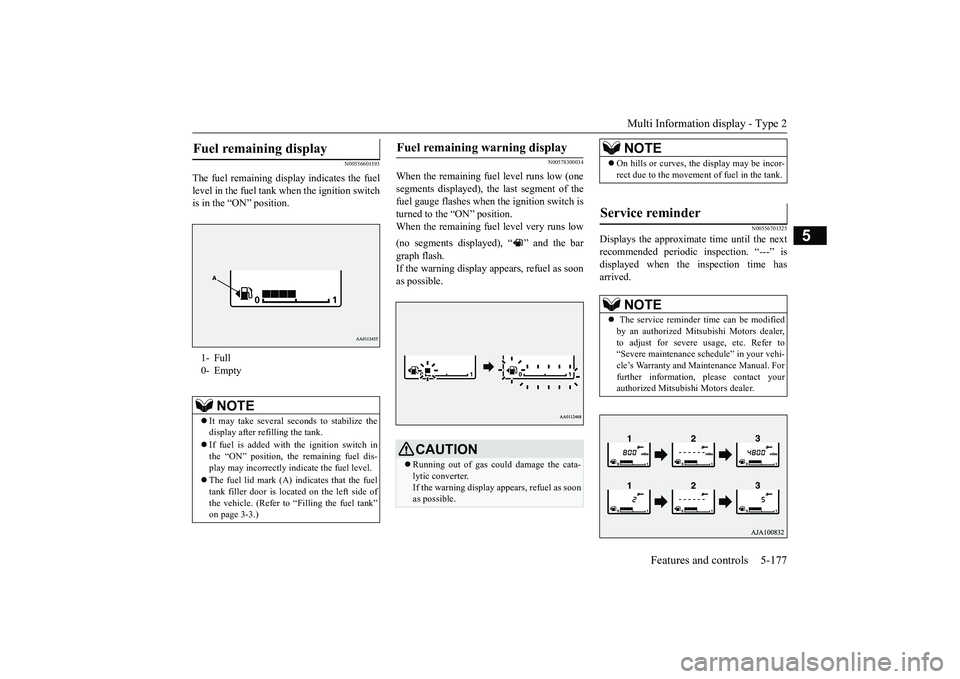
The fuel remain
ing display indicates the fuel
level in the fuel tank when the ignition switchis in the “ON” position.
N00578300034
When the remaining fuel level runs low (onesegments displayed), the last segment of thefuel gauge flashes when
the ignition switch is
turned to the “ON” position.When the remaining fuel level very runs low(no segments displayed), “ ” and the bargraph flash.If the warning display a
ppears, refuel as soon
as possible.
N00556701325
Displays the approximate time until the nextrecommended periodic inspection. “---” isdisplayed when the inspection time hasarrived.
Fuel remaining display 1- Full0- Empty
NOTE
It may take several se
conds to stabilize the
display after refilling the tank.If fuel is added with the ignition switch inthe “ON” position, th
e remaining fuel dis-
play may incorrectly i
ndicate the fuel level.
The fuel lid mark (A) indicates that the fueltank filler door is located on the left side ofthe vehicle. (Refer to “Filling the fuel tank”
Fuel remaining warning display
CAUTIONRunning out of gas coul
d damage the cata-
lytic converter.If the warning display appears, refuel as soonas possible.
NOTE
On hills or curves, the display may be incor-rect due to the movement of fuel in the tank.
Service reminder
NOTE
The service reminder
time can be modified
by an authorized Mitsubishi Motors dealer,to adjust for severe usage, etc. Refer to“Severe maintenance sc
hedule” in your vehi-
cle’s Warranty and Main
tenance Manual. For
further information,
please contact your
authorized Mitsubish
i Motors dealer.
BK0249100US.book 177 ページ 2017年5月10日 水曜日 午前8時49分
Page 259 of 441
Multi Information display - Type 25-178 Features and controls
5
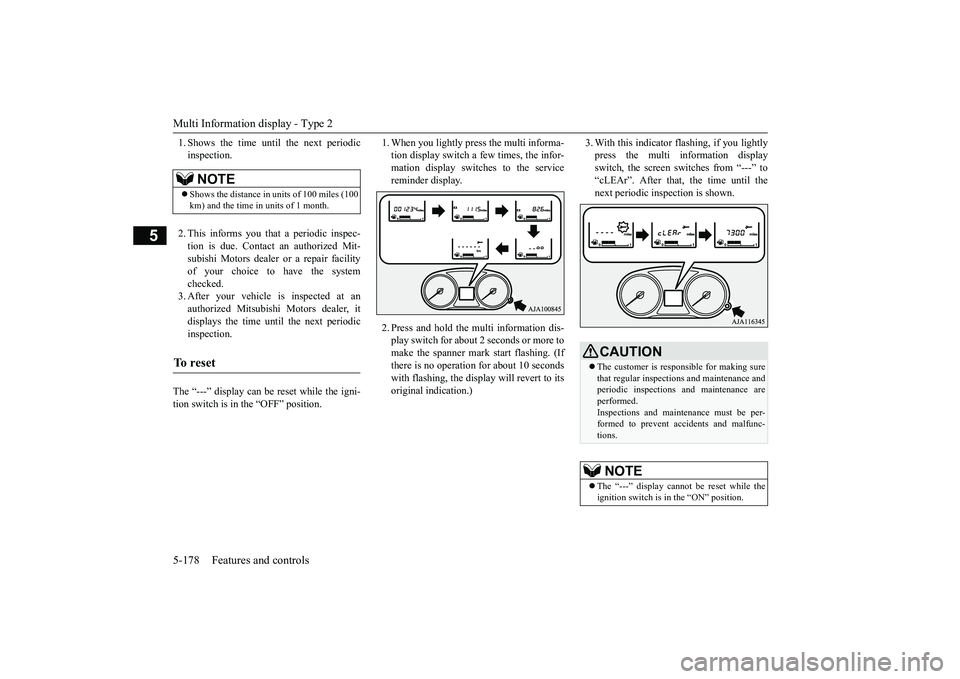
1. Shows the time until the next periodicinspection.2. This informs you that a periodic inspec-tion is due. Contact
an authorized Mit-
subishi Motors dealer or a repair facilityof your choice to have the systemchecked.3. After your vehicle is inspected at anauthorized Mitsubishi Motors dealer, itdisplays the time until the next periodicinspection.
The “---” display can be reset while the igni-tion switch is in the “OFF” position.
1. When you lightly press the multi informa-tion display switch a few times, the infor-mation display switches to the servicereminder display.2. Press and hold the mu
lti information dis-
play switch for about 2 seconds or more tomake the spanner mark start flashing. (Ifthere is no operation for about 10 secondswith flashing, the display will revert to itsoriginal indication.)
3. With this indicator flashing, if you lightlypress the multi information displayswitch, the screen sw
itches from “---” to
“cLEAr”. After that, the time until thenext periodic inspection is shown.
NOTE
Shows the distance in units of 100 miles (100km) and the time in units of 1 month.
To r e s e t
CAUTIONThe customer is responsible for making surethat regular inspections
and maintenance and
periodic inspections
and maintenance are
performed.Inspections and mainte
nance must be per-
formed to prevent accidents and malfunc-tions.NOTE
The “---” display cannot
be reset while the
ignition switch is in the “ON” position.
BK0249100US.book 178 ページ 2017年5月10日 水曜日 午前8時49分
Page 261 of 441
Multi Information display - Type 25-180 Features and controls
5
N00557101179
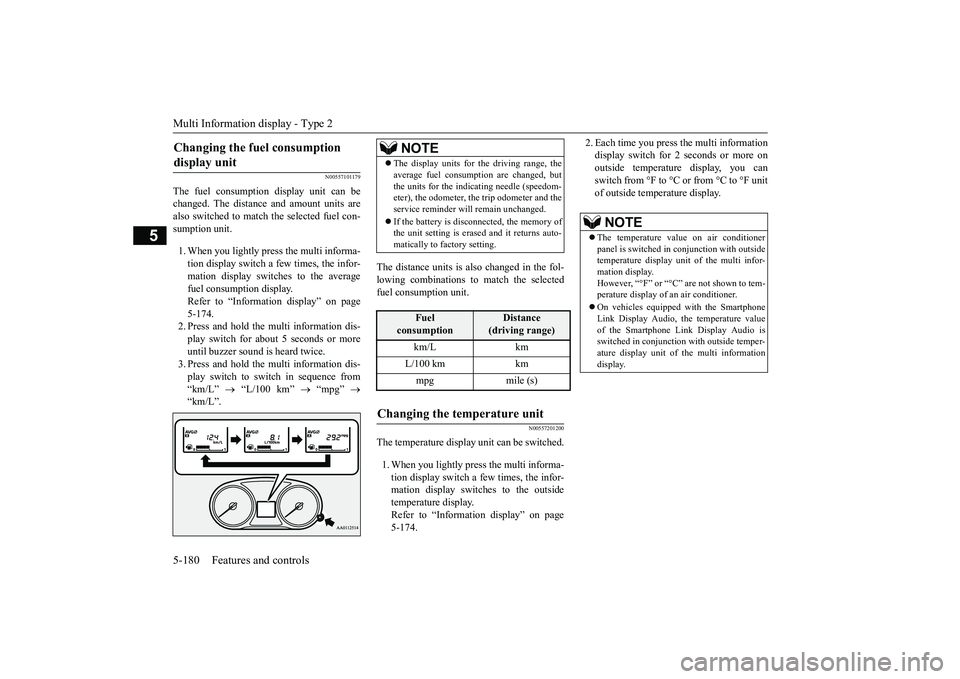
The fuel consumption display unit can bechanged. The distance and amount units arealso switched to match the selected fuel con-sumption unit.1. When you lightly press the multi informa-tion display switch a few times, the infor-mation display switches to the averagefuel consumption display.Refer to “Information display” on page5-174.2. Press and hold the multi information dis-play switch for about 5 seconds or moreuntil buzzer sound is
heard twice.
3. Press and hold the multi information dis-play switch to swit
ch in sequence from
“km/L”
“L/100 km”
“mpg”
The distance units is also changed in the fol-lowing combinations to match the selectedfuel consumption unit.
N00557201200
The temperature display unit can be switched.1. When you lightly press the multi informa-tion display switch a few times, the infor-mation display switches to the outsidetemperature display.Refer to “Information display” on page5-174.
2. Each time you press the multi informationdisplay switch for 2 seconds or more onoutside temperatur
e display, you can
switch from °F to °C or from °C to °F unitof outside temperature display.
Changing the fuel consumption display unit
NOTE
The display units for the driving range, theaverage fuel consumption are changed, butthe units for the indica
ting needle (speedom-
eter), the odometer, the trip odometer and theservice reminder will
remain unchanged.
If the battery is disconnected, the memory ofthe unit setting is erased and it returns auto-matically to factory setting.
Fuel
consumption
Distance
(driving range)
L/100 km kmmpg mile (s)
Changing the temperature unit
NOTE
The temperature value on air conditionerpanel is switched in
conjunction with outside
temperature display unit of the multi infor-mation display.However, “°F” or “°C” are not shown to tem-perature display of
an air conditioner.
On vehicles equippe
d with the Smartphone
Link Display Audio, the temperature valueof the Smartphone Li
nk Display Audio is
switched in conjunction
with outside temper-
ature display unit of
the multi information
display.
BK0249100US.book 180 ページ 2017年5月10日 水曜日 午前8時49分
Page 270 of 441

Indicator light, warning light, and information screen display list (multi information display - Type 1)
Features and controls 5-189
5
You try to release the Elec
tric parking brake switch
without depressing the brake pedal.
Refer to “Electric parki
ng brake” on page 5-54.
The Electric parking brak
e has been automatically
applied.
Refer to “Brake auto hold” on page 5-93.
The brake auto hold is automatically canceled
. Refer to “Brake auto hold” on page 5-93.
The brake auto hold is not available. Re
fer to “Brake auto hold” on page 5-93.
The Electric parking brake is not automatically applied because there is a fault in the Electric park-ing brake system.
When the ignition switch is
turned off or the opera-
tion mode is put in OFF, pl
ace the selector lever in
the “P” (PARK) position and depress the brake pedal more firmly than usual with the right foot.Then, operate the ignition switch or the engine switch.We recommend you to have the brake auto hold sys-tem inspected by a MITSUBISHI MOTORS Autho-rized Service Point.Refer to “Brake auto hold” on page 5-93.
Screen
Cause
Do this (Reference)
BK0249100US.book 189 ページ 2017年5月10日 水曜日 午前8時49分
Page 280 of 441
Indicator light, warning light, and information screen display list (multi information display - Type 1)
Features and controls 5-199
5
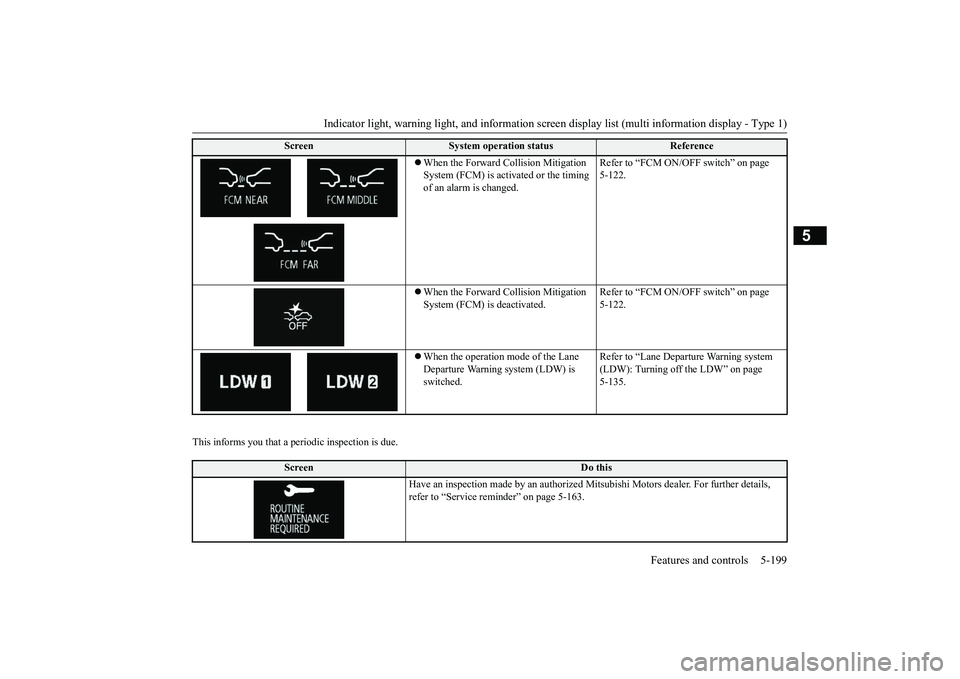
This informs you that a periodic inspection is due.
When the Forward Collision Mitigation System (FCM) is acti
vated or the timing
of an alarm is changed.
Refer to “FCM ON/OFF switch” on page 5-122.
When the Forward Collision Mitigation System (FCM) is deactivated.
Refer to “FCM ON/OFF switch” on page 5-122.
When the operation mode of the Lane Departure Warning system (LDW) is switched.
Refer to “Lane Departure Warning system (LDW): Turning off the LDW” on page 5-135.
Screen
Do this
Have an inspection made by an authorized Mi
tsubishi Motors dealer
. For further details,
refer to “Service remin
der” on page 5-163.
Screen
System operation status
Reference
BK0249100US.book 199 ページ 2017年5月10日 水曜日 午前8時49分