tow MITSUBISHI OUTLANDER III 2018 Owner's Manual
[x] Cancel search | Manufacturer: MITSUBISHI, Model Year: 2018, Model line: OUTLANDER III, Model: MITSUBISHI OUTLANDER III 2018Pages: 441, PDF Size: 13.71 MB
Page 193 of 441
Adaptive Cruise Control System (ACC) (if so equipped)5-112 Features and controls
5
N00576900036
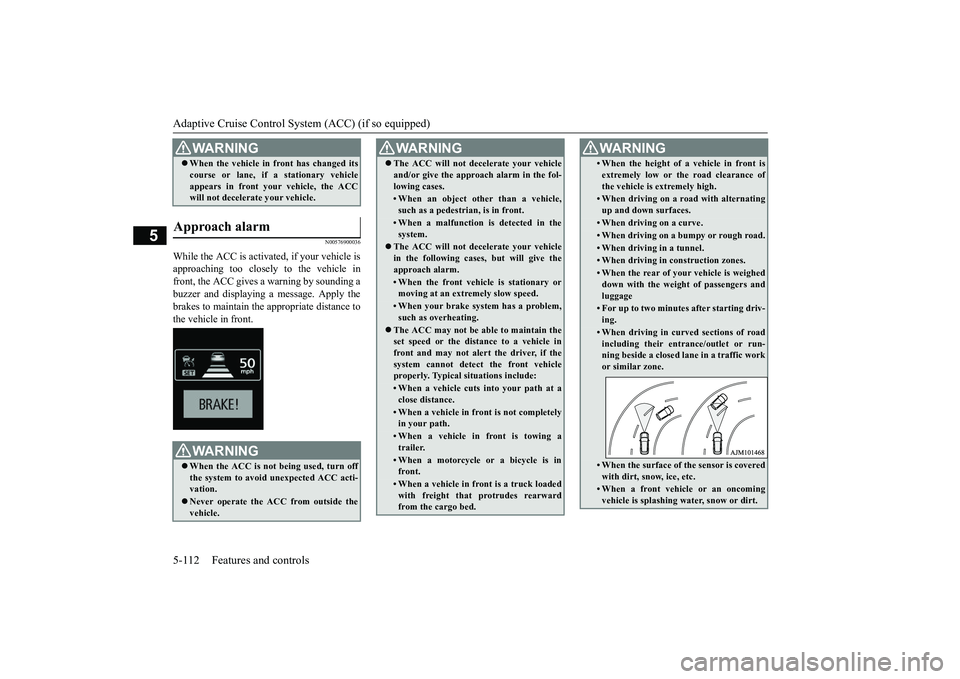
While the ACC is activated, if your vehicle isapproaching too closely to the vehicle infront, the ACC gives a warning by sounding abuzzer and displaying a message. Apply thebrakes to maintain the appropriate distance tothe vehicle in front.When the vehicle in
front has changed its
course or lane, if a stationary vehicleappears in front you
r vehicle, the ACC
will not decelerate your vehicle.
Approach alarm
WA R N I N GWhen the ACC is not being used, turn offthe system to avoid
unexpected ACC acti-
vation.Never operate the AC
C from outside the
vehicle.WA R N I N G
The ACC will not decelerate your vehicleand/or give the approach alarm in the fol-lowing cases.• When an object other than a vehicle,such as a pedestri
an, is in front.
• When a malfunction is detected in thesystem.
The ACC will not decelerate your vehiclein the following cases, but will give theapproach alarm.• When the front vehicle is stationary ormoving at an extr
emely slow speed.
• When your brake system has a problem,such as overheating.
The ACC may not be able to maintain theset speed or the dist
ance to a vehicle in
front and may not alert the driver, if thesystem cannot detect the front vehicleproperly. Typical situations include: • When a vehicle cuts
into your path at a
close distance.• When a vehicle in front is not completelyin your path.• When a vehicle in front is towing atrailer.• When a motorcycle or a bicycle is infront.• When a vehicle in fr
ont is a truck loaded
with freight that protrudes rearwardfrom the cargo bed.WA R N I N G
• When the height of a vehicle in front isextremely low or the road clearance ofthe vehicle is extremely high.• When driving on a r
oad with alternating
up and down surfaces.• When driving on a curve.• When driving on a bumpy or rough road.• When driving in a tunnel.• When driving in construction zones.• When the rear of your vehicle is weigheddown with the weight of passengers andluggage• For up to two minutes after starting driv-ing.• When driving in curved sections of roadincluding their entrance/outlet or run-ning beside a closed lane in a traffic workor similar zone.• When the surface of th
e sensor is covered
with dirt, snow, ice, etc.• When a front vehicle or an oncomingvehicle is splashing wa
ter, snow or dirt.
WA R N I N G
BK0249100US.book 112 ページ 2017年5月10日 水曜日 午前8時49分
Page 194 of 441

Adaptive Cruise Control System (ACC) (if so equipped)
Features and controls 5-113
5
N00581500027
There are two ways to increase the set speed.The set speed will increase by 1 mph (1km/h) every time you push up the “RES +”switch while the ACC is activated. If youhold the switch pushed up, the set speedincreases in 5 mph (5 km/h) increments.
When the accelerator
pedal is depressed
while driving with the ACC control working,you can accelerate the vehicle beyond thepresently set speed.When the vehicle speed reaches your desiredspeed, push down and release the “SET -”
a winding road.
Never use the ACC in the following situa-tions:• In heavy traffic.• On winding roads.• On slippery roads, such as icy, snow-cov-ered or dirt roads.• In adverse weather conditions, such asrain, snow or sand storms, etc.• On steep downslopes.• When the inclination of a road fre-quently changes.• When the approach alarm frequentlysounds.• When your vehicle is towed or is towinganother vehicle.• When your vehicle is on a chassis dyna-mometer or free rollers.• When tire inflation pressures are notadequate.• When the temporary sp
are tire is being
used.• When the radar sensor and/or its sur-rounding area are damaged or deformed.WA R N I N G
CAUTIONTo maintain proper performance of the ACC:• Always clean the surface of the radar sen-sor.• Avoid impacting the radar sensor or its sur-rounding area.• Do not put a sticker on the radar sensor orits surrounding area.• Do not paint the radar sensor.• Do not install a grill guard.• Do not modify the radar sensor or its sur-rounding area.• Always use tires of the same size, sametype, and same brand, and which have nosignificant wear differences.• Do not modify the vehicle’s suspension.
To increase the set speed
By using the “RES +” switch:
NOTE
There is some time
lag until the vehicle
begins accelerating to
the new set speed after
the set speed has been changed.The set speed can be changed even whileyour vehicle is followi
ng a vehicle in front
using the ACC. In this case, however,although the set speed itself is increased,your vehicle will
not accelerate.
When the switch is held, a buzzer will soundevery time the set speed changes
By using the accelerator pedal:
BK0249100US.book 113 ページ 2017年5月10日 水曜日 午前8時49分
Page 203 of 441
Forward Collision Mitigation System (FCM) (if so equipped)5-122 Features and controls
5
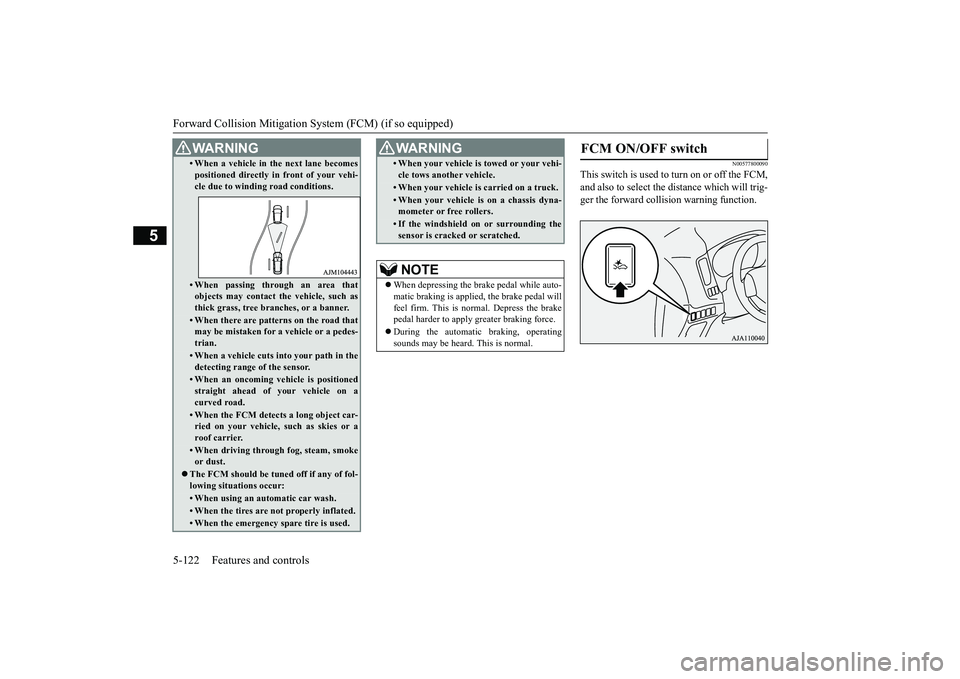
N00577800090
This switch is used to turn on or off the FCM,and also to select the distance which will trig-ger the forward colli
sion warning function.
• When a vehicle in the next lane becomespositioned directly in
front of your vehi-
cle due to winding road conditions.• When passing through an area thatobjects may contact th
e vehicle, such as
thick grass, tree br
anches, or a banner.
• When there are patterns on the road thatmay be mistaken for
a vehicle or a pedes-
trian.• When a vehicle cuts into your path in thedetecting range of the sensor.• When an oncoming vehicle is positionedstraight ahead of your vehicle on acurved road.• When the FCM detects a long object car-ried on your vehicle,
such as skies or a
roof carrier.• When driving through fog, steam, smokeor dust.
The FCM should be tuned off if any of fol-lowing situations occur:• When using an automatic car wash.• When the tires are not properly inflated. • When the emergency spare tire is used.WA R N I N G
• When your vehicle is
towed or
your vehi-
cle tows another vehicle.• When your vehicle is
carried on a truck.
• When your vehicle is on a chassis dyna-mometer or free rollers.• If the windshield on or surrounding thesensor is cracked or scratched.NOTE
When depressing the brake pedal while auto-matic braking is applie
d, the brake pedal will
feel firm. This is normal. Depress the brakepedal harder to apply
greater braking force.
During the automatic
braking, operating
sounds may be heard.
This is normal.
WA R N I N G
FCM ON/OFF switch
BK0249100US.book 122 ページ 2017年5月10日 水曜日 午前8時49分
Page 210 of 441
Blind Spot Warning (BSW) (with Lane Change Assist) (if so equipped)
Features and controls 5-129
5
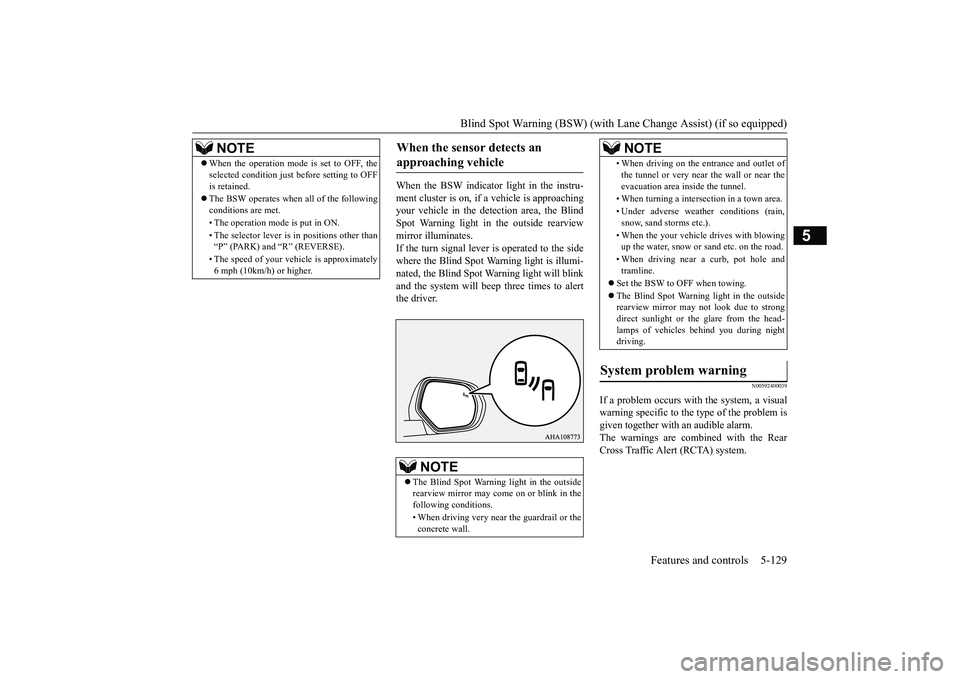
When the BSW indicator light in the instru-ment cluster is on, if a vehicle is approachingyour vehicle in the dete
ction area, the Blind
Spot Warning light in the outside rearviewmirror illuminates.If the turn signal lever is operated to the sidewhere the Blind Spot Warning light is illumi-nated, the Blind Spot Warning light will blinkand the system will beep three times to alertthe driver.
N00592400039
If a problem occurs with the system, a visualwarning specific to the type of the problem isgiven together with an audible alarm.The warnings are combined with the RearCross Traffic Alert (RCTA) system.
NOTE
When the operation mode is set to OFF, theselected condition just
before setting to OFF
is retained.The BSW operates when all of the followingconditions are met.• The operation mode is put in ON.• The selector lever is
in positions other than
“P” (PARK) and “R” (REVERSE).• The speed of your vehi
cle is approximately
6 mph (10km/h) or higher.
When the sensor detects an approaching vehicle
NOTE
The Blind Spot Warni
ng light in the outside
rearview mirror may come
on or blink in the
following conditions.• When driving very near the guardrail or theconcrete wall.
• When driving on the entrance and outlet ofthe tunnel or very near
the wall or near the
evacuation area inside the tunnel.• When turning a intersection in a town area.• Under adverse
weather condi
tions (rain,
snow, sand storms etc.).• When the your vehicle
drives with blowing
up the water, snow or sand etc. on the road.• When driving near a curb, pot hole andtramline.
Set the BSW to OFF when towing.The Blind Spot Warning light in the outsiderearview mirror may
not look due to strong
direct sunlight or th
e glare from the head-
lamps of vehicles
behind you during night
driving.
System problem warning
NOTE
BK0249100US.book 129 ページ 2017年5月10日 水曜日 午前8時49分
Page 292 of 441
Combination headlights and dimmer switch
Features and controls 5-211
5
light in the instrument
cluster i
ndicates when
the headlights are on high beam.
N00550001209
You can flash the high beams by pulling thelever gently toward you (2). The lights willgo back to normal when you let go. While thehigh beam is on, you will see a blue light onthe instrument panel.
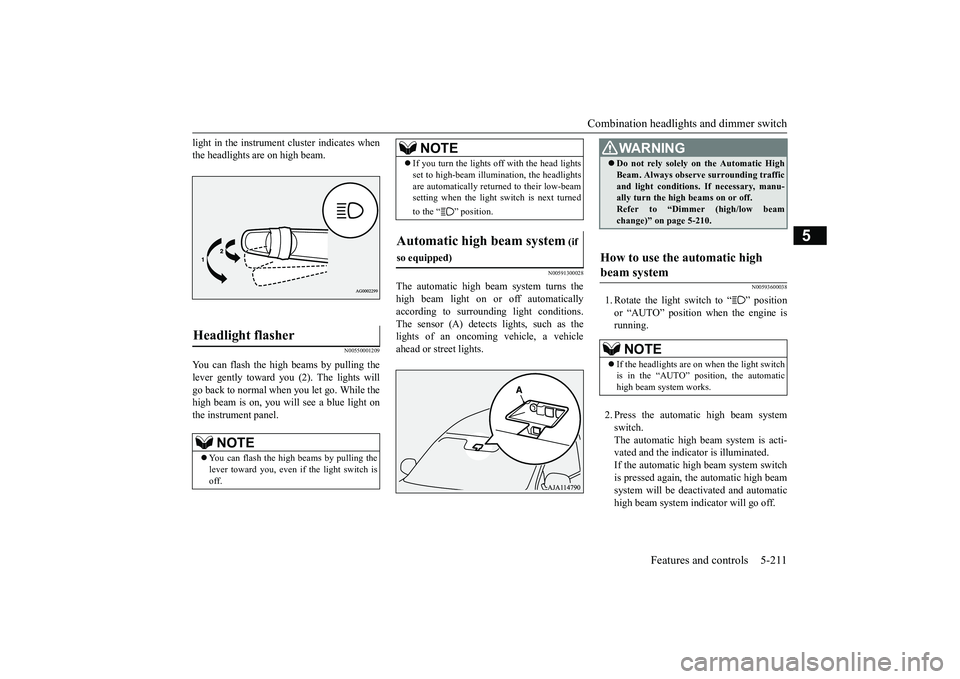
N00591300028
The automatic high beam
system turns the
high beam light on or
off automatically
according to surrounding light conditions.The sensor (A) detects lights, such as thelights of an oncoming
vehicle, a vehicle
ahead or street lights.
N00593600038
1. Rotate the light switch to “ ” positionor “AUTO” position when the engine isrunning.2. Press the automatic high beam systemswitch.The automatic high beam system is acti-vated and the indicator is illuminated.If the automatic high beam system switchis pressed again, the automatic high beamsystem will be deac
tivated and automatic
high beam system indicator will go off.
Headlight flasher
NOTE
You can flash the high beams by pulling thelever toward you, even if the light switch isoff.
If you turn the lights off with the head lightsset to high-beam illumin
ation, the headlights
are automatically returned to their low-beamsetting when the light
switch is next turned
to the “ ” position.
Automatic high beam system
(if
so equipped)
NOTE
WA R N I N GDo not rely solely on the Automatic HighBeam. Always observe surrounding trafficand light conditions. If necessary, manu-ally turn the high beams on or off.Refer to “Dimmer (high/low beamchange)” on page 5-210.
How to use the automatic high beam system
NOTE
If the headlights are on when the light switchis in the “AUTO” position, the automatichigh beam system works.
BK0249100US.book 211 ページ 2017年5月10日 水曜日 午前8時49分
Page 293 of 441
Combination headlights and dimmer switch5-212 Features and controls
5
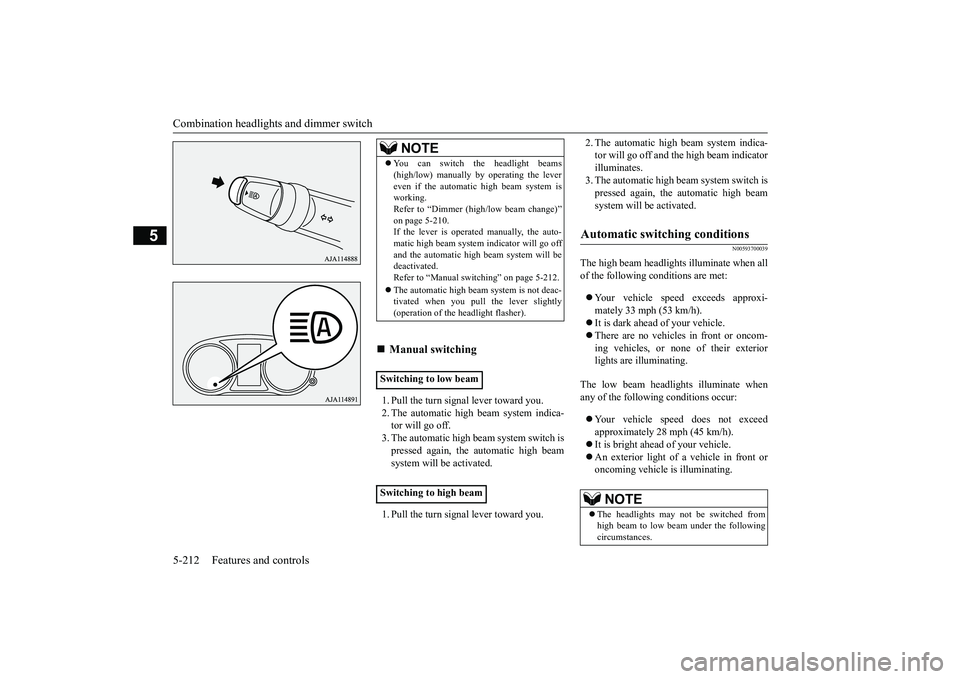
1. Pull the turn signal lever toward you.2. The automatic high beam system indica-tor will go off.3. The automatic high beam system switch ispressed again, the
automatic high beam
system will be activated.1. Pull the turn signal lever toward you.
2. The automatic high beam system indica-tor will go off and the high beam indicatorilluminates.3. The automatic high beam system switch ispressed again, the
automatic high beam
system will be activated.
N00593700039
The high beam headlight
s illuminate when all
of the following conditions are met:Your vehicle speed exceeds approxi-mately 33 mph (53 km/h).It is dark ahead of your vehicle.There are no vehicles in front or oncom-ing vehicles, or none of their exteriorlights are illuminating.
The low beam headlights illuminate whenany of the following conditions occur:Your vehicle speed does not exceedapproximately 28 mph (45 km/h).It is bright ahead of your vehicle.An exterior light of a vehicle in front oroncoming vehicle
is illuminating.
NOTE
You can switch the headlight beams(high/low) manually by operating the levereven if the automatic high beam system isworking.Refer to “Dimmer (hi
gh/low beam change)”
on page 5-210.If the lever is operated manually, the auto-matic high beam system
indicator will go off
and the automatic high beam system will bedeactivated.Refer to “Manual switching” on page 5-212.The automatic high beam
system is not deac-
tivated when you pull the lever slightly(operation of the headlight flasher).
Manual switching
Switching to low beamSwitching to high beam
Automatic switching conditions
NOTE
The headlights may not be switched fromhigh beam to low beam under the followingcircumstances.
BK0249100US.book 212 ページ 2017年5月10日 水曜日 午前8時49分
Page 294 of 441
Combination headlights and dimmer switch
Features and controls 5-213
5
The sensitivity of the sensor can be temporar-ily lowering in the following ways.1. Park your vehicle in
a safe place and the
ignition switch is turned to the “OFF” or“LOCK” position or the operation modeis put in OFF.2. Press the automatic high beam systemswitch more than 15 times within 5 sec-onds after operation mode is turned on.
• A vehicle in front
or oncoming vehicle is
hindered by any object such as continuousbends, elevated median
/island, traffic signs,
roadside trees.• Your vehicle passes
an oncoming vehicle
suddenly on a bend with poor visibility.• Another vehicle crosse
s ahead of your vehi-
cle.
The headlights may remain at low beam (orbe switched from high beam to low beam)when a reflective object (e.g. street light,traffic signal, notic
eboard and signboard)
reflects light. Any of the following
factors may influence
the headlight beam switching timing:• How brightly the exteri
or lights of a vehicle
in front or oncoming
vehicle il
luminate.
• Movement or direction of a vehicle in frontor oncoming vehicle.• Only right or left exte
rior light of a vehicle
in front or oncoming
vehicle is illuminat-
ing.• A vehicle in front or
oncoming vehicle is a
motorcycle.• Road conditions (gradient, bends and roadsurface).• The number of occupants and luggage load.The automatic high beam system recognisesenvironmental conditi
ons by sensing a light
source ahead of your vehicle. Therefore, youmay feel like someth
ing is not quite right
when the headlight beams are switched auto-matically.NOTE
The system may not de
tect a light vehicle
such as a bicycle.The system may not detect an ambientbrightness precisely. Th
is causes the traffic
to be dazzled by high beam or the low beamto be maintained. In such cases, you shouldswitch the headlight beams manually.• In bad weather (heavy rain, fog, snow orsandstorm).• The windshield is
dirty or fogged up.
• The windshield is cracked or broken.• The sensor is deformed or dirty.• A light, which is similar to the headlights ortail lights, is shin
ing around your vehicle.
• A vehicle in front
or oncoming vehicle is
driven without lights,
the exterior lights are
dirty or discoloured, or the direction of theheadlight beams is adjusted improperly. • It becomes dark and bright suddenly andcontinuously around your vehicle.• Your vehicle is driv
en on uneven surfaces.
• Your vehicle is driven on a winding road.• A reflective object su
ch as a noticeboard or
a mirror reflects a light ahead of your vehi-cle.• When lights of the vehi
cle in front or head-
lights of an oncoming ve
hicle blend into the
other lights.• The rear end of a vehicle in front (such as acontainer truck) re
flect a strong light.
• Your vehicle's headligh
t is broken or dirty.
NOTE
• Your vehicle is inclined
due to a flat tire or
towing.• The warning display appears.(Refer to “System problem warning” onpage 5-214.)good usage conditions: • Do not attempt to disassemble the sensor.• Do not affix a sticke
r or label on the wind-
shield near the sensor.• Avoid overload.• Do not modify your vehicle.• When the windshield is
replaced, use the
Mitsubishi Motors genuine parts.
To adjust the sensitivity of the sensor
NOTE
BK0249100US.book 213 ページ 2017年5月10日 水曜日 午前8時49分
Page 297 of 441
Headlight leveling swit
ch (if so equipped)
5-216 Features and controls
5
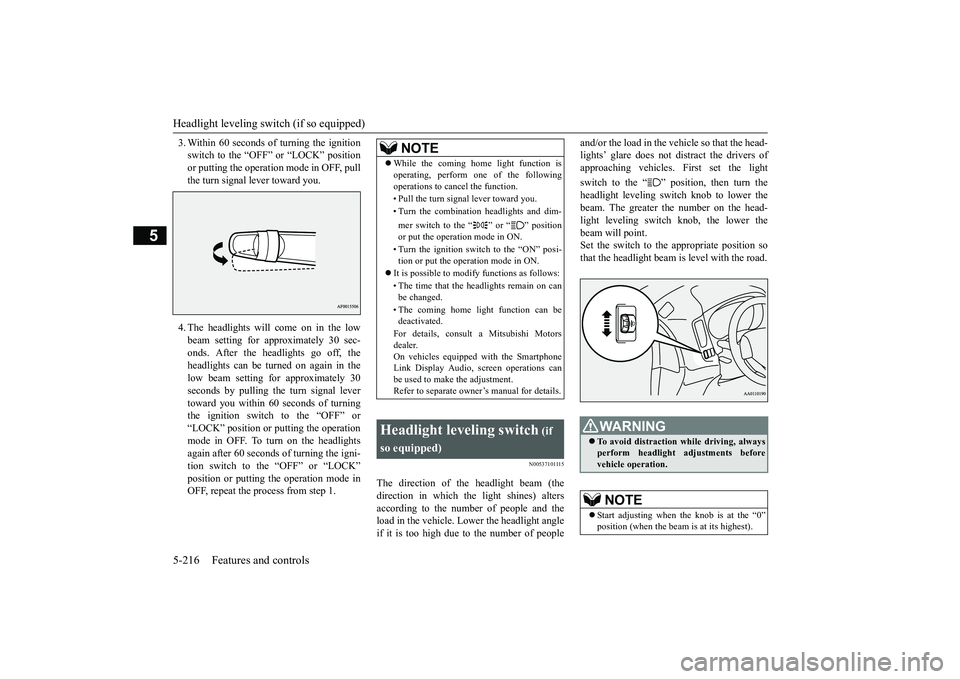
3. Within 60 seconds of turning the ignitionswitch to the “OFF” or “LOCK” positionor putting the operation mode in OFF, pullthe turn signal lever toward you.4. The headlights will come on in the lowbeam setting for approximately 30 sec-onds. After the headlights go off, theheadlights can be turned on again in thelow beam setting for approximately 30seconds by pulling the turn signal levertoward you within 60 seconds of turningthe ignition switch to the “OFF” or“LOCK” position or putting the operationmode in OFF. To turn on the headlightsagain after 60 seconds of turning the igni-tion switch to the “OFF” or “LOCK”position or putting th
e operation mode in
OFF, repeat the process from step 1.
N00537101115
The direction of the headlight beam (thedirection in which th
e light shines) alters
according to the number of people and theload in the vehicle. Lo
wer the headlight angle
if it is too high due to the number of people
and/or the load in the vehicle so that the head-lights’ glare does not distract the drivers ofapproaching vehicles. First set the lightswitch to the “ ” position, then turn theheadlight leveling switch knob to lower thebeam. The greater the number on the head-light leveling switch knob, the lower thebeam will point.Set the switch to the appropriate position sothat the headlight beam is level with the road.
NOTE
While the coming home light function isoperating, perform one of the followingoperations to canc
el the function.
• Pull the turn signal lever toward you.• Turn the combination headlights and dim-mer switch to the “ ” or “ ” positionor put the operation mode in ON.• Turn the ignition switch to the “ON” posi-tion or put the opera
tion mode in ON.
It is possible to modify functions as follows:• The time that the headlights remain on canbe changed.• The coming home light function can bedeactivated.For details, consult a Mitsubishi Motorsdealer.On vehicles equipped with the SmartphoneLink Display Audio, sc
reen operations can
be used to make the adjustment.Refer to separate owne
r’s manual for details.
Headlight leveling switch
(if
so equipped)
WA R N I N GTo avoid distraction wh
ile driving, always
perform headlight adjustments beforevehicle operation.NOTE
Start adjusting when the knob is at the “0”
is at its highest).
BK0249100US.book 216 ページ 2017年5月10日 水曜日 午前8時49分
Page 304 of 441
Wiper and washer switch
Features and controls 5-223
5
N00504601400
The windshield washer can be operated withthe ignition switch or the operation mode inON or ACC.The washer fluid will be sprayed onto thewindshield by pulling th
e lever toward you.
When the wipers are not in operation or inintermittent operation,
by pulling the lever
toward you, the wipers will operate severaltimes while the washer fluid is being sprayed.
By releasing the lever soon after pulling ittoward you, the washer
fluid will be sprayed
several times while the wipers are operatingseveral times.Intelligent washer will stop operating withany operation of the lever.
N00523201463
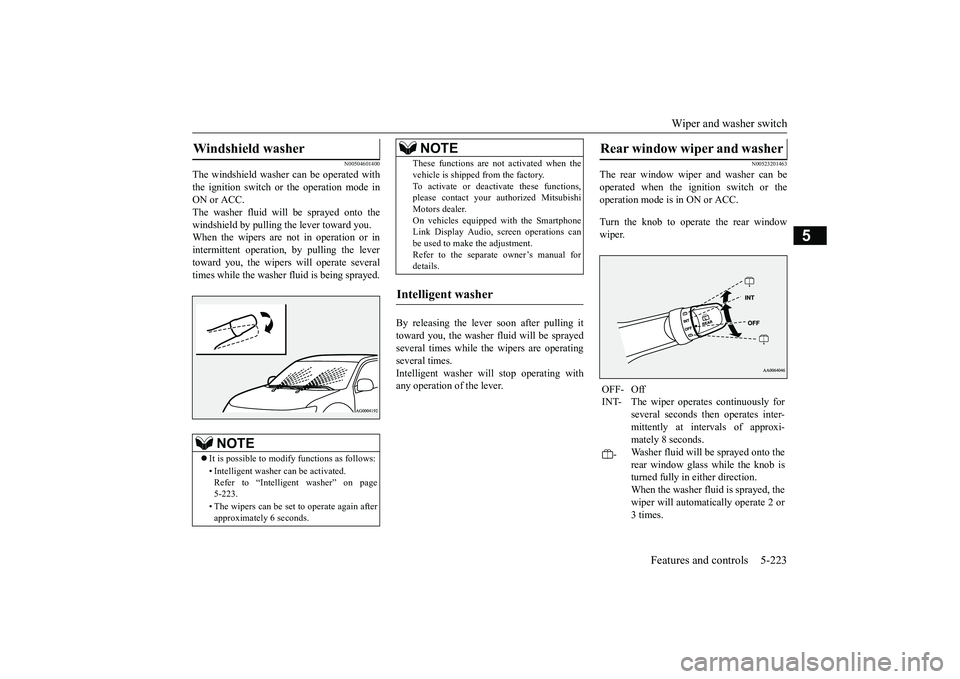
The rear window wiper and washer can beoperated when the ignition switch or theoperation mode is in ON or ACC.Turn the knob to operate the rear windowwiper.
Windshield washer
NOTE
It is possible to modify functions as follows:• Intelligent washer
can be activated.
Refer to “Intelligent washer” on page5-223.• The wipers can be set
to operate again after
approximately 6 seconds.
These functions are not activated when thevehicle is shipped from the factory.To activate or deacti
vate these functions,
please contact your authorized MitsubishiMotors dealer.On vehicles equippe
d with the Smartphone
Link Display Audio, sc
reen operations can
be used to make the adjustment.Refer to the separate
owner’s manual for
details.
Intelligent washer
NOTE
Rear window wiper and washer OFF- OffINT- The wiper operates continuously for
several seconds then operates inter-mittently at intervals of approxi-mately 8 seconds.
-
Washer fluid will be sprayed onto therear window glass while the knob isturned fully in either direction.When the washer fluid is sprayed, thewiper will automatically operate 2 or3 times.
BK0249100US.book 223 ページ 2017年5月10日 水曜日 午前8時49分
Page 325 of 441
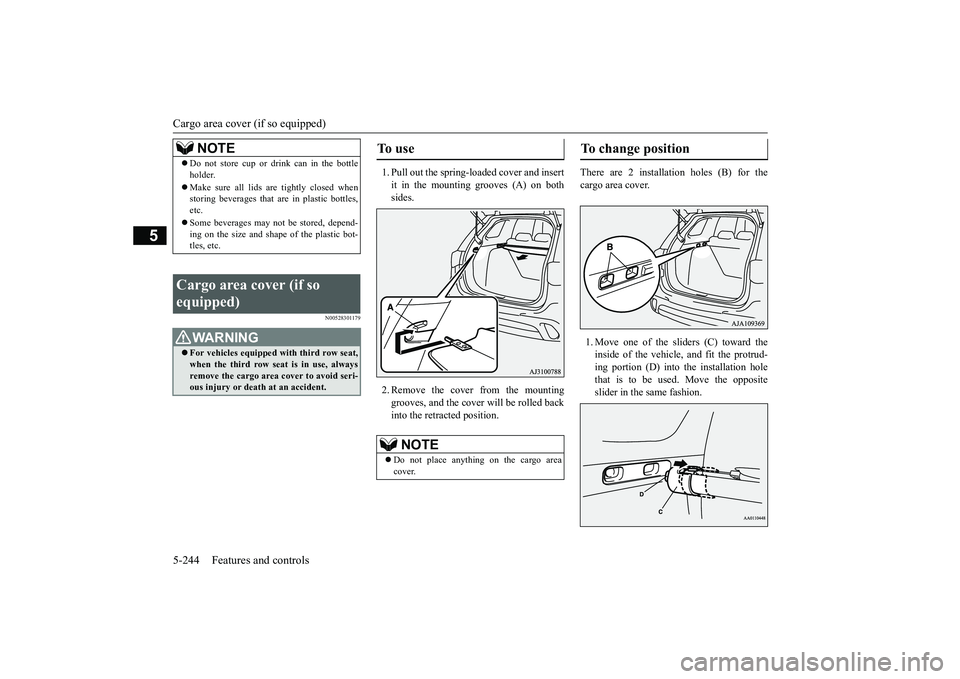
Cargo area cover (if so equipped)5-244 Features and controls
5
N00528301179
1. Pull out the spring-loaded cover and insertit in the mounting grooves (A) on bothsides.2. Remove the cover from the mountinggrooves, and the cover
will be rolled back
into the retracted position.
There are 2 installation holes (B) for thecargo area cover.1. Move one of the sliders (C) toward theinside of the vehicle, and fit the protrud-ing portion (D) into the installation holethat is to be used. Move the oppositeslider in the same fashion.
NOTE
Do not store cup or drink can in the bottleholder.Make sure all lids are tightly closed whenstoring beverages that
are in plastic bottles,
etc.Some beverages may not
be stored, depend-
ing on the size and shape of the plastic bot-tles, etc.
Cargo area cover (if so equipped)
WA R N I N GFor vehicles equipped with third row seat,when the third row seat
is in use, always
remove the cargo area
cover to avoid seri-
ous injury or deat
h at an accident.
To u s e
NOTE
Do not place anything on the cargo areacover.
To change position
BK0249100US.book 244 ページ 2017年5月10日 水曜日 午前8時49分