phone MITSUBISHI OUTLANDER PHEV 2018 Owner's Manual (in English)
[x] Cancel search | Manufacturer: MITSUBISHI, Model Year: 2018, Model line: OUTLANDER PHEV, Model: MITSUBISHI OUTLANDER PHEV 2018Pages: 538, PDF Size: 25.01 MB
Page 4 of 538
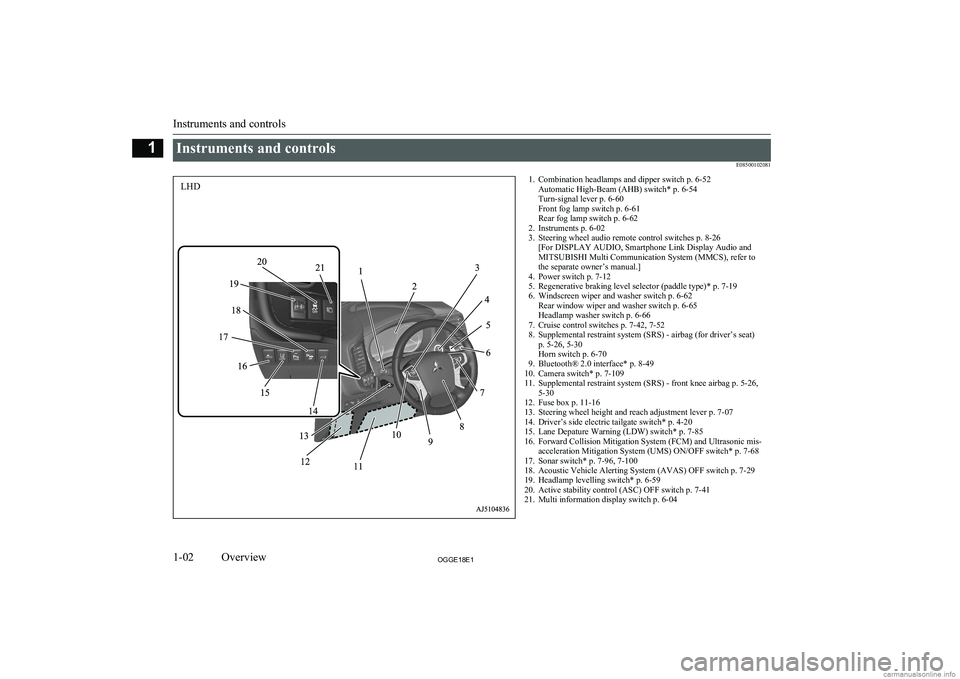
Instruments and controlsE085001020811. Combination headlamps and dipper switch p. 6-52Automatic High-Beam (AHB) switch* p. 6-54
Turn-signal lever p. 6-60
Front fog lamp switch p. 6-61
Rear fog lamp switch p. 6-62
2. Instruments p. 6-02
3. Steering wheel audio remote control switches p. 8-26 [For DISPLAY AUDIO, Smartphone Link Display Audio and
MITSUBISHI Multi Communication System (MMCS), refer to
the separate owner’s manual.]
4. Power switch p. 7-12
5. Regenerative braking level selector (paddle type)* p. 7-19
6. Windscreen wiper and washer switch p. 6-62 Rear window wiper and washer switch p. 6-65
Headlamp washer switch p. 6-66
7. Cruise control switches p. 7-42, 7-52
8. Supplemental restraint system (SRS) - airbag (for driver’s seat) p. 5-26, 5-30
Horn switch p. 6-70
9. Bluetooth® 2.0 interface* p. 8-49
10. Camera switch* p. 7-109
11. Supplemental restraint system (SRS) - front knee airbag p. 5-26, 5-30
12. Fuse box p. 11-16
13. Steering wheel height and reach adjustment lever p. 7-07
14. Driver’s side electric tailgate switch* p. 4-20
15. Lane Depature Warning (LDW) switch* p. 7-85
16. Forward Collision Mitigation System (FCM) and Ultrasonic mis- acceleration Mitigation System (UMS) ON/OFF switch* p. 7-68
17. Sonar switch* p. 7-96, 7-100
18. Acoustic Vehicle Alerting System (AVAS) OFF switch p. 7-29
19. Headlamp levelling switch* p. 6-59
20. Active stability control (ASC) OFF switch p. 7-41
21. Multi information display switch p. 6-04
Instruments and controls
1-02OGGE18E1Overview1LHD
Page 5 of 538
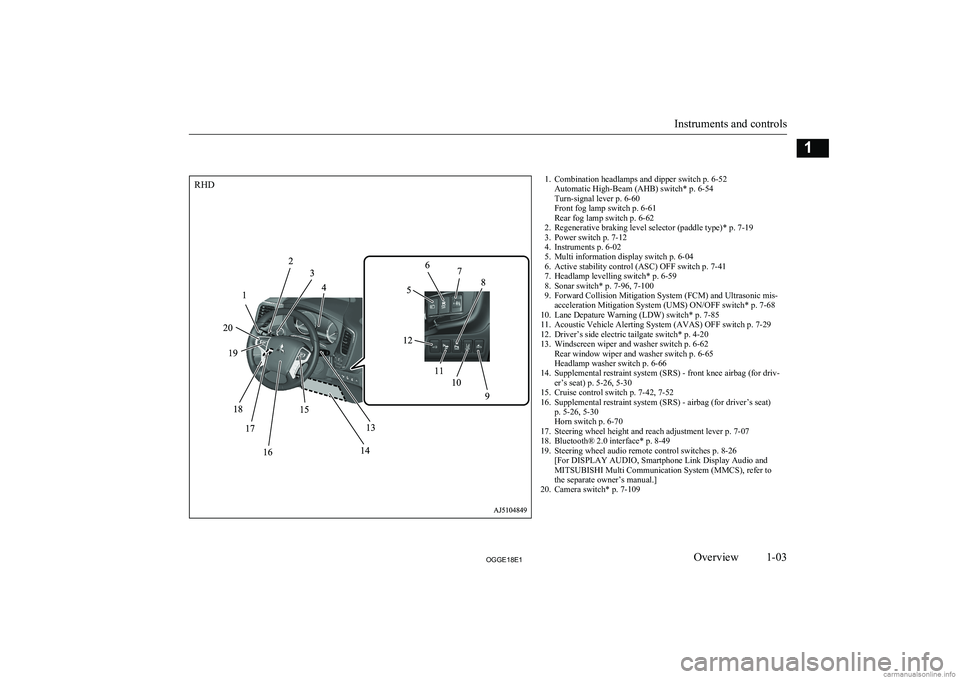
1. Combination headlamps and dipper switch p. 6-52Automatic High-Beam (AHB) switch* p. 6-54
Turn-signal lever p. 6-60
Front fog lamp switch p. 6-61
Rear fog lamp switch p. 6-62
2. Regenerative braking level selector (paddle type)* p. 7-19
3. Power switch p. 7-12
4. Instruments p. 6-02
5. Multi information display switch p. 6-04
6. Active stability control (ASC) OFF switch p. 7-41
7. Headlamp levelling switch* p. 6-59
8. Sonar switch* p. 7-96, 7-100
9. Forward Collision Mitigation System (FCM) and Ultrasonic mis- acceleration Mitigation System (UMS) ON/OFF switch* p. 7-68
10. Lane Depature Warning (LDW) switch* p. 7-85
11. Acoustic Vehicle Alerting System (AVAS) OFF switch p. 7-29
12. Driver’s side electric tailgate switch* p. 4-20
13. Windscreen wiper and washer switch p. 6-62 Rear window wiper and washer switch p. 6-65
Headlamp washer switch p. 6-66
14. Supplemental restraint system (SRS) - front knee airbag (for driv- er’s seat) p. 5-26, 5-30
15. Cruise control switch p. 7-42, 7-52
16. Supplemental restraint system (SRS) - airbag (for driver’s seat) p. 5-26, 5-30
Horn switch p. 6-70
17. Steering wheel height and reach adjustment lever p. 7-07
18. Bluetooth® 2.0 interface* p. 8-49
19. Steering wheel audio remote control switches p. 8-26 [For DISPLAY AUDIO, Smartphone Link Display Audio and
MITSUBISHI Multi Communication System (MMCS), refer to
the separate owner’s manual.]
20. Camera switch* p. 7-109
Instruments and controls
1-03OGGE18E1Overview1RHD
Page 6 of 538
![MITSUBISHI OUTLANDER PHEV 2018 Owners Manual (in English) 1. Multi Around Monitor* p. 7-106Audio* p. 8-13
[For DISPLAY AUDIO, Smartphone Link Display Audio and
MITSUBISHI Multi Communication System (MMCS), refer to
the separate owner’s manual.]
2. Hazard w](/img/19/34890/w960_34890-5.png "MITSUBISHI OUTLANDER PHEV 2018 Owners Manual (in English) 1. Multi Around Monitor* p. 7-106Audio* p. 8-13
[For DISPLAY AUDIO, Smartphone Link Display Audio and
MITSUBISHI Multi Communication System (MMCS), refer to
the separate owner’s manual.]
2. Hazard w")
1. Multi Around Monitor* p. 7-106Audio* p. 8-13
[For DISPLAY AUDIO, Smartphone Link Display Audio and
MITSUBISHI Multi Communication System (MMCS), refer to
the separate owner’s manual.]
2. Hazard warning flasher switch p. 6-60
3. ECO mode switch p. 6-61
4. Front passenger’s airbag indicator p. 5-29
5. Passenger’s ventilators p. 8-02
6. Accessory socket* p. 8-74 Cigarette lighter* p. 8-73
7. Electric tailgate power switch* p. 4-20
8. Key slot p. 7-15
9. 220-240 V AC power supply switch* p. 8-75
10. Blind Spot Warning (BSW) switch* p. 7-79
11. Heated steering wheel switch* p. 6-69
12. Heated windscreen switch* p. 6-68
13. Cup holder p. 8-82
14. Selector lever (Joystick type) p. 7-16
15. 220-240 V AC power supply* p. 8-75
16. Floor console box p. 8-81 Arm rest
Accessory socket p. 8-74
USB input terminal p. 8-69
17. Fuel tank filler door release lever p. 2-14
18. Bonnet release lever p. 11-04
19. Rear window demister switch p. 6-67 Wiper de-icer switch* p. 6-67
20. Air conditioner p. 8-04
21. Seat belt reminder p. 5-11
Instruments and controls
1-04OGGE18E1Overview1LHD
Page 7 of 538
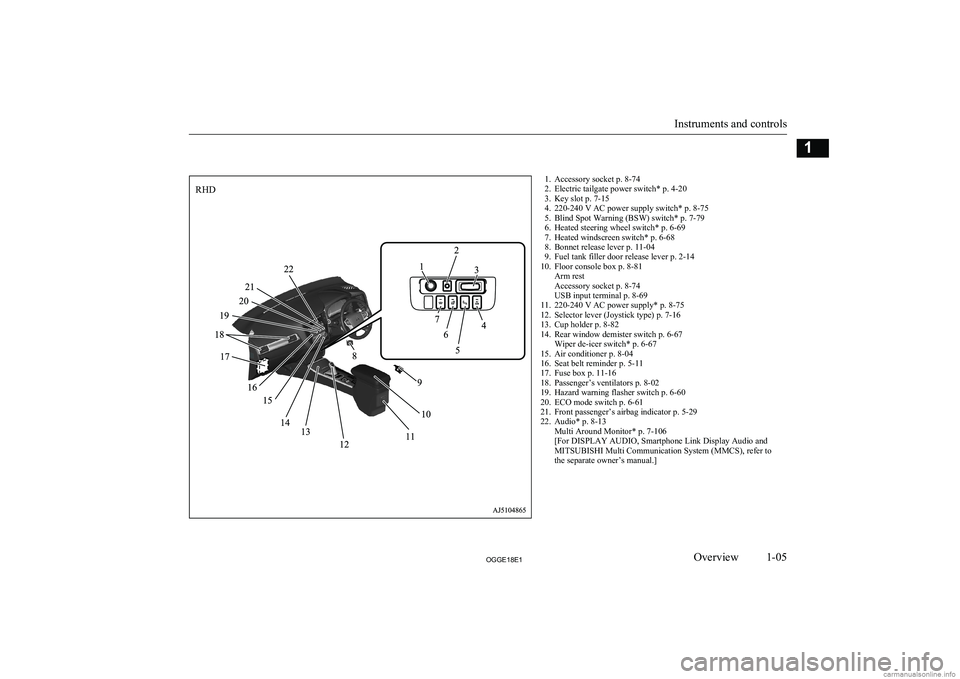
1. Accessory socket p. 8-74
2. Electric tailgate power switch* p. 4-20
3. Key slot p. 7-15
4. 220-240 V AC power supply switch* p. 8-75
5. Blind Spot Warning (BSW) switch* p. 7-79
6. Heated steering wheel switch* p. 6-69
7. Heated windscreen switch* p. 6-68
8. Bonnet release lever p. 11-04
9. Fuel tank filler door release lever p. 2-14
10. Floor console box p. 8-81 Arm rest
Accessory socket p. 8-74
USB input terminal p. 8-69
11. 220-240 V AC power supply* p. 8-75
12. Selector lever (Joystick type) p. 7-16
13. Cup holder p. 8-82
14. Rear window demister switch p. 6-67 Wiper de-icer switch* p. 6-67
15. Air conditioner p. 8-04
16. Seat belt reminder p. 5-11
17. Fuse box p. 11-16
18. Passenger’s ventilators p. 8-02
19. Hazard warning flasher switch p. 6-60
20. ECO mode switch p. 6-61
21. Front passenger’s airbag indicator p. 5-29
22. Audio* p. 8-13 Multi Around Monitor* p. 7-106
[For DISPLAY AUDIO, Smartphone Link Display Audio and
MITSUBISHI Multi Communication System (MMCS), refer to
the separate owner’s manual.]
Instruments and controls
1-05OGGE18E1Overview1RHD
Page 12 of 538
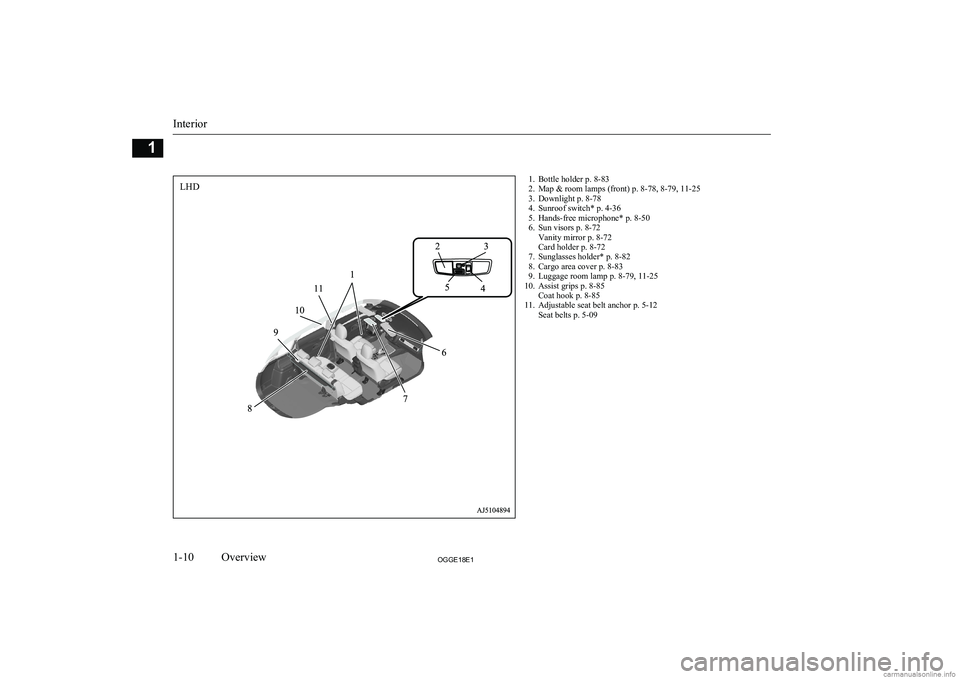
1. Bottle holder p. 8-83
2. Map & room lamps (front) p. 8-78, 8-79, 11-25
3. Downlight p. 8-78
4. Sunroof switch* p. 4-36
5. Hands-free microphone* p. 8-50
6. Sun visors p. 8-72 Vanity mirror p. 8-72
Card holder p. 8-72
7. Sunglasses holder* p. 8-82
8. Cargo area cover p. 8-83
9. Luggage room lamp p. 8-79, 11-25
10. Assist grips p. 8-85 Coat hook p. 8-85
11. Adjustable seat belt anchor p. 5-12 Seat belts p. 5-09
Interior
1-10OGGE18E1Overview1LHD
Page 13 of 538
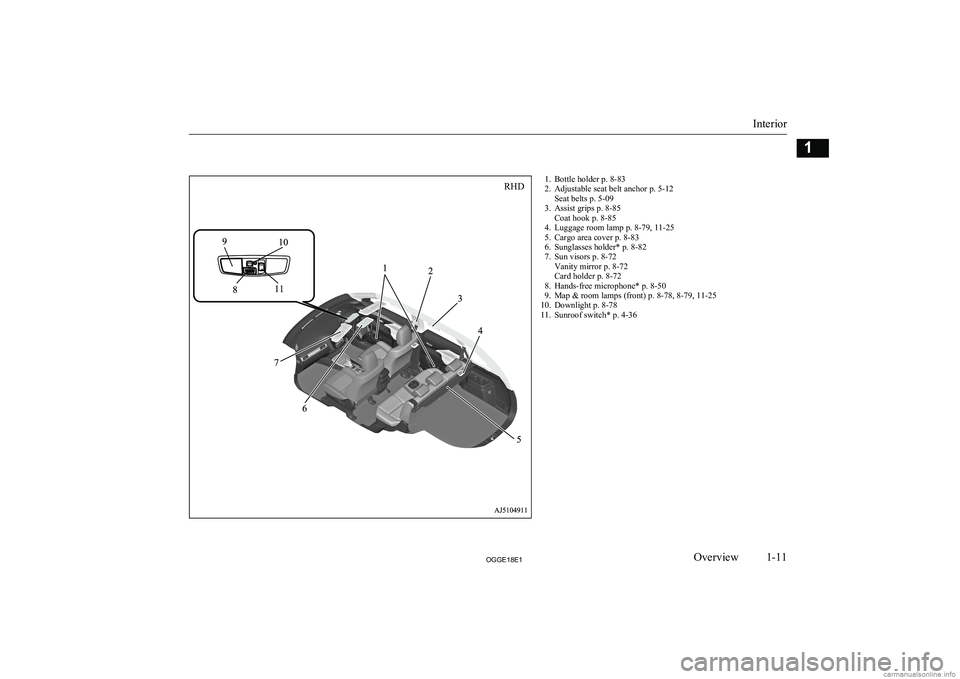
1. Bottle holder p. 8-83
2. Adjustable seat belt anchor p. 5-12 Seat belts p. 5-09
3. Assist grips p. 8-85 Coat hook p. 8-85
4. Luggage room lamp p. 8-79, 11-25
5. Cargo area cover p. 8-83
6. Sunglasses holder* p. 8-82
7. Sun visors p. 8-72 Vanity mirror p. 8-72
Card holder p. 8-72
8. Hands-free microphone* p. 8-50
9. Map & room lamps (front) p. 8-78, 8-79, 11-25
10. Downlight p. 8-78
11. Sunroof switch* p. 4-36
Interior
1-11OGGE18E1Overview1RHD
Page 40 of 538
lThe installation of accessories, optional
parts, etc., should only be carried out
within the limits prescribed by law in your country, and in accordance with the
guidelines and warnings contained with-
in the documents accompanying this ve- hicle.
l Installing electric components incorrect-
ly could lead to a fire. Refer to the “Modification/alterations to the electri-
cal or fuel systems” section within this
owner’s manual.
l When installing the radio, for the re-
quired information (frequency, transmis-
sion output, installing procedure), con- sult a MITSUBISHI MOTORS Author-
ized Service Point.
If the frequency, transmission output and installing condition are not appropriate,
it can adversely affect the electronic de- vices and could lead to unsafe vehicle operation.
l Using a cellular phone or radio set inside
the vehicle without an external antenna
may cause electrical system interference, which could lead to unsafe vehicle oper-ation.
l Tyres and wheels which do not meet
specifications must not be used.
Refer to the “Specifications” section for information regarding wheel and tyre
sizes.Important points!
Due to large number of accessory and re-
placement parts of different manufactures
available in the market, it is not possible, not only for MITSUBISHI MOTORS , but also
for a MITSUBISHI MOTORS Authorized
Service Point, to check whether the attach- ment or installation of such parts affects theoverall safety of your vehicle.
Even when such parts are officially author-
ized, for example by a “general operators permit” (an appraisal for the part) or throughthe execution of the part in an officially ap-
proved manner of construction, or when a single operation permit following the attach-
ment or installation of such parts, it cannot be deduced from that alone, that the driving
safety of your vehicles has not been affected.
Consider also that there basically exists no li- ability on the part of the appraiser or the offi- cial. Maximum safety can only be ensured
with parts recommended, sold and fitted or
installed by a MITSUBISHI MOTORS au-
thorized Service Point ( MITSUBISHI
MOTORS GENUINE replacement parts and
MITSUBISHI MOTORS accessories). The
same also pertains to modifications of vehi- cles with respect to the production specifica- tions. For safety reasons, do not attempt anymodifications other than those that follow the
recommendations of a MITSUBISHI
MOTORS authorized Service Point.
Modification/alterations to
the electrical or fuel systems E00200401583
MITSUBISHI MOTORS CORPORATION
has always manufactured safe, high quality vehicles. In order to maintain this safety and
quality, it is important that any accessory that is to be fitted, or any modifications carried
out which involve the electrical or fuel sys- tems, should be carried out in accordancewith MITSUBISHI MOTORS guidelines.CAUTIONl If the wires interfere with the vehicle body
or improper installation methods are used (protective fuses not included, etc.), elec- tronic devices may be adversely affected, re-
sulting in a fire or other accident.Genuine parts
E00200500499
MITSUBISHI MOTORS has gone to great
lengths to bring you a superbly crafted auto-
mobile offering the highest quality and de- pendability.
Modification/alterations to the electrical or fuel systems
2-16OGGE18E1General information2
Page 64 of 538
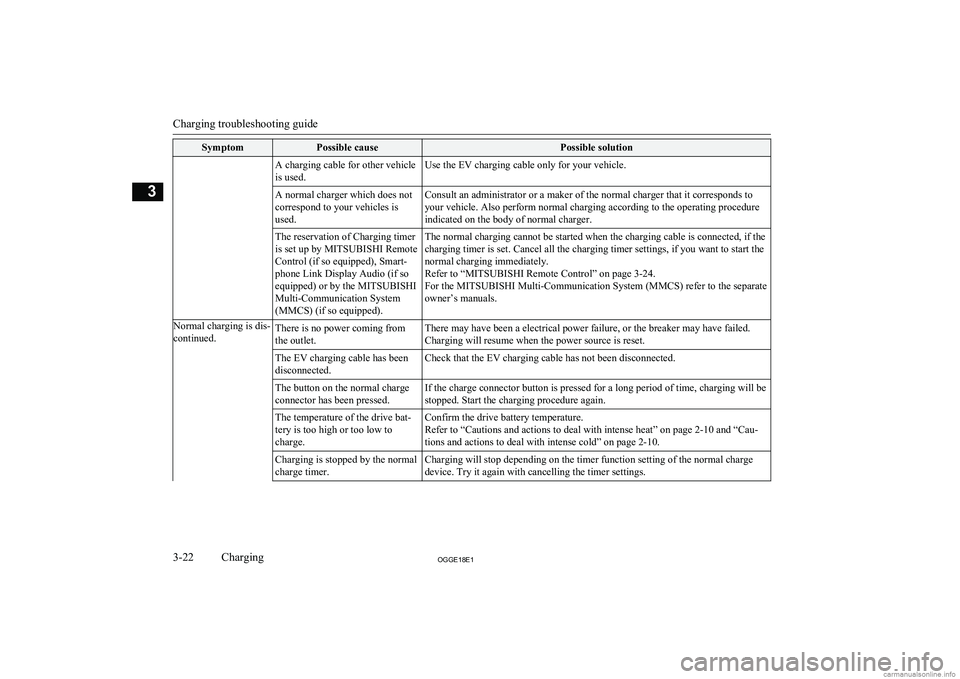
SymptomPossible causePossible solutionA charging cable for other vehicle
is used.Use the EV charging cable only for your vehicle.A normal charger which does not
correspond to your vehicles is
used.Consult an administrator or a maker of the normal charger that it corresponds to
your vehicle. Also perform normal charging according to the operating procedure
indicated on the body of normal charger.The reservation of Charging timer
is set up by MITSUBISHI Remote
Control (if so equipped), Smart-
phone Link Display Audio (if so
equipped) or by the MITSUBISHI
Multi-Communication System
(MMCS) (if so equipped).The normal charging cannot be started when the charging cable is connected, if the charging timer is set. Cancel all the charging timer settings, if you want to start the
normal charging immediately.
Refer to “MITSUBISHI Remote Control” on page 3-24.
For the MITSUBISHI Multi-Communication System (MMCS) refer to the separate owner’s manuals.Normal charging is dis-
continued.There is no power coming from
the outlet.There may have been a electrical power failure, or the breaker may have failed. Charging will resume when the power source is reset.The EV charging cable has been
disconnected.Check that the EV charging cable has not been disconnected.The button on the normal charge
connector has been pressed.If the charge connector button is pressed for a long period of time, charging will be
stopped. Start the charging procedure again.The temperature of the drive bat-
tery is too high or too low to
charge.Confirm the drive battery temperature.
Refer to “Cautions and actions to deal with intense heat” on page 2-10 and “Cau-
tions and actions to deal with intense cold” on page 2-10.Charging is stopped by the normal
charge timer.Charging will stop depending on the timer function setting of the normal charge device. Try it again with cancelling the timer settings.
Charging troubleshooting guide
3-22OGGE18E1Charging3
Page 65 of 538
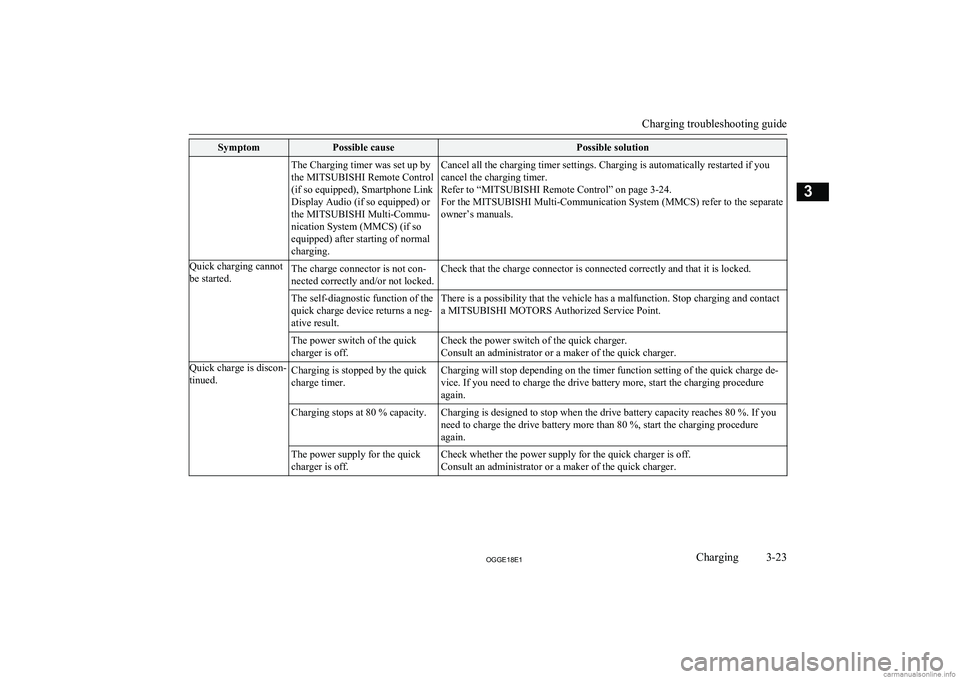
SymptomPossible causePossible solutionThe Charging timer was set up by
the MITSUBISHI Remote Control
(if so equipped), Smartphone Link
Display Audio (if so equipped) or
the MITSUBISHI Multi-Commu-
nication System (MMCS) (if so
equipped) after starting of normal
charging.Cancel all the charging timer settings. Charging is automatically restarted if you cancel the charging timer.
Refer to “MITSUBISHI Remote Control” on page 3-24.
For the MITSUBISHI Multi-Communication System (MMCS) refer to the separate
owner’s manuals.Quick charging cannot
be started.The charge connector is not con-
nected correctly and/or not locked.Check that the charge connector is connected correctly and that it is locked.The self-diagnostic function of the
quick charge device returns a neg-
ative result.There is a possibility that the vehicle has a malfunction. Stop charging and contact
a MITSUBISHI MOTORS Authorized Service Point.The power switch of the quick
charger is off.Check the power switch of the quick charger.
Consult an administrator or a maker of the quick charger.Quick charge is discon-
tinued.Charging is stopped by the quick
charge timer.Charging will stop depending on the timer function setting of the quick charge de-
vice. If you need to charge the drive battery more, start the charging procedure again.Charging stops at 80 % capacity.Charging is designed to stop when the drive battery capacity reaches 80 %. If you
need to charge the drive battery more than 80 %, start the charging procedure again.The power supply for the quick
charger is off.Check whether the power supply for the quick charger is off. Consult an administrator or a maker of the quick charger.
Charging troubleshooting guide
3-23OGGE18E1Charging3
Page 68 of 538
For the operation method of theMITSUBISHI Remote Control, please visit
the MITSUBISHI MOTORS Web site:
http://www.mitsubishi-motors.com/en/prod-
ucts/outlander_phev2/app/remote/
l If you need further information, please
contact a MITSUBISHI MOTORS Au-
thorized Service Point.WARNINGl Do not use the
MITSUBISHI Remote
Control if children, persons in need of care, pets, etc. are in the vehicle. Even if the remote climate control is used, thecabin may become hot or cold due to somereasons such as automatic stop of the sys-
tem. The cabin temperature may quickly
rise in sunshine, which poses a risk of heat
stroke and dehydration. In cold weather, on the other hand, the cabin temperature
may quickly drop. Either of which could lead to death in the worst case.
In addition, children can activate switches and controls, resulting in injury or a fatal
accident.
l The cooling fan in the engine compart-
ment may operate automatically when
charging or when operating air condition- er. Do not bring your hand close to the
cooling fan during charging.CAUTIONl Do not use a car cover except for the
MITSUBISHI MOTORS GENUINE car
cover, when using the charging timer or the remote climate control.NOTEl Keep the following points in mind when us-
ing a wireless LAN device:
• Communication speed and range vary de-
pending on the wireless LAN devices and the surrounding conditions (radio environ-
ment, obstacles, parking area environ- ment, etc.).
• Due to the characteristics of radio waves,
communication speed tends to decrease as the communication distance increases.
Use your wireless LAN device at a short
distance from the vehicle for better re- sponse.
• When a microwave oven or ISM (indus-
trial, scientific and medical) equipment is being used, the communication speed andrange of wireless LAN devices may de-crease. Use your wireless LAN device
away from these appliances and equip-
ment.NOTE• If a wireless LAN device and Bluetooth
(registered trademark of Bluetooth SIG, Inc.) are used simultaneously, the com-
munication speed and range of each de- vice may decrease. Use your wireless
LAN device away from Bluetooth devi- ces.
l Wireless LAN devices may not communi-
cate with the vehicle, or may not operate
normally or stably in the following environ- ment or situations. Check that the device cancommunicate with your vehicle before use.
• There is an obstruction such as a concrete
or metal wall between the vehicle and
wireless LAN device.
• The vehicle is surrounded by tall vehicles
in a parking lot.
• There are facilities nearby that emit strong
radio waves, such as a TV tower, trans-
former substation, broadcasting station or airport.
• There is a communication device such as
a mobile phone or radio, or an electric de- vice such as a personal computer near thewireless LAN device.
• The wireless LAN device is in contact
with or covered by a metal object.
• The battery of the wireless LAN device
has run down.
l The
MITSUBISHI Remote Control cannot
be used under the following conditions:
• The wireless LAN device is turned off.
• The
MITSUBISHI Remote Control appli-
cation software is not installed.
MITSUBISHI Remote Control*
3-26OGGE18E1Charging3