MITSUBISHI OUTLANDER PHEV 2018 (in English) User Guide
OUTLANDER PHEV 2018
MITSUBISHI
MITSUBISHI
https://www.carmanualsonline.info/img/19/34890/w960_34890-0.png
MITSUBISHI OUTLANDER PHEV 2018 (in English) User Guide
Page 357 of 538
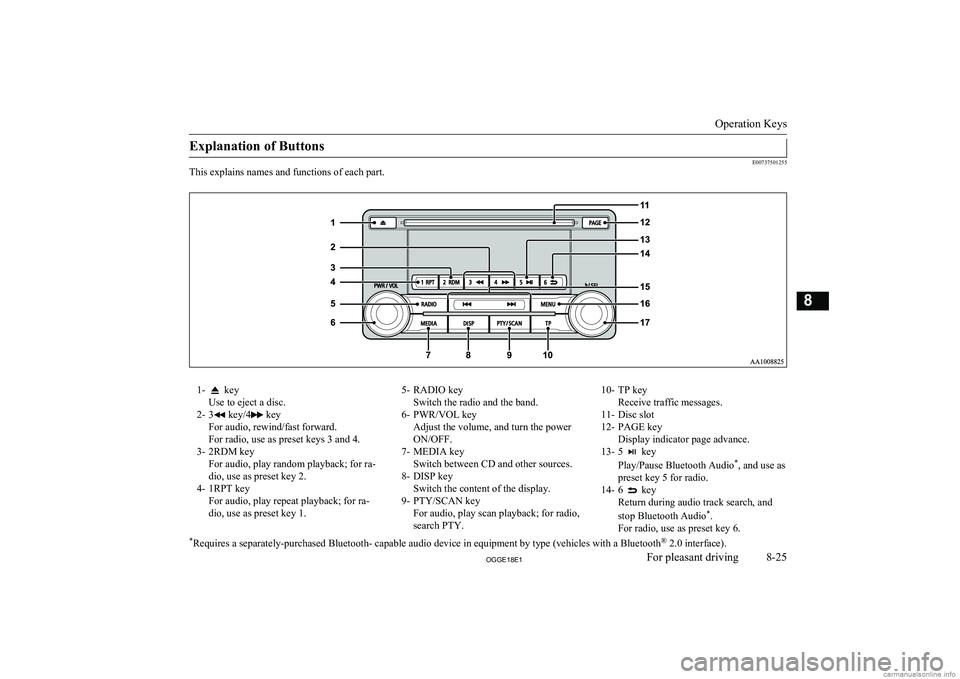
Explanation of Buttons
E00737501255
This explains names and functions of each part.
1- key
Use to eject a disc.
2- 3
key/4 key
For audio, rewind/fast forward.
For radio, use as preset keys 3 and 4.
3- 2RDM key For audio, play random playback; for ra-
dio, use as preset key 2.
4- 1RPT key For audio, play repeat playback; for ra-dio, use as preset key 1.
5- RADIO key Switch the radio and the band.
6- PWR/VOL key Adjust the volume, and turn the power
ON/OFF.
7- MEDIA key Switch between CD and other sources.
8- DISP key Switch the content of the display.
9- PTY/SCAN key For audio, play scan playback; for radio,
search PTY.10- TP key Receive traffic messages.
11- Disc slot
12- PAGE key Display indicator page advance.
13- 5
key
Play/Pause Bluetooth Audio *
, and use as
preset key 5 for radio.
14- 6
key
Return during audio track search, and
stop Bluetooth Audio *
.
For radio, use as preset key 6.
* Requires a separately-purchased Bluetooth- capable audio device in equipment by type (vehicles with a Bluetooth ®
2.0 interface).
Operation Keys
8-25OGGE18E1For pleasant driving8
Page 358 of 538
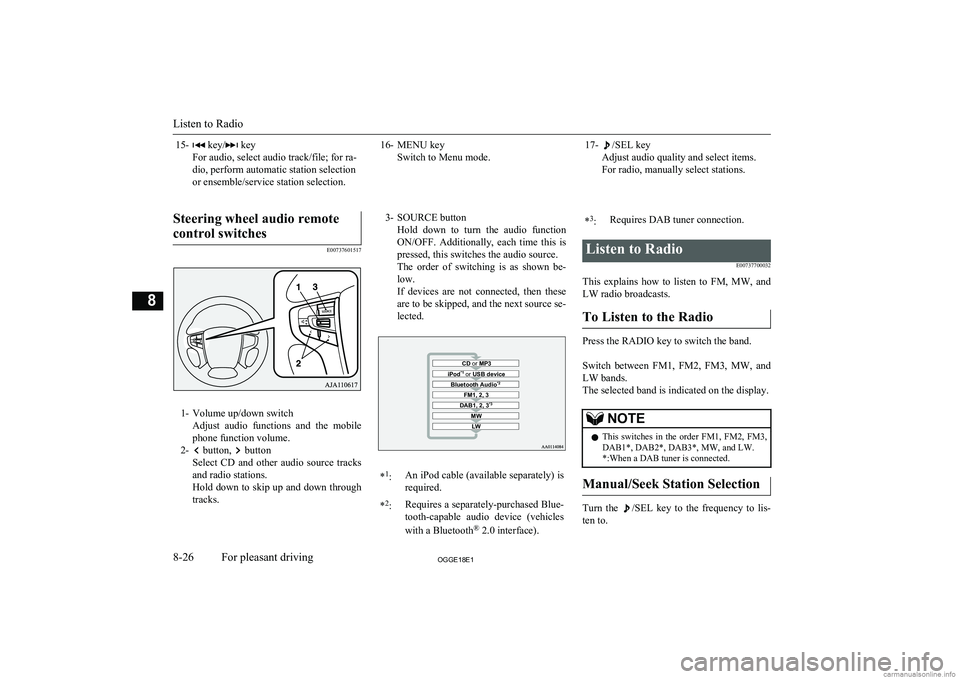
15- key/ key
For audio, select audio track/file; for ra-
dio, perform automatic station selection
or ensemble/service station selection.16- MENU key Switch to Menu mode.17-/SEL key
Adjust audio quality and select items.
For radio, manually select stations.
Steering wheel audio remote
control switches
E00737601517
1- Volume up/down switch Adjust audio functions and the mobile
phone function volume.
2-
button, button
Select CD and other audio source tracks
and radio stations.
Hold down to skip up and down through tracks.
3- SOURCE button
Hold down to turn the audio functionON/OFF. Additionally, each time this is
pressed, this switches the audio source.
The order of switching is as shown be- low.
If devices are not connected, then these are to be skipped, and the next source se-lected.CD or MP3MWLWDAB1, 2, 3 *3FM1, 2, 3Bluetooth Audio *2iPod*1
or USB device*1
:An iPod cable (available separately) is
required.* 2
:Requires a separately-purchased Blue-
tooth-capable audio device (vehicles
with a Bluetooth ®
2.0 interface).*3
:Requires DAB tuner connection.Listen to Radio
E00737700032
This explains how to listen to FM, MW, and
LW radio broadcasts.
To Listen to the Radio
Press the RADIO key to switch the band.
Switch between FM1, FM2, FM3, MW, and LW bands.
The selected band is indicated on the display.
NOTEl This switches in the order FM1, FM2, FM3,
DAB1*, DAB2*, DAB3*, MW, and LW. *:When a DAB tuner is connected.
Manual/Seek Station Selection
Turn the /SEL key to the frequency to lis-
ten to.
Listen to Radio
8-26OGGE18E1For pleasant driving8
Page 364 of 538
NOTElDepending on the generation, model, or soft-
ware version of the iPod/iPhone, playback
on this product may not be possible. (→8-14 ) Additionally, playback as ex-
plained in this document may not be possi- ble.
l For vehicles with a Bluetooth ®
2.0 interface,
the types of devices that can be connected
may vary.
For details, access the MITSUBISHI
MOTORS website.
Please read and agree to the “Warning about
Links to the Web Sites of Other Compa- nies”. The websites mentioned above may
connect you to websites other than the MITSUBISHI MOTORS website.
http://www.mitsubishi-motors.com/en/prod-
ucts/index.html
l Usage of iPod/iPhone hardware with the lat-
est software version is recommended.
l Regarding how to connect the iPod/iPhone,
refer to “How to connect an iPod” on page
8-70.
l When connecting the iPod/iPhone, use a
commercially available iPod connection ca- ble.
l Set up the device in order that no unsafe ac-
tions, such as plugging in the connection ca-ble are taken while driving.
l When inserting and removing the iPod/
iPhone, for safety’s sake first stop the vehi- cle.
l Depending on the status of the iPod/iPhone,
it may take some time until the device is rec-
ognized, or playback starts.NOTEl Depending on the iPod/iPhone, the button
functions on the product may not operatewhile the iPod/iPhone is connected.
l iPod/iPhone specifications and settings may
mean that connection is not possible, or re- sult in differences in operation or display.
l Depending on audio data in the iPod/iPhone,
track information may not be displayed cor- rectly.
l Depending on the status of the vehicle and
device, the iPod/iPhone may not play back after starting the Plug-in Hybrid EV system.
l Data containing copyright information may
not play back.
l It is recommended that the iPod/iPhone
equaliser settings be set to flat.
l Operate the iPod/iPhone while connected to
this product.
l If the iPod/iPhone is connected via Blue-
tooth as a Bluetooth- capable audio device,
then do not connect the iPod/iPhone using
an iPod cable. Connection using both meth- ods will result in erroneous operation.
l If an iPod/iPhone does not operate correctly,
then remove the iPod/iPhone from the prod-
uct, reset, then reconnect.
Play iPod
Press the MEDIA key to set the iPod as the
source.
The selected source is indicated on the dis-
play.
Select the Track (File)
Press the key or key to select the
track.
This enables selection of the next or previous
track.
Fast Forward or Rewind
Hold down the 3 key or the 4 key.
Fast forward/rewind is possible.
Switch Playback Mode
Repeat playback and shuffle playback are
possible.
Repeat Playback (RPT)
Press the 1RPT key.
Repeat playback of the track currently being
played.
NOTEl Pressing again will cancel.
Shuffle Playback (RDM)
Press the 2RDM key.
Listen to an iPod
8-32OGGE18E1For pleasant driving8
Page 365 of 538
Play tracks in the category currently beingplayed in a random order.NOTEl Pressing again will cancel.
Album Shuffle Playback
Hold down the 2RDM key.
Play back the album in a random order
(tracks in any order on the album).
NOTEl Pressing again will cancel.
Search Tracks
Search categories or track names, and select a
track. 1. Turn the
/SEL key to select the cate-
gory.
2. Press the
/SEL key. Categories or
tracks within the selected category are displayed.
3. Turn the
/SEL key to select the cate-
gory or track.
4. Press the /SEL key.
Repeat steps 1 to 4, and search for tracks.
Select the track, and press the
/SEL
key to play.
NOTEl While the category (1 st
level) is selected,
press the 6 key to cancel track search
mode.
l If there is no operation for 10 seconds after
selecting the category, then track search
mode will be cancelled.
l Select the category, and hold down the
/SEL key to start playback from the first
track in that category.
l While the track is selected, press the 6
key to return to the previous operation.
l While the track is selected, hold down the 6
key to cancel track search mode.
l If there is no operation for five seconds after
selecting the track, that file is played back.
l iPod operations such as selecting a track will
cancel track search mode.
Listen to Audio Files on a
USB Device E00736501261
By connecting commercially-available USB
devices such as USB memory to this product, you can play back audio files on these
through the product.
CAUTIONl Do not leave the USB device unattended in
the vehicle.
l Never hold these devices in your hand to op-
erate while driving, as this is dangerous.
l Do not use hard discs, card readers, or mem-
ory readers, as damage may occur to these or
to the data contained therein. If these are er- roneously connected, put the operation mode
of the power switch in OFF and then remove them.
l Because of the risk of data loss, it is recom-
mended that files be backed up.
l No guarantee is made as regards damage to
the USB device, nor regarding loss or dam-
age to data contained therein.
l Depending on how the devices are handled,
audio files being damaged or lost, therefore
it is recommended that data be backed up.NOTEl Digital audio players that support the mass
storage class specifications can be connec- ted.
l For details regarding the types of USB devi-
ces that can be connected and the types of files that can be played back in vehicles with
a Bluetooth ®
2.0 interface, refer to “Types
of connectable devices and supported file specifications” on page 8-71.
l Regarding how to connect USB devices, re-
fer to “How to connect a USB memory de-vice” on page 8-69.
Listen to Audio Files on a USB Device
8-33OGGE18E1For pleasant driving8
Page 367 of 538
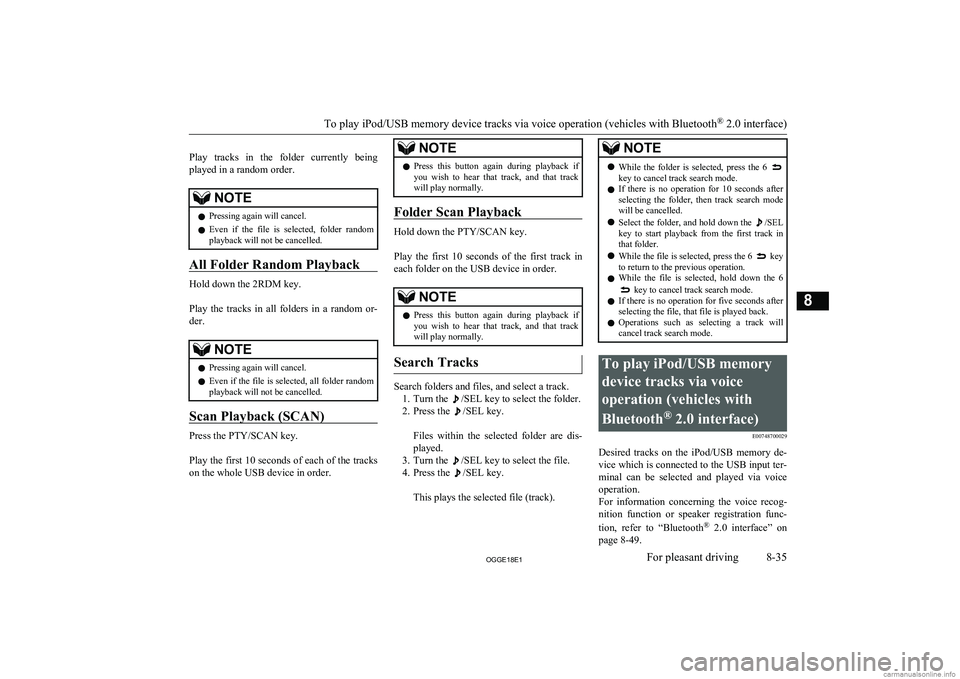
Play tracks in the folder currently being
played in a random order.NOTEl Pressing again will cancel.
l Even if the file is selected, folder random
playback will not be cancelled.
All Folder Random Playback
Hold down the 2RDM key.
Play the tracks in all folders in a random or-
der.
NOTEl Pressing again will cancel.
l Even if the file is selected, all folder random
playback will not be cancelled.
Scan Playback (SCAN)
Press the PTY/SCAN key.
Play the first 10 seconds of each of the tracks on the whole USB device in order.
NOTEl Press this button again during playback if
you wish to hear that track, and that trackwill play normally.
Folder Scan Playback
Hold down the PTY/SCAN key.
Play the first 10 seconds of the first track in each folder on the USB device in order.
NOTEl Press this button again during playback if
you wish to hear that track, and that trackwill play normally.
Search Tracks
Search folders and files, and select a track.
1. Turn the
/SEL key to select the folder.
2. Press the
/SEL key.
Files within the selected folder are dis- played.
3. Turn the
/SEL key to select the file.
4. Press the
/SEL key.
This plays the selected file (track).
NOTEl While the folder is selected, press the 6 key to cancel track search mode.
l If there is no operation for 10 seconds after
selecting the folder, then track search mode will be cancelled.
l Select the folder, and hold down the
/SEL
key to start playback from the first track in
that folder.
l While the file is selected, press the 6
key
to return to the previous operation.
l While the file is selected, hold down the 6
key to cancel track search mode.
l If there is no operation for five seconds after
selecting the file, that file is played back.
l Operations such as selecting a track will
cancel track search mode.
To play iPod/USB memory
device tracks via voice
operation (vehicles with
Bluetooth ®
2.0 interface)
E00748700029
Desired tracks on the iPod/USB memory de-
vice which is connected to the USB input ter-
minal can be selected and played via voice operation.
For information concerning the voice recog- nition function or speaker registration func-
tion, refer to “Bluetooth®
2.0 interface” on
page 8-49.
To play iPod/USB memory device tracks via voice operation (vehicles with Bluetooth ®
2.0 interface)
8-35OGGE18E1For pleasant driving8
Page 368 of 538
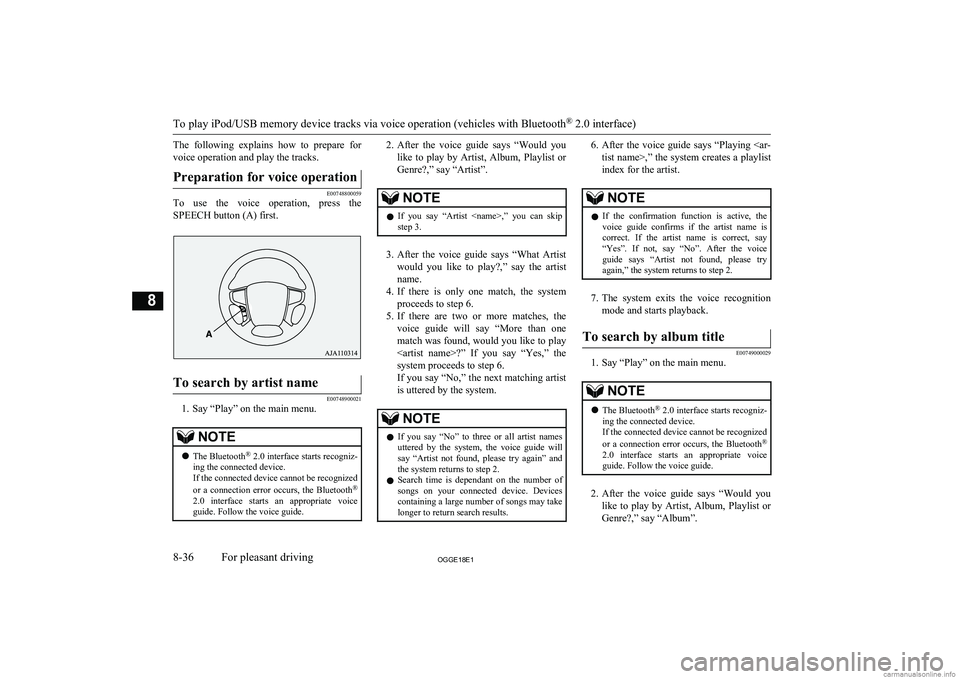
The following explains how to prepare forvoice operation and play the tracks.Preparation for voice operation
E00748800059
To use the voice operation, press the
SPEECH button (A) first.
To search by artist name
E00748900021
1. Say “Play” on the main menu.
NOTEl The Bluetooth ®
2.0 interface starts recogniz-
ing the connected device.
If the connected device cannot be recognized
or a connection error occurs, the Bluetooth ®
2.0 interface starts an appropriate voice
guide. Follow the voice guide.2. After the voice guide says “Would you
like to play by Artist, Album, Playlist or Genre?,” say “Artist”.NOTEl If you say “Artist ,” you can skip
step 3.
3. After the voice guide says “What Artist
would you like to play?,” say the artist name.
4. If there is only one match, the system
proceeds to step 6.
5. If there are two or more matches, the
voice guide will say “More than one
match was found, would you like to play ?” If you say “Yes,” the
system proceeds to step 6.
If you say “No,” the next matching artist
is uttered by the system.
NOTEl If you say “No” to three or all artist names
uttered by the system, the voice guide will say “Artist not found, please try again” and
the system returns to step 2.
l Search time is dependant on the number of
songs on your connected device. Devices containing a large number of songs may take
longer to return search results.6. After the voice guide says “Playing
tist name>,” the system creates a playlist
index for the artist.NOTEl If the confirmation function is active, the
voice guide confirms if the artist name is
correct. If the artist name is correct, say “Yes”. If not, say “No”. After the voice
guide says “Artist not found, please try again,” the system returns to step 2.
7. The system exits the voice recognition
mode and starts playback.
To search by album title
E00749000029
1. Say “Play” on the main menu.
NOTEl The Bluetooth ®
2.0 interface starts recogniz-
ing the connected device.
If the connected device cannot be recognized
or a connection error occurs, the Bluetooth ®
2.0 interface starts an appropriate voice
guide. Follow the voice guide.
2. After the voice guide says “Would you
like to play by Artist, Album, Playlist or Genre?,” say “Album”.
To play iPod/USB memory device tracks via voice operation (vehicles with Bluetooth ®
2.0 interface)
8-36OGGE18E1For pleasant driving8
Page 369 of 538
NOTElIf you say “Album
,” you can skip<br />
step 3.<br />
3. After the voice guide says “What Album<br />
would you like to play?” say the album title.<br />
4. If there is only one match, the system<br />
proceeds to step 6.<br />
5. If there are two or more matches, the<br />
voice guide will say “More than one<br />
match was found, would you like to play <album title>?” If you say “Yes,” thesystem proceeds to step 6.<br />
If you say “No,” the next matching al-<br />
bum is uttered by the system.<br />
NOTEl If you say “No” to three or all album titles<br />
uttered by the system, the voice guide will say “Album not found, please try again” and<br />
the system returns to step 2.<br />
6. After the voice guide says “Playing <al-<br />
bum title>,” the system creates a playlist index for the album title.<br />
NOTEl If the confirmation function is active, the<br />
voice guide confirms if the album title is<br />
correct. If the album title is correct, say<br />
“Yes”. If not, say “No”. After the voice guide says “Album not found, please try<br />
again,” the system returns to step 2.<br />
7. The system exits the voice recognition<br />
mode and starts playback.<br />
To search by playlist<br />
E00749100020<br />
1. Say “Play” on the main menu.<br />
NOTEl The Bluetooth ®<br />
2.0 interface starts recogniz-<br />
ing the connected device.<br />
If the connected device cannot be recognized<br />
or a connection error occurs, the Bluetooth ®<br />
2.0 interface starts an appropriate voice<br />
guide. Follow the voice guide.<br />
2. After the voice guide says “Would you<br />
like to play by Artist, Album, Playlist or Genre?,” say “Playlist”.<br />
NOTEl If you say “Playlist <playlist>,” you can skip<br />
step 3.<br />
If the device has no playlist, the voice guide<br />
will say “There are no playlists stored on de- vice” and the system returns to step 2.<br />
3. After the voice guide says “What Play-<br />
list would you like to play?,” say the<br />
playlist name.<br />
4. If there is only one match, the system<br />
proceeds to step 6.<br />
5. If there are two or more matches, the<br />
voice guide will say “More than one match was found, would you like to play<br />
<playlist>?” If you say “Yes,” the sys- tem proceeds to step 6.<br />
If you say “No,” the next matching play-<br />
list name is uttered by the system.<br />
NOTEl If you say “No” to three or all playlist names<br />
uttered by the system, the voice guide will say “Playlist not found, please try again” and<br />
the system returns to step 2.<br />
6. After the voice guide says “Playing<br />
<playlist>,” the system creates an index for the playlist.<br />
To play iPod/USB memory device tracks via voice operation (vehicles with Bluetooth ®<br />
2.0 interface)<br />
8-37OGGE18E1For pleasant driving8 <p></div><script>$(document).on('click', '#a369', function(){
$(this).hide();
$('#b369').height($('#a369').height()-22);
$('#b369').show();
});
$(document).on('click', '#b369', function(){
$(this).hide();
$('#a369').show();
});
$(document).ready(function(){
$('#b369').height($('#a369').height()-22);
});
</script> <div style="height: 250px">
<script async src="//pagead2.googlesyndication.com/pagead/js/adsbygoogle.js"></script>
<ins class="adsbygoogle"
style="display:block; min-height: 280px"
data-ad-client="ca-pub-1094764738794676"
data-ad-slot="8211391741"
data-ad-format="auto"></ins>
<script>
(adsbygoogle = window.adsbygoogle || []).push({});
</script></div>
<a name='370'></a><h3>Page 370 of 538</h3><div id='a370'><img loading='lazy' width='960' height='679' style='border: 1px solid #444444; max-width: 100%; display:block; height: auto;' alt='MITSUBISHI OUTLANDER PHEV 2018 (in English) User Guide NOTElIf the confirmation function is active, the
voice guide confirms if the playlist name is
correct. If the playlist name is correct, say
“Yes”. If not, say “No”. Af' title='MITSUBISHI OUTLANDER PHEV 2018 (in English) User Guide NOTElIf the confirmation function is active, the
voice guide confirms if the playlist name is
correct. If the playlist name is correct, say
“Yes”. If not, say “No”. Af' src='/img/19/34890/w960_34890-369.png' /></div><div id='b370' style='display: none; overflow: auto; width: 962px; height: 1300px; border: 1px solid #444444; padding: 10px; background-color: #eeeeee; max-width: 100%; height: auto'><p>NOTElIf the confirmation function is active, the<br />
voice guide confirms if the playlist name is<br />
correct. If the playlist name is correct, say<br />
“Yes”. If not, say “No”. After the voice guide says “Playlist not found, please try<br />
again,” the system returns to step 2. Refer to “Confirmation function setting” on page 8-52.<br />
7. The system exits the voice recognition<br />
mode and starts playback.<br />
To search by genre<br />
E00749200021<br />
1. Say “Play” on the main menu.<br />
NOTEl The <br />
Bluetooth (R)<br />
2.0 interface starts recog-<br />
nizing the connected device.<br />
If the connected device cannot be recognized<br />
or a connection error occurs, the Blue-<br />
tooth (R)<br />
2.0 interface starts an appropriate<br />
voice guide. Follow the voice guide.<br />
2. After the voice guide says “Would you<br />
like to play by Artist, Album, Playlist or Genre?,” say “Genre”.<br />
NOTEl If you say “Genre <type>,” you can skip<br />
step 3.<br />
3. After the voice guide says “What Genre<br />
would you like to play?,” say the music<br />
type.<br />
4. If there is only one match, the system<br />
proceeds to step 6.<br />
5. If there are two or more matches, the<br />
voice guide will say “More than one match was found, would you like to play<br />
<genre>?” If you say “Yes,” the system proceeds to step 6.<br />
If you say “No,” the next matching genre is uttered by the system.<br />
NOTEl If you say “No” to three or all genres uttered<br />
by the system, the voice guide will say<br />
“Genre not found, please try again” and the<br />
system returns to step 2.<br />
6. After the voice guide says “Playing<br />
<genre>,” the system creates an index for the genre.<br />
NOTEl If the confirmation function is active, the<br />
voice guide confirms if the genre is correct.<br />
If the genre is correct, say “Yes”. If not, say “No”. After the voice guide says “Genre not<br />
found, please try again,” the system returns<br />
to step 2. Refer to “Confirmation function setting” on page 8-52.<br />
7. The system exits the voice recognition<br />
mode and starts playback.<br />
Listen to Bluetooth Audio*<br />
E00736701234<br />
This product can play back tracks on com-<br />
mercially-available Bluetooth-capable audio devices.<br />
CAUTIONl Never hold these devices in your hand to op-<br />
erate while driving, as this is dangerous.<br />
l Do not leave the Bluetooth audio device un-<br />
attended in the vehicle.<br />
l Depending on how the devices are handled,<br />
audio files being damaged or lost, therefore it is recommended that data be backed up.<br />
Listen to Bluetooth Audio*<br />
8-38OGGE18E1For pleasant driving8 <p></div><script>$(document).on('click', '#a370', function(){
$(this).hide();
$('#b370').height($('#a370').height()-22);
$('#b370').show();
});
$(document).on('click', '#b370', function(){
$(this).hide();
$('#a370').show();
});
$(document).ready(function(){
$('#b370').height($('#a370').height()-22);
});
</script> <div style="height: 250px">
<script async src="//pagead2.googlesyndication.com/pagead/js/adsbygoogle.js"></script>
<ins class="adsbygoogle"
style="display:block; min-height: 280px"
data-ad-client="ca-pub-1094764738794676"
data-ad-slot="8211391741"
data-ad-format="auto"></ins>
<script>
(adsbygoogle = window.adsbygoogle || []).push({});
</script></div>
<a name='371'></a><h3>Page 371 of 538</h3><div id='a371'><img loading='lazy' width='960' height='679' style='border: 1px solid #444444; max-width: 100%; display:block; height: auto;' alt='MITSUBISHI OUTLANDER PHEV 2018 (in English) User Guide NOTElDepending on the type of Bluetooth-capable
audio devices, usage may not be possible, or
functions that can be used may be restricted.
l Confirm together with the user manuals for
the ' title='MITSUBISHI OUTLANDER PHEV 2018 (in English) User Guide NOTElDepending on the type of Bluetooth-capable
audio devices, usage may not be possible, or
functions that can be used may be restricted.
l Confirm together with the user manuals for
the ' src='/img/19/34890/w960_34890-370.png' /></div><div id='b371' style='display: none; overflow: auto; width: 962px; height: 1300px; border: 1px solid #444444; padding: 10px; background-color: #eeeeee; max-width: 100%; height: auto'><p>NOTElDepending on the type of Bluetooth-capable<br />
audio devices, usage may not be possible, or<br />
functions that can be used may be restricted.<br />
l Confirm together with the user manuals for<br />
the commercially- available Bluetooth-capa-<br />
ble audio devices.<br />
l Depending on the type of Bluetooth-capable<br />
audio devices, volume levels may differ. There is the danger of loud volumes, so prior<br />
to use, it is recommended that you turn the volume down.<br />
→ “Adjust Volume” on page 8-24<br />
l Depending on the status of the Bluetooth au-<br />
dio device, it may take some time until the device is recognized, or playback starts.<br />
l Bluetooth audio device specifications and<br />
settings may mean that connection is not possible, or result in differences in operationor display.<br />
l Depending on audio data in the Bluetooth<br />
audio device, track information may not be<br />
displayed correctly.<br />
l Depending on the status of the vehicle and<br />
device, the iPod/iPhone may not play back after starting the Plug-in Hybrid EV system.<br />
Connect a Bluetooth-capable<br />
Audio Device<br />
Regarding how to connect your Bluetooth de-<br />
vice, refer to “Connecting the Bluetooth® 2.0<br />
interface and Bluetooth® device” on page 8-55.<br />
Operation methods below describe situations<br />
once connection has been completed.NOTEl If the iPod/iPhone is connected via Blue-<br />
tooth as a Bluetooth-capable audio device, then do not connect the iPod/iPhone using<br />
an iPod connection cable. Connection using both methods will result in erroneous opera-<br />
tion.<br />
Play Bluetooth Audio<br />
1. Press the MEDIA key to set Bluetooth<br />
Audio as the source.<br />
<br />
The selected source is indicated on the display.<br />
<br />
2. Press the 5 <br />
key. Bluetooth Audio<br />
playback starts.<br />
NOTEl Hold down the 5 key to pause.<br />
l Press the 6 <br />
key to stop.<br />
Select the Track (File)<br />
Press the key or key to select the<br />
track.<br />
<br />
This enables selection of the next or previous<br />
track.<br />
Fast Forward or Rewind<br />
Hold down the 3 key or the 4 key.<br />
<br />
Fast forward/rewind is possible.<br />
Switch Playback Mode<br />
Repeat playback, random playback, and scan<br />
playback are possible.<br />
Repeat Playback (RPT)<br />
Press the 1RPT key.<br />
<br />
Repeat playback of the track currently being<br />
played.<br />
NOTEl Each time the 1RPT key is pressed, this<br />
switches in the order Repeat OFF, 1 track re-<br />
peat, All track repeat, and Repeat OFF.<br />
Random Playback (RDM)<br />
Press the 2RDM key.<br />
<br />
Play the tracks in the Bluetooth Audio device in a random order.<br />
Listen to Bluetooth Audio*<br />
8-39OGGE18E1For pleasant driving8 <p></div><script>$(document).on('click', '#a371', function(){
$(this).hide();
$('#b371').height($('#a371').height()-22);
$('#b371').show();
});
$(document).on('click', '#b371', function(){
$(this).hide();
$('#a371').show();
});
$(document).ready(function(){
$('#b371').height($('#a371').height()-22);
});
</script> <div style="height: 250px">
<script async src="//pagead2.googlesyndication.com/pagead/js/adsbygoogle.js"></script>
<ins class="adsbygoogle"
style="display:block; min-height: 280px"
data-ad-client="ca-pub-1094764738794676"
data-ad-slot="8211391741"
data-ad-format="auto"></ins>
<script>
(adsbygoogle = window.adsbygoogle || []).push({});
</script></div>
<a name='372'></a><h3>Page 372 of 538</h3><div id='a372'><img loading='lazy' width='960' height='679' style='border: 1px solid #444444; max-width: 100%; display:block; height: auto;' alt='MITSUBISHI OUTLANDER PHEV 2018 (in English) User Guide NOTElPressing again will cancel.
Scan Playback (SCAN)
Press the PTY/SCAN key.
Play the first 10 seconds of each of the tracks on the whole Bluetooth Audio device in or-
der.
NOTEl Press this' title='MITSUBISHI OUTLANDER PHEV 2018 (in English) User Guide NOTElPressing again will cancel.
Scan Playback (SCAN)
Press the PTY/SCAN key.
Play the first 10 seconds of each of the tracks on the whole Bluetooth Audio device in or-
der.
NOTEl Press this' src='/img/19/34890/w960_34890-371.png' /></div><div id='b372' style='display: none; overflow: auto; width: 962px; height: 1300px; border: 1px solid #444444; padding: 10px; background-color: #eeeeee; max-width: 100%; height: auto'><p>NOTElPressing again will cancel.<br />
Scan Playback (SCAN)<br />
Press the PTY/SCAN key.<br />
<br />
Play the first 10 seconds of each of the tracks on the whole Bluetooth Audio device in or-<br />
der.<br />
NOTEl Press this button again during playback if<br />
you wish to hear that track, and that trackwill play normally.<br />
Listen to Bluetooth Audio*<br />
8-40OGGE18E1For pleasant driving8 <p></div><script>$(document).on('click', '#a372', function(){
$(this).hide();
$('#b372').height($('#a372').height()-22);
$('#b372').show();
});
$(document).on('click', '#b372', function(){
$(this).hide();
$('#a372').show();
});
$(document).ready(function(){
$('#b372').height($('#a372').height()-22);
});
</script> <div style="height: 250px">
<script async src="//pagead2.googlesyndication.com/pagead/js/adsbygoogle.js"></script>
<ins class="adsbygoogle"
style="display:block; min-height: 280px"
data-ad-client="ca-pub-1094764738794676"
data-ad-slot="8211391741"
data-ad-format="auto"></ins>
<script>
(adsbygoogle = window.adsbygoogle || []).push({});
</script></div>
<ul class="actions" style="text-align:center;">
<li><a href="/mitsubishi-outlander-phev-2018-owner-s-manual-in-english/3/?srch=ad+blue" class="button">Load next 10 pages</a></li>
</ul>
<div style="text-align: center" class="text-center my-2">
<span class="article-section">
Page:
</span><a class='text-dark' href="/mitsubishi-outlander-phev-2018-owner-s-manual-in-english//?srch=ad+blue">< prev</a> <a class='text-dark' href="/mitsubishi-outlander-phev-2018-owner-s-manual-in-english//?srch=ad+blue">1-10</a> <strong>11-20</strong> <a class='text-dark' href="/mitsubishi-outlander-phev-2018-owner-s-manual-in-english/3/?srch=ad+blue">21-30</a> <a class='text-dark' href="/mitsubishi-outlander-phev-2018-owner-s-manual-in-english/4/?srch=ad+blue">31-40</a> <a class='text-dark' href="/mitsubishi-outlander-phev-2018-owner-s-manual-in-english/5/?srch=ad+blue">41-50</a> <a class='text-dark' href="/mitsubishi-outlander-phev-2018-owner-s-manual-in-english/5/?srch=ad+blue">50</a> <a class='text-dark' href="/mitsubishi-outlander-phev-2018-owner-s-manual-in-english/3/?srch=ad+blue">next ></a></div><div class="clear"></div><form action="/mitsubishi-outlander-phev-2018-owner-s-manual-in-english/" method="get"><span class="byline">Search: <input type="text" pattern=".{3,}" required title="3 characters minimum" name="srch" placeholder="ad blue" /> <input type="submit" value="search" /> (<a href='/mitsubishi-outlander-phev-2018-owner-s-manual-in-english/?srch=airbag'>airbag</a>, <a href='/mitsubishi-outlander-phev-2018-owner-s-manual-in-english/?srch=carplay'>carplay</a>, <a href='/mitsubishi-outlander-phev-2018-owner-s-manual-in-english/?srch=clutch'>clutch</a>, <a href='/mitsubishi-outlander-phev-2018-owner-s-manual-in-english/?srch=winter+tyres'>winter tyres</a>, <a href='/mitsubishi-outlander-phev-2018-owner-s-manual-in-english/?srch=spark+plugs'>spark plugs</a>, <a href='/mitsubishi-outlander-phev-2018-owner-s-manual-in-english/?srch=reset+sun+roof'>reset sun roof</a>)</span></form>
<script>
ga('send', 'event', 'view', 'MITSUBISHI', 'mitsubishi-outlander-phev-2018-owner-s-manual-in-english', {
nonInteraction: true
});</script>
<div style="height: 250px">
<script async src="//pagead2.googlesyndication.com/pagead/js/adsbygoogle.js"></script>
<ins class="adsbygoogle"
style="display:block"
data-ad-client="ca-pub-1094764738794676"
data-ad-slot="8211391741"
data-ad-format="auto"></ins>
<script>
(adsbygoogle = window.adsbygoogle || []).push({});
</script></div>
</section>
</div>
</div>
</div>
</div>
<!-- Footer -->
<div id="footer">
<div class="container">
<br/>
<h2><a href='/b/mitsubishi'>MITSUBISHI Owners Manuals</a></h2>
<div class="row">
<div class="4u">
<section>
<ul class="default">
<li><a href="/b/mitsubishi/mitsubishi-mirage-2018">2018 MITSUBISHI MIRAGE Owners Manual</a></li>
<li><a href="/b/mitsubishi/mitsubishi-asx-2012">2012 MITSUBISHI ASX Owners Manual</a></li>
<li><a href="/b/mitsubishi/mitsubishi-outlander-sport-2018">2018 MITSUBISHI OUTLANDER SPORT Owners Manual</a></li>
<li><a href="/b/mitsubishi/mitsubishi-space-runner-1991">1991 MITSUBISHI SPACE RUNNER Owners Manual</a></li>
</ul>
</section>
</div>
<div class="4u">
<section>
<ul class="default">
<li><a href="/b/mitsubishi/mitsubishi-l200-2016">2016 MITSUBISHI L200 Owners Manual</a></li>
<li><a href="/b/mitsubishi/mitsubishi-endeavor-2010-1-g">2010 MITSUBISHI ENDEAVOR 1.G Owners Manual</a></li>
<li><a href="/b/mitsubishi/mitsubishi-verada-1995">1995 MITSUBISHI VERADA Owners Manual</a></li>
<li><a href="/b/mitsubishi/mitsubishi-shogun-2008">2008 MITSUBISHI SHOGUN Owners Manual</a></li>
</ul>
</section>
</div>
<div class="4u">
<section>
<ul class="default">
<li><a href="/b/mitsubishi/mitsubishi-outlander-xl-2011">2011 MITSUBISHI OUTLANDER XL Owners Manual</a></li>
<li><a href="/b/mitsubishi/mitsubishi-lancer-2016-8-g">2016 MITSUBISHI LANCER 8.G Owners Manual</a></li>
<li><a href="/b/mitsubishi/mitsubishi-3000gt-1995-2-g">1995 MITSUBISHI 3000GT 2.G Owners Manual</a></li>
<li><a href="/b/mitsubishi/mitsubishi-space-runner-2001">2001 MITSUBISHI SPACE RUNNER Owners Manual</a></li>
</ul>
</section>
</div>
</div>
</div>
</div>
<!-- Copyright -->
<div id="copyright">
<div class="container">
<p>View, print and download for free: ad blue - MITSUBISHI OUTLANDER PHEV 2018 (in English) User Guide, 538 Pages, PDF Size: 25.01 MB. Search in MITSUBISHI OUTLANDER PHEV 2018 (in English) User Guide online. CarManualsOnline.info is the largest online database of car user manuals. MITSUBISHI OUTLANDER PHEV 2018 (in English) User Guide PDF Download. Instruments and controlsE085001020811. Combination headlamps and dipper switch p. 6-52Automatic High-Beam (AHB) switch* p. 6-54
Turn-signal lever p. 6-60
Front </p>
<p>All product names, logos, and brands are property of their respective owners.</p>
<p><a href='/privacy-policy'>Privacy Policy</a> | <a href='/about-us-contact'>About Us & Contact</a></p>
</div>
</div>
<script type="text/javascript">
function chooserbrand() {
$('#brand').prop('disabled', true);
if($('#year')) {
$('#year').prop('disabled', true);
}
if($('#vehicle')) {
$('#vehicle').prop('disabled', true);
}
$.ajax({
url: 'https://www.carmanualsonline.info/chooser.php',
type: 'POST',
data: {
brand: $('#brand').val()
},
success: function(responseText) {
$('#chooser').html(responseText);
}
});
}
function chooser() {
$('#brand').prop('disabled', true);
if($('#year')) {
$('#year').prop('disabled', true);
}
if($('#vehicle')) {
$('#vehicle').prop('disabled', true);
}
$.ajax({
url: 'https://www.carmanualsonline.info/chooser.php',
type: 'POST',
data: {
brand: $('#brand').val(),
year: $('#year').val(),
vehicle: $('#vehicle').val()
},
success: function(responseText) {
$('#chooser').html(responseText);
}
});
}
</script>
<script>
// var style = document.createElement('style');
// style.innerHTML = '#content div,img{'
// +'max-width: 100%;'
// +'display:block;'
// +'height: auto;'
// +'}'
// +'.logotop {'
// +'font-size: 80%;'
// +'display:block;'
// +'height: auto;'
// +'}';
// var ref = document.querySelector('script');
// ref.parentNode.insertBefore(style,ref);
var meta = document.createElement('meta');
meta.name = "viewport";
meta.content = "width=device-width, maximum-scale=5.0, minimum-scale=.25, user-scalable=yes";
document.getElementsByTagName('head')[0].appendChild(meta);
</script>
</body>
</html>