6-61 MITSUBISHI OUTLANDER PHEV 2018 Owner's Manual (in English)
[x] Cancel search | Manufacturer: MITSUBISHI, Model Year: 2018, Model line: OUTLANDER PHEV, Model: MITSUBISHI OUTLANDER PHEV 2018Pages: 538, PDF Size: 25.01 MB
Page 4 of 538
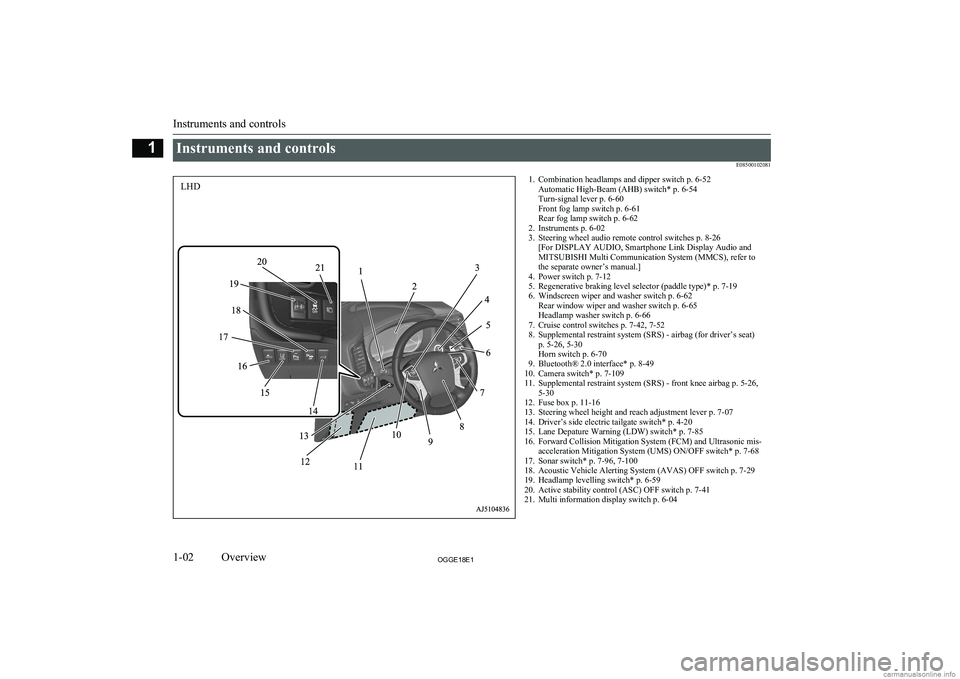
Instruments and controlsE085001020811. Combination headlamps and dipper switch p. 6-52Automatic High-Beam (AHB) switch* p. 6-54
Turn-signal lever p. 6-60
Front fog lamp switch p. 6-61
Rear fog lamp switch p. 6-62
2. Instruments p. 6-02
3. Steering wheel audio remote control switches p. 8-26 [For DISPLAY AUDIO, Smartphone Link Display Audio and
MITSUBISHI Multi Communication System (MMCS), refer to
the separate owner’s manual.]
4. Power switch p. 7-12
5. Regenerative braking level selector (paddle type)* p. 7-19
6. Windscreen wiper and washer switch p. 6-62 Rear window wiper and washer switch p. 6-65
Headlamp washer switch p. 6-66
7. Cruise control switches p. 7-42, 7-52
8. Supplemental restraint system (SRS) - airbag (for driver’s seat) p. 5-26, 5-30
Horn switch p. 6-70
9. Bluetooth® 2.0 interface* p. 8-49
10. Camera switch* p. 7-109
11. Supplemental restraint system (SRS) - front knee airbag p. 5-26, 5-30
12. Fuse box p. 11-16
13. Steering wheel height and reach adjustment lever p. 7-07
14. Driver’s side electric tailgate switch* p. 4-20
15. Lane Depature Warning (LDW) switch* p. 7-85
16. Forward Collision Mitigation System (FCM) and Ultrasonic mis- acceleration Mitigation System (UMS) ON/OFF switch* p. 7-68
17. Sonar switch* p. 7-96, 7-100
18. Acoustic Vehicle Alerting System (AVAS) OFF switch p. 7-29
19. Headlamp levelling switch* p. 6-59
20. Active stability control (ASC) OFF switch p. 7-41
21. Multi information display switch p. 6-04
Instruments and controls
1-02OGGE18E1Overview1LHD
Page 5 of 538
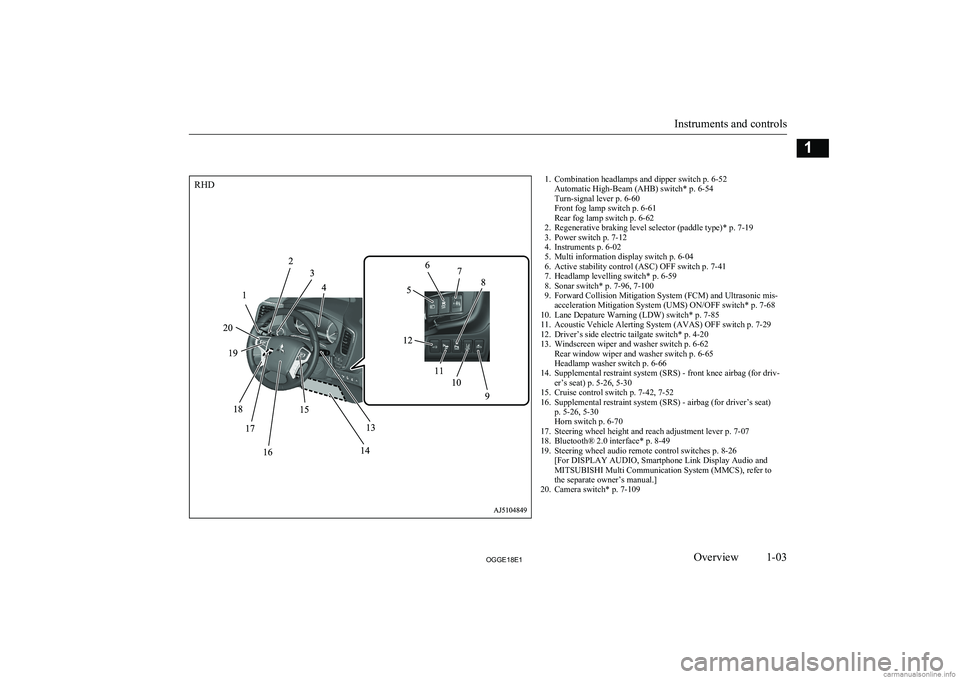
1. Combination headlamps and dipper switch p. 6-52Automatic High-Beam (AHB) switch* p. 6-54
Turn-signal lever p. 6-60
Front fog lamp switch p. 6-61
Rear fog lamp switch p. 6-62
2. Regenerative braking level selector (paddle type)* p. 7-19
3. Power switch p. 7-12
4. Instruments p. 6-02
5. Multi information display switch p. 6-04
6. Active stability control (ASC) OFF switch p. 7-41
7. Headlamp levelling switch* p. 6-59
8. Sonar switch* p. 7-96, 7-100
9. Forward Collision Mitigation System (FCM) and Ultrasonic mis- acceleration Mitigation System (UMS) ON/OFF switch* p. 7-68
10. Lane Depature Warning (LDW) switch* p. 7-85
11. Acoustic Vehicle Alerting System (AVAS) OFF switch p. 7-29
12. Driver’s side electric tailgate switch* p. 4-20
13. Windscreen wiper and washer switch p. 6-62 Rear window wiper and washer switch p. 6-65
Headlamp washer switch p. 6-66
14. Supplemental restraint system (SRS) - front knee airbag (for driv- er’s seat) p. 5-26, 5-30
15. Cruise control switch p. 7-42, 7-52
16. Supplemental restraint system (SRS) - airbag (for driver’s seat) p. 5-26, 5-30
Horn switch p. 6-70
17. Steering wheel height and reach adjustment lever p. 7-07
18. Bluetooth® 2.0 interface* p. 8-49
19. Steering wheel audio remote control switches p. 8-26 [For DISPLAY AUDIO, Smartphone Link Display Audio and
MITSUBISHI Multi Communication System (MMCS), refer to
the separate owner’s manual.]
20. Camera switch* p. 7-109
Instruments and controls
1-03OGGE18E1Overview1RHD
Page 6 of 538
![MITSUBISHI OUTLANDER PHEV 2018 Owners Manual (in English) 1. Multi Around Monitor* p. 7-106Audio* p. 8-13
[For DISPLAY AUDIO, Smartphone Link Display Audio and
MITSUBISHI Multi Communication System (MMCS), refer to
the separate owner’s manual.]
2. Hazard w](/img/19/34890/w960_34890-5.png "MITSUBISHI OUTLANDER PHEV 2018 Owners Manual (in English) 1. Multi Around Monitor* p. 7-106Audio* p. 8-13
[For DISPLAY AUDIO, Smartphone Link Display Audio and
MITSUBISHI Multi Communication System (MMCS), refer to
the separate owner’s manual.]
2. Hazard w")
1. Multi Around Monitor* p. 7-106Audio* p. 8-13
[For DISPLAY AUDIO, Smartphone Link Display Audio and
MITSUBISHI Multi Communication System (MMCS), refer to
the separate owner’s manual.]
2. Hazard warning flasher switch p. 6-60
3. ECO mode switch p. 6-61
4. Front passenger’s airbag indicator p. 5-29
5. Passenger’s ventilators p. 8-02
6. Accessory socket* p. 8-74 Cigarette lighter* p. 8-73
7. Electric tailgate power switch* p. 4-20
8. Key slot p. 7-15
9. 220-240 V AC power supply switch* p. 8-75
10. Blind Spot Warning (BSW) switch* p. 7-79
11. Heated steering wheel switch* p. 6-69
12. Heated windscreen switch* p. 6-68
13. Cup holder p. 8-82
14. Selector lever (Joystick type) p. 7-16
15. 220-240 V AC power supply* p. 8-75
16. Floor console box p. 8-81 Arm rest
Accessory socket p. 8-74
USB input terminal p. 8-69
17. Fuel tank filler door release lever p. 2-14
18. Bonnet release lever p. 11-04
19. Rear window demister switch p. 6-67 Wiper de-icer switch* p. 6-67
20. Air conditioner p. 8-04
21. Seat belt reminder p. 5-11
Instruments and controls
1-04OGGE18E1Overview1LHD
Page 7 of 538
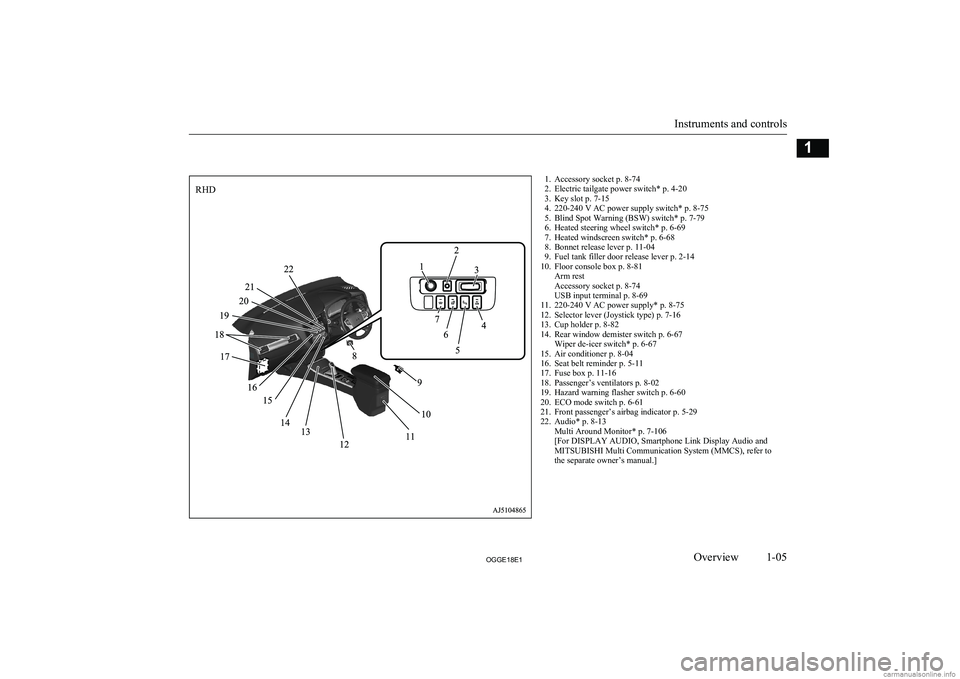
1. Accessory socket p. 8-74
2. Electric tailgate power switch* p. 4-20
3. Key slot p. 7-15
4. 220-240 V AC power supply switch* p. 8-75
5. Blind Spot Warning (BSW) switch* p. 7-79
6. Heated steering wheel switch* p. 6-69
7. Heated windscreen switch* p. 6-68
8. Bonnet release lever p. 11-04
9. Fuel tank filler door release lever p. 2-14
10. Floor console box p. 8-81 Arm rest
Accessory socket p. 8-74
USB input terminal p. 8-69
11. 220-240 V AC power supply* p. 8-75
12. Selector lever (Joystick type) p. 7-16
13. Cup holder p. 8-82
14. Rear window demister switch p. 6-67 Wiper de-icer switch* p. 6-67
15. Air conditioner p. 8-04
16. Seat belt reminder p. 5-11
17. Fuse box p. 11-16
18. Passenger’s ventilators p. 8-02
19. Hazard warning flasher switch p. 6-60
20. ECO mode switch p. 6-61
21. Front passenger’s airbag indicator p. 5-29
22. Audio* p. 8-13 Multi Around Monitor* p. 7-106
[For DISPLAY AUDIO, Smartphone Link Display Audio and
MITSUBISHI Multi Communication System (MMCS), refer to
the separate owner’s manual.]
Instruments and controls
1-05OGGE18E1Overview1RHD
Page 15 of 538
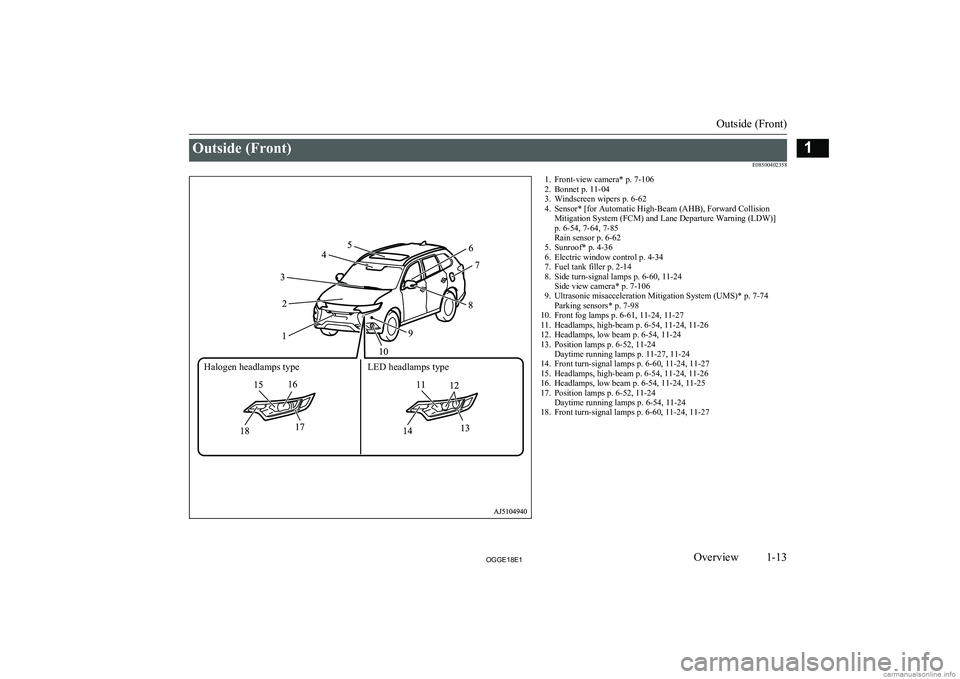
Outside (Front)E085004023581. Front-view camera* p. 7-1062. Bonnet p. 11-04
3. Windscreen wipers p. 6-62
4. Sensor* [for Automatic High-Beam (AHB), Forward Collision Mitigation System (FCM) and Lane Departure Warning (LDW)]
p. 6-54, 7-64, 7-85
Rain sensor p. 6-62
5. Sunroof* p. 4-36
6. Electric window control p. 4-34
7. Fuel tank filler p. 2-14
8. Side turn-signal lamps p. 6-60, 11-24 Side view camera* p. 7-106
9. Ultrasonic misacceleration Mitigation System (UMS)* p. 7-74 Parking sensors* p. 7-98
10. Front fog lamps p. 6-61, 11-24, 11-27
11. Headlamps, high-beam p. 6-54, 11-24, 11-26
12. Headlamps, low beam p. 6-54, 11-24
13. Position lamps p. 6-52, 11-24 Daytime running lamps p. 11-27, 11-24
14. Front turn-signal lamps p. 6-60, 11-24, 11-27
15. Headlamps, high-beam p. 6-54, 11-24, 11-26
16. Headlamps, low beam p. 6-54, 11-24, 11-25
17. Position lamps p. 6-52, 11-24 Daytime running lamps p. 6-54, 11-24
18. Front turn-signal lamps p. 6-60, 11-24, 11-27
Outside (Front)
1-13OGGE18E1Overview1Halogen headlamps type LED headlamps type
Page 145 of 538
Instruments.......................................................................................... 6-02
Multi information display................................................................... 6-02
Indication lamp, warning lamp, and information screen display list....................................................................................... 6-21
Indication lamps.................................................................................. 6-47
Warning lamps.................................................................................... 6-48
Information screen display.................................................................. 6-51
Combination headlamps and dipper switch........................................ 6-52
Headlamp levelling............................................................................. 6-59
Turn-signal lever................................................................................. 6-60
Hazard warning flasher switch............................................................6-60 ECO mode switch............................................................................... 6-61
Fog lamp switch.................................................................................. 6-61
Wiper and washer switch.................................................................... 6-62
Wiper de-icer switch*......................................................................... 6-67
Rear window demister switch............................................................. 6-67
Heated windscreen switch*.................................................................6-68 Heated steering wheel switch*............................................................6-69Horn switch......................................................................................... 6-70Instruments and controls
OGGE18E16
Page 148 of 538
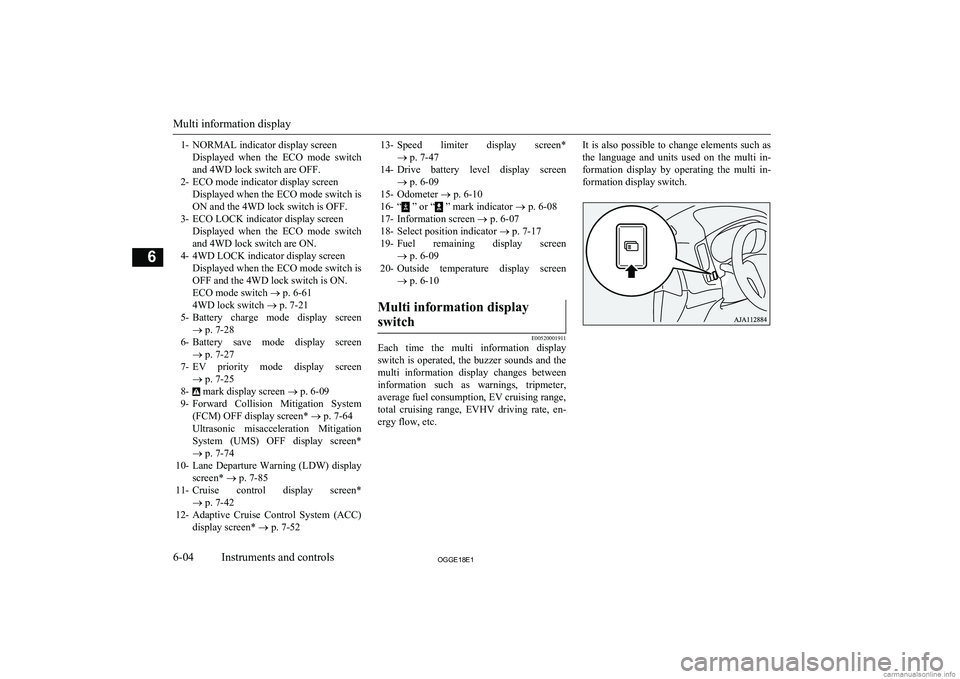
1- NORMAL indicator display screenDisplayed when the ECO mode switchand 4WD lock switch are OFF.
2- ECO mode indicator display screen Displayed when the ECO mode switch isON and the 4WD lock switch is OFF.
3- ECO LOCK indicator display screen Displayed when the ECO mode switchand 4WD lock switch are ON.
4- 4WD LOCK indicator display screen Displayed when the ECO mode switch isOFF and the 4WD lock switch is ON.ECO mode switch ® p. 6-61
4WD lock switch ® p. 7-21
5- Battery charge mode display screen
® p. 7-28
6- Battery save mode display screen
® p. 7-27
7- EV priority mode display screen
® p. 7-25
8-
mark display screen ® p. 6-09
9- Forward Collision Mitigation System
(FCM) OFF display screen* ® p. 7-64
Ultrasonic misacceleration Mitigation System (UMS) OFF display screen*
® p. 7-74
10- Lane Departure Warning (LDW) display
screen* ® p. 7-85
11- Cruise control display screen*
® p. 7-42
12- Adaptive Cruise Control System (ACC)
display screen* ® p. 7-52
13- Speed limiter display screen*
® p. 7-47
14- Drive battery level display screen
® p. 6-09
15- Odometer ® p. 6-10
16- “
” or “ ” mark indicator ® p. 6-08
17- Information screen ® p. 6-07
18- Select position indicator ® p. 7-17
19- Fuel remaining display screen
® p. 6-09
20- Outside temperature display screen
® p. 6-10
Multi information display
switch
E00520001911
Each time the multi information display
switch is operated, the buzzer sounds and the multi information display changes betweeninformation such as warnings, tripmeter,
average fuel consumption, EV cruising range,
total cruising range, EVHV driving rate, en- ergy flow, etc.
It is also possible to change elements such as
the language and units used on the multi in- formation display by operating the multi in- formation display switch.
Multi information display
6-04OGGE18E1Instruments and controls6
Page 187 of 538
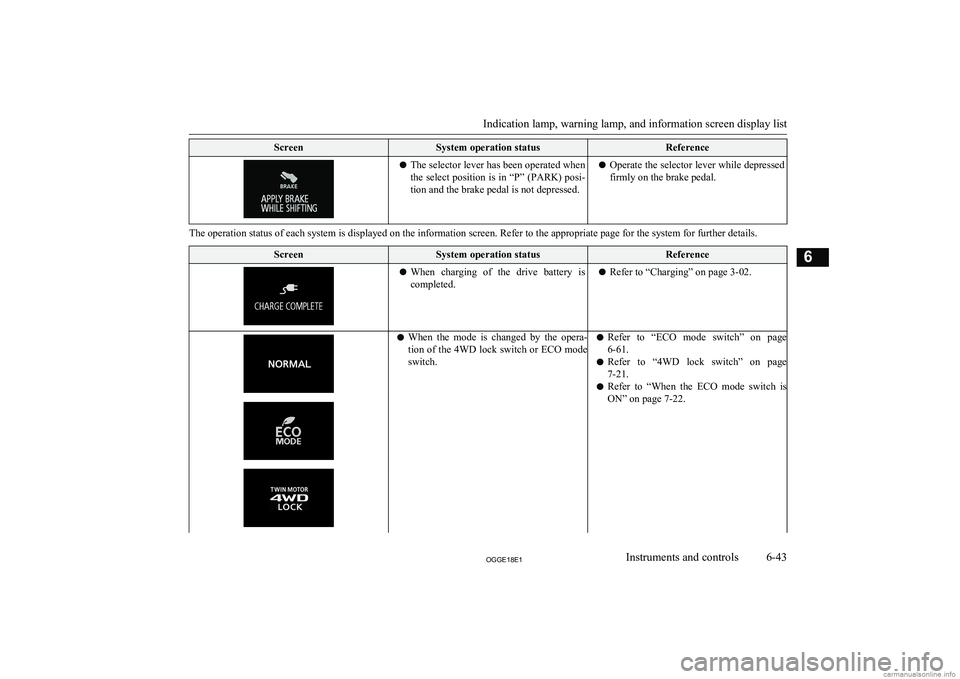
ScreenSystem operation statusReferencelThe selector lever has been operated when
the select position is in “P” (PARK) posi-
tion and the brake pedal is not depressed.l Operate the selector lever while depressed
firmly on the brake pedal.
The operation status of each system is displayed on the information screen. Refer to the appropriate page for the system for further details.
ScreenSystem operation statusReferencel When charging of the drive battery is
completed.l Refer to “Charging” on page 3-02.lWhen the mode is changed by the opera-
tion of the 4WD lock switch or ECO mode
switch.l Refer to “ECO mode switch” on page
6-61.
l Refer to “4WD lock switch” on page
7-21.
l Refer to “When the ECO mode switch is
ON” on page 7-22.
Indication lamp, warning lamp, and information screen display list
6-43OGGE18E1Instruments and controls6
Page 205 of 538
ECO mode switchE00531801111
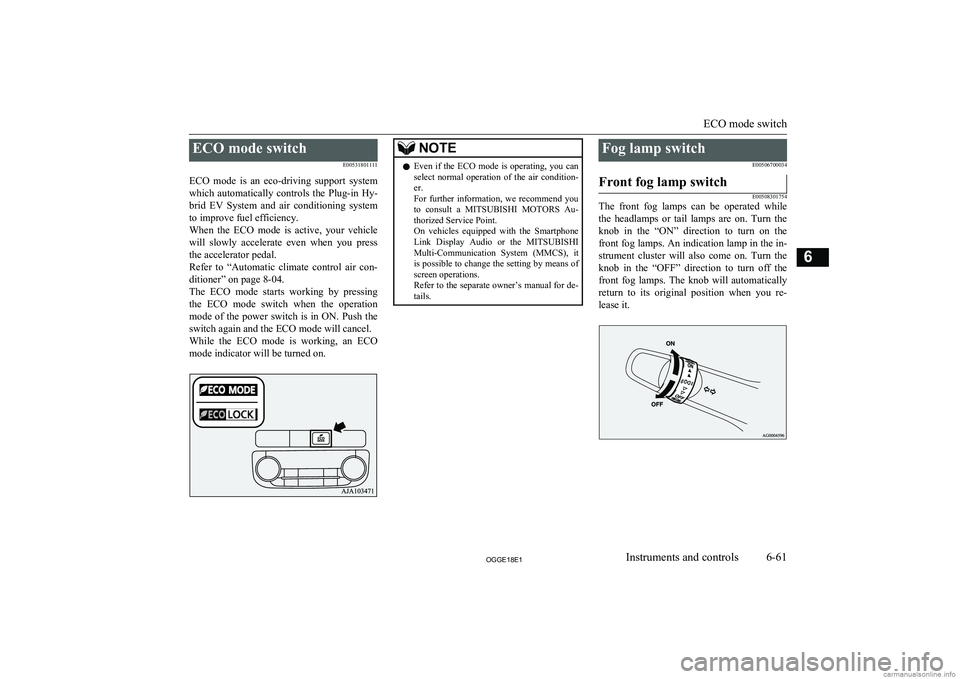
ECO mode is an eco-driving support system
which automatically controls the Plug-in Hy- brid EV System and air conditioning system to improve fuel efficiency.
When the ECO mode is active, your vehicle
will slowly accelerate even when you press the accelerator pedal.
Refer to “Automatic climate control air con- ditioner” on page 8-04.
The ECO mode starts working by pressing
the ECO mode switch when the operation mode of the power switch is in ON. Push the
switch again and the ECO mode will cancel. While the ECO mode is working, an ECO mode indicator will be turned on.NOTEl Even if the ECO mode is operating, you can
select normal operation of the air condition-
er.
For further information, we recommend you to consult a MITSUBISHI MOTORS Au-
thorized Service Point.
On vehicles equipped with the Smartphone Link Display Audio or the MITSUBISHI
Multi-Communication System (MMCS), it is possible to change the setting by means of
screen operations.
Refer to the separate owner’s manual for de-
tails.Fog lamp switch
E00506700034Front fog lamp switch
E00508301754
The front fog lamps can be operated while
the headlamps or tail lamps are on. Turn the knob in the “ON” direction to turn on the
front fog lamps. An indication lamp in the in- strument cluster will also come on. Turn theknob in the “OFF” direction to turn off the front fog lamps. The knob will automatically
return to its original position when you re- lease it.
ECO mode switch
6-61OGGE18E1Instruments and controls6
Page 237 of 538
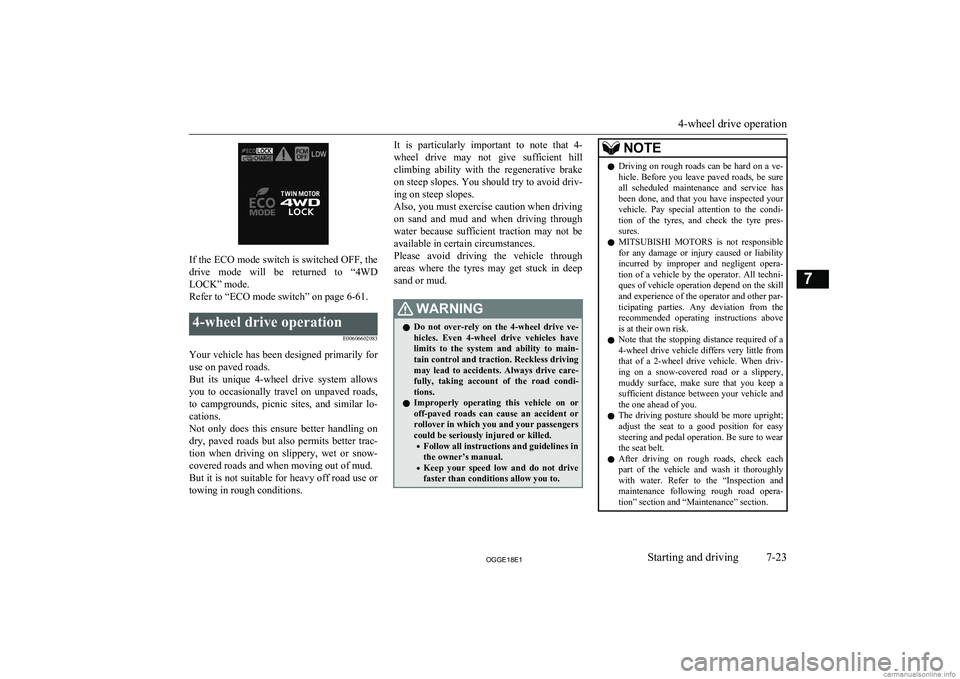
If the ECO mode switch is switched OFF, the
drive mode will be returned to “4WD LOCK” mode.
Refer to “ECO mode switch” on page 6-61.
4-wheel drive operation
E00606602083
Your vehicle has been designed primarily foruse on paved roads.
But its unique 4-wheel drive system allows
you to occasionally travel on unpaved roads, to campgrounds, picnic sites, and similar lo-
cations.
Not only does this ensure better handling on
dry, paved roads but also permits better trac-
tion when driving on slippery, wet or snow- covered roads and when moving out of mud.
But it is not suitable for heavy off road use or
towing in rough conditions.
It is particularly important to note that 4-
wheel drive may not give sufficient hill
climbing ability with the regenerative brake on steep slopes. You should try to avoid driv- ing on steep slopes.
Also, you must exercise caution when driving on sand and mud and when driving through
water because sufficient traction may not be
available in certain circumstances.
Please avoid driving the vehicle through
areas where the tyres may get stuck in deep sand or mud.WARNINGl Do not over-rely on the 4-wheel drive ve-
hicles. Even 4-wheel drive vehicles have
limits to the system and ability to main- tain control and traction. Reckless driving may lead to accidents. Always drive care-
fully, taking account of the road condi-
tions.
l Improperly operating this vehicle on or
off-paved roads can cause an accident or
rollover in which you and your passengers
could be seriously injured or killed.
• Follow all instructions and guidelines in
the owner’s manual.
• Keep your speed low and do not drive
faster than conditions allow you to.NOTEl Driving on rough roads can be hard on a ve-
hicle. Before you leave paved roads, be sure all scheduled maintenance and service has
been done, and that you have inspected your vehicle. Pay special attention to the condi- tion of the tyres, and check the tyre pres-
sures.
l MITSUBISHI
MOTORS is not responsible
for any damage or injury caused or liability
incurred by improper and negligent opera- tion of a vehicle by the operator. All techni-
ques of vehicle operation depend on the skill and experience of the operator and other par- ticipating parties. Any deviation from the
recommended operating instructions above is at their own risk.
l Note that the stopping distance required of a
4-wheel drive vehicle differs very little from
that of a 2-wheel drive vehicle. When driv- ing on a snow-covered road or a slippery,muddy surface, make sure that you keep a
sufficient distance between your vehicle and
the one ahead of you.
l The driving posture should be more upright;
adjust the seat to a good position for easy steering and pedal operation. Be sure to wear
the seat belt.
l After driving on rough roads, check each
part of the vehicle and wash it thoroughlywith water. Refer to the “Inspection andmaintenance following rough road opera-
tion” section and “Maintenance” section.
4-wheel drive operation
7-23OGGE18E1Starting and driving7