Press and hold MITSUBISHI OUTLANDER PHEV 2018 Owner's Manual (in English)
[x] Cancel search | Manufacturer: MITSUBISHI, Model Year: 2018, Model line: OUTLANDER PHEV, Model: MITSUBISHI OUTLANDER PHEV 2018Pages: 538, PDF Size: 25.01 MB
Page 21 of 538
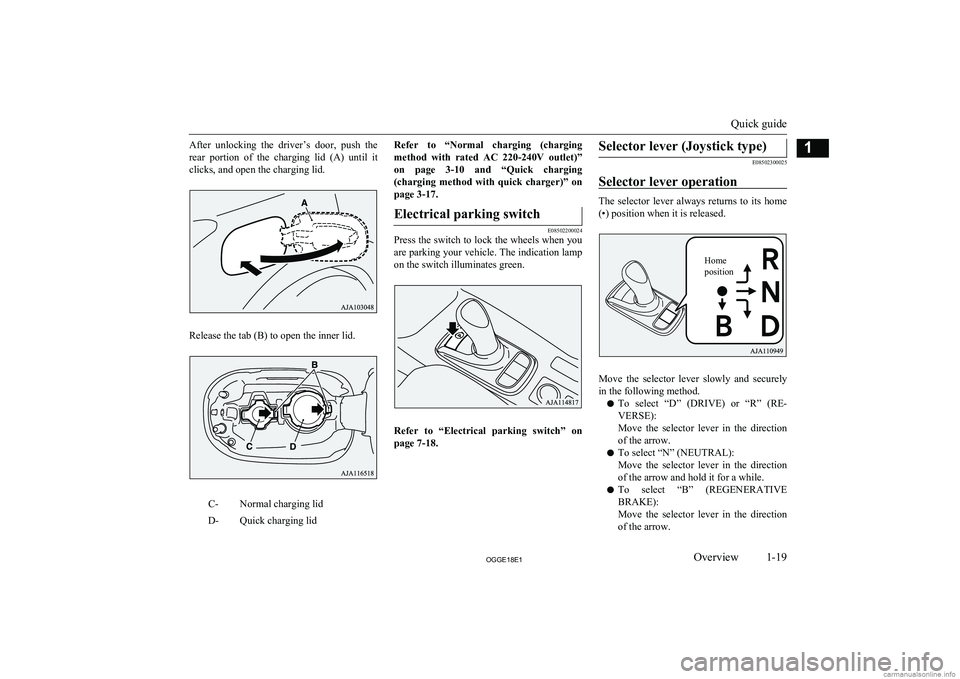
After unlocking the driver’s door, push the
rear portion of the charging lid (A) until it clicks, and open the charging lid.
Release the tab (B) to open the inner lid.
C-Normal charging lidD-Quick charging lidRefer to “Normal charging (charging method with rated AC 220-240V outlet)”
on page 3-10 and “Quick charging
(charging method with quick charger)” on
page 3-17.Electrical parking switch
E08502200024
Press the switch to lock the wheels when you
are parking your vehicle. The indication lamp on the switch illuminates green.
Refer to “Electrical parking switch” on
page 7-18.
Selector lever (Joystick type)
E08502300025
Selector lever operation
The selector lever always returns to its home
(•) position when it is released.
Move the selector lever slowly and securely
in the following method.
l To select “D” (DRIVE) or “R” (RE-
VERSE):
Move the selector lever in the direction
of the arrow.
l To select “N” (NEUTRAL):
Move the selector lever in the direction
of the arrow and hold it for a while.
l To select “B” (REGENERATIVE
BRAKE):
Move the selector lever in the direction
of the arrow.
Quick guide
1-19OGGE18E1Overview1 Home
position
Page 79 of 538
NOTElEven if the keyless operation key is within
70 cm of the driver’s door handle, front pas- senger’s door handle, or tailgate handle, ifthe key is near to the ground or high up, the
system may not operate.
l If the keyless operation key is within the op-
erating range, even someone not carrying the key can lock and unlock the doors and tail-gate by pressing the driver’s or front passen-ger’s door lock/unlock switch, the tailgate
lock switch or the tailgate open switch.Operating range for starting the
Plug-in Hybrid EV System and changing the operation mode
E00306301530
The operating range is the interior of the ve- hicle.
*:Forward direction:Operating rangeNOTEl Even if it is within the operating range, if the
keyless operation key is in a small item
holder such as the glove box, on top of the instrument panel, door pocket or in the lug-gage area, it may be impossible to start the
Plug-in Hybrid EV System.
l If a keyless operation key is too close to the
door or door window, it may be possible to
start the Plug-in Hybrid EV System or
change the operation mode even when the key is outside the vehicles.To operate using the keyless
operation function
E00305802434
NOTEl The charging lid is also locked/unlocked,
when the driver’s door is locked/unlocked.
Locking the doors and tailgate
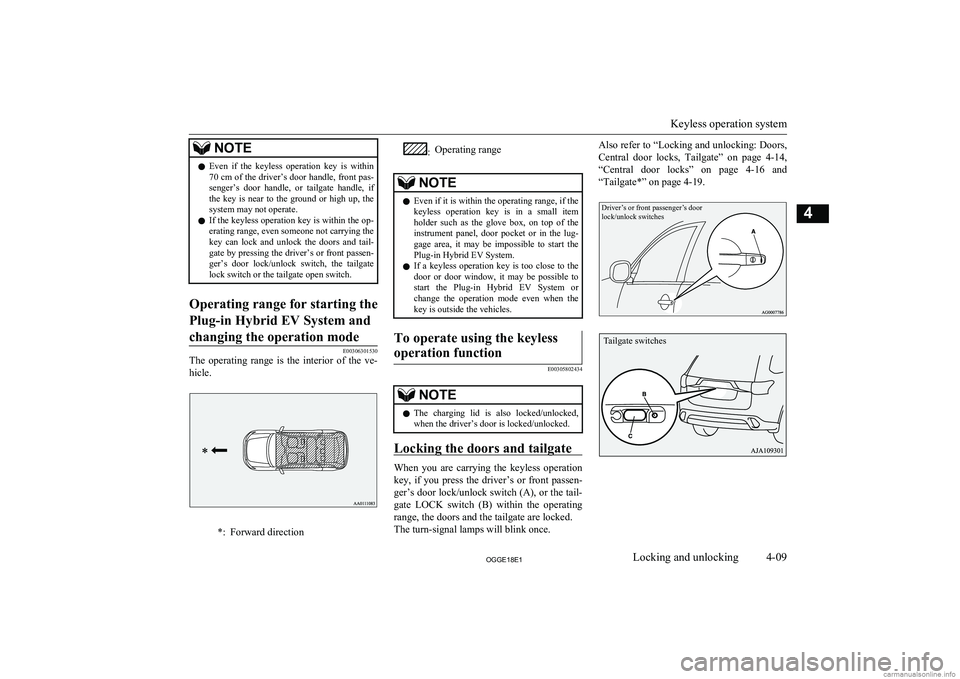
When you are carrying the keyless operation
key, if you press the driver’s or front passen- ger’s door lock/unlock switch (A), or the tail-
gate LOCK switch (B) within the operating range, the doors and the tailgate are locked.
The turn-signal lamps will blink once.
Also refer to “Locking and unlocking: Doors,
Central door locks, Tailgate” on page 4-14,
“Central door locks” on page 4-16 and
“Tailgate*” on page 4-19.Driver’s or front passenger’s door
lock/unlock switches
Keyless operation system
4-09OGGE18E1Locking and unlocking4 Tailgate switches
Page 100 of 538
Changing the security alarmsettings
E00301601365
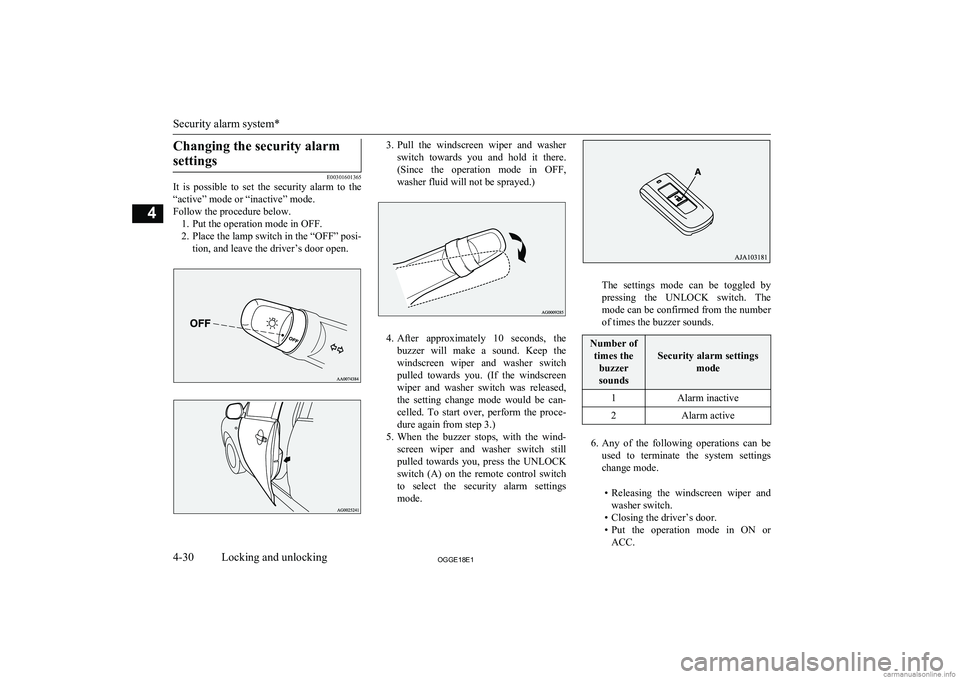
It is possible to set the security alarm to the
“active” mode or “inactive” mode.
Follow the procedure below. 1. Put the operation mode in OFF.
2. Place the lamp switch in the “OFF” posi- tion, and leave the driver’s door open.
3.Pull the windscreen wiper and washer
switch towards you and hold it there. (Since the operation mode in OFF,
washer fluid will not be sprayed.)
4. After approximately 10 seconds, the
buzzer will make a sound. Keep the windscreen wiper and washer switch
pulled towards you. (If the windscreen
wiper and washer switch was released,
the setting change mode would be can-
celled. To start over, perform the proce- dure again from step 3.)
5. When the buzzer stops, with the wind-
screen wiper and washer switch still
pulled towards you, press the UNLOCK switch (A) on the remote control switch to select the security alarm settings
mode.
The settings mode can be toggled by
pressing the UNLOCK switch. The mode can be confirmed from the numberof times the buzzer sounds.
Number of
times the buzzer
sounds
Security alarm settings mode
1Alarm inactive2Alarm active
6.Any of the following operations can be
used to terminate the system settings change mode.
• Releasing the windscreen wiper and
washer switch.
• Closing the driver’s door.
• Put the operation mode in ON or
ACC.
Security alarm system*
4-30OGGE18E1Locking and unlocking4
Page 102 of 538
NOTElIf the bonnet is open, the security indicator
illuminates, and the system does not enter the system preparation mode.
When the bonnet is closed, the system enters the system preparation mode, and after ap-
proximately 20 seconds the system enters the system armed mode.
4. After approximately 20 seconds, the
buzzer stops, and when the blinking of
the security indicator starts to slow
down, the system armed mode goes into effect.
The security indicator continues to blink
during the system armed mode.
NOTEl The security alarm system can be activated
when people are riding inside the vehicle or when the windows are open. To prevent ac-cidental activation of the alarm, do not set
the system to the system armed mode while people are riding in the vehicle.
l Avoid leaving valuable items inside the ve-
hicle even when the security alarm system
has been set to the “active” mode.To deactivate the vehicle incli-
nation detection function and the interior intrusion detectionfunction*
E00312101533
The vehicle inclination detection function
and the interior intrusion detection function
can be deactivated when parking in automa-
ted car parks, when leaving pets in the vehi- cle or when leaving the vehicle with the win-
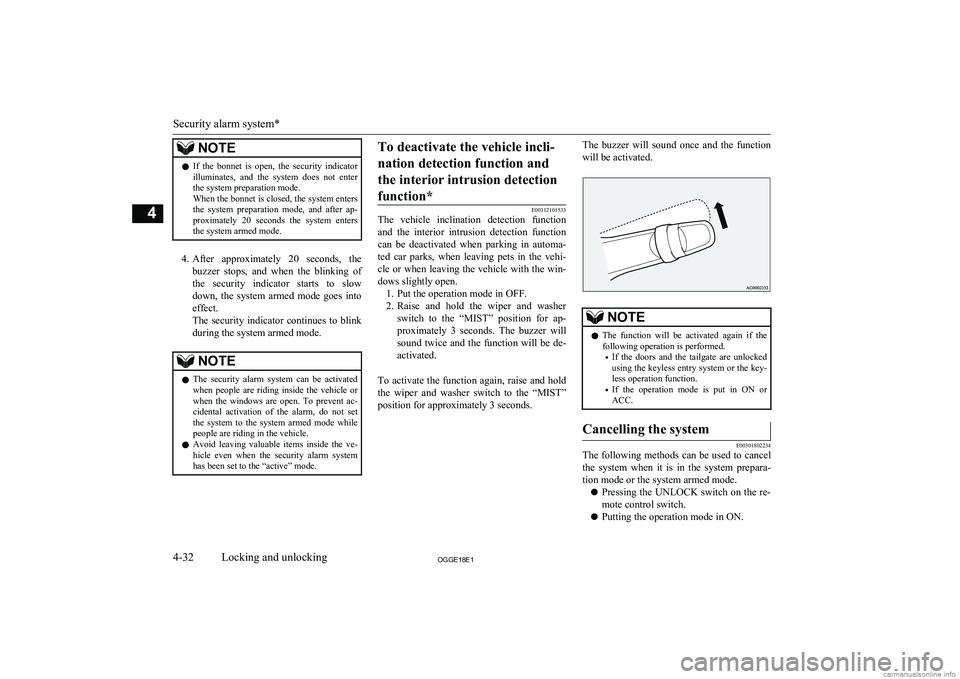
dows slightly open. 1. Put the operation mode in OFF.
2. Raise and hold the wiper and washer
switch to the “MIST” position for ap- proximately 3 seconds. The buzzer will
sound twice and the function will be de-
activated.
To activate the function again, raise and hold
the wiper and washer switch to the “MIST” position for approximately 3 seconds.
The buzzer will sound once and the function
will be activated.NOTEl The function will be activated again if the
following operation is performed.
• If the doors and the tailgate are unlocked
using the keyless entry system or the key-
less operation function.
• If the operation mode is put in ON or
ACC.Cancelling the system
E00301802234
The following methods can be used to cancel
the system when it is in the system prepara- tion mode or the system armed mode.
l Pressing the UNLOCK switch on the re-
mote control switch.
l Putting the operation mode in ON.
Security alarm system*
4-32OGGE18E1Locking and unlocking4
Page 103 of 538
lOpening any one of the doors or the tail-
gate, when the system is in the system
preparation mode.
l Holding the keyless operation key and
pressing the driver’s or front passenger’s
door lock/unlock switch, or the tailgate open switch to unlock the doors and the
tailgate.NOTEl If the bonnet is opened during the system
preparation mode, the system preparationmode is suspended.
The system returns to the system preparation mode when the bonnet is closed.
l If the auxiliary battery terminals are discon-
nected while the system is in the system preparation mode, the memory will be erased.
l It is possible to register up to four remote
control switches for keyless operation sys-tem.
As long as they are registered, any of the re-
mote control switches, other than the one used to activate the system, can be used to
cancel the system.
If you want to register additional remote control switches, please contact aMITSUBISHI MOTORS Authorized Serv-
ice Point.NOTEl The activation distance for keyless entry sys-
tem is approximately 4 m.
If it is not possible to lock or unlock the ve- hicle by pressing the switch at the correct
distance or the security alarm system cannot be set or cancelled using the switch, the bat-
tery may need to be replaced.
Replace the battery at a MITSUBISHI
MOTORS Authorized Service Point.
l If the UNLOCK switch on the remote con-
trol switch, or the driver’s or front passen- ger’s door lock/unlock switch is pressed and no door or the tailgate is opened within 30 seconds, the doors and the tailgate will auto-
matically relock. In this case as well, the
system preparation mode will go into effect.
l The time between pressing the UNLOCK
switch on the remote control switch, or thedriver’s or front passenger’s door lock/
unlock switch and automatic locking can be adjusted. Please consult a MITSUBISHI
MOTORS Authorized Service Point.
On vehicles equipped with the Smartphone
Link Display Audio or the MITSUBISHI
Multi-Communication System (MMCS), screen operations can be used to make theadjustment. Refer to the separate owner’s
manual for details.Alarm activation
E00301902408
When the system is in the system armed
mode, the alarm will be activated as follows
if the vehicle is unlocked or if any of the doors, tailgate or bonnet is opened using a
method other than the keyless entry system or the keyless operation function. 1. The inside alarm will be activated for
approximately 10 seconds. (except for vehicles equipped with the interior alarm
sensor)
NOTEl If the bonnet is opened during the system
armed mode, the vehicle outside alarm oper-
ates immediately, without the vehicle inside
alarm operating.
l The time for the vehicle inside alarm can be
adjusted. Please consult a MITSUBISHI
MOTORS Authorized Service Point.
2. The alarm will be activated for approxi-
mately 30 seconds.
The turn-signal lamps will blink, and the horn (the siren for vehicles equipped
Security alarm system*
4-33OGGE18E1Locking and unlocking4
Page 104 of 538
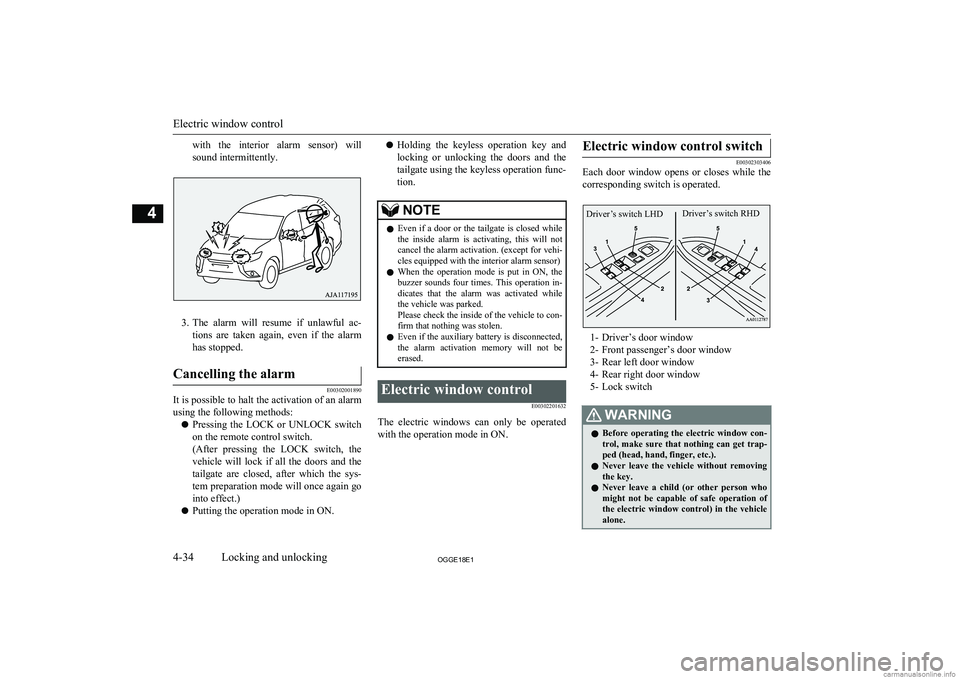
with the interior alarm sensor) will
sound intermittently.
3. The alarm will resume if unlawful ac-
tions are taken again, even if the alarm has stopped.
Cancelling the alarm
E00302001890
It is possible to halt the activation of an alarm
using the following methods:
l Pressing the LOCK or UNLOCK switch
on the remote control switch.
(After pressing the LOCK switch, the vehicle will lock if all the doors and the
tailgate are closed, after which the sys- tem preparation mode will once again go
into effect.)
l Putting the operation mode in ON.
l Holding the keyless operation key and
locking or unlocking the doors and the tailgate using the keyless operation func-
tion.NOTEl Even if a door or the tailgate is closed while
the inside alarm is activating, this will notcancel the alarm activation. (except for vehi-
cles equipped with the interior alarm sensor)
l When the operation mode is put in ON, the
buzzer sounds four times. This operation in-
dicates that the alarm was activated while the vehicle was parked.
Please check the inside of the vehicle to con-
firm that nothing was stolen.
l Even if the auxiliary battery is disconnected,
the alarm activation memory will not be erased.Electric window control
E00302201632
The electric windows can only be operatedwith the operation mode in ON.
Electric window control switch
E00302303406
Each door window opens or closes while the
corresponding switch is operated.
1- Driver’s door window
2- Front passenger’s door window
3- Rear left door window
4- Rear right door window
5- Lock switch
WARNINGl Before operating the electric window con-
trol, make sure that nothing can get trap-
ped (head, hand, finger, etc.).
l Never leave the vehicle without removing
the key.
l Never leave a child (or other person who
might not be capable of safe operation of the electric window control) in the vehicle alone.
Electric window control
4-34OGGE18E1Locking and unlocking4 Driver’s switch RHDDriver’s switch LHD
Page 106 of 538
WARNINGlIf the auxiliary battery terminals are dis-
connected or the fuse for electric window
is replaced, the safety mechanism will be
cancelled.
If a hand or head got trapped, a serious injury could result.CAUTIONl The safety mechanism is cancelled just be-
fore the window is fully closed. This allows the window to close completely. Therefore be especially careful that no fingers are trap-
ped in the window.
l The safety mechanism is deactivated while
the switch is pulled up. Therefore be espe-
cially careful that fingers are not trapped in the door window opening.NOTEl The safety mechanism can be activated if the
driving conditions or other circumstancescause the driver’s door window to be subjec- ted to a physical shock similar to that caused
by a trapped hand or head.NOTEl If the auxiliary battery terminals are discon-
nected or the fuse for electric window is re-
placed, the safety mechanism will be cancel-
led and the door window will not automati- cally open/close completely.
If the window is open, repeatedly raise the
driver’s door window switch until the win-
dow has been fully closed. Following this, release the switch, raise the switch once again and hold it in this condition for at least
1 second, then release it. You should now be able to operate the driver’s door window in
the normal fashion.Sunroof*
E00302702445
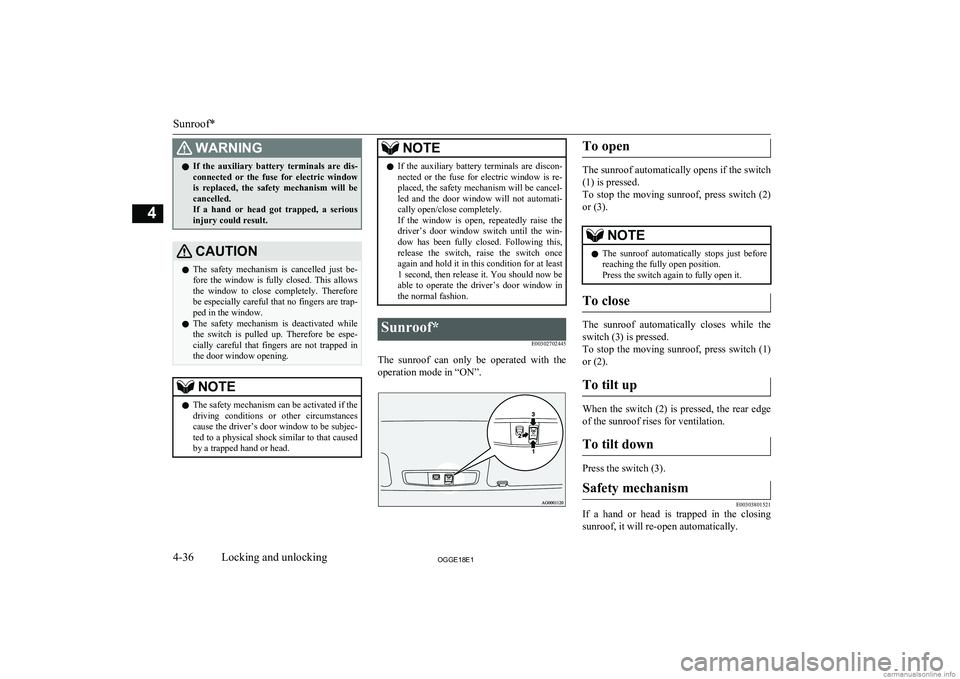
The sunroof can only be operated with theoperation mode in “ON”.
To open
The sunroof automatically opens if the switch
(1) is pressed.
To stop the moving sunroof, press switch (2) or (3).
NOTEl The sunroof automatically stops just before
reaching the fully open position.
Press the switch again to fully open it.
To close
The sunroof automatically closes while the
switch (3) is pressed.
To stop the moving sunroof, press switch (1)
or (2).
To tilt up
When the switch (2) is pressed, the rear edge of the sunroof rises for ventilation.
To tilt down
Press the switch (3).
Safety mechanism
E00303801521
If a hand or head is trapped in the closing sunroof, it will re-open automatically.
Sunroof*
4-36OGGE18E1Locking and unlocking4
Page 118 of 538
WARNINGlAlways adjust the belt to a snug fit.
l Always wear the lap portion of the belt
over your hips.3-point type seat belt (with
emergency locking mechanism)
E00404902918
This type of belt requires no length adjust- ment. Once worn, the belt adjusts itself to the
movement of the wearer, but in the event of a sudden or strong shock, the belt automatical-
ly locks to hold the wearer’s body.
NOTEl You can check if the belt locks by pulling it
forward quickly.
l If the seat belt buckles in the rear seating po-
sition are not found, you will find them un-
der the rear seat cushion. Refer to “Making a
luggage area” on page 5-06 for how to put
the seat belt buckles at the proper position.
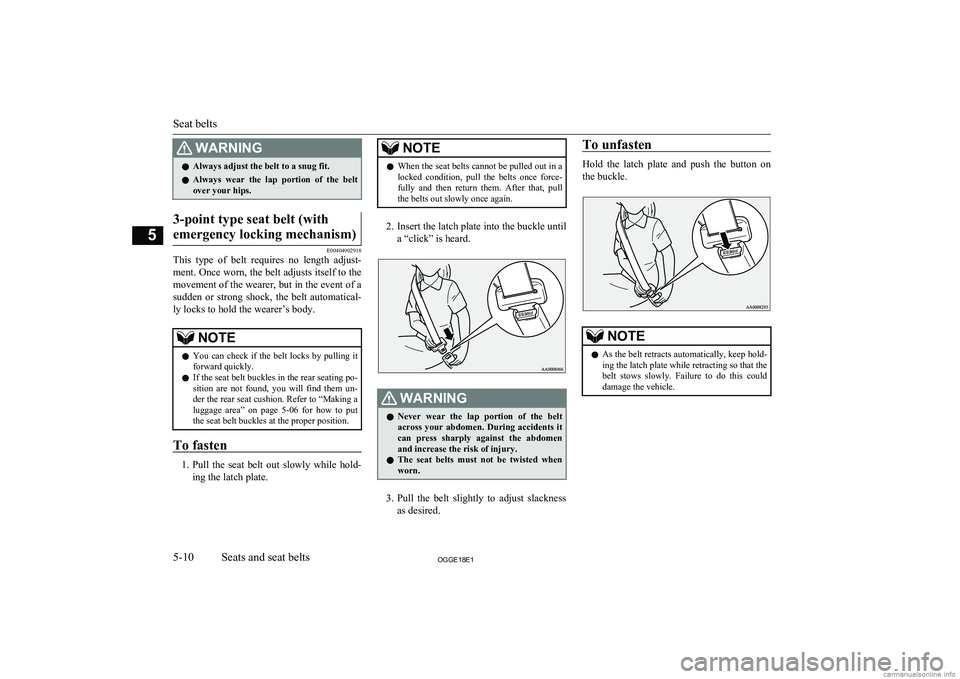
To fasten
1. Pull the seat belt out slowly while hold-
ing the latch plate.
NOTEl When the seat belts cannot be pulled out in a
locked condition, pull the belts once force-
fully and then return them. After that, pull
the belts out slowly once again.
2. Insert the latch plate into the buckle until
a “click” is heard.
WARNINGl Never wear the lap portion of the belt
across your abdomen. During accidents it
can press sharply against the abdomen and increase the risk of injury.
l The seat belts must not be twisted when
worn.
3. Pull the belt slightly to adjust slackness
as desired.
To unfasten
Hold the latch plate and push the button on
the buckle.
NOTEl As the belt retracts automatically, keep hold-
ing the latch plate while retracting so that the
belt stows slowly. Failure to do this could damage the vehicle.
Seat belts
5-10OGGE18E1Seats and seat belts5
Page 121 of 538
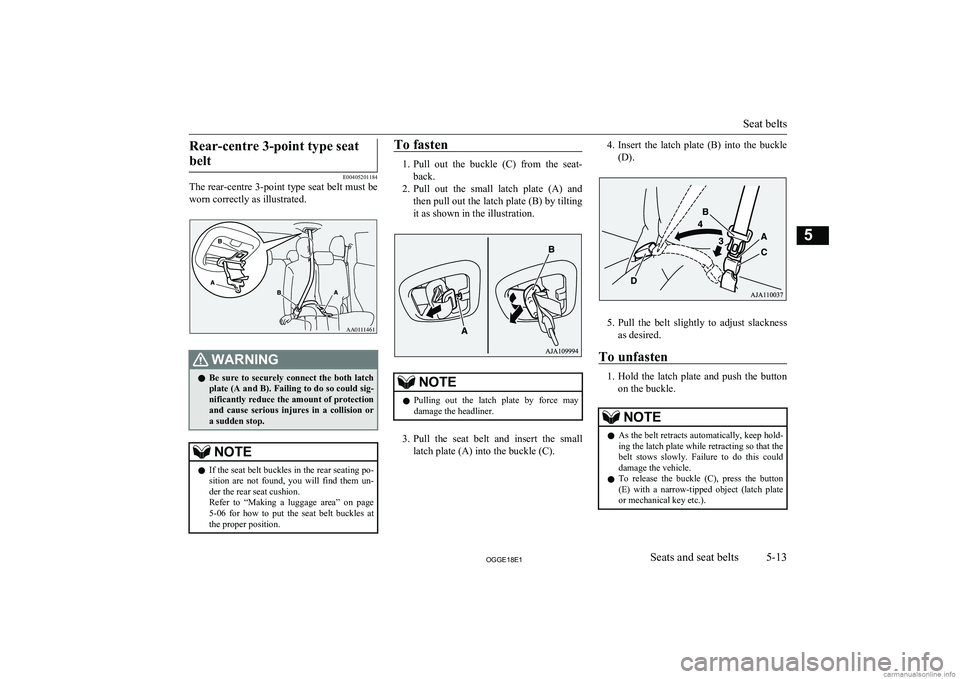
Rear-centre 3-point type seatbelt
E00405201184
The rear-centre 3-point type seat belt must be
worn correctly as illustrated.
WARNINGl Be sure to securely connect the both latch
plate (A and B). Failing to do so could sig-
nificantly reduce the amount of protection
and cause serious injures in a collision or a sudden stop.NOTEl If the seat belt buckles in the rear seating po-
sition are not found, you will find them un-
der the rear seat cushion.
Refer to “Making a luggage area” on page 5-06 for how to put the seat belt buckles at
the proper position.To fasten
1. Pull out the buckle (C) from the seat-
back.
2. Pull out the small latch plate (A) and
then pull out the latch plate (B) by tilting
it as shown in the illustration.
NOTEl Pulling out the latch plate by force may
damage the headliner.
3. Pull the seat belt and insert the small
latch plate (A) into the buckle (C).
4. Insert the latch plate (B) into the buckle
(D).
5. Pull the belt slightly to adjust slackness
as desired.
To unfasten
1. Hold the latch plate and push the button
on the buckle.
NOTEl As the belt retracts automatically, keep hold-
ing the latch plate while retracting so that the
belt stows slowly. Failure to do this could damage the vehicle.
l To release the buckle (C), press the button
(E) with a narrow-tipped object (latch plate
or mechanical key etc.).
Seat belts
5-13OGGE18E1Seats and seat belts5AA0111461
Page 146 of 538
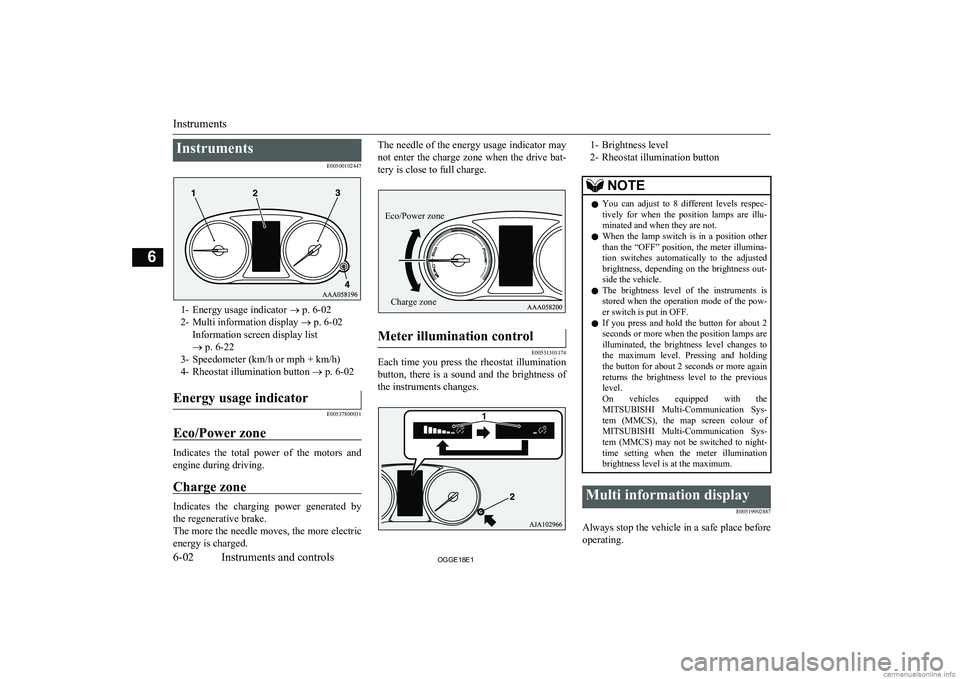
InstrumentsE00500102447
1- Energy usage indicator ® p. 6-02
2- Multi information display ® p. 6-02
Information screen display list
® p. 6-22
3- Speedometer (km/h or mph + km/h)
4- Rheostat illumination button ® p. 6-02
Energy usage indicator
E00537800031
Eco/Power zone
Indicates the total power of the motors and
engine during driving.
Charge zone
Indicates the charging power generated by the regenerative brake.
The more the needle moves, the more electric
energy is charged.
The needle of the energy usage indicator may
not enter the charge zone when the drive bat-tery is close to full charge.Meter illumination control
E00531301174
Each time you press the rheostat illumination
button, there is a sound and the brightness of the instruments changes.
1- Brightness level
2- Rheostat illumination buttonNOTEl You can adjust to 8 different levels respec-
tively for when the position lamps are illu- minated and when they are not.
l When the lamp switch is in a position other
than the “OFF” position, the meter illumina-
tion switches automatically to the adjusted brightness, depending on the brightness out- side the vehicle.
l The brightness level of the instruments is
stored when the operation mode of the pow- er switch is put in OFF.
l If you press and hold the button for about 2
seconds or more when the position lamps are illuminated, the brightness level changes to
the maximum level. Pressing and holding the button for about 2 seconds or more again
returns the brightness level to the previous
level.
On vehicles equipped with the MITSUBISHI Multi-Communication Sys-
tem (MMCS), the map screen colour of MITSUBISHI Multi-Communication Sys-
tem (MMCS) may not be switched to night-
time setting when the meter illumination brightness level is at the maximum.Multi information display
E00519902887
Always stop the vehicle in a safe place beforeoperating.
Instruments
6-02OGGE18E1Instruments and controls6 Eco/Power zoneCharge zone