light MITSUBISHI OUTLANDER PHEV 2018 Owner's Manual (in English)
[x] Cancel search | Manufacturer: MITSUBISHI, Model Year: 2018, Model line: OUTLANDER PHEV, Model: MITSUBISHI OUTLANDER PHEV 2018Pages: 538, PDF Size: 25.01 MB
Page 6 of 538
![MITSUBISHI OUTLANDER PHEV 2018 Owners Manual (in English) 1. Multi Around Monitor* p. 7-106Audio* p. 8-13
[For DISPLAY AUDIO, Smartphone Link Display Audio and
MITSUBISHI Multi Communication System (MMCS), refer to
the separate owner’s manual.]
2. Hazard w](/img/19/34890/w960_34890-5.png "MITSUBISHI OUTLANDER PHEV 2018 Owners Manual (in English) 1. Multi Around Monitor* p. 7-106Audio* p. 8-13
[For DISPLAY AUDIO, Smartphone Link Display Audio and
MITSUBISHI Multi Communication System (MMCS), refer to
the separate owner’s manual.]
2. Hazard w")
1. Multi Around Monitor* p. 7-106Audio* p. 8-13
[For DISPLAY AUDIO, Smartphone Link Display Audio and
MITSUBISHI Multi Communication System (MMCS), refer to
the separate owner’s manual.]
2. Hazard warning flasher switch p. 6-60
3. ECO mode switch p. 6-61
4. Front passenger’s airbag indicator p. 5-29
5. Passenger’s ventilators p. 8-02
6. Accessory socket* p. 8-74 Cigarette lighter* p. 8-73
7. Electric tailgate power switch* p. 4-20
8. Key slot p. 7-15
9. 220-240 V AC power supply switch* p. 8-75
10. Blind Spot Warning (BSW) switch* p. 7-79
11. Heated steering wheel switch* p. 6-69
12. Heated windscreen switch* p. 6-68
13. Cup holder p. 8-82
14. Selector lever (Joystick type) p. 7-16
15. 220-240 V AC power supply* p. 8-75
16. Floor console box p. 8-81 Arm rest
Accessory socket p. 8-74
USB input terminal p. 8-69
17. Fuel tank filler door release lever p. 2-14
18. Bonnet release lever p. 11-04
19. Rear window demister switch p. 6-67 Wiper de-icer switch* p. 6-67
20. Air conditioner p. 8-04
21. Seat belt reminder p. 5-11
Instruments and controls
1-04OGGE18E1Overview1LHD
Page 12 of 538
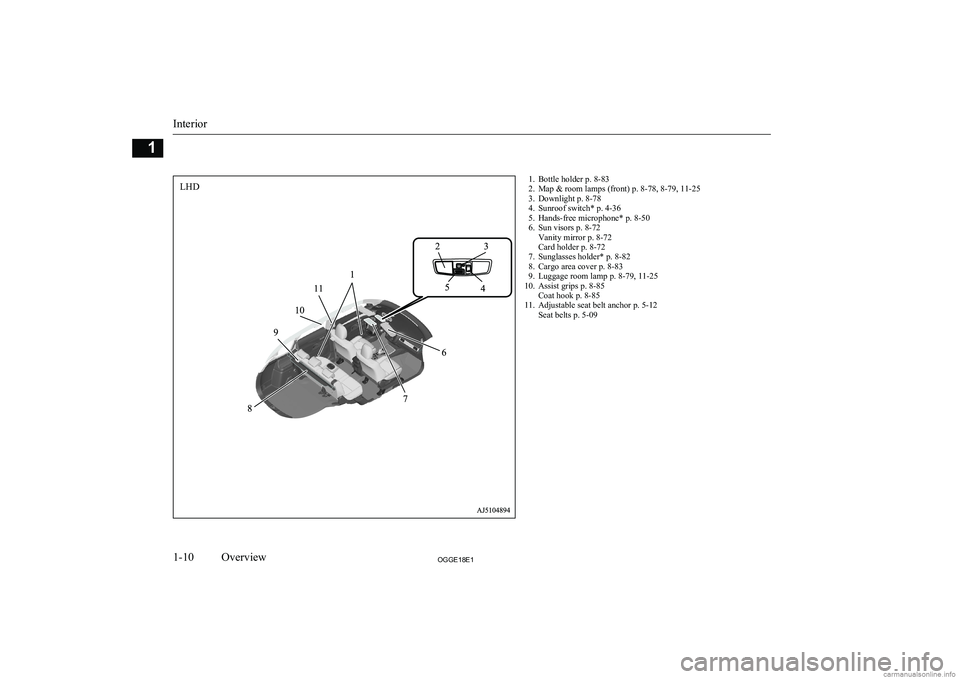
1. Bottle holder p. 8-83
2. Map & room lamps (front) p. 8-78, 8-79, 11-25
3. Downlight p. 8-78
4. Sunroof switch* p. 4-36
5. Hands-free microphone* p. 8-50
6. Sun visors p. 8-72 Vanity mirror p. 8-72
Card holder p. 8-72
7. Sunglasses holder* p. 8-82
8. Cargo area cover p. 8-83
9. Luggage room lamp p. 8-79, 11-25
10. Assist grips p. 8-85 Coat hook p. 8-85
11. Adjustable seat belt anchor p. 5-12 Seat belts p. 5-09
Interior
1-10OGGE18E1Overview1LHD
Page 13 of 538
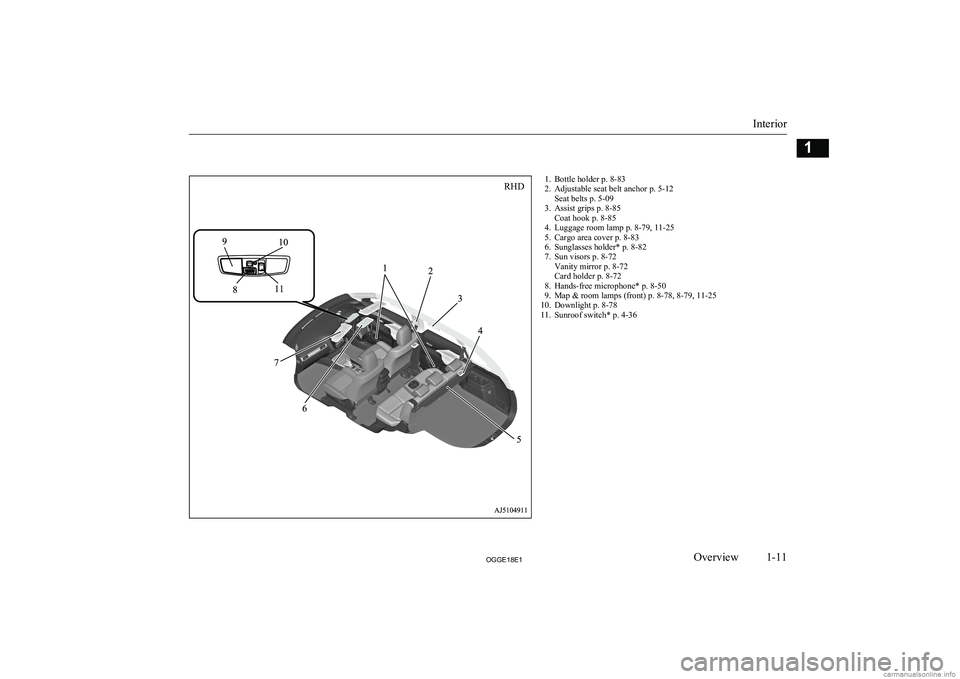
1. Bottle holder p. 8-83
2. Adjustable seat belt anchor p. 5-12 Seat belts p. 5-09
3. Assist grips p. 8-85 Coat hook p. 8-85
4. Luggage room lamp p. 8-79, 11-25
5. Cargo area cover p. 8-83
6. Sunglasses holder* p. 8-82
7. Sun visors p. 8-72 Vanity mirror p. 8-72
Card holder p. 8-72
8. Hands-free microphone* p. 8-50
9. Map & room lamps (front) p. 8-78, 8-79, 11-25
10. Downlight p. 8-78
11. Sunroof switch* p. 4-36
Interior
1-11OGGE18E1Overview1RHD
Page 18 of 538
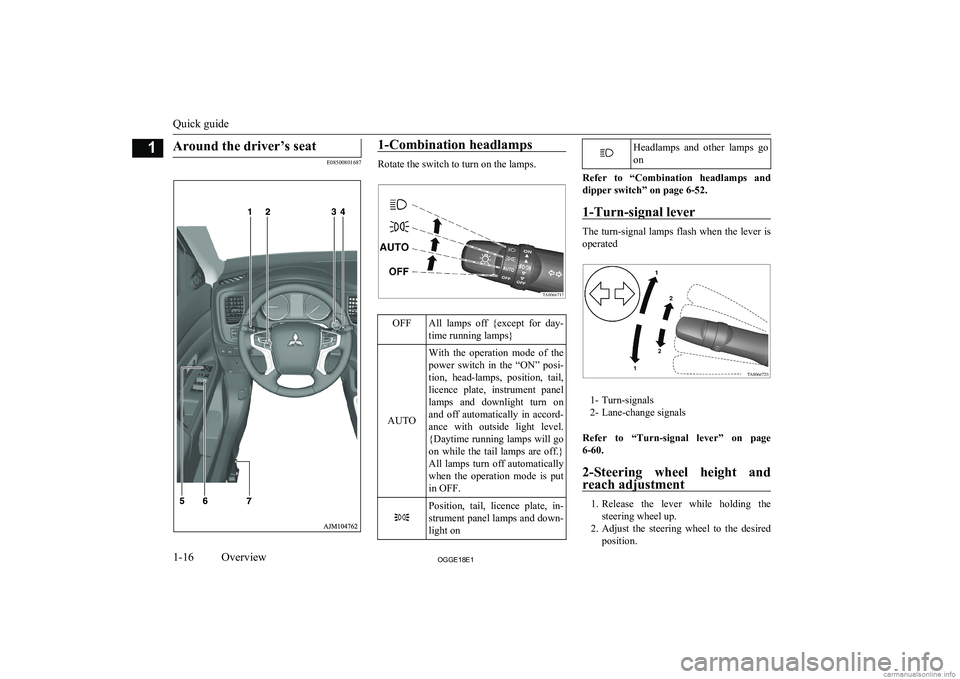
Around the driver’s seat
E08500801687
1-Combination headlamps
Rotate the switch to turn on the lamps.
OFFAll lamps off {except for day-
time running lamps}
AUTO
With the operation mode of the power switch in the “ON” posi-
tion, head-lamps, position, tail, licence plate, instrument panellamps and downlight turn on and off automatically in accord-
ance with outside light level. {Daytime running lamps will go
on while the tail lamps are off.} All lamps turn off automatically
when the operation mode is put
in OFF.Position, tail, licence plate, in-
strument panel lamps and down- light onHeadlamps and other lamps go
on
Refer to “Combination headlamps and dipper switch” on page 6-52.
1-Turn-signal lever
The turn-signal lamps flash when the lever is
operated
1- Turn-signals
2- Lane-change signals
Refer to “Turn-signal lever” on page 6-60.
2-Steering wheel height and
reach adjustment
1. Release the lever while holding the
steering wheel up.
2. Adjust the steering wheel to the desired
position.
Quick guide
1-16OGGE18E1Overview1
Page 29 of 538
lIt is the battery to operate the motor and
the air conditioning.
In addition to the drive battery, OUT-
LANDER PHEV has the auxiliary bat-
tery to operate lamps, wipers, etc.
l Compact, light-weight lithium ion bat-
tery with high energy density is used for the drive battery.
l The drive battery has the following char-
acteristics.
Please read this carefully paying atten-
tion to the following:
Characteristics
l The same as ordinary lithium-ion batter-
ies, the battery capacity of the drive bat-
tery gradually reduces with time. As the
drive battery capacity decreases, the ini- tial EV cruising range and the vehicle
performance will similarly decrease.
Depending on the usage conditions, such as frequent quick acceleration/decelera- tion, extremely hot weather, storing the
vehicle in high ambient temperatures, etc., the rate of battery capacity drop will
increase.
l The performance may be changed due to
the ambient temperature.
At low ambient temperature, in particu- lar, the EV cruising range is short and
the charging time is long, compared to operation at normal temperature. Also,charging may be stopped before com-
plete charging.
l When the ambient temperature lowers,
the engine will start frequently, even if there remains much power in the drive
battery.
l Because the engine starts frequently, the
fuel consumption will increase.
l The battery is gradually discharged with-
out use and the battery charge is low-
ered.
l It is not necessary to consume the bat-
tery completely before charging.Precautions for operation
l If your vehicle is not used for a long
time, check the drive battery level dis-
play every 3 months.
If the drive battery level display shows
0, charge the battery until some indica- tion appears. Alternatively, start the
Plug-in Hybrid EV System and turn on the ready indicator.
The engine will then automatically start to charge the drive battery.
Wait until the engine automatically
stops, then put the operation mode of the
power switch in OFF.
l MITSUBISHI
Motors collects drive bat-
teries. If you scrap your vehicle, please
consult a MITSUBISHI MOTORS Au-
thorized Service Point.
EV cruising range
E00205100025
lEven if the charge level is the same, the
EV cruising range may vary depending on driving conditions. Since driving at
high speed or climbing on a hill requires higher consumption of the drive batterythan usual, the EV cruising range is shortened.
EV cruising range
2-05OGGE18E1General information2
Page 47 of 538
WARNINGlTo reduce the risk of electric shock or fire
due to electric leak, always use an earthed
outlet protected by a residual current de-
tector, rated for amperage equal to or greater than the value specified by MITSUBISHI MOTORS , and that is con-
nected to a dedicated branch circuit. If
the circuit is shared, and another electri- cal device is being used at the same time
as the vehicle is charging, the circuit may heat abnormally, the breaker may trip
and the circuit may cause adverse inter- ference on the household electrical appli-
ances such as TVs and audio systems.
l It is possible to charge even in rain or
snow. However, be sure to pay attention to the following:
• Do not touch normal charge port, nor-
mal charge connector, outlet and plug with wet hands.
• Keep away from water when connect-
ing the normal charge port, normal
charge connector, outlet and plug.
• Do not perform the charging in the out
of doors when heavy rain, heavy snow, strong winds, and when bad weather is
expected.
• Do not charge if there is possibility a
lightning strike. When thunder rum- bling begins suddenly during normal
charging, do not touch the vehicle and the EV charging cable and turn off the
breaker.WARNINGl If water goes into the normal charge port
or the normal charge connector, it couldcause a short circuit, a fire and an electric shock.
Be sure to completely close the charging
lid and the inner lid and do not leave the EV charging cable in an outdoors.
l If the connected part of the charging plug
has been buried in snow while charging, turn off the hand switch or the breaker
connected with the outlet first, then re- move the snow and disconnect the charg-
ing plug. If your vehicle body has been buried in snow while charging, remove
the snow and then disconnect the charge connector.
l When you perform the normal charging
at away from home, some normal charg-
ers may not correspond to your vehicle. Consult an administrator or a maker of
the normal charger that it corresponds to your vehicle before using it. Also perform
normal charging according to the operat-
ing procedure indicated on the body of
normal charger.
l Do not open the charging lid for anything
other than charging and using the exter-
nal power feed.CAUTIONl Do not attempt to perform a jump start on
the auxiliary battery at the same time that the
drive battery is being charged. Doing so may
damage the vehicle or charging cable and
could cause injury.
Refer to “Emergency starting” on page 9-02.NOTEl If you open the charging lid with the opera-
tion mode of the power switch is ON, a buz- zer sounds approximately 10 minutes inter-mittently to alert the charging cannot be star- ted. If you close the charging lid or put theoperation mode in OFF, the buzzer stops.
l If you insert the charge connector to the
charge port with the operation mode is ON,
a buzzer sounds continuously approximately
10 minutes to alert the charging cannot be started.
If you pull the charge connector out or put the operation mode in OFF, the buzzer stops.
l Repeatedly performing only quick charging
may reduce the battery capacity.
In usual charge, normal charging is recom-
mended.
l To maintain the capacity of the drive battery,
the following is recommended:
• If you repeatedly perform only the quick
charging, fully charge the vehicle in nor- mal charging every 2 weeks.
Basic knowledge for charging
3-05OGGE18E1Charging3
Page 52 of 538
Handling and storing the con-trol box
E08301201093
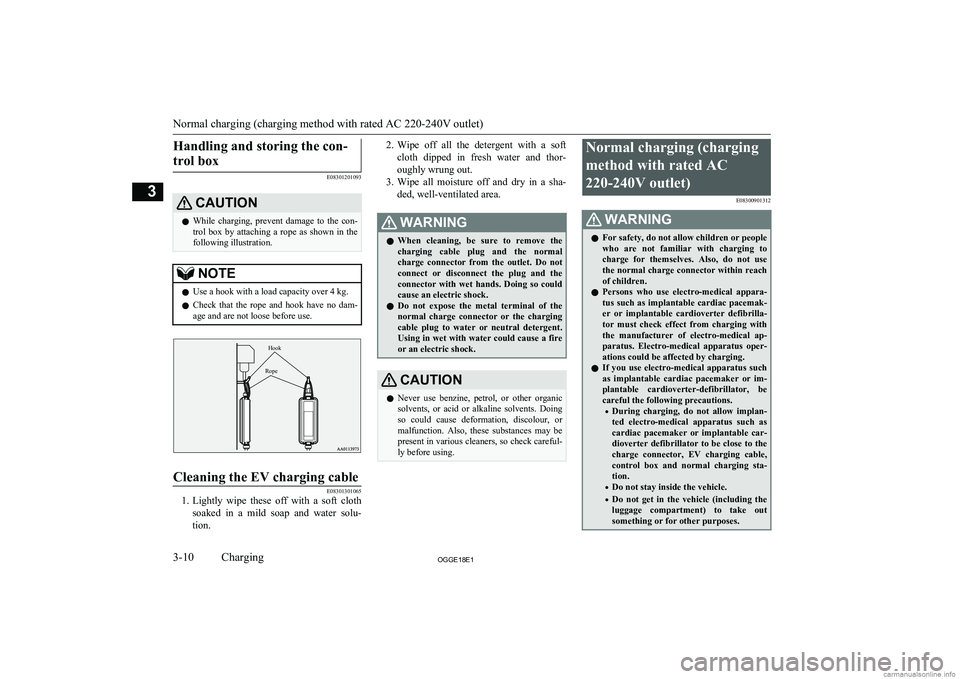
CAUTIONl While charging, prevent damage to the con-
trol box by attaching a rope as shown in the
following illustration.NOTEl Use a hook with a load capacity over 4 kg.
l Check that the rope and hook have no dam-
age and are not loose before use.HookRope
Cleaning the EV charging cable
E08301301065
1. Lightly wipe these off with a soft cloth
soaked in a mild soap and water solu- tion.
2. Wipe off all the detergent with a soft
cloth dipped in fresh water and thor- oughly wrung out.
3. Wipe all moisture off and dry in a sha-
ded, well-ventilated area.WARNINGl When cleaning, be sure to remove the
charging cable plug and the normalcharge connector from the outlet. Do not
connect or disconnect the plug and the
connector with wet hands. Doing so could cause an electric shock.
l Do not expose the metal terminal of the
normal charge connector or the chargingcable plug to water or neutral detergent.
Using in wet with water could cause a fire or an electric shock.CAUTIONl Never use benzine, petrol, or other organic
solvents, or acid or alkaline solvents. Doing so could cause deformation, discolour, or
malfunction. Also, these substances may be
present in various cleaners, so check careful- ly before using.Normal charging (charging
method with rated AC220-240V outlet) E08300901312WARNINGlFor safety, do not allow children or people
who are not familiar with charging to
charge for themselves. Also, do not use
the normal charge connector within reach of children.
l Persons who use electro-medical appara-
tus such as implantable cardiac pacemak-
er or implantable cardioverter defibrilla- tor must check effect from charging with
the manufacturer of electro-medical ap- paratus. Electro-medical apparatus oper- ations could be affected by charging.
l If you use electro-medical apparatus such
as implantable cardiac pacemaker or im- plantable cardioverter-defibrillator, be
careful the following precautions.
• During charging, do not allow implan-
ted electro-medical apparatus such as
cardiac pacemaker or implantable car- dioverter defibrillator to be close to the
charge connector, EV charging cable,
control box and normal charging sta-
tion.
• Do not stay inside the vehicle.
• Do not get in the vehicle (including the
luggage compartment) to take outsomething or for other purposes.
Normal charging (charging method with rated AC 220-240V outlet)
3-10OGGE18E1Charging3
Page 72 of 538
KeysE00300104175
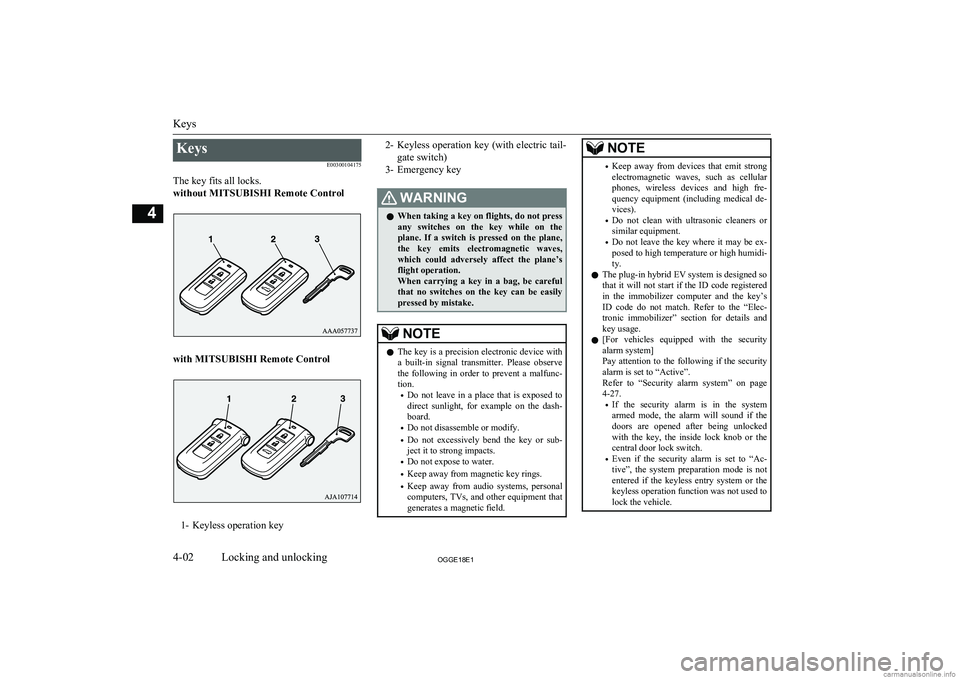
The key fits all locks.
without MITSUBISHI Remote Control
with MITSUBISHI Remote Control
1- Keyless operation key
2- Keyless operation key (with electric tail-
gate switch)
3- Emergency keyWARNINGl When taking a key on flights, do not press
any switches on the key while on the plane. If a switch is pressed on the plane,
the key emits electromagnetic waves, which could adversely affect the plane’s flight operation.
When carrying a key in a bag, be careful that no switches on the key can be easily
pressed by mistake.NOTEl The key is a precision electronic device with
a built-in signal transmitter. Please observe
the following in order to prevent a malfunc- tion.
• Do not leave in a place that is exposed to
direct sunlight, for example on the dash- board.
• Do not disassemble or modify.
• Do not excessively bend the key or sub-
ject it to strong impacts.
• Do not expose to water.
• Keep away from magnetic key rings.
• Keep away from audio systems, personal
computers, TVs, and other equipment that generates a magnetic field.NOTE• Keep away from devices that emit strong
electromagnetic waves, such as cellular
phones, wireless devices and high fre- quency equipment (including medical de-
vices).
• Do not clean with ultrasonic cleaners or
similar equipment.
• Do not leave the key where it may be ex-
posed to high temperature or high humidi- ty.
l The plug-in hybrid EV system is designed so
that it will not start if the ID code registered
in the immobilizer computer and the key’s ID code do not match. Refer to the “Elec-
tronic immobilizer” section for details and key usage.
l [For vehicles equipped with the security
alarm system]
Pay attention to the following if the security
alarm is set to “Active”.
Refer to “Security alarm system” on page 4-27.
• If the security alarm is in the system
armed mode, the alarm will sound if the
doors are opened after being unlocked with the key, the inside lock knob or the
central door lock switch.
• Even if the security alarm is set to “Ac-
tive”, the system preparation mode is not entered if the keyless entry system or thekeyless operation function was not used to
lock the vehicle.
Keys
4-02OGGE18E1Locking and unlocking4
Page 74 of 538
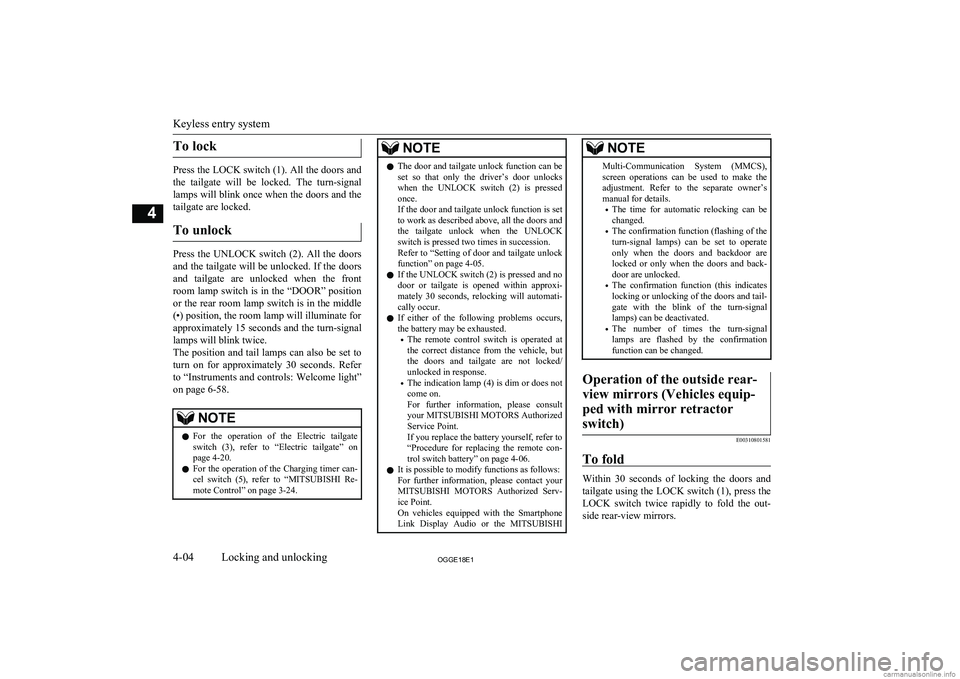
To lock
Press the LOCK switch (1). All the doors andthe tailgate will be locked. The turn-signal
lamps will blink once when the doors and the
tailgate are locked.
To unlock
Press the UNLOCK switch (2). All the doors
and the tailgate will be unlocked. If the doors and tailgate are unlocked when the frontroom lamp switch is in the “DOOR” positionor the rear room lamp switch is in the middle
(•) position, the room lamp will illuminate for
approximately 15 seconds and the turn-signal lamps will blink twice.
The position and tail lamps can also be set to
turn on for approximately 30 seconds. Refer to “Instruments and controls: Welcome light”
on page 6-58.
NOTEl For the operation of the Electric tailgate
switch (3), refer to “Electric tailgate” onpage 4-20.
l For the operation of the Charging timer can-
cel switch (5), refer to “MITSUBISHI Re-
mote Control” on page 3-24.NOTEl The door and tailgate unlock function can be
set so that only the driver’s door unlocks
when the UNLOCK switch (2) is pressed once.
If the door and tailgate unlock function is set
to work as described above, all the doors and
the tailgate unlock when the UNLOCK switch is pressed two times in succession.
Refer to “Setting of door and tailgate unlock
function” on page 4-05.
l If the UNLOCK switch (2) is pressed and no
door or tailgate is opened within approxi-mately 30 seconds, relocking will automati-
cally occur.
l If either of the following problems occurs,
the battery may be exhausted.
• The remote control switch is operated at
the correct distance from the vehicle, but
the doors and tailgate are not locked/
unlocked in response.
• The indication lamp (4) is dim or does not
come on.
For further information, please consult your MITSUBISHI MOTORS Authorized
Service Point.
If you replace the battery yourself, refer to
“Procedure for replacing the remote con-
trol switch battery” on page 4-06.
l It is possible to modify functions as follows:
For further information, please contact your MITSUBISHI MOTORS Authorized Serv-
ice Point.
On vehicles equipped with the Smartphone Link Display Audio or the MITSUBISHINOTEMulti-Communication System (MMCS),
screen operations can be used to make theadjustment. Refer to the separate owner’s
manual for details.
• The time for automatic relocking can be
changed.
• The confirmation function (flashing of the
turn-signal lamps) can be set to operateonly when the doors and backdoor arelocked or only when the doors and back-
door are unlocked.
• The confirmation function (this indicates
locking or unlocking of the doors and tail-
gate with the blink of the turn-signal lamps) can be deactivated.
• The number of times the turn-signal
lamps are flashed by the confirmation function can be changed.Operation of the outside rear-
view mirrors (Vehicles equip- ped with mirror retractorswitch)
E00310801581
To fold
Within 30 seconds of locking the doors and tailgate using the LOCK switch (1), press the LOCK switch twice rapidly to fold the out-
side rear-view mirrors.
Keyless entry system
4-04OGGE18E1Locking and unlocking4
Page 102 of 538
NOTElIf the bonnet is open, the security indicator
illuminates, and the system does not enter the system preparation mode.
When the bonnet is closed, the system enters the system preparation mode, and after ap-
proximately 20 seconds the system enters the system armed mode.
4. After approximately 20 seconds, the
buzzer stops, and when the blinking of
the security indicator starts to slow
down, the system armed mode goes into effect.
The security indicator continues to blink
during the system armed mode.
NOTEl The security alarm system can be activated
when people are riding inside the vehicle or when the windows are open. To prevent ac-cidental activation of the alarm, do not set
the system to the system armed mode while people are riding in the vehicle.
l Avoid leaving valuable items inside the ve-
hicle even when the security alarm system
has been set to the “active” mode.To deactivate the vehicle incli-
nation detection function and the interior intrusion detectionfunction*
E00312101533
The vehicle inclination detection function
and the interior intrusion detection function
can be deactivated when parking in automa-
ted car parks, when leaving pets in the vehi- cle or when leaving the vehicle with the win-
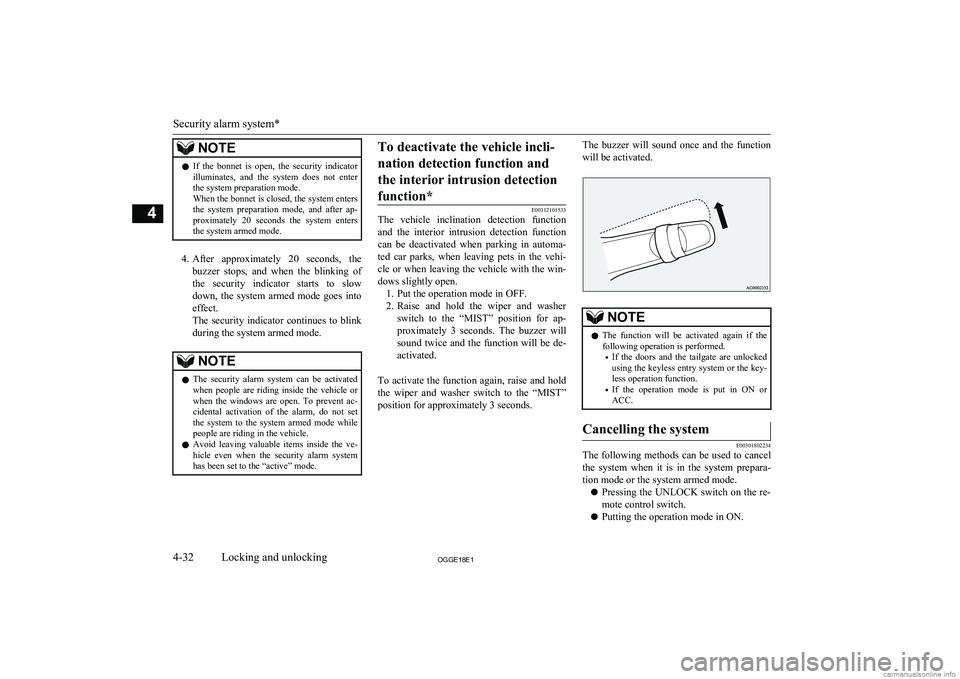
dows slightly open. 1. Put the operation mode in OFF.
2. Raise and hold the wiper and washer
switch to the “MIST” position for ap- proximately 3 seconds. The buzzer will
sound twice and the function will be de-
activated.
To activate the function again, raise and hold
the wiper and washer switch to the “MIST” position for approximately 3 seconds.
The buzzer will sound once and the function
will be activated.NOTEl The function will be activated again if the
following operation is performed.
• If the doors and the tailgate are unlocked
using the keyless entry system or the key-
less operation function.
• If the operation mode is put in ON or
ACC.Cancelling the system
E00301802234
The following methods can be used to cancel
the system when it is in the system prepara- tion mode or the system armed mode.
l Pressing the UNLOCK switch on the re-
mote control switch.
l Putting the operation mode in ON.
Security alarm system*
4-32OGGE18E1Locking and unlocking4