MPG MITSUBISHI OUTLANDER SPORT 2014 3.G Owners Manual
[x] Cancel search | Manufacturer: MITSUBISHI, Model Year: 2014, Model line: OUTLANDER SPORT, Model: MITSUBISHI OUTLANDER SPORT 2014 3.GPages: 384, PDF Size: 46.94 MB
Page 121 of 384
4-wheel drive operation 5-58 Features and controls
5
N00530600156
Your vehicle has been designed primarily for use on pavement.But its unique 4 -wheel drive system allows you to occasionally travel on unpaved roads, to campgrounds, picnic sites, and similarlocations. Not only does this ensure better handling on dry, paved roads but also permits better trac-tion when driving on slippery, wet or snow-covered roads and when moving out of mud. But it is not suitable for heavy off road use or towing in rough conditions.It is particularly important to note that 4- wheel drive may not give sufficient hill climbing ability and engine braking on steepslopes. You should try to avoid driving on steep slopes. Also, you must exercise caution when drivingon sand and mud and when driving through water because sufficient traction may not be available in certain circumstances.Please avoid driving the vehicle through areas where the tires may get stuck in deep sand or mud.
When turning a sharp corner in “4WD LOCK” or “LOCK” position at low speed, a slight difference in steering may be experi-enced similar to feeling
as if the brakes were
4-wheel drive operation
WA R N I N GDo not over-rely on the 4-wheel drive vehi- cles. Even 4-wheel drive vehicles have lim- its to the system and ability to maintain control and traction. Reckless driving may lead to accidents. Always drive carefully,taking account of the road conditions. Improperly operating this vehicle on or off-pavement can cause an accident or rollover in which you and your passengers could be seriously injured or killed.• Follow all instructions and guidelines inthe owner’s manual.• Keep your speed low and do not drivefaster than conditions.NOTE
Driving on rough roads can be hard on a vehicle. Before you leave the pavement, be sure all scheduled maintenance and servicehas been done, and that you have inspected your vehicle. Pay special attention to the condition of the tires, and check the tire pres-sures. Mitsubishi Motors is not responsible to the operator for any damage or injury caused or liability incurred by improper and negligentoperation of a vehicle. All techniques of vehicle operation depend on the skill and experience of the operator and other partici-pating parties. Any deviation from the rec- ommended operating instructions above is at their own risk.
Note that the stopping distance required of the 4-wheel drive vehicle differs very little from that of the front-wheel drive vehicle. When driving on a snow-covered road or a slippery, muddy surface, make sure that youkeep a sufficient distance between your vehi- cle and the one ahead of you. The driving posture should be more upright; adjust the seat to a good position for easy steering and pedal operation. Be sure to wearthe seat belt. After driving on rough roads, check each part of the vehicle and wash it thoroughly with water. Refer to the “Inspection and maintenance following rough road opera-tion” section and “Vehicle care and Mainte- nance” sections.CAUTION Setting the drive mode-selector to “4WD LOCK” or “LOCK” position to drive on drypaved road will increase fuel consumption, with possible noise generation.
Turning sharp corners
NOTE
BK0202700US.bo
ok 58 ページ 2013年3月28日 木曜日 午前11時54分
Page 155 of 384

Multi-information display 5-92 Features and controls
5
While driving, the momentary fuel consump- tion is shown with a bar graph. When the momentary fuel consumption sur-passes the average fuel consumption, the momentary fuel consumption is displayed with a green bar graph. (Type 2)Be conscious of maintaining the momentary fuel consumption above the average fuel con- sumption, it can help you drive with the betterfuel consumption.
The “Display language”, “Temperature unit”, “Fuel consumption unit”, and “Average fuelconsumption and speed reset method” set- tings can be modified as desired. For further details, refer to “Changing thefunction settings (With ignition switch or operation mode in ON)” on page 5-96.
N00556300180
When there is information to be announced, such as a system fault, a tone sounds and the
information screen is switched to the warning display screen. Refer to the warning list and take the neces- sary measures. Refer to “Warning display list(With ignition switch or operation mode in ON)” on page 5-108. When the cause of the warning display iseliminated, the warning display goes out automatically. Even if the cause of the warning display is not eliminated, you can return to the screenthat was displayed before the warning dis- play. If you press the multi-information meter switch, the display screen switches to thescreen display from before the warning and the warning (A) is displayed.
Disconnecting the battery cable will erase from memory the manual reset mode or auto reset mode setting for the average fuel con- sumption display. The display setting can be changed to the preferred units {mpg(US), mpg(UK), L/100km or km/L}.Refer to “Changing the function settings (With ignition switch or operation mode in ON)” on page 5-96.
Momentary fuel consumption dis- play
NOTE
When the momentary fuel consumption can- not be measured, a bar graph is not shown.NOTE
The display setting can be changed to the preferred units {mpg(US), mpg(UK), L/100km or km/L}. Refer to “Changing the function settings (With ignition switch or operation mode inON)” on page 5-96. It is possible to cancel the green bar graph. Refer to “Changing the function settings (With ignition switch or operation mode in ON)” on page 5-96.
Function setting screen Interrupt display screen (With ignition switch or operation mode in ON) Warning display
NOTE
Returning to the display screen from before the warning display
BK0202700US.bo
ok 92 ページ 2013年3月28日 木曜日 午前11時54分
Page 162 of 384
Multi-information display
Features and controls 5-99
5
N00557100143
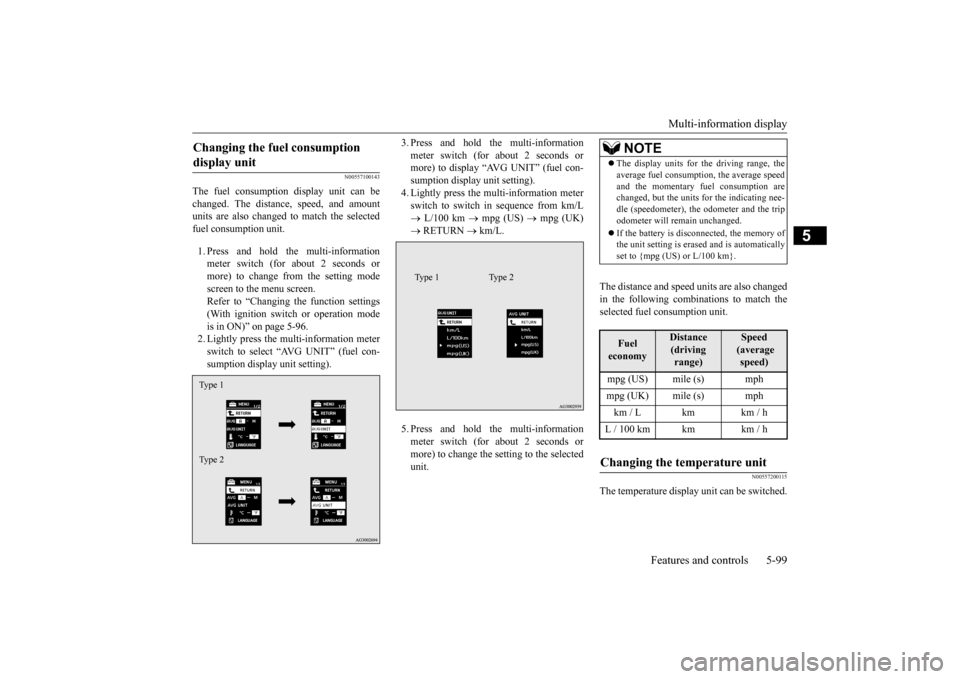
The fuel consumption display unit can be changed. The distance, speed, and amount units are also changed to match the selectedfuel consumption unit. 1. Press and hold the multi-information meter switch (for about 2 seconds or more) to change from the setting modescreen to the menu screen.Refer to “Changing the function settings (With ignition switch or operation mode is in ON)” on page 5-96.2. Lightly press the multi-information meter switch to select “AVG UNIT” (fuel con- sumption display unit setting).
3. Press and hold the multi-information meter switch (for about 2 seconds or more) to display “AVG UNIT” (fuel con- sumption display unit setting).4. Lightly press the multi-information meter switch to switch in sequence from km/L L/100 km
mpg (US)
mpg (UK)
RETURN
km/L.
5. Press and hold the multi-information meter switch (for about 2 seconds or more) to change the setting to the selected unit.
The distance and speed units are also changed in the following combinations to match theselected fuel consumption unit.
N00557200115
The temperature display unit can be switched.
Changing the fuel consumption display unit Type 1 Type 2
Type 1 Type 2
NOTE
The display units for the driving range, the average fuel consumption, the average speed and the momentary fuel consumption are changed, but the units for the indicating nee- dle (speedometer), the odometer and the tripodometer will remain unchanged. If the battery is disconnected, the memory of the unit setting is erased and is automatically set to {mpg (US) or L/100 km}.Fuel economy
Distance (driving range)
Speed (average speed)
mpg (US) mile (s) mphmpg (UK) mile (s) mphkm / L km km / hL / 100 km km km / hChanging the temperature unit
BK0202700US.bo
ok 99 ページ 2013年3月28日 木曜日 午前11時54分
Page 166 of 384
Multi-information display
Features and controls 5-103
5
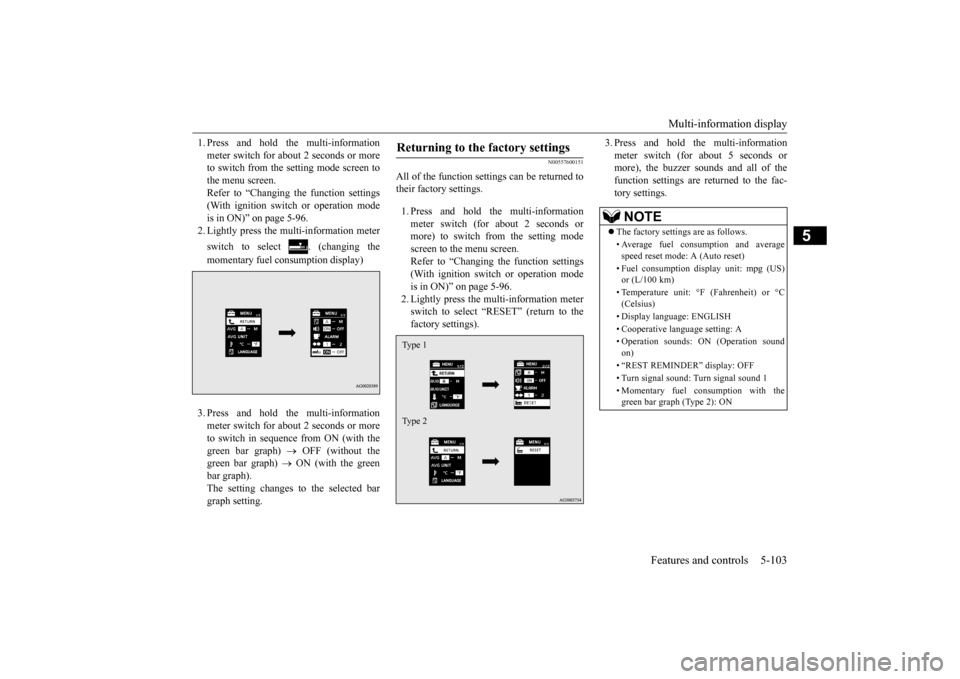
1. Press and hold the multi-information meter switch for about 2 seconds or more to switch from the setting mode screen to the menu screen.Refer to “Changing the function settings (With ignition switch or operation mode is in ON)” on page 5-96.2. Lightly press the multi-information meter switch to select . (changing the momentary fuel consumption display) 3. Press and hold the multi-information meter switch for about 2 seconds or more to switch in sequence from ON (with thegreen bar graph)
OFF (without the
green bar graph)
ON (with the green
bar graph).The setting changes to the selected bargraph setting.
N00557600151
All of the function settings can be returned totheir factory settings. 1. Press and hold the multi-information meter switch (for about 2 seconds or more) to switch from the setting mode screen to the menu screen.Refer to “Changing the function settings (With ignition switch or operation mode is in ON)” on page 5-96.2. Lightly press the multi-information meterswitch to select “RESET” (return to the factory settings).
3. Press and hold the multi-information meter switch (for about 5 seconds or more), the buzzer sounds and all of the function settings are returned to the fac-tory settings.
Returning to the factory settings Type 1 Type 2
NOTE
The factory settings are as follows. • Average fuel consumption and average speed reset mode: A (Auto reset) • Fuel consumption display unit: mpg (US) or (L/100 km) • Temperature unit: °F (Fahrenheit) or °C (Celsius) • Display language: ENGLISH • Cooperative language setting: A• Operation sounds: ON (Operation sound on) • “REST REMINDER” display: OFF • Turn signal sound: Turn signal sound 1 • Momentary fuel consumption with the green bar graph (Type 2): ON
BK0202700US.book
103 ページ 2013年3月28日 木曜日 午前11時54分