coolant MITSUBISHI OUTLANDER SPORT 2014 3.G Owners Manual
[x] Cancel search | Manufacturer: MITSUBISHI, Model Year: 2014, Model line: OUTLANDER SPORT, Model: MITSUBISHI OUTLANDER SPORT 2014 3.GPages: 384, PDF Size: 46.94 MB
Page 14 of 384
If this problem occurs...
Quick index 2-5
2
Problem
Do this
Ref. Page
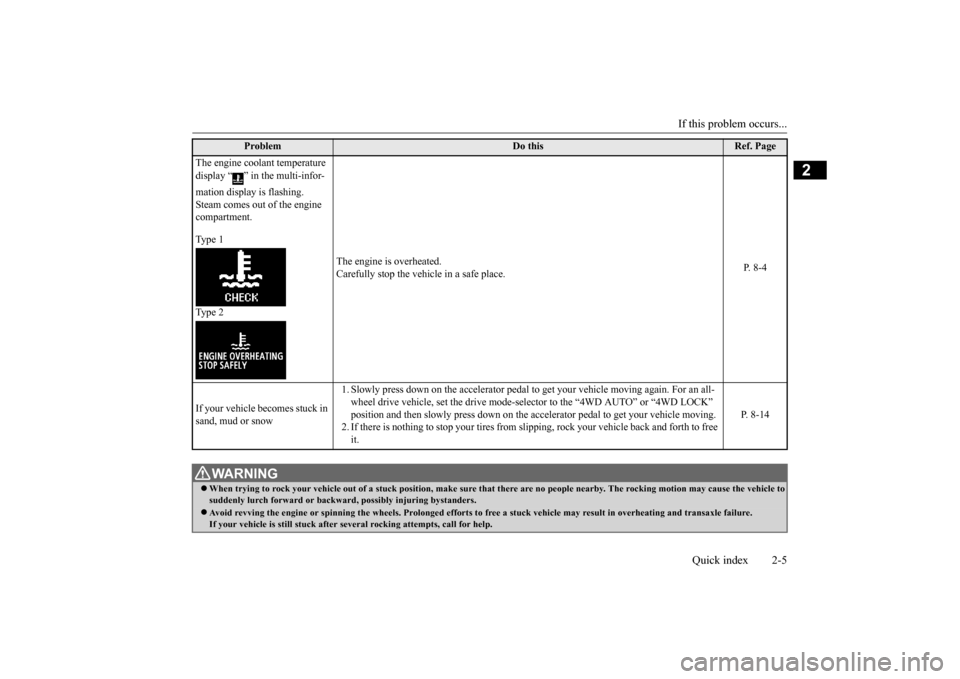
The engine coolant temperature display “ ” in the multi-infor- mation display is flashing. Steam comes out of the engine compartment. Type 1 Type 2
The engine is overheated. Carefully stop the vehicle in a safe place.
P. 8-4
If your vehicle becomes stuck in sand, mud or snow
1. Slowly press down on the accelerator pedal to
get your vehicle moving again. For an all-
wheel drive vehicle, set the drive mode-sel
ector to the “4WD AUTO” or “4WD LOCK”
position and then slowly press down on the
accelerator pedal to get your vehicle moving.
2. If there is nothing to stop your tires from sli
pping, rock your vehicle back and forth to free
it.
P. 8-14
WA R N I N G When trying to rock your vehicle out of a
stuck position, make sure that there are no
people nearby. The rocking motion may cau
se the vehicle to
suddenly lurch forward or backward, possibly injuring bystanders. Avoid revving the engine or spinning the
wheels. Prolonged efforts to free a stuck ve
hicle may result in overheating and transa
xle failure.
If your vehicle is still stuck after se
veral rocking attempts, call for help.
BK0202700US.bo
ok 5 ページ 2013年3月28日 木曜日 午前11時54分
Page 82 of 384
Free-hand Advanced Security Transmitt
er (F.A.S.T.-key) (if so equipped)
Features and controls 5-19
5
and someone tries to lock the vehicle by pressing the driver’s or front passenger’s door lock/unlock switch, or the liftgate LOCK switch, the warning display is dis-played and the buzzer
sounds for about 3 sec-
onds as a warning, and the doors and the liftgate cannot be locked.
N00560000117
When the operation mode is in OFF, andsomeone tries to lock the vehicle by pressingthe driver’s or front passenger’s door lock/unlock switch, or
the liftgate LOCK
switch while one of the doors or the liftgate isnot fully closed, the warning display is dis- played and the buzzer
sounds for about 3 sec-
onds as a warning, and the doors and theliftgate cannot be locked.
N00560100118
When the operation mode is in any mode other than OFF, all the doors and the liftgate are closed, and someone tries to lock thevehicle by pressing the driver’s or front pas- senger’s door lock/unlock switch, or the lift- gate LOCK switch, the warning display isdisplayed and the buzzer sounds for about 3 seconds as a warning, and the doors and the liftgate cannot be locked.
N00514600275
The operation mode can be in any mode to start the engine.
The starter motor will be turning for up to approximately 15 seconds if the engine switch is released at once. Pressing the engine switch again while the startermotor is still turning will stop the starter motor. The starter motor will be turning for up to approximately 30 seconds whilethe engine switch is pressed. If the engine does not start, wait for a while and then attempt to start the engineagain. Trying repeatedly with the startermotor still turning will damage the starter mechanism. If the engine will not start because the bat- tery is weak or discharged, refer to “Jump-starting the engine” on page 8-2 for instructions. A longer warm up period will only con- sume extra fuel. The engine is warmed up enough for driv-ing when the bar graph of engine coolant temperature display starts to move. Refer to “Interrupt display screen (With ignitionswitch or operation mode in ON)” on page 5-92.
Door ajar prevention system
Operation mode OFF reminder system
Starting and stopping the engine
Tips for starting
BK0202700US.bo
ok 19 ページ 2013年3月28日 木曜日 午前11時54分
Page 109 of 384
Starting the engine 5-46 Features and controls
5
Do not operate the starter motor continu- ously for longer than
15 seconds as this
could run the battery down or damage thestarter motor. If the engine does not start, turn the ignition switch back to the “OFF” position, wait a few seconds, and then tryagain. Trying repeatedly with the engine or starter motor still turning will damage the starter mechanism. If the engine will not start because the bat- tery is weak or discharged, refer to “Jump-starting the engine” (on page 8-2) for instructions. A longer warm up period will only con- sume extra fuel. The
engine is warmed up
enough for driving when the bar graph ofengine coolant temperature display starts to move. Refer to “Interrupt display screen (With ignition switch or operationmode in ON)” on page 5-92.
This model is equipped with an electronically controlled fuel injection system. This is a sys-tem that automatically controls fuel injection. There is usually no need to depress the accel- erator pedal when starting the engine.The starter should not be run for more than 15 seconds at a time. To prevent battery drain, wait a few secondsbetween attempts to restart the engine. 1. Make sure all occupants are properly seated with seat belts fastened. 2. Insert the ignition key.3. Make sure the parking brake is applied. 4. Press and hold the brake pedal down with your right foot.5. Press and hold the clutch pedal all the way down (manual transaxle).
6. On vehicles equipped with manual trans- axle, place the gearshift lever in the “N” (Neutral) position. On vehicles equipped with continuouslyvariable transmission (CVT), make sure the selector lever is in the “P” (PARK) position. 7. Turn the ignition switch to the “ON” posi- tion and make certain that all warning lights are functioning properly beforestarting the engine. 8. Turn the ignition switch to the “START” position without pressing the acceleratorpedal. Release the key when the engine starts.
Tips for starting
WA R N I N G Never run the engine in a closed or poorly ventilated area any longer than is needed to move your vehicle out of the area. Car-bon monoxide gas, which is odorless and extremely poisonous, could build up and cause serious injury or death.
CAUTION Do not push-start the vehicle.Do not run the engine
at high rpms or drive
at high speeds until the engine has had a chance to warm up. Release the ignition switch as soon as the engine starts. Otherwise, the starter motorwill be damaged.
Starting the engine
NOTE
On vehicles equipped with CVT, the starter will not operate unless the selector lever is in the “P” (PARK) or “N” (NEUTRAL) posi- tion.For safety reasons, start the engine in the “P” (PARK) position so that the wheels are locked.NOTE
Minor noises may be heard on engine start- up. These will disappear as the engine warms up.
BK0202700US.bo
ok 46 ページ 2013年3月28日 木曜日 午前11時54分
Page 122 of 384
4-wheel drive operation
Features and controls 5-59
5
applied. This is called tight corner braking and results from each of the four tires being at a different distance from the corner. The phe- nomenon is typical of 4-wheel drive vehicles.If this occurs, either straighten out the steer- ing wheel or change to another mode. Set the drive mode-selector to “4WD AUTO”, “4WD LOCK” or “SNOW” in accordance with the road conditions, and then gradually depress the accelerator pedal for asmooth start.
Set the drive mode-selector to “4WD LOCK” or “LOCK” and then gradually depress the accelerator pedal for a smooth start. Keep the pressure on the accelerator pedal as constantas possible, and drive at low speed.
Your vehicle may not provide sufficient hill climbing ability and engine braking on steepslope. Avoid driving on
steep slopes even
On snowy or icy roads
NOTE
The use of snow tires is recommended. Maintain a safe distance between vehicles, avoid sudden braking, and use engine brak-ing (downshifting).CAUTION Avoid sudden braking, sudden acceleration and sharp turning. Skidding occurs and con- trol of the vehicle could be lost.
Driving on sandy or muddy roads
CAUTION Do not force the vehicle or drive recklessly on sandy surfaces. In comparison with nor- mal road surfaces, the engine and otherdrive-system components are put under excessive strain when driving on such a sur- face. This could lead to accidents. If any of the following conditions occur while the vehicle is being driven, immedi-ately park your vehicle in a safe place and follow these procedures:• If the engine coolant temperature display
flashes on the information screen in the multi-information display or the engine power drops suddenly. Refer to “Engine overheating” on page 8-4.• If the “ ” warning display and “SLOW DOWN” or the “ ” warning display and “SERVICE REQUIRED” appear on the information screen in the multi-information display.Refer to “Warning display” on page 5-51.
WA R N I N G When attempting to rock your vehicle out of a stuck position, be sure that the area around the vehicle is clear of people and physical objects. The rocking motion may cause the vehicle to suddenly launch for-ward/backward, causing injury or dam- age to nearby people or objects.NOTE
Avoid sudden braking, sudden acceleration and sharp turning; such operations could result in the vehicle becoming stuck. If the vehicle becomes stuck in sandy or muddy roads, it can often be moved with a rocking motion. Move the gearshift leveralternately between the 1st and “R” (Reverse) positions (M/T), the “D” (DRIVE) and “R” (REVERSE) positions (CVT), whilepressing lightly on the accelerator pedal. Driving on rough road can cause rust on the vehicle; wash the vehicle thoroughly as soon as possible after such use.
Climbing/descending sharp grades
BK0202700US.bo
ok 59 ページ 2013年3月28日 木曜日 午前11時54分
Page 145 of 384
Multi-information display 5-82 Features and controls
5
N00554900195
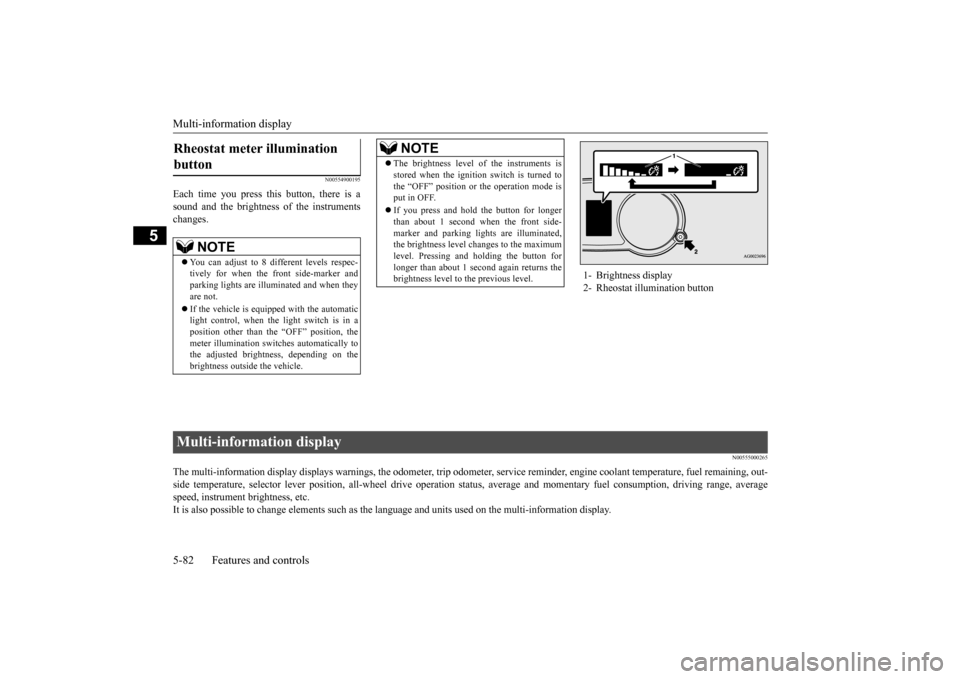
Each time you press this button, there is a sound and the brightness of the instruments changes.
N00555000265
The multi-information display displays warn
ings, the odometer, trip odometer, service re
minder, engine coolant temperature, fue
l remaining, out-
side temperature, selector lever position, all-wheel drive opera
tion status, average and momentar
y fuel consumption, driving ra
nge, average
speed, instrument brightness, etc. It is also possible to change elements such as th
e language and units used on the multi-information display.
Rheostat meter illumination button
NOTE
You can adjust to 8 different levels respec- tively for when the front side-marker and parking lights are illuminated and when they are not. If the vehicle is equipped with the automatic light control, when the light switch is in aposition other than the “OFF” position, the meter illumination switches automatically to the adjusted brightness, depending on thebrightness outside the vehicle.
The brightness level of the instruments is stored when the ignition switch is turned to the “OFF” position or the operation mode is put in OFF. If you press and hold the button for longer than about 1 second when the front side- marker and parking lights are illuminated,the brightness level changes to the maximum level. Pressing and holding the button for longer than about 1 second again returns thebrightness level to the previous level.NOTE
1- Brightness display 2- Rheostat illumination button
Multi-information display BK0202700US.bo
ok 82 ページ 2013年3月28日 木曜日 午前11時54分
Page 146 of 384
Multi-information display
Features and controls 5-83
5
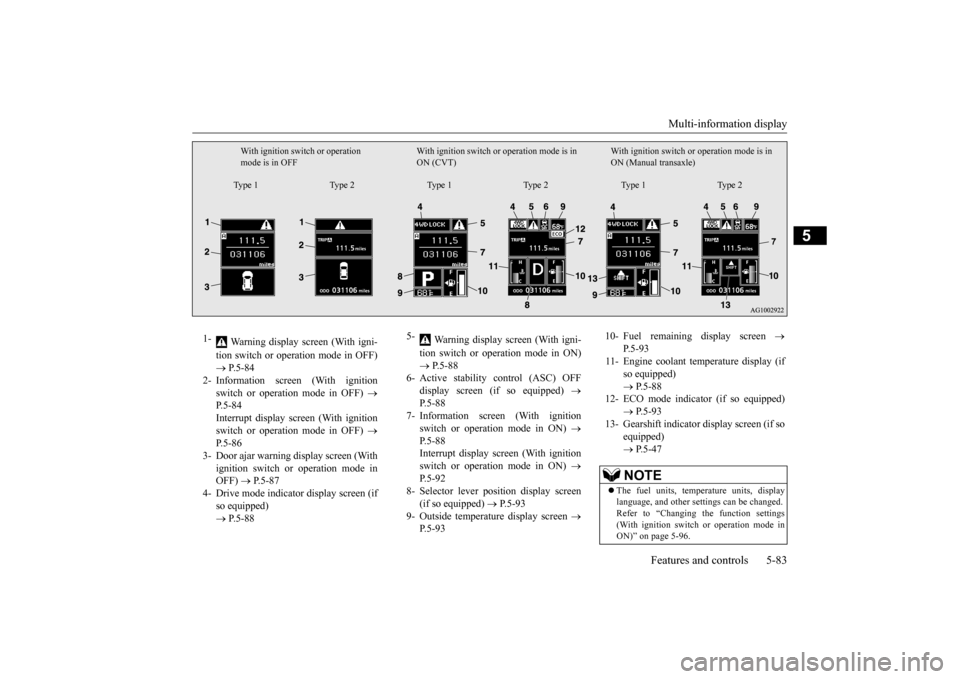
With ignition switch or operation mode is in OFF
With ignition switch or operation mode is in ON (CVT)
With ignition switch or
operation mode is in
ON (Manual transaxle)
Type 1 Type 2 Type 1 Type 2 Type 1 Type 2
1-
Warning display screen (With igni- tion switch or operation mode in OFF) P.5-84
2- Information screen (With ignition
switch or operation mode in OFF)
P.5-84 Interrupt display screen (With ignitionswitch or operation mode in OFF)
P.5-86
3- Door ajar warning display screen (With
ignition switch or operation mode in OFF)
P.5-87
4- Drive mode indicator display screen (if
so equipped) P.5-88
5-
Warning display screen (With igni- tion switch or operation mode in ON) P.5-88
6- Active stability control (ASC) OFF
display screen (if so equipped)
P.5-88
7- Information screen (With ignition
switch or operation mode in ON)
P.5-88 Interrupt display screen (With ignition switch or operation mode in ON)
P.5-92
8- Selector lever position display screen
(if so equipped)
P.5-93
9- Outside temperature display screen
P.5-93
10- Fuel remaining display screen
P.5-93
11- Engine coolant temperature display (if
so equipped) P.5-88
12- ECO mode indicator (if so equipped)
P.5-93
13- Gearshift indicator display screen (if so
equipped) P.5-47NOTE
The fuel units, temperature units, display language, and other settings can be changed.Refer to “Changing the function settings (With ignition switch or operation mode in ON)” on page 5-96.
BK0202700US.bo
ok 83 ページ 2013年3月28日 木曜日 午前11時54分
Page 152 of 384
Multi-information display
Features and controls 5-89
5
The operation method is the same as when the ignition switch or the operation mode is inOFF. For further details, refer to “Odometer/Trip odometer” on page 5-85.
Shows the distance and number of months until the next periodic inspection.Refer to “Service reminder” on page 5-94. Shows the engine coolant temperature. If the coolant becomes hot, “ ” will blink. Pay careful attention to the engine coolant temperature display while you are driving. Shows the approximate driving range (how many more miles or kilometers you can drive). When this driving range falls below30 miles (50 km), “---” is displayed. Refuel as soon as possible.
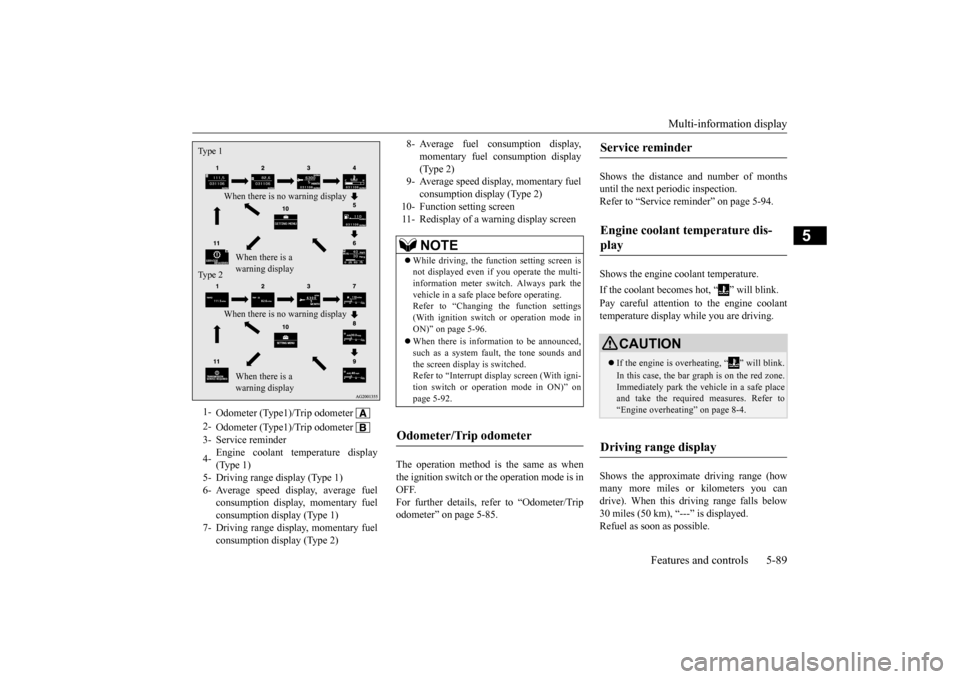
1-
Odometer (Type1)/Trip odometer
2-
Odometer (Type1)/Trip odometer
3- Service reminder 4-
Engine coolant temperature display (Type 1)
5- Driving range display (Type 1)6- Average speed display, average fuel
consumption display, momentary fuel consumption display (Type 1)
7- Driving range display, momentary fuel
consumption display (Type 2)
Ty p e 1
When there is no warning display
When there is a warning display
Ty p e 2
When there is no warning display
When there is a warning display
8- Average fuel consumption display,
momentary fuel consumption display(Type 2)
9- Average speed display, momentary fuel
consumption display (Type 2)
10- Function setting screen 11- Redisplay of a warning display screen
NOTE
While driving, the function setting screen is not displayed even if you operate the multi- information meter switch. Always park the vehicle in a safe place before operating.Refer to “Changing the function settings (With ignition switch or operation mode in ON)” on page 5-96. When there is information to be announced, such as a system fault, the tone sounds andthe screen display is switched. Refer to “Interrupt display screen (With igni- tion switch or operation mode in ON)” onpage 5-92.
Odometer/Trip odometer
Service reminder Engine coolant temperature dis- play
CAUTION If the engine is overheating, “ ” will blink. In this case, the bar graph is on the red zone. Immediately park the vehicle in a safe placeand take the required measures. Refer to “Engine overheating” on page 8-4.
Driving range display
BK0202700US.bo
ok 89 ページ 2013年3月28日 木曜日 午前11時54分
Page 236 of 384
Driving during cold weather
Driving safety 6-5
6
Before changing lanes, check your mir- rors and use your turn-signal light. While driving, watch the behavior of other drivers, bicyclists, and pedestrians. Always obey applicable laws and regula- tions. Be a polite and alert driver. Always leave room for unexpected events, such assudden braking. If you plan to drive in another country, obey their vehicle registration laws andmake sure you will be able to get the rightfuel.
N00629400461
Check the battery. At the same time, check the terminals and wiring. Duringextremely cold weather, the battery will not be as strong. Also, the battery power level may drop because more power isused for cold starting and driving. Before driving the vehicle, check to see if the engine runs at the proper speed and ifthe headlights are as bright as normally.Charge or replace the battery if necessary. During extreme cold weather, it is possi- ble that a very low battery could freeze. Warm the engine sufficiently. After start- ing the engine, allow a short warm-up time to distribute oil to all cylinders. Then drive your vehicle slowly. Stay at low speeds at first so that the transaxle, transfer case and rear axle oil have time to spread to all the lubricationpoints.
Manual transaxle can be harder to shift in cold weather conditions. This is normal and shifting will get easier as the transaxle warms up. Check the engine antifreeze. If there is not enough coolant because of a leak or from engine overheating, addMitsubishi Motors Genuine Super Long Life Coolant Premium or equivalent. Please read this section in conjunctionwith the “Engine coolant” on page 9-7.
N00629500491
All the parts of the brake system are criticalto safety. Have the vehicle serviced by anauthorized Mitsubishi Motors dealer or a repair facility of your choice at regular inter- vals according to the “WARRANTY ANDMAINTENANCE MANUAL”. Check the brake system while driving at a low speed immediately after starting, espe-
Driving during cold weather
WA R N I N G The battery gives off explosive hydrogen gas. Any spark or flame can cause the bat-tery to explode, which could cause serious injury or death. Always wear protective clothes and a facemask when working with your battery, or let a skilled mechanic do it.
WA R N I N G Never open the radiator cap when the radiator is hot. You could be seriouslyburned.
Braking When brakes are wet
BK0202700US.bo
ok 5 ページ 2013年3月28日 木曜日 午前11時54分
Page 249 of 384
Manual air conditioning-T
ype 1 (if so equipped)
7-4 Comfort controls
7
N00730300331 N00730500258
N00736500175
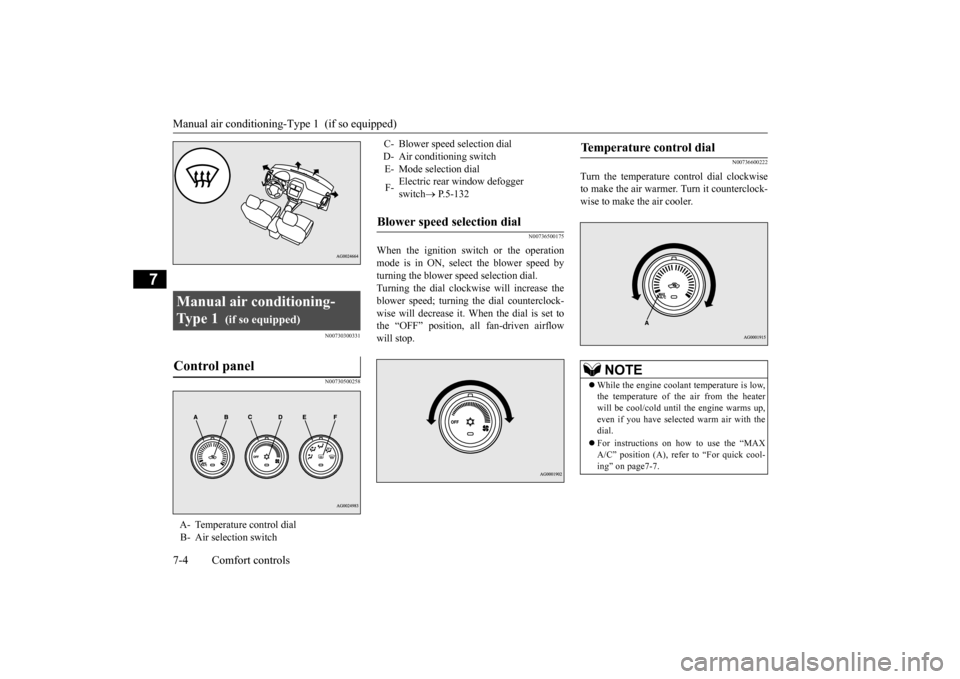
When the ignition switch or the operation mode is in ON, select the blower speed byturning the blower speed selection dial. Turning the dial clockwise will increase the blower speed; turning the dial counterclock-wise will decrease it. When the dial is set to the “OFF” position, all fan-driven airflow will stop.
N00736600222
Turn the temperature control dial clockwiseto make the air warmer. Turn it counterclock-wise to make the air cooler.
Manual air conditioning- Ty p e 1
(if so equipped)
Control panel
A- Temperature control dial B- Air selection switch
C- Blower speed selection dial D- Air conditioning switchE- Mode selection dial F-
Electric rear window defogger switch
P.5-132
Blower speed selection dial
Temperature control dial
NOTE
While the engine coolant temperature is low, the temperature of the air from the heater will be cool/cold until the engine warms up, even if you have selected warm air with thedial. For instructions on how to use the “MAX A/C” position (A), refer to “For quick cool- ing” on page7-7.
BK0202700US.bo
ok 4 ページ 2013年3月28日 木曜日 午前11時54分
Page 255 of 384
Manual air conditioning-T
ype 2 (if so equipped)
7-10 Comfort controls
7
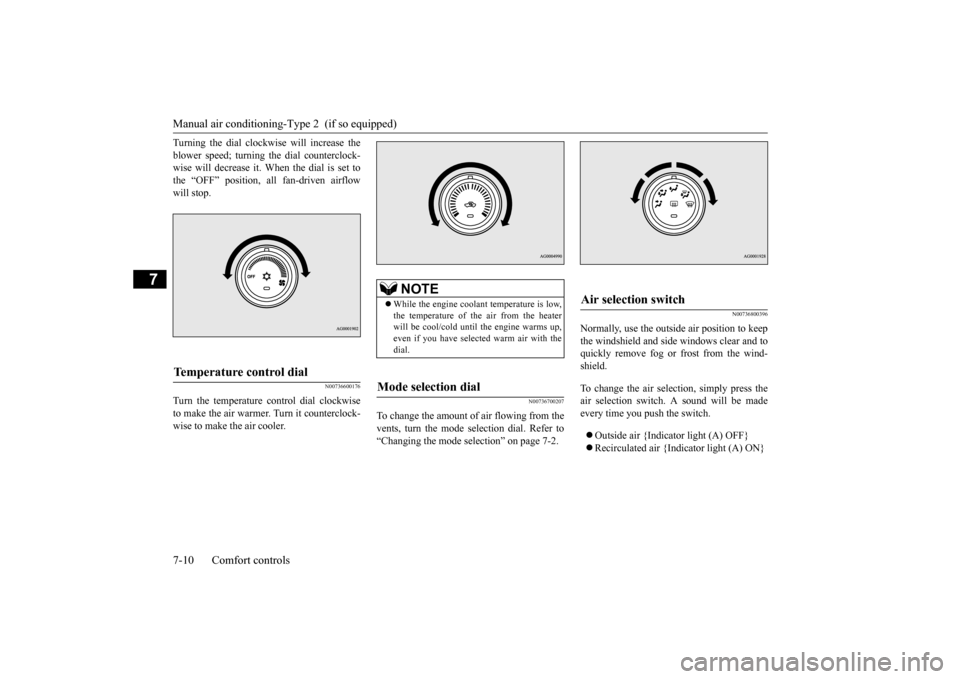
Turning the dial clockwise will increase the blower speed; turning the dial counterclock- wise will decrease it. When the dial is set to the “OFF” position, all fan-driven airflowwill stop.
N00736600176
Turn the temperature control dial clockwiseto make the air warmer. Turn it counterclock-wise to make the air cooler.
N00736700207
To change the amount of
air flowing from the
vents, turn the mode selection dial. Refer to “Changing the mode selection” on page 7-2.
N00736800396
Normally, use the outside air position to keepthe windshield and side windows clear and toquickly remove fog or frost from the wind- shield. To change the air selection, simply press the air selection switch. A sound will be made every time you push the switch. Outside air {Indicator light (A) OFF} Recirculated air {Indicator light (A) ON}
Temperature control dial
NOTE
While the engine coolant temperature is low, the temperature of the air from the heater will be cool/cold until the engine warms up,even if you have selected warm air with the dial.
Mode selection dial
Air selection switch
BK0202700US.bo
ok 10 ページ 2013年3月28日 木曜日 午前11時54分