language MITSUBISHI OUTLANDER SPORT 2014 3.G Owners Manual
[x] Cancel search | Manufacturer: MITSUBISHI, Model Year: 2014, Model line: OUTLANDER SPORT, Model: MITSUBISHI OUTLANDER SPORT 2014 3.GPages: 388, PDF Size: 20.04 MB
Page 114 of 388
Multi information display
Instruments and controls 6-5
6
average fuel consumption, EV cruising range,total cruising range,
EVHV driving rate,
energy flow, etc.It is also possible to change elements such asthe language and units used on the multiinformation display by operating the multiinformation display switch.
E00520201812
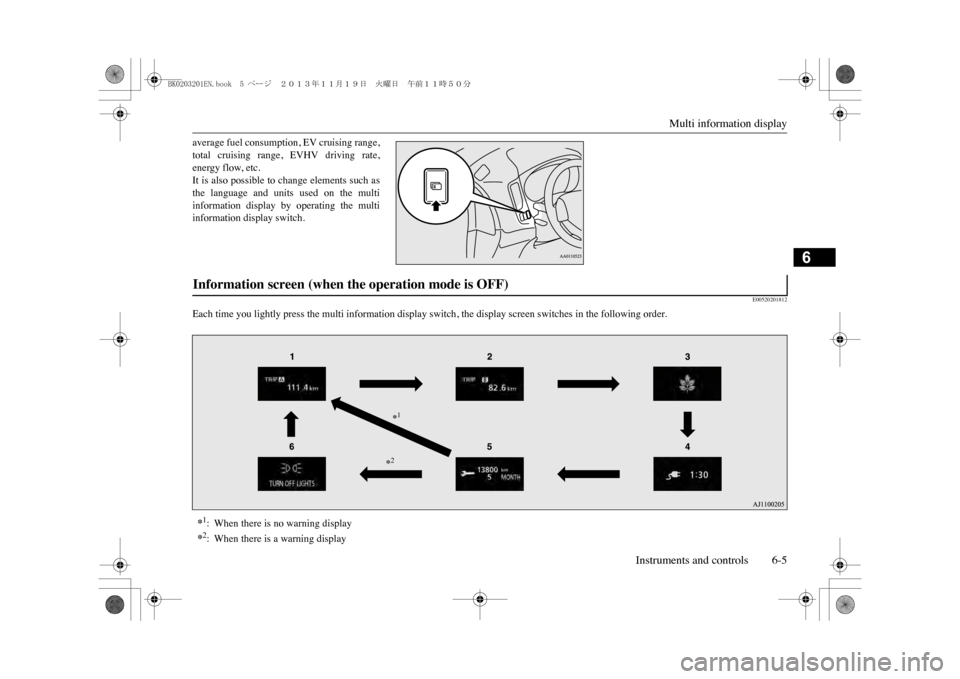
Each time you lightly press the multi info
rmation display switch, the display screen switches in the following order.
Information screen (when the operation mode is OFF) *1:When there is no warning display*2:When there is a warning display
*1*2
BK0203201EN.book 5 ページ 2013年11月19日 火曜日 午前11時50分
Page 124 of 388
![MITSUBISHI OUTLANDER SPORT 2014 3.G Owners Manual Multi information display
Instruments and controls 6-15
6
The display shows the score you achieved inthe last several minutes.[When the operation mode is put in OFF]The display shows the ov](/img/19/7545/w960_7545-123.png "MITSUBISHI OUTLANDER SPORT 2014 3.G Owners Manual Multi information display
Instruments and controls 6-15
6
The display shows the score you achieved inthe last several minutes.[When the operation mode is put in OFF]The display shows the ov")
Multi information display
Instruments and controls 6-15
6
The display shows the score you achieved inthe last several minutes.[When the operation mode is put in OFF]The display shows the overall ECO score thefunction has counted from the time when theoperation mode is set to “ON” to the timewhen it is set to “OFF”.
E00522701736
The “Display language”, “Temperature unit”,“Fuel consumption unit”, and “Average fuelconsumption and speed reset method” etc.setting can be modified as desired.1. Stop the vehicle in a safe place.Firmly apply the parking brake, and pressthe electrical parking switch and shift to“P” (PARK) position.
2. Lightly press the multi information dis-play switch a few times to switch theinformation screen to the function settingscreen.Refer to “Information screen” on page6-7.3. Press and hold the multi information dis-play switch for about 2 seconds or more toswitch from the setting mode screen to themenu screen.
Changing the function settings
ECO drive level
Low
High
CAUTIONzFor safety, stop the ve
hicle before operating.
While driving, even if you operate the multiinformation display switch, the function set-ting screen is not displayed.
NOTE
zTo r e t u r n t h e m e n u s c r e e n t o t h e f u n c t i o n s e t -ting screen, press and hold the multi infor-mation display switch fo
r about 2 seconds or
more.zIf no operations are made within about 30seconds of the menu sc
reen being displayed,
the display returns to the function settingscreen.
BK0203201EN.book 15 ページ 2013年11月19日 火曜日 午前11時50分
Page 125 of 388
Multi information display6-16 Instruments and controls
6
4. Select the item to change on the menuscreen and change to the desired setting.Refer to the following items for furtherdetails on the operation methods.Refer to “Changing the reset mode foraverage fuel consumption” on page 6-16.Refer to “Changing the fuel consumptiondisplay unit” on page 6-17.Refer to “Changing the temperature unit”on page 6-17.Refer to “Changing the display language”on page 6-18.Refer to “Changing the language coopera-tive control” on page 6-18.Refer to “Operation sound setting” onpage 6-19.Refer to “Changing the time until “RESTREMINDER” is displayed” on page 6-19.Refer to “Changing the turn-signal sound”on page 6-20.Refer to “Returning to the factory set-tings” on page 6-20.
E00522902054
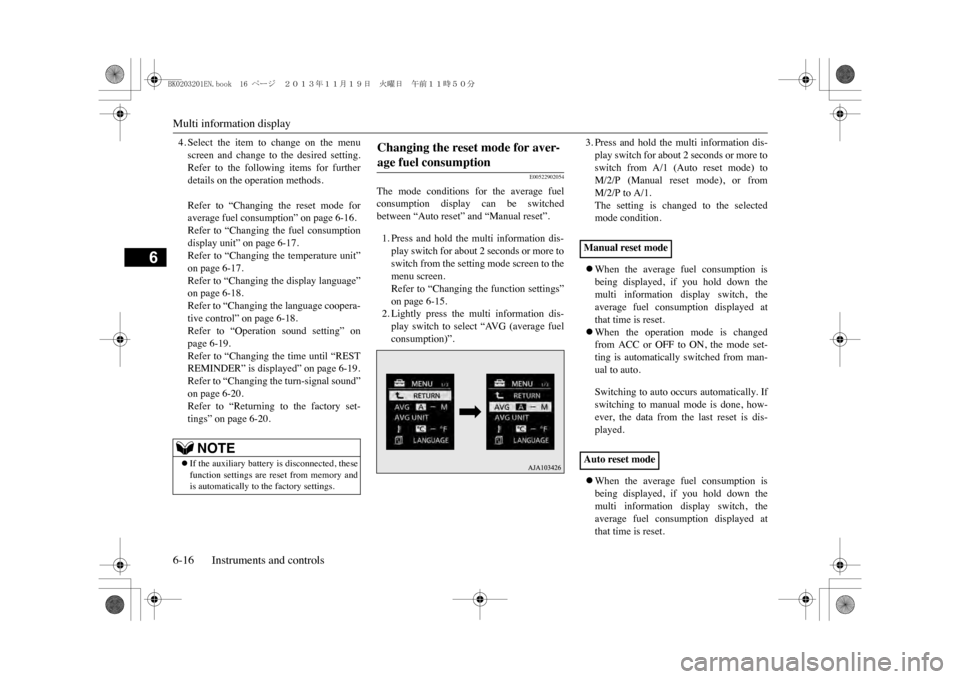
The mode conditions for the average fuelconsumption display can be switchedbetween “Auto reset” and “Manual reset”.1. Press and hold the multi information dis-play switch for about 2 seconds or more toswitch from the setting mode screen to themenu screen.Refer to “Changing the function settings”on page 6-15.2. Lightly press the multi information dis-play switch to select “AVG (average fuelconsumption)”.
3. Press and hold the multi information dis-play switch for about 2 seconds or more toswitch from A/1 (Auto reset mode) toM/2/P (Manual reset mode), or fromM/2/P to A/1.The setting is changed to the selectedmode condition.zWhen the average fuel consumption isbeing displayed, if you hold down themulti information display switch, theaverage fuel consumption displayed atthat time is reset.zWhen the operation mode is changedfrom ACC or OFF to ON, the mode set-ting is automatically switched from man-ual to auto.Switching to auto occurs automatically. Ifswitching to manual mode is done, how-ever, the data from the last reset is dis-played.zWhen the average fuel consumption isbeing displayed, if you hold down themulti information display switch, theaverage fuel consumption displayed atthat time is reset.
NOTE
zIf the auxiliary battery is disconnected, thesefunction settings are reset from memory andis automatically to the factory settings.
Changing the reset mode for aver-age fuel consumption
Manual reset modeAuto reset mode
BK0203201EN.book 16 ページ 2013年11月19日 火曜日 午前11時50分
Page 127 of 388
Multi information display6-18 Instruments and controls
6
3. Press and hold the multi information dis-play switch for about 2 seconds or more toswitch in from °C to °F, or from °F to °C.The setting is changed to the selected tem-perature unit.
E00523201741
The language of the multi information displaycan be switched.
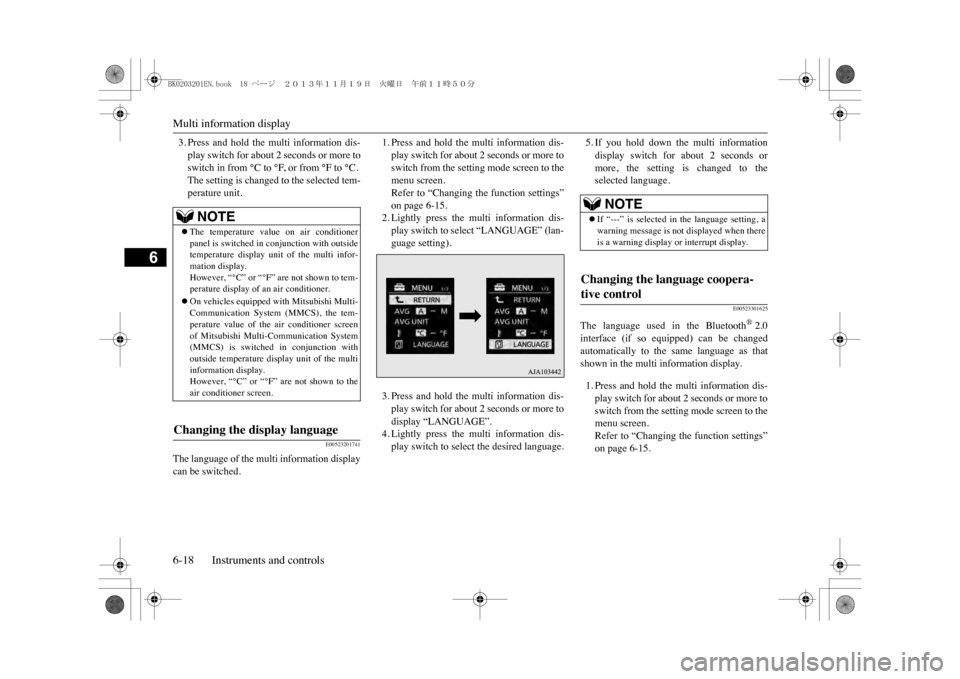
1. Press and hold the multi information dis-play switch for about 2 seconds or more toswitch from the setting mode screen to themenu screen.Refer to “Changing the function settings”on page 6-15.2. Lightly press the multi information dis-play switch to select “LANGUAGE” (lan-guage setting).3. Press and hold the multi information dis-play switch for about 2 seconds or more todisplay “LANGUAGE”.4. Lightly press the multi information dis-play switch to select the desired language.
5. If you hold down the multi informationdisplay switch for about 2 seconds ormore, the setting is changed to theselected language.
E00523301625
The language used in the Bluetooth
®2.0
interface (if so equipped) can be changedautomatically to the same language as thatshown in the multi information display.1. Press and hold the multi information dis-play switch for about 2 seconds or more toswitch from the setting mode screen to themenu screen.Refer to “Changing the function settings”on page 6-15.
NOTE
zThe temperature value on air conditionerpanel is switched in
conjunction with outside
temperature display unit of the multi infor-mation display.However, “°C” or “°F” are not shown to tem-perature display of an air conditioner.zOn vehicles equipped
with Mitsubishi Multi-
Communication System (MMCS), the tem-perature value of the air conditioner screenof Mitsubishi Multi-Communication System(MMCS) is switched
in conjunction with
outside temperature display unit of the multiinformation display.However, “°C” or “°F” are not shown to theair conditioner screen.
Changing the display language
NOTE
zIf “---” is selected in the language setting, awarning message is not
displayed when there
is a warning display or interrupt display.
Changing the language coopera-tive control
BK0203201EN.book 18 ページ 2013年11月19日 火曜日 午前11時50分
Page 128 of 388
Multi information display
Instruments and controls 6-19
6
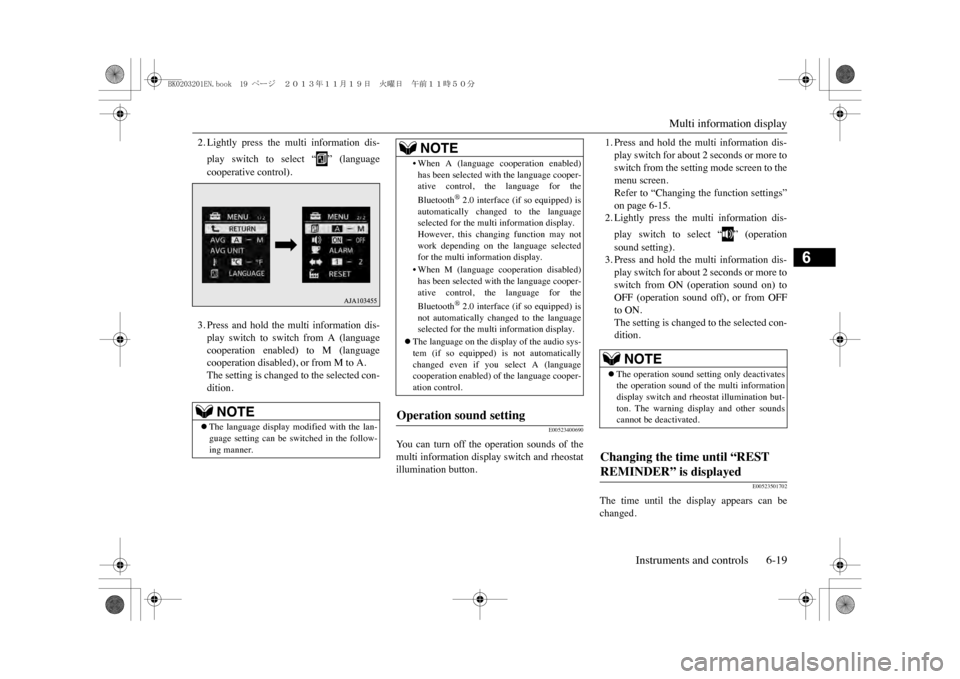
2. Lightly press the multi information dis-play switch to select “ ” (languagecooperative control).3. Press and hold the multi information dis-play switch to switch from A (languagecooperation enabled) to M (languagecooperation disabled), or from M to A.The setting is changed to the selected con-dition.
E00523400690
Yo u c a n t u r n o f f t h e o p e r a t i o n s o u n d s o f t h emulti information display switch and rheostatillumination button.
1. Press and hold the multi information dis-play switch for about 2 seconds or more toswitch from the setting mode screen to themenu screen.Refer to “Changing the function settings”on page 6-15.2. Lightly press the multi information dis-play switch to select “ ” (operationsound setting).3. Press and hold the multi information dis-play switch for about 2 seconds or more toswitch from ON (operation sound on) toOFF (operation sound off), or from OFFto ON.The setting is changed to the selected con-dition.
E00523501702
The time until the display appears can bechanged.
NOTE
zThe language display modified with the lan-guage setting can be switched in the follow-ing manner.
•When A (language
cooperation enabled)
has been selected with the language cooper-ative control, the language for theBluetooth
®2.0 interface (if so equipped) is
automatically changed to the languageselected for the multi information display.However, this changing function may notwork depending on the language selectedfor the multi information display.•When M (language c
ooperation disabled)
has been selected with the language cooper-ative control, the language for theBluetooth
®2.0 interface (if so equipped) is
not automatically changed to the languageselected for the multi information display.
zThe language on the disp
lay of the audio sys-
tem (if so equipped) is not automaticallychanged even if you
select A (language
cooperation enabled) of
the language cooper-
ation control.
Operation sound setting
NOTE
NOTE
zThe operation sound setting only deactivatesthe operation sound of the multi informationdisplay switch and rheostat illumination but-ton. The warning di
splay and other sounds
cannot be deactivated.
Changing the time until “REST REMINDER” is displayed
BK0203201EN.book 19 ページ 2013年11月19日 火曜日 午前11時50分
Page 129 of 388
Multi information display6-20 Instruments and controls
6
1. Press and hold the multi information dis-play switch for about 2 seconds or more toswitch from the setting mode screen to themenu screen.Refer to “Changing the function settings”on page 6-15.2. Lightly press the multi information dis-play switch to select “ALARM” (rest timesetting).3. Press and hold the multi information dis-play switch for about 2 seconds or more todisplay “ALARM”.4. Lightly press the multi information dis-play switch to select the time until the dis-play.5. Press and hold the multi information dis-play switch for about 2 seconds or more,the setting is changed to the selected time.
E00529100396
It is possible to change the turn-signal sound.
1. Press and hold the multi information dis-play switch for about 2 seconds or more toswitch from the setting mode screen to themenu screen.Refer to “Changing the function settings”on page 6-15.2. Lightly press the multi information dis-play switch to select (changing theturn-signal sound).3. Press and hold the multi information dis-play switch for about 2 seconds or more toswitch from 1 (turn-signal sound 1) to 2(turn-signal sound 2), or from 2 to 1.The setting changes to the selected turn-signal sound.
E00523601875
All of the function settings can be returned totheir factory settings.1. Press and hold the multi information dis-play switch for about 2 seconds or more toswitch from the setting mode screen to themenu screen.Refer to “Changing the function settings”on page 6-15.2. Lightly press the multi information dis-play switch to select “RESET” (returningto the factory settings).
3. When you press and hold the multi infor-mation display switch for about 5 secondsor more, the buzzer sounds and all of thefunction settings are returned to the fac-tory settings.
NOTE
zThe drive time is reset when the operationmode of the power switch is put in OFF.
Changing the turn-signal sound
Returning to the factory settings
NOTE
zThe factory settings
are as follows.
•Average fuel consum
ption reset mode: A
(Auto reset)•Fuel consumption display unit: L/100 km•Temperature unit: °C (Celsius)•Display language: ENGLISH or RUSSIAN•Cooperative language
setting: A (language
cooperation enabled)•Operation sounds: ON
(Operation sounds
on)•“REST REMINDER” display: OFF•Turn-signal sound: Turn-signal sound 1
BK0203201EN.book 20 ページ 2013年11月19日 火曜日 午前11時50分
Page 232 of 388
Rear-view camera*
Starting and driving 7-69
7
NOTE
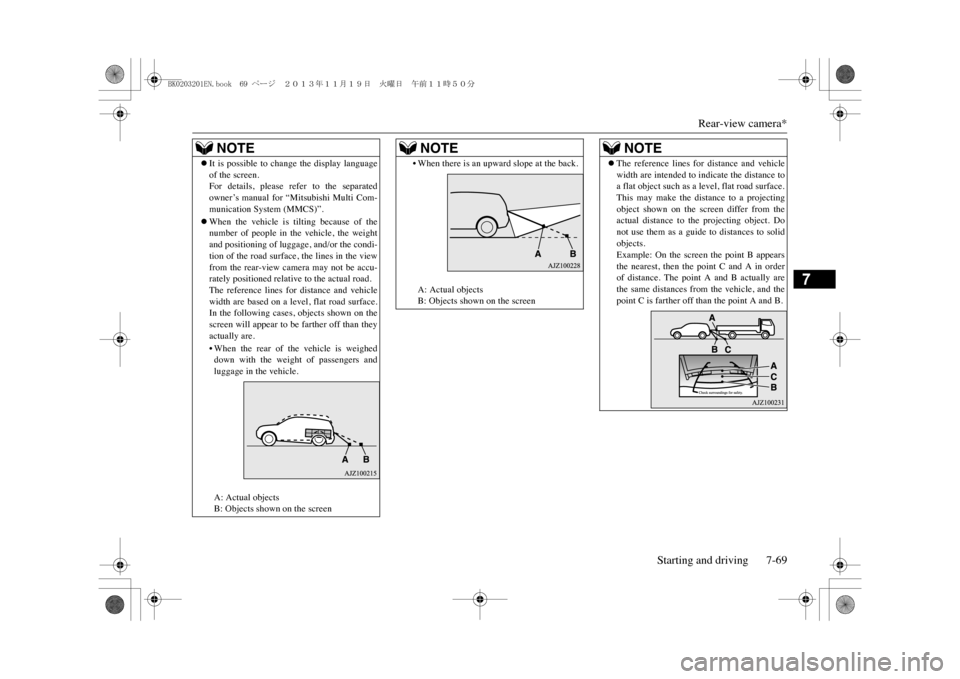
zIt is possible to change the display languageof the screen.For details, please refer to the separatedowner’s manual for “Mitsubishi Multi Com-munication System (MMCS)”.zWhen the vehicle is tilting because of thenumber of people in the vehicle, the weightand positioning of luggage
, and/or the condi-
tion of the road surface
, the lines in the view
from the rear-view camera may not be accu-rately positioned relative to the actual road.The reference lines for distance and vehiclewidth are based on a level, flat road surface.In the following cases
, objects shown on the
screen will appear to be farther off than theyactually are.•When the rear of the vehicle is weigheddown with the weight of passengers andluggage in the vehicle.A: Actual objectsB: Objects shown on the screen
•When there is an upward slope at the back.A: Actual objectsB: Objects shown on the screenNOTE
zThe reference lines for
distance and vehicle
width are intended to indicate the distance toa flat object such as a level, flat road surface.This may make the distance to a projectingobject shown on the screen differ from theactual distance to the projecting object. Donot use them as a guide
to distances to solid
objects.Example: On the screen the point B appearsthe nearest, then the point C and A in orderof distance. The point A and B actually arethe same distances from the vehicle, and thepoint C is farther off than the point A and B.NOTE
BK0203201EN.book 69 ページ 2013年11月19日 火曜日 午前11時50分
Page 274 of 388
System Settings
For pleasant driving 8-37
8
Change the mobile phone voice cut- in set-tings and the Bluetooth
® 2.0 interface lan-
guage.Depending on the vehicle, PHONE settingsmay not be possible.
Supported profiles(“Set value” bold typeface indicates factorydefault settings.)
PHONE Settings
NOTE
zCancel functions such as the mobile phone“dial lock”, and connect while on thestandby screen.zWhile connected, mobile phone (receivingcalls, etc.) operations may not function cor-rectly.zDepending on the distance between the prod-uct and the mobile phone, the conditionswithin the vehicle, and types of screening,connection may not be possible. In thesecases, situ
ate the mobile phone as close as
possible to the product.zEven though a Bluetooth-capable mobilephone, characteristics and specifications maymean that correct operation may not be pos-sible.zFor safety’s sake, do not operate the mobilephone while driving. When operating themobile phone, first stop the vehicle in a safelocation.
zEven though a Bluetooth-capable mobilephone, phone specifications
and settings may
result in differences in display, or preventcorrect operation.zSome models may not be confirmed as con-nected, or may not connect.Hands-free
HFP(v1.5)
Phonebook transfer
OPP(v1.1), PBAP(v1.0)
Settings name
Settings value
Settings content
PHONE IN set-tings
PHONE IN-R
During mobile phone voice cut-in, output sound from the right front speaker.
PHONE IN-L
During mobile phone voice cut-in, output sound from the left front speaker.
NOTE
HFM voice lan-guage set-tings
ENG-LISH
Change the hands free module voice language.
FRENCHGER-MANSPANISHITALIANDUTCHPORTU-GUESERUSSIAN
NOTE
zDepending on the vehicle model, this maynot display.Settings name
Settings value
Settings content
BK0203201EN.book 37 ページ 2013年11月19日 火曜日 午前11時50分
Page 280 of 388
Bluetooth® 2.0 interface
For pleasant driving 8-43
8
•In such circumstances, you can press thebutton briefly to switch between callers.Yo u w i l l s w i t c h t o t h e f i r s t c a l l e r a n d t h eother caller will be put on hold.•To establish a three-way call in such situ-ations, press the SPEECH button to entervoice recognition mode and then say“Join calls.”
zPress this button when an incoming call isreceived to refuse the call.zPress this button during a call to end thecurrent call.When another call is on hold, you willswitch to that call.zIf this button is pressed in the voice recog-nition mode, the voice recognition modewill be deactivated.
Yo u r v o i c e w i l l b e r e c o g n i z e d b y a m i c r o -phone in the overhead console, allowing youto make hands-free calls with voice com-mands.
E00727300514
The Bluetooth
® 2.0 interface is equipped
with a voice recognition function.Simply say voice commands and you can per-form various operations and make or receivehands-free calls.With the Bluetooth
® 2.0 interface, voice rec-
ognition is possible for English, French,
Spanish, Italian, German, Dutch, Portugueseand Russian. The factory setting is “English”or “Russian.”1. Press the SPEECH button.2. Say “Setup.”3. Say “Language.”4. The voice guide will say “Select a lan-guage: English, French, Spanish, Italian,German, Dutch, Portuguese or Russian”Say the desired language. (Example:“English”)
HANG-UP button
NOTE
zWhen you press the SPEECH button to entervoice recognition mode with a cellular phonepaired to the system, current information onthe cellular phone, such as “remaining bat-tery life,” “signal strength” or “roaming,”will be displayed on the audio display.
*
*: Some cellular phones will not send thisinformation to the Bluetooth
® 2.0 interface.
zCall waiting and three-way calls can be usedby the Bluetooth
® 2.0 interface, only if it is
possible to use those se
rvices with your cel-
lular phone.
Microphone
NOTE
zIf a cellular phone is brought close to themicrophone, it may create noise in the voiceon the phone. In such a case, take the cellularphone at a place as far as possible from themicrophone.
Vo i c e r e c o g n i t i o n f u n c t i o n
NOTE
NOTE
zIf the voice command that you say differsfrom the predefined command or cannot berecognised due to ambient noise or someother reason, the Bluetooth
® 2.0 interface
will ask you for the voice command again upto 3 times. zFor best performance
and further reduction
of ambient noise, the vehicle windowsshould be closed, lower the blower speed andrefrain from conversa
tion with your passen-
gers while engaging the voice recognitionfunction.zSome voice commands have alternativecommands.zDepending on the selected language, somefunctions may not be available.
Selecting the language
BK0203201EN.book 43 ページ 2013年11月19日 火曜日 午前11時50分
Page 281 of 388

Bluetooth® 2.0 interface8-44 For pleasant driving
8
5. The voice guide will say “English(French, Spanish, Italian, German, Dutch,Portuguese or Russian) selected. Is thiscorrect?” Say “Yes.”If you say “No,” the system will return toStep 4.6. When the voice guide says “English(French, Spanish, Italian, German, Dutch,Portuguese or Russian) selected,” the lan-guage change process will be completedand the system will return to the mainmenu.
E00760000019E00760100010
The Bluetooth
® 2.0 interface is equipped
with a help function. If you say “Help” when the system is waitingfor a voice command input, the system willtell you a list of the commands that can beused under the circumstances.
E00760200011
There are 2 cancel functions.If you are at the main menu, say “Cancel” toexit from the Bluetooth
® 2.0 interface.
If you are anywhere else within the system,say “Cancel” to return to the main menu.
E00760400013
The Bluetooth
® 2.0 interface is equipped
with a confirmation function.With the confirmation function activated, youare given more opportunities than normal toconfirm a command when making varioussettings to the Bluetooth
® 2.0 interface. This
allows you to decrease the possibility that asetting is accidentally changed. The confirmation function can be turned onor off by following the steps below. 1. Press the SPEECH button.2. Say “Setup.”3. Say “Confirmation prompts.”4. The voice guide will say “Confirmationprompts are
E00760501242
It is possible to use a password as a securityfunction by setting a password of your choicefor the Bluetooth
® 2.0 interface.
When the security function is turned on, it isnecessary to make a voice input of a 4-digitpassword in order to use all functions of theBluetooth
® 2.0 interface, except for recep-
tion. Use the following procedure to turn on thesecurity function by setting a password.
NOTE
zThe voice guide will repeat the same mes-sage twice. The first message is in the cur-rent language, and the second message is inthe selected language.zIf many entries are registered in the vehiclephonebook, changing the language will takea longer time.zChanging the language deletes the mobilephonebook imported to the Bluetooth
® 2.0
interface. If you wish to use it, you will haveto import it again.
Useful voice commands Help function Canceling Confirmation function setting
Security function Setting the password
BK0203201EN.book 44 ページ 2013年11月19日 火曜日 午前11時50分