engine MITSUBISHI OUTLANDER SPORT 2017 3.G Owners Manual
[x] Cancel search | Manufacturer: MITSUBISHI, Model Year: 2017, Model line: OUTLANDER SPORT, Model: MITSUBISHI OUTLANDER SPORT 2017 3.GPages: 399, PDF Size: 14.61 MB
Page 201 of 399
Bluetooth® 2.0 interface (if so equipped) 5-138 Features and controls
5
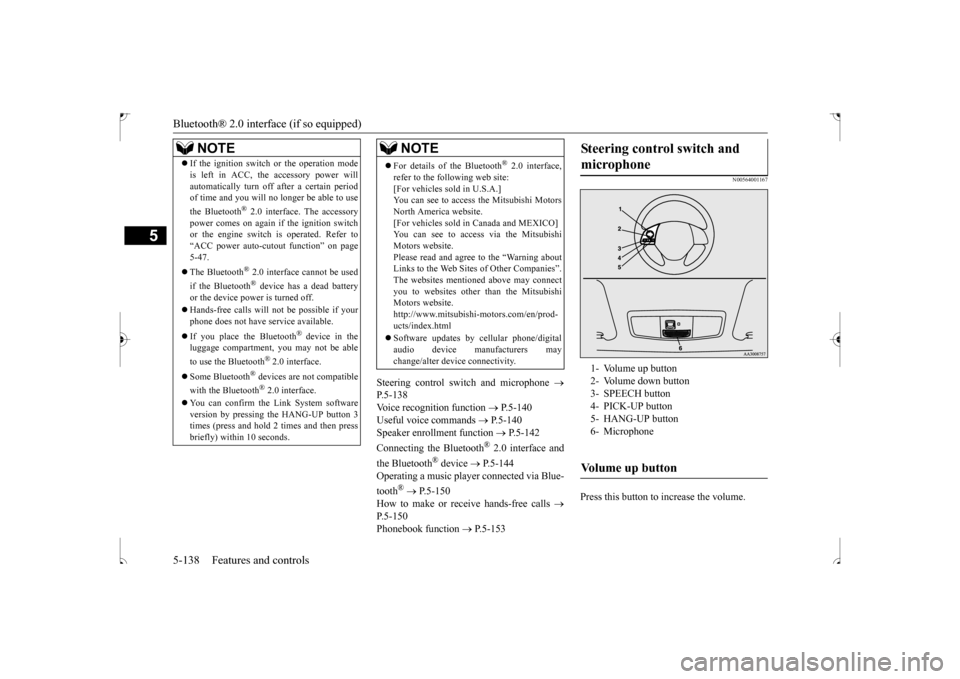
Steering control switch and microphone
P.5-138 Voice recognition function
P.5-140
Useful voice commands
P.5-140
Speaker enrollment function
P.5-142
Connecting the Bluetooth
® 2.0 interface and
the Bluetooth
® device
P.5-144
Operating a music player connected via Blue- tooth
® P.5-150
How to make or receive hands-free calls
P.5-150 Phonebook function
P.5-153
N00564001167
Press this button to increase the volume.
NOTE
If the ignition switch or the operation mode is left in ACC, the accessory power will automatically turn off after a certain period of time and you will no longer be able to use the Bluetooth
® 2.0 interface. The accessory
power comes on again if the ignition switch or the engine switch is operated. Refer to “ACC power auto-cutout function” on page5-47. The Bluetooth
® 2.0 interface cannot be used
if the Bluetooth
® device has a dead battery
or the device power is turned off. Hands-free calls will not be possible if your phone does not have service available. If you place the Bluetooth
® device in the
luggage compartment, you may not be able to use the Bluetooth
® 2.0 interface.
Some Bluetooth
® devices are not compatible
with the Bluetooth
® 2.0 interface.
You can confirm the Link System software version by pressing the HANG-UP button 3times (press and hold 2 times and then press briefly) within 10 seconds.
For details of the Bluetooth
® 2.0 interface,
refer to the following web site:[For vehicles sold in U.S.A.] You can see to access the Mitsubishi Motors North America website.[For vehicles sold in Canada and MEXICO] You can see to access via the Mitsubishi Motors website.Please read and agree to the “Warning about Links to the Web Sites of Other Companies”. The websites mentioned above may connectyou to websites other
than the Mitsubishi
Motors website. http://www.mitsubishi-motors.com/en/prod-ucts/index.html Software updates by cellular phone/digital audio device manufacturers may change/alter device connectivity.NOTE
Steering control switch and microphone
1- Volume up button 2- Volume down button3- SPEECH button 4- PICK-UP button 5- HANG-UP button6- MicrophoneVolume up button
BK0239500US.book
138 ページ 2016年5月13日 金曜日 午前8時53分
Page 205 of 399

Bluetooth® 2.0 interface (if so equipped) 5-142 Features and controls
5
If a passcode has been set and the security function is enabled, the voice guide will say “Hands-free system is locked. State the pass- code to continue” when the SPEECH button(except for vehicles with Mitsubishi Multi- Communication System) or PICK-UP button (for vehicles with Mi
tsubishi Multi-Commu-
nication System) is pressed to enter voice rec- ognition mode. Say the 4-digit passcode number to enter the passcode. If the entered passcode is wrong, the voice guide will say “<4-digit passcode>, Incorrect passcode. Please try again.” Enter the correctpasscode.
Use the following procedure to turn off the security function by disabling the passcode. 1. Press the SPEECH button (except for vehicles with Mitsubishi Multi-Commu-nication System) or PICK-UP button (for vehicles with Mitsubishi Multi-Commu- nication System).2. Say “Setup.” 3. Say “Passcode.” 4. The voice guide will say “Passcode isenabled. Would you like to disable it?” Answer “Yes.” Answer “No” to cancel the disabling ofthe passcode and return to the main menu. 5. When the disabling of the passcode is completed, the voice guide will say “Pass-code is disabled” and the system will return to the main menu.
N00564701021
The Bluetooth
® 2.0 interface can use the
speaker enrollment function to create a voicemodel for one person per language. This makes it easier for the Bluetooth
® 2.0
interface to recognize voice commands saidby you. You can turn a voice model registered with the speaker enrollment function on and offwhenever you want.
N00564801123
It takes about 2 to 3 minutes to complete thespeaker enrollment process.To ensure the best results, run through the process while in the driver’s seat, in an envi- ronment that is as quiet as possible (whenthere is no rain or strong winds and the vehi- cle windows are closed). Please turn off your phone while in speaker enrollment to preventinterruption of the process. Use the following procedure for speaker enrollment.
It is required for a little time after engine stop that the entered passcode is actually recorded in the system. If the ignition switch or the operation mode is made to ACC or ON or the engine isstarted immediately after engine stop, there is a case when the entered passcode is not recorded in the system. At this time, pleasetry to enter the passcode again.
Entering the passcode
NOTE
You can reenter the passcode as many times as you want. NOTE
If you have forgotten your passcode, say “Cancel” to quit the voice input mode and then check with an authorized Mitsubishi Motors dealer.
Disabling the passcode
NOTE
System must be unlocked to disable the pass- code.NOTE
Speaker enrollment function
Speaker enrollment
BK0239500US.book
142 ページ 2016年5月13日 金曜日 午前8時53分
Page 227 of 399
12 V power outlets 5-164 Features and controls
5
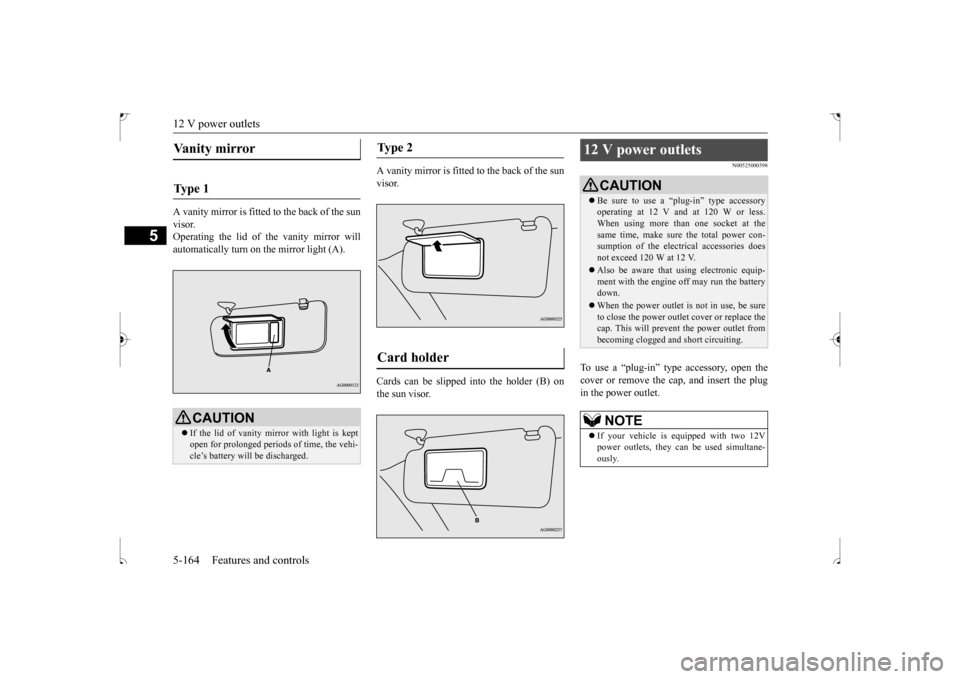
A vanity mirror is fitted to the back of the sun visor. Operating the lid of the vanity mirror willautomatically turn on the mirror light (A).
A vanity mirror is fitted to the back of the sun visor. Cards can be slipped into the holder (B) on the sun visor.
N00525000598
To use a “plug-in” type accessory, open thecover or remove the cap, and insert the plug in the power outlet.
Vanity mirror Ty p e 1
CAUTION If the lid of vanity mirror with light is kept open for prolonged periods of time, the vehi-cle’s battery will be discharged.
Ty p e 2 Card holder
12 V power outlets
CAUTION Be sure to use a “plug-in” type accessory operating at 12 V and at 120 W or less. When using more than one socket at the same time, make sure the total power con-sumption of the electrical accessories does not exceed 120 W at 12 V. Also be aware that using electronic equip- ment with the engine off may run the battery down. When the power outlet is not in use, be sure to close the power outlet cover or replace thecap. This will prevent the power outlet from becoming clogged and short circuiting.NOTE
If your vehicle is equipped with two 12V power outlets, they can be used simultane- ously.
BK0239500US.book
164 ページ 2016年5月13日 金曜日 午前8時53分
Page 233 of 399
Interior lights 5-170 Features and controls
5
1. Press and hold the 2 outer HomeLink
®
buttons for at least 10 seconds. The indi- cator will change from continuous yellow to rapidly flashing green.2. Release both buttons. 3. HomeLink
® is now in the train (or learn-
ing) mode and can be programmed at any time beginning with “Programming a new HomeLink
®” step 1.
N00585400037
To reprogram a HomeLink
® button, complete
the following. 1. Press and hold the desired HomeLink
®
button. Do not release the button. 2. The indicator light will begin to slowlyflash orange after 20 seconds. The Home- Link
® button can be released at this point.
Proceed with “Programming a new HomeLink
®” step 2.
N00585600039
Your HomeLink
® system operates on a radio
frequency subject to Federal Communica- tions Commission (FCC) Rules (For vehiclessold in U.S.A.) and Industry Canada Rules (For vehicles sold in Canada). This device complies with Part 15 of the FCC Rules andRSS- 210 of the Industry Canada Rules. Operation is subject to the following two con- ditions. This device may not cause harmful inter- ference. This device must accept any interference that may be received, including interfer-ence that may cause undesired operation.
This equipment complies with FCC radiation exposure limits set forth for an uncontrolledenvironment. End Users must follow the spe-cific operating instructions for satisfying RF exposure compliance. This transmitter must be at least 12 inches (20 cm) from the userand must not be co-located or operating in conjunction with any other antenna or trans- mitter.The term “IC:” before the certification/regis- tration number only signifies that Industry Canada technical specifications were met.
N00525300562
NOTE
Do not hold for longer than 20 seconds.
Reprogramming a single HomeLink
® button
NOTE
If you do not complete the programming of a new device to the button, it will revert to the previously stored programming. For questions or comments, visit www.homelink.com,www.youtube.com/HomeLinkGentex, or by calling the HomeLink
® Hotline.
General information
CAUTION The transmitter has been tested and complies with FCC and IC rules. Changes or modifications not expressly approved by the party responsible for com- pliance could void the user’s authority tooperate the device.
Interior lights
NOTE
Be aware that leaving the light illuminated with the engine off may run the battery down. Never leave the vehicle without checkingthat the light is off.
BK0239500US.book
170 ページ 2016年5月13日 金曜日 午前8時53分
Page 234 of 399
Interior lights
Features and controls 5-171
5
N00525401472
1- (DOOR) The light illuminates when a door or the liftgate is opened. It goes off approxi- mately 30 seconds after the door or lift-gate is closed. However, the light goes off immediately in the following cases:• When the ignition switch is turned to the “ON” position or the operation mode is put in ON.• When the power door lock function is used to lock the vehicle.
• When the remote control transmitter of the keyless entry system or the F.A.S.T.- key is used to lock the vehicle. • If the vehicle is equipped with theF.A.S.T.-key, when the F.A.S.T.-key is used to lock the vehicle. 2- The light goes off regardless of whether a door or the liftgate is open or closed.
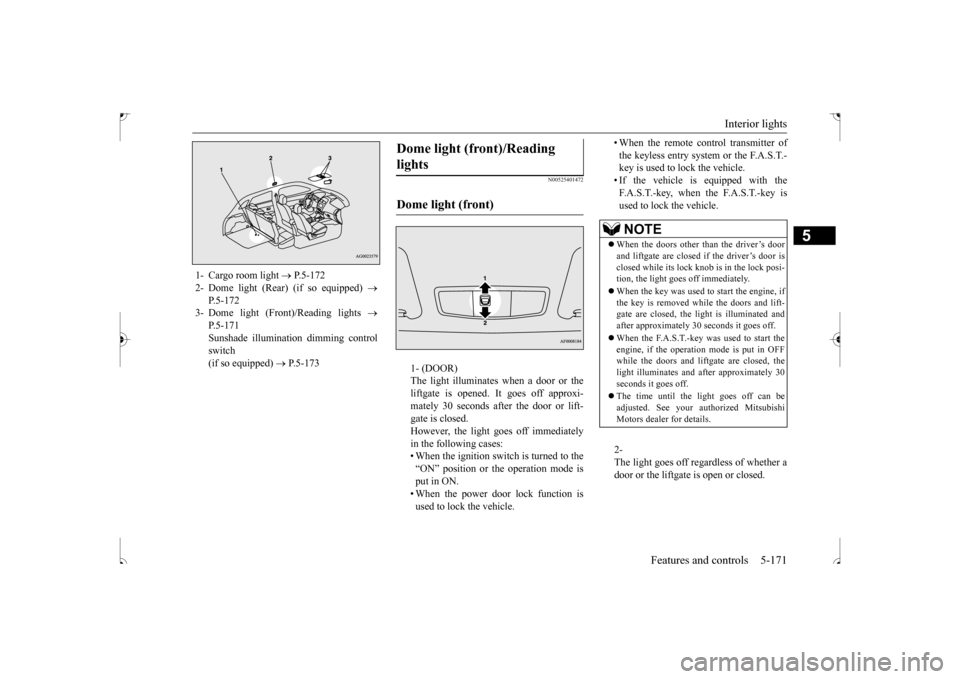
1- Cargo room light
P.5-172
2- Dome light (Rear) (if so equipped)
P.5-172
3- Dome light (Front)/Reading lights
P.5-171Sunshade illumination dimming control switch (if so equipped)
P.5-173
Dome light (front)/Reading lights Dome light (front)
NOTE
When the doors other than the driver’s door and liftgate are closed if the driver’s door is closed while its lock knob is in the lock posi-tion, the light goes off immediately. When the key was used to start the engine, if the key is removed while the doors and lift- gate are closed, the light is illuminated and after approximately 30 seconds it goes off. When the F.A.S.T.-key was used to start the engine, if the operation mode is put in OFFwhile the doors and liftgate are closed, the light illuminates and after approximately 30 seconds it goes off. The time until the light goes off can be adjusted. See your authorized MitsubishiMotors dealer for details.
BK0239500US.book
171 ページ 2016年5月13日 金曜日 午前8時53分
Page 235 of 399
Interior lights 5-172 Features and controls
5
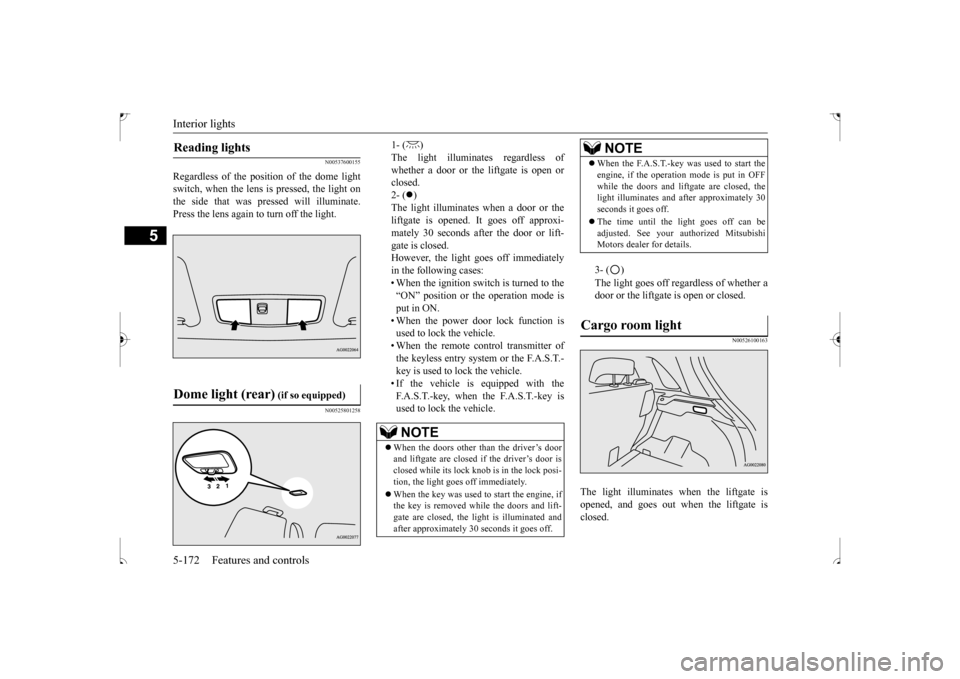
N00537600155
Regardless of the position of the dome light switch, when the lens is pressed, the light onthe side that was pressed will illuminate. Press the lens again to turn off the light.
N00525801258
1- ( ) The light illuminates regardless ofwhether a door or the liftgate is open or closed. 2- (
)
The light illuminates when a door or the liftgate is opened. It goes off approxi- mately 30 seconds after the door or lift-gate is closed. However, the light goes off immediately in the following cases:• When the ignition switch is turned to the“ON” position or the operation mode is put in ON. • When the power door lock function isused to lock the vehicle. • When the remote control transmitter of the keyless entry system or the F.A.S.T.-key is used to lock the vehicle. • If the vehicle is equipped with the F.A.S.T.-key, when the F.A.S.T.-key isused to lock the vehicle.
3- ( ) The light goes off regardless of whether a door or the liftgate is open or closed.
N00526100163
The light illuminates when the liftgate isopened, and goes out when the liftgate is closed.
Reading lights Dome light (rear)
(if so equipped)
NOTE
When the doors other than the driver’s door and liftgate are closed if
the driver’s door is
closed while its lock knob is in the lock posi- tion, the light goes off immediately. When the key was used to start the engine, if the key is removed while the doors and lift- gate are closed, the light is illuminated andafter approximately 30 seconds it goes off.
When the F.A.S.T.-key was used to start the engine, if the operation mode is put in OFF while the doors and liftgate are closed, the light illuminates and after approximately 30 seconds it goes off. The time until the light goes off can be adjusted. See your authorized MitsubishiMotors dealer for details.
Cargo room light
NOTE
BK0239500US.book
172 ページ 2016年5月13日 金曜日 午前8時53分
Page 236 of 399
Interior lights
Features and controls 5-173
5
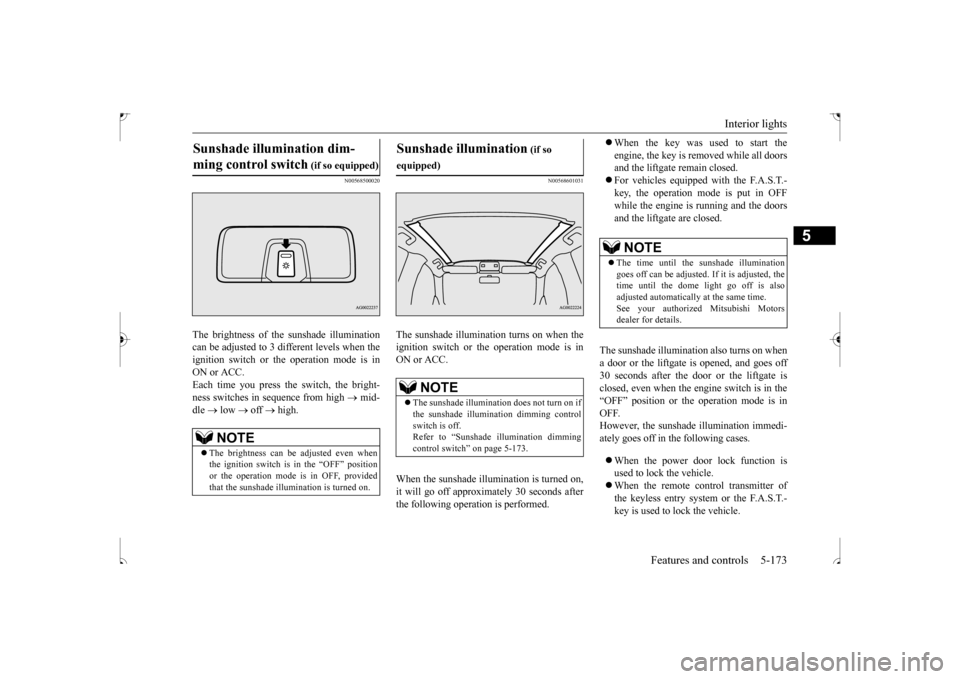
N00568500020
The brightness of the sunshade illumination can be adjusted to 3 different levels when the ignition switch or the operation mode is inON or ACC.Each time you press the switch, the bright- ness switches in sequence from high
mid-
dle
low
off
high.
N00568601031
The sunshade illumination turns on when the ignition switch or the operation mode is in ON or ACC. When the sunshade illu
mination is turned on,
it will go off approximately 30 seconds after the following operation is performed.
When the key was used to start the engine, the key is removed while all doors and the liftgate remain closed. For vehicles equipped with the F.A.S.T.- key, the operation mode is put in OFF while the engine is running and the doors and the liftgate are closed.
The sunshade illumination also turns on when a door or the liftgate is opened, and goes off 30 seconds after the door or the liftgate is closed, even when the engine switch is in the“OFF” position or the operation mode is in OFF. However, the sunshade illumination immedi-ately goes off in the following cases. When the power door lock function is used to lock the vehicle. When the remote control transmitter of the keyless entry system or the F.A.S.T.- key is used to lock the vehicle.
Sunshade illumination dim- ming control switch
(if so equipped)
NOTE
The brightness can be adjusted even when the ignition switch is in the “OFF” position or the operation mode is in OFF, providedthat the sunshade illumination is turned on.
Sunshade illumination
(if so
equipped)
NOTE
The sunshade illumination does not turn on if the sunshade illumination dimming controlswitch is off. Refer to “Sunshade illumination dimming control switch” on page 5-173.
NOTE
The time until the sunshade illumination goes off can be adjusted. If it is adjusted, thetime until the dome light go off is also adjusted automatically at the same time. See your authorized Mitsubishi Motorsdealer for details.
BK0239500US.book
173 ページ 2016年5月13日 金曜日 午前8時53分
Page 237 of 399
Storage spaces 5-174 Features and controls
5
If the vehicle is equipped with the F.A.S.T.-key, when the F.A.S.T.-key is used to lock the vehicle.
N00526301452
If any of the interior lights are left switched on with the ignition switch is in the “OFF” position or the operation mode is in OFF, it goes of
f automatically after
approximately 30 minutes.
The lights will illuminate again after they automatically go off if the ignition switch or the engine switch is operated, or if the keyless entry system or the F.A.S.T.-keyis operated.
N00526400469
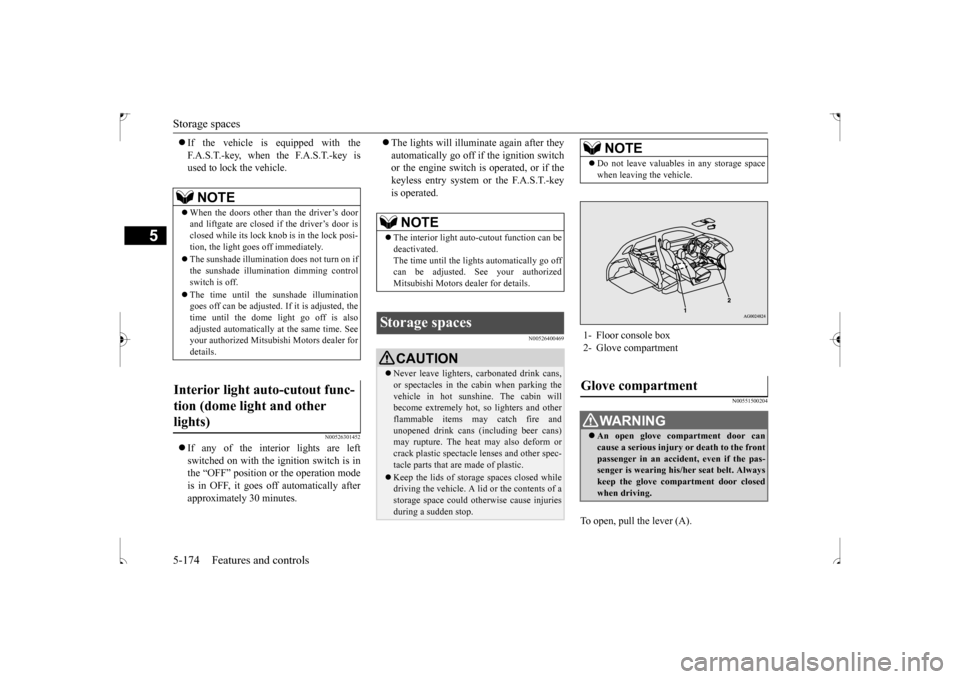
N00551500204
To open, pull the lever (A).
NOTE
When the doors other than the driver’s door and liftgate are closed if
the driver’s door is
closed while its lock knob is in the lock posi- tion, the light goes off immediately. The sunshade illumination does not turn on if the sunshade illumination dimming controlswitch is off. The time until the sunshade illumination goes off can be adjusted
. If it is adjusted, the
time until the dome light go off is also adjusted automatically at the same time. Seeyour authorized Mitsubishi Motors dealer for details.
Interior light auto-cutout func- tion (dome light and other lights)
NOTE
The interior light auto-cutout function can be deactivated. The time until the lights automatically go offcan be adjusted. See your authorized Mitsubishi Motors dealer for details.
Storage spaces
CAUTION Never leave lighters, carbonated drink cans, or spectacles in the cabin when parking the vehicle in hot sunshine. The cabin will become extremely hot, so lighters and otherflammable items may catch fire and unopened drink cans (including beer cans) may rupture. The heat may also deform or crack plastic spectacle lenses and other spec- tacle parts that are made of plastic. Keep the lids of storage spaces closed while driving the vehicle. A lid or the contents of astorage space could otherwise cause injuries during a sudden stop.
NOTE
Do not leave valuables in any storage space when leaving the vehicle.
1- Floor console box 2- Glove compartmentGlove compartment
WA R N I N G An open glove compartment door can cause a serious injury or death to the front passenger in an accident, even if the pas-senger is wearing his/her seat belt. Always keep the glove compartment door closed when driving.
BK0239500US.book
174 ページ 2016年5月13日 金曜日 午前8時53分
Page 245 of 399
Driving precaution 6-2 Driving safety
6
N00629301106
Your vehicle has been designed for both nor- mal and occasional off-road use. However,avoid driving the vehicle through areas where the tires may get stuck in deep sand or mud as your vehicle is designed primarily for use onpavement, unlike a conventional off-road vehicle. Keep in mind that 2-wh
eel drive vehicles are
less capable than 4-wheel drive vehicles for driving on muddy, slippery, wet or snow-cov- ered roads.Utility vehicles have higher ground clearance and a narrower track, which enables them to perform in a wide variety of off-road situa-tions. Because of the higher ground clear- ance, these vehicles have a higher center of gravity, which makes them handle differentlythan ordinary vehicles when driving on pave- ment. They are not designed to maneuver or corner at the same speed on pavement as con-ventional 2-wheel drive passenger cars any more than low-slung sports cars are designed
to perform satisfactorily in off-road condi- tions. Always drive safely and steer the vehicle carefully. Avoid operating the vehicle in amanner that might require sharp turns or abrupt maneuvers. As with other vehicles of this type, failure to operate this vehicle cor-rectly can result in loss of control or vehicle rollover. In a rollover crash, an unbelted person is sig-nificantly more likely to die than a personwearing a seat belt. Before starting the vehi- cle, always make certain that you and all your passengers are properly wearing their seatbelts (with children in the rear seat, in appro- priate restraints).
N00628800152
Fuel economy is dependent on many factors.Your personal driving habits can have a sig- nificant effect on your fuel use. Several rec-ommendations for achieving the greatest fuel economy are listed below. Whenever accelerating from a stop, always accelerate slowly and smoothly. When parked for even a short period, do not idle the engine. Shut it off. Plan your trips to avoid unnecessary stops.
Keep your tires inflated to the recom- mended pressures. When you drive on highways or dry improved roads, set the drive mode-selec-tor “2WD” or “4WD AUTO” position (if so equipped). For freeway driving, maintain a speed of approximately 50 mph (80 km/h) when traffic, roadway and weather conditions safely permit. Keep your air filter clean and your vehicle lubricated according to the recommenda- tions in this manual. Always keep your vehicle well main- tained. A poorly maintained engine wastes fuel and costs money. Never overload your vehicle.
N00628900049
Drunk driving is one of the most frequent causes of accidents.Your driving ability can be seriously impaired even with blood alcohol levels far below the legal minimum. If you have beendrinking, don’t drive. Ride with a designated non-drinking driver, call a cab or a friend, or use public transportation. Drinking coffee ortaking a cold shower will not make you sober. Similarly, prescription and nonprescription drugs affect your alertness, perception andreaction time. Consult with your doctor or
Driving precaution
WA R N I N G Utility vehicles have
a significantly higher
rollover rate than other types of vehicles. Avoid abrupt maneuvers and excessive speed. Always buckle up.
Fuel economy
Driving, alcohol and drugs
BK0239500US.bo
ok 2 ページ 2016年5月13日 金曜日 午前8時53分
Page 246 of 399
Floor mat
Driving safety 6-3
6
pharmacist before driving while under the influence of any of these medications.
N00628600046
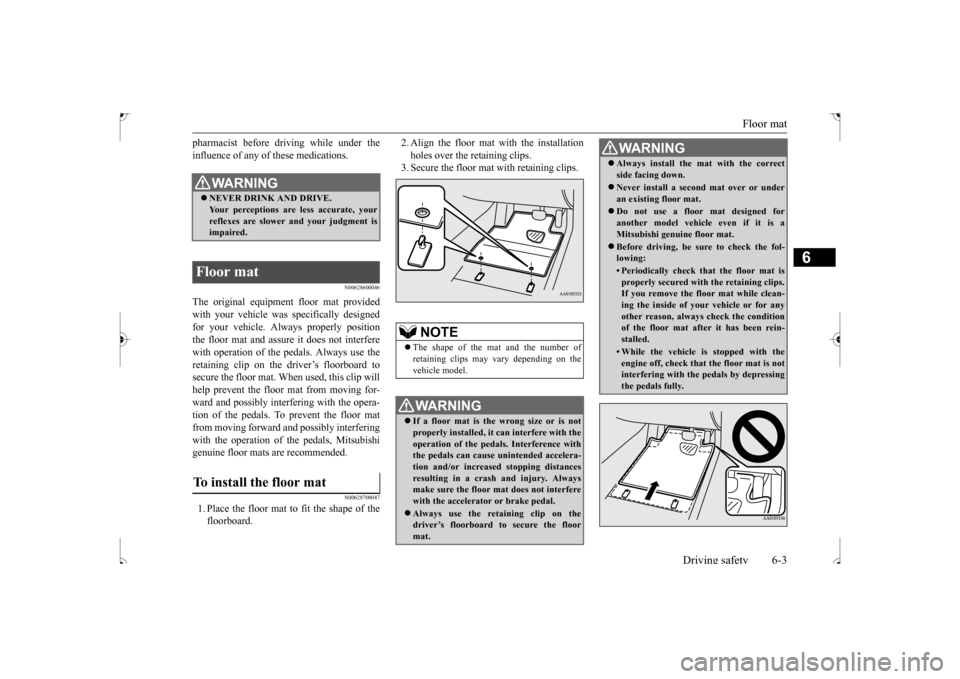
The original equipmen
t floor mat provided
with your vehicle was specifically designedfor your vehicle. Always properly position the floor mat and assure it does not interfere with operation of the pedals. Always use theretaining clip on the driver’s floorboard to secure the floor mat. When used, this clip will help prevent the floor mat from moving for-ward and possibly interfering with the opera- tion of the pedals. To prevent the floor mat from moving forward and possibly interferingwith the operation of the pedals, Mitsubishi genuine floor mats are recommended.
N00628700047
1. Place the floor mat to fit the shape of thefloorboard.
2. Align the floor mat with the installation holes over the retaining clips. 3. Secure the floor mat with retaining clips.
WA R N I N G NEVER DRINK AND DRIVE. Your perceptions are less accurate, your reflexes are slower and your judgment isimpaired.
Floor mat To install the floor mat
NOTE
The shape of the mat and the number of retaining clips may vary depending on the vehicle model.WA R N I N G If a floor mat is the wrong size or is not properly installed, it can interfere with the operation of the pedals. Interference with the pedals can cause unintended accelera-tion and/or increased stopping distances resulting in a crash and injury. Always make sure the floor mat does not interferewith the accelerator or brake pedal. Always use the reta
ining clip on the
driver’s floorboard to secure the floor mat.
Always install the mat with the correct side facing down. Never install a second mat over or under an existing floor mat. Do not use a floor mat designed for another model vehicle even if it is aMitsubishi genuine floor mat. Before driving, be sure to check the fol- lowing:• Periodically check that the floor mat isproperly secured with the retaining clips. If you remove the floor mat while clean- ing the inside of your vehicle or for anyother reason, always check the condition of the floor mat after it has been rein- stalled.• While the vehicle is stopped with theengine off, check that the floor mat is notinterfering with the pedals by depressing the pedals fully.WA R N I N G
BK0239500US.bo
ok 3 ページ 2016年5月13日 金曜日 午前8時53分