engine MITSUBISHI OUTLANDER SPORT 2017 3.G Manual PDF
[x] Cancel search | Manufacturer: MITSUBISHI, Model Year: 2017, Model line: OUTLANDER SPORT, Model: MITSUBISHI OUTLANDER SPORT 2017 3.GPages: 399, PDF Size: 14.61 MB
Page 156 of 399
Multi-information display
Features and controls 5-93
5
Shows the approximate driving range (how many more miles or kilometers you candrive). When this driving range falls below 30 miles (50 km), “---” is displayed. Refuel as soon as possible.
This displays the average speed from the last reset to the present.There are 2 types of mode settings as follows. For details on how to change the average speed display setting, refer to “Changing thefunction settings (With ignition switch or operation mode in ON)” on page 5-99. When the average speed is being dis- played, if you hold down the multi-infor-mation meter switch, these calculations will be reset to zero. When the following operation is per- formed, the mode setting changes auto- matically from manual to auto. [Except for vehicles equipped with the F. A . S . T. - k e y ]Turn the ignition switch to the “ON” posi- tion from the “ACC” or “OFF” position.
[For vehicles equipped with the F.A.S.T.- key] Change the operation mode to ON from ACC or OFF. When the average speed is being dis- played, if you hold down the multi-infor- mation meter switch, these calculations will be reset to zero. When the engine switch or the operation mode is in the following conditions, the average speed display will automatically reset. [Except for vehicles equipped with the F. A . S . T. - k e y ] The ignition switch has been set to the “ACC” or “OFF” position for about 4hours or more. [For vehicles equipped with the F.A.S.T.- key] The operation mode has been set to ACCor OFF for about 4 hours or more.
CAUTION If the engine is overheating, “ ” will blink. In this case, the bar graph is on the red zone. Immediately park the vehicle in a safe place and take the required measures. Refer to“Engine overheating” on page 8-4.
Driving range display
NOTE
The driving range is determined based on the fuel consumption data. This may vary depending on the driving conditions and hab-its. Treat the distance displayed as just a rough guideline. When you refuel, the driving range display is updated. However, if you only add a small amount of fuel, the correct value will not be displayed. Fill to a full tank whenever possible. When your vehicle is stopped on an extremely steep hill, the driving range valuemay, change. This is due to the movement of fuel in the tank and does not indicate any breakdown.
The display setting can be changed to the preferred units (miles or km). Refer to “Changing the function settings (With ignition switch or operation mode in ON)” on page 5-99.
Average speed display Manual reset mode
NOTE
Auto reset mode
NOTE
The average speed display and the average fuel consumption display can be reset sepa- rately in both auto reset mode and manualreset mode.
BK0239500US.bo
ok 93 ページ 2016年5月13日 金曜日 午前8時53分
Page 157 of 399

Multi-information display 5-94 Features and controls
5
This displays the average fuel consumption from the last reset to the present. There are 2 types of mode settings as follows. For details on how to change the average fuelconsumption display setting, refer to “Chang- ing the function settings (With ignition switch or operation mode in ON)” on page 5-99. The “ ” mark in the momentary fuel gauge shows the average fuel consumption. (Type 2)
When the average fuel consumption is being displayed, if you hold down the multi-information meter switch, these cal- culations will be reset to zero. When the following operation is per- formed, the mode setting changes auto- matically from manual to auto. [Except for vehicles equipped with the F.A.S.T.-key] Turn the ignition switch to the “ON” posi- tion from the “ACC” or “OFF” position. [For vehicles equipped with the F.A.S.T.- key]Change the operation mode to ON from ACC or OFF. When the average fuel consumption is being displayed, if you hold down themulti-information meter switch, these cal- culations will be reset to zero. When the engine switch or the operation mode is in the following conditions, the average fuel consumption display will automatically reset. [Except for vehicles equipped with the F.A.S.T.-key]
The ignition switch has been set to the “ACC” or “OFF” position for about 4 hours or more. [For vehicles equipped with the F.A.S.T.- key]The operation mode has been set to ACC or OFF for about 4 hours or more.
“---” is displayed when the average speed cannot be measured. The initial (default) setting is “Auto reset mode”. The display setting can be changed to the preferred units (mph or km/h).Refer to “Changing the function settings (With ignition switch or operation mode in ON)” on page 5-99. Disconnecting the battery cable will erase from memory the manual reset mode or autoreset mode setting for the average speed dis- play.
Average fuel consumption display
NOTE
Manual reset mode Auto reset mode
NOTE
The average speed display and the average fuel consumption display can be reset sepa- rately in both auto reset mode and manual reset mode. “---” is displayed when the average fuel con- sumption cannot be measured. The initial (default) setting is “Auto reset mode”. Average fuel consumption may vary depend on the driving conditions (road conditions,how you drive, etc.) The actual fuel con- sumption may differ from the fuel consump- tion displayed, so treat the fuel consumptiondisplayed as just a rough guideline. Disconnecting the battery cable will erase from memory the manual reset mode or auto reset mode setting for the average fuel con- sumption display. The display setting can be changed to the preferred units {mpg(US), mpg(UK), L/100km or km/L}. Refer to “Changing the function settings(With ignition switch or operation mode in ON)” on page 5-99.
BK0239500US.bo
ok 94 ページ 2016年5月13日 金曜日 午前8時53分
Page 164 of 399
Multi-information display
Features and controls 5-101
5
When the average fuel consumption and average speed are being displayed, if you hold down the multi-information meter switch, these calculations will be reset tozero. When the engine switch or the operation mode is in the following conditions, theaverage fuel consumption display and the average speed display will automatically reset. [Except for vehicles equipped with the F. A . S . T. - k e y ]The ignition switch has been set to the “ACC” or “OFF” position for about 4 hours or more. [For vehicles equipped with the F.A.S.T.- key] The operation mode has been in ACC or OFF for about 4 hours or more.
N00557100143
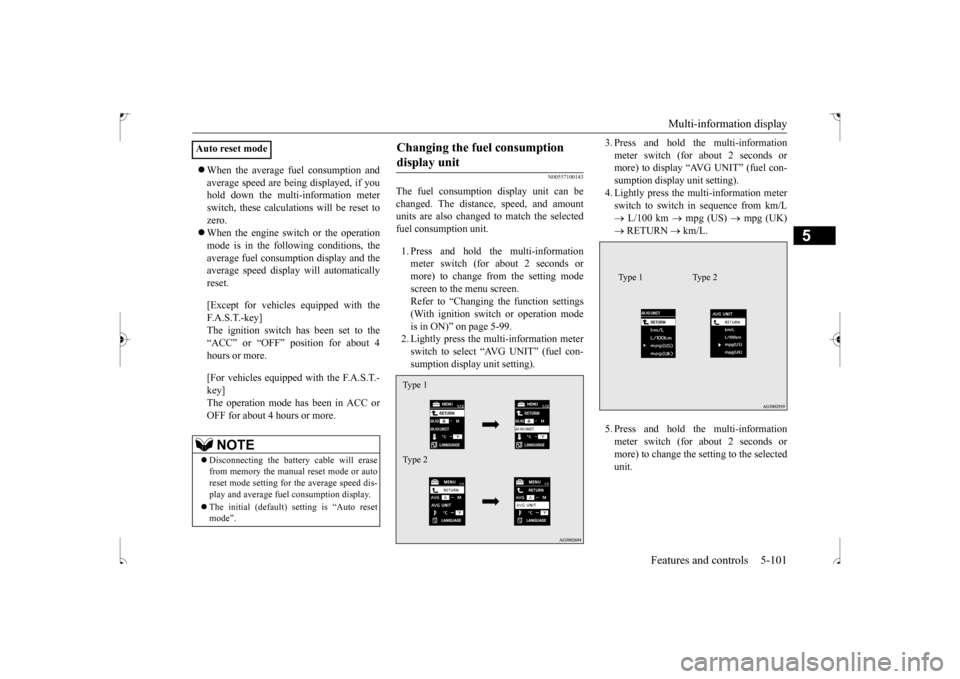
The fuel consumption display unit can be changed. The distance, speed, and amount units are also changed to match the selectedfuel consumption unit. 1. Press and hold the multi-information meter switch (for about 2 seconds or more) to change from the setting modescreen to the menu screen.Refer to “Changing the function settings (With ignition switch or operation mode is in ON)” on page 5-99.2. Lightly press the multi-information meter switch to select “AVG UNIT” (fuel con- sumption display unit setting).
3. Press and hold the multi-information meter switch (for about 2 seconds or more) to display “AVG UNIT” (fuel con- sumption display unit setting).4. Lightly press the multi-information meter switch to switch in sequence from km/L L/100 km
mpg (US)
mpg (UK)
RETURN
km/L.
5. Press and hold the multi-information meter switch (for about 2 seconds or more) to change the setting to the selected unit.
Auto reset mode
NOTE
Disconnecting the battery cable will erase from memory the manual reset mode or autoreset mode setting for the average speed dis- play and average fuel consumption display. The initial (default) setting is “Auto reset mode”.
Changing the fuel consumption display unit Type 1 Type 2
Type 1 Type 2
BK0239500US.book
101 ページ 2016年5月13日 金曜日 午前8時53分
Page 169 of 399
Indicator light, warning light, an
d information screen display list
5-106 Features and controls
5
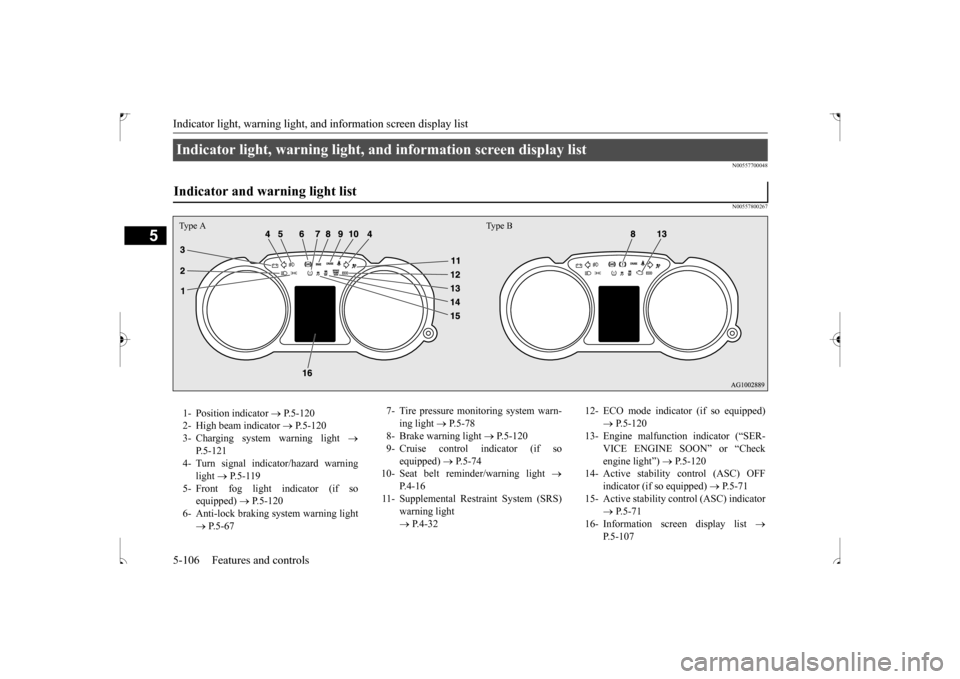
N00557700048 N00557800267
Indicator light, warning light, and information screen display list Indicator and warning light list Type A Type B1- Position indicator
P.5-120
2- High beam indicator
P.5-120
3- Charging system warning light
P.5-121
4- Turn signal indicator/hazard warning
light
P.5-119
5- Front fog light indicator (if so
equipped)
P.5-120
6- Anti-lock braking system warning light
P.5-67
7- Tire pressure monitoring system warn-
ing light
P.5-78
8- Brake warning light
P.5-120
9- Cruise control indicator (if so
equipped)
P.5-74
10- Seat belt reminder/warning light
P. 4 - 1 6
11- Supplemental Restraint System (SRS)
warning light P.4-32
12- ECO mode indicator (if so equipped)
P.5-120
13- Engine malfunction indicator (“SER-
VICE ENGINE SOON” or “Check engine light”)
P.5-120
14- Active stability control (ASC) OFF
indicator (if so equipped)
P.5-71
15- Active stability control (ASC) indicator
P.5-71
16- Information screen display list
P.5-107
BK0239500US.book
106 ページ 2016年5月13日 金曜日 午前8時53分
Page 173 of 399
Indicator light, warning light, an
d information screen display list
5-110 Features and controls
5
N00558101365
—
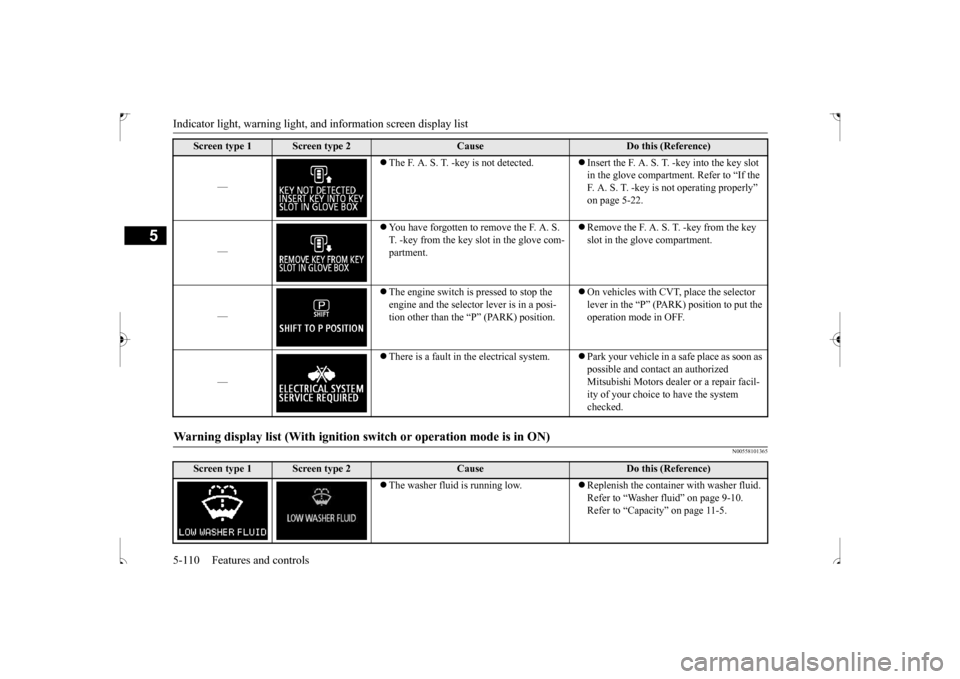
The F. A. S. T. -key is not detected.
Insert the F. A. S. T.
-key into the key slot
in the glove compartment. Refer to “If the F. A. S. T. -key is not operating properly” on page 5-22.
—
You have forgotten to remove the F. A. S. T. -key from the key slot in the glove com-partment.
Remove the F. A. S. T. -key from the key slot in the glove compartment.
—
The engine switch is pressed to stop the engine and the selector lever is in a posi-tion other than the “P” (PARK) position.
On vehicles with CVT, place the selector lever in the “P” (PARK) position to put the operation mode in OFF.
—
There is a fault in the electrical system.
Park your vehicle in a safe place as soon as possible and contact an authorized Mitsubishi Motors dealer or a repair facil- ity of your choice to have the system checked.
Warning display list (With ignition sw
itch or operation mode is in ON)
Screen type 1
Screen type 2
Cause
Do this (Reference)
The washer fluid is running low.
Replenish the container with washer fluid. Refer to “Washer fluid” on page 9-10.Refer to “Capacity” on page 11-5.
Screen type 1
Screen type 2
Cause
Do this (Reference)
BK0239500US.book
110 ページ 2016年5月13日 金曜日 午前8時53分
Page 176 of 399
Indicator light, warning light, an
d information screen display list Features and controls 5-113
5
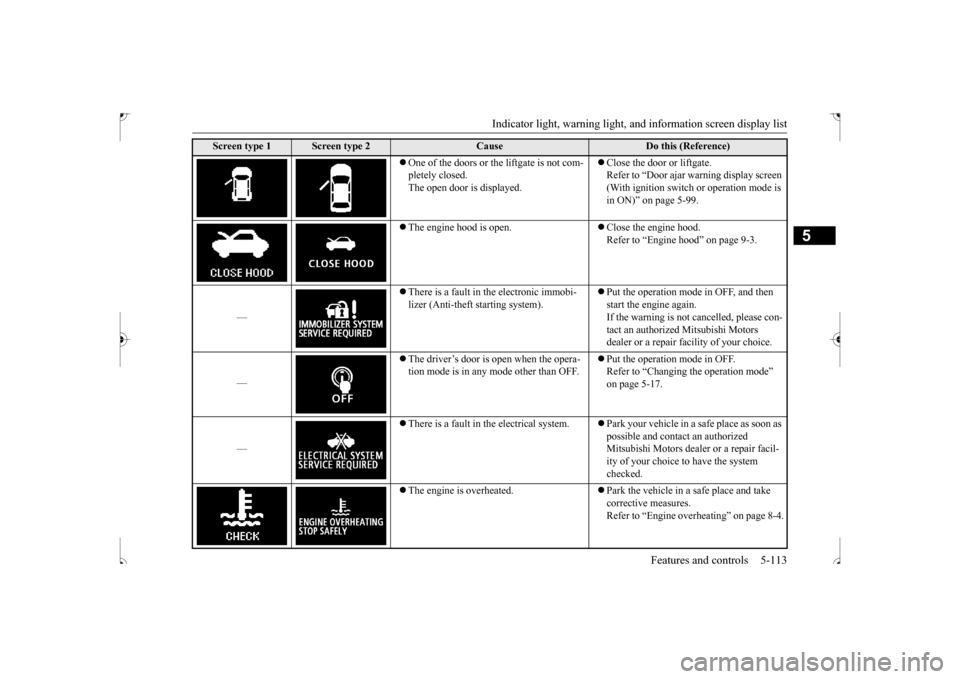
One of the doors or the liftgate is not com- pletely closed. The open door is displayed.
Close the door or liftgate. Refer to “Door ajar warning display screen (With ignition switch or operation mode is in ON)” on page 5-99.
The engine hood is open.
Close the engine hood. Refer to “Engine hood” on page 9-3.
—
There is a fault in the electronic immobi- lizer (Anti-theft starting system).
Put the operation mode in OFF, and then start the engine again.If the warning is not cancelled, please con- tact an authorized Mitsubishi Motors dealer or a repair facility of your choice.
—
The driver’s door is open when the opera- tion mode is in any mode other than OFF.
Put the operation mode in OFF. Refer to “Changing the operation mode” on page 5-17.
—
There is a fault in the electrical system.
Park your vehicle in a safe place as soon as possible and contact an authorized Mitsubishi Motors dealer or a repair facil-ity of your choice to have the system checked.
The engine is overheated.
Park the vehicle in a safe place and take corrective measures.Refer to “Engine overheating” on page 8-4.
Screen type 1
Screen type 2
Cause
Do this (Reference)
BK0239500US.book
113 ページ 2016年5月13日 金曜日 午前8時53分
Page 177 of 399
Indicator light, warning light, an
d information screen display list
5-114 Features and controls
5
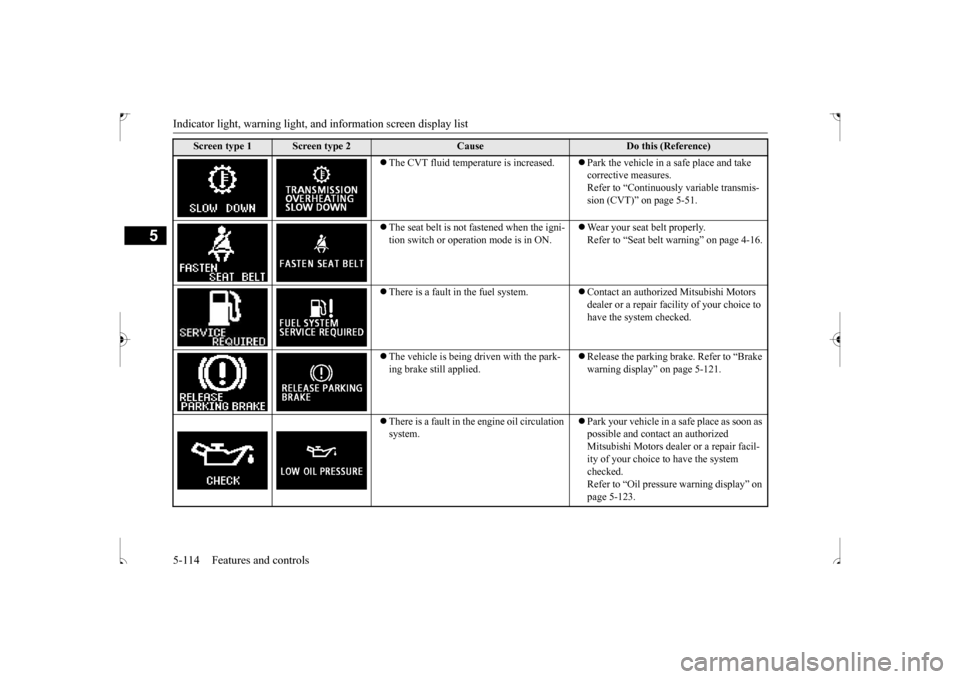
The CVT fluid temperature is increased.
Park the vehicle in a safe place and take corrective measures. Refer to “Continuously variable transmis-sion (CVT)” on page 5-51.
The seat belt is not fastened when the igni- tion switch or operation mode is in ON.
Wear your seat belt properly. Refer to “Seat belt warning” on page 4-16.
There is a fault in the fuel system.
Contact an authorized Mitsubishi Motors dealer or a repair facility of your choice to have the system checked.
The vehicle is being driven with the park- ing brake still applied.
Release the parking brake. Refer to “Brake warning display” on page 5-121.
There is a fault in the engine oil circulation system.
Park your vehicle in a safe place as soon as possible and contact an authorized Mitsubishi Motors dealer or a repair facil- ity of your choice to have the system checked. Refer to “Oil pressure warning display” on page 5-123.
Screen type 1
Screen type 2
Cause
Do this (Reference)
BK0239500US.book
114 ページ 2016年5月13日 金曜日 午前8時53分
Page 180 of 399
Indicator light, warning light, an
d information screen display list Features and controls 5-117
5
N00558200242
Other interrupt displays
Screen type 1
Screen type 2
System operation status
Reference
—
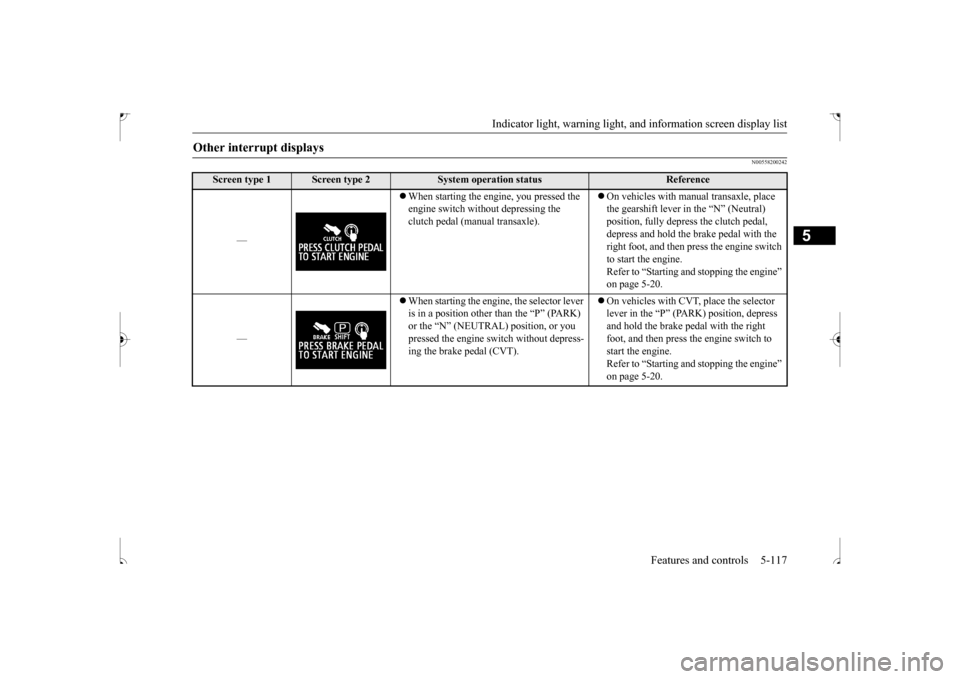
When starting the engine, you pressed the engine switch without depressing the clutch pedal (manual transaxle).
On vehicles with manual transaxle, place the gearshift lever in
the “N” (Neutral)
position, fully depress the clutch pedal, depress and hold the brake pedal with the right foot, and then press the engine switch to start the engine. Refer to “Starting and stopping the engine” on page 5-20.
—
When starting the engine, the selector lever is in a position other than the “P” (PARK) or the “N” (NEUTRAL) position, or you pressed the engine switch without depress- ing the brake pedal (CVT).
On vehicles with CVT, place the selector lever in the “P” (PARK) position, depress and hold the brake pedal with the right foot, and then press the engine switch to start the engine. Refer to “Starting and stopping the engine” on page 5-20.
BK0239500US.book
117 ページ 2016年5月13日 金曜日 午前8時53分
Page 182 of 399
Indicators
Features and controls 5-119
5
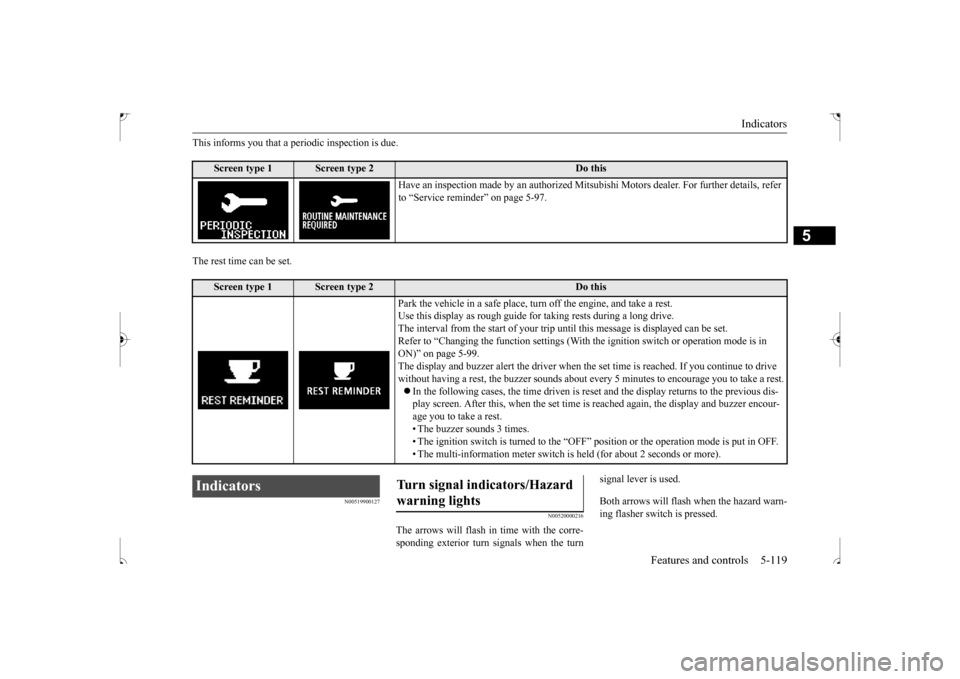
This informs you that a periodic inspection is due. The rest time can be set.
N00519900127
N00520000216
The arrows will flash in time with the corre- sponding exterior turn signals when the turn
signal lever is used. Both arrows will flash when the hazard warn- ing flasher switch is pressed.
Screen type 1
Screen type 2
Do this
Have an inspection made by an authorized Mitsub
ishi Motors dealer. For further details, refer
to “Service reminder” on page 5-97.
Screen type 1
Screen type 2
Do this
Park the vehicle in a safe place, turn off the engine, and take a rest. Use this display as rough guide for taking rests during a long drive. The interval from the start of your trip un
til this message is displayed can be set.
Refer to “Changing the function settings (With
the ignition switch or operation mode is in
ON)” on page 5-99. The display and buzzer alert the driver when th
e set time is reached. If you continue to drive
without having a rest, the buzzer sounds about ev
ery 5 minutes to encourage you to take a rest.
In the following cases, the time driven is rese
t and the display return
s to the previous dis-
play screen. After this, when the set time is
reached again, the display and buzzer encour-
age you to take a rest.• The buzzer sounds 3 times. • The ignition switch is turned to the “OFF”
position or the operation mode is put in OFF.
• The multi-information meter switch is
held (for about 2 seconds or more).
Indicators
Turn signal indicators/Hazard warning lights
BK0239500US.book
119 ページ 2016年5月13日 金曜日 午前8時53分
Page 183 of 399
Warning lights 5-120 Features and controls
5
N00520100086
A blue light comes on when the headlights are on high beam.
N00520200175
This indicator comes on while the front fog lights are on.
N00551301081
This indicator light illuminates while theparking lights are on.
N00568800023
This indicator will be displayed when fuel-efficient driving is achieved.
N00520300147 N00520400470
This light comes on when the ignition switch is turned to the “ON” position (engine off) orthe operation mode is put in ON. When the engine is started, the light should go off a few seconds later. A warning is alsodisplayed in the multi-information display.The warning light also illuminates after start- ing the engine under the following condi- tions. When the parking brake is still applied. When the brake fluid level is low. When the brake system circuit is not working properly.
Before driving, be sure that the parking brake is fully released and brake warning light is off.
N00520500804
This indicator is a part of the onboard diag- nostic (OBD) system which monitors the emissions, engine contro
l system or continu-
ously variable transmission (CVT) control
NOTE
If the indicator flashes faster than usual or if the indicator stays on without flashing, check for a malfunctioning turn signal light bulb or turn signal connection.
High beam indicator Front fog light indicator
(if so
equipped)Position indicator ECO mode indicator
(if so
equipped)
Warning lights Brake warning light
CAUTION If the brake warning light and the Anti-lock braking system warning light are illuminated at the same time, the braking force distribu- tion function will not operate, so the vehiclemay be destabilized during sudden braking under the following conditions.
• When the brake warning light does not goout even when the parking brake is released.• When the brake warning light stays onwhile driving.• If the above occurs, avoid sudden brakingand high-speed driving. Park the vehicle in a safe place, and contact an authorized Mitsubishi Motors dealer or a repair facilityof your choice as soon as possible.
The vehicle should be brought to a halt in the following manner when brake performance is deteriorated.• Confirm that the vehicle slows down whenyou press down on the brake pedal harder than usual. In some cases, the brake pedalmay go all the way to the floor.• Should the brakes fail, use engine brakingto reduce your speed and slowly apply the parking brake. Depress the brake pedal to illuminate thestop lights to alert the vehicles behind you.
Engine malfunction indicator (“SERVICE ENGINE SOON” or “Check engine light”)
CAUTION
BK0239500US.book
120 ページ 2016年5月13日 金曜日 午前8時53分