parking brake MITSUBISHI OUTLANDER SPORT 2017 3.G User Guide
[x] Cancel search | Manufacturer: MITSUBISHI, Model Year: 2017, Model line: OUTLANDER SPORT, Model: MITSUBISHI OUTLANDER SPORT 2017 3.GPages: 399, PDF Size: 14.61 MB
Page 121 of 399
Electronically controlled 4WD system (if so equipped) 5-58 Features and controls
5
To park the vehicle, first bring it to a com- plete stop, fully engage the parking brake,and then move the selector lever to the “P” (PARK) position. If the CVT does not shift while driving, or your vehicle does not pick up enough speedwhen starting on an uphill slope, it may be that there is something unusual happening in the transmission, causing a safety device toactivate. Have your vehicle checked at an authorized Mitsubishi Motors dealer or a repair facility of your choice as soon as possi-ble.
N00517201178
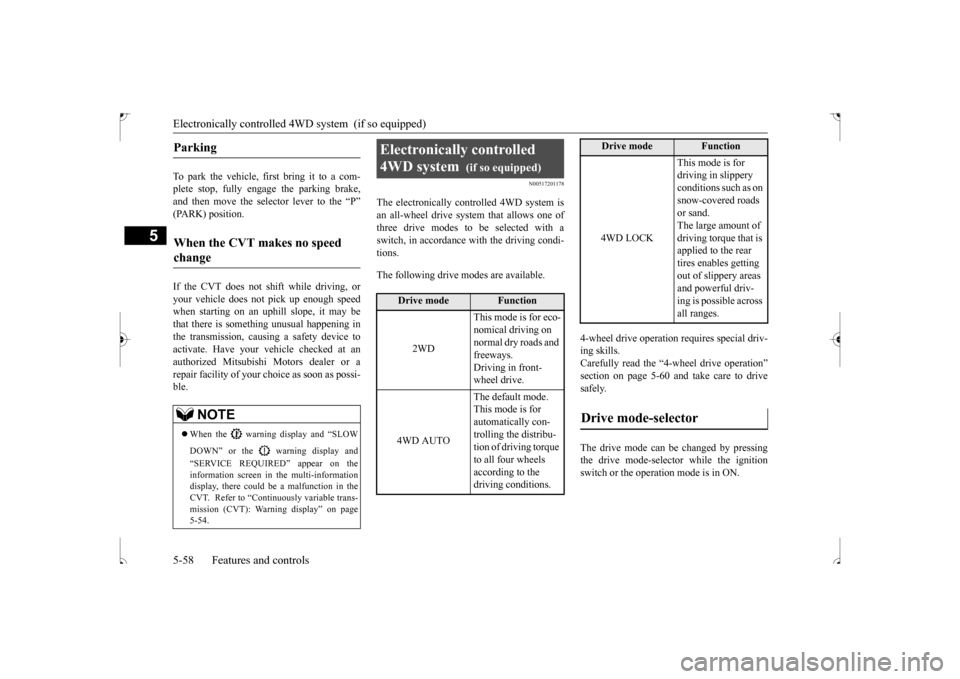
The electronically controlled 4WD system isan all-wheel drive system that allows one of three drive modes to be selected with a switch, in accordance with the driving condi-tions. The following drive modes are available.
4-wheel drive operation requires special driv- ing skills. Carefully read the “4-wheel drive operation”section on page 5-60
and take care to drive
safely. The drive mode can be changed by pressing the drive mode-selector while the ignition switch or the operation mode is in ON.
Parking
When the CVT makes no speed change
NOTE
When the warning display and “SLOW DOWN” or the warning display and “SERVICE REQUIRED” appear on the information screen in the multi-informationdisplay, there could be a malfunction in the CVT. Refer to “Continuously variable trans- mission (CVT): Warning display” on page5-54.
Electronically controlled 4WD system
(if so equipped)
Drive mode
Function
2WD
This mode is for eco- nomical driving on normal dry roads and freeways. Driving in front-wheel drive.
4WD AUTO
The default mode. This mode is for automatically con-trolling the distribu- tion of driving torque to all four wheels according to the driving conditions.
4WD LOCK
This mode is for driving in slippery conditions such as on snow-covered roads or sand. The large amount of driving torque that is applied to the rear tires enables getting out of slippery areas and powerful driv- ing is possible across all ranges.
Drive mode-selector
Drive mode
Function
BK0239500US.bo
ok 58 ページ 2016年5月13日 金曜日 午前8時53分
Page 129 of 399
Brake assist system 5-66 Features and controls
5
4. Depress the accelerator pedal and the hill start assist gradually will decrease the braking force as the vehicle starts moving.
N00562800050
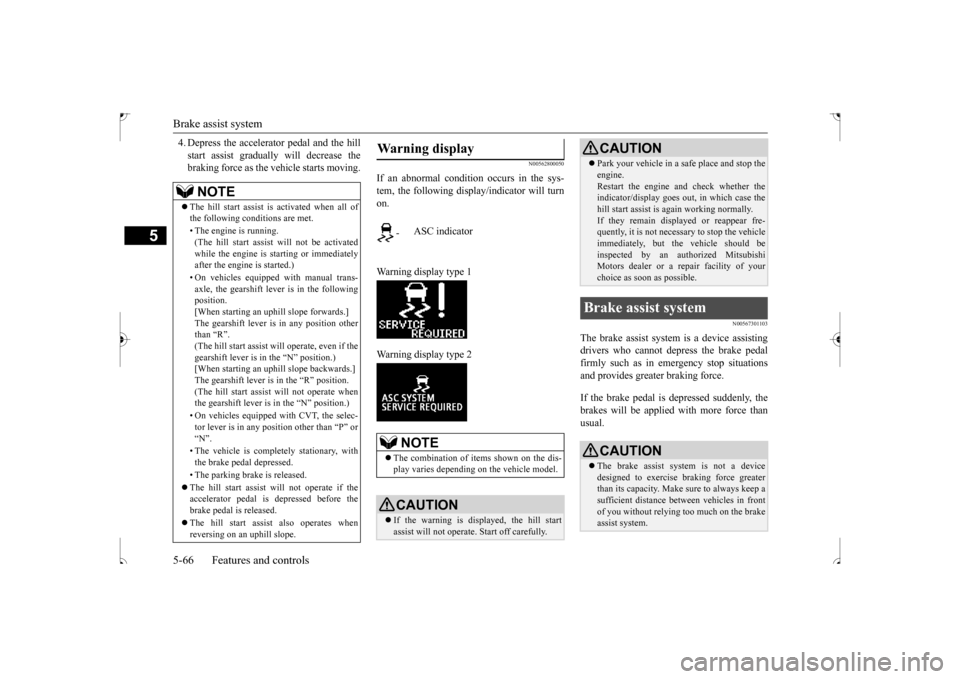
If an abnormal condition occurs in the sys- tem, the following display/indicator will turnon. Warning display type 1 Warning display type 2
N00567301103
The brake assist system
is a device assisting
drivers who cannot depress the brake pedalfirmly such as in emergency stop situations and provides greater braking force. If the brake pedal is depressed suddenly, the brakes will be applied with more force thanusual.
NOTE
The hill start assist is activated when all of the following conditions are met. • The engine is running. (The hill start assist will not be activated while the engine is starting or immediatelyafter the engine is started.) • On vehicles equipped with manual trans- axle, the gearshift lever is in the following position. [When starting an uphill slope forwards.]The gearshift lever is in any position other than “R”. (The hill start assist
will operate, even if the
gearshift lever is in the “N” position.) [When starting an uphill slope backwards.] The gearshift lever is in the “R” position.(The hill start assist will not operate when the gearshift lever is in the “N” position.) • On vehicles equipped with CVT, the selec- tor lever is in any position other than “P” or “N”. • The vehicle is completely stationary, with the brake pedal depressed. • The parking brake is released. The hill start assist will not operate if the accelerator pedal is depressed before thebrake pedal is released. The hill start assist also operates when reversing on an uphill slope.
Warning display
-
ASC indicator
NOTE
The combination of items shown on the dis- play varies depending on the vehicle model.CAUTION If the warning is displayed, the hill start assist will not operate. Start off carefully.
Park your vehicle in a safe place and stop the engine. Restart the engine and check whether the indicator/display goes out, in which case the hill start assist is again working normally. If they remain displayed or reappear fre- quently, it is not necessary to stop the vehicle immediately, but the vehicle should beinspected by an authorized Mitsubishi Motors dealer or a repair facility of your choice as soon as possible.
Brake assist system
CAUTION The brake assist system is not a device designed to exercise braking force greater than its capacity. Make sure to always keep asufficient distance between vehicles in front of you without relying too much on the brake assist system.CAUTION
BK0239500US.bo
ok 66 ページ 2016年5月13日 金曜日 午前8時53分
Page 132 of 399
Electric power steering system (EPS)
Features and controls 5-69
5
The anti-lock braking system and brake force distribution function may not work, so hard braking could make the vehicle unstable. Avoid hard braking and high-speed driving.Stop the vehicle in a safe place and contact an authorized Mitsubishi Motors dealer or repair facility of your choice.
N00529200077
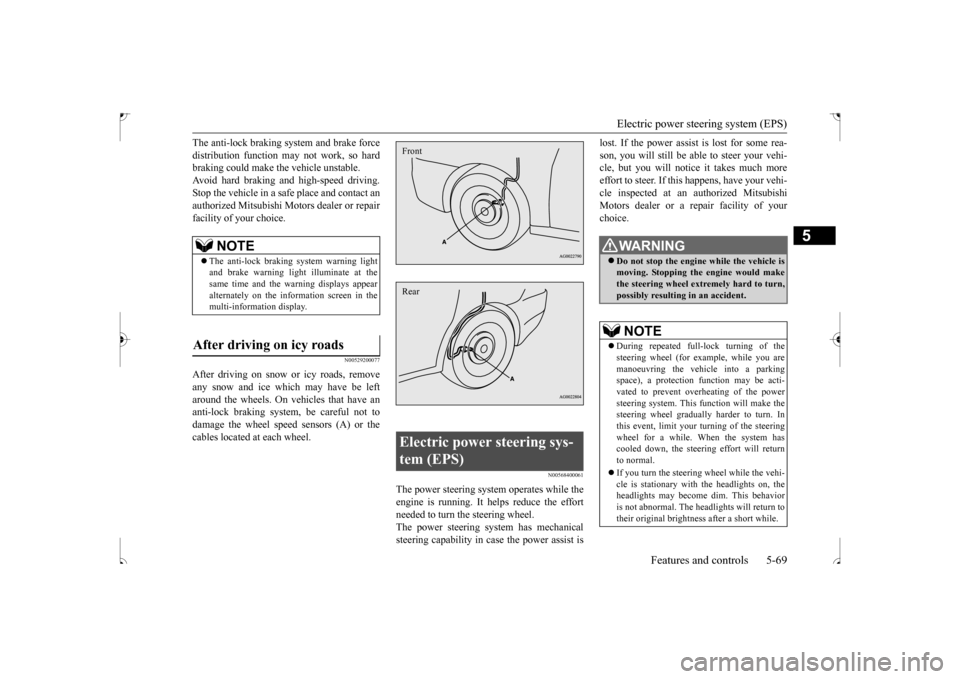
After driving on snow or icy roads, removeany snow and ice which may have be left around the wheels. On vehicles that have an anti-lock braking system, be careful not todamage the wheel speed sensors (A) or the cables located at each wheel.
N00568400061
The power steering system operates while the engine is running. It helps reduce the effortneeded to turn the steering wheel. The power steering system has mechanical steering capability in case the power assist is
lost. If the power assist is lost for some rea- son, you will still be able to steer your vehi- cle, but you will notice it takes much more effort to steer. If this happens, have your vehi-cle inspected at an authorized Mitsubishi Motors dealer or a repair facility of your choice.
NOTE
The anti-lock braking system warning light and brake warning light
illuminate at the
same time and the warning displays appear alternately on the information screen in the multi-information display.
After driving on icy roads
Electric power steering sys- tem (EPS) FrontRear
WA R N I N G Do not stop the engine while the vehicle is moving. Stopping the engine would makethe steering wheel extremely hard to turn, possibly resulting in an accident.NOTE
During repeated full-lock turning of the steering wheel (for example, while you are manoeuvring the vehicle into a parking space), a protection function may be acti-vated to prevent overheating of the power steering system. This function will make the steering wheel gradually harder to turn. Inthis event, limit your turning of the steering wheel for a while. When the system has cooled down, the steering effort will return to normal. If you turn the steering wheel while the vehi- cle is stationary with the headlights on, the headlights may become dim. This behavioris not abnormal. The headlights will return to their original brightness after a short while.
BK0239500US.bo
ok 69 ページ 2016年5月13日 金曜日 午前8時53分
Page 162 of 399
Multi-information display
Features and controls 5-99
5
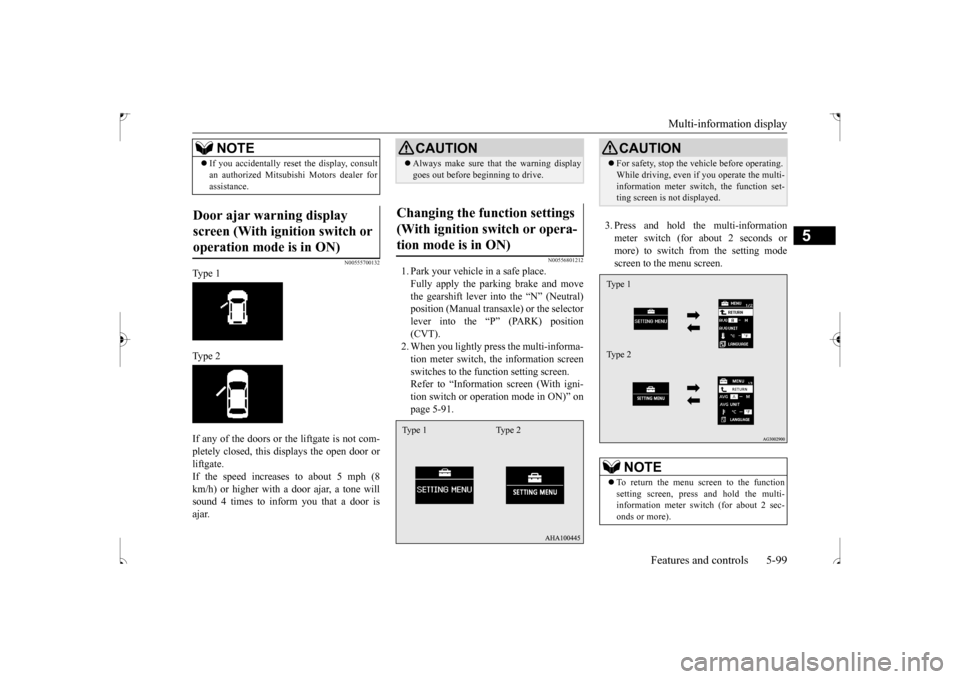
N00555700132
Type 1 Type 2 If any of the doors or the liftgate is not com- pletely closed, this displays the open door or liftgate. If the speed increases to about 5 mph (8km/h) or higher with
a door ajar, a tone will
sound 4 times to inform you that a door is ajar.
N00556801212
1. Park your vehicle in a safe place.Fully apply the parking brake and movethe gearshift lever into the “N” (Neutral) position (Manual transaxle) or the selector lever into the “P” (PARK) position(CVT). 2. When you lightly press the multi-informa- tion meter switch, the information screenswitches to the function setting screen. Refer to “Information screen (With igni- tion switch or operation mode in ON)” onpage 5-91.
3. Press and hold the multi-information meter switch (for about 2 seconds or more) to switch from the setting modescreen to the menu screen.
If you accidentally reset the display, consult an authorized Mitsubishi Motors dealer for assistance.
Door ajar warning display screen (With ignition switch or operation mode is in ON)
NOTE
CAUTION Always make sure that the warning display goes out before beginning to drive.
Changing the function settings (With ignition switch or opera-tion mode is in ON) Type 1 Type 2
CAUTION For safety, stop the vehicle before operating. While driving, even if you operate the multi- information meter switch, the function set- ting screen is not displayed.NOTE
To return the menu screen to the function setting screen, press and hold the multi-information meter switch (for about 2 sec- onds or more).Type 1 Type 2
BK0239500US.bo
ok 99 ページ 2016年5月13日 金曜日 午前8時53分
Page 177 of 399
Indicator light, warning light, an
d information screen display list
5-114 Features and controls
5
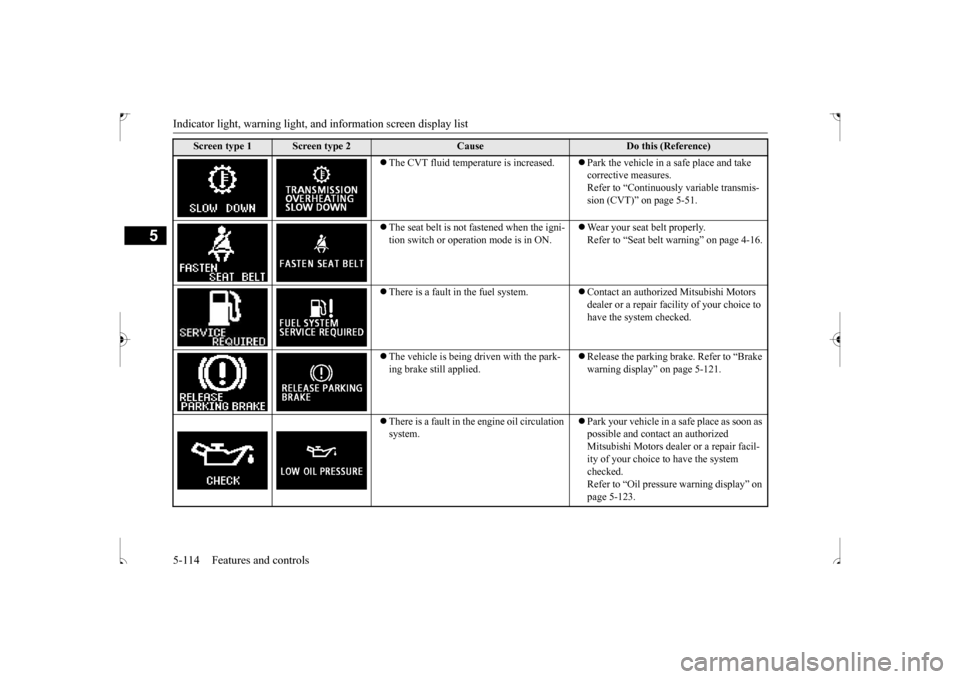
The CVT fluid temperature is increased.
Park the vehicle in a safe place and take corrective measures. Refer to “Continuously variable transmis-sion (CVT)” on page 5-51.
The seat belt is not fastened when the igni- tion switch or operation mode is in ON.
Wear your seat belt properly. Refer to “Seat belt warning” on page 4-16.
There is a fault in the fuel system.
Contact an authorized Mitsubishi Motors dealer or a repair facility of your choice to have the system checked.
The vehicle is being driven with the park- ing brake still applied.
Release the parking brake. Refer to “Brake warning display” on page 5-121.
There is a fault in the engine oil circulation system.
Park your vehicle in a safe place as soon as possible and contact an authorized Mitsubishi Motors dealer or a repair facil- ity of your choice to have the system checked. Refer to “Oil pressure warning display” on page 5-123.
Screen type 1
Screen type 2
Cause
Do this (Reference)
BK0239500US.book
114 ページ 2016年5月13日 金曜日 午前8時53分
Page 183 of 399
Warning lights 5-120 Features and controls
5
N00520100086
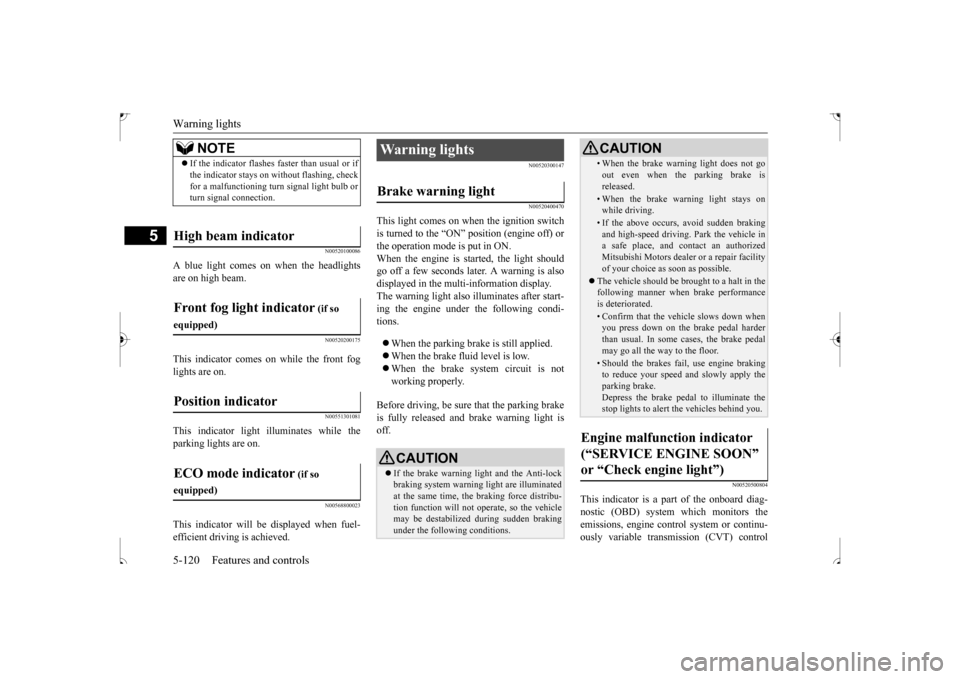
A blue light comes on when the headlights are on high beam.
N00520200175
This indicator comes on while the front fog lights are on.
N00551301081
This indicator light illuminates while theparking lights are on.
N00568800023
This indicator will be displayed when fuel-efficient driving is achieved.
N00520300147 N00520400470
This light comes on when the ignition switch is turned to the “ON” position (engine off) orthe operation mode is put in ON. When the engine is started, the light should go off a few seconds later. A warning is alsodisplayed in the multi-information display.The warning light also illuminates after start- ing the engine under the following condi- tions. When the parking brake is still applied. When the brake fluid level is low. When the brake system circuit is not working properly.
Before driving, be sure that the parking brake is fully released and brake warning light is off.
N00520500804
This indicator is a part of the onboard diag- nostic (OBD) system which monitors the emissions, engine contro
l system or continu-
ously variable transmission (CVT) control
NOTE
If the indicator flashes faster than usual or if the indicator stays on without flashing, check for a malfunctioning turn signal light bulb or turn signal connection.
High beam indicator Front fog light indicator
(if so
equipped)Position indicator ECO mode indicator
(if so
equipped)
Warning lights Brake warning light
CAUTION If the brake warning light and the Anti-lock braking system warning light are illuminated at the same time, the braking force distribu- tion function will not operate, so the vehiclemay be destabilized during sudden braking under the following conditions.
• When the brake warning light does not goout even when the parking brake is released.• When the brake warning light stays onwhile driving.• If the above occurs, avoid sudden brakingand high-speed driving. Park the vehicle in a safe place, and contact an authorized Mitsubishi Motors dealer or a repair facilityof your choice as soon as possible.
The vehicle should be brought to a halt in the following manner when brake performance is deteriorated.• Confirm that the vehicle slows down whenyou press down on the brake pedal harder than usual. In some cases, the brake pedalmay go all the way to the floor.• Should the brakes fail, use engine brakingto reduce your speed and slowly apply the parking brake. Depress the brake pedal to illuminate thestop lights to alert the vehicles behind you.
Engine malfunction indicator (“SERVICE ENGINE SOON” or “Check engine light”)
CAUTION
BK0239500US.book
120 ページ 2016年5月13日 金曜日 午前8時53分
Page 185 of 399
Information screen display 5-122 Features and controls
5
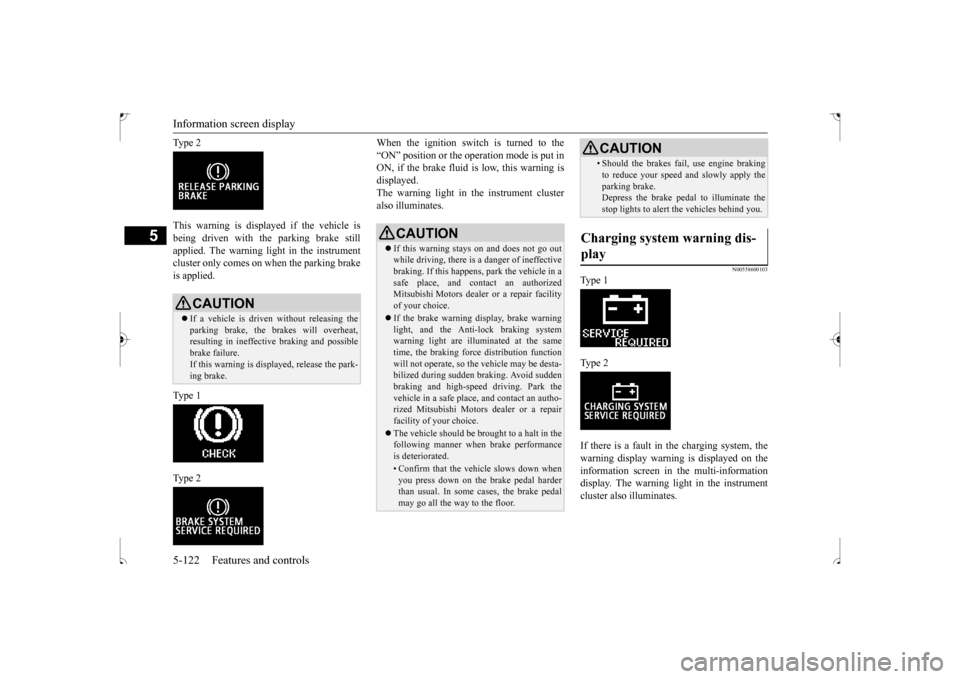
Ty p e 2 This warning is displayed if the vehicle is being driven with the parking brake still applied. The warning light in the instrumentcluster only comes on when the parking brake is applied. Ty p e 1 Ty p e 2
When the ignition switch is turned to the “ON” position or the operation mode is put in ON, if the brake fluid is low, this warning is displayed.The warning light in the instrument cluster also illuminates.
N00558600103
Ty p e 1 Ty p e 2 If there is a fault in the charging system, the warning display warning is displayed on theinformation screen in the multi-information display. The warning light in the instrument cluster also illuminates.
CAUTION If a vehicle is driven without releasing the parking brake, the brakes will overheat,resulting in ineffective braking and possible brake failure. If this warning is displayed, release the park- ing brake.
CAUTION If this warning stays on and does not go out while driving, there is a danger of ineffective braking. If this happens, park the vehicle in a safe place, and contact an authorizedMitsubishi Motors dealer or a repair facility of your choice. If the brake warning display, brake warning light, and the Anti-lock braking system warning light are illuminated at the sametime, the braking force distribution function will not operate, so the vehicle may be desta- bilized during sudden braking. Avoid suddenbraking and high-speed driving. Park the vehicle in a safe place, and contact an autho- rized Mitsubishi Motors dealer or a repairfacility of your choice. The vehicle should be brought to a halt in the following manner when brake performance is deteriorated.• Confirm that the vehicle slows down when you press down on the brake pedal harderthan usual. In some cases, the brake pedal may go all the way to the floor.
• Should the brakes fail, use engine brakingto reduce your speed and slowly apply the parking brake. Depress the brake pedal to illuminate the stop lights to alert the vehicles behind you.
Charging system warning dis- play
CAUTION
BK0239500US.book
122 ページ 2016年5月13日 金曜日 午前8時53分
Page 187 of 399
![MITSUBISHI OUTLANDER SPORT 2017 3.G User Guide Combination headlights and dimmer switch 5-124 Features and controls
5
[When the engine is started after the parking brake is released]
[When the engine is not running, or when the engine is started](/img/19/7550/w960_7550-186.png "MITSUBISHI OUTLANDER SPORT 2017 3.G User Guide Combination headlights and dimmer switch 5-124 Features and controls
5
[When the engine is started after the parking brake is released]
[When the engine is not running, or when the engine is started")
Combination headlights and dimmer switch 5-124 Features and controls
5
[When the engine is started after the parking brake is released]
[When the engine is not running, or when the engine is started before the parking brake isreleased]
Rotate the switch to operate the lights. The combinations of switch operations and illuminated lights differ in accordance with the following conditions.
Except for vehicles equipped with day- time running lights OFF All lights off
Parking, tail, front and rear side- marker lights, license plate and instrument panel lights on Headlights and other lights on
Vehicles equipped with daytime running lights OFF
The daytime running lights illumi- nated The daytime running lights illumi- natedParking, tail, front and rear side- marker lights, license plate and instrument panel lights on Headlights and other lights on
NOTE
Once the daytime running light come on, they do not go out until the ignition switch is turned to the “OFF” or “ACC” position or the operation mode is changed to OFF or ACC.
OFF All lights off
Parking, tail, front and rear side- marker lights, license plate and instrument panel lights on Headlights and other lights onNOTE
Even if the daytime running lights are not on, they will come on once the vehicle starts moving. Once the daytime running light come on, they do not go out until the ignition switch isturned to the “OFF” or “ACC” position or the operation mode is changed to OFF or ACC.
Ty p e 2 Except for vehicles equipped with day- time running lights OFF All lights off AUTO
Headlights and other lights turn on and off automatically in accordance with outside light level. Parking, tail, front and rear side- marker lights, license plate and instrument panel lights on Headlights and other lights on
BK0239500US.book
124 ページ 2016年5月13日 金曜日 午前8時53分
Page 188 of 399
![MITSUBISHI OUTLANDER SPORT 2017 3.G User Guide Combination headlights and dimmer switch
Features and controls 5-125
5
[When the engine is started after the parking brake is released]
[When the engine is not running, or when the engine is started](/img/19/7550/w960_7550-187.png "MITSUBISHI OUTLANDER SPORT 2017 3.G User Guide Combination headlights and dimmer switch
Features and controls 5-125
5
[When the engine is started after the parking brake is released]
[When the engine is not running, or when the engine is started")
Combination headlights and dimmer switch
Features and controls 5-125
5
[When the engine is started after the parking brake is released]
[When the engine is not running, or when the engine is started before the parking brake is released]
N00532601593
If the following operation is performed with the combination headlights and dim- mer switch in the “ ” or “ ” position, the lights automatically turn off. [Except for vehicles equipped with the F. A . S . T. - k e y ]The ignition switch is
turned to the “OFF”
or “ACC” position or the key is removed from the ignition swit
ch and the driver’s
door is opened.
Vehicles equipped with daytime running lights OFF
The daytime running lights illumi- nated
AUTO
The daytime running lights illumi- nated (when it is light outside the vehicle)Headlights and other lights turn on and off automatically in accordance with outside light level. The daytime running lights illumi- nated Parking, tail, front and rear side- marker lights, license plate and instrument panel lights on Headlights and other lights on
NOTE
Once the daytime running light come on, they do not go out until the ignition switch is turned to the “OFF” or “ACC” position orthe operation mode is changed to OFF or ACC.
OFF All lights off AUTO
Headlights and other lights turn on and off automatically in accordance with outside light level. Parking, tail, front and rear side- marker lights, license plate and instrument panel lights on Headlights and other lights on
NOTE
Even if the daytime running lights are not on, they will come on once the vehicle starts moving. Once the daytime running light come on, they do not go out until the ignition switch isturned to the “OFF” or “ACC” position or the operation mode is changed to OFF or ACC. The sensitivity of the automatic on/off con- trol can be adjusted.For further information, please contact your authorized Mitsubishi Motors dealer or a repair facility of your choice.
Do not cover the sensor (A) for the automatic on/off control by affixing a sticker or label to the windshield. If the lights do not turn on or off with the switch in the “AUTO” position, manuallyoperate the switch. Have the system checked by an authorized Mitsubishi Motors dealer or a repair facility of your choice.
Light auto-cutout function (headlights and other lights)
NOTE
BK0239500US.book
125 ページ 2016年5月13日 金曜日 午前8時53分
Page 206 of 399

Bluetooth® 2.0 interface (if so equipped)
Features and controls 5-143
5
1. Stop your vehicle in a safe area, put the gearshift lever in the “N” (Neutral) posi- tion (manual transaxle), or the selector lever in the “P” (PARK) position (contin-uously variable transmission (CVT)), and pull the parking brake lever. 2. Press the SPEECH button (except for vehicles with Mitsubishi Multi-Commu- nication System) or PICK-UP button (for vehicles with Mitsubishi Multi-Commu-nication System). 3. Say “Voice training.” 4. The voice guide will say “This operationmust be performed in a quiet environment while the vehicle is stopped. See the owner’s manual for the list of requiredtraining phrases. Press and release the SPEECH button when you are ready to begin. Press the HANG-UP button to can-cel at any time.” Press the SPEECH button to start the speaker enrollment process.
5. The voice guide will prompt for phrase 1. Repeat the corresponding phrase listed in table “Enrollment commands” on page5-160. The system will register your voice and then move on to the registration of thenext command. Continue the process until all phrases have been registered.
6. When all enrollment commands have been read out, the voice guide will say “Speaker enrollment is complete.” The system will then end the speaker enroll-ment process and return to the main menu.
N00564901081
You can turn a voice model registered with the speaker enrollment function on and off whenever you want. You can also retrain the system.Use the following procedure to perform these actions. 1. Press the SPEECH button (except for vehicles with Mitsubishi Multi-Commu-nication System) or PICK-UP button (for vehicles with Mitsubishi Multi-Commu- nication System).2. Say “Voice training.”
NOTE
Speaker enrollment is not possible unless the vehicle is parked. Make sure you park the vehicle in a safe area before attemptingspeaker enrollment.
NOTE
If you do not start the speaker enrollment process within 3 minutes after pressing the SPEECH button, the speaker enrollment function will time out. The voice guide will say “Speaker enroll-ment has timed out.” The system will then beep and the voice recognition mode will be deactivated. NOTE
To repeat the most recent voice training command, press and release the SPEECH button. If you press the HANG-UP button anytime during the process, the system will beep and stop the speaker enrollment process.
NOTE
Completing the speaker enrollment process will turn on the voice model automatically. The commands “Help” and “Cancel” will not work in this mode.
Enabling and disabling the voice model and retraining
BK0239500US.book
143 ページ 2016年5月13日 金曜日 午前8時53分