battery MITSUBISHI PAJERO IV 2011 User Guide
[x] Cancel search | Manufacturer: MITSUBISHI, Model Year: 2011, Model line: PAJERO IV, Model: MITSUBISHI PAJERO IV 2011Pages: 377, PDF Size: 29.43 MB
Page 84 of 377
Tripmeter
The tripmeter indicates
the distance travelled dur-
ing a particular trip or period.
There are two tripmeter displays: TRIP and
.
TRIP can be used to measure the distance trav-
elled since the
current trip began. At the same time,
TRIP can be used to measure the distance from
an intermediate location.
To switch the
display between TRIP and TRIP
, press the reset button (B) less than 1 second.
NOTE l If
you do
not push the button for about
10 seconds while the service reminder is
showing, the display will return to the odom-
eter indication.
l The odometer, tripmeter, and service remind-
er indications are given for 30 seconds after
the ignition switch has been turned to the
“ACC” or “LOCK” position.
l After the odometer, tripmeter, and service re-
minder indications have gone off, they come
back on for about 30 seconds if either of the
following actions takes place.
• The driver’s door is opened.
• The reset button is pressed.
To reset the tripmeter
To return the display to “0”, press the reset button
(B) for more than 2 seconds. Only the currently dis-
played value will be reset. NOTE
l When disconnecting
the
battery terminal for
a long time, the memory of tripmeter display
TRIP and are cleared, and the dis-
play returns to “0”. Service reminder
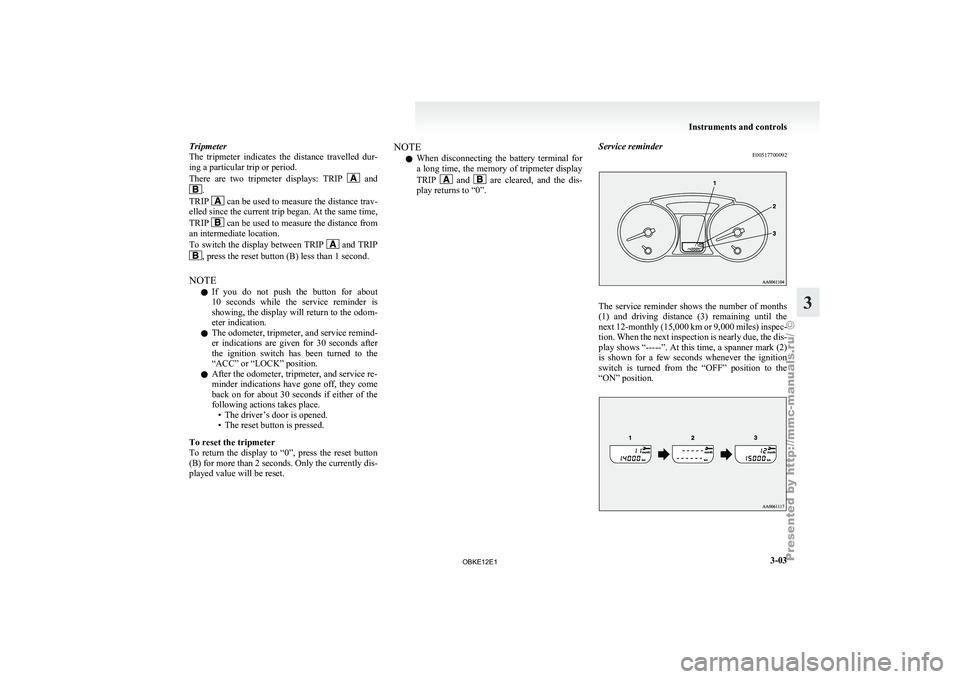
E00517700092 The service reminder shows the number of months
(1) and
driving
distance (3) remaining until the
next 12-monthly (15,000 km or 9,000 miles) inspec-
tion. When the next inspection is nearly due, the dis-
play shows “-----”. At this time, a spanner mark (2)
is shown for a few seconds whenever the ignition
switch is turned from the “OFF” position to the
“ON” position. Instruments and controls
3-03 3
OBKE12E1
Page 91 of 377
Check engine warning lamp
E00502601696
This lamp is
a part of an onboard diag-
nostic system which monitors the emis-
sions, engine control system or automat-
ic transmission control systems.
If a problem is detected in one of these
systems, this lamp illuminates.
Although your vehicle will usually be
drivable and not need towing, we recom-
mend you to have the system checked as
soon as possible.
[Vehicles to comply with the Euro 3 and
Euro 4 regulation]
This lamp will also illuminate for a few
seconds when the ignition switch is
turned to the “ON” position. If it does
not go off after a few seconds, we recom-
mend you to have the vehicle checked.
[Vehicles to comply with the Euro 5]
This lamp will also illuminate when the
ignition switch is turned “ON”, and goes
off after the engine has started. If it does
not go off after the engine has started,
we recommend you to have the system
checked. CAUTION
l
Prolonged driving
with
this
lamp on may cause further dam-
age to the emission control sys-
tem. It could also affect fuel
economy and drivability. CAUTION
l
If the lamp
does not illuminate
when the ignition switch is
turned to the “ON” position,
we recommend you to have the
system checked.
l If the lamp illuminates while
the engine is running, avoid
driving at high speeds and we
recommend you to have the sys-
tem checked.
Accelerator pedal and brake
pedal response may be negative-
ly influenced under these condi-
tions.
NOTE l The
engine electronic
control mod-
ule accommodating the onboard di-
agnostic system has various fault
data (especially about the exhaust
emission) stored.
This data will be erased if a bat-
tery cable is disconnected which
will make a rapid diagnosis diffi-
cult. Do not disconnect a battery
cable when the check engine warn-
ing lamp is ON. Charge warning display
E00502700472
This lamp illuminates
when the ignition
switch is turned to the “ON” position,
and goes off after the engine has started. CAUTION
l
If it illuminates
while the en-
gine is running, there is a prob-
lem in the charging system. In
this case, immediately park
your vehicle in a safe place and
we recommend you to have it
checked. Oil pressure warning lamp
E00502800529
This lamp illuminates
when the ignition
switch is turned to the “ON” position,
and goes off after the engine has started.
If it illuminates while the engine is run-
ning, the oil pressure is too low. Turn
the engine off and have it inspected. CAUTION
l
This warning
lamp
does not in-
dicate the amount of oil level in
the engine. This must be deter-
mined by checking the oil level
on the dipstick, while the en-
gine is switched off.
l If this lamp illuminates when
the engine oil level is not low,
have it inspected.
l If you continue driving with
low engine oil level or with this
warning lamp illuminated, en-
gine seizure may occur. Instruments and controls
3-10
3
OBKE12E1
Page 97 of 377
l
The driving
range is shown based on the ac-
cumulated fuel consumption data, however,
may be changed depending on the driving con-
dition (road condition, driving behavior,
etc.). If the battery terminals are disconnec-
ted, the accumulated fuel consumption data
will be erased. It is recommended to use the
indication as reference.
l When the vehicle is fueled, the driving range
will be updated. However, if the amount of
fueling is small, the indication may not be cor-
rect. Therefore, fill up the tank as much as
possible in case of fueling.
l When the vehicle is stopped on a steep slope,
the value of the driving range may increase.
This is caused by the fuel movement inside
the tank on the slope and is not deemed as a
failure.
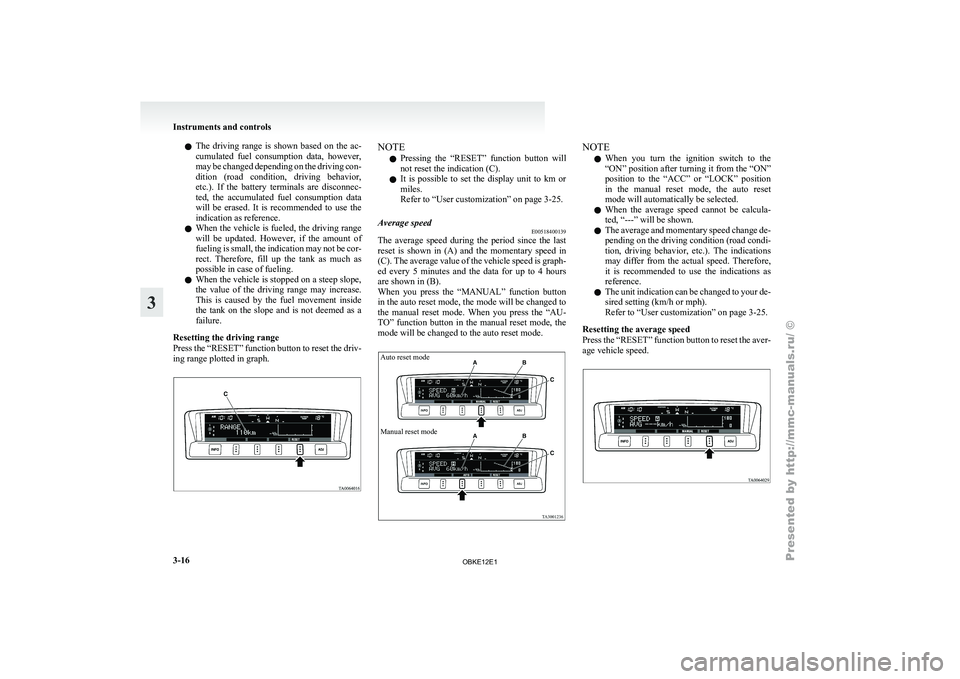
Resetting the driving range
Press the “RESET” function button to reset the driv-
ing range plotted in graph. NOTE
l Pressing
the “RESET”
function button will
not reset the indication (C).
l It is possible to set the display unit to km or
miles.
Refer to “User customization” on page 3-25.
Average speed E00518400139
The average speed during the period since the last
reset is
shown
in (A) and the momentary speed in
(C). The average value of the vehicle speed is graph-
ed every 5 minutes and the data for up to 4 hours
are shown in (B).
When you press the “MANUAL” function button
in the auto reset mode, the mode will be changed to
the manual reset mode. When you press the “AU-
TO” function button in the manual reset mode, the
mode will be changed to the auto reset mode.
Auto reset mode
Manual reset mode NOTE
l When
you turn
the ignition switch to the
“ON” position after turning it from the “ON”
position to the “ACC” or “LOCK” position
in the manual reset mode, the auto reset
mode will automatically be selected.
l When the average speed cannot be calcula-
ted, “---” will be shown.
l The average and momentary speed change de-
pending on the driving condition (road condi-
tion, driving behavior, etc.). The indications
may differ from the actual speed. Therefore,
it is recommended to use the indications as
reference.
l The unit indication can be changed to your de-
sired setting (km/h or mph).
Refer to “User customization” on page 3-25.
Resetting the average speed
Press the “RESET” function button to reset the aver-
age vehicle speed. Instruments and controls
3-16
3
OBKE12E1
Page 110 of 377
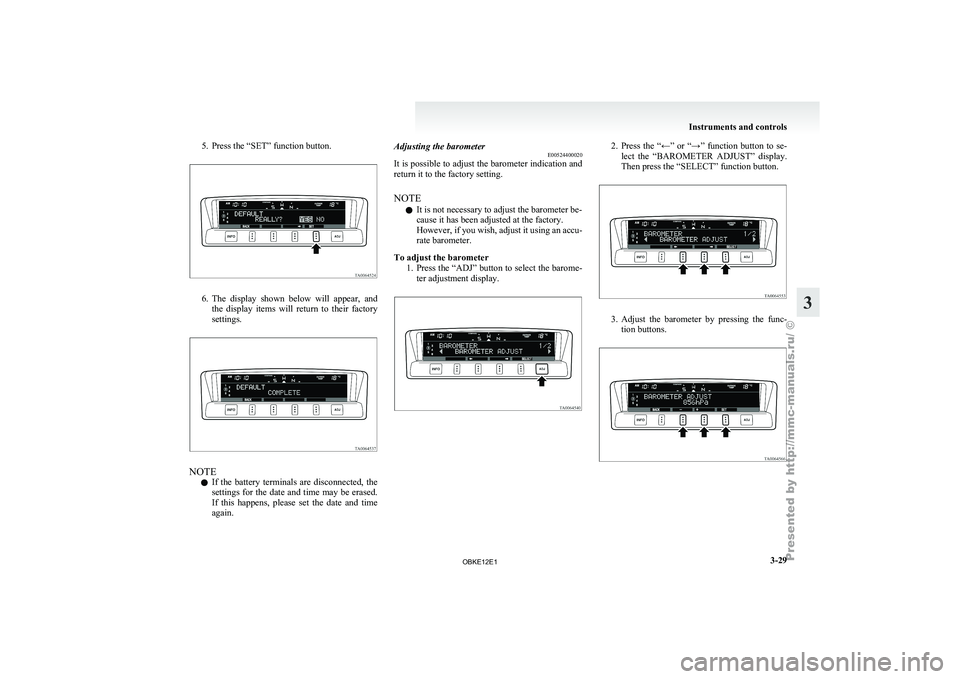
5. Press the “SET” function button.
6. The display shown below will appear, and
the display
items will return to their factory
settings. NOTE
l If
the battery
terminals are disconnected, the
settings for the date and time may be erased.
If this happens, please set the date and time
again. Adjusting the barometer
E00524400020
It is
possible
to adjust the barometer indication and
return it to the factory setting.
NOTE
l It is not necessary to adjust the barometer be-
cause it has been adjusted at the factory.
However, if you wish, adjust it using an accu-
rate barometer.
To adjust the barometer 1. Press the “ADJ” button to select the barome-ter adjustment display. 2. Press the “←” or “→” function button to se-
lect the “BAROMETER ADJUST” display.
Then press the “SELECT” function button. 3. Adjust the barometer by pressing the func-
tion buttons. Instruments and controls
3-29 3
OBKE12E1
Page 112 of 377
Combination headlamps and
dipper switch E00506001513
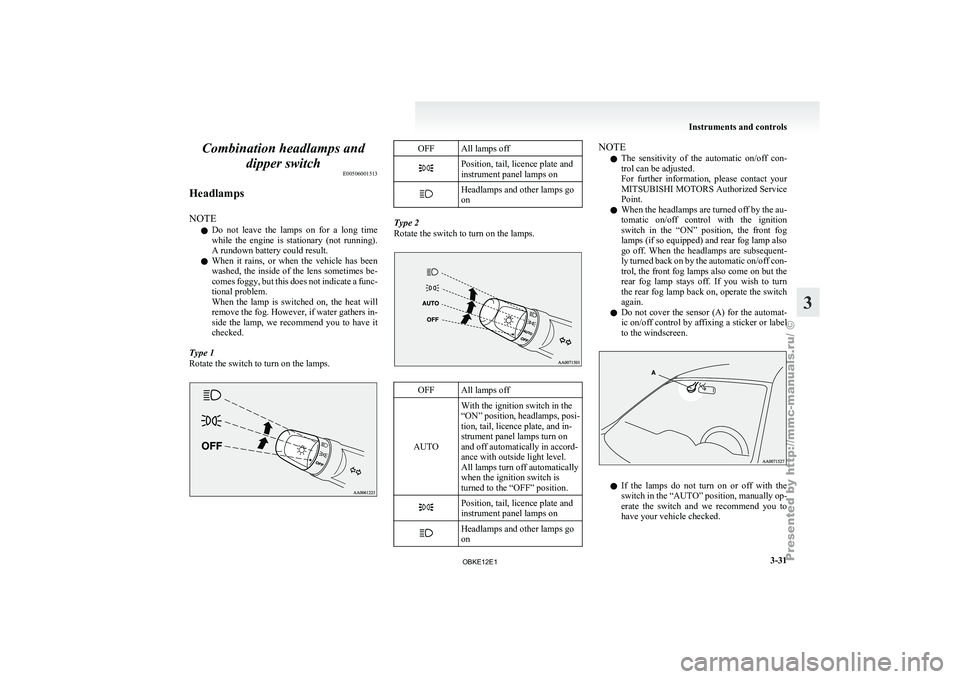
Headlamps
NOTE l Do
not leave
the lamps on for a long time
while the engine is stationary (not running).
A rundown battery could result.
l When it rains, or when the vehicle has been
washed, the inside of the lens sometimes be-
comes foggy, but this does not indicate a func-
tional problem.
When the lamp is switched on, the heat will
remove the fog. However, if water gathers in-
side the lamp, we recommend you to have it
checked.
Type 1
Rotate the switch to turn on the lamps. OFF All lamps off
Position, tail, licence plate and
instrument panel lamps on
Headlamps and other lamps go
on
Type 2
Rotate the switch to turn on the lamps.
OFF All lamps off
AUTO With the ignition switch in the
“ON” position, headlamps,
posi-
tion, tail, licence plate, and in-
strument panel lamps turn on
and off automatically in accord-
ance with outside light level.
All lamps turn off automatically
when the ignition switch is
turned to the “OFF” position. Position, tail, licence plate and
instrument panel lamps on
Headlamps and other lamps go
on NOTE
l The
sensitivity of
the automatic on/off con-
trol can be adjusted.
For further information, please contact your
MITSUBISHI MOTORS Authorized Service
Point.
l When the headlamps are turned off by the au-
tomatic on/off control with the ignition
switch in the “ON” position, the front fog
lamps (if so equipped) and rear fog lamp also
go off. When the headlamps are subsequent-
ly turned back on by the automatic on/off con-
trol, the front fog lamps also come on but the
rear fog lamp stays off. If you wish to turn
the rear fog lamp back on, operate the switch
again.
l Do not cover the sensor (A) for the automat-
ic on/off control by affixing a sticker or label
to the windscreen. l
If
the
lamps
do not turn on or off with the
switch in the “AUTO” position, manually op-
erate the switch and we recommend you to
have your vehicle checked. Instruments and controls
3-31 3
OBKE12E1
Page 136 of 377
CAUTION
l
Do not drive the vehicle with the mirror
folded in. The lack of rearward visibility
normally provided the mirror could lead
to an accident.
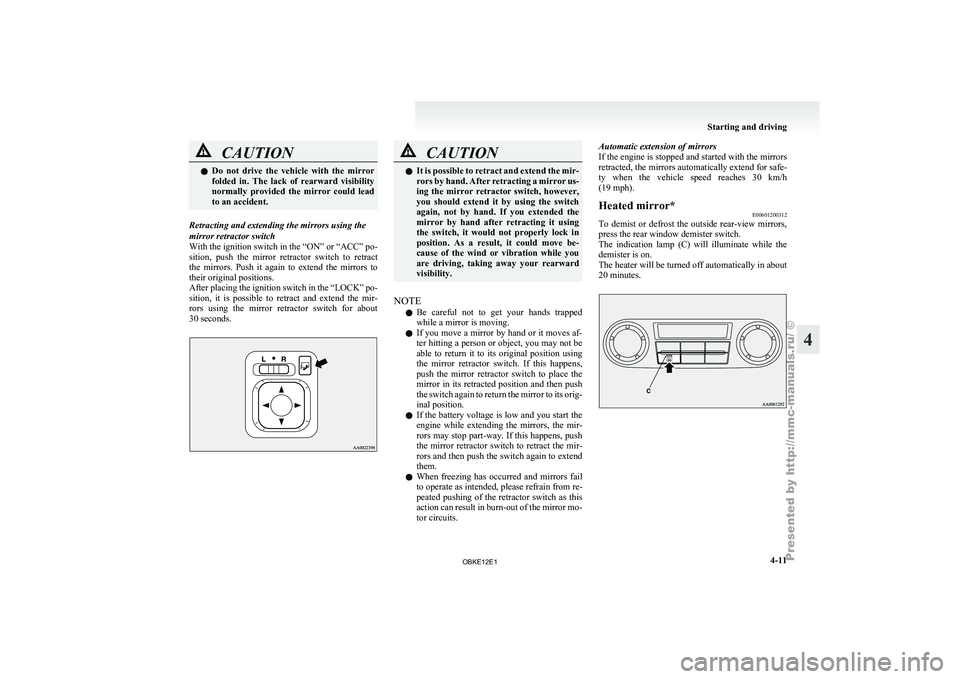
Retracting and extending the mirrors using the
mirror retractor switch
With the ignition
switch in the “ON” or “ACC” po-
sition, push the mirror retractor switch to retract
the mirrors. Push it again to extend the mirrors to
their original positions.
After placing the ignition switch in the “LOCK” po-
sition, it is possible to retract and extend the mir-
rors using the mirror retractor switch for about
30 seconds. CAUTION
l
It is possible
to retract and extend the mir-
rors by hand. After retracting a mirror us-
ing the mirror retractor switch, however,
you should extend it by using the switch
again, not by hand. If you extended the
mirror by hand after retracting it using
the switch, it would not properly lock in
position. As a result, it could move be-
cause of the wind or vibration while you
are driving, taking away your rearward
visibility.
NOTE l Be
careful not
to get your hands trapped
while a mirror is moving.
l If you move a mirror by hand or it moves af-
ter hitting a person or object, you may not be
able to return it to its original position using
the mirror retractor switch. If this happens,
push the mirror retractor switch to place the
mirror in its retracted position and then push
the switch again to return the mirror to its orig-
inal position.
l If the battery voltage is low and you start the
engine while extending the mirrors, the mir-
rors may stop part-way. If this happens, push
the mirror retractor switch to retract the mir-
rors and then push the switch again to extend
them.
l When freezing has occurred and mirrors fail
to operate as intended, please refrain from re-
peated pushing of the retractor switch as this
action can result in burn-out of the mirror mo-
tor circuits. Automatic extension of mirrors
If
the
engine
is stopped and started with the mirrors
retracted, the mirrors automatically extend for safe-
ty when the vehicle speed reaches 30 km/h
(19 mph).
Heated mirror* E00601200312
To demist or defrost the outside rear-view mirrors,
press the rear window demister switch.
The indication lamp
(C) will illuminate while the
demister is on.
The heater will be turned off automatically in about
20 minutes. Starting and driving
4-11 4
OBKE12E1
Page 138 of 377
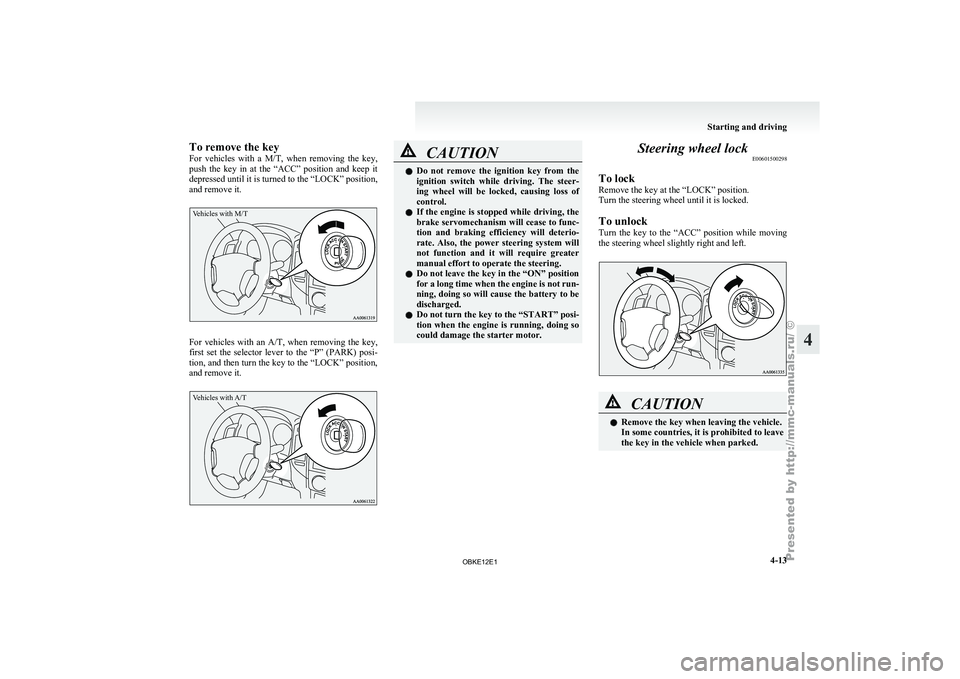
To remove the key
For vehicles
with
a M/T, when removing the key,
push the key in at the “ACC” position and keep it
depressed until it is turned to the “LOCK” position,
and remove it.
Vehicles with M/T For vehicles with an A/T, when
removing
the key,
first set the selector lever to the “P” (PARK) posi-
tion, and then turn the key to the “LOCK” position,
and remove it.
Vehicles with A/T CAUTION
l
Do not remove
the ignition key from the
ignition switch while driving. The steer-
ing wheel will be locked, causing loss of
control.
l If the engine is stopped while driving, the
brake servomechanism will cease to func-
tion and braking efficiency will deterio-
rate. Also, the power steering system will
not function and it will require greater
manual effort to operate the steering.
l Do not leave the key in the “ON” position
for a long time when the engine is not run-
ning, doing so will cause the battery to be
discharged.
l Do not turn the key to the “START” posi-
tion when the engine is running, doing so
could damage the starter motor. Steering wheel lock
E00601500298
To lock
Remove the key at the “LOCK” position.
Turn the steering wheel until it is locked.
To unlock
Turn the key
to the “ACC” position while moving
the steering wheel slightly right and left. CAUTION
l
Remove the key when leaving the vehicle.
In some countries, it is prohibited to leave
the key in the vehicle when parked. Starting and driving
4-13 4
OBKE12E1
Page 139 of 377
Starting
E00601600811
Tips for starting l Do not
operate
the starter motor continuous-
ly longer than 10 seconds; doing so could
run down the battery. If the engine does not
start, turn the ignition key back to “LOCK”
position, wait a few seconds, and then try
again. Trying repeatedly with the starter mo-
tor still turning will damage the starter mech-
anism. WARNING
l Never
run
the
engine in a closed or poor-
ly ventilated area any longer than is nee-
ded to move your vehicle in or out of the
area. Carbon monoxide gases are odour-
less and can be fatal. CAUTION
l
Never attempt to
start the engine by push-
ing or pulling the vehicle.
l Do not run the engine at high rpm or
drive the vehicle at high speed until the en-
gine has had a chance to warm up.
l Release the ignition key as soon as the en-
gine starts to avoid damaging the starter
motor.
l If your vehicle is equipped with a turbo-
charger, do not stop the engine immedi-
ately after high-speed or uphill driving.
First allow the engine to idle to give the
turbocharger a chance to cool down. Starting the engine (petrol-powered ve-
hicles)
E00601701994
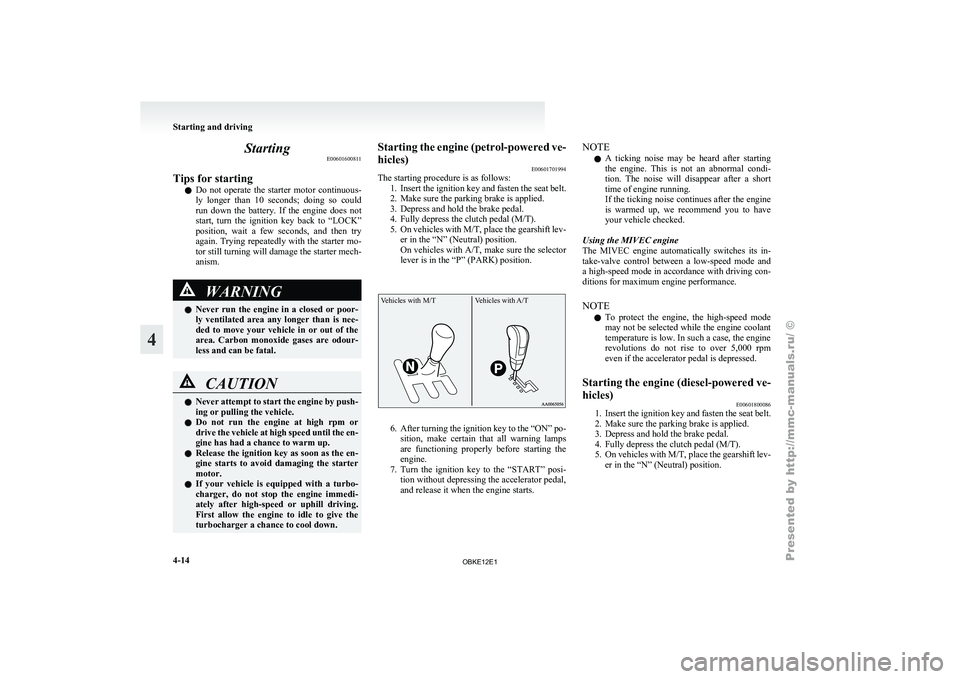
The starting procedure is as follows:
1. Insert the ignition
key and fasten the seat belt.
2. Make sure the parking brake is applied.
3. Depress and hold the brake pedal.
4. Fully depress the clutch pedal (M/T).
5. On vehicles with M/T, place the gearshift lev- er in the “N” (Neutral) position.
On vehicles with A/T, make sure the selector
lever is in the “P” (PARK) position.
Vehicles with M/T Vehicles with A/T 6. After turning the ignition key to the “ON” po-
sition, make
certain that all warning lamps
are functioning properly before starting the
engine.
7. Turn the ignition key to the “START” posi- tion without depressing the accelerator pedal,
and release it when the engine starts. NOTE
l A
ticking noise
may be heard after starting
the engine. This is not an abnormal condi-
tion. The noise will disappear after a short
time of engine running.
If the ticking noise continues after the engine
is warmed up, we recommend you to have
your vehicle checked.
Using the MIVEC engine
The MIVEC engine automatically switches its in-
take-valve control between a low-speed mode and
a high-speed mode in accordance with driving con-
ditions for maximum engine performance.
NOTE l To protect the engine, the high-speed mode
may not be selected while the engine coolant
temperature is low. In such a case, the engine
revolutions do not rise to over 5,000 rpm
even if the accelerator pedal is depressed.
Starting the engine (diesel-powered ve-
hicles) E00601800086
1. Insert the ignition key and fasten the seat belt.
2. Make sure the parking brake is applied.
3.
Depress and hold the brake pedal.
4. Fully depress the clutch pedal (M/T).
5. On vehicles with M/T, place the gearshift lev- er in the “N” (Neutral) position. Starting and driving
4-14
4
OBKE12E1
Page 144 of 377
Automatic transmission
INVECS-II Sports Mode 5A/T
(Intelligent & Innovative Vehicle Electronic Control System II) E00603200101
Designed for
optimum control and equipped with
adaptive control capabilities, the electronically con-
trolled transmission optimally matches gear shifts
to almost all driving and road conditions. CAUTION
l
This system
is
strictly intended to provide
supplementary functions. When travel-
ling downhill under certain conditions or
immediately after starting off when the au-
tomatic transmission is cold, no automat-
ic shiftdown may be made. The driver
should shiftdown to a lower gear to use en-
gine braking. Try to drive safely at all time.
NOTE l During
running-in period
or immediately af-
ter reconnection of the battery cable, there
may be a case where gear shifts are not made
smoothly. This does not indicate a faulty trans-
mission.
Gear shifts will become smooth after the trans-
mission has been shifted several times by the
electronic control system.
Selector lever operation E00603300522
The transmission has 5 forward gears and 1 reverse
gear. The individual gears are selected automatically, de-
pending
on the
position of the gear selector lever,
the speed of the vehicle and the position of the ac-
celerator pedal.
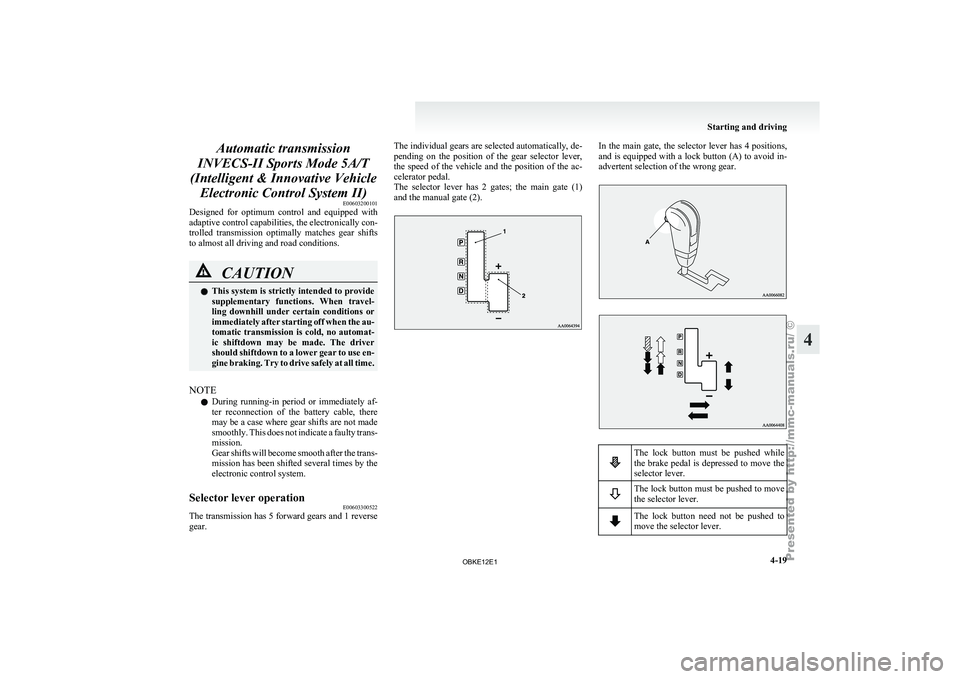
The selector lever has 2 gates; the main gate (1)
and the manual gate (2). In the main gate, the selector lever has 4 positions,
and is equipped
with a lock button (A) to avoid in-
advertent selection of the wrong gear. The lock button must be pushed while
the brake
pedal
is depressed to move the
selector lever. The lock button must be pushed to move
the selector lever.
The lock button need not be pushed to
move the selector lever. Starting and driving
4-19 4
OBKE12E1
Page 165 of 377
ABS warning lamp
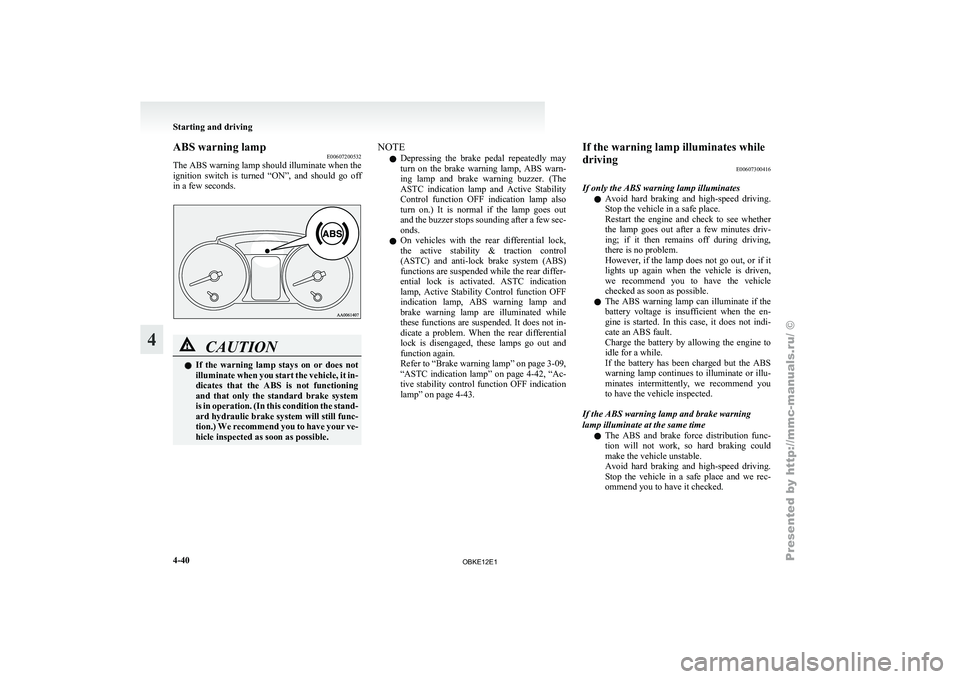
E00607200532
The ABS warning
lamp should illuminate when the
ignition switch is turned “ON”, and should go off
in a few seconds. CAUTION
l
If the
warning
lamp stays on or does not
illuminate when you start the vehicle, it in-
dicates that the ABS is not functioning
and that only the standard brake system
is in operation. (In this condition the stand-
ard hydraulic brake system will still func-
tion.) We recommend you to have your ve-
hicle inspected as soon as possible. NOTE
l Depressing
the brake
pedal repeatedly may
turn on the brake warning lamp, ABS warn-
ing lamp and brake warning buzzer. (The
ASTC indication lamp and Active Stability
Control function OFF indication lamp also
turn on.) It is normal if the lamp goes out
and the buzzer stops sounding after a few sec-
onds.
l On vehicles with the rear differential lock,
the active stability & traction control
(ASTC) and anti-lock brake system (ABS)
functions are suspended while the rear differ-
ential lock is activated. ASTC indication
lamp, Active Stability Control function OFF
indication lamp, ABS warning lamp and
brake warning lamp are illuminated while
these functions are suspended. It does not in-
dicate a problem. When the rear differential
lock is disengaged, these lamps go out and
function again.
Refer to “Brake warning lamp” on page 3-09,
“ASTC indication lamp” on page 4-42, “Ac-
tive stability control function OFF indication
lamp” on page 4-43. If the warning lamp illuminates while
driving
E00607300416
If only the ABS warning lamp illuminates l Avoid
hard
braking
and high-speed driving.
Stop the vehicle in a safe place.
Restart the engine and check to see whether
the lamp goes out after a few minutes driv-
ing; if it then remains off during driving,
there is no problem.
However, if the lamp does not go out, or if it
lights up again when the vehicle is driven,
we recommend you to have the vehicle
checked as soon as possible.
l The ABS warning lamp can illuminate if the
battery voltage is insufficient when the en-
gine is started. In this case, it does not indi-
cate an ABS fault.
Charge the battery by allowing the engine to
idle for a while.
If the battery has been charged but the ABS
warning lamp continues to illuminate or illu-
minates intermittently, we recommend you
to have the vehicle inspected.
If the ABS warning lamp and brake warning
lamp illuminate at the same time l The ABS and brake force distribution func-
tion will not work, so hard braking could
make the vehicle unstable.
Avoid hard braking and high-speed driving.
Stop the vehicle in a safe place and we rec-
ommend you to have it checked. Starting and driving
4-40
4
OBKE12E1