mirror MITSUBISHI PAJERO IV 2011 User Guide
[x] Cancel search | Manufacturer: MITSUBISHI, Model Year: 2011, Model line: PAJERO IV, Model: MITSUBISHI PAJERO IV 2011Pages: 377, PDF Size: 29.43 MB
Page 134 of 377

To reduce the glare
Type 1
The lever
(A)
at the bottom of the mirror can be
used to adjust the mirror to reduce the glare from
the headlamps of vehicles behind you during night
driving. 1- Normal
2- Anti-glare
Type 2
When the headlamps of the vehicles behind you are
very bright, the
reflection factor of the rear-view
mirror is automatically changed to reduce the glare. When the ignition switch is turned to the “ON” po-
sition, the reflection factor of the mirror is automat-
ically changed.
NOTE
l Do
not hang
items on, or spray glass cleaner
on the sensor (1), as reduced sensitivity
could result. Type 3
When the headlamps of the vehicles behind you are
very bright, the
reflection factor of the rear-view
mirror is automatically changed to reduce the glare. When the ignition switch is turned to the “ON” po-
sition, the
green
indicator (1) illuminates and the re-
flection factor of the mirror is automatically
changed.
NOTE
l Do not hang any items on, or spray glass clean-
er on the sensors (2) on the front and back
side, as reduced sensitivity could result.
l If you want to stop automatic mode, press
the switch (3) and the indicator will go off.
To return to automatic mode, press the
switch again or turn the ignition key to the
“ON” position after turning to “LOCK” or
“ACC” position. Starting and driving
4-09 4
OBKE12E1
Page 135 of 377
Outside rear-view mirrors
E00600900484
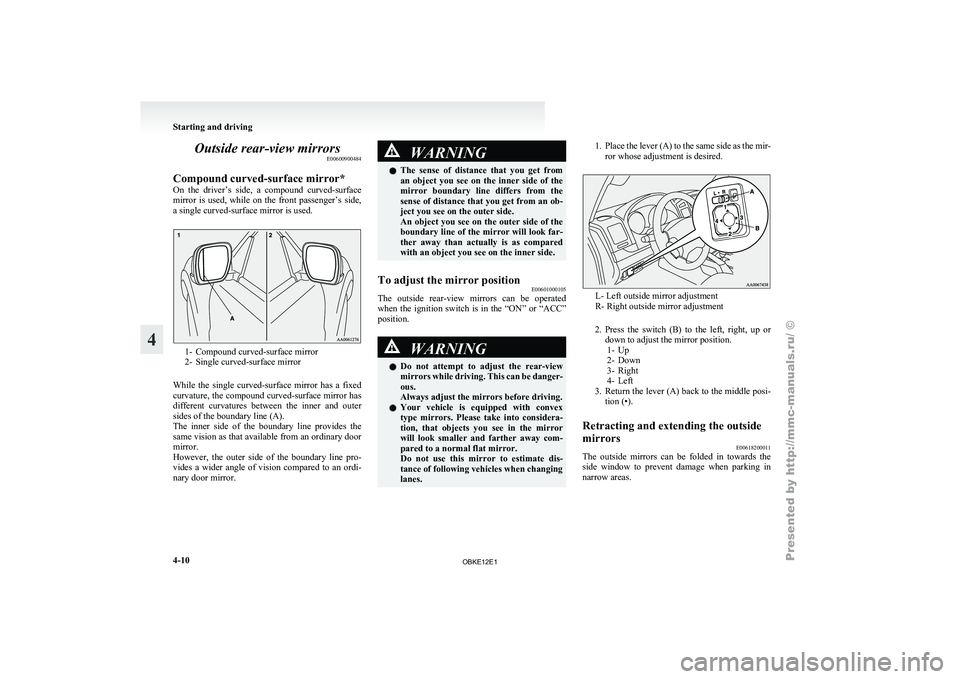
Compound curved-surface mirror*
On the driver’s
side, a compound curved-surface
mirror is used, while on the front passenger’s side,
a single curved-surface mirror is used. 1- Compound curved-surface mirror
2- Single curved-surface mirror
While the
single curved-surface mirror has a fixed
curvature, the compound curved-surface mirror has
different curvatures between the inner and outer
sides of the boundary line (A).
The inner side of the boundary line provides the
same vision as that available from an ordinary door
mirror.
However, the outer side of the boundary line pro-
vides a wider angle of vision compared to an ordi-
nary door mirror. WARNING
l The sense of
distance that you get from
an object you see on the inner side of the
mirror boundary line differs from the
sense of distance that you get from an ob-
ject you see on the outer side.
An object you see on the outer side of the
boundary line of the mirror will look far-
ther away than actually is as compared
with an object you see on the inner side.
To adjust the mirror position E00601000105
The outside rear-view mirrors can be operated
when the ignition
switch is in the “ON” or “ACC”
position. WARNING
l Do not attempt
to adjust the rear-view
mirrors while driving. This can be danger-
ous.
Always adjust the mirrors before driving.
l Your vehicle is equipped with convex
type mirrors. Please take into considera-
tion, that objects you see in the mirror
will look smaller and farther away com-
pared to a normal flat mirror.
Do not use this mirror to estimate dis-
tance of following vehicles when changing
lanes. 1. Place the lever (A) to the same side as the mir-
ror whose adjustment is desired. L- Left outside mirror adjustment
R- Right outside mirror adjustment
2. Press the switch
(B) to the left, right, up or
down to adjust the mirror position. 1- Up
2- Down
3- Right
4- Left
3. Return the lever (A) back to the middle posi- tion (•).
Retracting and extending the outside
mirrors E00618200011
The outside mirrors can be folded in towards the
side window to
prevent damage when parking in
narrow areas. Starting and driving
4-10
4
OBKE12E1
Page 136 of 377
CAUTION
l
Do not drive the vehicle with the mirror
folded in. The lack of rearward visibility
normally provided the mirror could lead
to an accident.
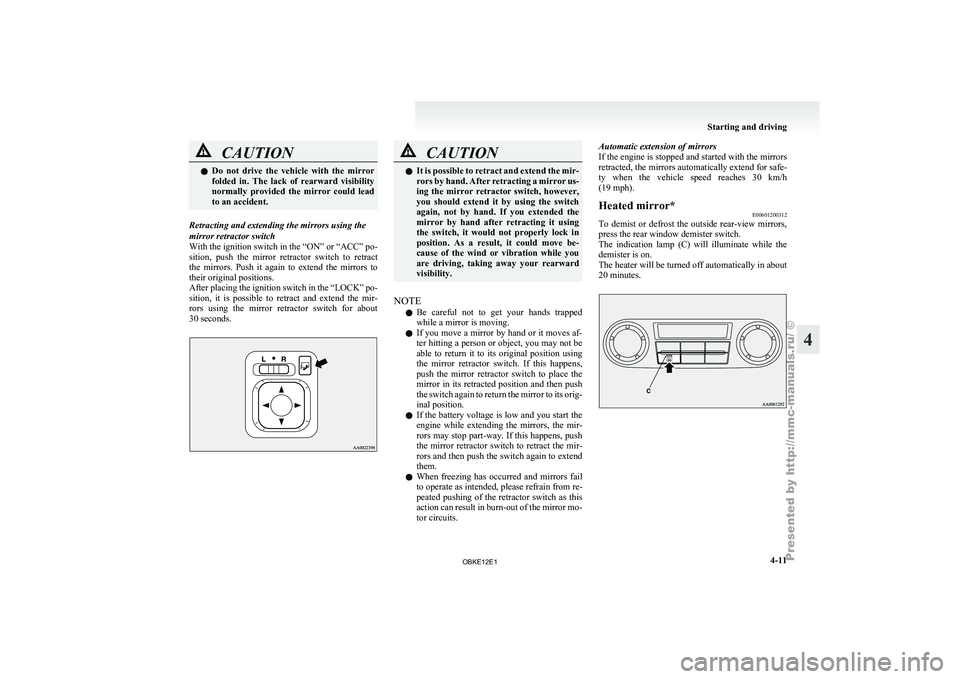
Retracting and extending the mirrors using the
mirror retractor switch
With the ignition
switch in the “ON” or “ACC” po-
sition, push the mirror retractor switch to retract
the mirrors. Push it again to extend the mirrors to
their original positions.
After placing the ignition switch in the “LOCK” po-
sition, it is possible to retract and extend the mir-
rors using the mirror retractor switch for about
30 seconds. CAUTION
l
It is possible
to retract and extend the mir-
rors by hand. After retracting a mirror us-
ing the mirror retractor switch, however,
you should extend it by using the switch
again, not by hand. If you extended the
mirror by hand after retracting it using
the switch, it would not properly lock in
position. As a result, it could move be-
cause of the wind or vibration while you
are driving, taking away your rearward
visibility.
NOTE l Be
careful not
to get your hands trapped
while a mirror is moving.
l If you move a mirror by hand or it moves af-
ter hitting a person or object, you may not be
able to return it to its original position using
the mirror retractor switch. If this happens,
push the mirror retractor switch to place the
mirror in its retracted position and then push
the switch again to return the mirror to its orig-
inal position.
l If the battery voltage is low and you start the
engine while extending the mirrors, the mir-
rors may stop part-way. If this happens, push
the mirror retractor switch to retract the mir-
rors and then push the switch again to extend
them.
l When freezing has occurred and mirrors fail
to operate as intended, please refrain from re-
peated pushing of the retractor switch as this
action can result in burn-out of the mirror mo-
tor circuits. Automatic extension of mirrors
If
the
engine
is stopped and started with the mirrors
retracted, the mirrors automatically extend for safe-
ty when the vehicle speed reaches 30 km/h
(19 mph).
Heated mirror* E00601200312
To demist or defrost the outside rear-view mirrors,
press the rear window demister switch.
The indication lamp
(C) will illuminate while the
demister is on.
The heater will be turned off automatically in about
20 minutes. Starting and driving
4-11 4
OBKE12E1
Page 177 of 377
Back sensor (vehicles without a towing bar)
Vehicle to obstacle dis-
tance Warning sound cycle
Approx. 150 to 80 cm Intermittent Approx. 80 to 40 cm Fast intermittent
Within approx. 40 cm Continuous Back sensor (vehicles with a towing bar)
Vehicle to obstacle dis-
tance Warning sound cycle
Approx. 150 to 120 cm Intermittent Approx. 120 to 60 cm Fast intermittentWithin approx. 60 cm Continuous CAUTION
l
The distances given are to be used for ref-
erence
only, as
errors may be caused by
various factors, such as temperature, hu-
midity, or the shape of the obstacles.
Changing the detection areas E00615800032
The detection areas can be changed as follows:
Vehicles with a towing bar
While the operation
of the system is stopped at the
“SONAR” switch, push the “SONAR” switch ap-
proximately 3 seconds or more, and release it. The
buzzer sounds twice to indicate that the detection
area has been changed. Vehicles without a towing bar
While the
operation
of the system is stopped at the
“SONAR” switch, push the “SONAR” switch ap-
proximately 3 seconds or more, and release it. The
buzzer sounds once to indicate that the detection
area has been changed.
NOTE
l The detection area will not change if you
keep the “SONAR” switch pushed for 10 sec-
onds or more.
“SONAR OFF” indication lamp E00615900075
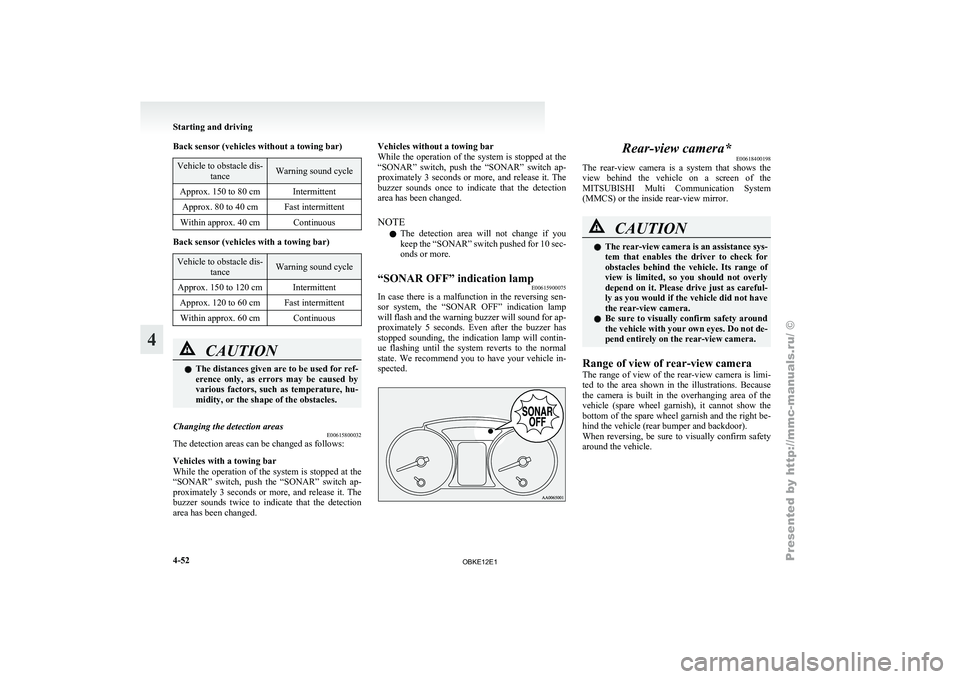
In case there is a malfunction in the reversing sen-
sor system, the
“SONAR OFF” indication lamp
will flash and the warning buzzer will sound for ap-
proximately 5 seconds. Even after the buzzer has
stopped sounding, the indication lamp will contin-
ue flashing until the system reverts to the normal
state. We recommend you to have your vehicle in-
spected. Rear-view camera*
E00618400198
The rear-view camera
is a system that shows the
view behind the vehicle on a screen of the
MITSUBISHI Multi Communication System
(MMCS) or the inside rear-view mirror. CAUTION
l
The rear-view
camera
is an assistance sys-
tem that enables the driver to check for
obstacles behind the vehicle. Its range of
view is limited, so you should not overly
depend on it. Please drive just as careful-
ly as you would if the vehicle did not have
the rear-view camera.
l Be sure to visually confirm safety around
the vehicle with your own eyes. Do not de-
pend entirely on the rear-view camera.
Range of view of rear-view camera
The range of
view of the rear-view camera is limi-
ted to the area shown in the illustrations. Because
the camera is built in the overhanging area of the
vehicle (spare wheel garnish), it cannot show the
bottom of the spare wheel garnish and the right be-
hind the vehicle (rear bumper and backdoor).
When reversing, be sure to visually confirm safety
around the vehicle. Starting and driving
4-52
4
OBKE12E1
Page 178 of 377
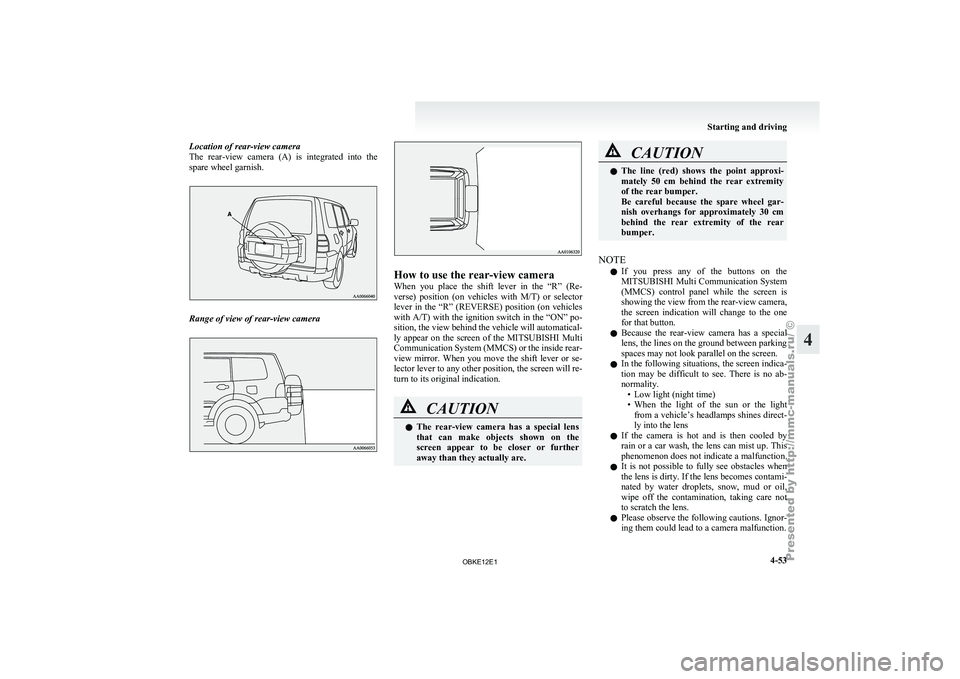
Location of rear-view camera
The rear-view camera
(A) is integrated into the
spare wheel garnish. Range of view of rear-view camera How to use the rear-view camera
When you
place
the shift lever in the “R” (Re-
verse) position (on vehicles with M/T) or selector
lever in the “R” (REVERSE) position (on vehicles
with A/T) with the ignition switch in the “ON” po-
sition, the view behind the vehicle will automatical-
ly appear on the screen of the MITSUBISHI Multi
Communication System (MMCS) or the inside rear-
view mirror. When you move the shift lever or se-
lector lever to any other position, the screen will re-
turn to its original indication. CAUTION
l
The rear-view
camera
has a special lens
that can make objects shown on the
screen appear to be closer or further
away than they actually are. CAUTION
l
The line (red)
shows the point approxi-
mately 50 cm behind the rear extremity
of the rear bumper.
Be careful because the spare wheel gar-
nish overhangs for approximately 30 cm
behind the rear extremity of the rear
bumper.
NOTE l If
you press
any of the buttons on the
MITSUBISHI Multi Communication System
(MMCS) control panel while the screen is
showing the view from the rear-view camera,
the screen indication will change to the one
for that button.
l Because the rear-view camera has a special
lens, the lines on the ground between parking
spaces may not look parallel on the screen.
l In the following situations, the screen indica-
tion may be difficult to see. There is no ab-
normality.
• Low light (night time)
• When the light of the sun or the lightfrom a vehicle’s headlamps shines direct-
ly into the lens
l If the camera is hot and is then cooled by
rain or a car wash, the lens can mist up. This
phenomenon does not indicate a malfunction.
l It is not possible to fully see obstacles when
the lens is dirty. If the lens becomes contami-
nated by water droplets, snow, mud or oil,
wipe off the contamination, taking care not
to scratch the lens.
l Please observe the following cautions. Ignor-
ing them could lead to a camera malfunction. Starting and driving
4-53 4
OBKE12E1
Page 180 of 377
Check surroundings for safety.To change the indication on the screen
of the inside rear-view mirror
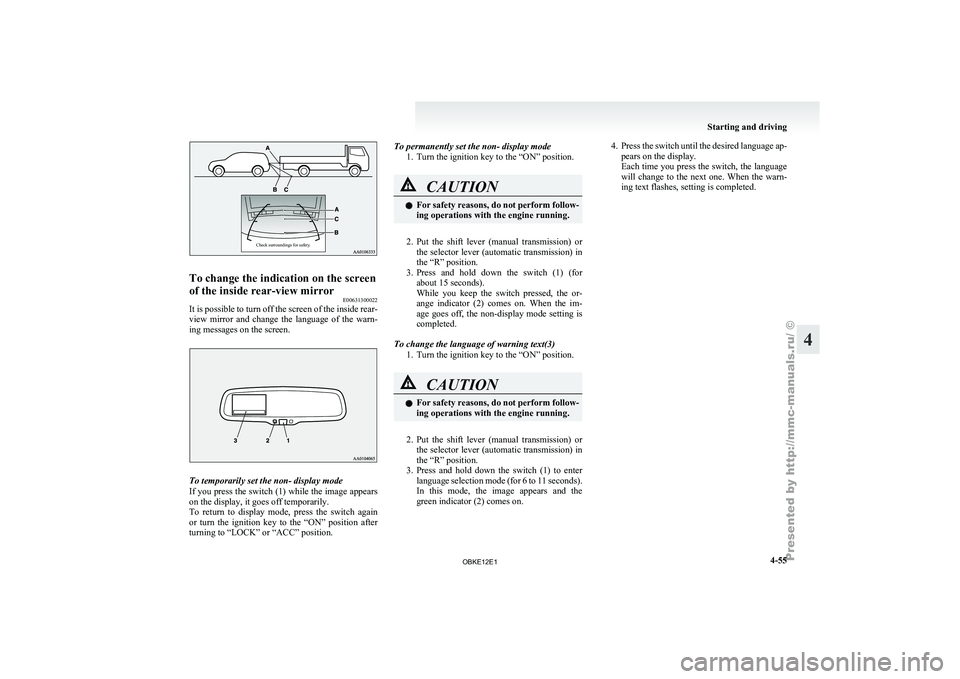
E00631300022
It is possible to turn off the screen of the inside rear-
view mirror and
change the language of the warn-
ing messages on the screen. To temporarily set the non- display mode
If you
press
the switch (1) while the image appears
on the display, it goes off temporarily.
To return to display mode, press the switch again
or turn the ignition key to the “ON” position after
turning to “LOCK” or “ACC” position. To permanently set the non- display mode
1. Turn the ignition key to the “ON” position. CAUTION
l
For safety
reasons,
do not perform follow-
ing operations with the engine running.
2. Put the shift lever (manual transmission) or
the selector
lever (automatic transmission) in
the “R” position.
3. Press and hold down the switch (1) (for about 15 seconds).
While you keep the switch pressed, the or-
ange indicator (2) comes on. When the im-
age goes off, the non-display mode setting is
completed.
To change the language of warning text(3) 1. Turn the ignition key to the “ON” position. CAUTION
l
For safety
reasons,
do not perform follow-
ing operations with the engine running.
2. Put the shift lever (manual transmission) or
the selector
lever (automatic transmission) in
the “R” position.
3. Press and hold down the switch (1) to enter language selection mode (for 6 to 11 seconds).
In this mode, the image appears and the
green indicator (2) comes on. 4. Press the switch until the desired language ap-
pears on the display.
Each time
you press the switch, the language
will change to the next one. When the warn-
ing text flashes, setting is completed. Starting and driving
4-55 4
OBKE12E1
Page 267 of 377
l
Do not
connect to the USB input terminal
any device (hard disk, card reader, memory
reader, etc.) other than the connectable devi-
ces specified in the previous section.
The device and/or data may be damaged. If
any of these devices was connected by mis-
take, remove it after turning the ignition
switch to the “LOCK” position.
File specifications E00762400017
You can play music files of the following specifica-
tions that are
saved in a USB memory device or oth-
er device supporting mass storage class. Item Condition
File format MP3, WMA, AAC,
WAV
Maximum number of
levels (including the
root) Level 8
Number of folders
700
Number of files 65,535 Sun visors
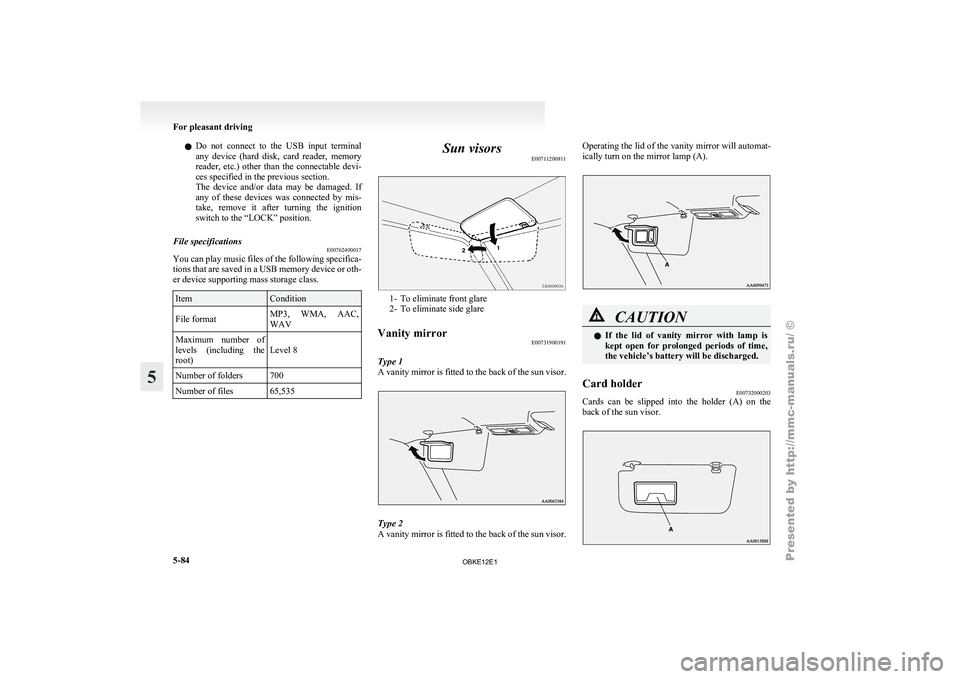
E00711200811 1- To eliminate front glare
2- To eliminate side glare
Vanity mirror E00731900191
Type 1
A vanity mirror
is fitted to the back of the sun visor. Type 2
A vanity
mirror
is fitted to the back of the sun visor. Operating the lid of the vanity mirror will automat-
ically turn on the mirror lamp (A).
CAUTION
l
If the lid
of vanity mirror with lamp is
kept open for prolonged periods of time,
the vehicle’s battery will be discharged.
Card holder E00732000203
Cards can be slipped into the holder (A) on the
back of the sun visor. For pleasant driving
5-84
5
OBKE12E1
Page 268 of 377
Slide plate*
E00732100086
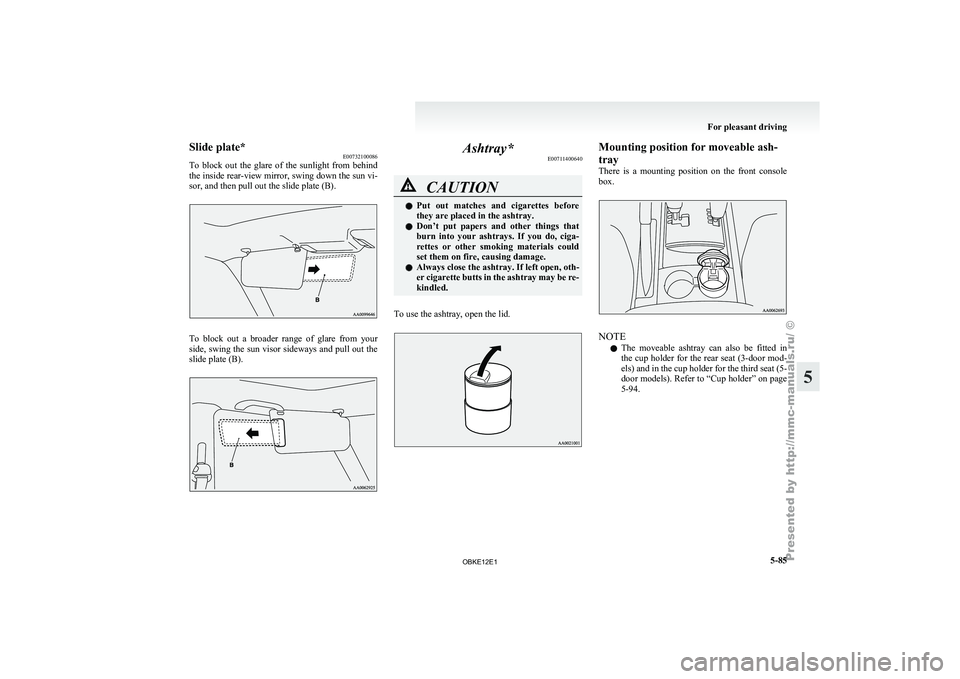
To block out
the glare of the sunlight from behind
the inside rear-view mirror, swing down the sun vi-
sor, and then pull out the slide plate (B). To block out a broader range of glare from your
side, swing
the
sun visor sideways and pull out the
slide plate (B). Ashtray*
E00711400640 CAUTION
l
Put out
matches
and cigarettes before
they are placed in the ashtray.
l Don’t put papers and other things that
burn into your ashtrays. If you do, ciga-
rettes or other smoking materials could
set them on fire, causing damage.
l Always close the ashtray. If left open, oth-
er cigarette butts in the ashtray may be re-
kindled.
To use the ashtray, open the lid. Mounting position for moveable ash-
tray
There is
a
mounting position on the front console
box. NOTE
l The
moveable ashtray
can also be fitted in
the cup holder for the rear seat (3-door mod-
els) and in the cup holder for the third seat (5-
door models). Refer to “Cup holder” on page
5-94. For pleasant driving
5-85 5
OBKE12E1
Page 305 of 377
CAUTION
l
After washing the vehicle, drive the vehi-
cle slowly while lightly depressing the
brake pedal several times in order to dry
out the brakes.
Leaving the brakes wet could result in re-
duced braking performance. Also, there
is a possibility that they could freeze up
or become inoperative due to rust, render-
ing the vehicle unable to move.
l When using an automatic car wash, pay
attention to the following items, referring
to the operation manual or consulting a
car wash operator. If the following proce-
dure is not followed, it could result in dam-
age to your vehicle.
• The outside mirrors are retracted.
• The wiper arm assembly is taped.
• If your vehicle is equipped with a reardeflector or roof rails, consult a car
wash operator before using the car
wash.
• If your vehicle has rain sensor wipers, place the wiper switch lever in the
“OFF” position to deactivate the rain
sensor.
During cold weather
Salt and other
chemicals spread on the roads in
some areas in winter can have a harmful effect on
the vehicle body. You should therefore wash the ve-
hicle as often as possible in accordance with our
care-instructions. It is recommended to have a pres-
ervative applied and the underfloor protection
checked before and after the cold weather season. After washing your vehicle, wipe off all water-
drops from
the
rubber parts around the doors to pre-
vent the doors from freezing.
NOTE
l To prevent freezing of the weatherstripping
on the doors, bonnet, etc., they should be trea-
ted with silicone spray.
Waxing E00901000560
Waxing the vehicle will help prevent the adherence
of dust and
road chemicals to the paintwork. Apply
a wax solution after washing the vehicle, or at least
once every three months to assist displacing of water.
Do not wax your vehicle in direct sunlight. You
should wax after the surfaces have cooled. CAUTION
l
Waxes containing
high
abrasive com-
pounds should not be used. Such waxes re-
move rust and stains effectively from the
paintwork but they are harmful to the lus-
tre on the painted surface and the plated
surface.
Further, they are harmful to glossy surfa-
ces such as grille, garnish, mouldings, etc.
l Do not use petrol or paint thinners to re-
move road tar or other contamination to
the vehicle surface.
l Do not apply wax on the areas having
black mat coating as it can cause uneven
discolouration, patches, blurs, etc. If
stained with wax, immediately wipe off
with a piece of soft cloth and warm water. CAUTION
l
On vehicles with
a sunroof, be careful
when waxing the area around the sunroof
opening, not to put any wax on the weath-
erstrip (black rubber). If stained with
wax, the weatherstrip cannot maintain a
weatherproof seal with the sunroof.
Polishing E00901100024
The vehicle should only be polished if the paint-
work has become stained or lost its lustre. Matt-fin-
ish parts and
plastic bumpers must not be polished,
polishing these parts will stain them or damage
their finish.
Damaged paint E00901200155
Small cracks and scratches in the paint coat should
be touched up
as soon as possible with
MITSUBISHI touch-up paint to prevent corrosion.
Check body areas facing the road or the tyres care-
fully for damage to the paint coat caused by flying
stones, etc. The paint code number for your vehicle
can be found on the vehicle information code plate.
(Refer to “Vehicle information code plate” on page
9-02.)
Cleaning plastic parts E00901300619
Use a sponge or chamois leather.
If a car
wax adheres on a grey or black rough sur-
face of the bumper, moulding or lamps, the surface
becomes white. In such a case, wipe it off using
lukewarm water and soft cloth or chamois leather. Vehicle care
7-04
7
OBKE12E1
Page 327 of 377
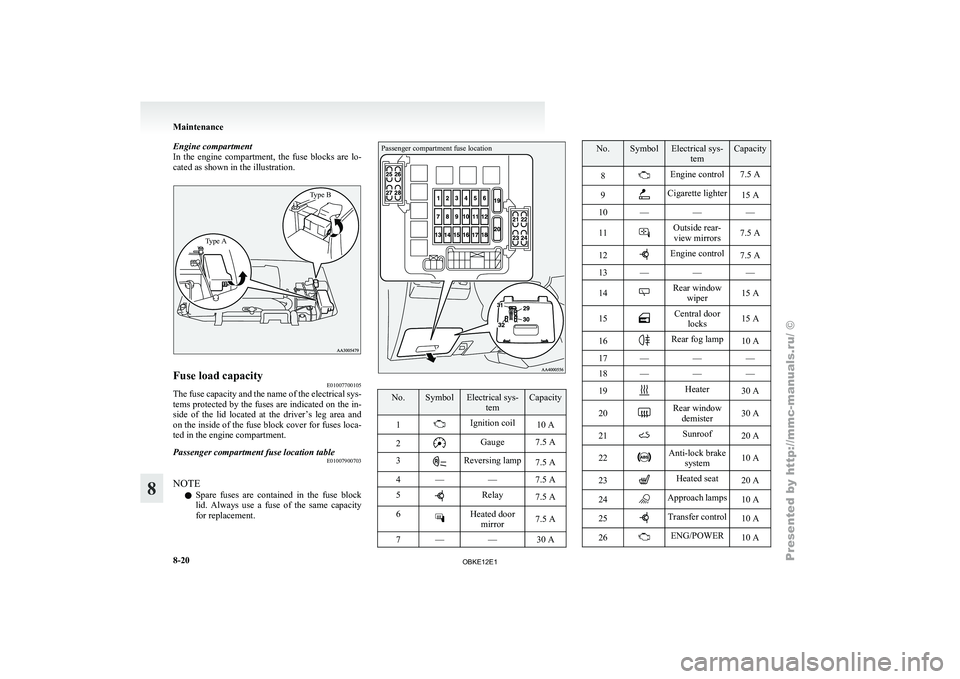
Engine compartment
In the engine
compartment, the fuse blocks are lo-
cated as shown in the illustration.
Type A Type BFuse load capacity
E01007700105
The fuse capacity and the name of the electrical sys-
tems protected by
the fuses are indicated on the in-
side of the lid located at the driver’s leg area and
on the inside of the fuse block cover for fuses loca-
ted in the engine compartment.
Passenger compartment fuse location table E01007900703
NOTE l Spare
fuses are
contained in the fuse block
lid. Always use a fuse of the same capacity
for replacement.
Passenger compartment fuse location No. Symbol Electrical sys-
tem Capacity
1 Ignition coil
10 A
2 Gauge 7.5 A
3 Reversing lamp
7.5 A
4 — — 7.5 A
5 Relay
7.5 A
6 Heated door
mirror 7.5 A
7 — — 30 A No. Symbol Electrical sys-
tem Capacity
8 Engine control 7.5 A
9 Cigarette lighter
15 A
10 — — —
11 Outside rear-
view mirrors 7.5 A
12 Engine control
7.5 A
13 — — —
14 Rear window
wiper 15 A
15 Central door
locks 15 A
16 Rear fog lamp
10 A
17 — — —
18 — — —
19 Heater
30 A
20 Rear window
demister 30 A
21 Sunroof
20 A
22 Anti-lock brake
system 10 A
23 Heated seat
20 A
24 Approach lamps
10 A
25 Transfer control
10 A
26 ENG/POWER
10 AMaintenance
8-20
8
OBKE12E1