steering MITSUBISHI PAJERO IV 2011 User Guide
[x] Cancel search | Manufacturer: MITSUBISHI, Model Year: 2011, Model line: PAJERO IV, Model: MITSUBISHI PAJERO IV 2011Pages: 377, PDF Size: 29.43 MB
Page 133 of 377
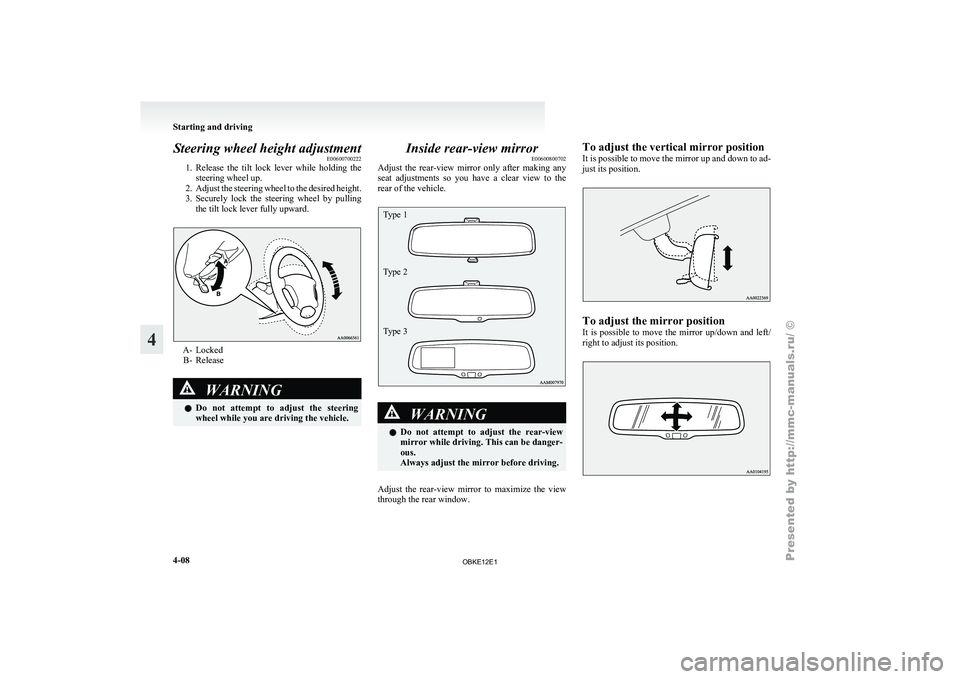
Steering wheel height adjustment
E00600700222
1. Release the tilt
lock lever while holding the
steering wheel up.
2. Adjust the steering wheel to the desired height.
3. Securely lock the steering wheel by pulling the tilt lock lever fully upward. A- Locked
B- Release WARNING
l Do not attempt
to adjust the steering
wheel while you are driving the vehicle. Inside rear-view mirror
E00600800702
Adjust the rear-view
mirror only after making any
seat adjustments so you have a clear view to the
rear of the vehicle.
Type 1
Type 2
Type 3 WARNING
l Do not attempt
to adjust the rear-view
mirror while driving. This can be danger-
ous.
Always adjust the mirror before driving.
Adjust the rear-view mirror to maximize the view
through the rear window. To adjust the vertical mirror position
It
is possible
to move the mirror up and down to ad-
just its position. To adjust the mirror position
It is
possible
to move the mirror up/down and left/
right to adjust its position. Starting and driving
4-08
4
OBKE12E1
Page 137 of 377
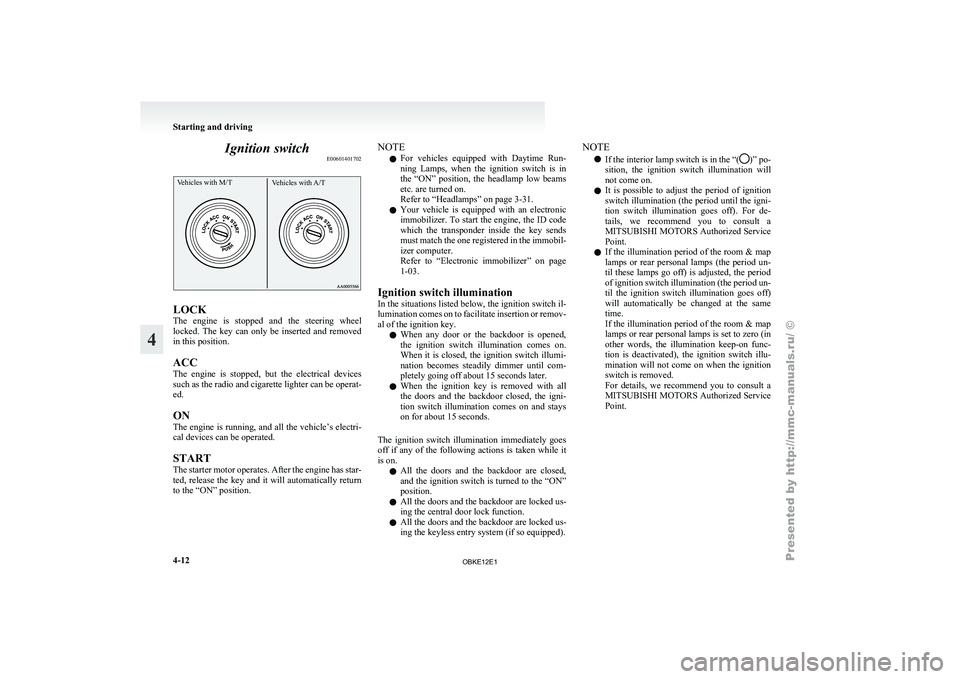
Ignition switch
E00601401702Vehicles with M/T Vehicles with A/TLOCK
The
engine is
stopped and the steering wheel
locked. The key can only be inserted and removed
in this position.
ACC
The engine is stopped, but the electrical devices
such as the radio and cigarette lighter can be operat-
ed.
ON
The engine is running, and all the vehicle’s electri-
cal devices can be operated.
START
The starter motor operates. After the engine has star-
ted, release the key and it will automatically return
to the “ON” position. NOTE
l For
vehicles equipped
with Daytime Run-
ning Lamps, when the ignition switch is in
the “ON” position, the headlamp low beams
etc. are turned on.
Refer to “Headlamps” on page 3-31.
l Your vehicle is equipped with an electronic
immobilizer. To start the engine, the ID code
which the transponder inside the key sends
must match the one registered in the immobil-
izer computer.
Refer to “Electronic immobilizer” on page
1-03.
Ignition switch illumination
In the situations listed below, the ignition switch il-
lumination comes on to facilitate insertion or remov-
al of the ignition key. l When any door or the backdoor is opened,
the ignition switch illumination comes on.
When it is closed, the ignition switch illumi-
nation becomes steadily dimmer until com-
pletely going off about 15 seconds later.
l When the ignition key is removed with all
the doors and the backdoor closed, the igni-
tion switch illumination comes on and stays
on for about 15 seconds.
The ignition switch illumination immediately goes
off if any of the following actions is taken while it
is on. l All the doors and the backdoor are closed,
and the ignition switch is turned to the “ON”
position.
l All the doors and the backdoor are locked us-
ing the central door lock function.
l All the doors and the backdoor are locked us-
ing the keyless entry system (if so equipped). NOTE
l If the interior
lamp switch is in the “( )” po-
sition, the ignition
switch illumination will
not come on.
l It is possible to adjust the period of ignition
switch illumination (the period until the igni-
tion switch illumination goes off). For de-
tails, we recommend you to consult a
MITSUBISHI MOTORS Authorized Service
Point.
l If the illumination period of the room & map
lamps or rear personal lamps (the period un-
til these lamps go off) is adjusted, the period
of ignition switch illumination (the period un-
til the ignition switch illumination goes off)
will automatically be changed at the same
time.
If the illumination period of the room & map
lamps or rear personal lamps is set to zero (in
other words, the illumination keep-on func-
tion is deactivated), the ignition switch illu-
mination will not come on when the ignition
switch is removed.
For details, we recommend you to consult a
MITSUBISHI MOTORS Authorized Service
Point. Starting and driving
4-12
4
OBKE12E1
Page 138 of 377
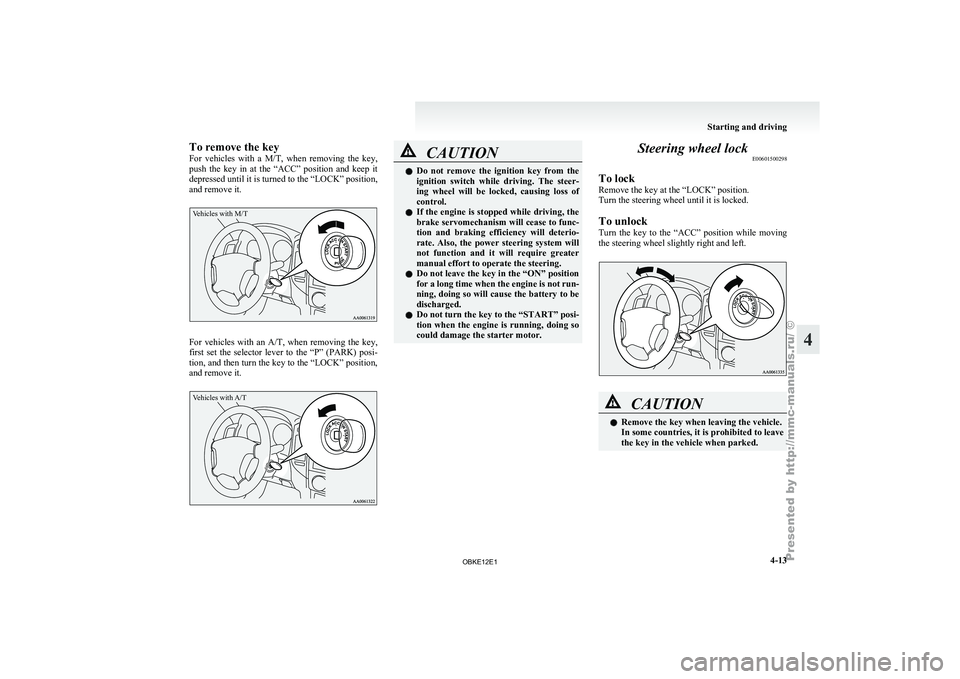
To remove the key
For vehicles
with
a M/T, when removing the key,
push the key in at the “ACC” position and keep it
depressed until it is turned to the “LOCK” position,
and remove it.
Vehicles with M/T For vehicles with an A/T, when
removing
the key,
first set the selector lever to the “P” (PARK) posi-
tion, and then turn the key to the “LOCK” position,
and remove it.
Vehicles with A/T CAUTION
l
Do not remove
the ignition key from the
ignition switch while driving. The steer-
ing wheel will be locked, causing loss of
control.
l If the engine is stopped while driving, the
brake servomechanism will cease to func-
tion and braking efficiency will deterio-
rate. Also, the power steering system will
not function and it will require greater
manual effort to operate the steering.
l Do not leave the key in the “ON” position
for a long time when the engine is not run-
ning, doing so will cause the battery to be
discharged.
l Do not turn the key to the “START” posi-
tion when the engine is running, doing so
could damage the starter motor. Steering wheel lock
E00601500298
To lock
Remove the key at the “LOCK” position.
Turn the steering wheel until it is locked.
To unlock
Turn the key
to the “ACC” position while moving
the steering wheel slightly right and left. CAUTION
l
Remove the key when leaving the vehicle.
In some countries, it is prohibited to leave
the key in the vehicle when parked. Starting and driving
4-13 4
OBKE12E1
Page 153 of 377
NOTE
l The
2WD/4WD operation
indication lamp
blinks while the selection is in process. Take
the following precautions when the indica-
tion lamp is blinking. • Keep the steering wheel in the straightahead position while making range selec-
tions. If you attempt to drive forward
with the steering wheel turned, gear rat-
tling may occur and the desired range
may not actually be selected.
• If the front wheel and/or centre differen- tial lock lamps continue blinking after a
“2H” ↔ “4H” ↔ “4HLc” selection has
been made with the vehicle moving, hold
the steering wheel in the straight ahead po-
sition and slowly depress the accelerator
pedal several times.
• If, after a “4HLc” ↔ “4LLc” selection has been made, the front and rear wheel
lamps continue blinking and the desired
range is not actually selected, return the
transfer shift lever to its previous posi-
tion. Place the steering wheel in the
straight ahead position, drive the vehicle
forward, and release the accelerator ped-
al. Next, hold down the clutch pedal
(with M/T) or place the selector lever in
the “N” (NEUTRAL) position (with A/T)
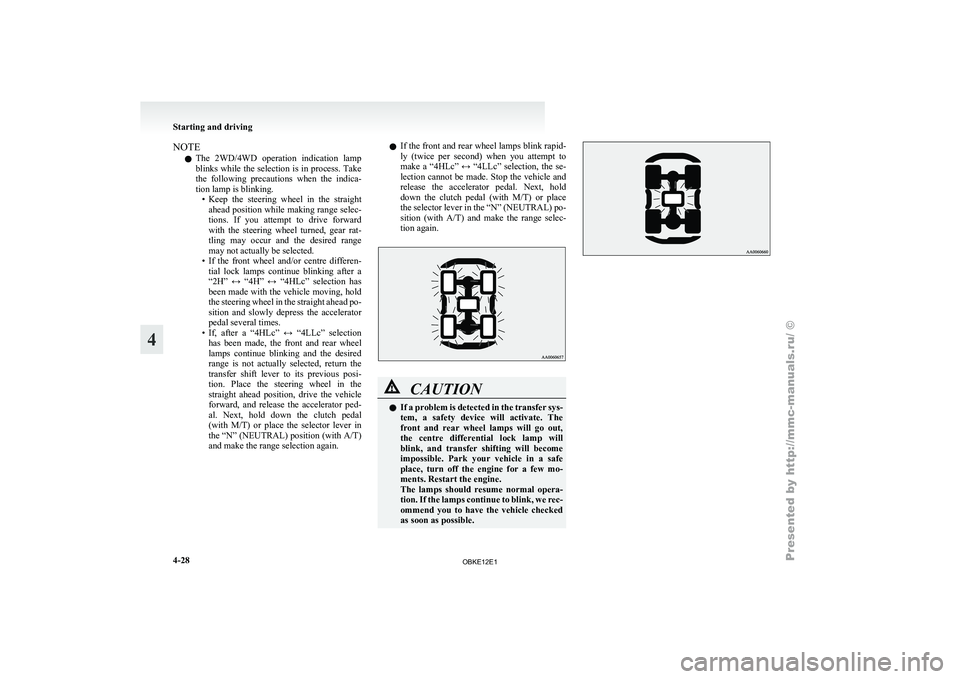
and make the range selection again. l
If
the
front and rear wheel lamps blink rapid-
ly (twice per second) when you attempt to
make a “4HLc” ↔ “4LLc” selection, the se-
lection cannot be made. Stop the vehicle and
release the accelerator pedal. Next, hold
down the clutch pedal (with M/T) or place
the selector lever in the “N” (NEUTRAL) po-
sition (with A/T) and make the range selec-
tion again. CAUTION
l
If a
problem
is detected in the transfer sys-
tem, a safety device will activate. The
front and rear wheel lamps will go out,
the centre differential lock lamp will
blink, and transfer shifting will become
impossible. Park your vehicle in a safe
place, turn off the engine for a few mo-
ments. Restart the engine.
The lamps should resume normal opera-
tion. If the lamps continue to blink, we rec-
ommend you to have the vehicle checked
as soon as possible. Starting and driving
4-28
4
OBKE12E1
Page 155 of 377
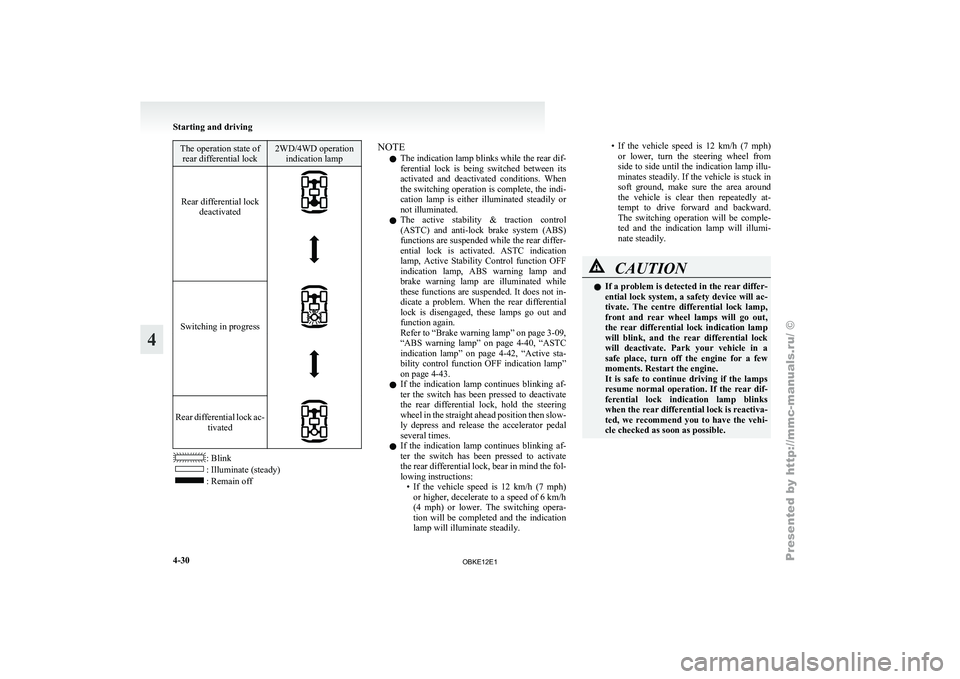
The operation state of
rear differential lock 2WD/4WD operation
indication lamp
Rear differential lock deactivated
Switching in progress
Rear differential lock ac-
tivated : Blink
: Illuminate (steady)
: Remain off NOTE
l The indication lamp blinks while the rear dif-
ferential
lock is
being switched between its
activated and deactivated conditions. When
the switching operation is complete, the indi-
cation lamp is either illuminated steadily or
not illuminated.
l The active stability & traction control
(ASTC) and anti-lock brake system (ABS)
functions are suspended while the rear differ-
ential lock is activated. ASTC indication
lamp, Active Stability Control function OFF
indication lamp, ABS warning lamp and
brake warning lamp are illuminated while
these functions are suspended. It does not in-
dicate a problem. When the rear differential
lock is disengaged, these lamps go out and
function again.
Refer to “Brake warning lamp” on page 3-09,
“ABS warning lamp” on page 4-40, “ASTC
indication lamp” on page 4-42, “Active sta-
bility control function OFF indication lamp”
on page 4-43.
l If the indication lamp continues blinking af-
ter the switch has been pressed to deactivate
the rear differential lock, hold the steering
wheel in the straight ahead position then slow-
ly depress and release the accelerator pedal
several times.
l If the indication lamp continues blinking af-
ter the switch has been pressed to activate
the rear differential lock, bear in mind the fol-
lowing instructions:
• If the vehicle speed is 12 km/h (7 mph)or higher, decelerate to a speed of 6 km/h
(4 mph) or lower. The switching opera-
tion will be completed and the indication
lamp will illuminate steadily. • If the vehicle speed is 12 km/h (7 mph)
or lower,
turn the steering wheel from
side to side until the indication lamp illu-
minates steadily. If the vehicle is stuck in
soft ground, make sure the area around
the vehicle is clear then repeatedly at-
tempt to drive forward and backward.
The switching operation will be comple-
ted and the indication lamp will illumi-
nate steadily. CAUTION
l
If a
problem
is detected in the rear differ-
ential lock system, a safety device will ac-
tivate. The centre differential lock lamp,
front and rear wheel lamps will go out,
the rear differential lock indication lamp
will blink, and the rear differential lock
will deactivate. Park your vehicle in a
safe place, turn off the engine for a few
moments. Restart the engine.
It is safe to continue driving if the lamps
resume normal operation. If the rear dif-
ferential lock indication lamp blinks
when the rear differential lock is reactiva-
ted, we recommend you to have the vehi-
cle checked as soon as possible. Starting and driving
4-30
4
OBKE12E1
Page 156 of 377
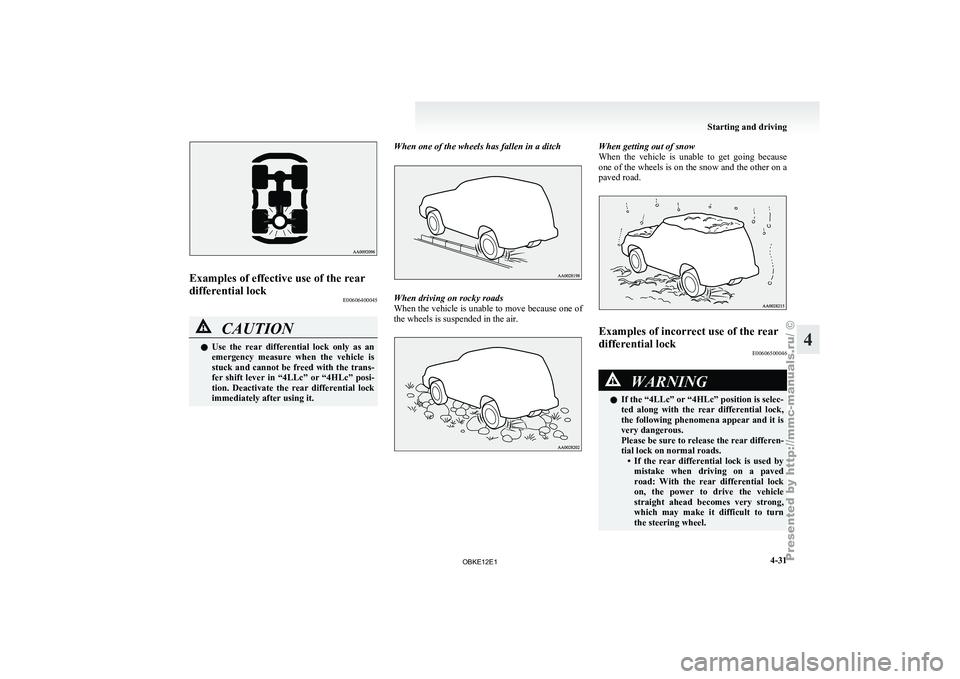
Examples of effective use of the rear
differential lock
E00606400045CAUTION
l
Use the rear differential lock only as an
emergency measure when the vehicle is
stuck and cannot be freed with the trans-
fer shift lever in “4LLc” or “4HLc” posi-
tion. Deactivate the rear differential lock
immediately after using it. When one of the wheels has fallen in a ditch When driving on rocky roads
When the
vehicle
is unable to move because one of
the wheels is suspended in the air. When getting out of snow
When the vehicle
is unable to get going because
one of the wheels is on the snow and the other on a
paved road. Examples of incorrect use of the rear
differential lock
E00606500046 WARNING
l If the “4LLc” or “4HLc” position is selec-
ted along
with
the rear differential lock,
the following phenomena appear and it is
very dangerous.
Please be sure to release the rear differen-
tial lock on normal roads. • If the rear differential lock is used bymistake when driving on a paved
road: With the rear differential lock
on, the power to drive the vehicle
straight ahead becomes very strong,
which may make it difficult to turn
the steering wheel. Starting and driving
4-31 4
OBKE12E1
Page 157 of 377
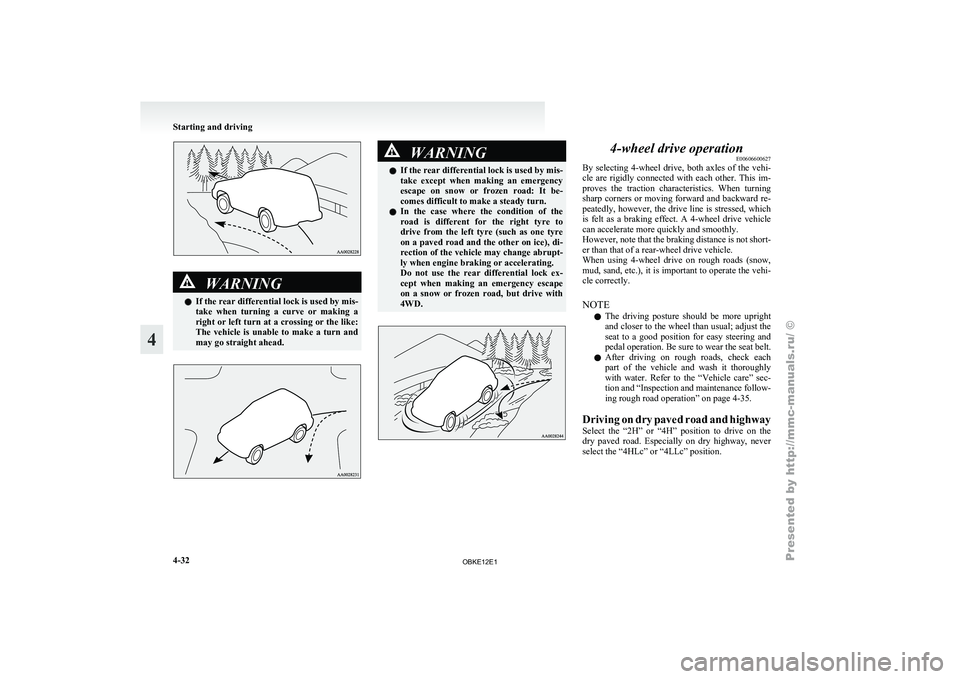
WARNING
l If the
rear differential lock is used by mis-
take when turning a curve or making a
right or left turn at a crossing or the like:
The vehicle is unable to make a turn and
may go straight ahead. WARNING
l If the rear
differential lock is used by mis-
take except when making an emergency
escape on snow or frozen road: It be-
comes difficult to make a steady turn.
l In the case where the condition of the
road is different for the right tyre to
drive from the left tyre (such as one tyre
on a paved road and the other on ice), di-
rection of the vehicle may change abrupt-
ly when engine braking or accelerating.
Do not use the rear differential lock ex-
cept when making an emergency escape
on a snow or frozen road, but drive with
4WD. 4-wheel drive operation
E00606600627
By selecting 4-wheel
drive, both axles of the vehi-
cle are rigidly connected with each other. This im-
proves the traction characteristics. When turning
sharp corners or moving forward and backward re-
peatedly, however, the drive line is stressed, which
is felt as a braking effect. A 4-wheel drive vehicle
can accelerate more quickly and smoothly.
However, note that the braking distance is not short-
er than that of a rear-wheel drive vehicle.
When using 4-wheel drive on rough roads (snow,
mud, sand, etc.), it is important to operate the vehi-
cle correctly.
NOTE
l The driving posture should be more upright
and closer to the wheel than usual; adjust the
seat to a good position for easy steering and
pedal operation. Be sure to wear the seat belt.
l After driving on rough roads, check each
part of the vehicle and wash it thoroughly
with water. Refer to the “Vehicle care” sec-
tion and “Inspection and maintenance follow-
ing rough road operation” on page 4-35.
Driving on dry paved road and highway
Select the “2H” or “4H” position to drive on the
dry paved road. Especially on dry highway, never
select the “4HLc” or “4LLc” position. Starting and driving
4-32
4
OBKE12E1
Page 159 of 377
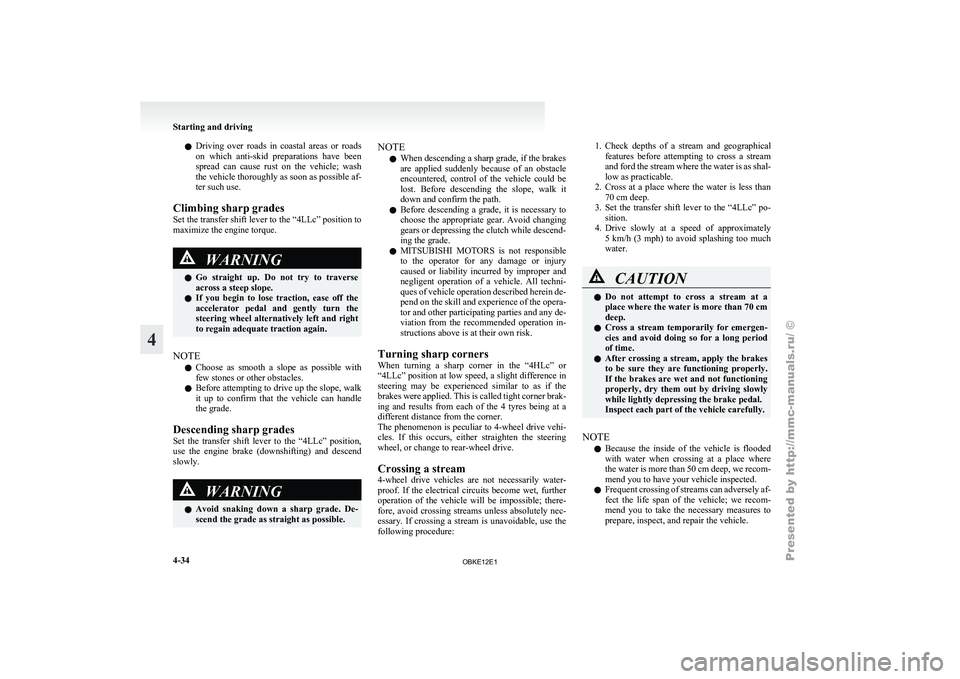
l
Driving over
roads in coastal areas or roads
on which anti-skid preparations have been
spread can cause rust on the vehicle; wash
the vehicle thoroughly as soon as possible af-
ter such use.
Climbing sharp grades
Set the transfer shift lever to the “4LLc” position to
maximize the engine torque. WARNING
l Go
straight
up.
Do not try to traverse
across a steep slope.
l If you begin to lose traction, ease off the
accelerator pedal and gently turn the
steering wheel alternatively left and right
to regain adequate traction again.
NOTE l Choose
as smooth
a slope as possible with
few stones or other obstacles.
l Before attempting to drive up the slope, walk
it up to confirm that the vehicle can handle
the grade.
Descending sharp grades
Set the transfer shift lever to the “4LLc” position,
use the engine brake (downshifting) and descend
slowly. WARNING
l Avoid
snaking
down
a sharp grade. De-
scend the grade as straight as possible. NOTE
l When descending a sharp grade, if the brakes
are
applied suddenly
because of an obstacle
encountered, control of the vehicle could be
lost. Before descending the slope, walk it
down and confirm the path.
l Before descending a grade, it is necessary to
choose the appropriate gear. Avoid changing
gears or depressing the clutch while descend-
ing the grade.
l MITSUBISHI MOTORS is not responsible
to the operator for any damage or injury
caused or liability incurred by improper and
negligent operation of a vehicle. All techni-
ques of vehicle operation described herein de-
pend on the skill and experience of the opera-
tor and other participating parties and any de-
viation from the recommended operation in-
structions above is at their own risk.
Turning sharp corners
When turning a sharp corner in the “4HLc” or
“4LLc” position at low speed, a slight difference in
steering may be experienced similar to as if the
brakes were applied. This is called tight corner brak-
ing and results from each of the 4 tyres being at a
different distance from the corner.
The phenomenon is peculiar to 4-wheel drive vehi-
cles. If this occurs, either straighten the steering
wheel, or change to rear-wheel drive.
Crossing a stream
4-wheel drive vehicles are not necessarily water-
proof. If the electrical circuits become wet, further
operation of the vehicle will be impossible; there-
fore, avoid crossing streams unless absolutely nec-
essary. If crossing a stream is unavoidable, use the
following procedure: 1. Check depths of a stream and geographical
features before
attempting to cross a stream
and ford the stream where the water is as shal-
low as practicable.
2. Cross at a place where the water is less than 70 cm deep.
3. Set the transfer shift lever to the “4LLc” po- sition.
4. Drive slowly at a speed of approximately 5 km/h (3 mph) to avoid splashing too much
water. CAUTION
l
Do not
attempt
to cross a stream at a
place where the water is more than 70 cm
deep.
l Cross a stream temporarily for emergen-
cies and avoid doing so for a long period
of time.
l After crossing a stream, apply the brakes
to be sure they are functioning properly.
If the brakes are wet and not functioning
properly, dry them out by driving slowly
while lightly depressing the brake pedal.
Inspect each part of the vehicle carefully.
NOTE l Because
the inside
of the vehicle is flooded
with water when crossing at a place where
the water is more than 50 cm deep, we recom-
mend you to have your vehicle inspected.
l Frequent crossing of streams can adversely af-
fect the life span of the vehicle; we recom-
mend you to take the necessary measures to
prepare, inspect, and repair the vehicle. Starting and driving
4-34
4
OBKE12E1
Page 163 of 377

When driving downhill
It is
important
to take advantage of the engine brak-
ing by shifting to a lower shift position while driv-
ing on steep downhill roads in order to prevent the
brakes from overheating. WARNING
l Do not
leave
any objects near the brake
pedal or let a floor mat slide under it; do-
ing so could prevent the full pedal stroke
that would be necessary in an emergency.
Make sure that the pedal can be operated
freely at all times. Make sure the floor
mat is securely held in place.
Brake pads l Avoid hard braking situations.
New
brakes need
to be broken-in by moder-
ate use for the first 200 km (125 miles).
l The disc brakes are provided with a warning
device which emits a shrieking metallic
sound while braking if the brake pads have
reached their wear limit.
If you hear this sound, have the brake pads re-
placed immediately. WARNING
l Driving with worn
brake pads will make
it harder to stop, and can cause an acci-
dent. Brake assist system
E00627000376
The brake assist system is a device assisting drivers
who cannot depress
the brake pedal firmly when it
is necessary to do so (such as in emergency stop sit-
uations) and provides greater braking force.
If the brake pedal is depressed suddenly, the brakes
will be applied with more force than usual. CAUTION
l
The brake
assist
system is not a device de-
signed to exercise braking force greater
than its capacity. Make sure to always
keep a sufficient distance between vehi-
cles in front of you without relying too
much on the brake assist system.
NOTE l Once
the brake
assist system is operational,
it maintains great braking force even if the
brake pedal is lightly released.
To stop its operation, completely remove
your foot from the brake pedal.
l When the brake assist system is in use while
driving, you may feel the brake pedal at-
tempt to resist, the pedal moves in small mo-
tions in conjunction with the operation noise,
or the vehicle body and the steering wheel vi-
brate. This occurs when the brake assist sys-
tem is operating normally and does not indi-
cate faulty operation. Continue to firmly de-
press the brake pedal. l
When
the
anti-lock
brake system warning
lamp is illuminated, the brake assist system
is not functioning. Starting and driving
4-38
4
OBKE12E1
Page 164 of 377
Anti-lock brake system (ABS)
E00607101248
Environmental conditions can
have an effect on
braking. During sudden braking when there is
snow, ice, oil, water etc. on the road surface, a skid
may occur. In this situation, steering control and
braking effectiveness is reduced and the stopping
distance is increased. The vehicle may also go into
an uncontrolled spin.
The ABS helps prevent the wheels from locking dur-
ing braking, thus maintaining directional stability,
ensuring controllability and providing optimum
braking force.
Driving hints
l Always maintain the same distance from the
vehicle in front of you as you would for a ve-
hicle not equipped with ABS.
Compared with vehicles not fitted with ABS,
your vehicle may require a longer stopping
distance in the following cases:
• Driving on gravel or snow-covered roads.
• Driving with tyre chains installed.
• Driving on roads where the road surfaceis pitted or has other differences in sur-
face height.
• Driving on bumpy roads or other poor driv- ing surfaces.
l In order to ensure that the ABS will operate
correctly in situations where tyre chains have
been fitted, drive in the “4H”, “4HLc”, or
“4LLc” position. l
Operation of
ABS is not restricted to situa-
tions where brakes are applied suddenly.
This system may also operate to prevent
wheel lock when you are driving over man-
holes, steel road-work plates, or the vehicle
is driven over steps or level differences in
the road, road markings, or other surfaces
which are difficult for the wheels to grip.
l When the ABS is activated, you may feel the
brake pedal pulsation and the vibrations of
the vehicle body and steering wheel. You
may also hear a characteristic noise. At this
time, you may feel as if the pedal attempts to
resist being depressed.
This is a normal result of the ABS operation,
and does not indicate a problem.
In this situation, to let the ABS work for
you, just hold the brake pedal down more
firmly. Do not pump the brake. This will
result in reduced braking performance.
l When the engine starts and after starting to
drive, you might hear operation noise from
the engine compartment or feel a shock from
the brake pedal. This is normal. The ABS is
performing self-check.
l The ABS will operate after the vehicle has ac-
celerated to a speed in excess of approximate-
ly 10 km/h (6 mph). It stops operating when
the vehicle decelerates to a speed below
about 5 km/h (3 mph). CAUTION
l
Even the ABS
cannot prevent the natural
laws of physics from acting on the vehi-
cle. It cannot for instance avoid accidents
that may result from excessive speed on
bends or following another vehicle too
closely or aquaplaning. It should remain
the driver’s task to observe safety precau-
tions to judge speeds and brake applica-
tions correctly in such conditions.
l Be sure to use tyres of the same type and
size on 4 wheels.
If tyre types or sizes are mixed, ABS may
not function normally.
l Never install a limited-slip differential,
which is not a MITSUBISHI MOTORS
genuine part, as the ABS may not func-
tion normally.
We recommend you to consult a
MITSUBISHI MOTORS Authorized
Service Point. Starting and driving
4-39 4
OBKE12E1