key MITSUBISHI PAJERO IV 2011 Owner's Guide
[x] Cancel search | Manufacturer: MITSUBISHI, Model Year: 2011, Model line: PAJERO IV, Model: MITSUBISHI PAJERO IV 2011Pages: 377, PDF Size: 29.43 MB
Page 139 of 377
Starting
E00601600811
Tips for starting l Do not
operate
the starter motor continuous-
ly longer than 10 seconds; doing so could
run down the battery. If the engine does not
start, turn the ignition key back to “LOCK”
position, wait a few seconds, and then try
again. Trying repeatedly with the starter mo-
tor still turning will damage the starter mech-
anism. WARNING
l Never
run
the
engine in a closed or poor-
ly ventilated area any longer than is nee-
ded to move your vehicle in or out of the
area. Carbon monoxide gases are odour-
less and can be fatal. CAUTION
l
Never attempt to
start the engine by push-
ing or pulling the vehicle.
l Do not run the engine at high rpm or
drive the vehicle at high speed until the en-
gine has had a chance to warm up.
l Release the ignition key as soon as the en-
gine starts to avoid damaging the starter
motor.
l If your vehicle is equipped with a turbo-
charger, do not stop the engine immedi-
ately after high-speed or uphill driving.
First allow the engine to idle to give the
turbocharger a chance to cool down. Starting the engine (petrol-powered ve-
hicles)
E00601701994
The starting procedure is as follows:
1. Insert the ignition
key and fasten the seat belt.
2. Make sure the parking brake is applied.
3. Depress and hold the brake pedal.
4. Fully depress the clutch pedal (M/T).
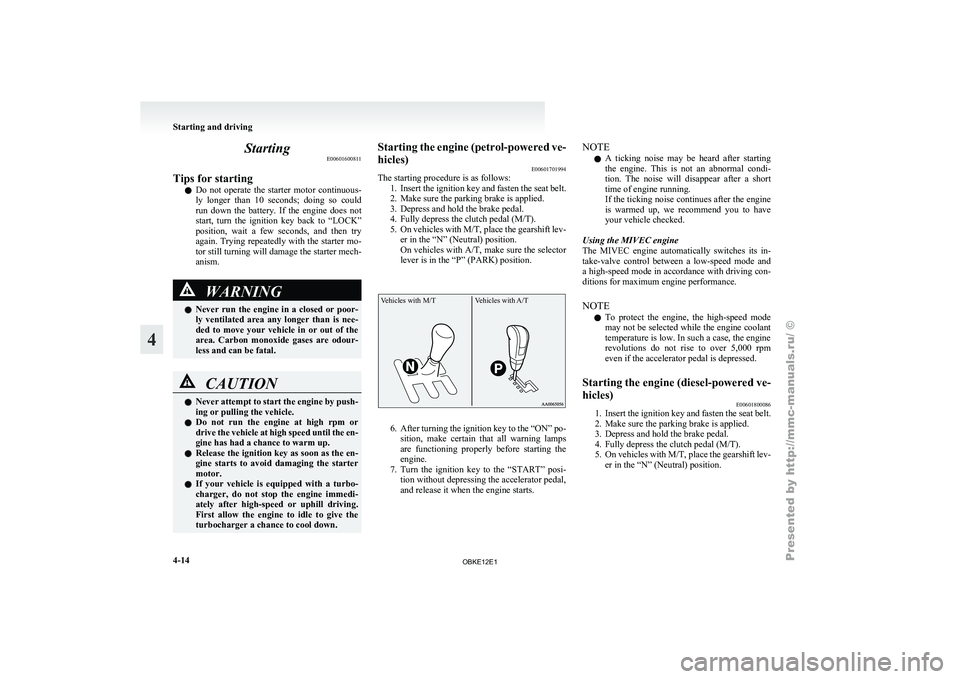
5. On vehicles with M/T, place the gearshift lev- er in the “N” (Neutral) position.
On vehicles with A/T, make sure the selector
lever is in the “P” (PARK) position.
Vehicles with M/T Vehicles with A/T 6. After turning the ignition key to the “ON” po-
sition, make
certain that all warning lamps
are functioning properly before starting the
engine.
7. Turn the ignition key to the “START” posi- tion without depressing the accelerator pedal,
and release it when the engine starts. NOTE
l A
ticking noise
may be heard after starting
the engine. This is not an abnormal condi-
tion. The noise will disappear after a short
time of engine running.
If the ticking noise continues after the engine
is warmed up, we recommend you to have
your vehicle checked.
Using the MIVEC engine
The MIVEC engine automatically switches its in-
take-valve control between a low-speed mode and
a high-speed mode in accordance with driving con-
ditions for maximum engine performance.
NOTE l To protect the engine, the high-speed mode
may not be selected while the engine coolant
temperature is low. In such a case, the engine
revolutions do not rise to over 5,000 rpm
even if the accelerator pedal is depressed.
Starting the engine (diesel-powered ve-
hicles) E00601800086
1. Insert the ignition key and fasten the seat belt.
2. Make sure the parking brake is applied.
3.
Depress and hold the brake pedal.
4. Fully depress the clutch pedal (M/T).
5. On vehicles with M/T, place the gearshift lev- er in the “N” (Neutral) position. Starting and driving
4-14
4
OBKE12E1
Page 140 of 377
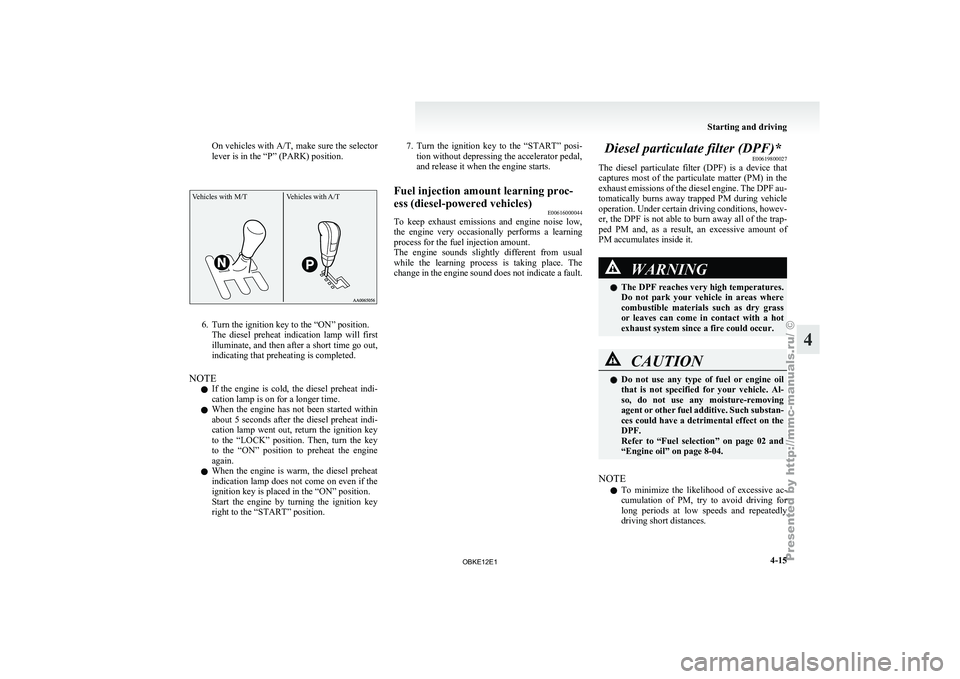
On vehicles with A/T, make sure
the selector
lever is in the “P” (PARK) position.
Vehicles with M/T Vehicles with A/T6. Turn the ignition key to the “ON” position.
The diesel preheat
indication lamp will first
illuminate, and then after a short time go out,
indicating that preheating is completed.
NOTE l If the engine is cold, the diesel preheat indi-
cation lamp is on for a longer time.
l When the engine has not been started within
about 5 seconds after the diesel preheat indi-
cation lamp went out, return the ignition key
to the “LOCK” position. Then, turn the key
to the “ON” position to preheat the engine
again.
l When the engine is warm, the diesel preheat
indication lamp does not come on even if the
ignition key is placed in the “ON” position.
Start the engine by turning the ignition key
right to the “START” position. 7. Turn the ignition key to the “START” posi-
tion without depressing the accelerator pedal,
and release it when the engine starts.
Fuel injection amount learning proc-
ess (diesel-powered vehicles) E00616000044
To keep
exhaust emissions and engine noise low,
the engine very
occasionally performs a learning
process for the fuel injection amount.
The engine sounds slightly different from usual
while the learning process is taking place. The
change in the engine sound does not indicate a fault. Diesel particulate filter (DPF)*
E00619800027
The diesel particulate
filter (DPF) is a device that
captures most of the particulate matter (PM) in the
exhaust emissions of the diesel engine. The DPF au-
tomatically burns away trapped PM during vehicle
operation. Under certain driving conditions, howev-
er, the DPF is not able to burn away all of the trap-
ped PM and, as a result, an excessive amount of
PM accumulates inside it. WARNING
l The DPF reaches very high temperatures.
Do not
park
your vehicle in areas where
combustible materials such as dry grass
or leaves can come in contact with a hot
exhaust system since a fire could occur. CAUTION
l
Do not use
any type of fuel or engine oil
that is not specified for your vehicle. Al-
so, do not use any moisture-removing
agent or other fuel additive. Such substan-
ces could have a detrimental effect on the
DPF.
Refer to “Fuel selection” on page 02 and
“Engine oil” on page 8-04.
NOTE l To
minimize the
likelihood of excessive ac-
cumulation of PM, try to avoid driving for
long periods at low speeds and repeatedly
driving short distances. Starting and driving
4-15 4
OBKE12E1
Page 148 of 377
CAUTION
l
Do not race the engine with brake pedal
pressed when the vehicle is stationary.
This can damage the A/T.
Also, when you depress the accelerator
pedal while holding down the brake ped-
al with the selector lever in the “P”
(PARK), “N” (NEUTRAL) or “D”
(DRIVE) position, the increase in engine
revolutions may be limited.
Passing acceleration E00604500156
To gain extra acceleration in “D” (DRIVE) posi-
tion, push the
accelerator to the floor. The automat-
ic transmission will automatically downshift.
NOTE
l In “Sports mode”, downshifts do not take
place when the accelerator is depressed all
the way to the floor.
Uphill/downhill driving E00610500089
DRIVING UPHILL
The transmission
may
not upshift to a higher gear
if the computer determines the current speed can-
not be maintained once a higher gear is engaged.
For smoother vehicle performance, if you release
the throttle while climbing a steep grade, the trans-
mission may not upshift. This is normal, as the com-
puter is temporarily preventing shifting. After reach-
ing the top of the hill, normal gear shift function
will resume. DRIVING DOWNHILL
When travelling down
steep grades, the computer
may automatically select a lower gear. This func-
tion assists engine braking efforts, reducing the
need for using the service brakes.
Waiting E00604600245
For short waiting periods, such as at traffic signals,
the vehicle can
be left in gear and held stationary
with the service brake.
For longer waiting periods with the engine running,
place the selector lever in the “N” (NEUTRAL) po-
sition and apply the parking brake, while holding
the vehicle stationary with the service brake. CAUTION
l
Never hold
the
vehicle stationary on a hill
using the accelerator pedal (without us-
ing the brake pedal). Always apply the
parking brake and/or service brakes.
Parking E00604700161
To park the vehicle, first bring it to a complete
stop, fully engage
the parking brake, and then
move the selector lever to the “P” (PARK) position.
If you are going to leave the vehicle unattended, al-
ways switch off the engine and remove the ignition
key. NOTE
l On
a slope,
be sure to apply the parking
brake before moving the selector lever to the
“P” (PARK) position. If you move the selec-
tor lever to the “P” (PARK) position before
applying the parking brake, it may be diffi-
cult to disengage the selector lever from the
“P” (PARK) position when next you drive
the vehicle, requiring application of a strong
force to the selector lever to move from the
“P” (PARK) position.
When the A/T makes no speed change E00604800348
If the transmission does not change speeds while
driving, or
your
vehicle does not pick up enough
speed when starting on an uphill slope, it may be
that there is something unusual happening in the
transmission, causing a safety device to activate.
We recommend you to have your vehicle checked
as soon as possible. 1. If your vehicle has difficulty moving uphill,
shift the selector lever into 2 nd
gear of the
“Sports mode”.
This method might not work depending on
the transmission malfunction.
2. Once the vehicle is moving on a level road, move the selector lever back to “D” (DRIVE). Starting and driving
4-23 4
OBKE12E1
Page 180 of 377
Check surroundings for safety.To change the indication on the screen
of the inside rear-view mirror
E00631300022
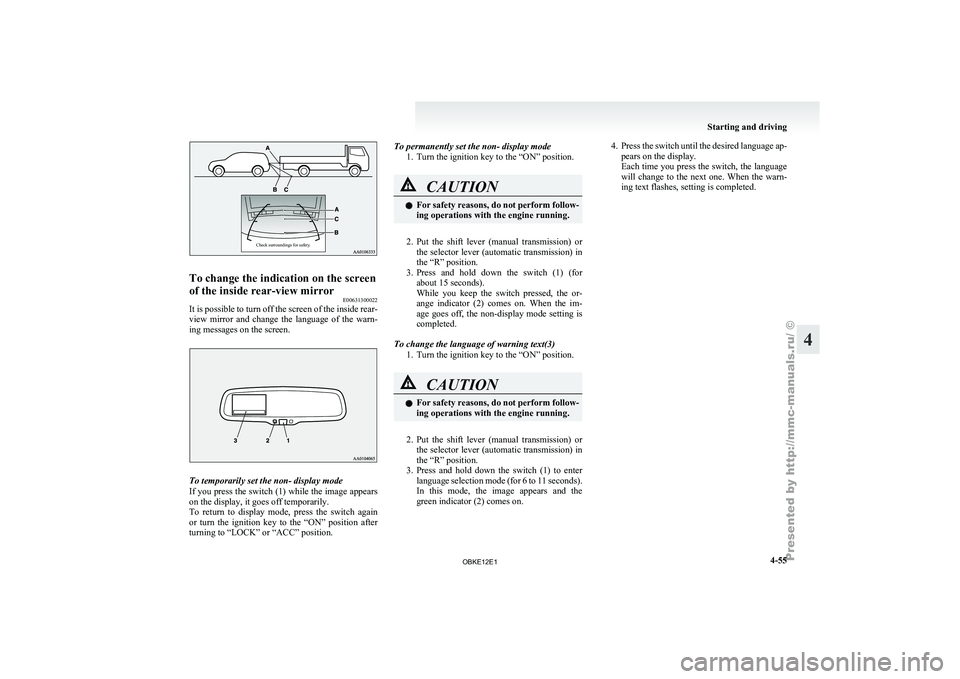
It is possible to turn off the screen of the inside rear-
view mirror and
change the language of the warn-
ing messages on the screen. To temporarily set the non- display mode
If you
press
the switch (1) while the image appears
on the display, it goes off temporarily.
To return to display mode, press the switch again
or turn the ignition key to the “ON” position after
turning to “LOCK” or “ACC” position. To permanently set the non- display mode
1. Turn the ignition key to the “ON” position. CAUTION
l
For safety
reasons,
do not perform follow-
ing operations with the engine running.
2. Put the shift lever (manual transmission) or
the selector
lever (automatic transmission) in
the “R” position.
3. Press and hold down the switch (1) (for about 15 seconds).
While you keep the switch pressed, the or-
ange indicator (2) comes on. When the im-
age goes off, the non-display mode setting is
completed.
To change the language of warning text(3) 1. Turn the ignition key to the “ON” position. CAUTION
l
For safety
reasons,
do not perform follow-
ing operations with the engine running.
2. Put the shift lever (manual transmission) or
the selector
lever (automatic transmission) in
the “R” position.
3. Press and hold down the switch (1) to enter language selection mode (for 6 to 11 seconds).
In this mode, the image appears and the
green indicator (2) comes on. 4. Press the switch until the desired language ap-
pears on the display.
Each time
you press the switch, the language
will change to the next one. When the warn-
ing text flashes, setting is completed. Starting and driving
4-55 4
OBKE12E1
Page 255 of 377
When the confirmation function is on, the sys-
tem will confirm
whether the number said is
acceptable. Answer “Yes.”
Answer “No” to return to pairing code selec-
tion.
NOTE l Some Bluetooth ®
devices require a specific
pairing code. Please refer to the device man-
ual for pairing code requirements.
l The pairing code entered here is only used
for the Bluetooth ®
connection certification.
It is any 4-digit number the user would like
to select.
Remember the pairing code as it needs to be
keyed into the Bluetooth ®
device later in the
pairing process.
Depending on the connection settings of the
Bluetooth ®
device, this code may have to be
entered each time you connect the Blue-
tooth ®
device to the Bluetooth ®
2.0 inter-
face. For the default connection settings, re-
fer to the instructions for the device.
7. The voice guide will say “Start pairing proce- dure on the device. See the device manual
for instructions.” Enter in the Bluetooth ®
de-
vice the 4-digit number you have registered
in Step 6.
NOTE l According to the corresponding device to
Bluetooth ®
, it might take a few minutes to
pair the Bluetooth ®
device with the Blue-
tooth ®
2.0 interface. l
If the
Bluetooth ®
2.0 interface cannot recog-
nize the Bluetooth ®
device, the voice guide
will say “Pairing has timed out” and the pair-
ing process will be cancelled.
Confirm that the device you are pairing sup-
ports Bluetooth ®
, and try pairing it again.
l If you enter the wrong number, the voice
guide will say “Pairing failed” and the pair-
ing process will be cancelled.
Confirm the number is right, and try pairing
it again.
8. The voice guide will say “Please say the name of the device after the beep.” You can
assign a desired name for the Bluetooth ®
de-
vice and register it as a device tag. Say the
name you want to register after the beep.
NOTE l When the confirmation function is on, after
repeating the device tag you have said, the
voice guide will ask “Is this correct?” An-
swer “Yes.”
To change the device tag, answer “No” and
then say the device tag again.
9. The voice guide will say “Pairing complete,” after which a beep will be played and the pair-
ing process will end.
Selecting a device E00760700016
If multiple paired Bluetooth ®
devices are
available
in the vehicle, the cellular phone or music player
most recently connected is automatically connected
to the Bluetooth ®
2.0 interface.
You can connect to the other cellular phone or mu-
sic player by following setting change procedures. To select a cellular phone
1. Press the SPEECH button.
2. Say “Setup.”
3.
Say “Select phone.”
4. After the voice guide says “Please say,” the numbers of the cellular phones and device
tags of corresponding cellular phones will be
read out in order, starting with the cellular
phone that has been most recently connected.
Say the number of the cellular phone that
you want to connect to.
When the confirmation function is on, the sys-
tem will ask you again whether the phone
that you want to connect to is correct. An-
swer “Yes” to continue and connect to the cel-
lular phone.
Answer “No,” and the voice guide will say
“Please say.”
Say the number of the phone that you want
to connect to.
NOTE l You can connect to a phone at any time by
pressing the SPEECH button and saying the
number, even before all of the paired num-
bers and device tags of corresponding cellu-
lar phones are read out by the system.
5. The selected phone will be connected to the Bluetooth ®
2.0 interface. The voice guide
will say “
system will return to the main menu.
To select a music player 1. Press the SPEECH button.
2. Say “Setup.”
3. Say “Select music player.”
4. After the voice guide says “Please say,” thenumbers of the music players and device tags For pleasant driving
5-72
5
OBKE12E1
Page 271 of 377
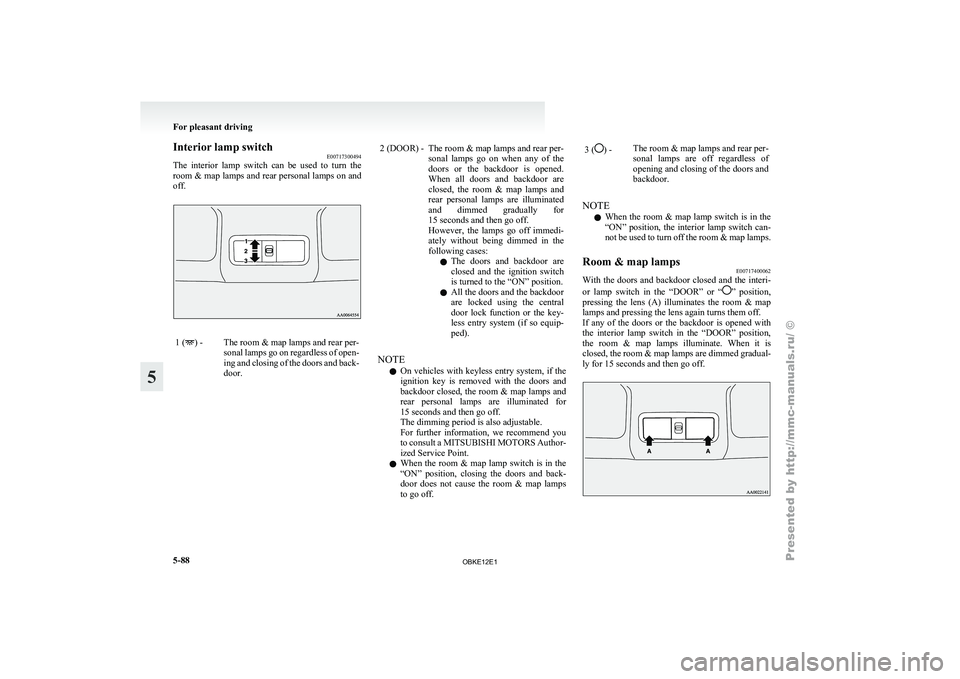
Interior lamp switch
E00717300494
The interior lamp
switch can be used to turn the
room & map lamps and rear personal lamps on and
off. 1 ( ) - The room & map lamps and rear per-
sonal lamps go
on regardless of open-
ing and closing of the doors and back-
door. 2 (DOOR) - The room & map lamps and rear per-
sonal lamps go
on when any of the
doors or the backdoor is opened.
When all doors and backdoor are
closed, the room & map lamps and
rear personal lamps are illuminated
and dimmed gradually for
15 seconds and then go off.
However, the lamps go off immedi-
ately without being dimmed in the
following cases:
l The doors and backdoor are
closed and the ignition switch
is turned to the “ON” position.
l All the doors and the backdoor
are locked using the central
door lock function or the key-
less entry system (if so equip-
ped).
NOTE l On
vehicles with
keyless entry system, if the
ignition key is removed with the doors and
backdoor closed, the room & map lamps and
rear personal lamps are illuminated for
15 seconds and then go off.
The dimming period is also adjustable.
For further information, we recommend you
to consult a MITSUBISHI MOTORS Author-
ized Service Point.
l When the room & map lamp switch is in the
“ON” position, closing the doors and back-
door does not cause the room & map lamps
to go off. 3 ( ) -
The room & map lamps and rear per-
sonal lamps are
off regardless of
opening and closing of the doors and
backdoor.
NOTE l When
the room
& map lamp switch is in the
“ON” position, the interior lamp switch can-
not be used to turn off the room & map lamps.
Room & map lamps E00717400062
With the doors and backdoor closed and the interi-
or lamp switch
in the “DOOR” or “ ” position,
pressing the
lens (A) illuminates the room & map
lamps and pressing the lens again turns them off.
If any of the doors or the backdoor is opened with
the interior lamp switch in the “DOOR” position,
the room & map lamps illuminate. When it is
closed, the room & map lamps are dimmed gradual-
ly for 15 seconds and then go off. For pleasant driving
5-88
5
OBKE12E1
Page 272 of 377
NOTE
l When
any of
the doors or the backdoor is
opened and the interior lamp switch in the
“ ” position, the room & map lamps remain
on even when the lens is pressed.
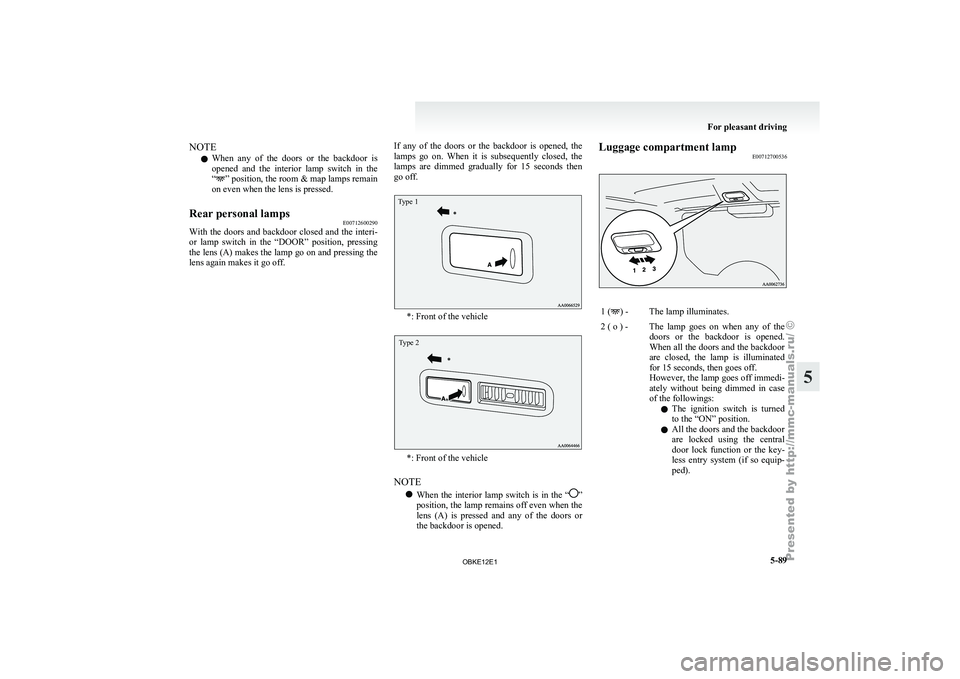
Rear personal lamps E00712600290
With the
doors and backdoor closed and the interi-
or lamp switch
in the “DOOR” position, pressing
the lens (A) makes the lamp go on and pressing the
lens again makes it go off. If any of the doors or the backdoor is opened, the
lamps go
on.
When it is subsequently closed, the
lamps are dimmed gradually for 15 seconds then
go off.
Type 1 *: Front of the vehicle
Type 2
*: Front of the vehicle
NOTE l When
the interior
lamp switch is in the “ ”
position, the lamp
remains off even when the
lens (A) is pressed and any of the doors or
the backdoor is opened. Luggage compartment lamp
E00712700536 1 ( ) - The lamp illuminates.
2 ( o ) - The lamp goes on when any of the doors or the
backdoor is opened.
When all the doors and the backdoor
are closed, the lamp is illuminated
for 15 seconds, then goes off.
However, the lamp goes off immedi-
ately without being dimmed in case
of the followings:
l The ignition switch is turned
to the “ON” position.
l All the doors and the backdoor
are locked using the central
door lock function or the key-
less entry system (if so equip-
ped). For pleasant driving
5-89 5
OBKE12E1
Page 273 of 377
NOTE
l On
vehicles with
keyless entry system, when
the ignition key is removed with the doors
and the backdoor closed, the lamp is illumi-
nated for 15 seconds, then goes off.
The dimming period is also adjustable.
For further information, we recommend you
to consult a MITSUBISHI MOTORS Author-
ized Service Point.
3 ( ) -
The lamp goes off.
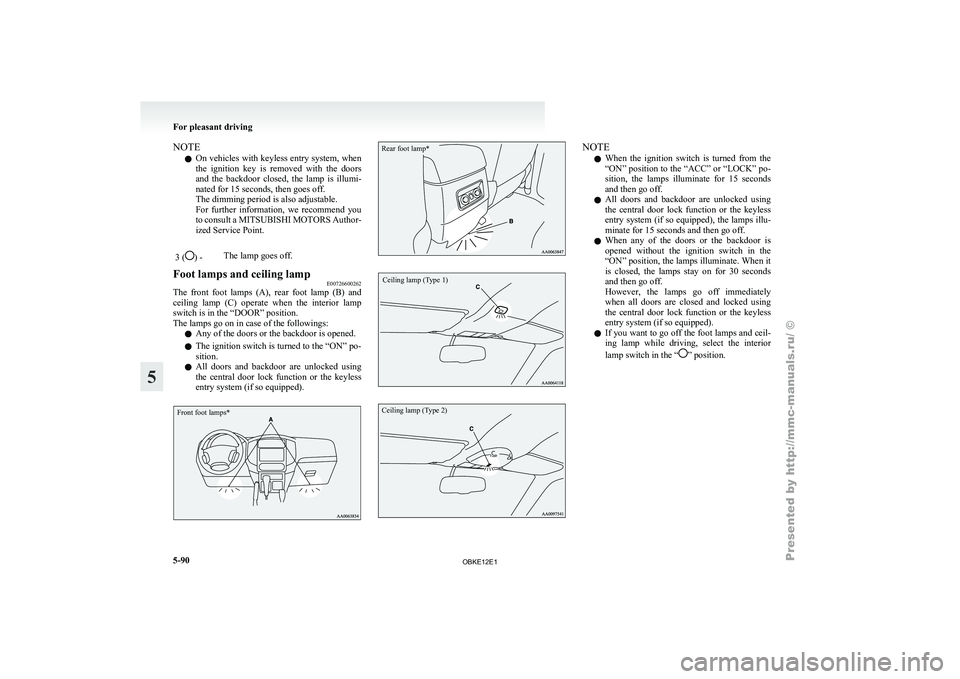
Foot lamps and ceiling lamp E00726600262
The front foot lamps (A), rear foot lamp (B) and
ceiling lamp (C)
operate when the interior lamp
switch is in the “DOOR” position.
The lamps go on in case of the followings:
l Any of the doors or the backdoor is opened.
l The ignition switch is turned to the “ON” po-
sition.
l All doors and backdoor are unlocked using
the central door lock function or the keyless
entry system (if so equipped).
Front foot lamps*
Rear foot lamp*
Ceiling lamp (Type 1)
Ceiling lamp (Type 2) NOTE
l When
the ignition
switch is turned from the
“ON” position to the “ACC” or “LOCK” po-
sition, the lamps illuminate for 15 seconds
and then go off.
l All doors and backdoor are unlocked using
the central door lock function or the keyless
entry system (if so equipped), the lamps illu-
minate for 15 seconds and then go off.
l When any of the doors or the backdoor is
opened without the ignition switch in the
“ON” position, the lamps illuminate. When it
is closed, the lamps stay on for 30 seconds
and then go off.
However, the lamps go off immediately
when all doors are closed and locked using
the central door lock function or the keyless
entry system (if so equipped).
l If you want to go off the foot lamps and ceil-
ing lamp while driving, select the interior
lamp switch in the “ ” position.For pleasant driving
5-90
5
OBKE12E1
Page 274 of 377

Door courtesy lamps
E00717500047
Each door courtesy
lamp illuminates when the rele-
vant door is opened and goes off when the door is
closed.
Front
Rear (5-door models) Lamps (room lamps, etc.) auto-cutout
function (Vehicles with keyless entry
system)
E00712900831
If any of
the interior lamps are left switched on
with the ignition switch in any position other than
“ON” or “ACC”, it goes off automatically after ap-
proximately 30 minutes.
The lamp goes on again if the ignition switch is
turned to the “ON” or “ACC” position, any door or
backdoor is opened and closed, or the keyless entry
remote control is operated.
NOTE
l The interior lamp auto-cut function period
can be adjusted or deactivated. We recom-
mend you to consult a MITSUBISHI
MOTORS Authorized Service Point for de-
tailed information and assistance. Storage spaces
E00713100885 CAUTION
l
Never leave
lighters,
cans of carbonated
drink, and spectacles in the cabin when
parking the vehicle in hot sunshine. The
cabin will become extremely hot, so light-
ers and other flammable items may catch
fire and unopened drink cans (including
beer cans) may rupture. The heat may al-
so deform or crack plastic spectacle len-
ses and other spectacle parts that are
made of plastic.
l Keep the lids of storage spaces closed
while driving the vehicle. A lid or the con-
tents of a storage space could otherwise
cause injuries.
NOTE l Do
not leave
valuables in any storage space
when leaving the vehicle. For pleasant driving
5-91 5
OBKE12E1
Page 275 of 377

1- Sunglasses holder*
2- Glove box
3-
Accessory box*
4-
Centre console box
5- Side box*
6- Luggage floor box
Glove box E00717601162
The glove box can be locked and unlocked using
the key. 1- To lock
2- To unlock
3-
To open, pull the lever NOTE
l When
the lamp
switch is in the “ ” or
“ ” position, the lower glove box lamp illu-
minates.
l The Auxiliary
Audio connector (RCA) (A)
or the Auxiliary Video connector (RCA) (A)
is located in the glove box (if so equipped).
For details, refer to “To use the external au-
dio input function” on page 5-56.
l The USB input terminal (B) is located in the
glove box (if so equipped). For details, refer
to “USB input terminal” on page 5-82.
l Small articles can be stored in the upper area
(C) of the glove box. Centre console box
E00722600105
Upper and lower boxes are located inside the cen-
tre console box. The centre console box can also be used as an arm-
rest. Refer to “Armrest” on page 2-08.
1- Upper box
2- Lower box
Upper box
To open
the upper box, lift the left upper release lev-
er (A) and raise the lid. For pleasant driving
5-92
5
OBKE12E1