key MITSUBISHI PAJERO IV 2011 User Guide
[x] Cancel search | Manufacturer: MITSUBISHI, Model Year: 2011, Model line: PAJERO IV, Model: MITSUBISHI PAJERO IV 2011Pages: 377, PDF Size: 29.43 MB
Page 28 of 377
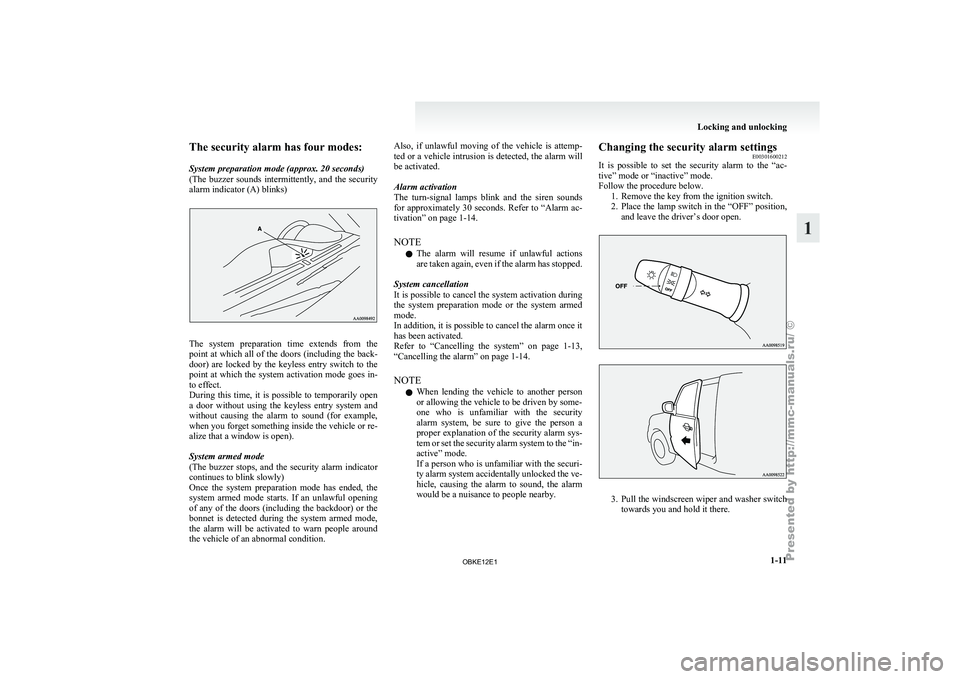
The security alarm has four modes:
System preparation mode (approx. 20 seconds)
(The buzzer
sounds
intermittently, and the security
alarm indicator (A) blinks) The system preparation time extends from the
point at
which
all of the doors (including the back-
door) are locked by the keyless entry switch to the
point at which the system activation mode goes in-
to effect.
During this time, it is possible to temporarily open
a door without using the keyless entry system and
without causing the alarm to sound (for example,
when you forget something inside the vehicle or re-
alize that a window is open).
System armed mode
(The buzzer stops, and the security alarm indicator
continues to blink slowly)
Once the system preparation mode has ended, the
system armed mode starts. If an unlawful opening
of any of the doors (including the backdoor) or the
bonnet is detected during the system armed mode,
the alarm will be activated to warn people around
the vehicle of an abnormal condition. Also, if unlawful moving of the vehicle is attemp-
ted or
a
vehicle intrusion is detected, the alarm will
be activated.
Alarm activation
The turn-signal lamps blink and the siren sounds
for approximately 30 seconds. Refer to “Alarm ac-
tivation” on page 1-14.
NOTE
l The alarm will resume if unlawful actions
are taken again, even if the alarm has stopped.
System cancellation
It is possible to cancel the system activation during
the system preparation mode or the system armed
mode.
In addition, it is possible to cancel the alarm once it
has been activated.
Refer to “Cancelling the system” on page 1-13,
“Cancelling the alarm” on page 1-14.
NOTE l When lending the vehicle to another person
or allowing the vehicle to be driven by some-
one who is unfamiliar with the security
alarm system, be sure to give the person a
proper explanation of the security alarm sys-
tem or set the security alarm system to the “in-
active” mode.
If a person who is unfamiliar with the securi-
ty alarm system accidentally unlocked the ve-
hicle, causing the alarm to sound, the alarm
would be a nuisance to people nearby. Changing the security alarm settings
E00301600212
It is possible
to set the security alarm to the “ac-
tive” mode or “inactive” mode.
Follow the procedure below. 1. Remove the key from the ignition switch.
2. Place the lamp switch in the “OFF” position,and leave the driver’s door open. 3. Pull
the windscreen wiper and washer switch
towards you and hold it there. Locking and unlocking
1-11 1
OBKE12E1
Page 29 of 377
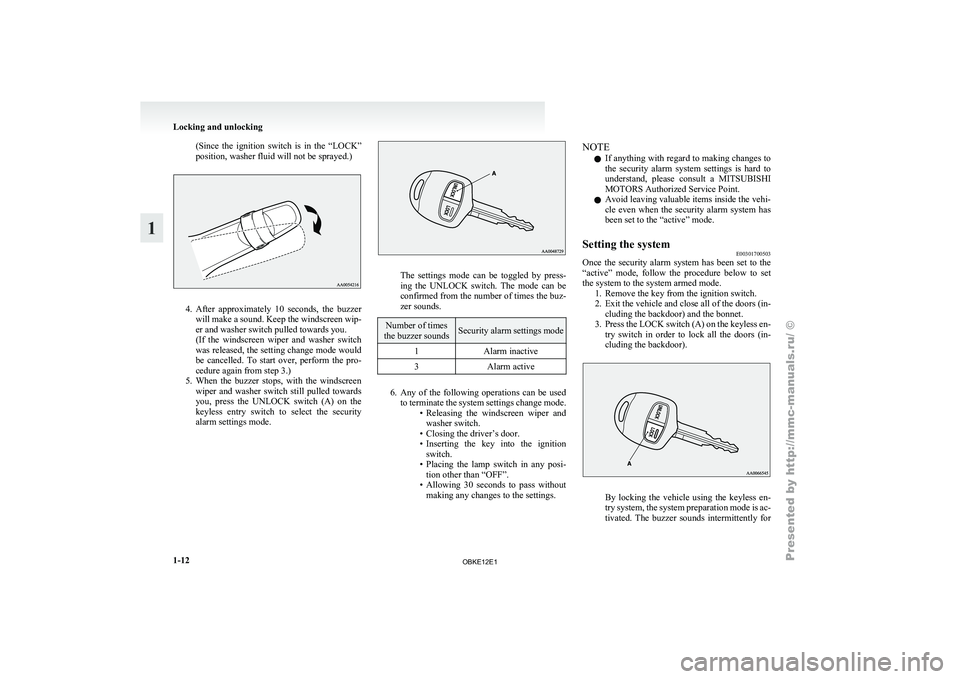
(Since the ignition switch is in the “LOCK”
position, washer fluid will not be sprayed.)
4. After approximately 10 seconds, the buzzer
will make
a sound. Keep the windscreen wip-
er and washer switch pulled towards you.
(If the windscreen wiper and washer switch
was released, the setting change mode would
be cancelled. To start over, perform the pro-
cedure again from step 3.)
5. When the buzzer stops, with the windscreen wiper and washer switch still pulled towards
you, press the UNLOCK switch (A) on the
keyless entry switch to select the security
alarm settings mode. The settings mode can be toggled by press-
ing the
UNLOCK
switch. The mode can be
confirmed from the number of times the buz-
zer sounds. Number of times
the buzzer sounds Security alarm settings mode
1 Alarm inactive
3 Alarm active 6. Any of the following operations can be used
to terminate
the system settings change mode.
• Releasing the windscreen wiper and washer switch.
• Closing the driver’s door.
• Inserting the key into the ignition switch.
• Placing the lamp switch in any posi- tion other than “OFF”.
• Allowing 30 seconds to pass without making any changes to the settings. NOTE
l If
anything with
regard to making changes to
the security alarm system settings is hard to
understand, please consult a MITSUBISHI
MOTORS Authorized Service Point.
l Avoid leaving valuable items inside the vehi-
cle even when the security alarm system has
been set to the “active” mode.
Setting the system E00301700503
Once the security alarm system has been set to the
“active” mode, follow
the procedure below to set
the system to the system armed mode. 1. Remove the key from the ignition switch.
2. Exit the vehicle and close all of the doors (in-cluding the backdoor) and the bonnet.
3. Press the LOCK switch (A) on the keyless en- try switch in order to lock all the doors (in-
cluding the backdoor). By locking the vehicle using the keyless en-
try system,
the
system preparation mode is ac-
tivated. The buzzer sounds intermittently for Locking and unlocking
1-12
1
OBKE12E1
Page 30 of 377
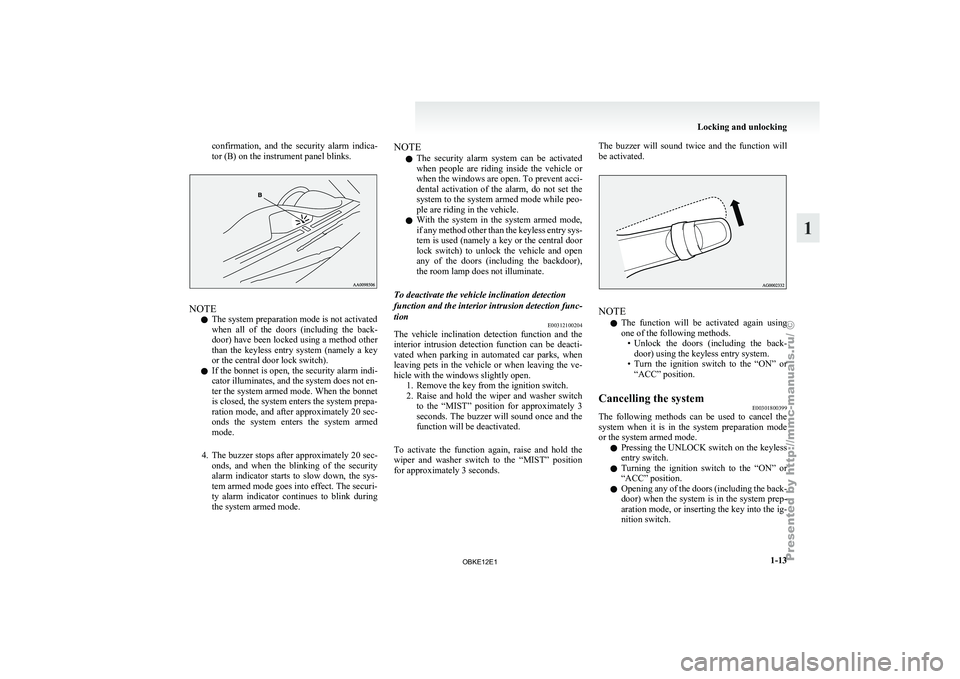
confirmation, and the security alarm indica-
tor (B) on the instrument panel blinks.
NOTE
l The system preparation mode is not activated
when
all of
the doors (including the back-
door) have been locked using a method other
than the keyless entry system (namely a key
or the central door lock switch).
l If the bonnet is open, the security alarm indi-
cator illuminates, and the system does not en-
ter the system armed mode. When the bonnet
is closed, the system enters the system prepa-
ration mode, and after approximately 20 sec-
onds the system enters the system armed
mode.
4. The buzzer stops after approximately 20 sec- onds, and when the blinking of the security
alarm indicator starts to slow down, the sys-
tem armed mode goes into effect. The securi-
ty alarm indicator continues to blink during
the system armed mode. NOTE
l The security
alarm
system can be activated
when people are riding inside the vehicle or
when the windows are open. To prevent acci-
dental activation of the alarm, do not set the
system to the system armed mode while peo-
ple are riding in the vehicle.
l With the system in the system armed mode,
if any method other than the keyless entry sys-
tem is used (namely a key or the central door
lock switch) to unlock the vehicle and open
any of the doors (including the backdoor),
the room lamp does not illuminate.
To deactivate the vehicle inclination detection
function and the interior intrusion detection func-
tion E00312100204
The vehicle inclination detection function and the
interior intrusion
detection
function can be deacti-
vated when parking in automated car parks, when
leaving pets in the vehicle or when leaving the ve-
hicle with the windows slightly open. 1. Remove the key from the ignition switch.
2. Raise and hold the wiper and washer switchto the “MIST” position for approximately 3
seconds. The buzzer will sound once and the
function will be deactivated.
To activate the function again, raise and hold the
wiper and washer switch to the “MIST” position
for approximately 3 seconds. The buzzer will sound twice and the function will
be activated.
NOTE
l The
function will
be activated again using
one of the following methods. • Unlock the doors (including the back-door) using the keyless entry system.
• Turn the ignition switch to the “ON” or “ACC” position.
Cancelling the system E00301800399
The following methods can be used to cancel the
system when it
is in the system preparation mode
or the system armed mode.
l Pressing the UNLOCK switch on the keyless
entry switch.
l Turning the ignition switch to the “ON” or
“ACC” position.
l Opening any of the doors (including the back-
door) when the system is in the system prep-
aration mode, or inserting the key into the ig-
nition switch. Locking and unlocking
1-13 1
OBKE12E1
Page 31 of 377
NOTE
l If
the bonnet
is opened during the system prep-
aration mode, the system preparation mode
is suspended. The system returns to the sys-
tem preparation mode when the bonnet is
closed.
l If the battery terminals are disconnected
while the system is in the system preparation
mode, the memory will be erased.
l It is possible to register up to 4 remote con-
trol switches. As long as they are registered,
any of the 4 remote control switches, other
than the one used to activate the system, can
be used to cancel the system.
If you want to register additional remote con-
trol switches, please contact a MITSUBISHI
MOTORS Authorized Service Point.
l The activation distance for the keyless entry
system is approximately 4 m.
If it is not possible to lock or unlock the vehi-
cle by pressing the switch at the correct dis-
tance or the security alarm system cannot be
set or cancelled using the switch, the battery
may need to be replaced.
For further information, please consult a
MITSUBISHI MOTORS Authorized Service
Point.
If you replace the battery yourself, refer to
“Procedure for replacing the remote control
switch battery” on page 1-05. l
If
the
UNLOCK switch is pressed and no
door is (including the backdoor) opened with-
in 30 seconds, the doors will automatically re-
lock. In this case as well, the system prepara-
tion mode will go into effect.
The time between pressing the UNLOCK
switch and automatic locking can be adjus-
ted. Consult a MITSUBISHI MOTORS Au-
thorized Service Point.
Alarm activation E00301900840
When the system is in the system armed mode, the
alarm will be
activated as follows if the vehicle is
unlocked and any of the doors (including the back-
door) or bonnet is opened using a method other
than pressing the UNLOCK switch on the keyless
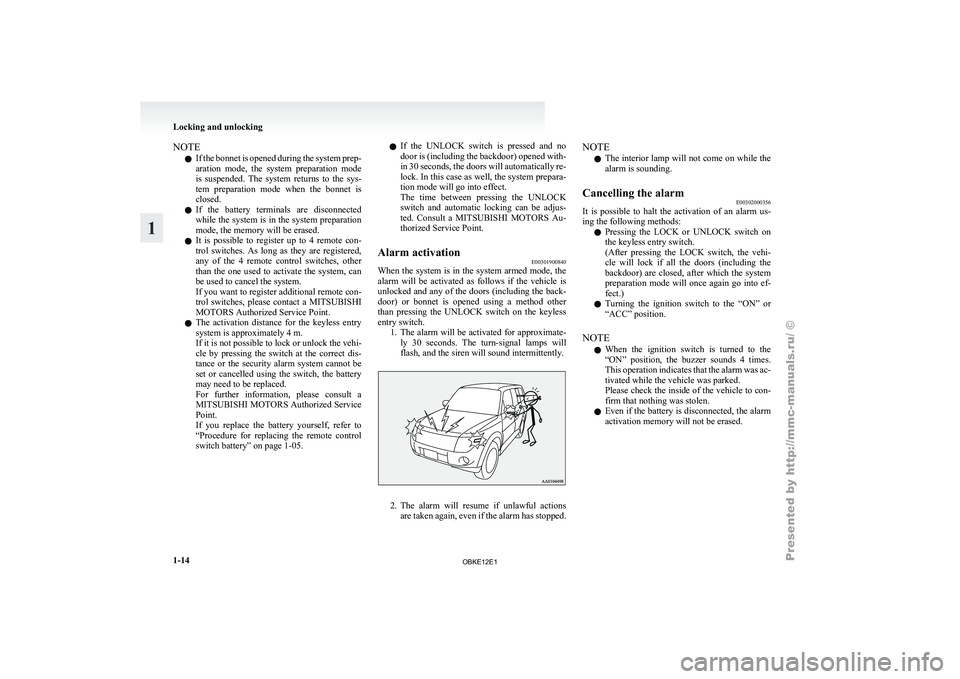
entry switch. 1. The alarm will be activated for approximate-ly 30 seconds. The turn-signal lamps will
flash, and the siren will sound intermittently. 2. The alarm will resume if unlawful actions
are taken
again, even if the alarm has stopped. NOTE
l The
interior lamp
will not come on while the
alarm is sounding.
Cancelling the alarm E00302000356
It is possible to halt the activation of an alarm us-
ing the following methods:
l Pressing the
LOCK
or UNLOCK switch on
the keyless entry switch.
(After pressing the LOCK switch, the vehi-
cle will lock if all the doors (including the
backdoor) are closed, after which the system
preparation mode will once again go into ef-
fect.)
l Turning the ignition switch to the “ON” or
“ACC” position.
NOTE l When the ignition switch is turned to the
“ON” position, the buzzer sounds 4 times.
This operation indicates that the alarm was ac-
tivated while the vehicle was parked.
Please check the inside of the vehicle to con-
firm that nothing was stolen.
l Even if the battery is disconnected, the alarm
activation memory will not be erased. Locking and unlocking
1-14
1
OBKE12E1
Page 32 of 377
Electric window control
E00302200185
The electric windows can only be operated with the
ignition switch in the “ON” position.
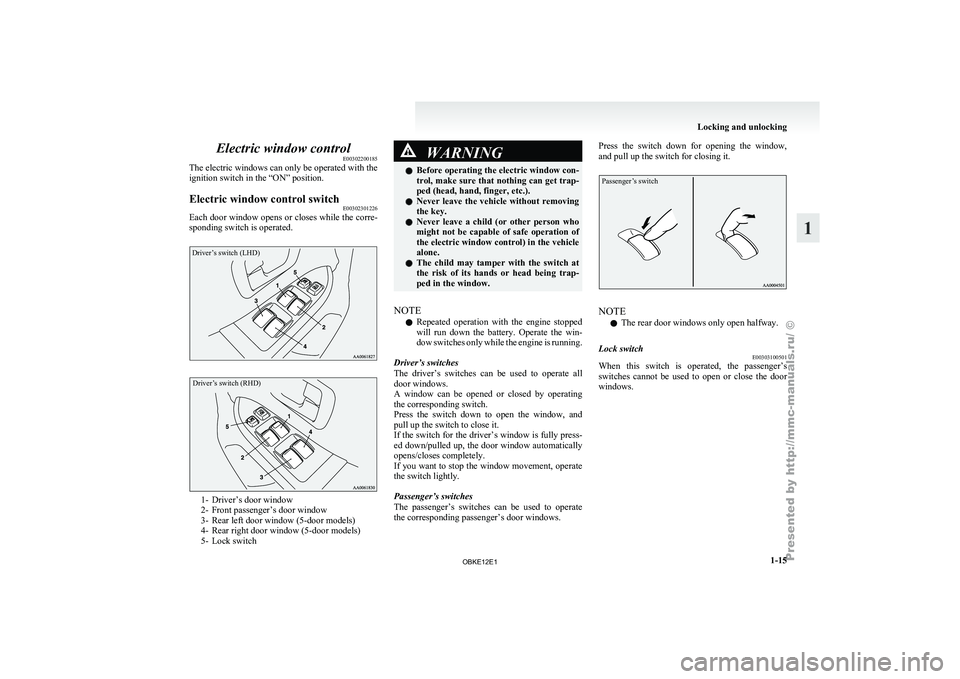
Electric window control switch E00302301226
Each door window opens or closes while the corre-
sponding switch is operated.Driver’s switch (LHD)
Driver’s switch (RHD) 1- Driver’s door window
2- Front passenger’s door window
3-
Rear left door window (5-door models)
4-
Rear right door window (5-door models)
5- Lock switch WARNING
l Before operating the
electric window con-
trol, make sure that nothing can get trap-
ped (head, hand, finger, etc.).
l Never leave the vehicle without removing
the key.
l Never leave a child (or other person who
might not be capable of safe operation of
the electric window control) in the vehicle
alone.
l The child may tamper with the switch at
the risk of its hands or head being trap-
ped in the window.
NOTE l Repeated
operation with
the engine stopped
will run down the battery. Operate the win-
dow switches only while the engine is running.
Driver’s switches
The driver’s switches can be used to operate all
door windows.
A window can be opened or closed by operating
the corresponding switch.
Press the switch down to open the window, and
pull up the switch to close it.
If the switch for the driver’s window is fully press-
ed down/pulled up, the door window automatically
opens/closes completely.
If you want to stop the window movement, operate
the switch lightly.
Passenger’s switches
The passenger’s switches can be used to operate
the corresponding passenger’s door windows. Press the switch down for opening the window,
and pull up the switch for closing it.
Passenger’s switch
NOTE
l The rear door windows only open halfway.
Lock switch E00303100501
When this switch is operated, the passenger’s
switches cannot be
used to open or close the door
windows. Locking and unlocking
1-15 1
OBKE12E1
Page 35 of 377
NOTE
l When
the sunroof
is tilted up, the sunshade
is automatically opened slightly.
To tilt down, press the switch (2). WARNING
l Do not
put
head, hands or anything else
out of the sunroof opening while driving
the vehicle.
l Never leave a child (or other person who
might not be capable of safe operation of
the sunroof switch) in the vehicle alone.
l Before operating the sunroof, make sure
that nothing is capable of being trapped
(head, hand, finger, etc.).
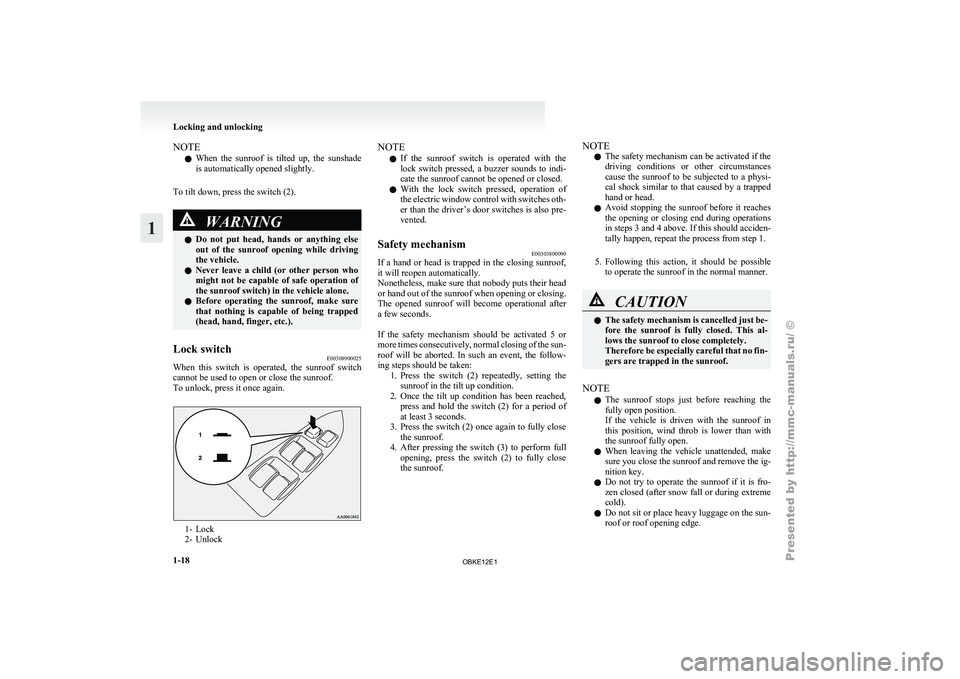
Lock switch E00308900025
When this switch is operated, the sunroof switch
cannot be used to open or close the sunroof.
To unlock, press it once again. 1- Lock
2- Unlock NOTE
l If
the sunroof
switch is operated with the
lock switch pressed, a buzzer sounds to indi-
cate the sunroof cannot be opened or closed.
l With the lock switch pressed, operation of
the electric window control with switches oth-
er than the driver’s door switches is also pre-
vented.
Safety mechanism E00303800090
If a hand or head is trapped in the closing sunroof,
it will reopen automatically.
Nonetheless, make sure
that nobody puts their head
or hand out of the sunroof when opening or closing.
The opened sunroof will become operational after
a few seconds.
If the safety mechanism should be activated 5 or
more times consecutively, normal closing of the sun-
roof will be aborted. In such an event, the follow-
ing steps should be taken: 1. Press the switch (2) repeatedly, setting thesunroof in the tilt up condition.
2. Once the tilt up condition has been reached, press and hold the switch (2) for a period of
at least 3 seconds.
3. Press the switch (2) once again to fully close the sunroof.
4. After pressing the switch (3) to perform full opening, press the switch (2) to fully close
the sunroof. NOTE
l The
safety mechanism
can be activated if the
driving conditions or other circumstances
cause the sunroof to be subjected to a physi-
cal shock similar to that caused by a trapped
hand or head.
l Avoid stopping the sunroof before it reaches
the opening or closing end during operations
in steps 3 and 4 above. If this should acciden-
tally happen, repeat the process from step 1.
5. Following this action, it should be possible to operate the sunroof in the normal manner. CAUTION
l
The safety
mechanism
is cancelled just be-
fore the sunroof is fully closed. This al-
lows the sunroof to close completely.
Therefore be especially careful that no fin-
gers are trapped in the sunroof.
NOTE l The
sunroof stops
just before reaching the
fully open position.
If the vehicle is driven with the sunroof in
this position, wind throb is lower than with
the sunroof fully open.
l When leaving the vehicle unattended, make
sure you close the sunroof and remove the ig-
nition key.
l Do not try to operate the sunroof if it is fro-
zen closed (after snow fall or during extreme
cold).
l Do not sit or place heavy luggage on the sun-
roof or roof opening edge. Locking and unlocking
1-18
1
OBKE12E1
Page 58 of 377
WARNING
l The seat belts must not be twisted when
worn.
3. Pull the belt slightly to adjust slackness as de-
sired.
To unfasten
Hold the
latch plate and push the button on the buck-
le. NOTE
l As
the belt
retracts automatically, keep hold-
ing the latch plate while retracting so that the
belt stows slowly. Failure to do this could
damage the vehicle. Seat belt reminder/warning lamp
E00409800338
The seat belt
warning lamp is located on the instru-
ment panel. A tone and warning lamp are used to
remind the driver to fasten the seat belt. When the ignition key is turned to the “ON” posi-
tion, the warning
lamp will come on and a tone
will sound for about 6 seconds. If the driver’s seat
belt remains unfastened for approximately 1 mi-
nute later, the warning lamp will flash and the tone
sound intermittently (each 12 times) when the vehi-
cle is driven. If the driver subsequently unfastens
the seat belt while driving, the warning lamp and
tone will issue further warnings. And if the seat
belt remains unfastened, the warning lamp and tone
will issue further warnings each time the vehicle
starts moving from a stop. When the seat belt is fas-
tened, the warnings will stop.
Adjustable seat belt anchor (front
seats) E00405000286
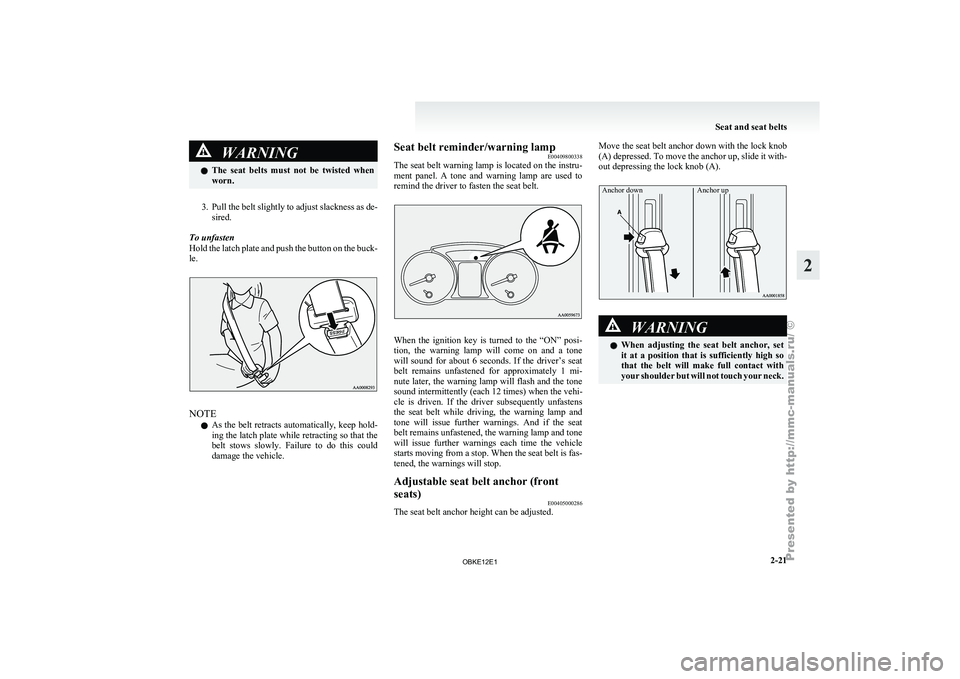
The seat belt anchor height can be adjusted. Move the seat belt anchor down with the lock knob
(A) depressed. To
move the anchor up, slide it with-
out depressing the lock knob (A).
Anchor down Anchor up WARNING
l When adjusting
the
seat belt anchor, set
it at a position that is sufficiently high so
that the belt will make full contact with
your shoulder but will not touch your neck. Seat and seat belts
2-21 2
OBKE12E1
Page 63 of 377
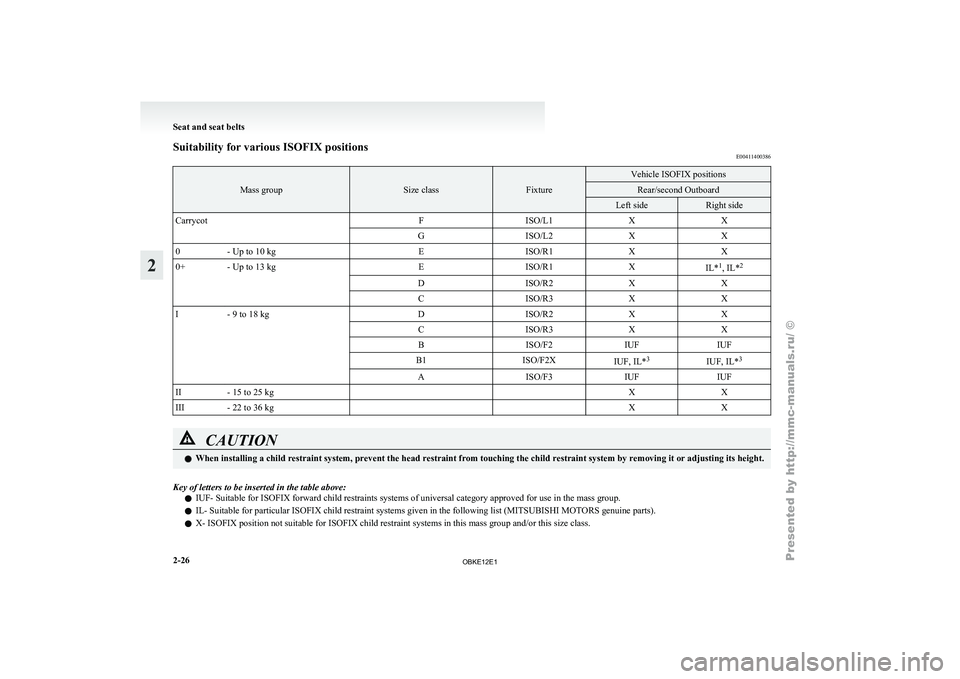
Suitability for various ISOFIX positions
E00411400386Mass group Size class Fixture Vehicle ISOFIX positions
Rear/second Outboard
Left side Right side
Carrycot FISO/L1XX
G ISO/L2XX
0 - Up to 10 kg EISO/R1XX
0+ - Up to 13 kg EISO/R1X
IL*1
, IL* 2
D ISO/R2XX
C ISO/R3XX
I - 9 to 18 kg DISO/R2XX
C ISO/R3XX
B ISO/F2IUFIUF
B1 ISO/F2X
IUF, IL*3
IUF, IL*3
A ISO/F3IUFIUF
II - 15 to 25 kg X X
III - 22 to 36 kg X XCAUTION
l
When installing a child restraint system, prevent the head restraint from touching the child restraint system by removing it or adjusting its height.
Key of letters to be inserted in the table above: l IUF- Suitable for ISOFIX forward child restraints systems of universal category approved for use in the mass group.
l IL- Suitable for particular ISOFIX child restraint systems given in the following list (
MITSUBISHI MOTORS genuine parts).
l X- ISOFIX position not suitable for ISOFIX child restraint systems in this mass group and/or this size class. Seat and seat belts
2-26
2
OBKE12E1
Page 65 of 377
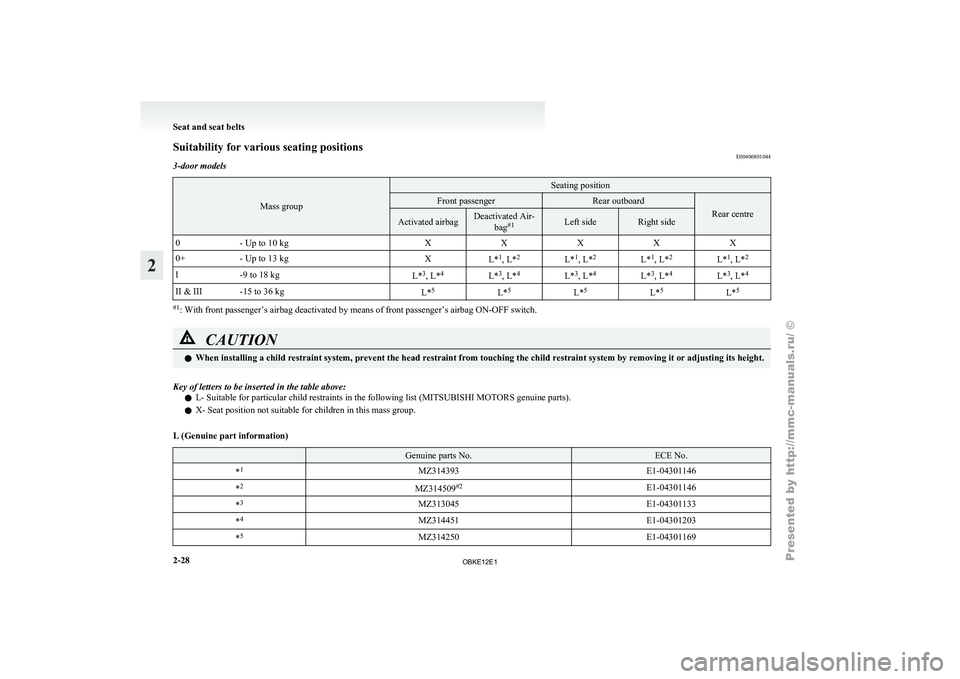
Suitability for various seating positions
E00406801044
3-door models Mass group Seating position
Front passenger Rear outboard
Rear centre
Activated airbag Deactivated Air-
bag#1 Left side Right side
0 - Up to 10 kg XXXXX
0+ - Up to 13 kg
XL*1
, L* 2
L*1
, L* 2
L*1
, L* 2
L*1
, L* 2
I -9 to 18 kg
L*3
, L* 4
L*3
, L* 4
L*3
, L* 4
L*3
, L* 4
L*3
, L* 4
II & III -15 to 36 kg L*5
L*5
L*5
L*5
L*5 #1
: With front passenger’s airbag deactivated by means of front passenger’s airbag ON-OFF switch. CAUTION
l
When installing a child restraint system, prevent the head restraint from touching the child restraint system by removing it or adjusting its height.
Key of letters to be inserted in the table above: l L- Suitable for particular child restraints in the following list (
MITSUBISHI MOTORS genuine parts).
l X- Seat position not suitable for children in this mass group.
L (Genuine part information) Genuine parts No. ECE No.
* 1
MZ314393 E1-04301146
* 2
MZ314509#2
E1-04301146
* 3
MZ313045 E1-04301133
* 4
MZ314451 E1-04301203
* 5
MZ314250 E1-04301169Seat and seat belts
2-28
2
OBKE12E1
Page 66 of 377
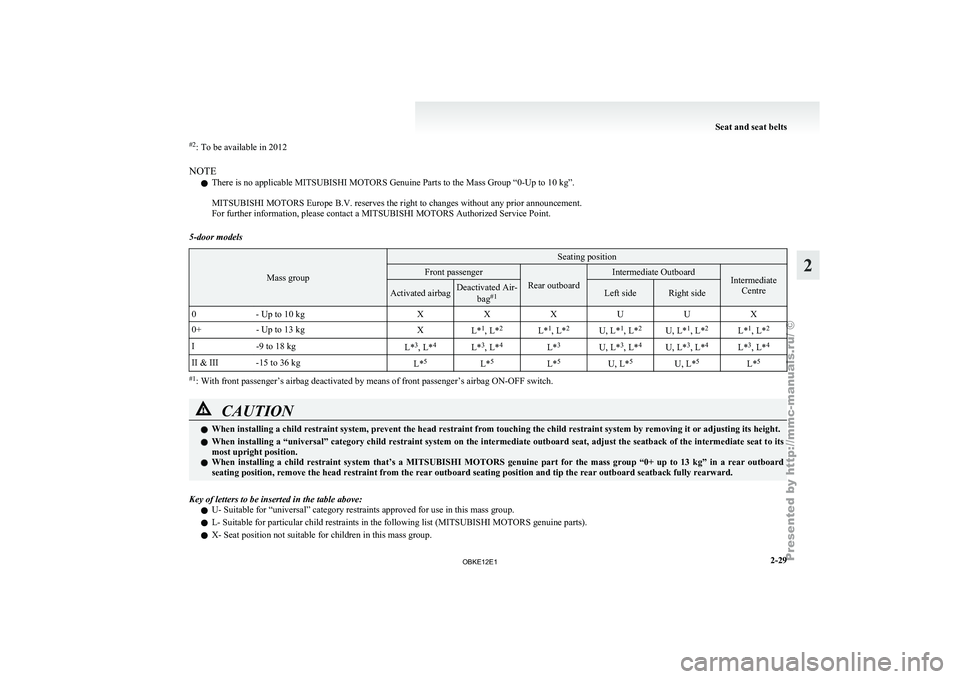
#2
: To be available in 2012
NOTE l There is no applicable MITSUBISHI MOTORS
Genuine Parts to the Mass Group “0-Up to 10 kg”.
MITSUBISHI MOTORS
Europe B.V. reserves the right to changes without any prior announcement.
For further information, please contact a MITSUBISHI MOTORS Authorized Service Point.
5-door models Mass group Seating position
Front passenger
Rear outboard Intermediate Outboard
Intermediate
Centre Activated airbag Deactivated Air-
bag#1 Left side Right side
0 - Up to 10 kg XXXUUX
0+ - Up to 13 kg
XL*1
, L* 2
L*1
, L* 2
U, L*1
, L* 2
U, L*1
, L* 2
L*1
, L* 2
I -9 to 18 kg
L*3
, L* 4
L*3
, L* 4
L*3
U, L*3
, L* 4
U, L*3
, L* 4
L*3
, L* 4
II & III -15 to 36 kg L*5
L*5
L*5
U, L*5
U, L*5
L*5 #1
: With front passenger’s airbag deactivated by means of front passenger’s airbag ON-OFF switch. CAUTION
l
When installing a child restraint system, prevent the head restraint from touching the child restraint system by removing it or adjusting its height.
l When installing
a
“universal” category child restraint system on the intermediate outboard seat, adjust the seatback of the intermediate seat to its
most upright position.
l When installing a child restraint system that’s a MITSUBISHI MOTORS genuine part for the mass group “0+ up to 13 kg” in a rear outboard
seating position, remove the head restraint from the rear outboard seating position and tip the rear outboard seatback fully rearward.
Key of letters to be inserted in the table above: l U- Suitable for “universal” category restraints approved for use in this mass group.
l L- Suitable for particular child restraints in the following list (
MITSUBISHI MOTORS genuine parts).
l X- Seat position not suitable for children in this mass group. Seat and seat belts
2-29 2
OBKE12E1