ignition MITSUBISHI PAJERO IV 2011 Manual PDF
[x] Cancel search | Manufacturer: MITSUBISHI, Model Year: 2011, Model line: PAJERO IV, Model: MITSUBISHI PAJERO IV 2011Pages: 377, PDF Size: 29.43 MB
Page 265 of 377

USB input terminal*
E00761900015
You can connect
your USB memory device or
iPod* to play music files stored in the USB memo-
ry device or iPod.
The following explains how to connect and remove
a USB memory device or iPod.
Refer to the following sections for details on how
to play music files:
Refer to “To play tracks from USB device” on
page 5-43.
*: “iPod” is a registered trademark of Apple Inc. in
the United States and other countries.
How to connect a USB memory device E00762000273
1. Park your vehicle in a safe place and turn the
ignition switch to the “LOCK” position.
2. Open
the USB input terminal cover (A) in
the glove box. 3. Connect the connector cable (C) to the USB
memory device (B). 4. Connect the connector cable (C) to the USB
input terminal (D). CAUTION
l
Keep the lid
of the glove box closed while
driving the vehicle. A lid or the contents
of the glove box could otherwise cause in-
juries.
NOTE l Do
not connect
the USB memory device to
the USB input terminal directly.
The USB memory device may be damaged.
l When closing the glove box, be careful not
to trap the connector cable.
5. To remove the connector cable, turn the igni- tion switch to the “LOCK” position first and
perform the installation steps in reverse.
How to connect an iPod E00762100014
1. Park your vehicle in a safe place and turn the
ignition switch to the “LOCK” position.
2. Open
the USB input terminal cover (A) in
the glove box. For pleasant driving
5-82
5
OBKE12E1
Page 266 of 377
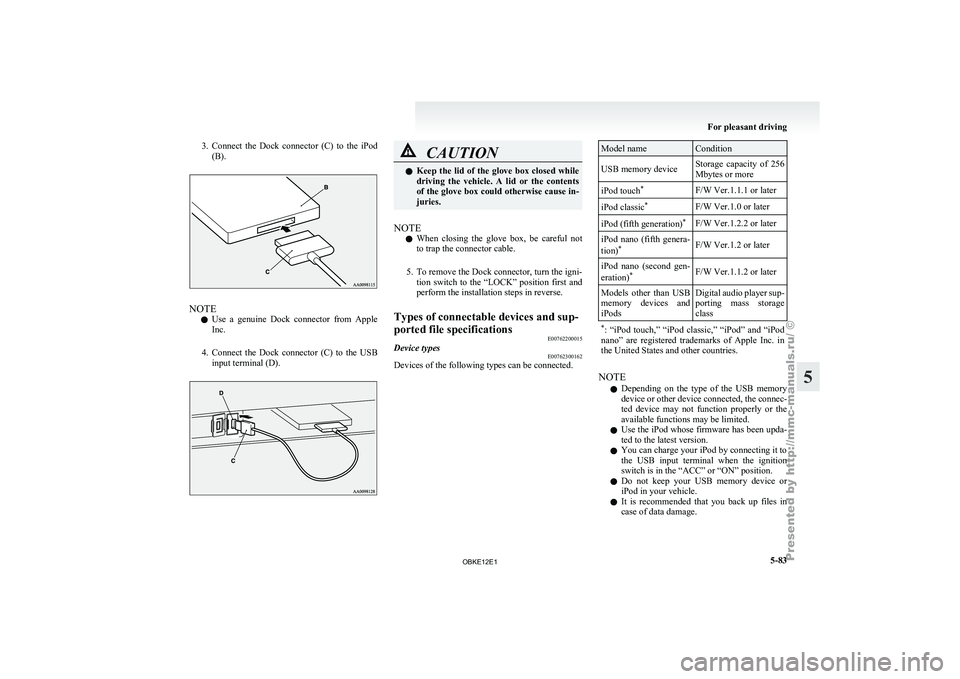
3. Connect the Dock connector (C) to the iPod
(B). NOTE
l Use
a genuine
Dock connector from Apple
Inc.
4. Connect the Dock connector (C) to the USB input terminal (D). CAUTION
l
Keep the lid
of the glove box closed while
driving the vehicle. A lid or the contents
of the glove box could otherwise cause in-
juries.
NOTE l When
closing the
glove box, be careful not
to trap the connector cable.
5. To remove the Dock connector, turn the igni- tion switch to the “LOCK” position first and
perform the installation steps in reverse.
Types of connectable devices and sup-
ported file specifications E00762200015
Device types E00762300162
Devices of the following types can be connected. Model name Condition
USB memory device Storage capacity of 256
Mbytes or more
iPod touch *
F/W Ver.1.1.1 or later
iPod classic *
F/W Ver.1.0 or later
iPod (fifth generation) *
F/W Ver.1.2.2 or later
iPod nano (fifth genera-
tion) *
F/W Ver.1.2 or later
iPod nano (second gen-
eration) *
F/W Ver.1.1.2 or later
Models other than USB
memory devices
and
iPods Digital
audio player sup-
porting mass storage
class
* : “iPod touch,”
“iPod classic,” “iPod” and “iPod
nano” are registered trademarks of Apple Inc. in
the United States and other countries. NOTE
l Depending
on the
type of the USB memory
device or other device connected, the connec-
ted device may not function properly or the
available functions may be limited.
l Use the iPod whose firmware has been upda-
ted to the latest version.
l You can charge your iPod by connecting it to
the USB input terminal when the ignition
switch is in the “ACC” or “ON” position.
l Do not keep your USB memory device or
iPod in your vehicle.
l It is recommended that you back up files in
case of data damage. For pleasant driving
5-83 5
OBKE12E1
Page 267 of 377
l
Do not
connect to the USB input terminal
any device (hard disk, card reader, memory
reader, etc.) other than the connectable devi-
ces specified in the previous section.
The device and/or data may be damaged. If
any of these devices was connected by mis-
take, remove it after turning the ignition
switch to the “LOCK” position.
File specifications E00762400017
You can play music files of the following specifica-
tions that are
saved in a USB memory device or oth-
er device supporting mass storage class. Item Condition
File format MP3, WMA, AAC,
WAV
Maximum number of
levels (including the
root) Level 8
Number of folders
700
Number of files 65,535 Sun visors
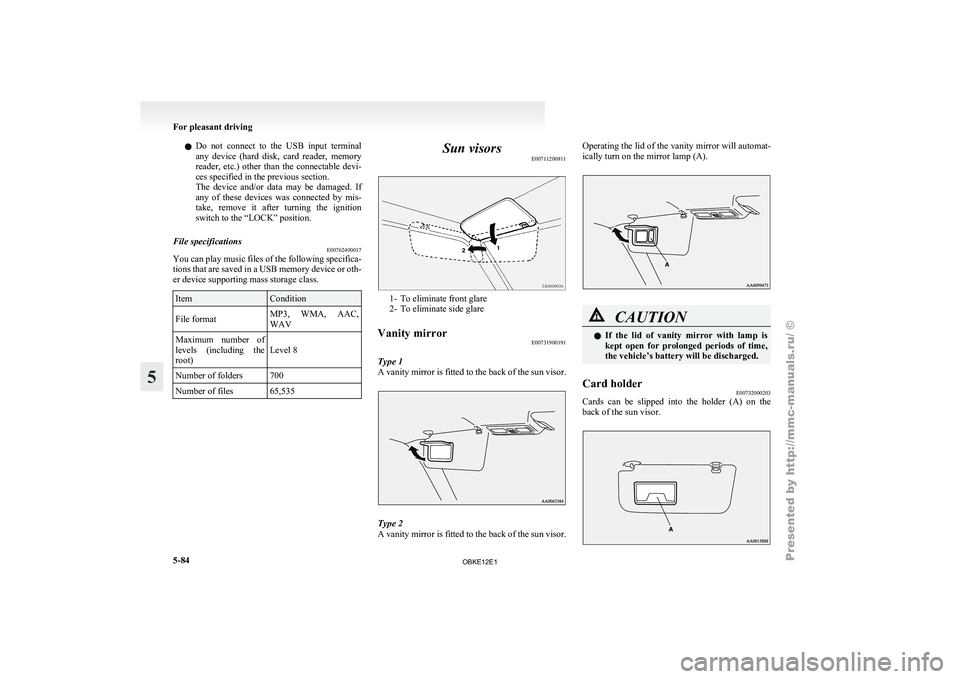
E00711200811 1- To eliminate front glare
2- To eliminate side glare
Vanity mirror E00731900191
Type 1
A vanity mirror
is fitted to the back of the sun visor. Type 2
A vanity
mirror
is fitted to the back of the sun visor. Operating the lid of the vanity mirror will automat-
ically turn on the mirror lamp (A).
CAUTION
l
If the lid
of vanity mirror with lamp is
kept open for prolonged periods of time,
the vehicle’s battery will be discharged.
Card holder E00732000203
Cards can be slipped into the holder (A) on the
back of the sun visor. For pleasant driving
5-84
5
OBKE12E1
Page 269 of 377

Cigarette lighter*
E00711501042
The cigarette lighter
can be used while the ignition
switch is in the “ON” or “ACC” position. 1- Open the lid
2- Push all the way in.
The cigarette
lighter will automatically return to its
original position with a “click” when ready. Pull it
out for use.
After use, insert the cigarette lighter to its original
position in the socket.
NOTE
l Do not leave the cigarette lighter removed
from its socket, because the socket might be-
come clogged by foreign material and be
short-circuited. CAUTION
l
Do not touch
the heating element or the
cigarette lighter housing, hold the knob
only to prevent burns.
l Do not allow children to operate or play
with the cigarette lighter as burns may oc-
cur.
l Something is wrong with the cigarette
lighter if it does not pop back out within
approximately 30 seconds of being push-
ed in. We recommend you to have it
checked.
l Do not use any electric appliance that is
not approved by MITSUBISHI
MOTORS. Doing so could damage the
socket. If you used the cigarette lighter af-
ter damaging the socket, the cigarette
lighter might pop out or fail to come out
after being pushed in.
l When the cigarette lighter socket is used
as a power source for an electric appli-
ance, be sure that the electric appliance
operates at 12 V and has an electric ca-
pacity of 120 W or less. In addition, long
use of the electric appliance without run-
ning the engine may run down the battery. Accessory socket
E00711600987
The accessory socket
can be used while the igni-
tion switch is in the “ON” or “ACC” position. CAUTION
l
Be aware
that
using electronic equipment
with the engine off may run the battery
down.
l When you connect an electrical device,
make sure it is rated at 12 V and its elec-
trical capacity does not exceed 120 W.
When using some sockets at the same
time, make sure the total power consump-
tion of the electrical accessories does not
exceed 120 W at 12 V.
l When the accessory socket is not in use,
be sure to close the cap or plug, because
the socket might become clogged by for-
eign material and be short-circuited.
NOTE l The
two or
more accessory sockets can be
used simultaneously. For pleasant driving
5-86
5
OBKE12E1
Page 271 of 377
Interior lamp switch
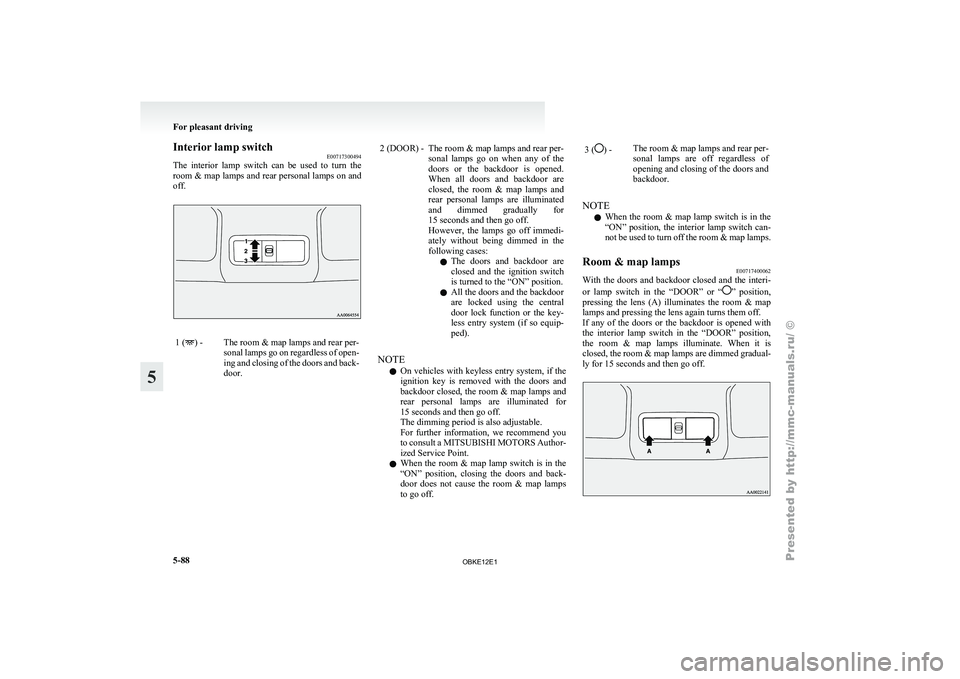
E00717300494
The interior lamp
switch can be used to turn the
room & map lamps and rear personal lamps on and
off. 1 ( ) - The room & map lamps and rear per-
sonal lamps go
on regardless of open-
ing and closing of the doors and back-
door. 2 (DOOR) - The room & map lamps and rear per-
sonal lamps go
on when any of the
doors or the backdoor is opened.
When all doors and backdoor are
closed, the room & map lamps and
rear personal lamps are illuminated
and dimmed gradually for
15 seconds and then go off.
However, the lamps go off immedi-
ately without being dimmed in the
following cases:
l The doors and backdoor are
closed and the ignition switch
is turned to the “ON” position.
l All the doors and the backdoor
are locked using the central
door lock function or the key-
less entry system (if so equip-
ped).
NOTE l On
vehicles with
keyless entry system, if the
ignition key is removed with the doors and
backdoor closed, the room & map lamps and
rear personal lamps are illuminated for
15 seconds and then go off.
The dimming period is also adjustable.
For further information, we recommend you
to consult a MITSUBISHI MOTORS Author-
ized Service Point.
l When the room & map lamp switch is in the
“ON” position, closing the doors and back-
door does not cause the room & map lamps
to go off. 3 ( ) -
The room & map lamps and rear per-
sonal lamps are
off regardless of
opening and closing of the doors and
backdoor.
NOTE l When
the room
& map lamp switch is in the
“ON” position, the interior lamp switch can-
not be used to turn off the room & map lamps.
Room & map lamps E00717400062
With the doors and backdoor closed and the interi-
or lamp switch
in the “DOOR” or “ ” position,
pressing the
lens (A) illuminates the room & map
lamps and pressing the lens again turns them off.
If any of the doors or the backdoor is opened with
the interior lamp switch in the “DOOR” position,
the room & map lamps illuminate. When it is
closed, the room & map lamps are dimmed gradual-
ly for 15 seconds and then go off. For pleasant driving
5-88
5
OBKE12E1
Page 272 of 377
NOTE
l When
any of
the doors or the backdoor is
opened and the interior lamp switch in the
“ ” position, the room & map lamps remain
on even when the lens is pressed.
Rear personal lamps E00712600290
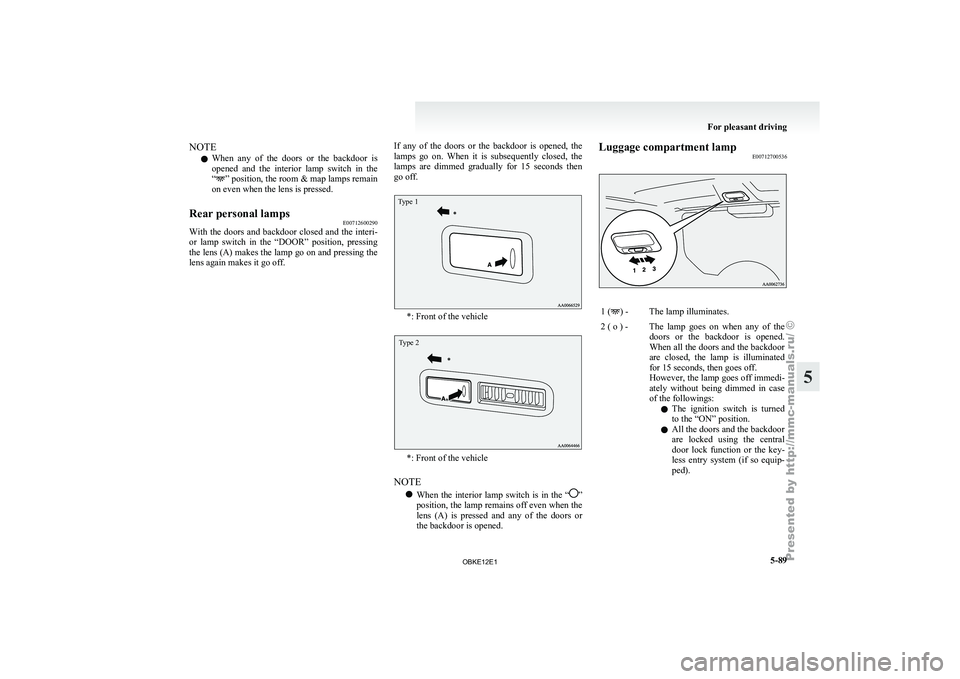
With the
doors and backdoor closed and the interi-
or lamp switch
in the “DOOR” position, pressing
the lens (A) makes the lamp go on and pressing the
lens again makes it go off. If any of the doors or the backdoor is opened, the
lamps go
on.
When it is subsequently closed, the
lamps are dimmed gradually for 15 seconds then
go off.
Type 1 *: Front of the vehicle
Type 2
*: Front of the vehicle
NOTE l When
the interior
lamp switch is in the “ ”
position, the lamp
remains off even when the
lens (A) is pressed and any of the doors or
the backdoor is opened. Luggage compartment lamp
E00712700536 1 ( ) - The lamp illuminates.
2 ( o ) - The lamp goes on when any of the doors or the
backdoor is opened.
When all the doors and the backdoor
are closed, the lamp is illuminated
for 15 seconds, then goes off.
However, the lamp goes off immedi-
ately without being dimmed in case
of the followings:
l The ignition switch is turned
to the “ON” position.
l All the doors and the backdoor
are locked using the central
door lock function or the key-
less entry system (if so equip-
ped). For pleasant driving
5-89 5
OBKE12E1
Page 273 of 377
NOTE
l On
vehicles with
keyless entry system, when
the ignition key is removed with the doors
and the backdoor closed, the lamp is illumi-
nated for 15 seconds, then goes off.
The dimming period is also adjustable.
For further information, we recommend you
to consult a MITSUBISHI MOTORS Author-
ized Service Point.
3 ( ) -
The lamp goes off.
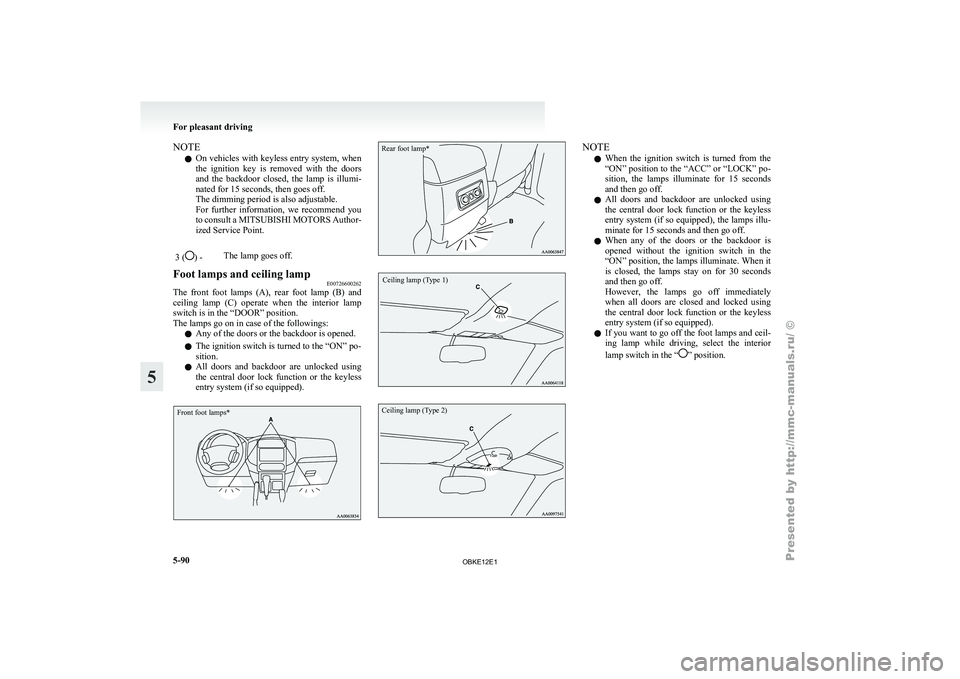
Foot lamps and ceiling lamp E00726600262
The front foot lamps (A), rear foot lamp (B) and
ceiling lamp (C)
operate when the interior lamp
switch is in the “DOOR” position.
The lamps go on in case of the followings:
l Any of the doors or the backdoor is opened.
l The ignition switch is turned to the “ON” po-
sition.
l All doors and backdoor are unlocked using
the central door lock function or the keyless
entry system (if so equipped).
Front foot lamps*
Rear foot lamp*
Ceiling lamp (Type 1)
Ceiling lamp (Type 2) NOTE
l When
the ignition
switch is turned from the
“ON” position to the “ACC” or “LOCK” po-
sition, the lamps illuminate for 15 seconds
and then go off.
l All doors and backdoor are unlocked using
the central door lock function or the keyless
entry system (if so equipped), the lamps illu-
minate for 15 seconds and then go off.
l When any of the doors or the backdoor is
opened without the ignition switch in the
“ON” position, the lamps illuminate. When it
is closed, the lamps stay on for 30 seconds
and then go off.
However, the lamps go off immediately
when all doors are closed and locked using
the central door lock function or the keyless
entry system (if so equipped).
l If you want to go off the foot lamps and ceil-
ing lamp while driving, select the interior
lamp switch in the “ ” position.For pleasant driving
5-90
5
OBKE12E1
Page 274 of 377

Door courtesy lamps
E00717500047
Each door courtesy
lamp illuminates when the rele-
vant door is opened and goes off when the door is
closed.
Front
Rear (5-door models) Lamps (room lamps, etc.) auto-cutout
function (Vehicles with keyless entry
system)
E00712900831
If any of
the interior lamps are left switched on
with the ignition switch in any position other than
“ON” or “ACC”, it goes off automatically after ap-
proximately 30 minutes.
The lamp goes on again if the ignition switch is
turned to the “ON” or “ACC” position, any door or
backdoor is opened and closed, or the keyless entry
remote control is operated.
NOTE
l The interior lamp auto-cut function period
can be adjusted or deactivated. We recom-
mend you to consult a MITSUBISHI
MOTORS Authorized Service Point for de-
tailed information and assistance. Storage spaces
E00713100885 CAUTION
l
Never leave
lighters,
cans of carbonated
drink, and spectacles in the cabin when
parking the vehicle in hot sunshine. The
cabin will become extremely hot, so light-
ers and other flammable items may catch
fire and unopened drink cans (including
beer cans) may rupture. The heat may al-
so deform or crack plastic spectacle len-
ses and other spectacle parts that are
made of plastic.
l Keep the lids of storage spaces closed
while driving the vehicle. A lid or the con-
tents of a storage space could otherwise
cause injuries.
NOTE l Do
not leave
valuables in any storage space
when leaving the vehicle. For pleasant driving
5-91 5
OBKE12E1
Page 283 of 377
If the vehicle breaks down
E00800101179
If the vehicle
breaks down on the road, move it to
the shoulder and use the hazard warning flashers and/
or the warning triangle etc. Refer to “Hazard warn-
ing flasher switch” on page 3-35.
If the engine stops/fails
Vehicle operation and control are affected if the en-
gine stops. Before moving the vehicle to a safe
area, be aware of the following:
l The brake booster becomes inoperative and
the pedal effort will increase. Press down the
brake pedal harder than usual.
l Since the power steering pump is no longer
operative, the steering wheel feels heavy
when turning it. Emergency starting
E00800502587
If the engine
cannot be started because the battery
is weak or dead, the battery from another vehicle
can be used with jumper cables to start the engine. WARNING
l To start
the
engine using jumper cables
connected to another vehicle, perform the
correct procedures according to the in-
struction below. Incorrect procedures
could result in a fire or explosion or dam-
age to the vehicles. CAUTION
l
Do not attempt
to start the engine by pull-
ing or pushing the vehicle. It could dam-
age your vehicle.
l Always wear protective eye goggles when
working near the battery.
l Keep the battery out of the reach of chil-
dren.
1. Get the vehicles close enough so the jumper
cables can
reach, but be sure the vehicles
aren’t touching each other. CAUTION
l
Check the
other
vehicle. It must have a 12-
volt battery.
If the other system isn’t 12-volt, shorting
can damage both vehicles. 2. Set the parking brake firmly on each vehicle.
Put an
A/T in “P” (PARK) or a M/T in “N”
(Neutral). Turn off the ignition switch. WARNING
l Turn off
the
ignition on both vehicles be-
forehand. Make sure that the cables or
your clothes cannot be caught by the fan
or drive belt. Personal injury could result.
3. Turn off all lamps, heater and other electrical
loads.
4. Make
sure battery electrolyte is at the proper
level. Refer to “Battery” on page 8-10. WARNING
l If electrolyte
fluid
is not visible, or ap-
pears to be frozen, Do Not Attempt Jump
Starting!
A battery might rupture or explode if the
temperature is below the freezing point
or if it is not filled to the proper level.
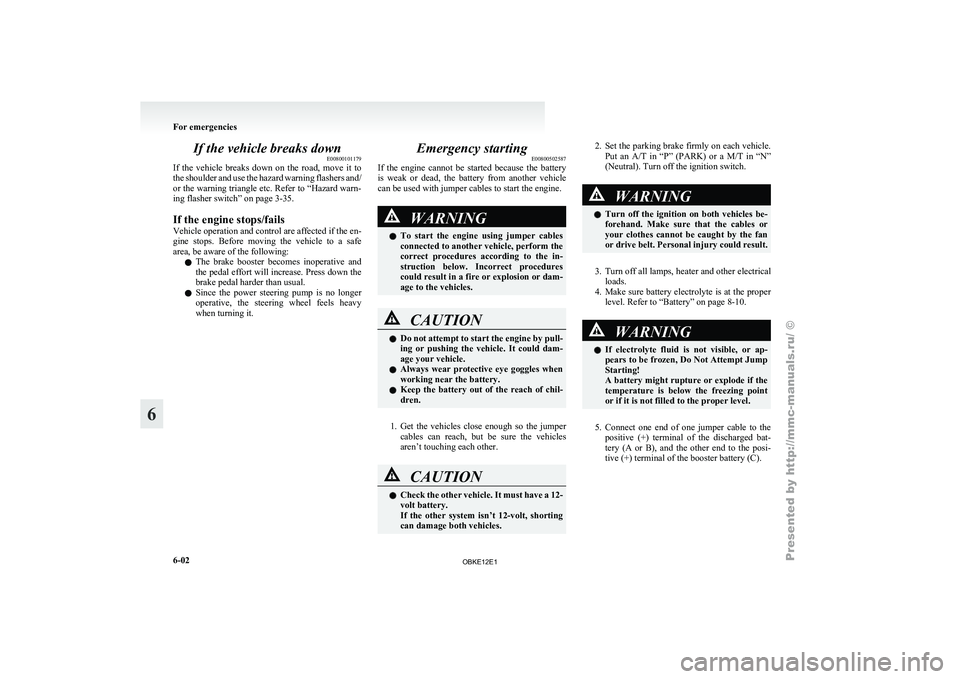
5. Connect one end of one jumper cable to the
positive (+)
terminal of the discharged bat-
tery (A or B), and the other end to the posi-
tive (+) terminal of the booster battery (C). For emergencies
6-02
6
OBKE12E1
Page 287 of 377
Bleeding the fuel system (diesel-
powered vehicles only) E00800700149
The fuel system should be bled to remove air as de-
scribed below if the fuel supply is exhausted during
travel.
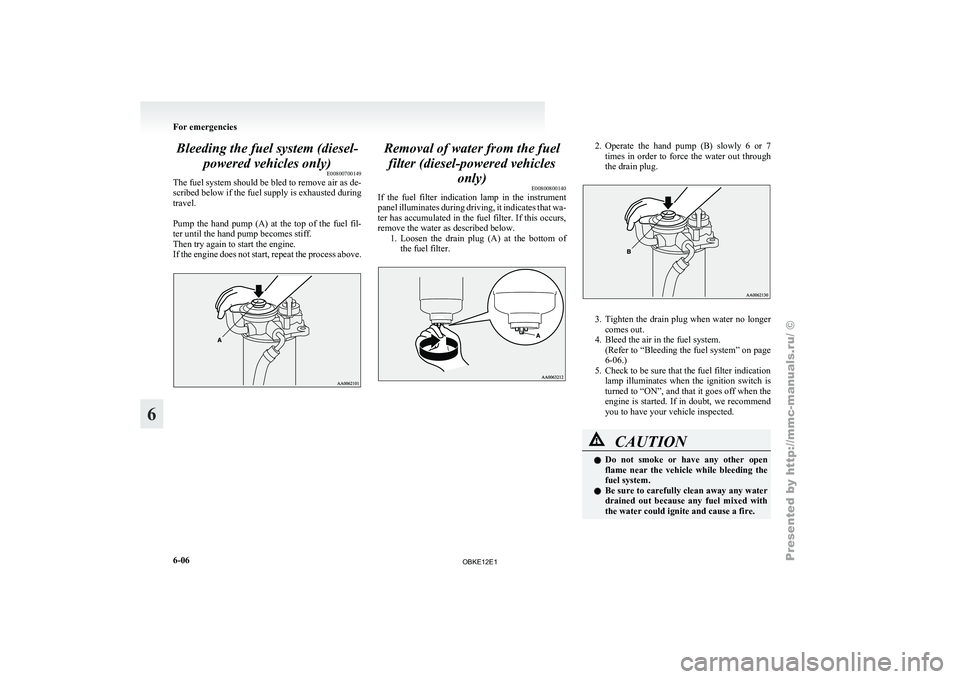
Pump the hand
pump (A) at the top of the fuel fil-
ter until the hand pump becomes stiff.
Then try again to start the engine.
If the engine does not start, repeat the process above. Removal of water from the fuel
filter (diesel-powered vehicles only) E00800800140
If the fuel
filter indication lamp in the instrument
panel illuminates during driving, it indicates that wa-
ter has accumulated in the fuel filter. If this occurs,
remove the water as described below. 1. Loosen the drain plug (A) at the bottom ofthe fuel filter. 2. Operate the hand pump (B) slowly 6 or 7
times in order to force the water out through
the drain plug. 3. Tighten the drain plug when water no longer
comes out.
4. Bleed the air in the fuel system.
(Refer
to “Bleeding the fuel system” on page
6-06.)
5. Check to be sure that the fuel filter indication lamp illuminates when the ignition switch is
turned to “ON”, and that it goes off when the
engine is started. If in doubt, we recommend
you to have your vehicle inspected. CAUTION
l
Do not
smoke
or have any other open
flame near the vehicle while bleeding the
fuel system.
l Be sure to carefully clean away any water
drained out because any fuel mixed with
the water could ignite and cause a fire. For emergencies
6-06
6
OBKE12E1