audio MITSUBISHI SHOGUN 2003 (in English) Owner's Guide
[x] Cancel search | Manufacturer: MITSUBISHI, Model Year: 2003, Model line: SHOGUN, Model: MITSUBISHI SHOGUN 2003Pages: 392, PDF Size: 14.34 MB
Page 238 of 392
H11A369D
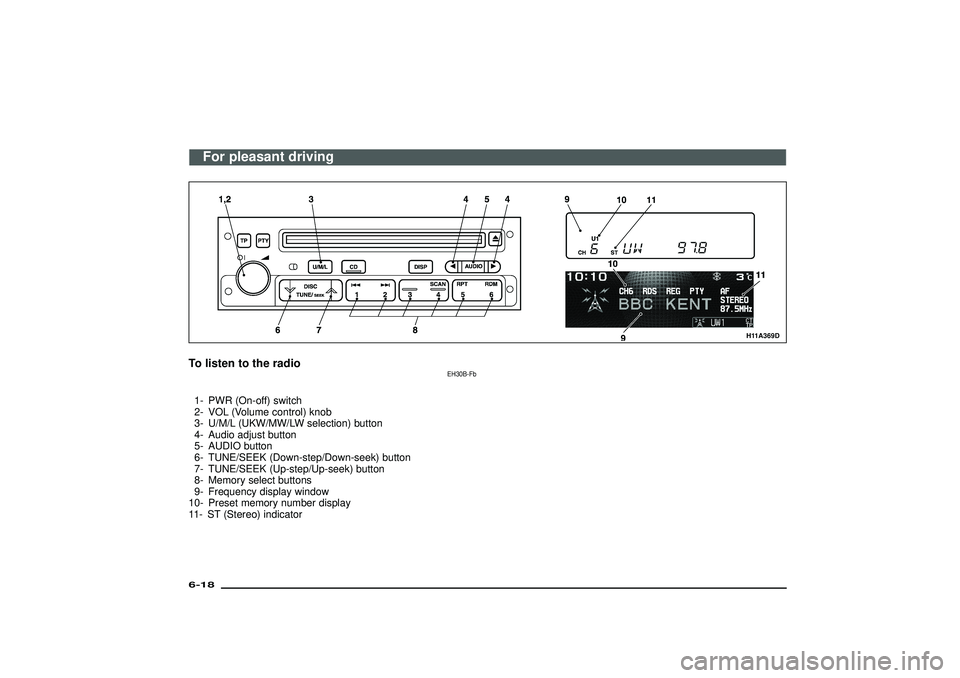
To listen to the radio
EH30B-Fb
1- PWR (On-off) switch
2- VOL (Volume control) knob
3- U/M/L (UKW/MW/LW selection) button
4- Audio adjust button
5- AUDIO button
6- TUNE/SEEK (Down-step/Down-seek) button
7- TUNE/SEEK (Up-step/Up-seek) button
8- Memory select buttons
9- Frequency display window
10- Preset memory number display
11- ST (Stereo) indicatorFor pleasant driving
6-18Div:
Out put date:
Page 239 of 392
1. Press the PWR switch (1) to turn on the
radio.
Press the PWR switch again to switch
it off.
2. Press the U/M/L button (3) to select the
desired band (U1/U2/MW/LW).
3. Press the TUNE/SEEK button (6 or 7)
or one of the Memory select buttons (8)
to tune to a station.
Refer to“How to adjust the tune”or
“How to enter frequencies in the
memory”on page 6-20.How to adjust the volumeVOL (Volume control)-2
Turn the VOL knob clockwise to increase
the volume.
H11A348G
Multi centre display
H30B003A
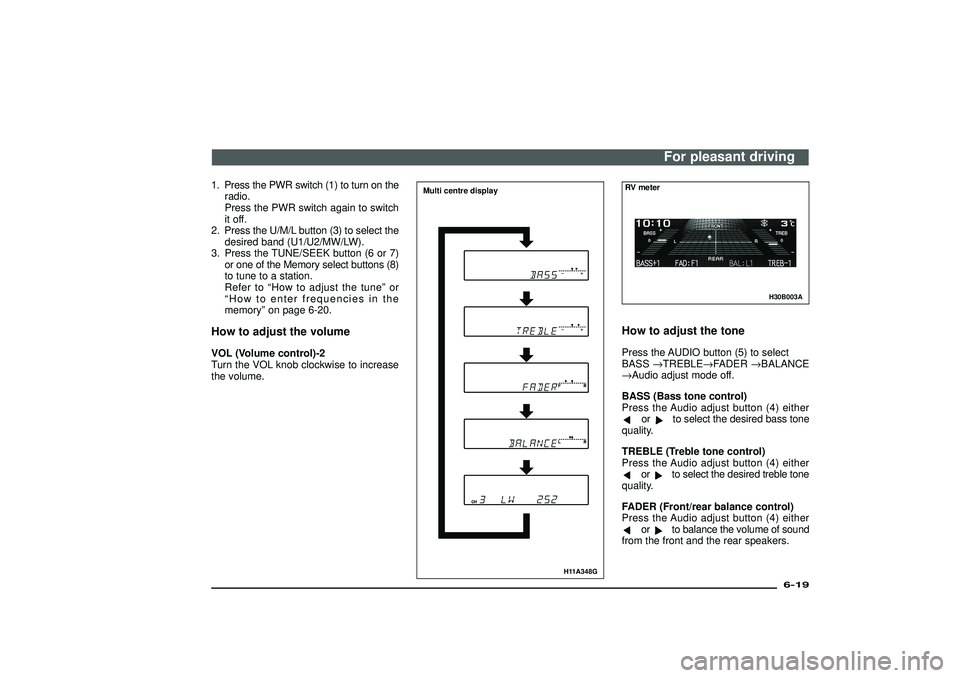
RV meterHow to adjust the tonePress the AUDIO button (5) to select
BASS→TREBLE→FADER→BALANCE
→Audio adjust mode off.
BASS (Bass tone control)
Press the Audio adjust button (4) either
or
to select the desired bass tone
quality.
TREBLE (Treble tone control)
Press the Audio adjust button (4) either
or
to select the desired treble tone
quality.
FADER (Front/rear balance control)
Press the Audio adjust button (4) either
or
to balance the volume of sound
from the front and the rear speakers.For pleasant driving
6-19
Div:
Out put date:
Page 240 of 392
BALANCE (Left/right balance control)
Press the Audio adjust button (4) either
or
to balance the volume of sound
from the left and the right speakers.
NOTE
Audio adjust mode will be canceled when
radio or CD operation is performed or no
adjustment is performed for more than 7
seconds.
How to adjust the tuneManual tuning
The frequency changes every time the
TUNE/SEEK button (6 or 7) is pressed.
Press the button to select the desired sta-
tion.
Automatic tuning
After keeping the TUNE/SEEK button (6 or
7) depressed for more than about 1 sec-
ond, release the button, and the selected
station reception will start.
H11A248A
How to enter frequencies in the
memoryManual setting
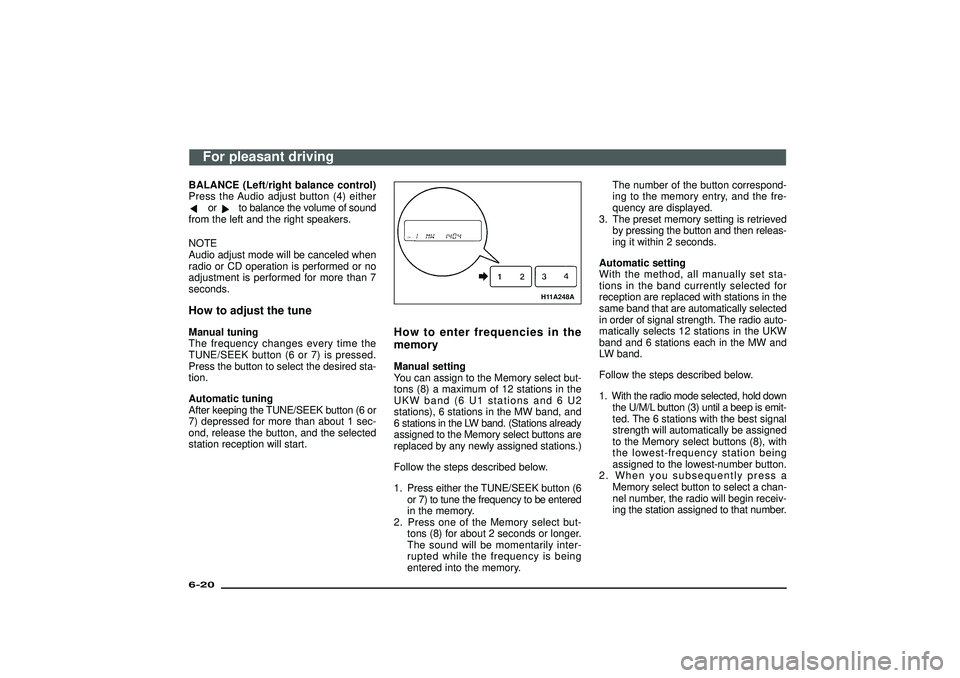
You can assign to the Memory select but-
tons (8) a maximum of 12 stations in the
UKW band (6 U1 stations and 6 U2
stations), 6 stations in the MW band, and
6 stations in the LW band. (Stations already
assigned to the Memory select buttons are
replaced by any newly assigned stations.)
Follow the steps described below.
1. Press either the TUNE/SEEK button (6
or 7) to tune the frequency to be entered
in the memory.
2. Press one of the Memory select but-
tons (8) for about 2 seconds or longer.
The sound will be momentarily inter-
rupted while the frequency is being
entered into the memory.The number of the button correspond-
ing to the memory entry, and the fre-
quency are displayed.
3. The preset memory setting is retrieved
by pressing the button and then releas-
ing it within 2 seconds.
Automatic setting
With the method, all manually set sta-
tions in the band currently selected for
reception are replaced with stations in the
same band that are automatically selected
in order of signal strength. The radio auto-
matically selects 12 stations in the UKW
band and 6 stations each in the MW and
LW band.
Follow the steps described below.
1. With the radio mode selected, hold down
the U/M/L button (3) until a beep is emit-
ted. The 6 stations with the best signal
strength will automatically be assigned
to the Memory select buttons (8), with
the lowest-frequency station being
assigned to the lowest-number button.
2. When you subsequently press a
Memory select button to select a chan-
nel number, the radio will begin receiv-
ing the station assigned to that number.
For pleasant driving
6-20Div:
Out put date:
Page 246 of 392
H11A375A
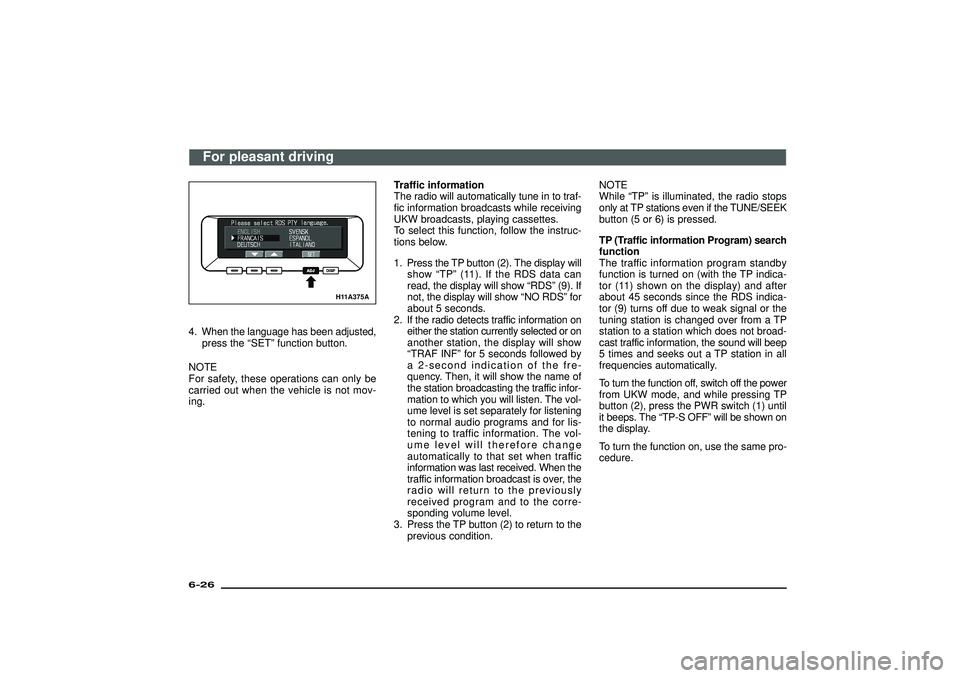
4. When the language has been adjusted,
press the“SET”function button.
NOTE
For safety, these operations can only be
carried out when the vehicle is not mov-
ing.Traffic information
The radio will automatically tune in to traf-
fic information broadcasts while receiving
UKW broadcasts, playing cassettes.
To select this function, follow the instruc-
tions below.
1. Press the TP button (2). The display will
show“TP”(11). If the RDS data can
read, the display will show“RDS”(9). If
not, the display will show“NO RDS”for
about 5 seconds.
2. If the radio detects traffic information on
either the station currently selected or on
another station, the display will show
“TRAF INF”for 5 seconds followed by
a 2-second indication of the fre-
quency. Then, it will show the name of
the station broadcasting the traffic infor-
mation to which you will listen. The vol-
ume level is set separately for listening
to normal audio programs and for lis-
tening to traffic information. The vol-
ume level will therefore change
automatically to that set when traffic
information was last received. When the
traffic information broadcast is over, the
radio will return to the previously
received program and to the corre-
sponding volume level.
3. Press the TP button (2) to return to the
previous condition.NOTE
While“TP”is illuminated, the radio stops
only at TP stations even if the TUNE/SEEK
button (5 or 6) is pressed.
TP (Traffic information Program) search
function
The traffic information program standby
function is turned on (with the TP indica-
tor (11) shown on the display) and after
about 45 seconds since the RDS indica-
tor (9) turns off due to weak signal or the
tuning station is changed over from a TP
station to a station which does not broad-
cast traffic information, the sound will beep
5 times and seeks out a TP station in all
frequencies automatically.
To turn the function off, switch off the power
from UKW mode, and while pressing TP
button (2), press the PWR switch (1) until
it beeps. The“TP-S OFF”will be shown on
the display.
To turn the function on, use the same pro-
cedure.
For pleasant driving
6-26Div:
Out put date:
Page 247 of 392
H11A204A
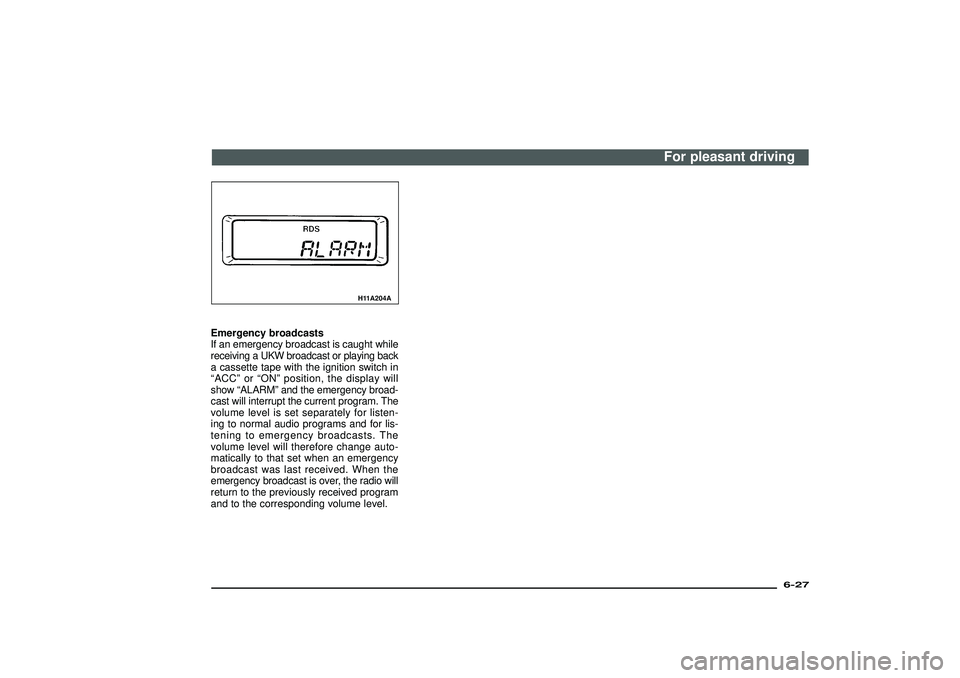
Emergency broadcasts
If an emergency broadcast is caught while
receiving a UKW broadcast or playing back
a cassette tape with the ignition switch in
“ACC ”or “ON ”position, the display will
show “ALARM ”and the emergency broad-
cast will interrupt the current program. The
volume level is set separately for listen-
ing to normal audio programs and for lis-
tening to emergency broadcasts. The
volume level will therefore change auto-
matically to that set when an emergency
broadcast was last received. When the
emergency broadcast is over, the radio will
return to the previously received program
and to the corresponding volume level.
For pleasant driving
6-27
Div:
Out put date:
Page 250 of 392
To change the order of tracks
played back (For CD player)Press the RDM button (11), and the RDM
indicator (16) will light and will be ran-
domly selected, tracks for playback. To
release, press the button again.To change the order of discs
played back (For CD autochanger)Press the RDM button (11), and the RDM
indicator (16) will light and tracks for play-
back will be selected randomly from all
discs loaded into the changer.
To release, press the button again.How to use the SCAN buttonUse the SCAN button (9) to search for a
particular track, etc. When this button is
pressed, the first 10 seconds of each track
on the disc will be played.
The disc will advance at fast-forward speed
between each 10-second play. When a
track you want to listen to is played in this
way, press the SCAN button again, that
track will then be played from its begin-
ning. After completion of this scanning of
tracks, the disc will begin ordinary play.
H11C004A
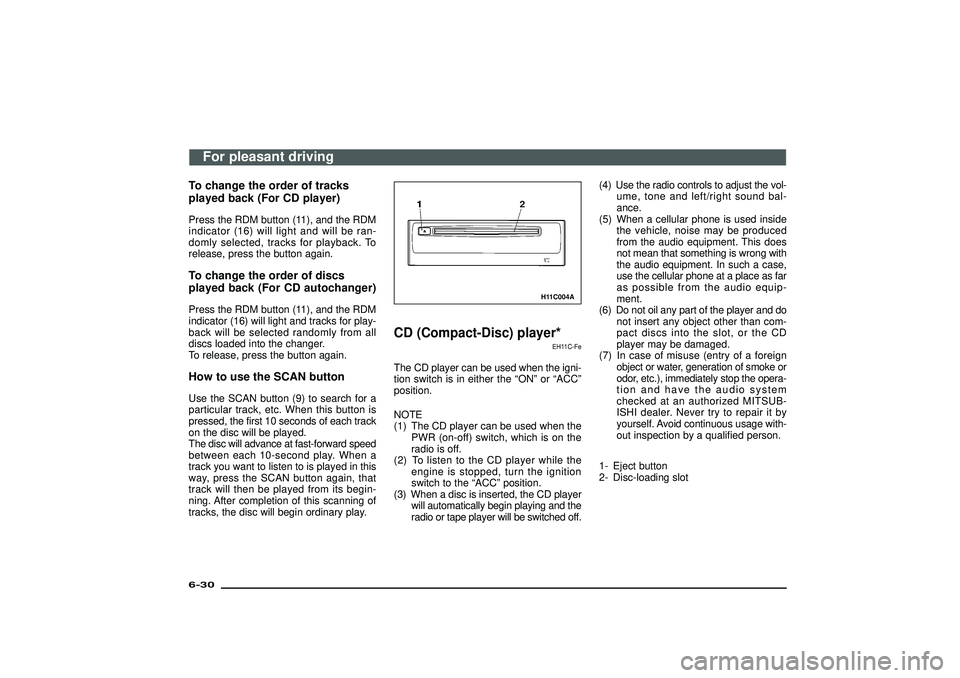
CD (Compact-Disc) player*
EH11C-Fe
The CD player can be used when the igni-
tion switch is in either the“ON”or“ACC”
position.
NOTE
(1) The CD player can be used when the
PWR (on-off) switch, which is on the
radio is off.
(2) To listen to the CD player while the
engine is stopped, turn the ignition
switch to the“ACC”position.
(3) When a disc is inserted, the CD player
will automatically begin playing and the
radio or tape player will be switched off.(4) Use the radio controls to adjust the vol-
ume, tone and left/right sound bal-
ance.
(5) When a cellular phone is used inside
the vehicle, noise may be produced
from the audio equipment. This does
not mean that something is wrong with
the audio equipment. In such a case,
use the cellular phone at a place as far
as possible from the audio equip-
ment.
(6) Do not oil any part of the player and do
not insert any object other than com-
pact discs into the slot, or the CD
player may be damaged.
(7) In case of misuse (entry of a foreign
object or water, generation of smoke or
odor, etc.), immediately stop the opera-
tion and have the audio system
checked at an authorized MITSUB-
ISHI dealer. Never try to repair it by
yourself. Avoid continuous usage with-
out inspection by a qualified person.
1- Eject button
2- Disc-loading slot
For pleasant driving
6-30Div:
Out put date:
Page 252 of 392
NOTE
(1) When the first disc has played to the
end, the second disc will start to play
automatically. When the second, third,
fourth, fifth, and sixth disc have each
played to the end, the sequence will
begin again from the first disc.
(2) The current setting of the disc selec-
tion button (1) will be stored in memory
even if the engine has been turned off.How to eject a discPress one of the disc selection buttons (1)
to select the disc number which you would
like to eject.
Then press the eject button (4) to eject that
disc.
NOTE
When a disc is ejected when in CD mode
(single player or autochanger), the sys-
tem automatically switches to the radio.
H11F032A
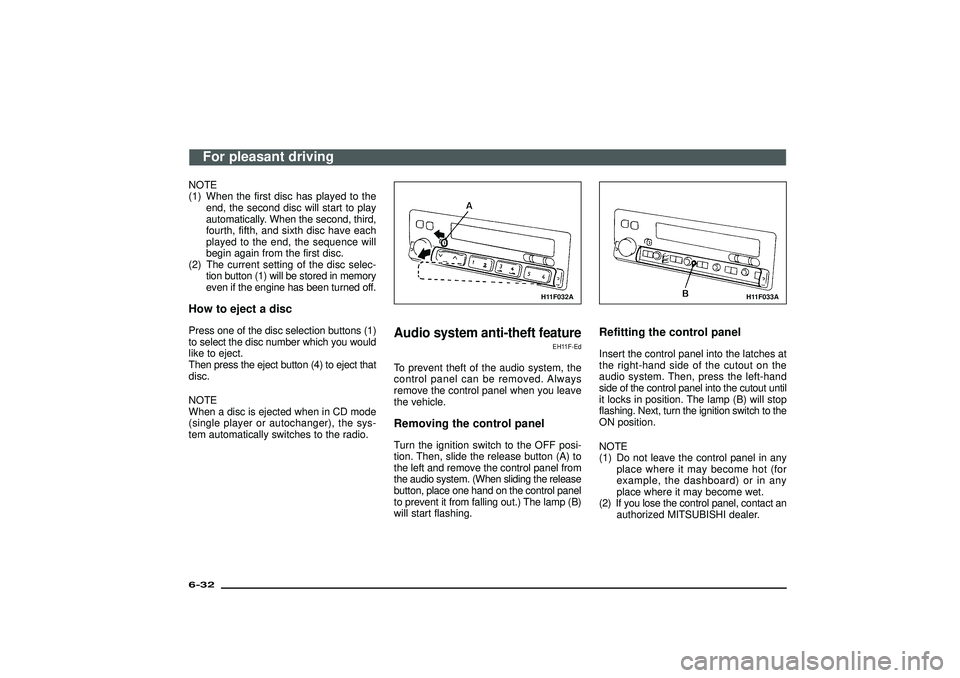
Audio system anti-theft feature
EH11F-Ed
To prevent theft of the audio system, the
control panel can be removed. Always
remove the control panel when you leave
the vehicle.Removing the control panelTurn the ignition switch to the OFF posi-
tion. Then, slide the release button (A) to
the left and remove the control panel from
the audio system. (When sliding the release
button, place one hand on the control panel
to prevent it from falling out.) The lamp (B)
will start flashing.
H11F033A
Refitting the control panelInsert the control panel into the latches at
the right-hand side of the cutout on the
audio system. Then, press the left-hand
side of the control panel into the cutout until
it locks in position. The lamp (B) will stop
flashing. Next, turn the ignition switch to the
ON position.
NOTE
(1) Do not leave the control panel in any
place where it may become hot (for
example, the dashboard) or in any
place where it may become wet.
(2) If you lose the control panel, contact an
authorized MITSUBISHI dealer.
For pleasant driving
6-32Div:
Out put date:
Page 382 of 392
Accessory boxes ................................................ 6-62
Accessory socket ............................................... 6-61
Additional equipment ......................................... 9-21
Air purifier ........................................................... 6-55
Antenna .............................................................. 6-35
Anti-lock brake system (ABS) ............................ 5-45
Armrest .............................................................. 3-13
Ashtray ............................................................... 6-60
Audio system anti-theft feature ......................... 6-32
Automatic air conditioning .................................. 6-43
Automatic transmission fluid ................................ 9-4
Automatic transmissionINVECS-II Sport Mode 5A/T(Intelligent & Innovative
Vehicle Electronic Control SystemII ) ........... 5-17
Auto-speed (cruise) control ................................ 5-53
Backdoor ............................................................ 2-10
Battery ................................................................. 9-6
Bleeding the fuel system (diesel-powered vehicles only) ..................... 8-23
Bonnet .................................................................. 2-9
Brake fluid ............................................................ 9-8
Brake pedal free play ......................................... 9-18
Braking ............................................................... 5-44
Capacities ........................................................ 10-16
Catalytic converter ............................................... 5-6
Cautions on handling of 4WD vehicles .............. 5-42
CD (Compact-Disc) player ................................. 6-30
Central door locks ................................................ 2-8
Changing a fuse ................................................. 8-33
Chassis number ................................................. 10-2
“Child-protection” rear doors (5-door models) ..... 2-6
Child restraint ..................................................... 3-33
Cigarette lighter .................................................. 6-59
Cleaning the inside of your vehicle ...................... 7-2
Cleaning the outside of your vehicle .................... 7-4
Clutch fluid ......................................................... 9-10
Clutch pedal free play ........................................ 9-18
Combination head lamps, dipper and turn signal switch ................................................... 4-14
Correct 4-wheel drive operation ......................... 5-38
Cup tray ............................................................. 6-65 Dimensions ........................................................ 10-6
Doors ................................................................... 2-4
Driving and alcohol ............................................ 1-13
Economical driving ............................................... 5-7
Electric remote-controlled outside
rear-view mirrors ............................................ 5-51
Electric window control ...................................... 2-12
Electrical system .............................................. 10-10
Electronic immobilizer (Anti-theft starting system) ............................... 2-2
Emergency starting ............................................ 8-25
Engine ................................................................ 10-9
Engine coolant ..................................................... 9-5
Engine number ................................................... 10-2
Engine oil ............................................................. 9-2
Engine overheating ............................................ 8-21
Exterior and interior lamp operation ................... 9-18
Front fog lamp switch ......................................... 4-22
Front heater/ Manual air conditioning .................................. 6-36
Front seat ............................................................. 3-6
Fuel consumption ............................................. 10-12
Fuel gauge ........................................................... 4-4
Fuel, engine coolant, oil and exhaust gas leakage ......................... 9-17
Fuses ................................................................. 8-28
Genuine parts .................................................... 1-12
Glove box ........................................................... 6-63
Handling of cassette tapes ................................ 6-33
Hazard warning flasher switch ........................... 4-20
Headlamp levelling switch ................................. 4-16
Headlamps washer switch ................................. 4-19
Head restraints ................................................... 3-28
Heated seats ...................................................... 3-10
Hinges and latches lubrication ........................... 9-19
Horn switch ........................................................ 4-24
How to set a CD autochanger ........................... 6-31 If a tyre is punctured .......................................... 8-13
If the vehicle breaks down ................................... 8-2
Ignition switch ..................................................... 5-11
Indication and warning lamps .............................. 4-6
Inside rear-view mirror ....................................... 5-50
Installation of accessories .................................. 1-10
Installation position for warning triangle ............. 6-67
Instruments .......................................................... 4-2
Jack and jack handle ........................................... 8-5
Jacking up the vehicle ......................................... 8-8
Keyless entry system ........................................... 2-5
Keys ..................................................................... 2-2
Limited-slip differential ....................................... 5-48
Luggage compartment lamp .............................. 4-26
Luggage floor box .............................................. 6-66
Making a flat seat ............................................... 3-26
Making a luggage area ...................................... 3-14
Manual outside rear-view mirrors ...................... 5-51
Manual transmission .......................................... 5-15
Meter, gauge and indication/
warning lamp operation .................................. 9-18
MITSUBISHI active stability & traction control system (M-ASTC) .................. 5-57
Modifications/alterations to the electric or fuel systems ................................... 1-11
Multi centre display ............................................ 4-27
Notes regarding diesel fuel .............................. 10-14
Odometer/Tripmeter ............................................. 4-3
Operation under adverse driving conditions ......................................................... 8-2
Other specifications .......................................... 10-11
Outside rear-view mirror .................................... 5-50
Alphabetical index
1
0-18Div:
Out put date: