lock MITSUBISHI SHOGUN 2008 (in English) Workshop Manual
[x] Cancel search | Manufacturer: MITSUBISHI, Model Year: 2008, Model line: SHOGUN, Model: MITSUBISHI SHOGUN 2008Pages: 538, PDF Size: 25.09 MB
Page 103 of 538
Seat and seat belts
2-57
2
Installing a child restra
int system to a 3-point
type seat belt
E00408700428
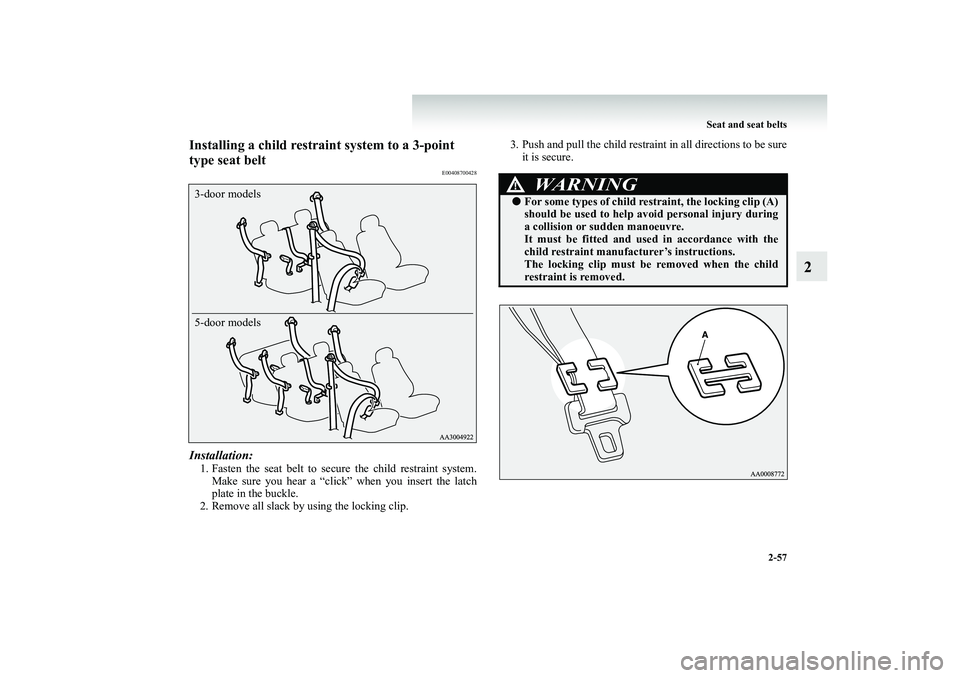
Installation:1. Fasten the seat belt to secu
re the child restraint system.
Make sure you hear a “click” when you insert the latchplate in the buckle.
2. Remove all slack by using the locking clip.
3. Push and pull the child restraint in all directions to be sure
it is secure.
3-door models 5-door models
WARNING
!●
For some types of child rest
raint, the lock
ing clip (A)
should be used to help avoid personal injury during a collision or su
dden manoeuvre.
It must be fitted and us
ed in accordance with the
child restraint manufact
urer’s instructions.
The locking clip must be
removed when the child
restraint is removed.
BK-BK2008E1ENUK.en-uk-Section5.fm Page
57 Wednesday, January 9, 2008 4:28 PM
Page 110 of 538
2-64 Seat and seat belts
2
To turn an airbag off
E00410600075
WARNING
!●
Do not fit any accessory
that makes the indicator
impossible to see, and do
not cover the indicator
with a sticker. You would no
t be able to verify the
status of the passenger airbag system.
WARNING
!●
To reduce risk of serious or fatal injury:• Always remove the key from the ignition switch before operating an ai
rbag ON-OFF switch. Fail-
ure to do so could advers
ely affect the airbag per-
formance. • Wait at least 60 seconds
to operate the airbag ON-
OFF switch after turning
the ignition switch from
the “ON” position to the “LOCK” position. The SRS airbag system is designed to retainenough voltage to deploy the airbag. • Always remove the key from an airbag ON-OFF switch after operati
ng that switch. Failure to do so
could lead to improper posi
tion of the airbag ON-
OFF switch. • Do not turn OFF the front passenger’s airbag ON-OFF switch except when
a rearward facing child
restraint system is fitt
ed to the front passenger
seat.• If the indicator does not illuminate when the front passenger’s airbag ON-OFF
switch is turned OFF,
do not fit a rearward facing child restraint systemto the front passenger seat. We recommend you to have the system inspected by a MITSUBISHI MOTORS Authorized
Service Point.
• If the indicator remains
on when the front passen-
ger’s airbag ON-OFF switch is turned ON, do not allow anyone to sit on the front passenger seat. Werecommend you to have th
e system inspected by a
MITSUBISHI MOTORS
Authorized Service
Point.
BK-BK2008E1ENUK.en-uk-Section5.fm Page
64 Wednesday, January 9, 2008 4:28 PM
Page 128 of 538
3-4 Instruments and controls
3
NOTE●
If you do not push the button for about 10 seconds while the service reminder is showing, the display will return to the odometer indication.
●
The odometer, tripmeter, an
d service reminder indications
are given for 30 seconds after the ignition switch has been turned to the “ACC” or “LOCK” position.
●
After the odometer, tripmeter, and service reminder indi- cations have gone off, they come back on for about 30 seconds if either of the fo
llowing actions takes place.
• The driver’s door is opened.• The reset button is pressed.
To reset the tripmeter To return the display to “0”, press the reset button (B) for morethan 2 second. Only the currently displayed value will be reset.NOTE●
When disconnecting the battery
terminal for a long time,
the memory of tripmeter display TRIP and are cleared, and the display returns to “0”.
Service reminder
E00517700092
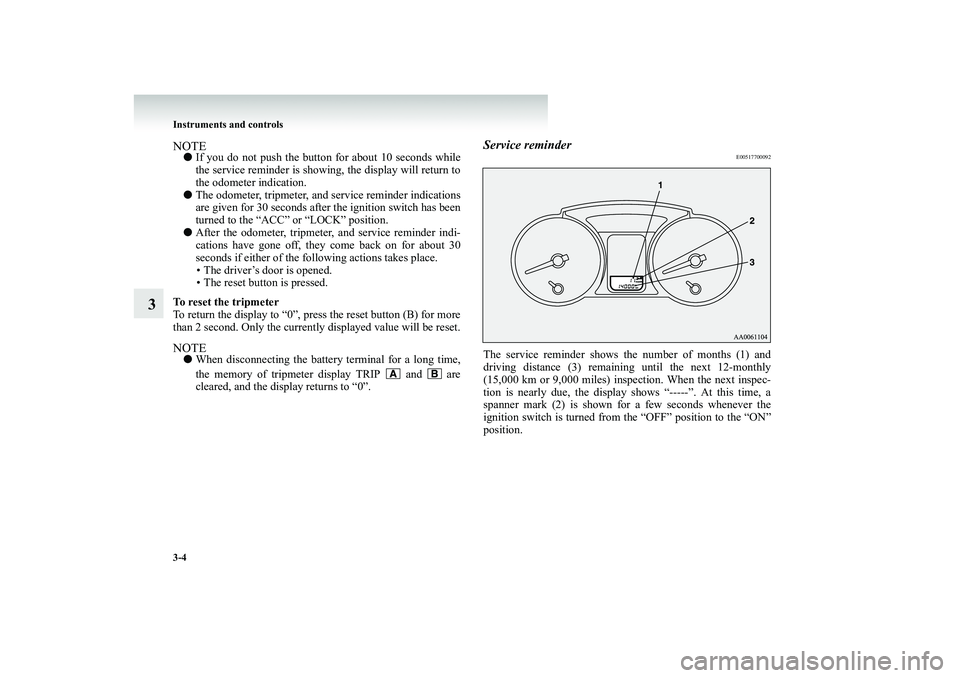
The service reminder shows the number of months (1) anddriving distance (3) remaining until the next 12-monthly(15,000 km or 9,000 miles) inspection. When the next inspec- tion is nearly due, the display s
hows “-----”. At this time, a
spanner mark (2) is shown for a few seconds whenever theignition switch is turned from the “OFF” position to the “ON” position.
BK-BK2008E1ENUK.en-uk-Section6.fm Page 4 Wednesday, January 9, 2008 4:32 PM
Page 134 of 538
3-10 Instruments and controls
3
Indicator and warning lamps
E00501501353
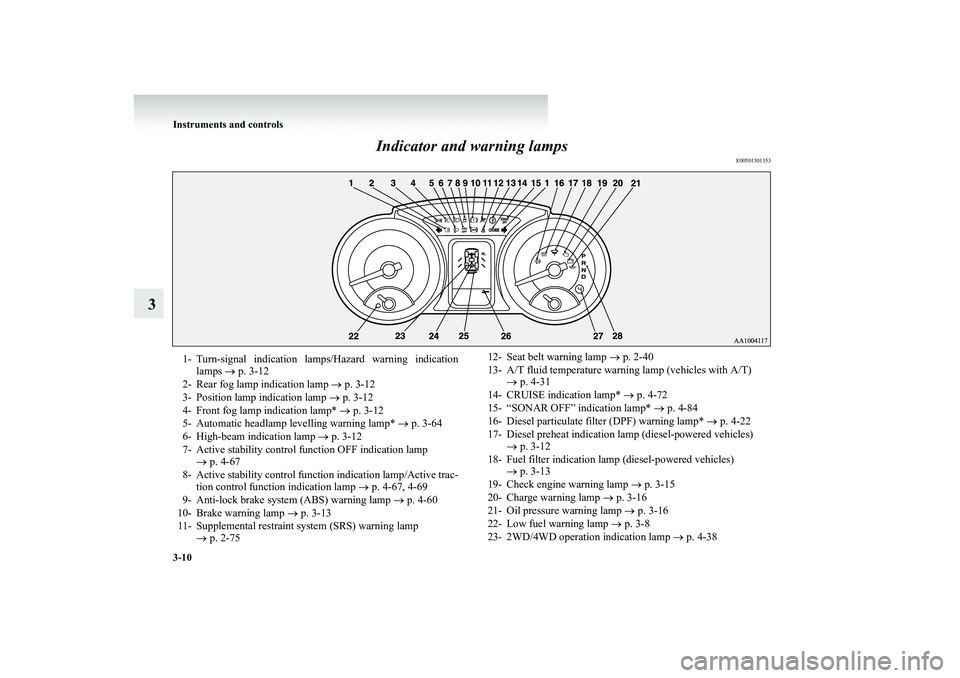
1- Turn-signal indication lamps/Hazard warning indication
lamps
→ p. 3-12
2- Rear fog lamp indication lamp
→ p. 3-12
3- Position lamp indication lamp
→ p. 3-12
4- Front fog lamp indication lamp*
→ p. 3-12
5- Automatic headlamp levelling warning lamp*
→ p. 3-64
6- High-beam indication lamp
→ p. 3-12
7- Active stability control function OFF indication lamp
→ p. 4-67
8- Active stability control function indication lamp/Active trac-
tion control function indication lamp
→ p. 4-67, 4-69
9- Anti-lock brake system (ABS) warning lamp
→ p. 4-60
10- Brake warning lamp
→ p. 3-13
11- Supplemental restraint system (SRS) warning lamp
→ p. 2-75
12- Seat belt warning lamp
→ p. 2-40
13- A/T fluid temperature warning lamp (vehicles with A/T)
→ p. 4-31
14- CRUISE indication lamp*
→ p. 4-72
15- “SONAR OFF” indication lamp*
→ p. 4-84
16- Diesel particulate filter (DPF) warning lamp*
→ p. 4-22
17- Diesel preheat indication lamp (diesel-powered vehicles)
→ p. 3-12
18- Fuel filter indication lamp (diesel-powered vehicles)
→ p. 3-13
19- Check engine warning lamp
→ p. 3-15
20- Charge warning lamp
→ p. 3-16
21- Oil pressure warning lamp
→ p. 3-16
22- Low fuel warning lamp
→ p. 3-8
23- 2WD/4WD operation indication lamp
→ p. 4-38
BK-BK2008E1ENUK.en-uk-Section6.fm Page
10 Wednesday, January 9, 2008 4:32 PM
Page 135 of 538
Instruments and controls
3-11
3
24- Rear differential lock indication lamp*
→ p. 4-43
25- Door-ajar warning lamp
→ p. 3-17
26- Service reminder
→ p. 3-4
27- Sports mode indicator (vehicles with A/T)
→ p. 4-30
28- Selector lever position indication lamps (vehicles with A/T,
“N” indication lamp is used also as A/T warning lamp)→ p. 4-27
BK-BK2008E1ENUK.en-uk-Section6.fm Page
11 Wednesday, January 9, 2008 4:32 PM
Page 136 of 538
3-12 Instruments and controls
3
Indicator lamps
E00501600012
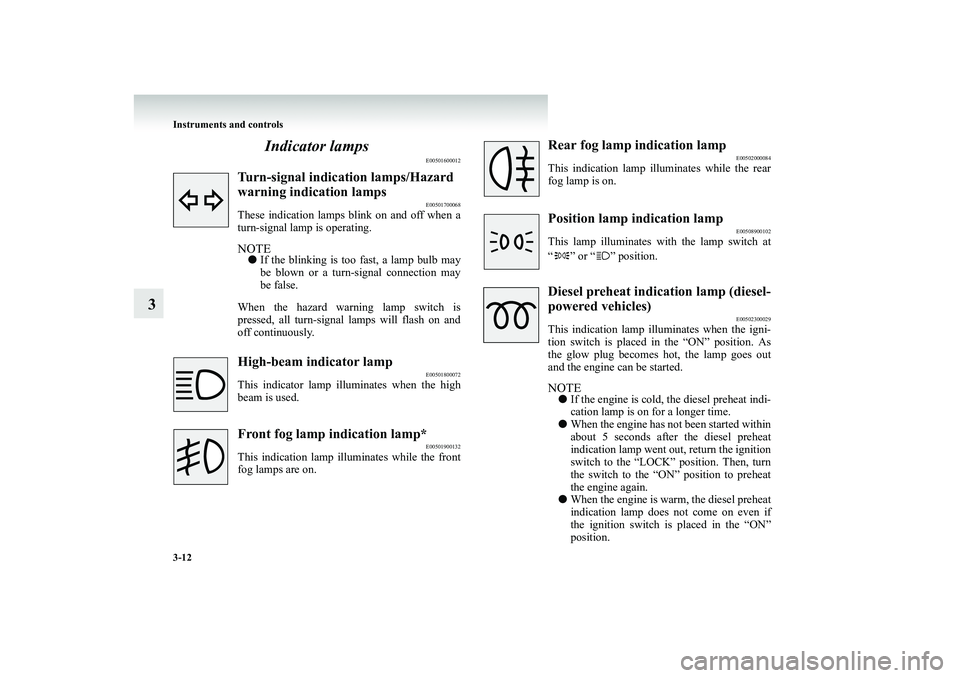
Turn-signal indication lamps/Hazard warning indication lamps
E00501700068
These indication lamps blink on and off when a turn-signal lamp is operating.NOTE●
If the blinking is too fast, a lamp bulb may be blown or a turn-signal connection may be false.
When the hazard warning lamp switch is pressed, all turn-signal lamps will flash on andoff continuously.High-beam indicator lamp
E00501800072
This indicator lamp illuminates when the highbeam is used.Front fog lamp indication lamp*
E00501900132
This indication lamp illuminates while the frontfog lamps are on.
Rear fog lamp indication lamp
E00502000084
This indication lamp illuminates while the rearfog lamp is on.Position lamp indication lamp
E00508900102
This lamp illuminates with the lamp switch at “ ” or “ ” position.Diesel preheat indica
tion lamp (diesel-
powered vehicles)
E00502300029
This indication lamp illuminates when the igni- tion switch is placed in the “ON” position. Asthe glow plug becomes hot, the lamp goes out and the engine can be started.NOTE●
If the engine is cold,
the diesel preheat indi-
cation lamp is on for a longer time.
●
When the engine has not been started within about 5 seconds after the diesel preheatindication lamp went out, return the ignition switch to the “LOCK” position. Then, turn the switch to the “ON” position to preheat the engine again.
●
When the engine is warm, the diesel preheat indication lamp does not come on even if the ignition switch is placed in the “ON” position.
BK-BK2008E1ENUK.en-uk-Section6.fm Page
12 Wednesday, January 9, 2008 4:32 PM
Page 142 of 538
3-18 Instruments and controls
3
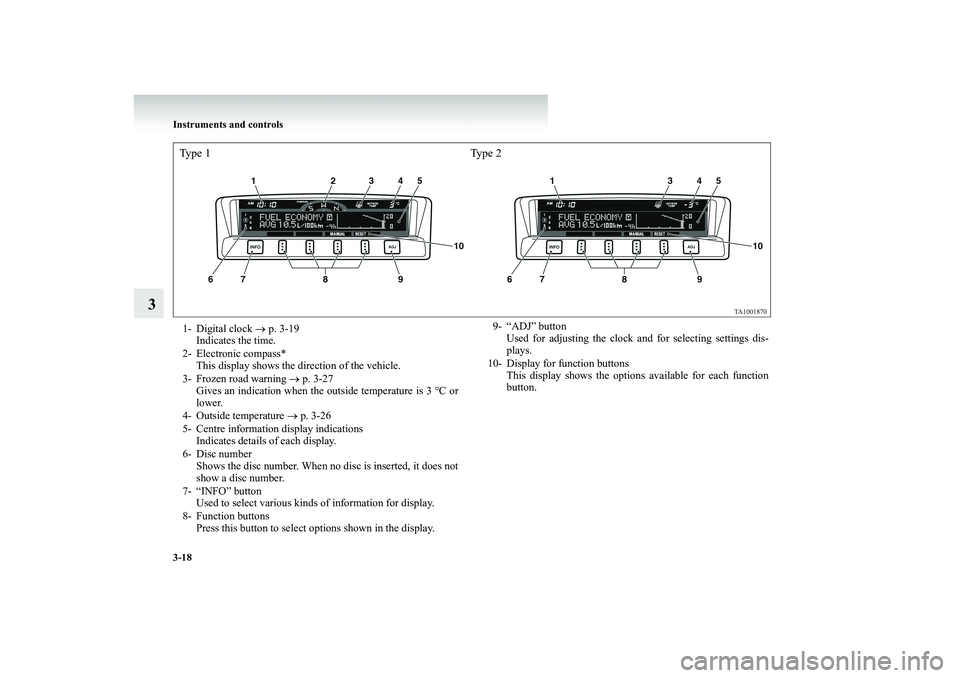
Type 1 Type 21- Digital clock
→ p. 3-19
Indicates the time.
2- Electronic compass*
This display shows the direction of the vehicle.
3- Frozen road warning
→ p. 3-27
Gives an indication when the outside temperature is 3 °C orlower.
4- Outside temperature
→ p. 3-26
5- Centre information display indications
Indicates details of each display.
6- Disc number
Shows the disc number. When no disc is inserted, it does notshow a disc number.
7- “INFO” button
Used to select various kinds of information for display.
8- Function buttons
Press this button to select options shown in the display.
9- “ADJ” button
Used for adjusting the clock and for selecting settings dis-plays.
10- Display for function buttons
This display shows the options available for each functionbutton.
BK-BK2008E1ENUK.en-uk-Section6.fm Page
18 Wednesday, January 9, 2008 4:32 PM
Page 143 of 538
Instruments and controls
3-19
3
Adjusting the time
E00518000021
Following modes are available for clock adjustment: ●
For vehicles with MITSUBISHI genuine audio: “Automatic mode” and “Manual mode”
●
Except for vehicles with MITSUBISHI genuine audio: “Manual mode” only
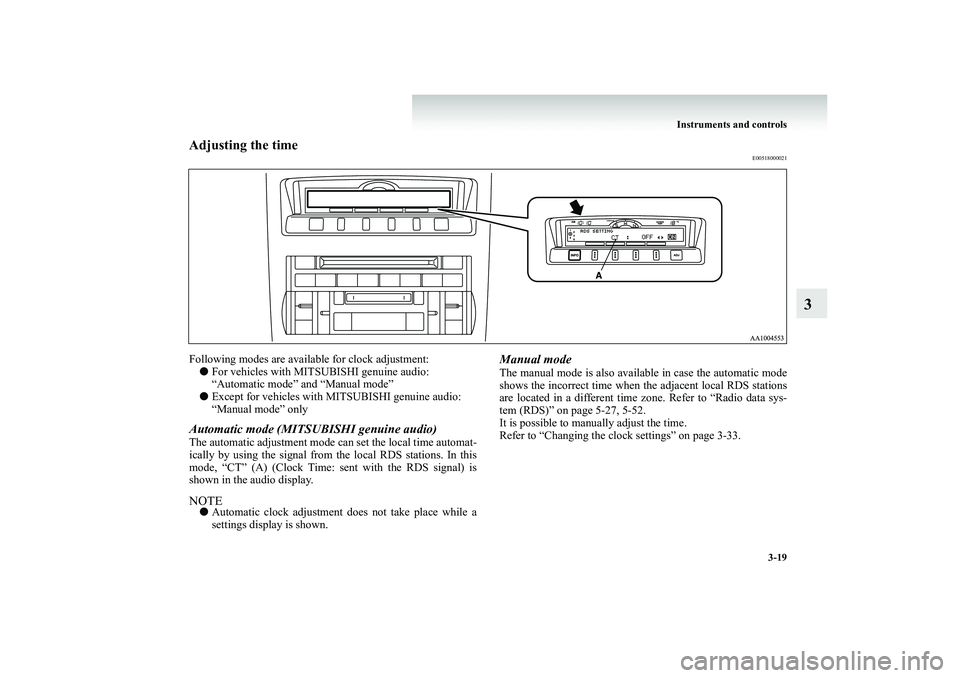
Automatic mode (MITSUBISHI genuine audio)The automatic adjustment mode can set the local time automat- ically by using the signal from the local RDS stations. In this mode, “CT” (A) (Clock Time:
sent with the RDS signal) is
shown in the audio display.NOTE●
Automatic clock adjustment does not take place while a settings display is shown.
Manual modeThe manual mode is also avai
lable in case the automatic mode
shows the incorrect time when
the adjacent local RDS stations
are located in a different time zo
ne. Refer to “Radio data sys-
tem (RDS)” on page 5-27, 5-52. It is possible to manually adjust the time. Refer to “Changing the clock settings” on page 3-33.
BK-BK2008E1ENUK.en-uk-Section6.fm Page
19 Wednesday, January 9, 2008 4:32 PM
Page 145 of 538
Instruments and controls
3-21
3
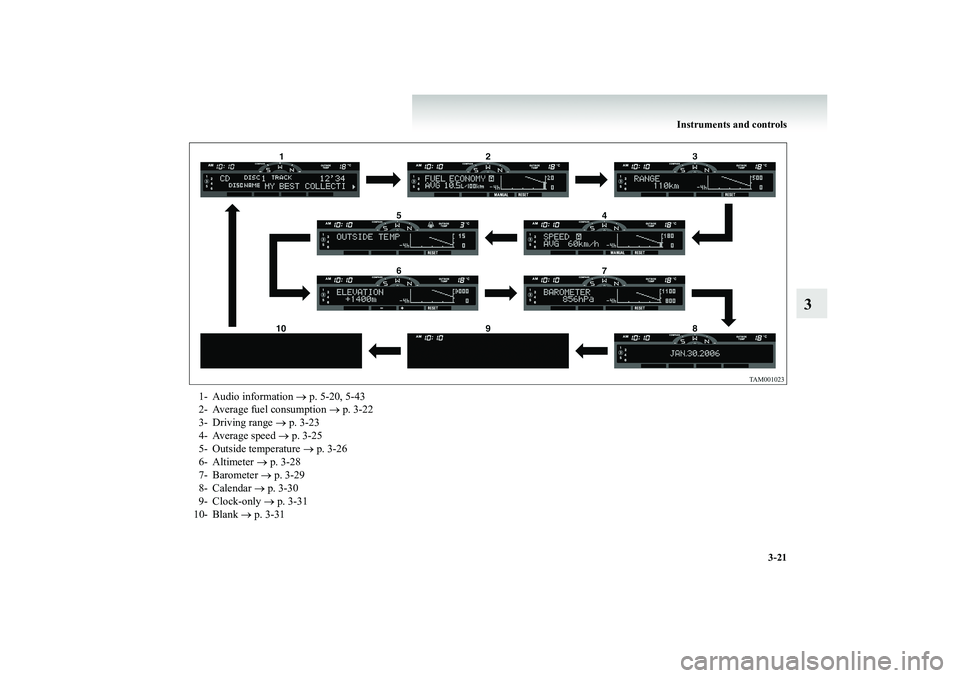
1- Audio information
→ p. 5-20, 5-43
2- Average fuel consumption
→ p. 3-22
3- Driving range
→ p. 3-23
4- Average speed
→ p. 3-25
5- Outside temperature
→ p. 3-26
6- Altimeter
→ p. 3-28
7- Barometer
→ p. 3-29
8- Calendar
→ p. 3-30
9- Clock-only
→ p. 3-31
10- Blank
→ p. 3-31
BK-BK2008E1ENUK.en-uk-Section6.fm Page
21 Wednesday, January 9, 2008 4:32 PM
Page 146 of 538
3-22 Instruments and controls
3
Average fuel consumption
E00518200052
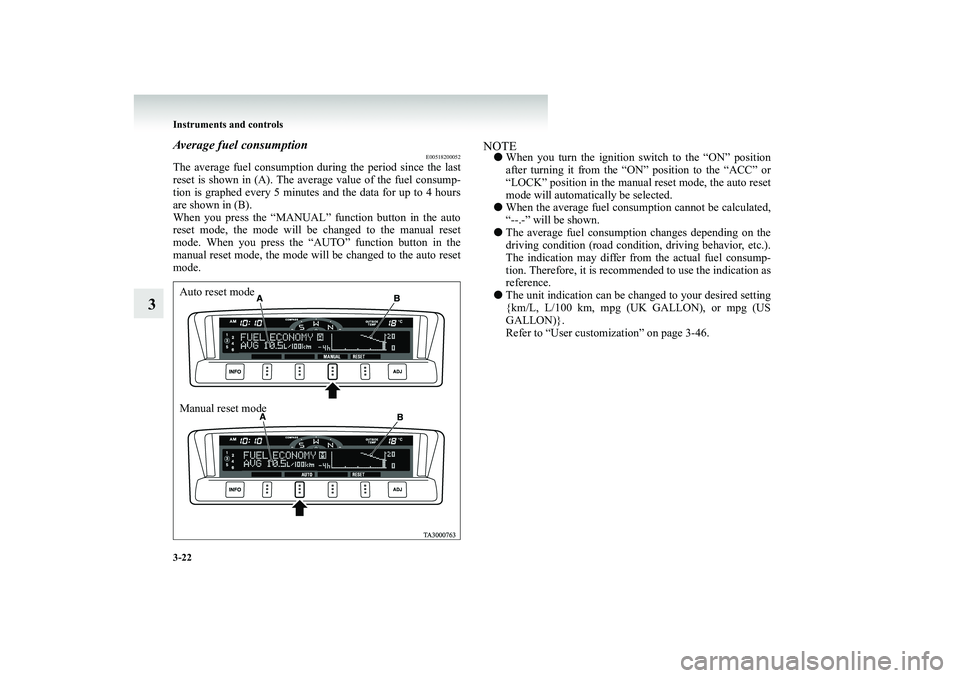
The average fuel consumption
during the period since the last
reset is shown in (A). The aver
age value of the fuel consump-
tion is graphed every 5 minutes and the data for up to 4 hoursare shown in (B). When you press the “MANUAL”
function button in the auto
reset mode, the mode will be changed to the manual resetmode. When you press the “AUTO” function button in the manual reset mode, the mode will be changed to the auto reset mode.
NOTE●
When you turn the ignition sw
itch to the “ON” position
after turning it from the “ON” position to the “ACC” or “LOCK” position in the manual reset mode, the auto reset mode will automatically be selected.
●
When the average fuel cons
umption cannot be calculated,
“--.-” will be shown.
●
The average fuel consumptio
n changes depending on the
driving condition (road condition, driving behavior, etc.). The indication may differ from the actual fuel consump- tion. Therefore, it is reco
mmended to use the indication as
reference.
●
The unit indication can be changed to your desired setting {km/L, L/100 km, mpg (UK GALLON), or mpg (USGALLON)}. Refer to “User customization” on page 3-46.
Auto reset mode Manual reset mode
BK-BK2008E1ENUK.en-uk-Section6.fm Page
22 Wednesday, January 9, 2008 4:32 PM