phone MITSUBISHI SHOGUN 2016 Owner's Manual (in English)
[x] Cancel search | Manufacturer: MITSUBISHI, Model Year: 2016, Model line: SHOGUN, Model: MITSUBISHI SHOGUN 2016Pages: 404, PDF Size: 18.95 MB
Page 7 of 404
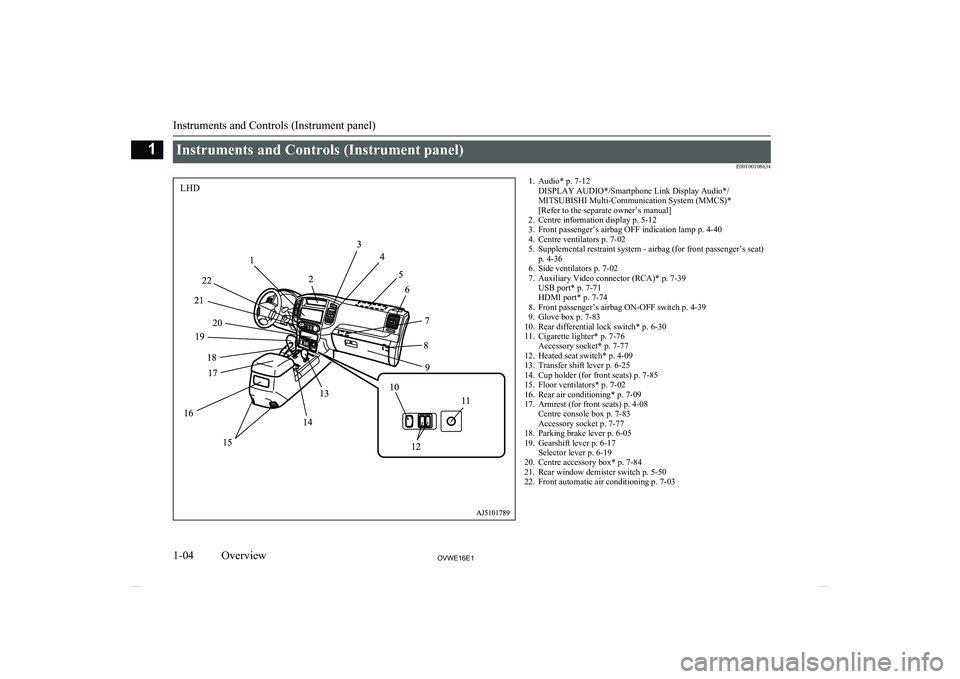
Instruments and Controls (Instrument panel)E001001086341. Audio* p. 7-12DISPLAY AUDIO*/Smartphone Link Display Audio*/
MITSUBISHI Multi-Communication System (MMCS)*
[Refer to the separate owner’s manual]
2. Centre information display p. 5-12
3. Front passenger’s airbag OFF indication lamp p. 4-40
4. Centre ventilators p. 7-02
5. Supplemental restraint system - airbag (for front passenger’s seat) p. 4-36
6. Side ventilators p. 7-02
7. Auxiliary Video connector (RCA)* p. 7-39 USB port* p. 7-71
HDMI port* p. 7-74
8. Front passenger’s airbag ON-OFF switch p. 4-39
9. Glove box p. 7-83
10. Rear differential lock switch* p. 6-30
11. Cigarette lighter* p. 7-76 Accessory socket* p. 7-77
12. Heated seat switch* p. 4-09
13. Transfer shift lever p. 6-25
14. Cup holder (for front seats) p. 7-85
15. Floor ventilators* p. 7-02
16. Rear air conditioning* p. 7-09
17. Armrest (for front seats) p. 4-08 Centre console box p. 7-83
Accessory socket p. 7-77
18. Parking brake lever p. 6-05
19. Gearshift lever p. 6-17 Selector lever p. 6-19
20. Centre accessory box* p. 7-84
21. Rear window demister switch p. 5-50
22. Front automatic air conditioning p. 7-03
Instruments and Controls (Instrument panel)
1-04OVWE16E1Overview1LHD
Page 8 of 404
![MITSUBISHI SHOGUN 2016 Owners Manual (in English) 1. Audio* p. 7-12DISPLAY AUDIO*/Smartphone Link Display Audio*/
MITSUBISHI Multi-Communication System (MMCS)*
[Refer to the separate owner’s manual]
2. Front automatic air conditioning p. 7-03
3. Re](/img/19/34885/w960_34885-7.png "MITSUBISHI SHOGUN 2016 Owners Manual (in English) 1. Audio* p. 7-12DISPLAY AUDIO*/Smartphone Link Display Audio*/
MITSUBISHI Multi-Communication System (MMCS)*
[Refer to the separate owner’s manual]
2. Front automatic air conditioning p. 7-03
3. Re")
1. Audio* p. 7-12DISPLAY AUDIO*/Smartphone Link Display Audio*/
MITSUBISHI Multi-Communication System (MMCS)*
[Refer to the separate owner’s manual]
2. Front automatic air conditioning p. 7-03
3. Rear window demister switch p. 5-50
4. Centre accessory box* p. 7-84
5. Gearshift lever p. 6-17 Selector lever p. 6-19
6. Parking brake lever p. 6-05
7. Armrest (for front seats) p. 4-08 Centre console box p. 7-83
Accessory socket p. 7-77
8. Rear air conditioning* p. 7-09
9. Floor ventilators* p. 7-02
10. Cup holder (for front seats) p. 7-85
11. Transfer shift lever p. 6-25
12. Cigarette lighter* p. 7-76 Accessory socket* p. 7-77
13. Heated seat switch* p. 4-09
14. Rear differential lock switch* p. 6-30
15. Glove box p. 7-83
16. Front passenger’s airbag ON-OFF switch p. 4-39
17. Auxiliary Video connector (RCA)* p. 7-39 USB port* p. 7-71
HDMI port* p. 7-74
18. Side ventilators p. 7-02
19. Supplemental restraint system - airbag (for front passenger’s seat) p. 4-36
20. Centre ventilators p. 7-02
21. Front passenger’s airbag OFF indication lamp p. 4-40
22. Centre information display p. 5-12
Instruments and Controls (Instrument panel)
1-05OVWE16E1Overview1RHD
Page 9 of 404
InteriorE00100206325
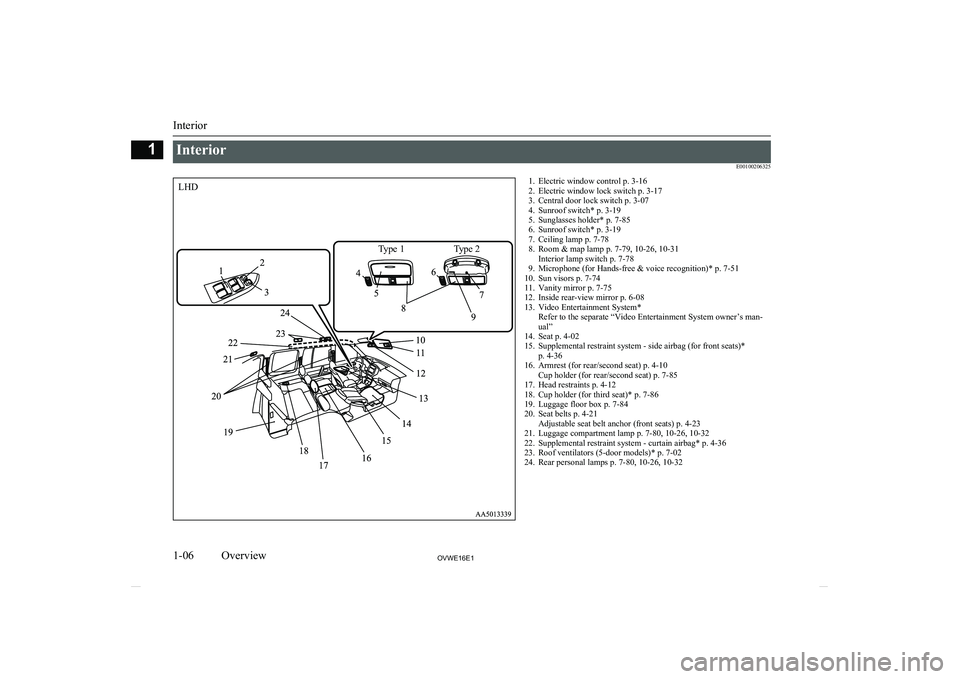
LHDType 1Type 21. Electric window control p. 3-162. Electric window lock switch p. 3-17
3. Central door lock switch p. 3-07
4. Sunroof switch* p. 3-19
5. Sunglasses holder* p. 7-85
6. Sunroof switch* p. 3-19
7. Ceiling lamp p. 7-78
8. Room & map lamp p. 7-79, 10-26, 10-31 Interior lamp switch p. 7-78
9. Microphone (for Hands-free & voice recognition)* p. 7-51
10. Sun visors p. 7-74
11. Vanity mirror p. 7-75
12. Inside rear-view mirror p. 6-08
13. Video Entertainment System* Refer to the separate “Video Entertainment System owner’s man-
ual”
14. Seat p. 4-02
15. Supplemental restraint system - side airbag (for front seats)* p. 4-36
16. Armrest (for rear/second seat) p. 4-10 Cup holder (for rear/second seat) p. 7-85
17. Head restraints p. 4-12
18. Cup holder (for third seat)* p. 7-86
19. Luggage floor box p. 7-84
20. Seat belts p. 4-21 Adjustable seat belt anchor (front seats) p. 4-23
21. Luggage compartment lamp p. 7-80, 10-26, 10-32
22. Supplemental restraint system - curtain airbag* p. 4-36
23. Roof ventilators (5-door models)* p. 7-02
24. Rear personal lamps p. 7-80, 10-26, 10-32
Interior
1-06OVWE16E1Overview1
Page 10 of 404
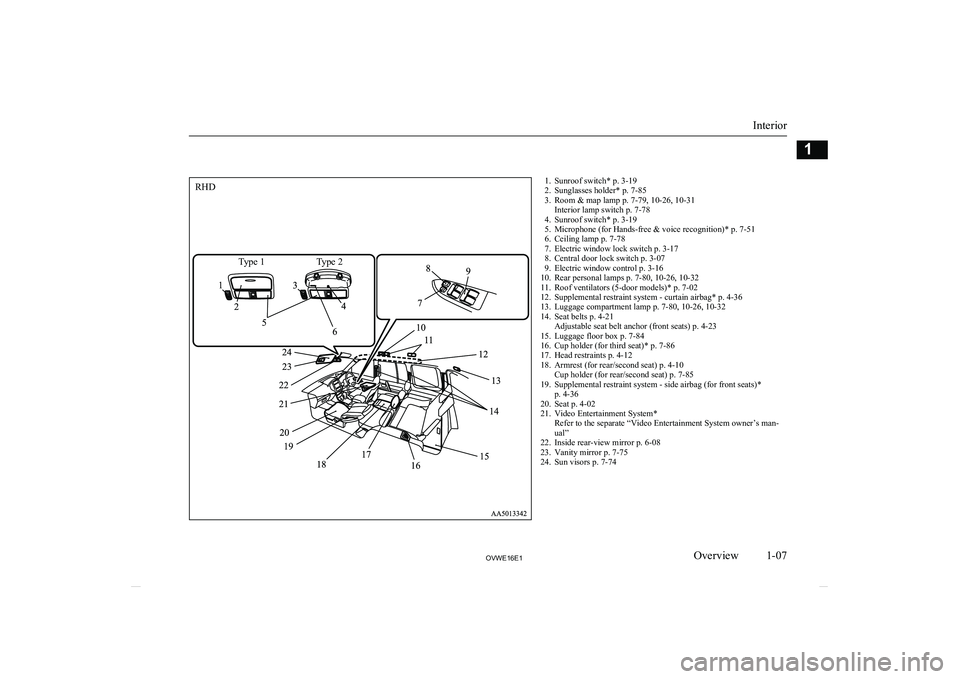
RHDType 1Type 21. Sunroof switch* p. 3-19
2. Sunglasses holder* p. 7-85
3. Room & map lamp p. 7-79, 10-26, 10-31 Interior lamp switch p. 7-78
4. Sunroof switch* p. 3-19
5. Microphone (for Hands-free & voice recognition)* p. 7-51
6. Ceiling lamp p. 7-78
7. Electric window lock switch p. 3-17
8. Central door lock switch p. 3-07
9. Electric window control p. 3-16
10. Rear personal lamps p. 7-80, 10-26, 10-32
11. Roof ventilators (5-door models)* p. 7-02
12. Supplemental restraint system - curtain airbag* p. 4-36
13. Luggage compartment lamp p. 7-80, 10-26, 10-32
14. Seat belts p. 4-21 Adjustable seat belt anchor (front seats) p. 4-23
15. Luggage floor box p. 7-84
16. Cup holder (for third seat)* p. 7-86
17. Head restraints p. 4-12
18. Armrest (for rear/second seat) p. 4-10 Cup holder (for rear/second seat) p. 7-85
19. Supplemental restraint system - side airbag (for front seats)* p. 4-36
20. Seat p. 4-02
21. Video Entertainment System* Refer to the separate “Video Entertainment System owner’s man-
ual”
22. Inside rear-view mirror p. 6-08
23. Vanity mirror p. 7-75
24. Sun visors p. 7-74
Interior
1-07OVWE16E1Overview1
Page 17 of 404
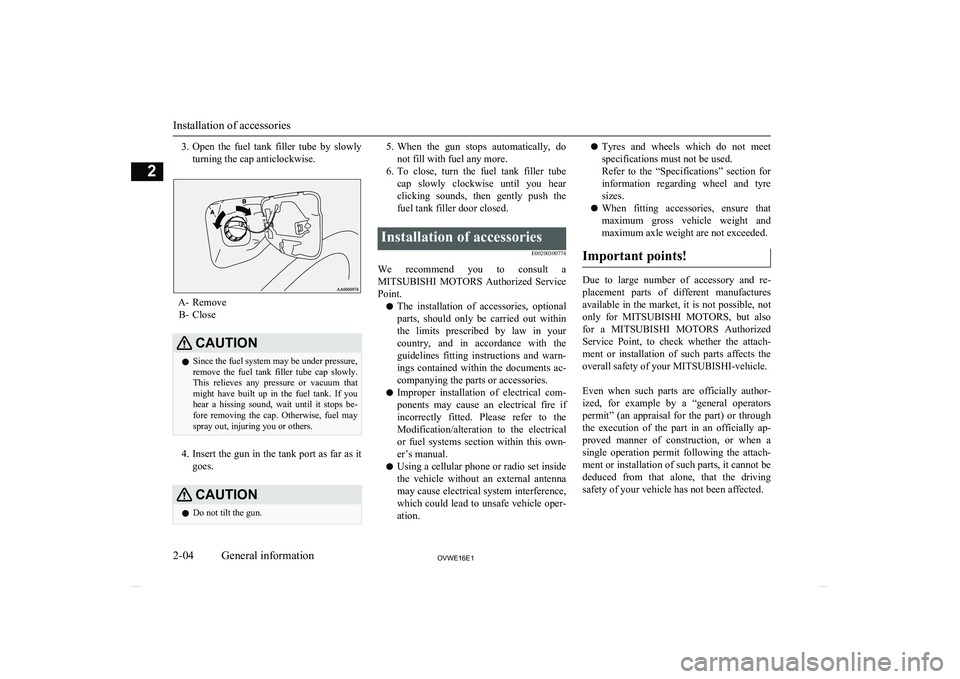
3.Open the fuel tank filler tube by slowly
turning the cap anticlockwise.
A- Remove B- Close
CAUTIONl Since the fuel system may be under pressure,
remove the fuel tank filler tube cap slowly. This relieves any pressure or vacuum that
might have built up in the fuel tank. If you
hear a hissing sound, wait until it stops be- fore removing the cap. Otherwise, fuel may
spray out, injuring you or others.
4. Insert the gun in the tank port as far as it
goes.
CAUTIONl Do not tilt the gun.5.
When the gun stops automatically, do
not fill with fuel any more.
6. To close, turn the fuel tank filler tube
cap slowly clockwise until you hear clicking sounds, then gently push the
fuel tank filler door closed.Installation of accessories
E00200300774
We recommend you to consult aMITSUBISHI MOTORS Authorized Service
Point.
l The installation of accessories, optional
parts, should only be carried out within
the limits prescribed by law in your
country, and in accordance with the
guidelines fitting instructions and warn-
ings contained within the documents ac- companying the parts or accessories.
l Improper installation of electrical com-
ponents may cause an electrical fire if
incorrectly fitted. Please refer to the
Modification/alteration to the electrical
or fuel systems section within this own- er’s manual.
l Using a cellular phone or radio set inside
the vehicle without an external antenna
may cause electrical system interference, which could lead to unsafe vehicle oper-ation.
l Tyres and wheels which do not meet
specifications must not be used.
Refer to the “Specifications” section for information regarding wheel and tyre
sizes.
l When fitting accessories, ensure that
maximum gross vehicle weight and maximum axle weight are not exceeded.
Important points!
Due to large number of accessory and re- placement parts of different manufactures
available in the market, it is not possible, not only for MITSUBISHI MOTORS , but also
for a MITSUBISHI MOTORS Authorized
Service Point, to check whether the attach- ment or installation of such parts affects theoverall safety of your MITSUBISHI-vehicle.
Even when such parts are officially author-
ized, for example by a “general operators permit” (an appraisal for the part) or throughthe execution of the part in an officially ap-
proved manner of construction, or when a single operation permit following the attach-
ment or installation of such parts, it cannot be deduced from that alone, that the driving
safety of your vehicle has not been affected.
Installation of accessories
2-04OVWE16E1General information2
Page 87 of 404
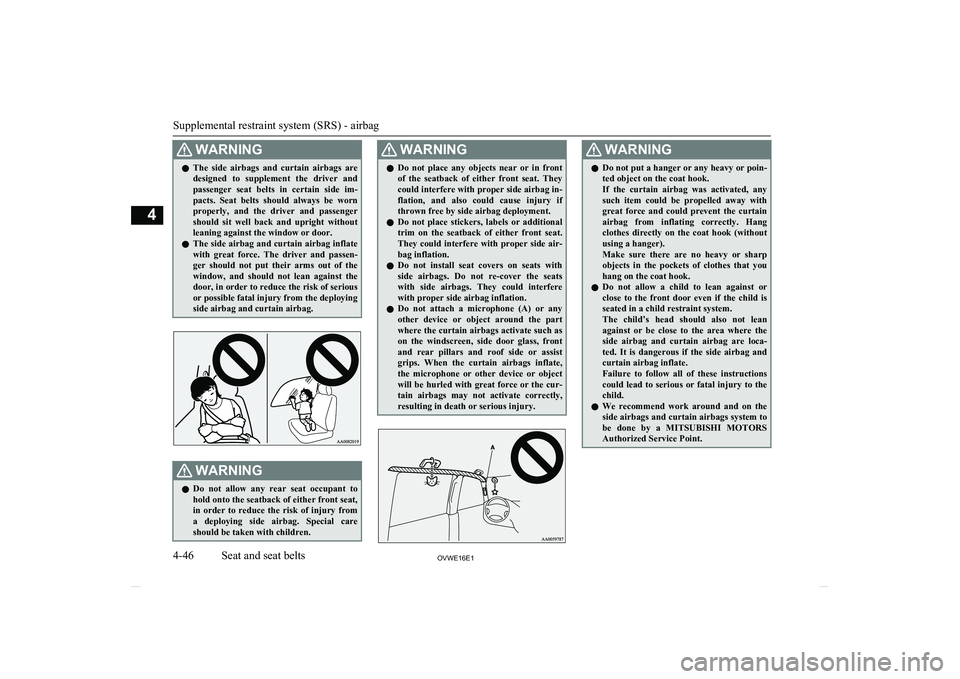
WARNINGlThe side airbags and curtain airbags are
designed to supplement the driver and passenger seat belts in certain side im-
pacts. Seat belts should always be worn properly, and the driver and passenger
should sit well back and upright without
leaning against the window or door.
l The side airbag and curtain airbag inflate
with great force. The driver and passen- ger should not put their arms out of the window, and should not lean against the
door, in order to reduce the risk of serious
or possible fatal injury from the deploying
side airbag and curtain airbag.WARNINGl Do not allow any rear seat occupant to
hold onto the seatback of either front seat,
in order to reduce the risk of injury from
a deploying side airbag. Special care
should be taken with children.WARNINGl Do not place any objects near or in front
of the seatback of either front seat. They could interfere with proper side airbag in-
flation, and also could cause injury if thrown free by side airbag deployment.
l Do not place stickers, labels or additional
trim on the seatback of either front seat.
They could interfere with proper side air- bag inflation.
l Do not install seat covers on seats with
side airbags. Do not re-cover the seats with side airbags. They could interfere
with proper side airbag inflation.
l Do not attach a microphone (A) or any
other device or object around the part where the curtain airbags activate such as
on the windscreen, side door glass, front and rear pillars and roof side or assistgrips. When the curtain airbags inflate,
the microphone or other device or object will be hurled with great force or the cur- tain airbags may not activate correctly,resulting in death or serious injury.WARNINGl Do not put a hanger or any heavy or poin-
ted object on the coat hook.
If the curtain airbag was activated, any
such item could be propelled away with
great force and could prevent the curtain
airbag from inflating correctly. Hang clothes directly on the coat hook (withoutusing a hanger).
Make sure there are no heavy or sharp objects in the pockets of clothes that you
hang on the coat hook.
l Do not allow a child to lean against or
close to the front door even if the child is seated in a child restraint system.
The child’s head should also not lean
against or be close to the area where the side airbag and curtain airbag are loca-
ted. It is dangerous if the side airbag and
curtain airbag inflate.
Failure to follow all of these instructions
could lead to serious or fatal injury to the child.
l We recommend work around and on the
side airbags and curtain airbags system to
be done by a MITSUBISHI MOTORS
Authorized Service Point.
Supplemental restraint system (SRS) - airbag
4-46OVWE16E1Seat and seat belts4
Page 102 of 404
NOTElPlacing a cellular phone in the monitor’s
small storage compartment may weaken the
phone’s reception. This does not indicate a fault with the system.
l Use of wireless devices such as transceivers
or a cellular phone near the monitor mayNOTEmake the following condition on the display. This does not indicate a fault with the sys-tem.
• The screen goes dark temporarily.
• The compass may not show the correct di-
rection.NOTEl Depending on the angle of view, you may
see reddish horizontal lines on the monitor.The lines are a characteristic of the vacuum
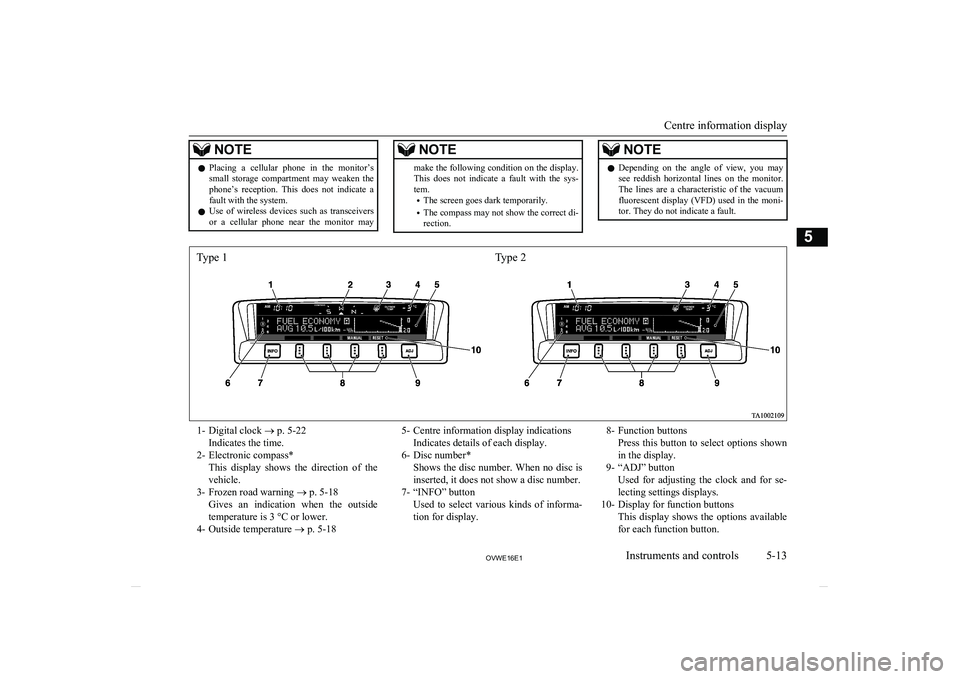
fluorescent display (VFD) used in the moni- tor. They do not indicate a fault.1- Digital clock ® p. 5-22
Indicates the time.
2- Electronic compass* This display shows the direction of the
vehicle.
3- Frozen road warning ® p. 5-18
Gives an indication when the outside temperature is 3 °C or lower.
4- Outside temperature ® p. 5-185- Centre information display indications
Indicates details of each display.
6- Disc number* Shows the disc number. When no disc is
inserted, it does not show a disc number.
7- “INFO” button Used to select various kinds of informa-tion for display.8- Function buttons Press this button to select options shown
in the display.
9- “ADJ” button Used for adjusting the clock and for se-lecting settings displays.
10- Display for function buttons This display shows the options available
for each function button.
Centre information display
5-13OVWE16E1Instruments and controls5 Type 1Type 2
Page 200 of 404
NOTElThe detection area will not change if you
keep the “SONAR” switch pushed for 10
seconds or more.“SONAR OFF” indication
lamp
E00615901362
In case there is a malfunction in the reversing sensor system, the “SONAR OFF” indicationlamp will flash and the warning buzzer willsound for approximately 5 seconds. Even af-ter the buzzer has stopped sounding, the indi-
cation lamp will continue flashing until the
system reverts to the normal state. We rec- ommend you to have your vehicle inspection.
Rear-view camera*
E00618401980
The rear-view camera is a system that shows the view behind the vehicle on a screen of the
MITSUBISHI Multi Communication System
(MMCS), the DISPLAY AUDIO or the
Smartphone Link Display Audio.CAUTIONl The rear-view camera is an assistance sys-
tem that enables the driver to check for ob- stacles behind the vehicle. Its range of view
is limited, so you should not overly depend on it. Please drive just as carefully as you
would if the vehicle did not have the rear-
view camera.
l Be sure to visually confirm safety around the
vehicle with your own eyes. Do not depend entirely on the rear-view camera.
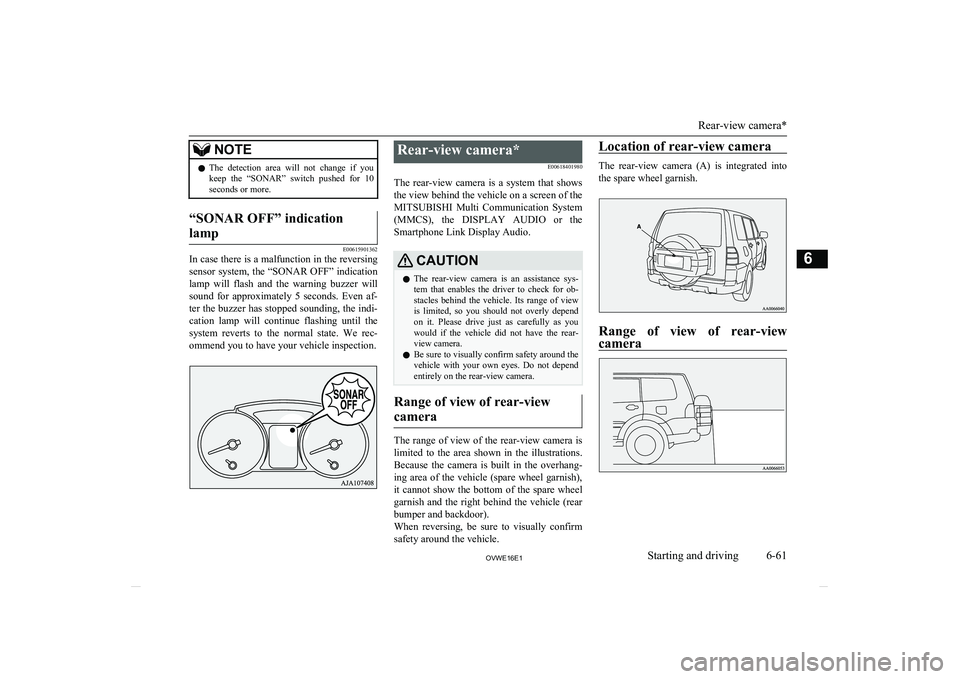
Range of view of rear-view
camera
The range of view of the rear-view camera is
limited to the area shown in the illustrations.
Because the camera is built in the overhang- ing area of the vehicle (spare wheel garnish),it cannot show the bottom of the spare wheel
garnish and the right behind the vehicle (rear bumper and backdoor).
When reversing, be sure to visually confirm
safety around the vehicle.
Location of rear-view camera
The rear-view camera (A) is integrated into
the spare wheel garnish.
Range of view of rear-viewcamera
Rear-view camera*
6-61OVWE16E1Starting and driving6
Page 201 of 404
How to use the rear-view cam-era
When you place the shift lever in the “R” (Reverse) position (on vehicles with M/T) or
selector lever in the “R” (REVERSE) posi-
tion (on vehicles with A/T) with the ignition
switch in the “ON” position, the view behind
the vehicle will automatically appear on the screen of the MITSUBISHI Multi Communi-
cation System (MMCS), the DISPLAY AU- DIO or the Smartphone Link Display Audio.
When you move the shift lever or selector
lever to any other position, the screen will re- turn to its original indication.
CAUTIONl The rear-view camera has a special lens that
can make objects shown on the screen ap-
pear to be closer or further away than they
actually are.CAUTIONl The line (red) shows the point approximately
50 cm behind the rear extremity of the rear
bumper.
Be careful because the spare wheel garnish overhangs for approximately 30 cm behind
the rear extremity of the rear bumper.NOTEl Because the rear-view camera has a special
lens, the lines on the ground between park-
ing spaces may not look parallel on the screen.
l In the following situations, the screen indi-
cation may be difficult to see. There is no abnormality.
• Low light (night time)
• When the light of the sun or the light from
a vehicle’s headlamps shines directly into
the lens
l If the camera is hot and is then cooled by
rain or a car wash, the lens can mist up. This
phenomenon does not indicate a malfunc- tion.
l It is not possible to fully see obstacles when
the lens is dirty. If the lens becomes conta- minated by water droplets, snow, mud or oil,
wipe off the contamination, taking care not to scratch the lens.
l Please observe the following cautions. Ig-
noring them could lead to a camera malfunc-
tion.
• Do not subject the camera to physical
shock.NOTE• Do not apply wax to the camera.
• Do not splash the camera with boiling wa-
ter.
• Do not disassemble the camera.
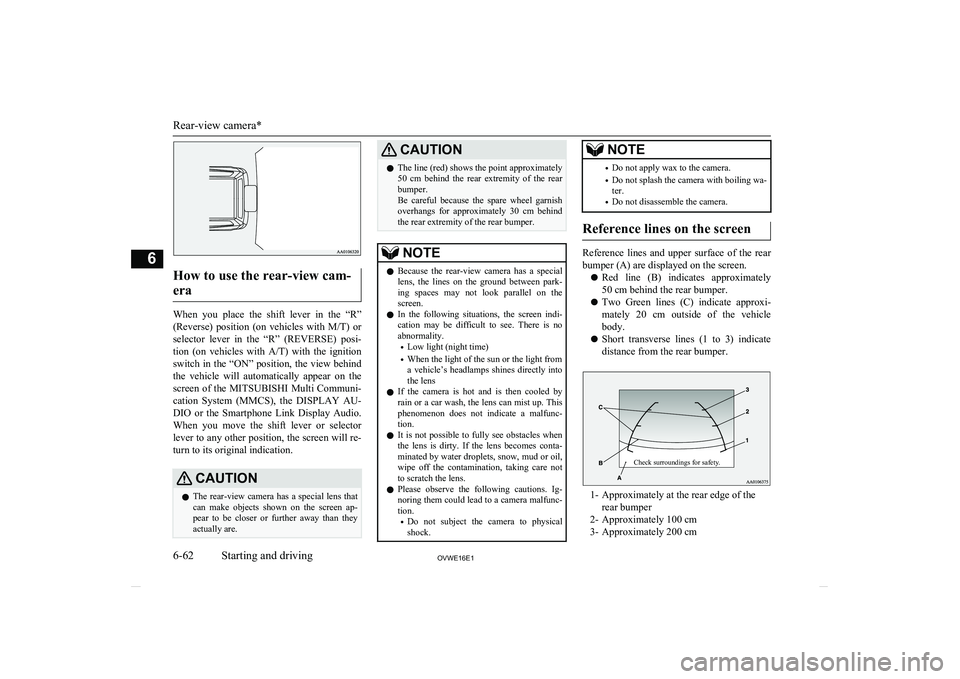
Reference lines on the screen
Reference lines and upper surface of the rear
bumper (A) are displayed on the screen.
l Red line (B) indicates approximately
50 cm behind the rear bumper.
l Two Green lines (C) indicate approxi-
mately 20 cm outside of the vehicle body.
l Short transverse lines (1 to 3) indicate
distance from the rear bumper.
Check surroundings for safety.
1- Approximately at the rear edge of the rear bumper
2- Approximately 100 cm
3- Approximately 200 cm
Rear-view camera*
6-62OVWE16E1Starting and driving6
Page 217 of 404
LW/MW/FM radio/CDplayer* E00708503518
The audio system can only be used when the ignition switch is in the “ON” or “ACC” po-sition.NOTEl To listen to the audio system while the en-
gine is stopped, turn the ignition switch to
the “ACC” position.
l If a cellular phone is used inside the vehicle,
it may create noise from the audio equip-
ment. This does not mean that anything is wrong with your audio equipment. In such acase, use the cellular phone at a place as far
away as possible from the audio equipment.
l If foreign objects or water get into the audio
equipment, or if smoke or a strange odour
comes from it, immediately turn off the au-
dio system. We recommend you to have it checked. Never try to repair it by yourself.
Avoid continuous usage without inspection by a qualified person.Important Points on Usage
E00735500023
iPod/iPhone Playback Func- tion*
l This product supports audio playback
from iPod/iPhone devices, however dif-fering versions mean that playback can-
not be guaranteed.
l Please be aware that depending on the
iPod/iPhone model or version, operation
may differ.
How to Clean
E00735700025
l If the product becomes dirty, wipe with
a soft cloth.
l If very dirty, use a soft cloth dipped in
neutral detergent diluted in water, and then wrung out. Do not use benzene,
thinners, or other chemical wipes. This
may harm the surface.
Trademarks
E00735801225
l Product names and other proper names
are the trademarks or registered trade- marks of their respective owners.
l Furthermore, even if there is no specific
denotation of trademarks or registered
trademarks, these are to be observed in
their entirety.
“Made for iPod,” “Made for iPhone”
mean that an electronic accessory has
been designed to connect specifically to iPod or iPhone, respectively, and has
been certified by the developer to meet Apple performance standards.
iPhone, iPod, iPod classic, iPod nano,
and iPod touch are trademarks of Apple
Inc., registered in the U.S. and other countries.
Apple is not responsible for the opera- tion of this device or its compliance with
safety and regulatory standards.
NOTEl iPod and iTunes licensing allows individual
users to privately reproduce and play back
non- copyrighted material as well as material
that may be legally copied and reproduced.
Infringement of copyright is prohibited.
LW/MW/FM radio/CD player*
7-12OVWE16E1For pleasant driving7